


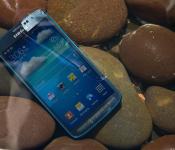
Android 4.4 OTA Rolling Out to AT&T Samsung Galaxy S4 Active
 The more rugged version of the Samsung Galaxy S4, the Galaxy S4 Active, that found its way to AT&T’s network is getting an OTA update today moving it from Android 4.3 Jelly Bean to Android 4.4 KitKat. According to the release information on AT&T‘s blog there are a number of things you will you find other than just a new OS version. Take a quick read.
- Improved user interface with Android 4.4 KitKat: The latest version of Android includes enhancements such as re-styled status and navigation bars, a new full-screen-immersive mode, color emoji support, improved closed captioning support, stronger security and smarter power use.
- Enhanced music access: Full screen album art and media controls are available from the lock screen when listening to music.
- Camera access: The camera can also be accessed directly from the lock screen.
- Location menu: An integrated location menu enables users to easily activate GPS and share location details.
- Wireless printing: Integrated support for wireless printing available in enhanced settings.
- New sound controls: Set sound for specific Samsung applications in enhanced settings.
You will want to make sure you have over 50% charge to your device and a Wi-Fi connection available to download the 426.84mb file needed to update. If you happen to meet the above requirements then you should head into your device settings and check for the update if you haven’t seen it yet.
Source: AT&T Via: Android Police Img: CNET
//<![CDATA[
ord = window.ord || Math.floor(Math.random()*1E16);
document.write('’);
//]]>
Search in private on your Android with Disconnect Search [App of the Day]

Sometimes it’s nice to be off the grid for awhile. What if you need to look something up, but don’t want it to be recorded everywhere? Now there is an app out there for your incognito needs.
Disconnect Search lets you search on Google, Yahoo, Bing, blekko, or DuckDuckGo, completely untraceably. It stops search engines and ISPs from tracking your searches and IP address by anonymizing the search through Disconnect. It also stays away from recording personal info from your device, allowing for complete anonymity.

It’s a bit more secure than using something like Incognito Mode on Chrome, and it’s way easier to use. It comes with a nice widget, and is super simple to use.
If you’d like to be a bit more secure when you browse, head to the Play Store to download Disconnect Search today.
The post Search in private on your Android with Disconnect Search [App of the Day] appeared first on AndroidGuys.
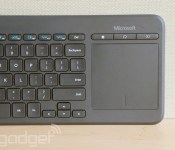
Microsoft’s new keyboard is meant to be used with Smart TVs

This fall marks 20 years that Microsoft has been making keyboards (make that “computer hardware,” as it was quaintly called back in 1994). Ironically, though, as the company approaches this milestone, it’s now making accessories not just for PCs, but… Smart TVs? Yes indeed. The company just announced the All-in-Media Keyboard, and while you could use it with a computer, it was designed to help you navigate your TV or media streamer from your couch. Chiefly, it features a built-in touchpad — something we’ve seen on other devices — meaning you won’t need to balance a standalone mouse on your La-Z-Boy.
In addition to the pad, there’s a dedicated left-click button, along with volume and mute buttons, allowing you to hold the device almost as if it were a tablet, or a giant remote. Otherwise, the spill-resistant keyboard has all the features you’d expect (except, perhaps, a numpad), with three programmable keys and various Windows 8 shortcuts. As with some other Microsoft keyboards, it doesn’t use Bluetooth but rather, a 2.4GHz wireless technology that requires you to plug in a USB transceiver. So long as your smart TV/media streamer is USB HID-compliant, though (and it probably is), you should be good to go. As a bonus, the battery door on the back has an extra cubby-hole for the transceiver, which should hopefully reduce the chances of you losing the thing. Intrigued? We’ve got hands-on photos above, and you’ll be able to buy one tomorrow for around $40.
Filed under: Peripherals, HD, Microsoft
Source: Microsoft

The BBC wants you to binge-watch its new BBC Three series on iPlayer

The BBC isn’t due to transition BBC Three to an online-only channel until late next year, but that isn’t stopping it from testing the waters first. The Beeb confirmed today that for the first time, it will make a complete series available on BBC iPlayer before airing it on TV, allowing you to indulge in a Netflix-style binge (should you so wish). All six episodes of Chris Lilley’s Jonah From Tonga, a new show from the Australian comedian behind Angry Boys and Summer Heights High, will go live on iPlayer from May 2nd for 48 hours. It’ll then be broadcast on BBC Three from May 8th. While critics believe the BBC’s decision to take the popular TV channel online will be “bad for comedy”, it’ll ultimately be up to the public to decide whether it was right to do so.
Filed under: Internet
Source: BBC Media Centre
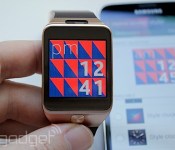
Samsung Gear 2 review: much improved, but that doesn’t mean you should buy it

2013 was the year of the smartwatch. In promise, anyway — maybe not delivery. Of the many, many different, colorful and unusual timepieces that would populate our blogroll, it was perhaps Samsung’s Galaxy Gear that made the most headlines. Why? Partly because it was a new product from one of technology’s biggest players, and partly because it was just so bad. Poor battery life, an unpopular design and limited apps meant that the $300 accessory never had a chance of catching on. But, resilient as ever, Samsung is having another crack at it. In fact, it’s having another three cracks at it with the release of the Gear 2, Gear 2 Neo and Gear Fit smartwatches. The big question this time around: Is the second-gen Gear any better than its predecessor? Spoiler alert: Yes, it is. But enough that you might actually want one? That question is a little more complex.
Hardware

If you were hoping for a complete redesign, it’s time to put on your disappointment pants. As far as aesthetics go, the Gear 2 is merely an evolution of the original. The main body is once again fashioned out of brushed metal, while the strap is made of a similar plastic material as before, with a near-identical clasp mechanism. I say “near,” as the microphone is no longer housed in this section, so the part of the clasp where this used to be is now thinner. The affectionately titled “wart” camera no longer resides in the strap either; it’s back up in the main watch housing, where it should have been all along. The result is that the strap is now just “dumb” plastic; there’s no technology inside like before. This is good news, as it means you can replace it with a host of fancy color options — there’s even a tiny release lever on the underside to make swapping a cinch. The model I tested had a chocolate-brown strap that actually compliments the rest of the watch quite well. So I’ve no urge to change it, but it’s still nice to have the option.
Other minor, yet welcome cosmetic changes include the removal of the visible screws from the top of the watch’s face. Meanwhile, the sole button now sits beneath the 1.63-inch, Super AMOLED display, just like on Samsung’s phones. I don’t suspect anyone buys a smartwatch based on its silicon, but if you must know, there’s a dual-core 1GHz chip in here, along with a 300mAh battery. While the Gear 2′s hardware is clearly similar to the original, it feels more refined, more cohesive. In fact, I’d go so far as to say that the first iteration was a bit of a rush job; the result of a scramble to put something out. The Gear 2, however, feels a lot like what the original should have been.

Beyond the superficial changes, there are a couple of internal additions that significantly expand the functionality here. These include an optical heart rate monitor (much like the one found on the Galaxy S5), an IR blaster and IP67 dust-resistance and waterproofing (that means total dust protection, and being waterproof to one meter for 30 minutes). Instantly, then — at least on paper — the Gear 2 is a more robust, and potentially more useful device. Of course, that’s if the software (or apps) are there to realize that potential — a question we’ll return to later.
Meanwhile, most of the other key hardware has remained unchanged. That means Bluetooth 4.0, 4GB of storage, a microphone and an accelerometer. Oh, and remember that weird charging cradle? Well, that’s mostly gone. I say “mostly,” as there’s still a proprietary adapter you’ll need to plug a micro-USB cable into, but it’s smaller and sturdier than the delicate cradle (with its moving parts) you had to deal with last time. It’s still not ideal — if you lose it, you’re screwed — but it’s a definite improvement nonetheless.
Software

The first thing you’ll need to do once you pry the Gear 2 out of its faux-pine box (what is it with Samsung and faux… stuff?) is connect it to one of the 17 compatible handsets. (Those are listed here, but basically, it includes most recent and flagship-caliber Samsung devices.) Yes, you still need to have a compatible device, but at least there’s a decently sized list to choose from this time.
Once you’re connected over Bluetooth, you’ll need to download the Gear Manager app from Samsung’s own store, and then you’re good to go. As a warning, you’ll be hanging out in the Gear Manager app a lot for the first few days. It’s where you can change the watch face, adjust pretty much all the settings and download apps. Often, it’s quicker to change a setting via the app than to do it on the watch. Mind you, it’s not difficult to change settings directly on the Gear; it’s just that you might feel more at home on your handset.
The Gear Manager part is relatively unchanged the second time around. The big deal when it comes to software is Samsung’s decision to have the second generation of Gear devices run on Tizen, rather than Android. What does that mean beyond the lack of “Galaxy” branding? Firstly, it means any apps you were using on the original Gear are no good here. That’s a big deal. Not just because it causes a fracture in the user experience, but also in the ecosystem as a whole. One of the biggest problems facing the Galaxy Gear was the dearth of third-party apps — a situation that improved only slightly in the months after it launched. With the introduction of Tizen, however, what tiny progress that was made has basically evaporated. As of this writing, there were just 10 third-party apps for the Gear 2 (that’s 22, technically, but 12 are just watch faces.)

For those wondering what the OS switch means for the user experience, the answer’s actually very little. If you’ve used the Galaxy Gear, and someone gave you a Gear 2, there’s nothing in the UI to suggest something new is running under the hood. The font, icons and menus are almost identical to the Android edition. This means it’s still a pretty basic, homemade-looking interface (much like Samsung’s TouchWiz phone UI, to be fair). That said, it’s functional, tidy and easy to use.
One area where the software has improved is in the number of native apps. While you wait for Facebook and Twitter to build apps for the Gear 2, there’s a host of tools on the watch that go some way to making the watch useful right out of the box. These include things we’ve seen before, such as a stopwatch, phone dialer, a media controller and access to contacts and call logs. There are also a few new additions such as: Exercise, Heart Rate Monitor and a self-contained media player (which plays music locally from the watch, not via the phone). Most of them are fairly self-explanatory. The Exercise app, in particular, is basically a stripped-down version of Samsung’s S Health app. Which is to say, you can tell it you’re about to go for a run, do some walking, ride a bike or go on a hike. If you’re doing anything more exotic, or just knocking out your weekly dose of Insanity/Zumba (Zumbanity?), you’ll need to pick whatever’s the best fit.

This basic feature set appears to be growing at a fast clip. About two days after I obtained the device, the Gear 2 received a couple of firmware updates, and not just bug fixes, either. One of them included a whole new app for tracking sleep. It’s a fairly simple affair (basically you tell it you’re about to sleep, and let it know when you wake up) but even so, it’s a relief to see that new features are being added. I’m not entirely sure I want to be wearing this in bed, though, but hey, I’ll take new features where I can get them.
Another area that seems to be improved in version two is notifications. For many, this is what a smartwatch is all about, allowing you to glance at tweets, calls and messages from your wrist. The original Gear was a bit hit-and-miss in this regard. For example, if you used Samsung’s own email client, it would send a fairly useful notification to the watch. But with Gmail notifications, all you got was a mostly useless alert letting you know that email had arrived. Thanks! The Gear 2′s Gmail notifications are much better, with a decent snippet of the message included in the alert. It’s usually enough for you to determine whether it’s a message you want to deal with now or later. The list of apps for which you can get notifications is also surprisingly extensive, and includes pretty much every app on your phone. Never want to miss a Candy Crush message again? Not a problem; have them sent right to your wrist (for your own sanity, please don’t).
In use

Let’s get it out of the way right now: The current lack of compelling apps means you’re limited to notifications, timekeeping, taking calls and a few new features that Samsung introduced in the Gear 2. As mentioned earlier, the notifications are a clear improvement over the original Gear. There are still some limitations that we’d love to see addressed, however. For example, when you receive a Gmail notification, you can read some of the mail, but there’s no way to reply without getting your phone involved. You can reply to text messages with either templates or S Voice, which is a bit hit-and-miss. Overall, though, I’m glad to see the notifications are generally more useful.
There are some third-party apps, however, with the RSS reader Feedly being a favorite of mine. Feedly, if you recall, was quick to pick up new users when Google Reader shut down. It’s something I use daily on the desktop, so the idea of being able to access it on the Gear 2 was instantly appealing. The reality isn’t quite what I’d hoped, though. First of all, you need to add the app to the phone as well. No major hardship, and something I’d probably do anyway in this case, but it all adds to the sense of being “tethered” to the phone. I think I possibly had an expectation that the watch version of the app might be configurable through Gear Manager with my account credentials, but alas, no.
The user experience itself isn’t entirely perfect, either (which is disappointing, as Feedly’s web app is well-designed). You can browse your main feed on the watch, swiping stories as you go. Once you find something of interest, you can swipe up to read on the phone, or down to save it for later (also on the phone). The frustrating thing is that choosing “read on the phone” doesn’t wake, or open the app — you still have to unlock the handset — at which point it will be there waiting. A small detail, but one that underscores how the Gear 2 is really just an accessory to go with the phone.
One nice addition that doesn’t rely on the phone is the new music player app. If you have some tunes on your phone or desktop, you can load them directly onto the Gear 2 and play them via a Bluetooth headset/headphones. So, if you’re going for a jog, or maybe just want to leave the phone at home, you can use the Gear 2′s 4GB of onboard storage for storing some music. What you get then, is precisely what I’ve always wanted: a wire-free, wrist-worn media player.
Now seems like a good time to talk about battery life. This was a massive sore point with the original Gear, which only lasted about a day on a charge. I’m not sure what voodoo the Korean firm has done, but it’s somehow made a slightly smaller battery (300mAh, compared to 315) last nearly three times as long. I consistently got three days between charges with what I imagine is average, or slightly higher-than-average use (it is my job to play with these things, after all). This is a definite plus. If the battery had been less capable, it probably would have sealed the watch’s fate. Three days is still not as much as I’d like, but it’s strides better than before.

Perhaps some of the more compelling features are those new fitness credentials — i.e., the heart rate monitor and the exercise app. (The pedometer is the same one used on the original.) I’m glad to see these new additions, of course, but the execution is poor. The heart rate monitor falls somewhere between “not bad” and “frustrating.” Which is a similar experience to the one we tested on the Galaxy S5. When it wants to play along, it gives a reading close enough to what dedicated sports bands offer. But if you so much as move your wrist, or make a noise (the watch warns you to remain still and quiet!) you have to try again. When it does work — assuming you’ve set up S Health on your host phone — your latest pulse reading will be sent directly over to the app.
The same goes for the exercise app. Pull it up on the Gear 2; tell it you’re off on a stroll; and do your thing. Once you’re done doing that, let the app know and it’ll shimmy that information over to S Health too. What we couldn’t get to work was the pedometer. It counts steps just fine, showing the number on the display. While imperfect, it’s close enough, if perhaps a little optimistic compared to dedicated fitness trackers. But, for the love of all things smart, I’ve been unable to get it to sync with the phone. There’s a menu in Gear Manager for S Health with a “Transfer Now” option. I selected it a number of times, and received a “success” message, yet the step count on the phone’s S Health app simply won’t budge from zero.

This didn’t seem right, so I paired the Gear 2 with a different phone — a process that requires a factory reset of the watch and a load of software updates. Once I was done pairing, I was presented with a dedicated “Fitness with Gear” app (rather than S Health) that was practically reading the number of steps from the watch before I even knew what was happening. Weirdly, I then went into S Health on the phone, and it acted like it had never met me before, taking me through the whole setup process from scratch. Hardly a seamless experience, especially if you’re trying to foster an ecosystem. But, the features are there, and if you want a bit of a high-level fitness tool, it might do the job. All told, the hardware components seem to work fine, but the supporting software from Samsung leaves a lot to be desired.
It’s this disjointed experience that pretty much sums up the Gear 2, and perhaps Samsung in general. All the things you could possibly want are there. There’s a camera, call handling, step tracking, heart rate monitoring, a microphone, a speaker, media-control options, calendar-handling alerts and notifications. Most of these things the Gear 2 does fairly well, but you can never shake the feeling that it’s box ticking, or a “lite” version of the feature or function you really wanted. We’d love to see hardware and software working together much more closely. Maybe for third-party app developers to be invited in and make use of their expertise — or, at the very least, coerced into making an app for the Gear 2 in the first place. There’s definitely potential; it just seems mostly unrealized.
Camera

There is, of course, a camera. It’s a 2-megapixel affair, a negligible improvement over the 1.9-megapixel shooter from the first edition. There’s the same 720p video shooting, and, well, not a lot else. A camera is one of the less common features in the smartwatch world, so it’s a differentiator if nothing else. When I first played with the original Gear, I couldn’t imagine a time you’d opt for the watch camera over the much better one just inches away in your pocket. But I was wrong: I’ve used it quite a lot. Not really for photos I’d ever want to look at, but for quick “scrapbooking” of things I see, or want to remember. Perhaps to remind myself to Google something when I get home. That is, of course, the exact same experience on the Gear 2. I can’t really tell much difference between the old and new camera, but it serves a purpose, and is all the better for being housed within the watch’s body (and not the strap). If you’re curious, there’s a gallery below so you can see the quality for yourself.
The competition
Where to start? It’s fair to say the dance floor at the smartwatch disco is positively bustling compared to even just a few months ago. Thanks to its recent makeover, the Pebble Steel ($250) is still a strong favorite with many. Of course, the Pebble doesn’t have a color screen, nor does it have a camera, if those things are important. (For what it’s worth, I’m not sure they are.) Then again, it offers a great selection of apps, and long battery life, too.
Two other competitors I feel compelled to mention are the Qualcomm Toq ($250) and Sony’s SmartWatch 2 ($300). Both have their strengths, but have yet to make a big splash with buyers. Really, this competition section should be more about what’s about to be released. Android Wear is set to shake up the smartwatch market, and with LG and Motorola on board, it’s clear the smartwatch disco is about to get even more crowded.
In the meantime, if you want a watch with fitness cred, I still love the Adidas Smart Run ($400), as well as Garmin’s Forerunner 620 ($400) — but these are dedicated devices, so you won’t get notifications or calendar features, et cetera. This might have also been a good time to mention the Fitbit Force, but that was recently recalled after some users reported skin irritation from the plastic band.
Wrap-up

The good news is that Samsung has addressed some of the major issues that plagued the original Galaxy Gear — namely, the short battery life. But, the company also deserves credit for squeezing more hardware into a smaller space, and generally polishing the design. The Gear 2 looks better and performs better than the original in every possible way. But here’s the rub: Of all the things it does, it doesn’t do any of them well enough to justify the price. It still feels like something of an executive toy. Sure, there will be those for whom the Gear 2 is a great fit (no pun intended), but unless you’re a loyal early adopter, there isn’t a compelling reason to lay down the $300 asking price. And that’s not least because of the small app selection. If Samsung can lure enough developers over to Tizen, it might become a more appealing prospect. But, until then, you might want to wait and see what Google’s Android Wear platform brings to the table.
Filed under: Cellphones, Wearables, Mobile, Samsung

Anki Drive levels up with new robotic cars, tracks and a race mode

Arguably the coolest part about Anki Drive’s robotic toy cars is that you could upgrade them over time with weapons and points as if they were character vehicles in a video game. Unlike a video game however, Anki’s original system only had a single race track and just four available model cars (two were bundled in the starter kit). Further, there was only one mode of gameplay — a Battle mode that encourages you to knock your opponent off the road — which some might find a little tiresome after a while. Now, however, Anki has introduced not just two new tracks to the mix, but also a couple of new cars and a few software improvements that include the company’s number one requested feature: race mode.
Race mode still lets you sabotage your fellow racers, of course, but this time, your primary objective is to be the first in 15, 30 or 45 laps. Think of it as the real-life version of Mario Kart, if you will. The gameplay is a little more strategic than regular Battle mode, as you have to decide if it’s best to just race as fast as you can, or hang back a little to see if you can slow your competition down with a weapon at your disposal. In addition to the new racing mode, there’s a bunch of new changes to the UI itself. For example, there’ll now be an in-app scoreboard so you can see who’s ahead and who’s behind you in a race. There’s also now a “boost” mechanic that you can earn that’ll let you zoom ahead the rest at incredible speed. This software update will be rolled out today for the entire Anki Drive system — both the original set and the new tracks and vehicles, which we’ll explain in more detail below.

Let’s start with the two new race tracks. One is Crossroads, which features a looping intersection, and the other is Bottleneck, which, you guessed it, has a narrow neck in part of the road. If you’re wondering what took Anki so long to come up with these new race courses, it’s because making them compatible with Anki’s machine learning cars isn’t as easy as just laying paint on a piece of vinyl. While the two new race courses have the same sort of positional code embedded in the ink as the original, their unique designs require a special encoding scheme for the cars to grok. According to Anki’s president Hanns Tappeiner, the encoding scheme for the intersection part of Crossroads and the narrow section of Bottleneck is completely different from the rest of the track, and the AI of the cars had to be improved to handle them. “For example, figuring out whether to stop before the intersection and wait, or to zoom through it fast […] that’s something new we had to develop.” In the case of Bottleneck, Anki had to educate the AI that it’s better to be in the center rather than the edge.
As for the gameplay differences between the two tracks, Tappeiner says that Crossroads is a lot more strategic than the original. “You can zoom through the intersection or stop in front and wait for another car to pass by so that you can deploy your weapon… it creates a fun chaos.” Bottleneck, on the other hand, is a “track for people who love to race” because you need to be mindful of where you are on the road to gain maximum speed.

To go along with the new tracks, Anki is also announcing a couple of new specialized vehicles. Hadion, the orange model above, is designed for speed. It has less armor and lighter weaponry than the rest, but it’s the fastest and most nimble car. “It’s really good at straights and quick around corners,” Tappeiner told us. But perhaps what really makes it valuable is that the Hadion comes with the Turbo Boost speed option bundled right in without you having to earn it as a separate skill. Next is Corax, which is arguably the beast of the lot. It’s heavily armored, and it’s also the only car that can deploy two weapons at the same time. Because it’s so powerful, the car is actually locked when you first get it. “You need to use it as an AI car first — you need to beat it in order to win it.”
To those who already have the original Anki Drive, you should get the updated software with the new race mode starting today. If you want to snag one of the new cars, both the Corax and the Hadion are cost $69 each. As for the race tracks, you’ll have to wait until May 6th to get those — they’ll be available for $99 each.
Source: Anki

Let the audience decide your fate in new Twitch-backed game

When some 1.1 million people played Pokémon together via Twitch’s game-broadcasting service, developer Studio Bean must’ve gotten inspired. Choice Chamber takes the idea of the audience deciding what happens onscreen to a new level and injects Twitch chat into the game’s DNA; here, the peanut gallery has a direct impact on the player’s progression. As you make your way through a series of randomly generated rooms, the audience (people watching you broadcast via Twitch, of course) takes a series of polls that alter the game’s flow. It’s a lot like playing as dungeon master with your Dungeons and Dragons crew, but with a 21st century twist. As cool as voting on what weapon the player gets, or summoning a giant fist that wipes across the screen to obliterate a boss monster sounds, though, the project is only halfway to its $30,000 Kickstarter funding goal. With four days left in the campaign, Twitch has announced that it’ll step in and match the funds needed to finish the game.
This marks the first time that the streaming outfit has played an active role in game development, and, if it’s a hit, chances are that we could see more like it in the future. If you want a taste of controlling a game without the hassles of actually playing one yourself, the arcadey Dead Nation on PS4 and the upcoming Daylight use Twitch interaction, too. Not into zombies or horror? Well, Twitch is still playing Pokémon.
Filed under: Gaming, Home Entertainment, HD
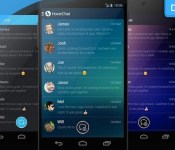
Download: HoverChat offers SMS multitasking with Facebook-like ‘HoverHeads’

Since Google decided to scrap the SMS app in Android 4.4, developers have scrambled to fill the gap. Apps including Textra, HelloSMS and EvolveSMS have helped raise the bar for SMS apps on the platform, along with HoverChat, an app you might previously have known as Ninja SMS. Like its rivals, HoverChat utilises the traditional list-based inbox, but it’s how the app handles incoming messages and notifications is what sets it apart from the rest of the competition.
Despite its goofy name, Facebook’s Chat Head feature has proved to be somewhat of a revelation. Assigning a floating chat bubble (normally with someone’s face inside it) to a contact, users can respond quickly to friends no matter what app they are using at the time. HoverChat takes the same approach with its “HoverHeads”, but lets you tailor them to fit your needs. In that respect, you can choose which of your friends will get their own chat bubble when they text, quickly pop-out a chat windows from your inbox, make them semi-transparent (perfect for when you’re reading) and even send encrypted messages. Unfortunately, encrypted messaging is limited to messages sent between HoverChat users, meaning the majority of your outgoing texts will not take advantage of the app’s additional privacy measures.

The app’s customisation features don’t end there either. HoverChat also includes a fully-featured store that serves themes, fonts and custom HoverHeads, with both free and premium options available. Although you’ll probably want to see your significant other’s face inside heart or star shape (softie), premium HoverHeads are often animated. Got a nerdy mate? There’s an “Geek” GIF avatar that’ll do the job. Despite the rise of messaging apps like Whatsapp and Snapchat, SMS still serves a purpose, at least for now. If you find yourself in the midst of a text message onslaught, HoverChat and its HoverHeads will have you multi-tasking like a maestro.
The app is available now for free on Google Play, while the paid version (£2.39) will unlock all of the in-app purchases on the store.
Source: HoverChat (Free), (Premium)

Ford put a Mustang on top of the Empire State Building, piece by piece

Ford is marking the launch of the 2015 Mustang in the same way it did for the original 50 years ago — by putting one at the top of the Empire State Building. The company has partnered with auto supplier DST to cut its latest sports car into pieces and reassemble it on the building’s observation deck, 86 floors up. You can check out the vehicle for yourself if you visit the New York City skyscraper no later than April 17th.
The feat was considerably more involved this time around. In addition to having to split up a car full of electronics that weren’t present in the 1965 model, the team had to get the vehicle up the elevators and assembled in less than six hours. DST’s workers say they had to practice the operation like a race car’s pit crew; even the slightest delay could have created problems. The effort ultimately amounts to a publicity stunt, but it’s also an impressive technical feat that few (if any) will get to see again.
[Image credit: AFP/Getty Images]
Filed under: Transportation
Via: Gizmodo
Source: Ford

HTC allows devs to tap into the power of the One’s Duo Camera

The HTC One (M8) brought with it a load of new camera features, including its unique Duo Camera setup on its back side. Now, the handset maker is opening up the code that powers the pair in a SDK preview for third-party devs. This means that apps can be designed specifically for the M8′s cameras with DualLens and DimensionPlus APIs baked right in. In other words, developers will get their hands on that bokeh-style refocusing and multi-angled shot selection in addition to depth maps from the pair of cameras. Of course, only time will tell how eager app makers are to latch on to HTC’s smartphone snapshooting tricks, but at least now they’ll have the necessary tools to do so.
Filed under: Cellphones, Software, Mobile
Source: HTC
 AIVAnet