



Facebook’s making moves to challenge PayPal

After attempts to kickstart its own virtual currency stalled, Facebook may soon get into the business of sending real money between you and your friends. According to The Financial Times, the social network is “only weeks away” from receiving the necessary approval in Ireland to operate its own e-money service. If given the green light, the company could effectively become a financial institution like PayPal (at least in Europe), allowing it to store and send money between millions users all over the continent. Facebook is said to have discussed partnering with at least three London-based firms that offer app-based international money transfers, but has yet to confirm it plans to take responsibility for your funds. With Zuckerberg and co. already facing user trust issues over the social network’s use of ads, throwing money into the mix may only complicate matters.
[Image credit: Marco Paköeningrat, Flickr]
Filed under: Internet, Facebook
Source: Financial Times

T-Mobile is killing overages on all plans starting this June

T-Mobile hasn’t quite been as UnCarrier as some would like. Despite the network’s turn toward overage-free service, there’s still occasional chances that you’ll pay extra for heavy use — especially if you’re on a grandfathered plan. That won’t be a problem for long, though, as the carrier will soon rude surprises on your bill from June onward. The move won’t deliver huge savings unless you regularly pay surcharges — and you’ll still have to deal with throttling — but it’s good to have some reassurance that your costs won’t get out of control in the future.
Filed under: Cellphones, Wireless, Mobile, T-Mobile
Source: T-Mobile

The UK’s stolen phone market is as healthy as ever

It may be easy to report and track stolen smartphones in the UK, but that’s not preventing some of the country’s shops from selling these ill-gotten handsets. A BBC undercover operation has revealed that at least eight stores in London are willing to buy stolen phones, even when the hardware is obviously locked down. One of the locations was only willing to make an exchange outdoors, but none of them were seriously concerned about a run-in with the law.
It’s not hard to understand why retailers would be so brazen. As forensics experts will tell you, it’s easy to stop tracking if you can restore a phone’s software. You can also change a device’s unique IMEI number to get around attempted service blocks. It’s uncertain what will happen to the stores caught by the BBC op, but they’re likely just the tip of the iceberg — until kill switches and other more serious anti-theft measures come into play, you’ll want to be careful about using your phone on the street.
Filed under: Cellphones, Mobile
Source: BBC
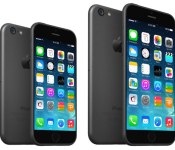
Apple Reportedly Negotiating with Carriers for $100 Price Increase on iPhone 6
Apple is negotiating with wireless carriers to raise the price of the iPhone 6 by $100, claims Jefferies analyst Peter Misek (Via StreetInsider). Carriers initially are refusing to negotiate on the iPhone’s $199 base price, but they may not be able to resist as the iPhone 6 is shaping up to be 2014′s blockbuster handset.
“The possibility may at first seem far-fetched in light of investor concerns regarding possible carrier subsidy and handset price cuts due to smartphone saturation and lack of differentiation,” Misek comments. “But we think this general lack of differentiation could be the reason why Apple may be able to get a price increase. Carriers realize that the iPhone 6 will likely be the only headline-worthy high-end phone launched this year and that they will lose subs if they do not offer it.”

Apple is expected to ship the iPhone 6 later this year, with rumors suggesting the phone will be available with a 4.7-inch touchscreen display at first. A larger 5.5-inch version may follow at the end of this year or early next year.
Along with a larger display, the next-generation iPhone may include a thinner design, Apple’s new A8 processor, a Touch ID fingerprint sensor, 1GB of RAM, and an improved camera with optical image stabilization. The iPhone 6 is expected to run iOS 8, which may feature a new Healthbook app, improved Maps and a possible Siri API.
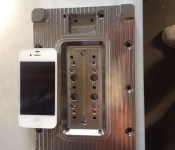
New Photo of Alleged iPhone 6 Manufacturing Mold Hints at 4.7-Inch Display
Over the weekend, several photos surfaced reportedly showing details on manufacturing molds for the iPhone 6. While the manufacturing mold photos left it unclear as to the size of the device body it would yield, a new photo shared by Nowhereelse.fr [Google Translate] shows a nearly identical mold with an iPhone 4s placed next to it for comparison. Calculations based on the comparison suggest that the mold could in fact yield a device with a display of roughly 4.7 inches, in line with the rumored size for the smaller of the two iPhone 6 models.

One source of uncertainty lies in the shape of the mold, which is tapered. But Nowhereelse.fr believes that there are additional pieces yet to be attached to the bottom of the mold, pieces which would result in the iPhone’s body being formed at the wider portion of the mold depression.
Some of the holes that were drilled into the block in fact serve to fix the inserts which will form a crude which is then machined housing (finishes) using a CNC milling machine. Thus, and assuming that my theory is correct, the dimensions of the box will be determined by the widest part and not the bottom of the mold.
In this assumption, I started to resize the photo to scale against me in reference to the size of the iPhone 4s. I then measured the dimensions of the widest part of the mold which is approximately 138mm long by 64mm wide.
By superimposing and resizing an iPhone 5s image into the mold and aligning it with the wider portion of the depression, Nowhereelse.fr determines that the device’s screen would be roughly 12 centimeters or 4.7 inches diagonally.
 iPhone 5s superimposed and resized to 4.7-inch display (Source: Nowehereelse.fr)
Apple’s iPhone 6 is expected to launch later this year, with the 4.7-inch model perhaps preceding an even larger 5.5-inch model by a few months. Jefferies analyst Peter Misek today reported that Apple is negotiating with carriers for a $100 price increase on the iPhone 6 as the device gets larger and the company packs more technology into it.

T-Mobile ends overage fees, calls for other carriers to do the same

T-Mobile is calling on all wireless providers to put an end to the high fees that pain customers in the event of a data overage. T-Mobile president and CEO John Legere on Monday confirmed that effective June 2014 the carrier will no longer charge overage fees. What’s more, the outspoken leader has called on the other providers to do the same.
“Today I’m laying down a challenge to AT&T, Verizon and Sprint to join T-Mobile in ending these outrageous overage penalties for all consumers – because it’s the right thing to do. Overage fees are flat out wrong.”
If you agree with Legere and want to help put a stop to the fees you can sign a petition on Change.org.
The post T-Mobile ends overage fees, calls for other carriers to do the same appeared first on AndroidGuys.
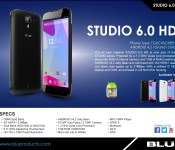
Sneak Peak at the coming Blu Studio 6.0 HD phablet

The Blu Studio 6.0 HD is shaping up to be a solid budget competitor in the phablet game. This device is everything that the Galaxy Mega should have been; LCD display, AOSP Android 4.2.2, with a quad-core processor. There’s no LTE and while it’s only got 1 GB of RAM as opposed to the 1.5 GB of the Galaxy Mega, keep in mind that the device isn’t running the resource-heavy TouchWiz UI, so it evens out.
The device firmware isn’t quite finished and ready for distribution, so what we’re going to do is a first look at the hardware with which we’re dealing.
Both the black and the white versions are very classy looking. I prefer the black, but even though I don’t generally care for the look of large white devices, I would take either color in a heartbeat.
The front of the device is a nearly bezel-less design around the gorgeous 6 inch 720p display. Rather than waste the screen real-estate on a navigation bar, they gave the bottom bezel to the same buttons which would normally reside on the nav-bar, and bravo to Blu for putting them in the correct order: back, home, recents.
The sides have the traditionally placed volume rocker on the left, power/sleep button on the right. You’ll find the microUSB charging port centered on top of the device and the 3.5 mm headset jack to it’s left. There’s also a very classy silver, metallic bezel which surrounds the device.
The device’s rear is beveled to a very aesthetically pleasing degree. There’s a centered 8 MP camera at the top crowing the LED flash and the “BLU” logo a quarter inch beneath, and a quarter-inch from the bottom center there’s a half-inch speaker slit.
My short experience with the device has been wonderful. This is one of the few devices in the 6 inch range that I would gladly use as my daily-driver. Fair battery life and for a budget device, (price TBA) it performs admirably. See screenshots for battery life and benchmark.
Anyone think you might pick one of these up for satisfy your itch for a phablet? Let us know in the comments below!
The post Sneak Peak at the coming Blu Studio 6.0 HD phablet appeared first on AndroidGuys.

Get the Verizon Samsung Galaxy S5 for $99

The Samsung Galaxy S5, arguably the most anticipated phone this year to date, was launched this week with great reviews around the web. With every flagship launch, there will undoubtedly be early adopter sales and promos. The Galaxy S5 is no exception.
For a limited time, you can pay just $99 for the latest and greatest that Samsung has to offer. Verizon, via Amazon.com, is selling the Galaxy S5 for 50% off the normal on-contract price. Further, Verizon’s own site is offering 2 Samsung Galaxy S5′s for the price of one at $199. Time is of the essence with this promotion as well.
With a grocery bag full of top of the line specs, this is a deal worth looking into if you are in the market for a new on- contract device. With deals like these, Verizon and the Galaxy S5 might even put you in the market for a new phone.
The post Get the Verizon Samsung Galaxy S5 for $99 appeared first on AndroidGuys.
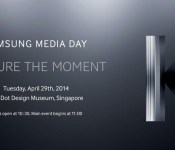
Samsung’s Kapture the Moment event may bring the “Galaxy K Zoom”

Last night, Samsung announced their Kapture the Moment event at Samsung Media day. It will be held on April 29th at the Red Dot Design Museum in Singapore, and could possibly be the announcement of the Galaxy S5 Zoom we’ve all some of us have been waiting for.
The rumors can’t stop there, though. On the event image sits a giant ‘K’ on the right side, and of course, the word ‘capture’ is spelled with a ‘K’. Could it possibly be the Galaxy K Zoom? Or are they going to get a bit more original with the name? We’ll have to wait to find out!
In case you missed it, the S5 Zoom is expected to bring a 20MP camera with 10x optical zoom, Xenon flash, OIS, with 2GB RAM, and a 4.8-inch 720p display.
Via: CNET, Source: Samsung Mobile (Twitter)
The post Samsung’s Kapture the Moment event may bring the “Galaxy K Zoom” appeared first on AndroidGuys.
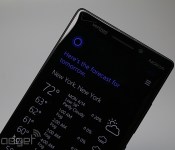
Windows Phone 8.1 finally makes the OS feel whole

Android, iOS, Windows Phone. Each of these mobile platforms had to start somewhere, and it’s never anywhere close to perfect on the first try. Tenaciously, each OS gets better with each new iteration until, at some point, it just all clicks together. Sure, they’re all still works in progress, but there comes a time in which all of the gaping holes in features and functionality get plugged and concerns about the product’s future are alleviated. Arguably, Windows Phone may finally have approached its coming-of-age with an update to version 8.1.
Windows Phone only had a few big pain points remaining, and 8.1 certainly appears ready to fill the holes. The platform now has a fancy notification center to complement the information displayed on Live Tiles; the keyboard has improved with new swipe gestures; the OS can now support even more hardware options; and last but not least, it now comes with a smart virtual assistant to take on Siri, Google Now and S-Voice. The 8.1 update cooked up a lot of great things, and I got the opportunity to take it for a spin for a few days ahead of the official developer preview’s launch. It may not be perfect yet, but Windows Phone just grew up significantly. Here are some of the firmware’s highlights.
Cortana

Windows Phone included a search option from the beginning, and it was useful at the time, but smart competitors like Siri, S Voice and Google Now have quickly turned the tide, rendering Microsoft’s “voice assistant” completely obsolete. Thankfully, the 8.1 update introduces a personal assistant named Cortana which brings Windows Phone into the modern era.
Named after Master Chief’s trusty AI sidekick in Halo, Cortana is designed to help you do essentially whatever you need to do on a phone. She does the usual things: schedule appointments, alerts you to upcoming flights, tells you the weather, gets you directions to your next meeting, dictates messages, toggle settings and opens apps. And yes, she even tells jokes and responds in humorous ways to (most) silly questions. Those are givens these days, so I’ll tackle the more unusual things she can do.
First, Cortana has her own notebook, which she uses to gather more information about you and your preferences. She learns about your dining preferences, travel needs, regular routine and news stories you’re keeping track of (I’m hooked on the hunt for MH370 right now, so Cortana keeps that front and center). Often, these things will even pop up on Cortana’s Live Tile.
Another interesting part of Cortana is that she has the ability to give me reminders about specific people. For instance, I don’t want to forget that I need to ask my mom about her latest road trip, so I tell Cortana and she ensures that the reminder flashes on the screen the next time she calls.
If there’s a time in which you want to activate Cortana in a public (or quiet) place and you don’t want to disturb anyone else around you, you can just type your request in the bar at the bottom and Cortana will take care of the rest.

Cortana can also set up Quiet Hours for you. This is Windows Phone’s version of Do Not Disturb mode, which restricts calls and texts during specific hours, as well as times the calendar lists you as busy. If there are certain people who you want to allow in during those times, ask Cortana to add them to your Inner Circle (or just add them manually if you prefer).
Windows Phone 8.1 also supports geofencing, and Cortana takes full advantage of this opportunity. If you know that you’re going to be passing by the local pizzeria and you want to grab a pie on your way home from work, tell Cortana to remind you when you pass by, and she’ll make sure you remember.
My biggest frustration about Cortana is the fact that it takes me two clicks to get in and start talking: the first click to get into the program, and the second to tell her to begin listening. I’d like to see Cortana gain a true hands-free feature. An always-listening mode, for example, would allow me to simply use a hotword to activate her, and if that’s not an option yet, I would at least like the program to start listening once I press the search key to enter it. This kind of automatic option is technically possible in Windows Phone, since Cortana automatically listens for responses whenever she asks me questions (when I ask to send a text to someone, Cortana asks me for the message and then listens for my answer).
Microsoft boasts that Cortana can understand context — she can see something like “Thursday for coffee” in an incoming text and she’ll help you set it up in the calendar — but this is one area in which she needs a little work. Case in point: I used Cortana to turn on two alarms (one for five minutes from now, the other fifteen minutes from now), but she couldn’t understand when I asked her to turn off both of my alarms. She also couldn’t understand when I requested that she turn off my next alarm, and mistook 1:39PM for AM (I didn’t specify one or the other, but Cortana just assumed that I meant AM — despite the fact that she could’ve easily looked at my alarms and seen for herself). Curiously, the input box, which doubles as a suggestion box, told me to ask Cortana very specifically to turn off the 1:39PM alarm. This means the phone itself was smart enough to figure out which was which, but Cortana didn’t share the same knowledge for some reason. There were also plenty of times in which I’d ask a question in conversational style and I’d end up getting Bing search results.
It’s the little things like this that indicate why Cortana’s still in beta for now. There’s a lot more for her to learn over time, but at least she’s got a solid base to start from. Not only will Cortana get a better idea of your likes and dislikes as you interact with her more often, she’s also powered by Bing servers and will be constantly updated by Microsoft engineers, which means she’ll continue to get smarter as more people use her as well — and you won’t have to wait for formal updates to benefit from those changes.
I was impressed by how well the phone dictates my requests, aside from the occasional time when she couldn’t get exactly what I was telling her. I can’t be sure yet how well she’ll work on budget devices with lower-powered processors, but the Lumia Icon test unit I played with was able to process my requests in a very short period of time. Now it’s just a matter of refining how Cortana interacts with the users, by making her even more personal and understanding context a little better. However, this is just my first few days of using the service on a regular basis; over the next few days I’ll do more testing to see how Cortana compares with competing virtual assistants.
Action Center

Ever since Windows Phone was first introduced, I’ve liked the ability to use Live Tiles to look at glanceable information whenever the Start screen is displayed. Unfortunately, it wasn’t a full solution to a much greater problem: how does a user look at notifications without having to exit an app or unlock the screen? It’s hard to believe that it took Microsoft over three and a half years to figure it out, but Windows Phone 8.1 addresses that glaring oversight with a notification menu called Action Center. But forget the fact that it’s taken so long for it to arrive — it’s actually well done for a first go. In fact, after a few days of use I already prefer using it over the iOS notification center (although it’s still not quite as good as Android’s option).
The Action Center consists of four spaces on top for customizable shortcuts or toggles, depending on which action you choose. Here is where you can toggle your brightness, airplane mode, bluetooth, internet sharing, quiet hours, location and rotation lock; you may also get a shortcut for your camera (extremely helpful your phone doesn’t have a hardware button to do this for you) and settings like WiFi and VPN. For most activities listed, this is much faster and easier than pinning a specific Live Tile to Start or digging through settings menus to do it.
The original status bar still hangs out on the top of the screen, but it now comes with a battery meter and date, both of which I’ve found handy. The option to clear all notifications and go straight into settings are also near the top, though they’re located just underneath the shortcuts.

As for the notifications themselves, they’re easy enough to click to get more info or swipe to clear them out for any given app. You can also click to access a specific notification (say, one particular email) or choose to simply open up the entire app itself. Oddly, should you choose to open up a specific email, there’s no way to move backward or forward through your inbox, so you have to re-open the Action Center and click on a different email to read it.
The Action Center offers a few advantages over its iOS counterpart. For one, iOS doesn’t have shortcuts or toggles of any kind; additionally, you can swipe away your notifications, sync them up with your apps and Live Tiles in real-time, clear all of them at once (arguably one of the biggest pain points on the iOS version) and the status bar indicates that you have new notifications awaiting you. That said, iOS at least offers multiple tabs for more types of content, such as a “today” tab that shows calendar appointments, today’s weather and stock information.

It doesn’t fare as well against Android options, however. While a handful of versions of the notification menu exist thanks to manufacturers wishing to differentiate, the guidelines are the same. Not only can you swipe away notifications, you can also use two fingers to expand individual ones — and you can even act upon most of them (for instance, you can choose to delete or reply to emails directly from that menu). On Android, you can also access plenty of shortcuts, settings and toggles by pulling down the tray with two fingers; there are more on the screen, but they’re not as customizable as it is on Windows Phone.
For now, don’t pay too much mind to how it compares with Android — in its very first implementation, Microsoft managed to make the Action Center not only usable but enjoyable as well. This is a huge win for the company, which needed to do well in this area if it wanted to progress upward and onward.
Word Flow Keyboard
Another pain point in the Windows Phone experience has been its Word Flow keyboard, which was among the best in the mobile space when it first emerged on Windows Phone 7 but hasn’t improved much since; it got stale while Android flourished with a wide number of great keyboards boasting a lot of neat features. With 8.1, the keyboard just got upgraded to support swipe gestures, which is something I’ve grown used to using on Android phones and tablets. (Fun trivia: we first saw keyboard swiping on a Windows Mobile device, so it’s nice to see it finally come back to Microsoft’s mobile OS.)
With the swipe gestures, Word Flow works precisely as you’d expect it to — use your finger to draw to each letter in a word, and the phone figures out what you’re trying to say. It’s not completely perfect, as it doesn’t always get every word that I try to type, but that’s nothing new with these types of keyboards. It’s still a huge improvement over the previous version of Word Flow, and I noticed that my experience got better with practice in just a few days of use.
Hardware support

Last fall’s firmware update (known simply as Update 3) added support for larger and higher-resolution displays, as well as top-of-the-line processors. This upgrade was crucial for Microsoft, because until then the company struggled to convince manufacturers and consumers that a flagship Windows Phone could be just as good as an Android or iOS device at the same price. Microsoft had some strict hardware requirements to ensure WP8 devices were optimized to its liking. Fortunately Nokia found a way to differentiate its Lumia 1020 by featuring a 41MP PureView camera, but otherwise there wasn’t much reason to choose it over, say, an HTC One or Samsung Galaxy S4.
Good news: this wasn’t a one-off scenario for Microsoft, because version 8.1 comes with some fantastic improvements in this arena. Arguably, the most important addition is support for dual-SIM devices. The company wants to hit emerging markets hard, and by offering that extra SIM underneath the hood, Microsoft effectively throws in a new selling point to help it compete against Android in those markets.
There’s also support for virtual soft keys (until now, only capacitive keys were allowed) and even more Qualcomm chipsets than before, and the hardware camera button is no longer required. As much as I like using that button, it simply doesn’t make much sense on budget devices; eliminating the shutter key may shave off a bit of a phone’s production costs, which hopefully will make inexpensive handsets similar to the Lumia 520 even less expensive.
Finally, WP8.1 will also let you save your apps to SD, which makes a huge difference if you’re low on extra storage. Interestingly enough, Microsoft says that the apps are still encrypted to ensure that random users can’t snag your SD card and try to copy your games over to their device.
Other key improvements

The change log is too lengthy to list all of the new improvements to Windows Phone, but I want to highlight a few other features which enjoyed some much-needed attention from Microsoft.
Personalization. The new update makes Windows Phone feel a touch more personal. Not only can you choose your own wallpaper for the Start screen, the picture you choose also moves behind the Live Tiles (or through them, in the case of transparent tiles). I’d love to see something similar for the application list as well, since not much seems to happen visually on that screen. Microsoft will also have a new app out in the coming weeks that will let you choose from a bunch of new lock screens.
Battery saver. In the past, Battery Saver has worked exactly the way you’d think it should: when your battery starts getting low, this feature begins shutting off the non-essential apps and services in order to keep your phone alive as long as possible. It still does all that, but it improves upon it by adding the ability to see which apps are causing the most drain to your battery. If any of your apps are hogging all the power for itself, you can tell it to shut off in the background.
Calendar. Arguably, one of the weakest links in the OS has been the calendar. This also saw some significant improvements across the board in 8.1: most importantly, Microsoft’s added weekly and monthly views. The month view shows colored lines for each day that you have appointments, the different colors representing the specific calendar it’s assigned to. The weekly view is a grid of eight boxes (one for each day of the week and another that shows the week in relation to the rest of the month), but you can press on any day and it will expand to show more details.
Store. The Store has a slightly different look, but the most interesting part of it is that apps can now update automatically, if you desire. On top of that, apps that you’ve purchased in the past now show up as “owned” when you conduct a search for them. Finally, the act of installing an app doesn’t kick you out to the application list — it just keeps you on the same page you were already on.
Wrap-up

Finally. For the past three years, I’ve admired Windows Phone for many reasons, but the update to 8.1 marks the first time that the platform actually feels… complete. In other words, there are no more gaping holes in its features or functionality — essentially, I can now use Windows Phone without feeling like I’m giving up something that I’d otherwise enjoy on an Android device or an iPhone. With the update to version 8.1, you can now enjoy a functional personal assistant, a robust notification center, solid hardware support and a great keyboard, all of which were huge pain points that needed to be addressed a long time ago.
Of course, Microsoft still has plenty of challenges ahead. After all, it’s still quite uncertain what kind of changes will happen to Windows Phone after the Nokia acquisition is finalized, and we still haven’t seen a ton of manufacturers announce new hardware yet, despite Microsoft’s claim that there’s a ton of renewed interest in the platform. The OS has struggled to grow since its conception and is just now starting to hit double digits in market share (in certain regions, anyway). My hope is that this update signifies a change in momentum for the company. With new leadership, new significant functionality and the company’s “One Microsoft” vision, Windows Phone 8.1 could easily be the boost the company needs to foster continued growth.
Filed under: Cellphones, Wireless, Software, Mobile, Microsoft
 AIVAnet