



T-Mobile intros $40 Simple Starter Plan

T-Mobile on Wednesday introduced its latest service option, the $40 Simple Starter plan. Touted as part of something larger unfolding this week (Day 1 of 3), the plan provides unlimited talk, text, and 500MB data with tethering for only $40 per month.
“Un-carrier is a movement, not a marketing strategy. We are freeing consumers from the predatory practices of traditional US wireless companies and that includes these plans that start with a low price and a low data limit, but then hit you with insane fees if you send one too many emails. It’s wrong!.. I know we have it right and when we all are done reporting results from the first quarter – I think you’ll share my conviction.” – John Legere, president and CEO of T-Mobile.
The new Simple Starter Plan launches April 12 and is designed for “value conscious” customers. As of today there are no other wireless carriers offering single line $40 rate plans with 4G LTE data included.
T-Mobile CEO John Leger penned a blog post today, thumping the proverbial chest and promising more great things ahead.
Not only aren’t we done, we will never be done. We’ve hardly gotten started. We will keep listening to our customers because they are innovating and showing their creativity in the way they are using wireless.
What else would you like to see happen in the wireless space? What do you think T-Mobile has up its sleeve for Thursday and Friday?
The post T-Mobile intros $40 Simple Starter Plan appeared first on AndroidGuys.
More OnePlus One specs confirmed as we wait patiently for its arrival

What’s potentially the most hyped phone so far this year, OnePlus has outed some more specs for the OnePlus One. If you recall, the One will be announced on April 23rd. Just in time for their weekly hint, OnePlus has outed some more specs.
It has been confirmed that the new phone will be toting a 2.5GHz Snapdragon 801 processor and 3GB RAM. The Snapdragon 801 is one of the best on the market, and we’ve only seen the RAM bumped up to 3GB on a few devices. And in case you forgot, OnePlus confirmed the phone will have a 3,100 mAh non-removable battery and will be kept under their original $400 price point.
Peter Lau goes into more detail on the devices newly confirmed specs:
The higher CPU clock of 2.5GHz instead of 2.3GHz will bring more overall speed and an increased experience to the user. A higher GPU clock of 578MHz instead of 450MHz will allow for less time spent waiting for games and other graphics.
After carefully considering each option, today I can tell you that the OnePlus One will come with 3GB of RAM. This way no matter how memory hungry your games and apps may be, you will never have to worry about delay due to a lack of available RAM.
This phone is turning out to be one for the spec heads. Other than what they’ve given us so far, we have no idea what the phone will look like. Speaking of looks, In case you wanted a “sneak peek” as to what the phone will look like, here’s a video of Steve Kondik unboxing the mystery device.
Stay tuned for more leaks and specs in the coming weeks!
Source: OnePlus
The post More OnePlus One specs confirmed as we wait patiently for its arrival appeared first on AndroidGuys.

US denies that ‘Cuban Twitter’ was developed to create political unrest

Last week, we brought you the story of ZunZuneo, an oddly-named startup that sought to launch a social network like Twitter in Cuba. The twist in the tale, is that it was built and funded by the United States Agency of International Development, allegedly as a way to slowly turn the island’s youth away from rum and cigars and toward a local version of the Arab Spring. Naturally, the agency denies this, posting a rebuttal online that says the project was designed to circumvent the “information blockade” to connect people who have been cut off from the outside world. At a hearing on Capitol Hill, USAID head Rajiv Shah publicly denied the allegations, saying that “working to improve platforms of communication is a core part of what USAID works to do.” We’re sure that this story is going to run and run, at least until it forms the plot of the next Jason Bourne movie.
Filed under: Internet
Via: Time
Source: USAID
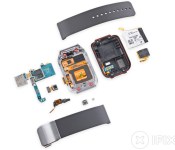
Samsung Gear 2’s battery is pretty easy to replace

After having their way with Amazon’s Fire TV last week, the tool-wielding maniacs educators at iFixit are back, this time inspecting the insides of Samsung’s Gear 2 smartwatch. While iFixit neglected to give the original Gear the teardown treatment, its sequel garners immediate favor by moving the camera module from the strap to the watch’s main body, making band replacements trivial. A screwdriver and “a bit of light prying” were all that was needed to crack the thing open, and following the initial breach, most components were found to be easy to remove (and therefore replace), particularly the battery. The only sticking point, really, was a fused display assembly that would require replacing in its entirety if damaged or defective. Overall, though, the Gear 2 scored an impressive 8 out of 10 on iFixit’s repairability scale, though we doubt your local jewelry store horologist would agree.
Filed under: Wearables, Samsung
Via: SlashGear
Source: iFixit

Amazon Fire TV review: the set-top that tries to do everything

Here’s the thing about Amazon: We can’t figure the company out half the time. Few things embody that quite as well as the Fire TV. The company is adamant that the set-top box is not a gaming console, but it’s invested heavily in original game development for it and even produced a shockingly good gamepad accessory. Still, video games are just a “bonus.” One of the pillars of the streaming-media box is supposed to be openness, but there’s no denying that other services like Netflix are treated like second-class citizens here. They’re invited to the party; they just better not outshine the host.
The Fire TV may be the next step for Amazon as it tries to build its own ecosystem, but it’s also yet another entry in the crowded streaming-media market. And the big question is: Do we need another? We’ve got TV set-tops for cable, satellite and fiber (at one time joined by a disc player for movies and maybe a game system or two). The next-gen game consoles do double duty as entertainment hubs, and there’s no shortage of cheap boxes designed specifically to stream Netflix, HBO Go and Pandora. Add in smart TVs and the rise of pint-sized dongles, and the question of what to watch becomes how to watch. The Fire TV is trying to muscle out competitors with its $99 price and a strong focus on performance, search and openness. Now that we’ve spent a few days living with one, we can judge whether it’s just another option among many, or truly a standout that finally fixes problems the others have so far ignored.
Hardware
The Fire TV is the very definition of understated design. It’s a simple matte black box with a small Amazon logo etched in the top and single white LED on the front to tell you when it’s powered on. There are no purple cloth tags (like on the Roku) and the company didn’t bother with embellishments like rounded corners. Even around back, there’s a minimal selection of ports; just HDMI, Ethernet and optical audio jacks, plus a currently useless USB socket. The result is perhaps the most attractive and unobtrusive streaming set-top box we’ve seen yet. While its overall footprint is larger than the Apple TV’s, it’s still only 0.7 inches tall, which means it’s nearly invisible from 10 feet away. Besides, the remote uses Bluetooth instead of IR, so you can hide it anywhere you want.
Not that you’re going to be picking it up terribly often, but Amazon’s box is actually quite heavy — a dense block made from plastic, aluminum and silicon. Most of the internal space is taken up by a giant heatsink, an essential concession given the rather high-powered internals. The 1.7GHz quad-core Snapdragon processor, along with the Adreno 320 GPU, is far more powerful than anything found in other streaming devices and it shows. Searches and even browsing the UI are noticeably faster on the Fire TV than on a Roku or Apple TV. And we haven’t even mentioned what it’s capable of on the gaming front, but let’s not get ahead of ourselves.

Amazon also more or less nailed the remote’s design. It’s just the right size with a shallow, but comfortable groove for your finger underside. The buttons have little travel, but do produce a satisfying click when pressed. The remote does still bear the marks of Fire TV’s Android roots. Below the thin ring that serves as a directional pad are six buttons aligned in rows of three — the top row features your old-school Android back, home and menu keys. There are two minor, but irksome, issues here. For one, the menu key is largely useless except from within certain apps (more on that later) and it would feel more natural if the media controls were directly below the directional pad and select button. This not only led to occasionally hitting the menu button when I was looking for fast-forward, but it also sends a subtle message to the user about the priority of the controls. If Amazon was indeed building a media-first device, then the media controls should have taken precedence — and thus had better placement — on the remote.
The most important key on the remote, though, is the search button. Amazon wants this to be the primary way you interact with the UI and indeed, the voice search here is both easy to use and insanely fast. Simply press and hold the microphone key, which is separated from the rest of the buttons, and speak into the mic built into the Bluetooth controller. More often than not within a second or two you’ve got your results, and there’s no need to breakout a special remote app on your phone.
Software

The Fire TV is, as you’d expect, running a heavily tweaked version of Fire OS, which is itself a heavily tweaked version of Android. It’s not surprising then that there are some seams showing around the edges of this young platform. Still, Amazon does deserve credit for stitching together a UI that’s smooth, polished and (mostly) intuitive. The layout should be immediately familiar to anyone who has used a Kindle Fire before — the home screen is populated with movies, TV shows and apps arranged in the form of large, easy-to-read icons and there’s a heavy dose of side-scrolling carousels. On the left are the various top-level distinctions (games, search, movies, et cetera), while the right is reserved for various sublists, such as “recently used” and “featured.” It’s not the cleanest or simplest design we’ve ever seen, (Apple or Roku definitely hold that title), but even your Luddite parents should be able to find their way around.
Once it’s plugged in and connected, the Fire TV presents a short (and apparently unskippable) demo video to make sure you’re familiar with its features. A number of other help videos are also located under the settings menus, and if there’s still a problem, requesting a support phone call from an Amazon rep is just a button press away. It’s not quite as easy as the Kindle Fire HDX’s Mayday button, but it should mean you could gift one of these to a relative without worrying if they’d actually be able to use it. The focus here is on making sure anyone can get it running, and if they get addicted to Amazon’s growing suite of services, then all the better.
The problems start, though, once you start to dig a little deeper into the interface. Fire TV sticks with the carousel layout found on Amazon’s tablets. That’s fine for perusing short lists, like the top 10 movies on Prime, but when you’re looking at broader categories it can become quite cumbersome. Scrolling through the entire list of available action movies on Amazon can take a couple of minutes, even if you’re just holding down the right button and not bothering to read. To make matters worse, there appears to be no rhyme or reason to the order of these lists. And when you reach the end, it doesn’t automatically cycle back to the beginning.

The best way to track down the content you want is search. First the good: Amazon has created a voice search that’s both fast and accurate. Now for the bad: You can’t use your voice to search other content sources besides Amazon. It does offer “quick” links to videos on Hulu, but by default, it tries to push you to purchase or rent titles through Instant Video. To find out if you can watch it for free through your Hulu Plus subscription, you’ll have to click through the “more ways to watch” option. If you try to press the voice search button from within the Netflix app, you’re kicked back out to the home screen, where can only search through Amazon’s library.
Things get even worse if you decide not to use voice search. For instance, if you navigate to the search tab on the left, you’ll still have to click up to access text search since it defaults to voice. And, while Amazon was quick to mock others for their archaic text-entry methods, the Fire TV’s keyboard is even more offensive. You’re offered a string of letters from A to Z in that all-too-familiar carousel view, which you’ll have to scroll through and punch letters in one at a time. And, again, you can’t scroll past the end to return to “A.” That means when searching for something like La Dolce Vita or La Jetée, you have to scroll from the first letter of the alphabet to the last option on the keyboard, which is a space. And you’ll have to do that since voice search has a tendency to trip over foreign language titles, and especially the word “la.”
The killer feature, though, is supposed to be ASAP, short for Advanced Stream And Prediction. The idea is that it’s designed to predict what you’re going to watch and start preloading it in the background (so long as the source is Amazon itself). If you hover over a title while browsing for a period of time or click through to the information page for a movie, ASAP is supposed to start downloading the content in the background. In demos, that meant when you pressed play, your video started playing instantly — no buffering or loading screen. It’s even supposed to preload the next episode of TV shows you’re working through. In real use, however, the feature never quite lived up to its promise. It should get better with time, but we still saw loading screens more often than not. And the wait was noticeably longer over WiFi than it was using a wired Ethernet connection.
Apps and content

It’s definitely a good thing for Amazon and its customers that players like Hulu and Netflix are on board, but there are certainly some issues on the app front. For one, most of the offerings are badly done ports of Google TV apps. They’re not well-maintained and still retain elements of their respective UIs that were designed for devices with keyboards. YouTube in particular still displays prompts for keyboard shortcuts on the screen. Pandora has a nice feature in that it pops up notifications, but it has a strange tendency to start playing even after being stopped. For instance, after listening to a Black Sabbath station during a session of the game Sev Zero, we decided to back out and watch an episode of Invader Zim. When the show was over, we spent a few minutes poking around the menus and then walked away. The Fire TV eventually went to sleep. But when we woke it up the next morning, it instantly picked back up in the middle of “The Wind Cries Mary.” This weird behavior extends beyond the questionably built apps. More than once, the Fire TV froze up, displaying a blank screen before eventually crashing and kicking us back out to the home screen after backing out of a movie.
Gaming

Fire TV’s major one-up over the competition isn’t power, voice search or the platform’s openness: It’s games. Apple TV, Roku and Chromecast don’t offer much in the way of gaming functionality. Meanwhile, the Fire TV even has its own (separately sold, $40) gamepad. No, this isn’t an Amazon game console, but it’s damn close.
Before addressing Fire TV’s limitations when it comes to gaming — of which there are many — allow us to be up-front here: It’s a net positive that Amazon’s jumping into gaming. Not only is the company’s latest major hardware launch capable of playing games, but also Amazon’s got its own game-development department. Hell, Amazon even outright bought the studio that made the new Killer Instinct game. The first game from Amazon Game Studios, Sev Zero, was available at Fire TV’s launch last week. It’s fun, pretty and embodies “leading by example.” Sev Zero is a medium-sized game that’s enjoyed as both a casual dalliance and a serious affair. It’s the kind of title that Fire TV’s game store should be filled with. What we’ve found thus far is something else entirely.
General experience

That Fire TV runs a fork of Android is most apparent while browsing the selection of games currently available. Regardless of Amazon’s categorical breakdown, the selection is easily described as, “an abridged version of Android gaming’s greatest hits.” A smattering of Sonic the Hedgehog titles, Minecraft: Pocket Edition and — of course — Canabalt are all there, as well as newer hits like Dead Trigger 2 and Asphalt 8: Airborne. Of course, it’s not just the selection that reeks of Android.
The other unifying theme is, ironically, inconsistency. Some games look great and fit on TV without a hitch, while others cut off some UI elements (and, ultimately, pieces of the game being played). It’s clear that many titles are rushed conversions from other platforms, something that’s evident whether it’s the gamepad not doing anything beyond standing in for a touchscreen or the game not displaying correctly.
There are only so many games to choose from at launch, but Amazon Game Studios lead Mike Frazzini told us that “thousands” are expected by next month. With just 8GB of storage, though, don’t expect to amass a huge library of digital games on Fire TV. With a handful of streaming apps installed (Netflix, Hulu, YouTube, etc.), we hit a limit of eight to 15 of Amazon’s smallest and simplest games at any one time on our box. Stuff like Asphalt 8 and Dead Trigger 2 come with prettier graphics, but they also come with hefty storage requirements (over 1GB for the former). Installing Deus Ex: The Fall, Sev Zero and The Cave was easily enough to eat up the available 5.5GB for apps and games.
Smaller, fixable issues are also in ready supply. Browsing for games to buy is a mess (and only stands to get messier as the library grows); it’s easy to accidentally quit out of a game with voice search; and there’s no way to leave a game running should you take a break and watch a few episodes of Inside Amy Schumer.
Playing games

Structure and ecosystem aside, the good news is that playing games on Fire TV can be pretty fantastic. Not every game has a demo, but many are free (at least for a limited trial). And, of course, there’s always the standard paid option. If you’re looking for exclusives, there’s only one so far (Sev Zero), but many more are slated to arrive in the coming months.
So, which games should you buy? We suggest the following, and in this order:
- Sev Zero: Part third-person shooter, part tower-defense game (yes, seriously), Sev Zero is a terrible sell on paper. Give this one a chance: It’s a great demonstration of Amazon Game Studios’ talent and is a refreshing, Iron Brigade-esque hybrid of two totally different genres. And hey, it’s really fun! You can switch between tower defense and third-person mode on the fly, which makes Sev Zero a delightful balancing act as the difficulty ramps up.
- Asphalt 8: Airborne: This is the closest you’ll get to Ridge Racer/Need for Speed on Fire TV, and it comes shockingly close. Asphalt 8‘s first few levels cost nothing, and we doubt you’ll blink an eye when asked to pay $1 for more races. It’s not our favorite way of buying a game, but Asphalt 8 is too good to skip just on principle.
- Outland: There’s no reason not to at least try Outland, as it’s another one that starts free and asks for money only when you’ve already been hooked. This is one of the many one-button games, and it’s a gorgeously drawn version of the ubiquitous mobile genre that is endless runners. It controls beautifully, which is important because Outland requires reactionary puzzle solving (often under strict time constraints). This one is perfect for both casual and hardcore alike, as well as everyone in between.
- Rayman Fiesta Run: If you’ve never encountered Ubisoft’s surreal platforming standard before, Rayman Fiesta Run is an endless-runner take on Rayman‘s long-running formula. This game is another no-brainer, as it’s quirky, smart, hilarious and a joy to play. The level art is consistently beautiful, and the music is always a pleasure.
- Minecraft: Pocket Edition: What can we say about Minecraft that hasn’t already been said? There’s nothing quite like it (at least on Fire TV, outside of maybe Terraria). The only real downside is its price (just under $10), but we’ll forgive that — just for being an excellent game.
There are lots of other great games available on Fire TV, but we’ve only played so many thus far. Beware: There are also tons of not-so-great games available. Should you be unsure, we’d suggest sites like Pocket Gamer and Touch Arcade, as many of Fire TV’s titles were previously mobile games.
Gamepad

Have you used an Xbox 360 gamepad? Good news: Fire TV’s gamepad is very, very similar. With the exception of a trio of Android-specific controls and media-playback buttons (as well as a GameCircle button), its composition is identical: offset analog sticks, two triggers, two shoulder pads, a d-pad and four face buttons. The fit and feel aren’t quite as nice as Microsoft’s forebear; Fire TV’s gamepad feels like a good third-party Xbox 360 controller, in so many words.
The battery life, courtesy of two AAs, has so far been good. After several days of regular use, our first controller is still running its first pair of batteries. At $40, though… maybe you have a spare Bluetooth gamepad sitting around? We’re told that “most” work, and you could always plug in a wired Xbox 360 gamepad if you’re sitting nearby.
The competition

Curiously, though it’s one of the Fire TV’s most direct competitors, Google TV is missing from Amazon’s official comparison list (scroll a little past the halfway mark). While there are some good reasons for that (there’s no single product line or spec, and the Google TV branding has been mostly abolished), Fire TV’s Android underpinnings are nonetheless quite obvious. One of the easiest comparisons is to the Hisense Pulse/Pulse Pro family of devices. The Pulse Pro unveiled at CES has similar, if slightly lesser specs than Fire TV, with 1GB of RAM and 8GB of ROM storage tied to a dual-core CPU. Like other Android-based TV products we’ve seen, it also has voice search and a number of the same apps. The existing Google TV environment has tried to toss in so many options and integration with live TV that it’s more complicated than the Fire TV, and so far, it doesn’t have a similar focus on performance. According to rumors, though, Google TV’s next iteration could feature similarly streamlined menus and a focus on gaming — plus a box from big G itself, so watch out.
The Apple TV also costs $99, but comes tied to an entirely different ecosystem. Infuriatingly, too, it doesn’t come with an HDMI cable in the box. The difference here mostly depends on which platform you prefer. Recent software updates have made frustrations like setting up a WiFi connection as simple as touching an iPhone or iPad to the box — no cheesy onscreen menus needed. You can also stream over AirPlay, but you’ll of course need an iDevice to make that happen. Amazon’s set-top box also lets users “fling” content from a phone or tablet to the TV, but right now, its ambitions go a bit further. As with Google, rumor has it that Apple will focus more on gaming with its next hardware or software update, so for now, the choice between these boxes is more a decision between iTunes and Amazon Prime than anything else.
Meanwhile, one of our favorite media streamers, the $99 Roku 3, is facing a heartier challenge than ever thanks to the Fire TV. In its favor, the Roku is still dead-simple to use, and offers a content selection that its rivals can’t match. Even so, being caught on the outside without its own content store and mobile hardware ecosystem for support, it loses some of the media-sync features that Amazon, Google and Apple can provide. It also doesn’t have a gaming experience to match the Fire TV, although how much that means depends on your personal taste. Today, the improved performance of its latest generation and generous suite of available services mean it’s still generally the best option, but there are caveats, and with another six to 12 months on shelves, it will be interesting to see if the competition catches up. Plus, if you don’t want to spend $99, then the cheaper Roku options provide an experience comparable to the others listed here and let you leave a few Jacksons in your pocket.
Finally, Google’s wonderful $35 Chromecast dongle is by far the most accessible of the bunch. It’s cheap, and the list of media services it ties into — Netflix, YouTube, Pandora and Plex — is growing longer by the day. Aside from that, an often overlooked, feature is the Chromecast’s inclusion of HDMI-CEC, which means it can change the TV to its own input as soon as it’s activated, something Apple, Roku and Amazon don’t do. Of course, being cheap does have its downsides: there’s no remote control, which could be a dealbreaker for people who aren’t already used to navigating their media on a phone or tablet. It also doesn’t have as many services available right away, and the only gaming experiences we’ve seen so far have been quite casual indeed. For $35, it does a ton, and doesn’t need your cable provider’s permission to stream HBO Go. And for some people, that will be more than enough.
Wrap-up

The Fire TV is a compelling proposition, so long as you’re already locked into the Amazon ecosystem. It’s fast, powerful and priced in line with its higher-end competition. The addition of a single game controller for $40 gives access to gaming that doesn’t take the place of a console, but suits the need of generation raised on tablets and smartphones. The relatively high controller price (compared to the box itself) makes multiplayer a bit dodgy, so if you’re looking for couch co-op, that’s something to think about. The preferential inclusion of Amazon services is a bit of a hurdle too, but if you already have a Kindle Fire and Prime subscription, it makes more sense.
As a general-purpose photo, video and music streamer, though, even features like ASAP and its high-powered processor aren’t quite enough to separate Fire TV from the pack. It’s a worthy option, but far from the best, and we’ll need some time to see how well it’s supported by games, apps and services to see if Amazon can become a serious hardware player in the living room. Version 2.0 will probably be where all our questions are answered.
Ben Gilbert and Richard Lawler contributed to this review; Edgar Alvarez and Daniel Orren produced the video review.
Filed under: Home Entertainment, Amazon
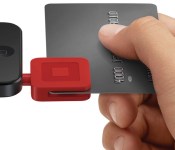
Apple Mulled Acquisition Offer for Square, but Deal Looks Unlikely for Now
With a goal to overhaul the online payments industry and a new revolving credit facility worth $200 million, analysts and technology pundits are wondering where Square is headed next. At least one theory proposed by Re/Code explores the possibility of an Apple acquisition.

Both Apple and Google have been rumored to be in talks with Square in the past year about a possible acquisition, but no firm offers have been made. Square is not actively trying to sell the company, but it would entertain a premium offer insider sources claim, unless it was from Google.
Either way, a sale to Google would disappoint Dorsey, according to multiple people familiar with his thinking. For one, he was reportedly put off by Google after being involved in acquisition talks between his former company, Twitter, and the search giant. He also believes, sources said, that his company’s design aesthetic and values match up much more closely with Apple than Google.
Square has close ties to Apple with its hardware chief Jesse Dorogusker leaving his position as director of engineering for the iPod, iPhone and iPad accessories at Apple to join the mobile payments startup.
A Square acquisition would be beneficial for both Apple and Square claims Re/Code. Square’s future would be secured by Apple’s cash reserves and its favorable position in retail, while Apple would be able to use Square’s payment expertise to jump start any plans it has for a mobile payment system. Apple, though, may be ready to enable online purchases via an iPhone, but it likely is not ready for the robust offline system offered by Square.
But Apple’s entrance into mobile payments is much more likely to start with services that use its iPhones to help make online purchases easier to consummate rather than moving into offline payments, industry sources say. Square wouldn’t be of much help in that regard. As such, Apple has soured on the idea of making an acquisition offer to Square for now, according to sources familiar with the company’s thinking.
Apple may be developing a mobile payment service that would allow consumers to pay for physical goods using information stored in their iTunes accounts. The company is thought to have moved Jennifer Bailey from her position in Apple’s online stores to a new role that places her in charge of building a payment service for the company.
Apple already has the underpinnings of such a payment system with the millions of credit cards stored in customer’s iTunes accounts and its Passbook digital wallet app. CEO Tim Cook hinted at the possibility of mobile payments during a recent earning conference call, saying there is “a big opportunity on the platform.”

AERENA: Clash of Champions is available now for Android tablets and Phablets
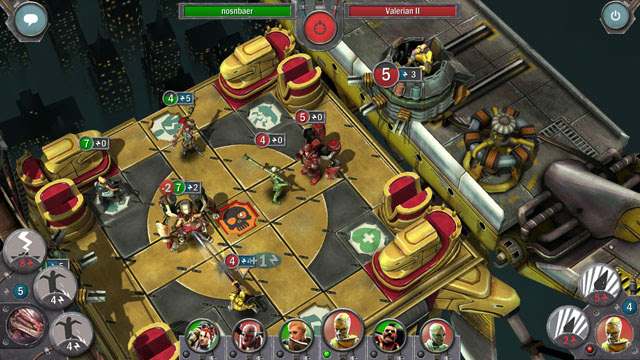
 Late last year, we covered an upcoming game called AERENA: Clash of Champions which was aiming to be a tactical, turn-based team game to be enjoyed as either singleplayer or multiplayer. The game was initially only available on PC Steam, however after an extended time in beta for Android, the game is now finally available for all to play. The gameplay is simple: each match is between two players who each have a team of champions. This team of champions will rotate to promote fairer play, though seeing as the game is free to play, favourite champions can also be purchased to be retained by the player.
 The game looks to have been polished a lot with special attention paid to the UI and the gorgeous graphics. Cliffhanger Productions has specified that the game is intended for tablets and phablets implying that those graphics need some relatively serious performance to make. Surprisingly though, despite the graphics, the game only takes up 159MB. The best part of the game is the possibility to play cross-platform multiplayer with PC and Mac players (and with iOS players too, though that version of the game is only ‘coming soon’).
AERENA: Clash of Champions is available for free on the Google Play Store now (links below); let us know if you pick it up and how you find it.
Game: AERENA: Clash of Champions
Price: Free
Press Release
ÆRENA: Clash of Champions, Out Now on Google Play
April 8, 2014 – ÆRENA: Clash of Champions launches today on Google Play for Android tablets and phablets. A tactical game of single and multiplayer strategy featuring turn-based duels between two opponents and their teams of champions, ÆRENA: Clash of Champions is the latest game from Cliffhanger Productions (Shadowrun Online).
Made specifically for core gamers and strategy fans, ÆRENA: Clash of Champions pits two players and their teams of champions head-to-head in a unique Ætherpunk setting. Matches are short and intense, with game design that allows clever players to switch the balance of power up until the final blow.
ÆRENA’s team-based combat means players are never forced into a single “best” strategy. By combining the strengths of different champions, support ships, and the abilities of Æther shells, players can create strategies wholly unique to their play-styles.
With an emphasis on fair-to-play, players will always have access to a rotating cast of powerful champions and ships to command in battle, with new content coming all the time. Additionally, players have the option to purchase favorites and add them to their rosters permanently.
Google Play:
https://play.google.com/store/apps/details?id=at.cliffhanger.AErenaKey Features:
• Tactical, turn-based combat built specifically for strategy gamers.
• Build up a team of champions, ships, and abilities to suit your play-style.
• High-end, 3D visuals made for tablets.
• Short and challenging matches keep gameplay intense.
• Player-progression with XP, level-ups and rewards.
• Enter the League of Champions and battle for prizes.
• Cross-platform gameplay with PC and Mac (iOS coming soon)
//<![CDATA[
ord = window.ord || Math.floor(Math.random()*1E16);
document.write('’);
//]]>

First Strike on Android Review: the nuclear war game that you feel guilty for Loving
 There’s something weirdly addictive about games to do with the end of the world, or maybe that’s just me. From the indie PC classic Defcon to Plague Inc. on mobile, I find these types of games incredibly hard to put down once I’ve started playing. That’s exactly been the case with First Strike, Feinheit kreativ studio’s first game, which involves the amassing of nuclear weapons in a race to destroy other global superpowers before they destroy you. Rather ironically, and probably a good thing for people who find it hard to play a game about Mutually Assured Destruction, is that a quarter of all revenue from the game will be contributed to help reduce nuclear weapons around the world through ICAN and Green Cross Switzerland; who said being bad couldn’t be good too?
 To start playing, you will pick a nation to play (which will have an associated difficulty), and pick the number of enemies you’ll be playing against. Naturally, increasing the number will increase the chance that you will succumb to a nuclear end, but that’s all part of the fun. After this, you will be given control of a small number of regions where you will have bases at; each base can perform several tasks like build nuclear warheads, research new technologies, or expand to adjacent regions. All of these actions require time and as your actions become more powerful and more lucrative, their creation time will also increase.
 Depending on what warheads are stored at each regional base, you will also be able to perform offensive and defensive actions. If for instance a nuke is launched towards you, a cruise missile can be launched to intercept it, nullifying it. Offensively, you can choose to launch a single rocket, or once you’ve stockpiled enough missiles, you can perform a ‘First Strike’ which launches all missiles that you possess that are within range of your target. Obviously at first your range will be quite limited, but research some key technologies and the whole world opens up.
 The game effectively becomes a game of cat and mouse at this point, with missiles flying everywhere and trying to figure out when is best to attack and when is best to sit back and defend. So far in my experience, the AI is quite ruthless, regardless of the difficulty, and you’ll need to stay on your toes not to get bombed off the face of the planet.
 The game plays incredibly simply; the globe is easily explored by swiping around, zooming in and out is as easy as pinching and controlling your regions is extremely easy with a series of touches. The interface is often a series of interconnected circles, which not only looks great, but makes for a really simple interface. On a smaller screen, like that of my Moto G, the buttons can get a little small, but I never had any issues with pressing the wrong buttons at any time. The one thing that is a little annoying on smaller screens is the text in-game can be positively tiny. There’s probably not much that can be done seeing as how crowded some menu’s can get, like the technology web, but be prepared to have to read the on-screen text very closely.
 And that’s First Strike. There’s no convoluted story or needless things to collect; you just fire missiles, win or lose, then rinse and repeat. I had a ball playing First Strike, though it pains me a little that there’s no multiplayer in the game as it would have been fantastic. All the same, it’s a fantastic, beautiful, well-made game, and though it does cost $3.99, it’s sure to keep you addicted and coming back for more. If you’re interested, you can pick up First Strike at the Play Store links below.
 Game: First Strike
Price: $3.99
//<![CDATA[
ord = window.ord || Math.floor(Math.random()*1E16);
document.write('’);
//]]>
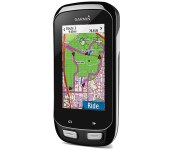
Garmin’s latest bike computer talks to your gear shifter

Bike computers have been connecting to an ever larger sphere of devices, ranging from fitness sensors to smartphones. It only makes sense, then, that they integrate with the bike itself — and Garmin is doing just that with its new Edge 1000. The device can tell what gear you’re using when paired with Shimano’s Di2 electronic shifter, and ties that info to your ride; it’s now easy to figure out if dropping gears helped you conquer that hill a little faster. There are a few big upgrades over the Edge 810 that don’t require high-end bike components, of course. The 1000 supports new Garmin peripherals that include both a handlebar remote as well as cadence/speed sensors, and you can share ride segments through the company’s smartphone app if you want to prove your worth to nearby cyclists. This flagship Edge will be expensive at $600 ($700 bundled with sensors) when it ships later in the spring, but that premium may be worthwhile if you just have to get a competitive advantage over fellow pedal-pushers.
Filed under: GPS, Transportation
Source: Garmin
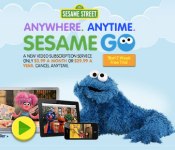
Sesame Go video service offers constant Cookie Monster for $4 a month

If you were looking for another streaming service to pitch a few bucks to each month — and you have a few Sesame Street fans in the house — Sesame Go might be your next subscription. For $3.99 per month or $29.99 for a year (you can cancel whenever), the US-only service will stream to PCs, Mac and mobile devices. It’ll run within a web browser, which should mean less concerns about whether that fingerprint-addled tablet is compatible or not. The service starts today — visit Sesame Go for details on how to get (how to get) a free two-week trial.

Filed under: Cellphones, Home Entertainment, Tablets, Internet, HD, Mobile
Via: TNW
Source: Sesame Go
 AIVAnet