



Buy the Samsung Galaxy S5 for $100 at Target with trade-in

Target have opened up a deal for customers wanting to get their hands on a new Samsung Galaxy S5. For a limited time, Target are offering the Samsung Galaxy S5 for only $100 with a new two-year contract when you trade in an eligible smartphone.
The carriers eligible with Target’s deal are Verizon, AT&T, and Sprint.
The deal runs from April 11th through till April 19th and you can check if your device is eligible using this link.
The post Buy the Samsung Galaxy S5 for $100 at Target with trade-in appeared first on AndroidGuys.

Google I/O Registration Pushed Back to April 15th-18th

We’re you ready to register for Google I/O tomorrow? I am sure some of you were, but now, you have to wait another week. Google has pushed back the Google I/O registration by a week, but don’t think it has anything to do on their end. Okay it probably does, but Google is claiming they pushed it back due to making the registration even easier.
In literally a few hours, Google was going to open registration for this year’s Google I/O, but right at the last minute, they decided to push it back a week to April 15th. You will then have until that following Friday, the 18th, to get your registration in to the anticipated event. Google decided to change things up this year, by implementing a kind of lottery drawing, instead of the normal first come, first served. So once you guys register for I/O, Google will do their drawing, but you will still have to dish out the $900 price for the ticket. $300 of you are part of the academic group, but still, pretty hefty price tag. Not like you will leave empty handed, because we all know Google is fairly nice to their guests who attend by giving them all kinds of goodies that end up being more than the ticket.
So set your calendars for April 15th, so you get your registration in. Let us know if you plan on attending the event.
//<![CDATA[
ord = window.ord || Math.floor(Math.random()*1E16);
document.write('’);
//]]>
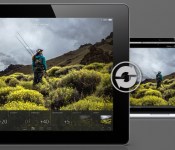
Lightroom mobile arrives for iPad with touch-friendly interface, realtime sync

Adobe Lightroom is one of the most popular image archive tools on the market, and beginning today, iPad-toting photogs now have an iOS app for their DSLR, smartphone and even tablet pics (gasp!) to call home. The companion application, Lightroom mobile, brings much of the desktop version’s functionality to your portable slate. The touch-friendly interface, which supports both portrait and landscape orientations, swaps mouse clicks for taps and swipes. Flick up or down to pick or reject images, for example, or tap twice to cycle through metadata. Any changes you make to an image in the app will be pushed to the cloud and out to any other Lightroom apps that you’ve signed into. Similarly, if you edit an image on a desktop or laptop (which you’ll want to do before making prints, since the iPad’s display isn’t calibrated), your changes will appear in Lightroom mobile within a few seconds.
Lr mobile uses Smart Previews to push compressed raw images to your device. Shots are scaled down to 2,560 pixels at the longest end, so they’re roughly 1-2 megabytes in size. Untouched RAW frames are left on your desktop or a server, so don’t worry about filling up your iPad with a hundred or so full-size DNGs. The app offers the same editing presets as you’ll find in Lightroom 5 (you need to download the 5.4 update before getting started with mobile). You can also tweak settings — such as color temperature, exposure, highlights and clarity — individually. Touch comes into play with editing shots as well. You can tap to select a white point or pull up the untouched version at any time by tapping the screen with three fingers. Images sync over WiFi, or, if you’ve been blessed with an unlimited data plan, you can use a cellular connection as well. The app is available today for iPad 2 or later running iOS 7 or higher. While it’s free to download, you’ll need a Creative Cloud subscription that includes Lightroom to take full advantage.
Filed under: Software

Internet security key flaw exposes a whole load of private data

Most internet security holes, even the bigger ones, tend to be fairly limited in scope — there are only so many people using the wrong software or visiting the wrong sites. Unfortunately, that’s not true of the newly revealed Heartbleed Bug. The flaw, which affects some older versions of common internet encryption software, lets attackers grab both a site’s secure content and the encryption keys that protect that content. As such, a successful intruder could both obtain your private information from a given site and impersonate that site until its operators catch on. Since the vulnerable code is both popular and has been in the wild for as long as two years, there’s a real possibility that some of your online data is at risk.
The good news? There’s already updated software available that protects against Heartbleed. However, the scale of the bug may leave data open to theft for a long time to come — many sites will have to patch up their infrastructure, and there’s no way to lock down content if someone steals it. Codenomicon doesn’t know if hackers are exploiting the bug, so it’s hard to measure the real-world damage. If the exploit is as widespread as it sounds, though, you may want to keep a close watch over your internet accounts until it’s clear that the danger has passed.
Filed under: Internet
Source: The Heartbleed Bug

Adobe Announces ‘Lightroom Mobile’ for iPad, Enabling Editing On-the-Go
Adobe’s professional photo editing software Lightroom has finally made its way to iOS devices with Adobe’s new Lightroom mobile app for the iPad, allowing photographers who use the desktop version of Lightroom to edit and organize photos from anywhere. Lightroom mobile is not a standalone app, requiring both a subscription to Adobe’s Creative Cloud and Lightroom 5 to function.
Integrating seamlessly with the full version of Lightroom 5 for PCs and Macs, Lightroom mobile allows users to log in to the app with an Adobe ID to access the library of content stored in a desktop version of Lightroom. The app downloads Smart Previews of files from the desktop app, allowing for very fast content transfers between the desktop and the mobile app.
The new Lightroom mobile app brings powerful Lightroom tools to the iPad, delivering photography essentials – such as non-destructive processing of files – and utilizing new Smart Preview technologies to free professional-class photo editing from the confines of the desktop. Lightroom mobile is built on a powerful synchronization architecture, designed specifically for photos, and provides the most efficient way to manage and edit images across desktops, mobile devices and the Web.
Smart Previews do require an ongoing Internet connection to sync back and forth between Adobe’s servers to prevent iPad users from having to download huge files, but files can also be downloaded in full for offline editing if preferred.

Lightroom mobile supports much of the same functionality as the desktop version of Lightroom, offering users access to metadata and a basic editing toolbar that contains desktop presets (except for custom presets) and adjustment tools for altering shadows, clarity, contrast, and more. There are also crop and rotate tools for manipulating photos, and a simple three finger tap on the screen displays the before and after when editing.
All of the adjustments made within Lightroom mobile are automatic and sync to Lightroom on the desktop, with history states saved as well, making all iterations of a final image visible at a glance.
Adobe’s new app has been designed with mobile productivity in mind and it is not, at this time, designed to replace the desktop version of Lightroom for editing. Adobe envisions it as more of a quick-use tool, allowing users to sort through images and make quick edits on files to determine what might need further editing via the desktop.
Swiping through a huge number of images and using quick touch gestures to mark favorites can be done somewhat more quickly on a tablet, for example. Adobe’s Lightroom mobile has intuitive gestures that include a two-finger tap as an app-wide gesture that controls a number of different functions, including toggling metadata, turning on the histogram, and more.
Images are grouped by folders specified in Lightroom and displayed in a grid gallery. Tapping an image allows it to be viewed full screen and a simple swipe up or down allows it to be flagged for editing or rejected. Lightroom mobile also has some powerful organizational capabilities, letting users sort images by different aspects like capture time, file name, modification time, and more.
Photos in Lightroom mobile can be saved to the camera roll or shared via social networking sites and images taken with the iPad can also be set to import directly into the app – and the desktop version of Lightroom via syncing. The app also contains built-in slideshow functionality, allowing users to use their Lightroom photos in presentations.

Adobe purposefully left some features out of Lightroom mobile so the simple touch experience wouldn’t be overwhelmed with a glut of unnecessary functions. Custom created presets are not available, for example, nor are star labels. The company did make it clear, however, that it is open to adding additional features that its customers want in Lightroom mobile in the future.
With Lightroom mobile, photos will also be viewable and shareable on Lightroom.Adobe.com. While Lightroom mobile is limited to the iPad 2 or later at this time, Adobe does has plans for an iPhone version later this year.
Lightroom mobile for the iPad is available as a free download [Direct Link] but using it will require an Adobe Creative Cloud subscription. Access to the app is included with following plans: Creative Cloud Complete ($49.99/month), the Photoshop Photography Program ($9.99/month), which includes access to both Photoshop and Lightroom, Creative Cloud Student and Teacher Edition ($29.99/month) and Creative Cloud for teams ($69.99/month/user). 
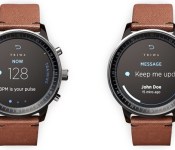
iWatch Rumored to Include UV Light Exposure Sensor
Apple’s long-rumored “iWatch” smartwatch may include a UV light exposure sensor provided by Texas-based Silicon Labs, according to a new research note from Barclays analyst Blayne Curtis (via AppleInsider). The digital ultraviolet sensor, which was announced in February, is described by Silicon Labs as “ideal for activity-tracking wrist and arm bands, smart watches and smartphone handsets.” In addition to tracking UV sun exposure, the sensor is also said to track heart/pulse rate and blood oximetry levels and provide proximity and gesture control.

Traditional watch-style iWatch concept by Gábor Balogh
These chips measure UV exposure to aid those with elevated risk of sunburn or just a general concern about excessive sun exposure, and we believe they may be of appealing to OEMs looking to differentiate in a crowded market. To that end, while these products have seen little public hype thus far, we believe SLAB has a win in Apple’s upcoming iWatch (late 2H14 or early 2015).
Past reports have indicated that Apple is preparing to include the ability to monitor a number of health-related metrics in the iWatch such as heart rate, sleep activity, movement, perspiration levels, and skin temperature. Apple is also said to be developing a “Healthbook” app for iOS 8 which would help the iWatch monitor and track health statistics like weight, heart rate, calories and step counts in conjunction with the iPhone.
Over the past year, Apple has also hired a number of health experts in fields related to heart rate monitoring and fitness tracking, including two executives from pulse-oximetry company Masimo and others from C8 MediSensors, a company that develops non-invasive blood monitoring sensors.
While details on the iWatch have been mostly limited, more information on the product is likely to be revealed as the product’s release grows closer. It is unknown when Apple plans to release the iWatch itself, but a fall release date alongside iOS 8 and the next-generation iPhone is likely.

Apple Bringing More Chip Development In House [iOS Blog]
 Apple is planning on creating an R&D team to develop baseband chips, which are used to control a device’s radio functions like modulation, signal generation and more, for future iPhones in-house, according to a new report from DigiTimes. The baseband chip is separate from the A7 processor, which Apple already designs with an in-house team.
Apple reportedly plans to form a R&D team to develop baseband processors for use in iPhones to be released in 2015 and will place the baseband chip orders with Samsung Electronics and Globalfoundries, according to industry sources.
Qualcomm is currently the company that Apple acquires its baseband chips from, although they’re produced in mass quantities at Apple manufacturing partner Taiwan Semiconductor Manufacturing Company.
Recently, Apple has made moves to bring more chip development in-house, including purchasing chipmaker Renesas Electronics, who creates chips for smartphone displays. It also acquired low-power wireless chip provider Passif Semiconductor, whose chips could be used to improve battery life in wearables, like Apple’s rumored iWatch.
The moves are a part of Apple’s effort to control its own production supplies and core technologies, and include partnerships like Apple’s deal with GT Advanced, which will provide the Cupertino company with massive supplies of sapphire displays.

Watch the Navy’s electromagnetic railgun blow stuff up before it hits the high seas

The Navy announced plans today to deploy an electromagnetic railgun that can do some epic damage. Set to go into testing on one of Navy’s joint high speed vessels (JHSV) in 2016, the gun uses Lorentz Force to “rapidly accelerate and launch a projectile between two conductive rails.” The result is a gun that can shoot a ton further than a traditional weapon. Even better, it can maintain kinetic energy while it’s in flight, making it so it doesn’t need a lot of explosives onboard to do some damage when it gets to the car, building, or other ship you’re trying to blow up. The Navy’s chief engineer, Rear Adm. Bryant Fuller says the gun will “allow us to effectively counter a wide-range of threats at a relatively low cost, while keeping our ships and sailors safer by removing the need to carry as many high-explosive weapons.” JHSV’s aren’t used for combat, so the railguns will be on their way to some TBD boats soon. For now, you can see them in action in the official Navy video below.
Source: Navy

This is what Titanfall looks like on Xbox 360

Titanfall doesn’t officially release for Xbox 360 until tomorrow, but somehow a few gamers have gotten it early and, what’s more, they’ve decided to show it off. The good news is that the game appears to play exactly the same on the Xbox 360 as it does its current-gen counterpart — just as developer Bluepoint Games promised. The graphical fidelity isn’t as easy to judge, however. Two of the videos below (spotted by NeoGAF) aren’t what we’d call great representations of the title: one is a Twitch stream and another looks like it was shot with a cheap handheld camera. A third is a full direct-feed Attrition match on Boneyard. In the Twitch stream, the game is a bit laggy and the frame rate dips quite a bit in spots, but that could be a result of the game running on pre-release servers. We spoke with the user and he said that since that stream he’s had a much better experience with very low ping.
In the shaky-cam video, you can clearly see that tucked away in the options menu is a checkbox for locking the frame rate at 30Hz, which should improve performance. The Attrition match runs pretty well frorm start to finish, and looks pretty okay in the graphics department too. We’re comparing the two different versions against one another this week, so keep it tuned here for our impressions.
Filed under: Gaming, Home Entertainment, HD
Via: NeoGAF
Source: YouTube (1), CityFlex (Twitch), (2)

Game of Thrones’ season premiere is free to watch on Xbox this week

If you missed out on Game of Thrones‘ season 4 premiere when it first aired — say, because of the HBO Go meltdown — you’re in for a treat this week. HBO is giving all Xbox users free access to the episode between April 8th and April 14th, whether or not they’re subscribers to the premium TV service. Some cable and satellite providers are also offering gratis access through their on-demand platforms and websites. This isn’t purely an act of generosity, as you might imagine. Besides giving HBO a chance to advertise a show à la Silicon Valley, the free content could steer some of the many people pirating Game of Thrones toward legitimate sources. Time Warner’s CEO has argued that piracy promotes HBO’s series — his company may see a chance to replicate that buzz through official channels.
Filed under: Gaming, Home Entertainment, HD, Microsoft
 AIVAnet