


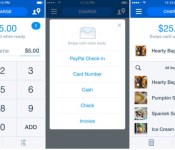
‘PayPal Here’ for iOS Updated with Revamped User Interface, Dynamic Search [iOS Blog]
PayPal today updated its point-of-sale solution app PayPal Here, bringing a refreshed interface and a variety of features. The app now includes a dynamic search tool that allows users to search for specific items and charges, a streamlined custom inventory entry system, and the ability to swipe cards at any moment during the order process. The update also includes enhanced cart views and simplified order entry fields for quicker sales processing.

What’s New in Version 2.0
• Overall upgraded experience with a fresh look and feel
• New dynamic search tool
• Now you can swipe cards at any time during the order process
• Easier custom inventory entry system
• Simplified order entry, profile, settings, and log-in process
• Quicker visibility of customers that have “checked-in” to pay
• Enhanced cart view for reviewing sales before payment
• Faster entry and auto-fill of customer info for database and receipts
PayPal Here originally launched on the iPhone in 2012, and debuted on the iPad last year with additional features, including the ability to connect to a cash drawer and printer. The app allows individual users and businesses to accept credit and debit cards, send invoices, and track cash payments among other point-of-sale features.
PayPal Here is a free app for the iPhone and iPad and can be downloaded through the App Store. [Direct Link: iPhone/iPad]

Google I/O registration pushed back a week

Originally scheduled for today, the Google I/O registration system has been pushed back a few days.
Seemingly having issues with the system, Google I/O 2014 registration will now run from April 15th till April 18th.
Google I/O runs from June 25-26th 2014 at the Moscone Center in San Francisco, with tickets costing $900 per person, or $300 for a student.
The post Google I/O registration pushed back a week appeared first on AndroidGuys.

Microsoft’s deal to buy Nokia gets thumbs-up from China

When one massive corporation buys another one, it’s not as simple as handing over the dosh and winking. There’s also the small matter of the world’s competition authorities, which check that the deal won’t affect market conditions. China has finally given its blessing to the Microsoft – Nokia tie-up, meaning that the pair can make their marriage official, probably before the end of April. Of course, that only gives us a few days to work out a facetious portmanteau to name the pair — Microkia and Nokrosoft are all we’ve got so far.
Filed under: Cellphones, Tablets, Mobile, Microsoft, Nokia
Source: Nokia
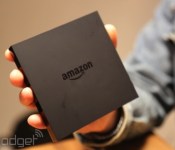
AllCast Android app brings screen-mirroring to Amazon Fire TV

After making fast friends with Android and Chromecast, AllCast is naturally ambling toward the next newest living-room device. If you’re already bored using Amazon Fire TV for its intended functions, AllCast and Mirror support are currently in beta for Bezos’ streaming box. And really, all you have to do is sideload the screen-mirroring app’s APK onto your Fire TV and it should show up as a target for the Android application’s content beaming. On Google+ developer Koushik Dutta writes that the receiver app’s been submitted to the Amazon App Store, and he’s just waiting on approval for it to go live. If you’re feeling impatient however, well, maybe try reading a book — we hear Amazon has a device for those, too.
Filed under: Home Entertainment, HD, Amazon
Source: Koushik Dutta (Google+)
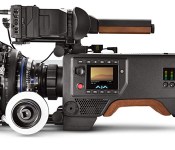
AJA’s 4K camera runs $9,000, but nobody will mistake you for a tourist

Though AJA is best known for disk recorders, it’s just revealed the 4K CION, its first cinema camera. It’ll take on BlackMagic Design and a growing list of 4K DSLRs — including Sony’s new Alpha A7s and the Panasonic GH4. While the $9,000 model loses out on price, AJA is targeting serious users with features like a shoulder mount, 12-bit 444 ProRes recording, an SSD drive and a PL lens mount. It also has a APSC-sized global CMOS sensor and 12 stops of dynamic range, just like BlackMagic’s new URSA model. However, the latter runs a much lower $6,000, and BlackMagic also has the Production Camera 4K at a mere $3,000 after a price drop. But the CION might work for those who find the 6K Red Dragon Scarlett too much, especially if it actually makes its summer ship date.
Filed under: Cameras
Via: Cinema5D
Source: AJA
Personalizing Your Phone with Favorite Ringtones
Having a new phone is surely exciting because it offers lots of features to explore. You probably will spend many hours just to try each feature. Once you have finished exploring your phone’s features, you might start thinking about personalizing your new phone. Many people choose to personalize their phone as it is a way to differentiate their phone from other people’s phones.
As to avoid confusion whether it is your phone that is ringing, you can change your default ringtones to your favorite ringtones. Even though a phone usually has several default ringtones, the possibility of two or more people in your surroundings to use a similar default ringtones like yours is high. If your phone default ringtones is changed, you can easily notice anytime your phone is ringing. This allows you to answer a call as soon as possible even though you are in a public area.
To change your default ringtones with your favorite ringtones, there are two simple ways to do. They are:
1. Use Your Favorite Songs
Most phone owners have a collection of their favorite songs in their phone. To have a custom ringtone from your favorite song, you just need to set your favorite song as your phone’s ringtone. For this purpose, you should firstly choose a song and then click on set it as menu. Right after that, you can have your favorite song as your new custom ringtone. If you use this way, you will have a full song as your new ringtone. If you feel bored with the song, you can simply change it with other songs. The step to change the ringtone is just the same. Because this way is really easy, many people consider changing their ringtones several times a day.
2. Creating Your Own Ringtones Using a Ringtone Application
You can create your own unique, personalized ringtone using a ringtone application. A custom ringtone that you can create is a part of your favorite song so that it is usually short. This application is available on the internet. You should go online to be able to use this application.
To get your custom ringtone, you should firstly visit a site that provides the application or ringtone creation service. Once you have at the site, you will need to upload your favorite song to their server. For this purpose, you can choose any song from your favorite song lists in your computer. You can also extract song from YouTube if you cannot find your favorite song in your computer. Even, you can upload any favorite sound. As if you figure out that a part of your relaxation music is interesting, you may use it. After your song has been fully uploaded, you can use their platform to rip your song. This effort allows you to choose a part of the song that you like most.
Then, you can directly save the ripped song to your computer. To move the ripped song into your phone, you just need to send it through your phone connection device. This process is really fast. You will likely be able to have a custom ringtone in a few minutes. If you want to have several custom ringtones, you had better collect all favorite songs in one folder. This enables you to upload a song more easily as you do not need to make a search anymore.
In order to get a satisfying result, you are recommended to use a ringtone application that has a good reputation. A highly reputable application is reliable and it is usually free. Even though you want to make several ringtones, you will be able to make them without paying anything.

US Navy fine tunes seafaring laser weapon and unmanned robocopters (video)

That electromagnetic railgun is cool and all, but it’s not the Navy’s only wargadget in progress. Apparently, the Armed Forces branch has also been working tirelessly to improve its ship-mounted lasers and autonomous helicopters since we’d last heard about them. The new laser prototype, in particular, is a beefed-up version of what we saw in 2013. It’s capable of firing high-energy beams for $1 per shot, providing ships a low-cost alternative to weapons that require expensive ammunition. Within the past months, Navy engineers have consolidated the weapon’s controls, so a single person can target, track and fire at threats like unmanned aircraft and attack boats using only a video game-like controller. The Navy wants to deploy this cost-effective death ray this summer aboard the same ship its predecessor occupied (the USS Ponce in the Gulf Sea), but it’s still going through some final-stage adjustments.
On the other hand, a Navy helicopter with unmanned flight capability just finished two rounds of testing that proves it’s surprisingly easy to use. In fact, a Marine was able to program a flight on its controller (a tablet) after only 15 minutes of training. Aside from being able to fly without a pilot, the choppers can also automatically detect and avoid obstacles such as telephone wires, as well as take the safest paths in inclement weather. These “robocopters” will be used chiefly to deliver supplies to the front lines, since resupply vessels frequently get targeted by enemies. Yes, they’re like Amazon’s delivery drones on a bigger, more serious scale. Even Chief of Naval Research Rear Adm. Matthew Klunder compared the two: “We’re talking the same concept here,” he said, “the difference is, we’re bringing our customer, the Marine, 5,000 pounds of ammo and water instead.” The Navy didn’t mention when the autonomous choppers are being deployed, so for now, you’ll have to make do with the flight demo below.
[Image credit: John F. Williams for Office of Naval Research/Flickr]
Filed under: Misc, Transportation

BT Sport gets Chromecast support

As we previously reported, BT Sport has just announced a new partnership with Google Chromecast in order to bring the streaming functionality to their companion app.
BT Sport is the latest addition to a Chromecast line-up that already includes BBC iPlayer, YouTube and Netflix, plus Google Play Movies and Google Play Music.
BT Sport is free for BT Broadband customers and with the added Chromecast support are now able to stream the content including Football, Baseball, Basketball, Moto GP, and UFC to the big screen.
Simply update the app from the Google Play Store and you should notice a new cast button in the app which allows you to push the content to the Google Chromecast.
The post BT Sport gets Chromecast support appeared first on ChromeWatching.
Read the rest at the source, ChromeWatching.com
The post BT Sport gets Chromecast support appeared first on AndroidGuys.
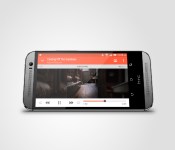
HTC One M8 gets relegated to bottom of the list for benchmark cheating

HTC openly admitted that their new HTC One M8 device could detect a benchmark app profiling the devices performance and by doing so would enter a high performance mode where every setting would be maximised.
What this effectively meant was that the benchmark results where exaggerated to a point where the results would never represent a real-world use case scenario, but would mean that the HTC One M8 would top the charts.
Futuremark, quite rightly so, haven’t taken too kindly to the antics employed by HTC and as a result have relegated the device to the bottom of the charts below another 1000 devices for effectively cheating the system.
We have delisted the new HTC One (M8) from our 3DMark benchmark rankings because it does not comply with our rules for manufacturers. Specifically, ”The platform may not detect the launch of the benchmark executable. The platform must not…modify the usual functioning of the platform based on the detection of the benchmark.”
Whilst HTC claim they don’t see a problem with this, and it only represents a case where a developer could squeeze every ounce of performance from the device, have we begun to see the beginning of a time where we can no longer trust benchmark scores as manufacturers begin to develop ways to always come out on top?
The post HTC One M8 gets relegated to bottom of the list for benchmark cheating appeared first on AndroidGuys.

Best Buy Offering up to $300 Gift Card for Phone or Tablet Trade-In.

Do you have an old phone or tablet lying around collecting dust, or are you just ready to upgrade to the latest and greatest in tech? If this is the case, Best Buy has a promotion that just may interest you.
They’re calling it “The Great Tech Refresh”, and they are offering up to a $300 Best Buy gift card for your used smartphone or tablet. All you need to do is go to Best Buy’s website and click the “learn more” option next to the gift card promotion. There, you can click the link and follow the instructions to get the estimated value of your device.
For instance, I priced my Sony Xperia Tablet Z and was pleasantly surprised that Best Buy offered me a $240 gift card for it. As the saying goes, your mileage may vary. This offer is in-store only.
The promotion started this week, and is in this week’s paper advertisement with no set end date. I’m certain this is a limited time offer, so get this deal if/while you can.
The post Best Buy Offering up to $300 Gift Card for Phone or Tablet Trade-In. appeared first on AndroidGuys.
 AIVAnet