


AcDisplay Brings a Unique Active Display to Your Device – APP OF THE WEEK
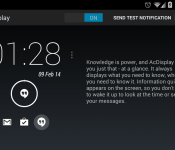

The Active Display on the Moto X won over a lot of us when we first saw it in action. To have a feature that faintly shows your notifications on your lockscreen, without even having to touch the phone, is something we all could get behind. Since that feature was shown off, developers out there have tried their very best to replicate that function, and some have been pretty successful, and some have fallen short. AcDisplay strives to give you Active Display on your device, but they have added some twists to it.
Right off the bat, once you get a notification, you will notice the circle around the icon has a countdown. This is because you can set up the active display to only show you the notification for one second, or you can show it for thirty seconds. This is pretty different from from the rest, which I dug. Also what is different about this app, is once you have looked at your notification, and your screen has been shut off, the active display disappears. I guess the developers felt that if it wasn’t important enough to open, you don’t need to see it anymore. Some people will like this feature, some will not.
Other ways to rid your lockscreen of a notification, is to swipe left or right. Pretty standard when it comes to getting rid of notifications, and of course swiping up will up will open the notification, and swiping down will unlock your phone. I found that this function was iffy at times, and it would get stuck on the active display. Just a minor bug I know the devs will remedy in a future update.
AcDisplay is free in the Play Store, so I suggest giving it a try. If you want to see the app in action, check out my video run-through below so you can determine if its for you or not. Let us know if you downloaded it, and if you like.
//<![CDATA[
ord = window.ord || Math.floor(Math.random()*1E16);
document.write('’);
//]]>
 AIVAnet