


Nokia shows off ‘MD-12’ Bluetooth speaker to match its new smartphones

It’s not all fun phones and games at Nokia’s Build shindig here in San Francisco. In addition to giving us a closer look at the new Lumia 930, 630 and 635, the company is showing off a Bluetooth speaker to accompany them. The MD-12 (even Stephen Elop seemed embarrassed by the name) is available in the same cheerful color palette as the new handsets, including a bright orange hue. On the audio front, this is really just a companion device, but Nokia is claiming the bass is still better than you’d expect on a device like this. As for size, it’s especially compact — this thing is about the size of a hockey puck, making it even smaller than, say, the Mini Jambox. That said, there appears to still be a robust battery inside: Nokia is claiming 15 hours of audio playback, compared with 10 hours for the Mini Jambox. No word on when, exactly, it will go on sale, but Elop himself said it will cost $55.
Filed under: Peripherals, Microsoft, Nokia

Yahoo encrypts almost everything, says more security updates are on the way

After finding its name on an NSA target list, Yahoo understandably pledged to shore up its security efforts. The plan was to encrypt all information moving between its data centers while simultaneously giving users the option to use encryption for all of its online services. Now the company says it’s almost there, explaining on its Tumblr page that data center traffic is now fully encrypted, Yahoo searches and homepage traffic defaults to HTTPS encryption and noting that webmail has been encrypted since January.
Users can also encrypt Yahoo News, Sports, Finance and other services by manually adding HTTPS before the site’s URL. It’s good progress, but there’s more work to do. “This isn’t a project where we’ll ever check a box and be finished,” Alex Stamos, Yahoo’s new security Chief, explained. “Our fight to protect our users and their data is an on-going and critical effort.” Next up? An encrypted build of Yahoo Messenger, due for release later this year. Check out Yahoo’s official Tumblr for the full security update.
Filed under: Internet
Source: Yahoo
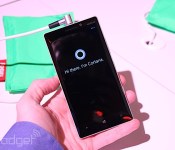
The Nokia Lumia 930 is a global version of the Icon (hands-on)

The Nokia Lumia Icon is a fantastic Windows Phone that comes with a bunch of top features that most Windows Phone users haven’t been able to enjoy until recently, but it had one critical flaw: it was an exclusive to Verizon, which meant that only a handful of users in the US could buy it. For the rest of the world, the only way to get a top-of-the-line Windows Phone (in nearly every spec, that is) has been to buy the Lumia 1520, but its large 6-inch display — though beautiful at 1080p — simply made it too big for a lot of people. Fortunately, that’s about to end because Nokia announced a global version of the Icon known as the Lumia 930.
Interestingly enough, there’s not much of a difference between the two devices. This actually is a bit surprising, considering Verizon has historically landed design exclusives with Nokia like the Lumia 822 and 928. The resemblance is definitely striking, with the only major hardware changes manifest in the presence of GSM bands instead of CDMA and the additional colors that Nokia will offer.
Unlike the Icon, Stephen Elop mentioned that we likely won’t be seeing the 930 in the US — at least, not on a carrier, and not anytime soon. Still, this will be an ideal Windows Phone for many folks in other corners of the globe; it comes with pentaband LTE (bands 1, 3, 7, 8 and 20), quad-band HSPA+ (up to 42.2Mbps) and quad-band GSM/EDGE, so you should be able to get solid speeds nearly anywhere you go, even if you’re not getting LTE in your neck of the woods.
The 930 will come in four color options: white, black, bright orange and bright green. Just like on the Icon, these colors are mainly reflected as part of the polycarbonate panel on the back, and aren’t swappable like the covers on the 630 and 635, also announced earlier today.
Ultimately, Nokia’s latest high-end device takes the Lumia Icon and resolves a lot of our primary concerns with it: it now has global LTE and HSPA+ for international users around the world, it comes in more colors and isn’t limited to just one specific carrier. And if the 5-inch 1080p display and Snapdragon 800 processor fit the bill, you’ll want to keep your eyes peeled for it starting in June for around $599 (though price may vary on market and operator).
We’ll have a video and a bunch more images ready for you shortly, but here are a few to get you started.
Filed under: Cellphones, Wireless, Mobile, Microsoft, Nokia
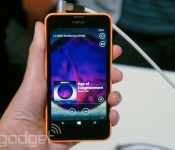
Nokia Lumia 630 and 635 bring Windows Phone 8.1 to budget seekers (hands-on)

Nokia may not be an official part of Microsoft yet — that should finally happen later this month, if you ask either company — but that doesn’t stop the phone maker from cranking out more devices at the software giant’s developer conference. This morning at Build, Stephen Elop announced three new Lumia devices, although two of them are about as close to twins as you can possibly get: the Lumia 630, which is a 3G device that comes in single and dual-SIM flavors, and the 635, which adds LTE. Both are sub-$200 smartphones aimed squarely at both emerging markets and anyone else who just wants a Windows Phone 8.1 device without spending a lot of money in the process.
At 4.5 inches, the pair of devices hit a sweet spot in display size, but its 854×480 FWVGA resolution isn’t going to bedazzle. It’s an inexpensive phone, however, so it’s not horrible given what you’re paying for. The handsets aren’t necessarily designed from a premium perspective, but just like the 620 and 625 before them, these phones are colorful and offer interchangeable shells, which make them a lot more personable and customizable. In addition to the standard black and white hues, you’ll be able to choose from green, orange and yellow (all bright).
When we played with the new devices, we saw two different types of covers. One of the options is matte, while the other is a two-toned option that is essentially an inverted version of the Lumia 620′s cover. They’re easy to swap and they add an element of fun to the phones. It’s 9.2mm thick and has blunt edges that slant slightly, and this actually works in the handset’s favor — sure, it’s not the thinnest device on the market, but it’s very comfortable and easy to hold.
Thanks to this morning’s update to Windows Phone, the Lumia 630 comes with a whole bunch of firsts for a Windows Phone: the inaugural dual-SIM device, the first we’ve seen with virtual soft keys and the first without a physical shutter button on the right-hand side. If you’re going to be using the 5MP rear camera on a regular basis, you’ll at least be able to add the camera into the action center as a quick access shortcut. You’ll also be able to take advantage of Cortana, the new virtual assistant on Windows Phone 8.1.
It comes with a Snapdragon 400 chipset and a mere 512MB of RAM, which means it doesn’t have that much extra horsepower. Fortunately, we were pleasantly surprised in our first impressions; when we played with the 630, it felt a lot snappier than we originally expected. Of course, we’ll have to see if that translates into regular real-world use in our full review when the time comes, but at least for now we’ll take this as a good sign.
When the devices come to market in May, the single-SIM 630 will be $159, while you’ll be able to get the dual-SIM variant for $169 and the Lumia 635 for $189. This may not be quite as inexpensive as the tremendously successful Lumia 520, but we’d be very surprised if we don’t see a Lumia 530 or similar with Windows Phone 8.1 sometime in the near future.
Dana Wollman contributed to this report.
Filed under: Cellphones, Mobile, Microsoft, Nokia
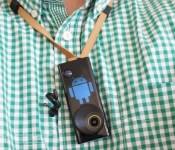
Lifelogging camera Autographer reaches out to Android users

Having a photojournalist follow us around all day could work out to be pretty expensive, which is why we liked the idea of Autographer’s neck-worn lifelogging camera – even if we didn’t appreciate the low-fi picture quality. In any case, the device’s creators are continuing to improve the product, releasing a companion app on Google Play that opens it up to Android users. The company can’t fix the camera’s weak sensor, but at least there’s an identical set of features to what’s on the iOS counterpart.
Filed under: Cameras
Source: Google Play
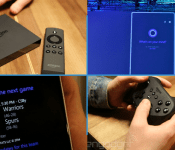
Daily Roundup: Amazon Fire TV, Microsoft announces Windows Phone 8.1 and more!

You might say the day is never really done in consumer technology news. Your workday, however, hopefully draws to a close at some point. This is the Daily Roundup on Engadget, a quick peek back at the top headlines for the past 24 hours — all handpicked by the editors here at the site. Click on through the break, and enjoy.

Amazon’s Fire TV promises a premium set-top experience
What you’re looking at is Amazon’s new Fire TV set-top box. Above all, this tiny, $99 media streamer is lightning fast thanks to its “ASAP” technology, which preloads content based upon your location in the UI. But this little black box isn’t just for TV, it plays games too.

Windows Phone 8.1 and Cortana officially revealed at Build 2014
Windows Phone 8.1 has finally arrived! Today at Build 2014, Microsoft unveiled the latest version of its mobile OS, featuring a brand new notification center (“Action Center”) and the anticipated Cortana digital assistant.

Microsoft unveils Cortana, its answer to Siri and Google Now
Earlier today, Microsoft announced Cortana, its new, Bing-powered digital assistant for Windows Phone 8.1. The search tool currently exists as a beta, but 8.1 users can access it via its own special Live Tile. What’s more, Microsoft opened the API to select developers like Hulu and Facebook.

Fire TV ‘isn’t trying’ to be a game console, but is Amazon’s first real investment in gaming
Is the Fire TV simply a gaming-capable media streamer, or vice versa? Well, we spoke with Amazon VP Pete Larsen and he assured us that the Fire TV “isn’t trying to be a game console.” Regardless of the company’s “create-a-market” approach with The set-top box, Amazon has indeed invested in the world of video games.
You also might like:

Engadget HD Podcast 392 – 4.2.14

If you have a dozen shows that always seem to overlap and you just can’t bear to miss any of them, then Verizon may have just the thing. Its FiOS Media Server has arrived under the name Quantum TV DVR and it’s ready to make you master of your multi-room domain. With this week’s announcements, some casual competition arises between your hosts regarding the details on what Amazon will (did) release — congratulations Richard — and the company has locked in season two of Alpha House, along with six other new shows to satisfy your TV jones. The crew also flashes back to the OG Slingbox and provides you with a pile of Must See HDTV for the week. So grab a seat and head on down to the streaming links below to join us for this week’s edition of the Engadget HD Podcast.
Hosts: Richard Lawler, Ben Drawbaugh
Producer: Jon Turi
Hear the podcast:
08:18 – Verizon FiOS Media Server arrives as Quantum TV DVR
20:00 – Xbox One update tests a DVR button and OneGuide on SmartGlass
28:49 – Vudu’s 1080p movies and TV shows are now streaming on Chromecast
33:41 – Amazon launches Fire TV for $99
37:39 – Amazon Prime signs ’24′ away from Netflix just before the new season airs on Fox
38:57 – Amazon’s Alpha House wins re-election, six new series set to debut
39:45 – Dish teams up with Disney and ABC to offer app access to content
41:07 – Watch Sony explain Project Morpheus and its VR plans for PlayStation
42:27 – Valve’s VR guru jumps ship to become Oculus’ head scientist
44:20 – Gadget Rewind 2005: Slingbox
49:17 – Must See HDTV for the week of March 31st
Get the podcast:
[iTunes] Subscribe to the Podcast directly in iTunes (MP3).
[RSS – AAC] Enhanced feed, subscribe to this with iTunes.
[RSS – MP3] Add the Engadget HD Podcast feed to your RSS aggregator.
Contact the podcast:
Having a chat with Cortana, Windows Phone’s new personal assistant

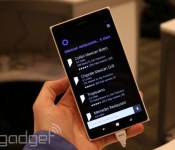
Anyone who’s played Halo, the iconic first-person shooter based 500 years in the future, knows where Microsoft came up with the name of Cortana, its new voice recognition program on Windows Phone 8.1. Master Chief might be the star of the video game series, but Cortana is the heroic digital sidekick that saves his behind in almost every level. Granted, the Windows Phone version may not help you explore an alien planet or teach you how to defeat the bad guys, but it’s still capable of some great stuff.
Just press the search button on the bottom of every Windows Phone device (as long as it uses 8.1, of course) and Cortana pops up, ready to listen and obey your commands. What kinds of things can she do? You can tell her to call someone, send a text, set reminders, take notes and hook you up with all sorts of information that you might need throughout the course of any given day. And since it’s powered by Bing, the engine working behind the scenes has a solid amount of oomph.
At present time, there’s one major catch to the feature, which is currently in beta status: while Cortana is quite functional, the only way to activate the service is to physically press a button on the screen. We’re told that always-listening capabilities (as seen on devices like the Moto X) are in the works and hopefully can be incorporated at some point down the road, but for right now that remains a significant limitation to the service.
We hope to get more personal time with Cortana in the coming weeks as new Windows Phone 8.1 devices come out, but we at least got a few minutes to play around with the service. It’ll start out in beta mode, which means that Microsoft still has some work to do before it’s a completely solid and reliable feature. In its early stages, interacting with Cortana was still an enjoyable experience, although there were a few instances in which we had to repeat (or rephrase) our request in order for the system to recognize what we were asking. For instance, Cortana interpreted “find me a…” as “find Mia,” and attempted to find a contact in the People Hub under that name. Still, we were also in a crowded room with a lot of voices nearby, so we have a feeling that it performs more reliably in quieter environments.
Regardless, we’re pretty happy with what Cortana is capable of. When you first try to set up the service, you’ll be prompted to answer a few questions about yourself, so Cortana can become better acquainted with your preferences. You can assign nicknames to yourself and other contacts, and it uses its own “virtual notebook” to remember what you’ve done in the past. The service can parse email and detect that you have a flight booked — and then it will ask you if you want her to track that flight. Indeed, Microsoft is taking a more personal (as in, personal assistant) approach to Google Now.
Additionally, Cortana will learn your voice and your preferences as time goes by, so in theory the service should get even more accurate and reliable the more you use it. And since developers have access to Microsoft’s speech API, third-party apps can be a part of the fun; because of this, you’ll be able to pull up your contacts’ Facebook pages, send out tweets, add shows to your Hulu Plus queue and do plenty more. Finally, Windows Phone 8.1 now features geofencing, which means you can tell Cortana to remind you to pick up groceries when you pass by the store of your choice.
Even though it’s not completely perfect yet, Cortana’s off to a pretty good start. There’s a lot of room for improvement, of course, but we’re excited by what Microsoft has been brewing up for the past two years. And who knows — perhaps in a few years the actual Cortana herself will pop up as a hologram to the delight of video game fans everywhere, but we might be getting ahead of ourselves.
Filed under: Cellphones, Wireless, Mobile, Microsoft

An afternoon with the Fire TV

We came away relatively impressed with the Fire TV during our brief hands-on. But we all know that units set up specifically for press demonstrations are hardly the best indicator of how a device will function in the real world. So we immediately went back our lair and began putting the newest kid on the streaming block through its paces. Once away from the carefully controlled demonstration area, it became clear that the Fire TV is more of a mixed bag — and still tied to its Android / Google TV roots — than Amazon would like you to believe.
When you first plug in your Fire TV you’re treated to a rather lengthy instructional video hosted by a sketchy (as in crudely drawn, not as in disreputable) man. Most of the functions are pretty straight forward, but it’s a nice touch, especially for the less tech savvy out there. The Fire TV is definitely a streaming set-top box you could give to your grandmother. It certainly helps that the whole UI is intelligently designed and extremely intuitive. Our only major complaint from an interface standpoint is that it can be a little busy at times. All the large images and tile-like collections of apps and movies that populate the Home tab are pretty, but a little distracting. Still, it’s responsive and we didn’t encounter a single stutter over the course of an afternoon spent installing several apps, a game or two and streaming plenty of movies, TV shows, YouTube clips and music.
One feature that we felt let down a little by was ASAP. While it was flawless during the demonstrations both on and off stage at Amazon’s New York event, things weren’t quite as smooth back in the dark recesses of Engadget HQ. The first title we fired up simply failed to play at all, while the Blair Witch Project took a full 36 seconds to start. On the other hand, The Avengers only displayed a loading screen for roughly one second and after that we were able to bounce around the movie seamlessly. And when we backed out to the menu and picked Skyfall from the suggested titles it started up instantly, just like it did during the demo. It seems that maybe we needed to let the Fire TV warm up first.

We are extremely happy to report that multitasking is not only possible, the hardware appears more than capable of handling it. We were able to fire up our favorite Pandora station then drop out to the main menu, install Sev Zero and play through the entire first level without dropping a frame or causing the audio to skip. Obviously playing a song in the background isn’t particularly taxing, but it’s likely to be the only time you make use of the Fire TV’s multitasking ability.
Nothing highlights both the strengths and weaknesses of Amazon’s set-top quite like the app selection. Plenty of major services are represented — though a few of their apps are just ported Google TV products. While that certainly made it easy for companies to get on board with the new platform, the results often leave something to be desired. The YouTube app even preserves the indicators for keyboard shortcuts, despite the fact that you can’t currently use a keyboard with the Fire TV.
Even search left us with some mixed feelings. The voice search functions almost flawlessly — it’s fast, accurate and always just a button press away. But sometimes voice search can be tripped up by foreign or gibberish words. (Just try getting it to recognize Suspiria.) Or, perhaps you’re one of the millions of people out there with a speech disorder or impediment. Then you’ll have to rely on text search, and while Amazon was eager to poke fun at Roku’s on screen keyboard and compared it to entering your high score on an NES, the Fire TV solution is even more onerous. First, you’ll have to move up to the search tab on the left side, then over to the right to search interface, then up again to access the text search (it defaults to voice). Then you’re presented with a carousel of letters that you must scroll through from A-Z, punching in each one manually.
In general it seems like the good outweighs the bad on the Fire TV, but — likely for the sake of expediency — it’s clear there were a few questionable decisions made. We’ll withhold judgement though until our full review.
Filed under: Home Entertainment, HD, Amazon
Jailbreak Tweak Auxo 2 Brings Unified Control Center, Gesture-Based Multitasking to iOS [iOS Blog]
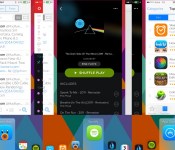
Auxo 2, the follow up to 2012’s popular jailbreak tweak Auxo, is now available in the Cydia Store. The product of developers @Sentry_NC and QusicS, the new tweak includes a number of features including a unified view for the Control Center and app switcher, a Quick Switcher for moving between apps using gestures, a hot corners feature that allows access to apps by touching the corners of an iOS device, and more.

Unlike the stock iOS 7 experience, Auxo 2 allows users to access the app switcher, multitasking controls, and Control Center toggles entirely with the use of gestures, all while combining all three elements into one interface and offering a variety of settings for customization.
Auxo 2’s flagship feature is the Quick Switcher, which allows users to switch between apps by swiping from the bottom left of a device and releasing a finger on an open app. By default, the Quick Switcher is limited to six apps, but users may enable an unlimited amount of apps in the settings. The Quick Switcher features a fluid animation in line with the rest of iOS 7, and features dynamic full screen previews for each app.

Meanwhile, Auxo 2′s Multi-Center feature combines iOS 7′s toggles, App Switcher, and media controls into one interface. In order to achieve the sheer number of controls located within Multi-Center, Auxo 2 locates a few elements in different places, with the AirPlay/AirDrop buttons and control toggles at the top, which is followed by media controls at the bottom. Multi-Center animates in and out of an open app, and contains various customization settings.
Auxo 2 also offers a Hot Corners feature, which allows users to return to the home screen by swiping up from the bottom right corner of the screen or access the app switcher from swiping up from the bottom left of the display. This enables users to access both UI elements with only gestures as opposed to using the home button.

Among other features, Auxo 2 allows the user to scrub through iTunes Radio tracks with its media controls, something that is not possible with the stock Music app. Other toggles for turning off elements, accessing the last open app, inverting the Hot Corners feature, and disabling the tweak in selected apps are available as well.
Auxo 2 is out now on the Cydia Store for $3.99, and is available at a discounted price of $1.99 for users who bought the original Auxo tweak. iDownloadBlog also has a detailed review of Auxo 2 covering all of its major features and customization options, and can be seen in the video below.

     |
 AIVAnet