


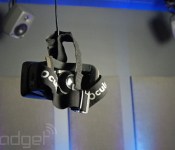
Jaunt VR wants to capture the real world and put it in an Oculus Rift

When Mark Zuckerberg bought Oculus VR last month, he was looking beyond gaming. “Imagine enjoying a court side seat at a game,” he said. “or consulting with a doctor face-to-face.” Oculus’ developing VR headgear can do more than transport us to virtual worlds — it can help us experience the real one, too. The trick, however, is you have to figure out how to capture the world in 360-degrees before you can share it. Turns out, there’s a company working on that; it calls itself Jaunt.
“We’re basically trying to create the methodology for making content like this,” Jaunt CEO Jens Christensen explains. “We call it cinematic VR.” Christensen’s company is hoping to build the foundation that stereoscopic 3D VR filmmaking will stand on — a full-stack solution for creating cinema-quality virtual experiences. This amounts to specialized camera hardware, computational photography algorithms, specialized plugins for popular editing suites and purpose-built software. “It’s actually very hard,” the CEO joked with us. “You can’t have a camera man, he’d be in the shot.”

Peering through an Oculus Rift at the company’s test footage, we can see what he means. Jaunt’s prototype camera captures a sweeping 360-degree view, and sees everything except for a small area just below the viewer’s feet. Our hosts point out a tree in a scene of monks practicing kung fu, outing it as the director’s cover. The scenes are convincing and immersive, but imperfect — the majestic view of San Francisco’s Golden Gate is a little less breathtaking when you can see where the separate bits of footage are stitched together. Christensen explains that the camera, software and algorithms are all still in the prototype phase. “This is a new problem, shooting in this media. You can’t just attack one part of it.”
Jaunt hopes to make its tools available for VR-minded filmmakers later this year, but wouldn’t tell us specifics about who it’s partnered with or how VR films, once made, would be distributed. Either way, funding won’t be a problem: the company announced today that it has secured $6.8 million in venture capital to refine its end-to-end production solution.
Filed under: Gaming, Internet, Facebook
Source: Jaunt VR

Farm Accident Prevention is the Job of Employers and Employees

There is no doubt about it farming can be a very dangerous occupation. Although the number of farmers and workers in the UK represent only a small percentage of the workforce, they account for a significant amount of accidents and injuries each year in the UK. In order to reduce the likelihood or chances of accidents on the farm it is important to be aware of the common causes of accidents on farms.
They include heavy machinery and equipment including but not limited to vehicles. Falling, drowning, strains, and falls caused by heavy lifting or pulling. Also, handling or inhaling dangerous chemicals. For example, pesticides, fungicides, herbicides and fertilisers. There is much that can be done to eliminate and reduce the risks associated with farming. Both sides have an important role to play. Both the employer and employee has to in maintaining an acceptable level of safety on the farm.
It is important that employers should be aware of the potential risks associated with their farm. Knowing the risks involved is indeed half of the battle. The other half is making the employees aware of the risks involved and putting measures in place to prevent their occurrence and thereby eliminate the chances of a farm accident.
Employers and employees are both responsible for maintaining a safe working environment on the farm. As an employer you are obligated by law to provide a safe working environment for all your employees and your employees are obligated to take the necessary safety precautions to ensure their safety while on the farm.
The proper handling of the animals or livestock on a farm can greatly minimise the chance of injury from an accident. The right restraints and equipment such as tethers, halters, paddles, and yokes are essential for their handling, treatment by veterinarians and workers, as well as to transport them.
Restraints should work effectively to ensure that the animal in question is fully restrained and unable to kick, buck, or move. Farm workers should be fully aware and trained in the handling of the different animals. Including the best and most effective way to restrain them without hurting or harming the animal or themselves.
All machinery and equipment purchased should be compliant with the minimum safety requirements by law and carry all the necessary documentation for their safe handling and operation. Equipment should be regularly serviced and maintained.
This guarantees that they perform at their optimum safety levels and are able to effectively and satisfactorily carry out the tasks they are assigned to. Any employee assigned to operate or repair the equipment, machinery, or vehicle should be properly trained to do so.
Ordinary substances used to rear animals and grow crops can be very dangerous chemicals if misused or stored inappropriately. It is important that detergents, medications, pesticides, fertilisers, paints, and lubricants be managed and stored properly according to the manufacturer’s instructions. An ounce of prevention is definitely worth more than a pound of cure so it is important that employers and employees work together.
For advice on a farm accident claim, contact Priority Legal.
Read the latest on agriculutral news and safety.
About the author:
Mark Summers is a legal specialist who writes for Priority Legal. You can find Mark here on Google Plus. Please add him to your circles.
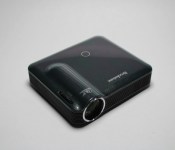
Product Review: Brookstone Pocket Projector Pro

Our mobile devices can do so much today that it is starting to become the universal device in our world. From ringing up purchases to just taking photos; our mobile devices are a hub of entertainment/information in our on-the-go world. So when it comes to entertainment you can bet that a good chunk of folks get their news, YouTube videos, and music from their mobile but sometimes that can be a problem. I don’t know about you but I have had many moments where quite a few people want to see a movie I have stored on my device but even with a 5.7 inch screen my Note 3 just can’t cut it for 5 people. Now there are quite a few ways to put locally stored content on the TV but they usually require some other things (wi-fi, HDTV, certain brand) and in some cases you have that but just can’t get it to work (Chromecast and hotel wi-fi anyone). There are also those times that you just want to get a bigger screen, this and all other scenarios can be solved by a portable projector and it just so happens that the great folks over at Brookstone sent me one to review. So without out further ado let us review the Pocket Projector Pro.

What’s In The Box:
- Pocket Projector Pro
- MHL to HDMI cable
- HDMI Cable
- Adapter Tips
- Charger with different socket options
- Pouch
Performance:
I have put the Pocket Projector Pro through its paces with heavy (and I mean HEAVY) use throughout this review and I have to say the Brookstone Pocket Projector Pro can do it all. I have connected my PS4 to this to play some COD Ghosts, used the MHL cable (with adapter tip that is included and needed for use with my Note 3) to play movies via screen mirroring, and have even used the projector connected to my Mac for a second screen because why not. Through all these uses the Brookstone Pocket Projector Pro chugged on brilliantly and I have absolutely no complaints on the performance of the projector.
What We Liked About It:
It can play video up to 1280 x 800 resolution which is HD quality and can give you a 100 inch screen if you wanted it. There is also something called Short Throw Technology incorporated into the Pocket Projector Pro that allows it to project a 60 inch from just 6 feet away. This helps give you that “theater” experience in a much smaller area than most projectors.

Video Quality:
As stated above the Pocket Projector Pro can put out video quality of 1280×800 which is HD and well looks pretty damn good in my book, considering the size. I received the Pocket Projector Pro at CES and even under the bright lights the images played beautifully. If you shine direct sunlight at the image however that’s a different story, but that’s usually the case with all projectors anyway.

Sound:
The Pocket Projector Pro also has a built in speaker and while convenient in a small very quiet room it, I wouldn’t use it to show a movie. If you’re trying to get that theater effect I’d suggest utilizing the Auxiliary out jack to get better sound with an external speaker.
Power:
Brookstone in all their all knowingness also made a USB port available to ensure your connected mobile device is powered while being use with the Pocket Projector Pro. This is a small feature but when you’re playing a movie/s for a few hours straight that USB is going to be a lifesaver.

Adapter Tips:
This may not seem like a big deal but if you own a fairly new device like me with my Samsung Note 3, then you’ll be forever thankful to Brookstone for including the adapter tips. If you did not know the issue here is the MHL cable, newer Samsung devices require a 11-pin adapter in order to play HDMI content to the projector or HDTV. It also requires an external power source which the 11-pin adapter included with the Pocket Projector Pro allows. If it wasn’t for this little adapter you would need to drop about $20 bucks to get that 11 pin adapter required by Samsung on Amazon. With that said thank you Brookstone for covering us Sammy owners in that area, very thoughtful of you.

Portability:
The name does say Pocket Projector Pro and the projector itself is very portable when pitted against standard projectors. It fits perfectly in my backpack so much so that I can just grab it and go. I can set it on a self-standing dinner table and use that as my base or even just place it on a step of a step ladder if I am outside (which I did, forgot my tripod). Also the fact that it is so small allows me to use it with even the smallest tripods like my Joby Gorillapod. This is great for me because the Gorillapod has flexible legs so I can wrap it around a pole if I needed to, though I wouldn’t recommend it. Always better to have stable ground when it comes to projectors.
What We Would Change:
This speaker is small for a reason, it is meant to be portable but the fact that you need to have it connected to a wall outlet at all times if you want to use it makes me doubt that. Brookstone does offer a battery pack for the Pocket Projector Pro online that will allow you to get up to 2 hours worth of HD video projecting but it will cost you $100. The pack itself is 8800mAh which is ok but if 8800mAh will get me 2 hours then why not give me the option to use my own battery pack, say my Limefuel 24,000 portable power bank. If math serves me right I would at least be able to get about 5 hours worth of HD video streaming. That is one thing I would change, give me the option to use one of my own portable power banks or at least sell me a usb cable by itself for me to use. This is the only thing I would change everything else is great.
Overall Thoughts:
The Brookstone Pocket Projector Pro is my go to projector when I am going out to visit family or just want to play COD on a bigger screen. With the compact size and ease of use there is no reason why this shouldn’t be your next portable projector. I have included a link below to the Pocket Projector Pro along with a link to the external battery pack should you desire that 2 hour HD viewing without being tied to an outlet. So hit up those links down below and get your hands on the Brookstone Pocket Projector Pro, you won’t regret it. This has been an AndroidSPIN review, thanks for reading.
Brookstone Pocket Projector Pro
Brookstone Pocket Projector Pro Battery
//<![CDATA[
ord = window.ord || Math.floor(Math.random()*1E16);
document.write('’);
//]]>

Apple Announces WWDC 2014 Scheduled for June 2-6, Ticket Lottery Starts Today
Apple today announced that its annual Worldwide Developers Conference (WWDC) for 2014 will be held June 2-6 at the Moscone West convention center in San Francisco. The company also announced that tickets for the event will go on sale starting now through Monday, April 7 starting at 10:00 AM. PDT Tickets will be issued to attendees via a random lottery.

“We have the most amazing developer community in the world and have a great week planned for them,” said Philip Schiller, Apple’s senior vice president of Worldwide Marketing. “Every year the WWDC audience becomes more diverse, with developers from almost every discipline you can imagine and coming from every corner of the globe. We look forward to sharing with them our latest advances in iOS and OS X so they can create the next generation of great apps.”
As was the case in previous years, Apple’s requirements for purchasing a ticket to WWDC include membership in one of the company’s paid developer programs. Developers who apply for a ticket via lottery will know their status by Monday, April 7 at 5:00 PM. PDT. Student scholarships will be given to 200 students, who will be able to attend the conference for free. 
     |

Europe votes to kill roaming charges and enshrine net neutrality

If you’ve heard of the European politician Neelie Kroes, it’s likely been in the context of her long-waged war for a more open internet, including a ban on mobile roaming charges. Well, following a vote by the European Parliament, Kroes’ demands are no longer hot air. So long as the legislation passes through one more hurdle — namely approval by ministers from member states — we’re told that EU travelers will stop having to worry about extra data charges by Christmas 2015. Meanwhile, the principle of net neutrality would also be protected by law, making it illegal for European internet providers to ban, block or degrade specific web traffic depending on who’s sending or receiving it. It sounds encouraging enough, even if we’re not sure how much we can rely on European lawmakers to actually deliver the goods. We should find out, one way or another, once the member states are asked to agree the new regulations, some time around the end of this year.
Via: GigaOm
Source: Europa.eu

Explore the ancient temples of Angkor Wat through Google Street View

After touring the canals of Venice and braving the Polar Bear capital of the world, you can now visit the ancient temple complex of Angkor Wat in Cambodia… virtually, that is. The armchair adventurer’s best friend, Google Street View, now touts around 90,000 panoramic images of the vast 12th century Khmer wonder. Google took photos of Angkor Wat’s glorious temples, sculptures and wall carvings, using both its Street View cars and its 40-pound backpacks called Trekkers, which Hawaii’s local government recently used to capture its beaches on film. To make the experience even fuller, Google’s also adding 300 exhibits of various Angkor Wat-related artworks to its virtual museum. Obviously, there’s nothing quite like admiring the complex’s architecture in person, but hey, this could be good enough for folks who can’t pack up and travel the world.
Source: Google Maps, Street View

NASA suspends most collaborative work with Russia due to Ukraine tensions

Blaming Russia’s “ongoing violation of Ukraine’s sovereignty and territorial integrity,” NASA has announced that it’s suspending nearly all of its engagements with Roscosmos, the Russian space agency. Cooperation will, however, continue on the International Space Station “to maintain safe and continuous operation.” The Space Agency says it’s still committed to future human spaceflight launches on US soil, but without Russian assistance or extra funding, these will will have to wait until 2017. “The choice here is between fully funding the plan to bring space launches back to America or continuing to send millions of dollars to the Russians. It’s that simple.”
The full statement from NASA:
“Given Russia’s ongoing violation of Ukraine’s sovereignty and territorial integrity, NASA is suspending the majority of its ongoing engagements with the Russian Federation. NASA and Roscosmos will, however, continue to work together to maintain safe and continuous operation of the International Space Station. NASA is laser focused on a plan to return human spaceflight launches to American soil, and end our reliance on Russia to get into space. This has been a top priority of the Obama Administration’s for the past five years, and had our plan been fully funded, we would have returned American human spaceflight launches – and the jobs they support – back to the United States next year. With the reduced level of funding approved by Congress, we’re now looking at launching from U.S. soil in 2017. The choice here is between fully funding the plan to bring space launches back to America or continuing to send millions of dollars to the Russians. It’s that simple. The Obama Administration chooses to invest in America – and we are hopeful that Congress will do the same.”
Filed under: Transportation, Science, Alt
Source: NASA

Samsung’s ChatON now lets you recall those embarrassing messages

In an effort to get owners of its smartphones to actually use ChatON, Samsung has thrown numerous features at the messaging app to see what sticks. For instance, it’s just gifted inveterate file sharers with 1GB media transfers and given FourSquare types the ability to divulge their position and route via Glympse. But it also came up with a feature that may resonate more: the ability to cancel a missive. Provided you’re in a one-to-one chat, you can now tap the message bubble and hit “recall” to delete a text on the recipient’s device, even if they’ve already read it. Samsung says that’ll be handy if you text the wrong person, but we know what that feature’s really for.
Filed under: Software, Samsung
Source: Samsung

Verizon slashes More Everything prices to keep pace with AT&T

Not to be caught cold by recent price cuts from AT&T, and to keep up with T-Mobile’s relentless UnCarrier marketing blitz, Verizon has slightly tweaked its More Everything plan to reward its more data-thirsty customers. As of now, subscribers to the company’s Edge early-upgrade program who sign up for 10GB or more of data can add additional smartphones to their plan for $15. That’s $5 less than the $20 it originally charged. On top of that, Big Red has also slashed the cost of its monthly access fee from $40 to $25, meaning a family of four will pay $160 a month for 10GB of data and unlimited calls and texts. That puts Verizon on a completely level playing field with AT&T, while keeping T-Mobile directly in its crosshairs. You will, of course, need be part of Edge to benefit from these discounts, but it means you’ll also be able to upgrade your phone as quickly (or as slowly) as you’d like.
Filed under: Cellphones, Wireless, Mobile, Verizon
Source: Verizon

This is what it’s like to operate an arcade claw machine using just gestures (video)

We knew gesture cameras will be making their way to computers and mobile devices this year, but seeing one on the classic claw crane was a pleasant surprise for us. This IDF tech demo was courtesy of a Guangzhou company called The Best Sync, and according to Intel VP Doug Fisher, it only took three days to develop this project using Intel’s RealSense technology — as represented here by the Creative Interactive Gesture Camera (co-developed by SoftKinetic). The gestures were simple: move your hand in one of the four directions to position the claw, and clench your fist to drop it on the dolls. The joystick replacement didn’t make the game any easier, but it seemed like everyone still had fun with it. Well, at least this author did, as you can see in our video after the break.
 AIVAnet