


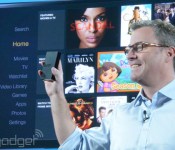
Amazon launches Fire TV, an Android-powered streaming and gaming set-top box for $99

We’ve been waiting for it for quite sometime, but now Amazon is finally ready to make its play for the living room. Fire TV is not a barebones device like the Chromecast, it’s a powerful Android-driven platform with ties to the broader Amazon ecosystem. Inside the slim black plastic box is a quad-core CPU with a full 2GB of RAM — that makes it more akin to a high-end smartphone than your typical streaming device. And its incredibly slim, shorter than a dime,with barely enough clearance for the small selection of ports around back, which includes the standard HDMI as well as optical audio and Ethernet.
The interface is incredibly image heavy. Browsing through the Amazon video store is basically just scrolling through an endless barrage of movie posters presented in a moving 3D bar. And, at least during the demo, the hardware churned through the slick UI with nary a hiccup in sight. But far more impressive was how quick videos were to load. Pressing play on almost any video instantaneously launched the movie or show. And we mean instantaneously. There was no pause, lag or loading screen — it’s impressive to say the least.
Developing…
And, true to the company’s word, this is not a closed ecosystem. It’s powered by Android and HTML, which should make porting apps extremely simple. The device will launch with access to Hulu and Prime (obviously) but other partners will be added over time, Including Netflix, Plex, and NBA Gametime, if the demo screens are to be believed. It can pull in content from other Amazon services as well. If you’ve got photos on your Amazon Cloud Drive, you can beam them to your TV and look at them either as a scrolling screensaver mosaic or as a slideshow.
You can obviously control the Fire TV with the buttons on your remote, but you can also use voice control. Inside the remote is a microphone which captures your searches, sends them to the Amazon cloud, deciphers them and tells the Fire TV what to pull up. And it does all of this incredibly quickly, at least as fast as Google Now. Amazon is also bringing X-Ray to the platform. If you’ve got an Amazon tablet you can pull up additional info about characters, actors, and the soundtrack while you’re watching your favorite movies or TV shows. While you’ve been able to do that for sometime, it’s now a truly second screen experience. X-Ray for music is also accessible on FireTV, so you can see the lyrics to whatever track you’re listening too. Basically if it’s a feature of the Fire OS, it’s coming to the TV box. Even FreeTime, the kid-friendly version of the software that lets parents control what their children can watch, when and for how long.

It wasn’t super surprising, but Amazon also announced that it is bringing gaming to its new set-top. 2K, Double Fine and Ubisoft (among others) will be bringing their wares to platform. The biggest name though, is definitely Minecraft. While you’ll be able play games with the remote or a custom Amazon app for your phone or tablet, which is coming next month, the big news is that Amazon will be selling an accessory game controller — and yes it’s the same one we saw previously in leaks. It’s not unlike an Xbox controller, but with the standard set of Android buttons on its face and media controls along one edge. And to prove it’s serious about gaming, Amazon has scored a number of exclusive titles for Fire TV, like Sev Zero, which is built by Amazon Game Studios.
Sure, other set-tops have tried the gaming thing — most notably Roku — but it’s immediately clear that Amazon is taking the space much more seriously. Roku has only a handful of titles, and most are casual titles. Part of the difference here is pure hardware. Others simply haven’t crammed in the horsepower that Amazon has.
Fire TV is available today for $99.
Filed under: Home Entertainment, HD, Amazon
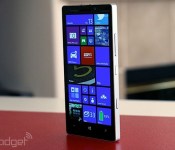
Microsoft’s opening-day Build keynote is happening now, get your liveblog here!

It’s technically called “Build Windows.” But this year, the biggest news coming out of Microsoft’s annual developer conference might not have much to do with Windows at all. Sure, we’re expecting a software update, for which we’ve already seen copious leaks. But what about Windows Phone? Is version 8.1 on the way? Maybe we’ll even hear about Cortana, Microsoft’s answer to Siri. And hey, what of Nokia? Is this acquisition gonna ever close or what? Lastly, can we see some new hardware? Might we catch a glimpse of some new phones ahead of tonight’s Nokia shindig? Your guess is as good as ours, which means you’ll want to follow our liveblog as we give you the blow-by-blow.


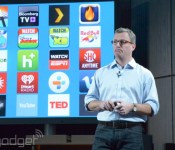
Netflix, YouTube, Hulu Plus, WatchESPN and more services launch on Amazon Fire TV

After announcing its new Fire TV set-top box today, Amazon naturally revealed a content lineup to go along with the $99 streaming device. That includes the new Amazon Video series we’ve been hearing about and TV shows it’s signed up as Prime streaming exclusives. Amazon also announced several apps headed to the Fire TV: HBO Go (but apparently not at launch), Showtime Anytime, Flixster, Netflix, YouTube, Hulu Plus, WatchESPN and many, many more. The Amazon listing has a deeper list on what’s available, we’ll have more information after we go hands-on.
Filed under: HD
Source: Fire TV, Fire TV Apps
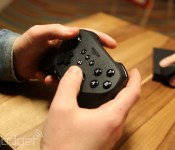
Here’s Amazon’s gamepad: standard controller layout, media functionality for $40

We all expected this, right? Yes, Amazon has a game controller, and it works with the company’s newly announced Fire TV. Sure, you could use the set-top box’s remote or an upcoming custom app to play games, but there’s a dedicated controller too that’s ready to wrangle Minecraft Pocket Edition, NBA 2K14 and titles from other big name developers Ubisoft and Take-Two. “The controller is comfortable, it’s familiar,” noted Amazon Games’ Mick Frazzini. As you might expect, this means that there’s a button, dual-thumbstick and d-pad layout similar to the Xbox’s option. With Amazon’s offering, there are skip and play/pause media controls along the bottom edge with navigation controls placed front and center. There’s even a GameCircle button that offers easy access to scores and achievements. And yes, dual triggers and a pair of shoulder buttons rest along the top edge.
Amazon’s Fire wireless game controller runs on two AA batteries and touts 55 hours of juice before needing a rest — thanks to “Intelligent power management with auto-sleep.” The accessory will set you back an additional $40, but it’ll come with 1,000 Amazon Coins and Sev Zero (an Amazon Game Studios third-person shooter) to get the action started. What’s more, the outfit says that the average price of games on its platform is around $1.85 with over 1,000 free options to boot. That’s good, because from the looks of things, Amazon’s own game devs are hard at work on a truckload of titles that are “coming soon.” If you’re itching to place your order, jump over to the source link to do just that.
Filed under: Gaming, Home Entertainment, HD, Amazon
Source: Amazon
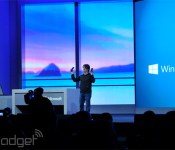
Windows Phone 8.1 and Cortana officially revealed at Build 2014

As predicted, Microsoft is using its Build developer conference to launch Windows Phone 8.1, the latest and (we hope) greatest version of its mobile OS. The company’s fed us a bunch of information about the update already, and a vast number of leaks have covered nearly all remaining features. Still, it’s about time for us to get the skinny on everything the new upgrade entails, so let’s break down exactly what you can expect from Windows Phone going forward.
Microsoft’s Joe Belfiore took the stage and talked up (among other things), new hardware partners like Prestigio and Micromax that should help the company penetrate those valuable developing markets. As multiple leaks have pointed out ahead of time, 8.1 indeed comes with a notification center (called the Action Center) that users can invoke by swiping down from the top of the screen — from there you can view and dismiss your email and social notifications as well as toggle Wi-Fi and Bluetooth connections. Pretty standard fare, if you ask us. What’s a little less standard are WP8.1′s customizable lock screens: developers can tweak them in some pretty stunning ways, though Microsoft hasn’t yet said when they’ll actually get access. Throw in the ability to set your own images as the background for your Live Tiles and you’ve got yourself a level of personality that’s been sorely lacking from Windows Phone to date.

And yes, Cortana is here too. She completely replaces the standard Bing search interface in Windows Phone… which makes sense considering she’s powered by Bing anyway. But what can she actually do? Cortana can handle the usual tasks that you’d expect of a modern digital assistant: she can make calls and send messages, as well as jot down reminders. Third-party developers can tap into Cortana as well so users can call out to them by name (think “Skype, call Michael”). Want to make her even smarter? Users can also define their interests (think sports, traffic updates) in a “notebook” so she knows what to keep tabs on in the future. On-stage demos have a history of turning sketchy quickly, but Belfiore’s repeated voice interactions with Cortana sounded surprisingly natural. No stilted computer-speak here — Microsoft may have finally crafted a digital assistant worth talking to. That said, she’s still firmly in beta for now.
Considering Windows’ prevalence in the workplace, it’s no surprise that Windows Phone 8.1 has some new IT-friendly features too. There’s support for enterprise VPNs, along with signed and encrypted messaging to keep those corporate secrets under wraps.
Developing…
Filed under: Mobile
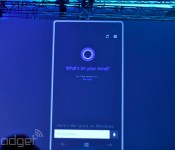
Microsoft unveils Cortana, its answer to Siri and Google Now

At Microsoft’s Build 2014 developer’s conference, it has just announced Cortana, a new voice search tool for Windows Phone 8.1 powered by Bing. It fully replaces the search function in Windows Phone, and you’ll be able to access it (her?) through a special Live Tile. On top of finding thing, it can make calls, send texts, take notes, give reminders and set alarms. Microsoft said it’ll work with third part apps as well, and has been working with select developers to integrate it. So far, it’s showed Hulu Plus and Facebook operating in the app, though there’s no official word about that yet.
Microsoft also said that Cortana will get smarter over time, learning based on your search requests or other actions. It’ll even function as a pseudo-secretary, making sure you’re not disturbed during quiet times but still letting people from your inner circle get through. To do that, it’ll ask questions such as whether it should track a flight it found in your email, for instance — a decidedly Google Now-type touch. Once trained, it’ll function using using casual language questions, and respond with a casual “sounds good?” when it confirms. Another trick is Hulu Plus integration that’ll let you tell Cortana to queue up a show, for instance. You can perform similar tricks with Facebook, by asking “what’s up” with somebody, and being led straight to there profile page. It seemed to work well during the demo despite a couple of hiccups, but Microsoft’s Joe Belfiore reminded us that Cortana is still in beta at the moment.
Developing…
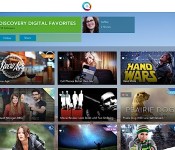
TiVo co-founders’ new Qplay web video service is now available for everyone

A little over a month ago, TiVo founders Mike Ramsay and Jim Barton announced Qplay, a service that lets users curate personalized video streams, or “Qs,” from a variety of different sources. At the time, the only way you could use the iPad app and the service was to purchase the Early Adopter bundle, which gives you both the app and the TV adapter for $49. Today that restriction has been lifted and the app is now open and free to everyone, adapter not required. Along with the general availability of the app, Qplay has also introduced new video content from media curators like Vanity Fair and Reddit plus new video sources like College Humor, Funny or Die and the New York Times.
If you’d rather have the service create a Q for you, the company has curated a few more new ones as well, such as Late Night Funny, Movie Trailers and Photography. Further, the latest Qplay update will let you share those videos via Facebook, Twitter and email, just in case your friends aren’t hip to the whole Qplay thing just yet. Of course, if you want to watch those Qs on an actual television, you still have to cough up that $49 for the aforementioned adapter. But if you’re happy with just your iPad, you can now at least try your hand at this new take on streaming video without spending a dime. If you’re still a little fuzzy on how the whole thing works, there’s a handy dandy tutorial video after the break.

Amazon’s first Fire TV games include in-house titles and Minecraft

Amazon’s new Fire TV media hub may be focused on video, but it’s going to have a significant game roster — including some examples from the company itself. Amazon Game Studios is building more than a dozen titles for the set-top box that include Sev Zero, a Gears of War-like sci-fi shooter. You’ll have some third-party games to choose from, of course, such a special port of Minecraft Pocket Edition, a Monsters Inc. endless runner and the arcade racer Asphalt 8. “Thousands” of games will be available within a month, and you’ll see software from major developers like Ubisoft and Take Two. While you shouldn’t count on Fire TV replacing your PS4 or Xbox One any time soon, it’s evident that you won’t be hurting for things to play.
Filed under: Gaming, Home Entertainment, HD, Amazon
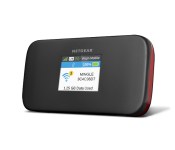
Virgin Mobile debuts 4G LTE mobile hotspot in Netgear Mingle

Virgin Mobile USA this week introduced its first 4G LTE mobile hotspot, the Netgear Mingle. Priced $99, the device piggybacks off of Sprint’s network and is equipped for the carrier’s tri-band Spark LTE speeds. According to Virgin Mobile, the Mingle allows for up to 10 devices to connect at once and features an 1800mAh battery good for 12.5 hours usage. The device features a 1.77-inch LCD display and can be paired with any of the prepaid data plans. Virgin Mobile users can purchase a 250MB bucket for $5/day, 1.5GB/month for $25, and 6GB for $55.
Virgin Mobile USA and NETGEAR Introduce the NETGEAR Mingle Mobile Hotspot on Broadband2Go
Virgin Mobile’s first 4G LTE broadband device now available
Virgin Mobile USA and NETGEAR® Inc. (NASDAQGM: NTGR) (www.netgear.com) announced today the availability of the NETGEAR MingleTM mobile hotspot, Virgin Mobile’s first 4G LTE broadband device on its Broadband2Go portfolio. Priced at $99.99, NETGEAR Mingle is the industry’s first Sprint SparkTM-enabled tri-band device designed for no-contract[1] customers in the United States.
There are an increasing number of people who want Wi-Fi-only devices so they can stay connected while on the go, and the ultra-portable NETGEAR Mingle mobile hotspot is the ideal solution for customers who want to access multiple devices and connect seamlessly. Mingle accommodates up to 10 wireless devices simultaneously, including notebooks, tablets, digital cameras, smartphones and MP3 players. Additional features include dual-mode 3G/4G LTE (where available), a powerful 1,800mAh battery that lasts up to 12.5 hours of active time[2], secure access with password protection, and a 1.77-inch LCD display screen. With Mingle, customers can buy less expensive Wi-Fi-only tablets and other devices and have always-on Internet connectivity when needed off a single account.
“With long-range outdoor/indoor Wi-Fi and fast 4G LTE speeds, customers are able to surf and download quickly on Mingle when they’re out and about,” said Angela Rittgers, vice president-Marketing, Virgin Mobile USA. “The lightweight and sleek design, along with flexible daily and monthly payment options, makes this the perfect mobile solution to fuel customers’ on-the-go lifestyles.”
Virgin Mobile Broadband2Go offers no-contract mobile broadband plans with diversified price points and data allotments to satisfy consumers’ varying usage needs, with no commitment and starting at just $5 a day for 250MB. For those who need a little more data, Broadband2Go also offers 1.5GB monthly access for $25 or 6GB per month for $55.[i]
Accessories available for the NETGEAR Mingle mobile hotspot
- Desktop charging cradle: Designed to enhance the capabilities of NETGEAR Mingle, the cradle conveniently charges the device and improves the signal by up to 10dB. Its integrated MIMO (multiple-input and multiple-out) antennas allow users to experience significant improvement in speeds, coverage and signal both indoors and in fringe areas. For more information on the desktop charging cradle, please visit http://www.netgear.com/service-providers/products/mobile/mobile-hotspots/77xs-cradle.aspx.
- NETGEAR AirCard app: A free app that enables the end-user to conveniently manage the NETGEAR Mingle mobile hotspot status, connection and settings from an iOS or Android™ smartphone or tablet. Available for download on Apple iTunes®, Google Play™, and Amazon Appstore.
Sprint, Virgin Mobile USA’s parent company, continues to expand its Sprint Spark service, bringing the total number of markets available to 18: Austin, Texas; Baltimore; Chicago; Dallas; Fort Lauderdale, Fla.; Fort Worth, Texas; Houston; Jacksonville, Fla.; Kansas City, Kan./Mo.; Los Angeles; Miami; New York; Philadelphia; Provo, Utah; Salt Lake City; San Antonio, Texas; Tampa, Fla; and Trenton, N.J. When not in a Sprint Spark LTE market, Mingle will automatically provide 3G high-speed service to customers. NETGEAR Mingle mobile hotspot is now available online and at participating retailers. For more information, visit http://www.virginmobileusa.com.
The post Virgin Mobile debuts 4G LTE mobile hotspot in Netgear Mingle appeared first on AndroidGuys.
BBM update adds stickers, group photo sharing, and more!

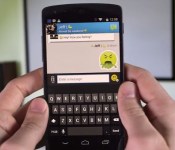
Blackberry is determined to continue support for its Android app. With the recent update to BBM 2.0, users were able to use one-click sharing, BBM voice, and the ability to send larger files. There’s a pretty decent update rolling out to BBM for Android today, adding stickers and picture sharing in multi-person chats.
Let’s first talk about the addition of stickers. You can download them from inside the app, and there are a good amount of sticker packs already available. Unfortunately, though, it comes at a price. Each sticker pack contains roughly 20-25 stickers, and costs $1.99. They range anywhere from WWE and Shaun the Sheep to CosCat and Bubble Bot. New sticker packs will be added regularly, with the hopes of keeping you interested in the messenger.
Sticker packs aren’t the only feature added to this update. They’ve finally added the much-needed picture sharing in multi-person chats. What’s more, is Blackberry also added file sharing for up to 16MB, up from the previous 10MB limit.
Check out the update below!
Source: Blackberry
The post BBM update adds stickers, group photo sharing, and more! appeared first on AndroidGuys.
 AIVAnet