


Sony’s Xperia Z2 is coming to North America in May

Sony’s Xperia Z2 is already available in a few corners of the world, but North America has so far been left high and dry. That drought will soon come to an end, though, as Bell says that it’s bringing the waterproof Android flagship to Canada this May. While the carrier isn’t divulging pricing at this stage, we’d expect the Z2 to cost $200 Canadian or more on a two-year plan, like most high-end smartphones. As for the good ol’ US of A? Unfortunately, there’s no word on an American launch — for now, you’ll have to make do with the Xperia Z1S if you live stateside.
Filed under: Cellphones, Mobile, Sony

On Xbox One, game broadcasters are quickly catching up to PlayStation 4

Though Xbox One sales may be slightly behind that of the PlayStation 4, it looks like game broadcasting is taking off at a much quicker pace on Microsoft’s new console. In the first week of availability, 108K Xbox One owners took to Twitch to broadcast games; the same number was reached on the PlayStation 4 after 25 days of availability. This is largely due to Twitch broadcasting launching alongside the PS4, whereas broadcasting didn’t function on the Xbox One until early last month — resultantly, millions of Xbox One consoles were already out in the wild, whereas the PS4 had to be physically purchased and brought home before users discovered the glory of … mostly safe for work broadcasts. It also didn’t hurt that the Xbox One had its first major exclusive game, Titanfall, launching alongside game broadcasting (we even got in on the fun ourselves). Regardless, it looks like game broadcasting is proving more than just a passing fad.

BT sports channels are coming to Chromecast in the UK

Fans across the Atlantic are about to get an option for streaming UK-based sporting events on Google’s dongle. BT is set to make its sports offerings available on Chromecast, joining the BBC iPlayer app in beaming home-grown content to the diminutive living room gadget. Of course, only those who use BT broadband will be able to view action from the pitch. Details are sparse for now, and there’s no official word on a launch date for the sports coverage to arrive on Chromecast yet either. The £30 add-on has only been available in Europe for two weeks, so there’s sure to be more viewing options on the way.
[Image Credit: Carl Court/AFP/Getty Images]
Filed under: HD
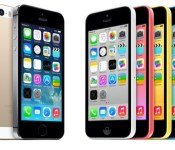
Apple Seeking to Boost iPhone Display Quality by Acquiring Chip Firm Renesas SP Drivers
Apple is in talks with chipmaker Renesas Electronics over the potential acquisition of a unit that creates chips for smartphone displays, reports Japanese business site Nikkei. The chips, which are already used in the iPhone’s liquid crystal displays, improve both image sharpness and battery life.

Renesas SP Drivers, the division Apple is aiming to purchase, is a leading producer of drivers and controllers for small LCDs. The company is a joint venture between Renesas, Sharp, and Powerchip, with Apple offering 50 billion yen or $479 million for Renesas’ 55 percent stake in the company. Following the transaction, Sharp is also expected to sell its 25 percent of shares in Renesas SP to Apple, while Powerchip will retain 20 percent.
Renesas SP is the world’s leading producer of drivers and controllers for small and midsize LCDs, with a market share of around one-third. These chips determine a display’s quality and performance as well as a phone’s overall energy efficiency – they are said to account for around 10% of battery usage.
Renesas’ 240 employees are expected to stay with Apple and the company is aiming to complete the transaction by the summer.
In recent years Apple has taken a greater interest in controlling its own production supplies and core technologies, signing a deal with GT Advanced that will provide it with massive quantities of sapphire and purchasing several chip firms in the past, including P.A. Semi and Passif Semiconductor.
     |
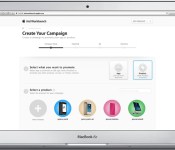
Apple Expands Access to iAd Workbench, Introduces Short Videos for Mobile Ads
Apple is making it easier for anyone to create an ad campaign using its iAd Workbench mobile advertising tool. As noted by Ad Age, the company is now allowing any person with an Apple ID to open an iAd Workbench account and create an ad campaign, a feature previously restricted to registered developers. The changes will make it simpler for advertisers, small and large, to create ads for the platform.

At the onset of its mobile-ad business, Apple extended olive branches to a select group of brands, promising premier reach. But advertisers pushed back against its pricey offerings. Now, it appears Apple has concluded money in mobile ads comes from a wide net; in short, it’ll look more like Google.
Apple is also introducing new features to Workbench, its web-based platform used for tracking and launching campaigns. Users can now include short videos in an ad, which will be displayed full screen on the iPad and the iPhone, as first described earlier this year. Previously, iPhone ads were limited to less obtrusive banners that needed to be tapped before a video would play. Video iAds are also able to send viewers to websites or promoted iTunes content, rather than just mobile apps.
At the current point in time, the iAd Workbench expansion is limited to mobile ads and does not extend to iTunes Radio. Ad buyers are able to pay based on cost-per-click or cost-per-thousand impressions.
The company is likely hoping to attract new advertisers to the iAd platform with the introduction of videos and the simplification of account creation. Since its 2010 debut, iAd has been largely unsuccessful gaining advertising partners, but Apple has been aiming to revive iAd since the introduction of iTunes Radio.
Several major advertising partners, including McDonald’s, Nissan, Pepsi, and Procter & Gamble signed up for iAd when iTunes Radio debuted and Apple has managed to increase iAd revenue to $260 million in 2013 from $38 million in 2011.
| |
5 Of The Worst Signage Failures
When your business’ sign is flopping in the wind, you are communicating a clear message to your clients. And that message is one of disarray, a lack of attention to details, and a sense of sloppiness. These are not desirable points to communicate. There are a number of ways sign installation can quickly go wrong. Here are several mistakes that can drastically damage the potentially positive work your sign can do.
Banners Blowing
One popular sign variety is the banner. These can be quite long, or rather short. They can be posted in a variety of spaces such as lamp posts and above entranceways. Some of these locations are more vulnerable to installation problems than others.
When you have a banner posted outside, it must be able to stand up to the elements. Things such as wind and rain can really challenge how well your sign was installed. Now in a hurricane most people won’t be too judgemental, but if a little summer’s breeze is sending your banner flapping in the wind, you have a classic case of poor installation.
Quality banner installation takes elements such as the wind into account. This means that the proper tension needed in order to maintain a taut appearance will be implemented. Failure to get this balance correct leads to floppy and sagging signs. The right sorts of materials must be used in the installation, and everything needs to be properly mounted. Don’t let your banner becoming a burden! Instead, make sure you get quality sign installers to help.
Dips and Dents
If you have a long sign, one of the challenges can be to keep it nice a taut. When there is a lot of material to work with, it is very important that it be properly supported from behind. Failure to do this can lead to distracting dips and dents. Although this may not render the entire sign as ineffective, it certainly distracts the client and ultimately communicates that there is a lack of attention to detail.
Some of these dips and dents can cause more serious problems. Not only can they undermine the lifecycle of the sign material, but it can also create unfortunate visual effects. For example, a sign with a image of a face which suffers from a few dents may turn a friendly image to a lopsided disturbing one. Its always bad to make clients feel disturbed, so you want to ensure that your signs do not suffer any such difficulties. Check out this post for some examples of this problem http://www.signs.com/blog/sign-installation-failures/
Disintegrating Materials
The materials used in installing your sign, as well as the materials used to create your sign, must consist of items which can stand up to the environment. If you want to display your sign outside, the materials used must be able to withstand both wind and rain exposure.
If you use a material which is unacceptably weak, your sign can literally fall apart. You may begin to suffer from dips and dents, or the flopping and sagging material. In order to determine what kinds of material your installation requires, you will need to evaluate the location where the sign will be on display.
Consulting professionals is ideal in for this problem because the sorts of materials available to help display signs is extensive. Those who work frequently with them will be able to give you guidance about what is most and least likely to hold up.
Tilted Displays
Failure to properly mount a sign can result in it tilting one way or the other. This distracts from the content of the sign and ultimately makes the business appear sloppy. It can be quite unsettling to those who want to see clean cut lines. If the sign is near any other square lines, it can be quite visually unappealing to have one be slightly asque. You can see an example of this on this post about public and state building signs: http://www.smashingmagazine.com/public-and-state-building-signs-part-1/
Beautiful Display, Incorrect Spelling
Suppose you have successfully and proudly displayed your sign. You have managed to get it installed using the right material, at the right height, and its situated perfectly to entice your customers. But, after admiring all this hard work, it strikes you that one of the words is misspelled. Sometimes misspelled words can even suggest something completely different than what was intended. This can range from comic to inappropriate. You want to be sure that whoever you are working with on your sign, everyone is on the lookout for misspellings and the like. Failure to catch such things can be costly and deter potential clients. For a good laugh, check out these comic sign tragedies http://www.buzzfeed.com/tasneemnashrulla/29-spelling-mistakes-from-india-that-will-make-you-laugh-cry
Louise Williams has traveled all over the globe to study and capture all of the various types of signs out there. From Europe to China to India, she’s seen all types of signage, and now she brings her knowledge to IS Installations and to the masses.
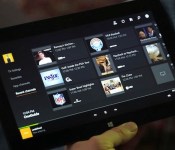
TV-focused Xbox One update tests a DVR button and OneGuide on SmartGlass

We called the Xbox One a work in progress in our initial review, and to its credit, Microsoft has been hard at work addressing various software shortcomings (party system, friend notifications, Twitch streaming and so much more) over the last few months. One aspect that’s remained mostly the same since launch — besides some tweaks and a remote control accessory — is its unique HDMI-passthrough TV experience and that’s getting some much-needed attention in a new update preview test. Microsoft may be focused on gaming under Phil Spencer, but a big part of its strategy is to win there is by controlling input 1 on your HDTV, and making the Xbox One more useful in other ways than as a Titanfall machine could help. Check after the break for a video preview of the new features plus a few more details on what they can do, and which countries are getting access to more TV listings and voice controls.

For users in the preview group, their SmartGlass second screen app on phones or tablets is ready to work as a universal remote control, with features similar to the app for Google TV. There’s also a new DVR button so owners can watch recorded shows without grabbing the old cable remote, and it can bring the full OneGuide listing of live TV and streaming options to the second screen. Finally, SmartGlass is adding a “recent channels” layout (shown above) built just for the second screen, showing you what’s on those stations now. Microsoft has already added a slew of gaming and messaging-related tweaks to SmartGlass recently, and it’s also rolling out “rent once, play anywhere” for Xbox Video across TV, PC and phone.

Until now, the Xbox One’s TV control features have been extremely focused on live TV (it already controls pause, fast forward or rewind, but it just couldn’t pull up the DVR menu) even though that’s not how we watch these days. The DVR button seems like it should be compatible with most providers but we don’t have an official list yet, and at least right now there’s no associated voice command. Also, the system still can’t see what’s recorded on your DVR or set up new recordings by itself, so there’s still going to be some adjustment if you’re switching back and forth between menus and remotes. Even when we’ve used the Xbox One’s voice controls extensively, OneGuide has been tough to dive into because of what it lacks (DVR, cable video on-demand), so we’ll need some hands-on time to see if this makes it worth using more.
Outside the US, Canada and several European countries including the UK, France and Germany will get new OneGuide and Kinect features. There Microsoft is adding live TV scheduling info to the OneGuide and Kinect voice commands to control set-top boxes and other home theater equipment (features that were already live in the US). We’ve been through the update preview process before so we’re pretty familiar with how it works, but it sounds like this one may go on a bit longer than the others. The extra time will be used to get feedback from users on how well these new features working before they roll out to everyone “later this year.” Of course, if that extra time is used to add proper surround sound passthrough or Blu-ray 3D playback, then that would be cool too Microsoft.
Filed under: Gaming, Home Entertainment, HD, Microsoft
Source: Xbox Wire, Xbox (YouTube)

Engadget giveaway: win an iPad mini Retina courtesy of ClickMeeting!

The modern workforce is a global one, but you still need to get in some face time with co-workers and associates far and wide. ClickMeeting want’s to help one lucky Engadget reader keep that personal connection and spread their message by offering an iPad mini and six months of its ClickWebinar service. This will help you make presentations to your team or dole out advice to interested clientele, and with mobile apps for iOS, Android and BlackBerry, the software lets you do it from any location. So whether it’s slurping down civet lattes at the corner cafe or direct from your kitchen table, you can get your message to the masses — and they don’t have to know you’re still wearing pajama bottoms. Simply head down to the Rafflecopter widget below for up to three chances at winning this iPad mini and ClickWebinar combo.
- Entries are handled through the Rafflecopter widget above. Comments are no longer accepted as valid methods of entry. You may enter without any obligation to social media accounts, though we may offer them as opportunities for extra entries. Your email address is required so we can get in touch with you if you win, but it will not be given to third parties.
- Contest is open to all residents of the 50 States, the District of Columbia, and Canada (excluding Quebec), 18 or older! Sorry, we don’t make this rule (we hate excluding anyone), so direct your anger at our lawyers and contest laws if you have to be mad.
- Winners will be chosen randomly. One (1) winner will receive one (1) Apple iPad mini Retina (ME279LL/A – Silver, 16GB) and six (6) months of ClickMeeting’s ClickWebinar service (which supports up to 50 attendees per meeting).
- If you are chosen, you will be notified by email. Winners must respond within three days of being contacted. If you do not respond within that period, another winner will be chosen. Make sure that the account you use to enter the contest includes your real name and a contact email or Facebook login. We do not track any of this information for marketing or third-party purposes.
- This unit is purely for promotional giveaway. ClickMeeting, Apple and Engadget / AOL are not held liable to honor warranties, exchanges or customer service.
- The full list of rules, in all its legalese glory, can be found here.
- Entries can be submitted until April 2nd at 11:59PM ET. Good luck!
Filed under: Announcements, HD, Mobile, Alt, Apple

Airtame wireless screen-mirroring dongle shipping soon for $99

Airtame, the Danish startup that received our Best of CES 2014 award for its awesome wireless video dongle, has confirmed that it will be shipping its first lot to its beta users this month. Better yet, the device has since been upgraded from a single-core Freescale chip to a dual-core version, along with dual-band WiFi and hardware acceleration on all three PC platforms: Windows, Linux and Mac. Over 15,000 Airtame dongles have been pre-ordered so far, and these will start shipping in May or June after some tweaking based on the beta feedback.
For those who aren’t familiar with Airtame, this is an HDMI dongle that you plug into a monitor or TV. With the software installed on your PC, you can wirelessly mirror or extend your desktop to one or multiple remote screens equipped with the dongle. What’s more, you can also choose to do so over your home network or over a direct WiFi connection (while somehow still maintaining your PC’s internet connection). The team claims that the performance is superior to that of existing Miracast dongles and Chromecast, featuring a low 25 to 30ms latency that’s good enough for gaming — as we found out at CES. The Chromecast, on the other hand, has a one- to two-second delay (plus it’s not really made for screen mirroring); and we’ve yet to come across a Miracast pairing that works reliably.
The Airtame dongle will eventually support smartphone and tablet video transmission, as the team received a lot of requests for a way to beam local content to the remote screen. However, app developers will need to use Airtame’s SDK to enable this feature — there will be supported apps at launch, and the dongle will also have its own browser that can be controlled from your mobile device.
In terms of retail availability, you can already pre-order the $99 Airtame dongle via the official website, or you can wait for its launch at select large, but unnamed retailers in the US, Canada, UK and Europe. Russia and some Asian countries will get the dongle later, as they require local safety certifications.
Filed under: Home Entertainment, Wireless, HD

Google to focus on portrait shots and effects with improved camera app

We know that Google has been looking to bring more advanced photo features to Android for a while, but it may soon be ready to show off what it’s been working on. Sources aware of Google’s plans have confirmed to us that the search giant is currently testing a new version of its camera app that will sport a refreshed UI, a background-blurring effect for portrait shots, and improved panorama and Photo Sphere modes. As part of its overhaul, we’re told that Google has finally fixed issues with the default camera’s photo framing, allowing users to snap images with a new 100-percent no-crop viewfinder. That means you’ll see exactly what your Android device will capture before you hit the shutter button, with no unwanted objects creeping in at the edges.
The company is also said to be making the camera app more extensible, by opening support for third-party filters. This will allow developers (and Android enthusiasts) to create and import custom effects inside the stock camera app. The camera app’s portrait skills may see some improvements too, with the addition a new lens blur mode that will take photos with a shallower depth of field, mimicking the effects you’d typically see in Nokia’s Refocus app and HTC’s new One. New high-resolution panorama and Photo Sphere modes have also been added, improving the quality of your sweeping shots.
While many are awaiting the release of Android 4.4.3, the latest version of KitKat, Google is set to make these camera improvements available to users by way of a standalone update. Our sources indicate that the app will exist separately so that non-Nexus owners running Android 4.4 and above will be able to take advantage of the improvements, without having to wait for an OTA update from their device maker or carrier.
Filed under: Cellphones, Software, Mobile, Google
 AIVAnet