



Windows Phone 8.1 reportedly getting a Notification Center and personal assistant

With each new update, Microsoft’s Windows Phone platform resolves more and more concerns that we’ve had ever since its initial launch three years ago. According to Tom Warren at The Verge, Microsoft has a new update in the works — currently known to us as Windows Phone 8.1 — that will implement a new Notification Center as well as a personal assistant that will be closer to Google Now and Apple’s Siri technology. This new version of Windows Phone will reportedly be revealed at the company’s BUILD conference in April.
So how exactly will the new Windows Phone Notification Center work? According to Warren’s sources, it’ll be accessed the same way iOS and Android users are accustomed to: by swiping down from the top of the screen. Not necessarily the most original idea, but if this is true, it would at least be much more familiar (and perhaps more compelling) to anyone looking to switch to Windows Phone from one of its competing platforms. That’s not to say it will be identical, however, as a short swipe would bring up Quick Settings, while a long swipe would display your full history of notifications.
Also, WP8.1 is where Microsoft’s Cortana feature would finally come in handy. This will offer much more interaction and personalization than the current Bing Search, in that it will feature more of a contextual learning experience based on location and other personal data. These new features will help make the new WP assistant more competitive with Google Now and Siri.
Finally, Warren mentions a few other features in the works for WP8.1: independent volume controls (ringtone and media would be separated), additional Enterprise support with VPN, Facebook and Twitter support in the People Hub and Bing Smart Search results that bring Windows Phone closer to its desktop counterpart. Xbox Music and Video are also rumored to be separated in the new update. Nokia’s also reportedly working on two smartphones that will come out around the same time as 8.1, one of which involves off-the-glass gestures and another one which utilizes virtual navigation buttons.
Filed under: Cellphones, Wireless, Mobile, Microsoft
Source: The Verge
Dell Venue 8 Pro review: a good Windows tablet, but wait for the bug fixes

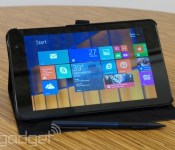
And then there were… four? Once considered a novelty, 8-inch Windows tablets are now everywhere: Lenovo has one; so does Toshiba; and Acer is already on its second. Not to be left out, Dell recently started shipping the Venue 8 Pro, which costs about the same as its competitors ($300), but adds an active digitizer for pen input (psst: The stylus is sold separately). Like most of its rivals, too, it makes use of a quad-core Intel Atom processor promising fairly long battery life, and enough power to handle some lightweight desktop apps, in addition to whatever you might download from the Windows Store. Unfortunately, we can’t really name our favorite 8-inch Windows tablet until we review a few more of them, but for now, we can safely say the Venue 8 Pro offers some decent value for the money. Read on to see why.
Hardware

We know, we know: Looks aren’t everything. But to the extent that good design and build quality matter (especially on budget devices like these), Dell is off to a fine start. Unlike its rivals, which mostly have plain plastic backs, the Venue 8 Pro is coated in a soft, rubbery finish (available in black and red) that makes the device easier to grip and also lends it a premium feel — not unlike how we felt about the rubber back on the original Nexus 7. Be warned, though, that while the textured back cover does a good job masking fingerprints, it is susceptible to scratches. Granted, you probably won’t ding it up just by putting it in a bag with other items, but at one point, I accidentally scraped it with the micro-USB cable while attempting to plug in the device. It’s a faint mark, but still, I can’t unsee it. At least the glass on the front side seems pretty scratch-resistant.
You’ll be hard-pressed to find an 8-inch tablet that isn’t thin, light and easy to hold in one hand. Nonetheless, all that’s true of the Venue 8 Pro: It immediately makes a good case for choosing an 8-inch tablet over a 10- or 11-inch one. According to our own Sean Buckley, who owns one, it’s even small enough to fit in the back pocket of his (not-too-skinny) jeans. As it happens, though, it’s even more compact than some rival models. All told, the tablet weighs in at 0.87 pound and measures 0.35 inch thick, leaving just enough room on the edges for you to comfortably rest your fingers. The Acer Iconia W4, meanwhile, weighs 0.91 pound and measures 0.42 inch thick; Toshiba’s Encore tablet also nears the one-pound mark, landing at 0.98 pounds. Point being: You can’t do much better than the Venue 8 Pro, at least as far as portability goes.

One thing that makes the Venue 8 Pro a bit strange to use at first: It appears to be missing a Start button. More precisely, it has one; it’s just not where you’d expect it to be. Instead of a touch-sensitive Start button built into one of the bezels, the tablet has a physical Start key located on the top portrait edge of the device. We’ll be honest, it took us a little while to stop tapping the bezels and go straight for the physical button. That said, now that we’ve gotten the hang of it, we have to give Dell credit for at least choosing the button location carefully. Since the key sits on the top edge, over toward the right, it’s easy to hit when you’re using the tablet in portrait mode, and also when you flip it over into landscape, at which point the button is within reach of your left thumb. Still, a capacitive key would’ve been even easier. Will you do that for us next time, Dell? At least consider it?
Continuing our tour of the hardware, you’ll find most of the usual suspects: a headphone jack up top, with a micro-USB charging port, power/lock button and volume rocker on the right portrait side. There, you’ll also find a covered microSD slot to augment the 32GB or 64GB of built-in storage. And yes, you probably will want to insert a memory card — after installing a bunch of games and 10 gigabytes of comics, we burned through 64GB alarmingly quickly. One thing you won’t find: a micro-HDMI port. That’s a shame if you ever feel like pushing your HD content to a bigger screen (N.B.: This does support the Miracast wireless streaming standard, but it’s not fair to expect that everyone’s TV will be compatible). Meanwhile, other 8-inch tablets like the Toshiba Encore do offer this, so if mirroring your apps on a big screen is a priority, you at least know where to look.

The left side of the tablet is blank, and on the bottom, you’ll find the lone speaker. That means if you’re cradling the tablet in portrait mode while listening to music, the speaker grille will stand free and clear of your hands. But if you’re holding it in landscape, there’s a good chance your right hand will cover it. No matter, though: This speaker is gloriously, shockingly loud — far louder than we’d expect a single speaker on a mobile device to be. Be warned, however, that the sound quality gets distorted at top volume, and the difference is especially stark if you’re used to stereo sound on devices like the HTC One. At any rate, if you’re listening to ’80s hair metal, you’ll want to take it down a notch to really appreciate the song.
Finishing up, there’s a 5-megapixel camera around back, along with some “Intel Inside” branding and the usual FCC label, which can be a bit difficult to peel off. The 1.2MP webcam, meanwhile, is located on the front bezel, over toward the right corner.
Etc.

For $300, Dell is selling the Venue 8 Pro as a standalone slate, but we also thought we’d walk you through the accessories too — you know, just in case you want to sometimes use the device as a pint-size laptop replacement. For starters, there’s the $40 folio case, which has a tough shell and a soft suede-like lining. You can use it as a straight-up case, of course, but you can also fold it up, allowing you to watch movies with the screen propped up. There’s also a second position, with the tablet lying face-up at a slight angle, making on-screen typing just a bit easier.
In our experience, we found the tablet stays put once you prop it all the way up, though it can be quite difficult to pry out of the case when you feel like going commando. (On the plus side, this means you don’t have to worry about it falling out.) And what if you want to do some typing? Well, Dell has also announced a wireless keyboard, but it’s not shipping yet and indeed, we haven’t had a chance to try it.
Display

Given that the same Bay Trail processor powers all these 8-inch Windows tablets, there aren’t many opportunities for companies to differentiate themselves: It’s design, display quality and maybe camera performance. And… that’s it. Fortunately, Dell didn’t skimp on the screen — the 1,280 x 800 IPS panel here is just lovely. The problem is, though the screen is rated at 400 nits, you’ll rarely see the screen get that bright, at least not with auto-brightness turned on; for whatever reason, the tablet defaults to a very dim setting, and even if you manually adjust the brightness slider, you still can’t go any brighter.
Fortunately, Dell says it’s working on a firmware fix so that when you do use the ambient light sensor, the screen won’t default to such a conservative setting. For now, unless you happen to be working in a dimly lit room, you’ll want to turn off the ambient light sensor, even if it means a dip in battery life. Plus, even with the brightness at a more medium setting, colors are punchy, without being too saturated, and the screen is easy to view from various angles. So it is quite possible to enjoy the vibrant screen while still getting long battery life.
Dell surprised all of us when it announced the Venue 8 Pro with an active digitizer. Most 8-inch Windows tablets (heck, most budget tablets) don’t support pen input. Here, though, you get a Synaptics digitizer built in, even on the base $300 model. It’s a shame, then, that it doesn’t work nearly as well as the pen displays you’ll find on the Surface Pro 2 or any of the Galaxy Note tablets. In desktop mode, we were initially tickled by the pen’s hovering capabilities, but our enthusiasm waned quickly after that. Sometimes, we had to try multiple attempts to launch a desktop program by double-tapping the shortcut with the pen. Other times, when using Explorer, the pen didn’t initially highlight the object we wanted it to, or we would see stuttering as we tried to scroll through a long file list. So far, Dell has already issued at least one firmware update meant to address this problem, and it’s also promising another fix that should hopefully make pen input even smoother.
Software

In retrospect, it’s not surprising that Microsoft decided to showcase Windows 8.1 on 8-inch tablets: Many of the improvements to the OS make it especially easy to use on smaller-screened devices. For example, new keyboard shortcuts allow you to swipe the space bar to cycle through spelling suggestions, and to swipe various letters to expose the punctuation symbols that would otherwise be hidden. Also, you get more options for Live Tile sizes, including an extra small one that seems especially well-suited to smaller displays like this.
Additionally, all of the other headline features in Windows 8.1 can be found here, including an always-visible Start button in the lower-left corner of the desktop, expanded split-screen options and the ability to take photos from the lock screen (an especially handy feature on a smaller device like this). Also, as you’ve no doubt heard by now, Windows 8.1 ushers in a slew of new first-party apps, including Reading List (an alternative to Pocket), Bing Food & Drink, Bing Health & Fitness, a calculator, an alarms app and a sound recorder. Meanwhile, other built-in programs have received meaningful updates, with Xbox Radio and a new set of photo-editing tools, to name just two examples.
And what of third-party apps? We’re happy to report the selection is steadily growing, even if there are still some holes. Flipboard recently arrived on the Windows Store recently, as has SlingPlayer, which launched as we were writing this review. Even before that, we had apps like Facebook, Twitter, Foursquare, Pandora, Rhapsody, Slacker Radio, Amazon Kindle, Nook, Zinio, Angry Birds, Bejeweled, Fitbit, Mint.com, NYTimes, Wall Street Journal, Hulu Plus, Netflix, ESPN, ABC Family, ABC News, NBC News, CBS, CBS Sports, CNN, MTV and the AP.
At this point, the ol’ “Windows doesn’t have enough apps” argument simply doesn’t carry as much weight: The Windows Store catalog is growing, and it’s growing fast. That said, if you buy the Venue 8 Pro (or any other Windows tablet), you still won’t find every program you’re searching for, at least not on the day you buy it. Some notable omissions? Instagram, Tumblr, HBO Go, Pocket and a first-party NPR player, to name just a few. Some major airline apps would be nice, too. Again, though, given how many heavy-hitters eventually made their way onto the platform, we have faith that most of these holdouts will join the fold at some point or another.
Performance and battery life
| Device | PCMark7 | 3DMark06 | 3DMark11 | ATTO (top disk speeds) |
|---|---|---|---|---|
| ASUS Transformer Book T100 (1.33GHz Intel Atom Z3740, Intel HD graphics) | 2,461 | 2,113 |
E338 / P209 |
123 MB/s (reads); 58 MB/s (writes) |
| Dell Venue 8 Pro (1.33GHz Intel Atom Z3740D, Intel HD graphics) | 2,343 | 1,986 |
E299 / P164 |
86 MB/s (reads); 45 MB/s (writes) |
As we already discovered when we reviewed the ASUS Transformer Book T100, Intel’s new Bay Trail processors are powerful enough to handle not just Windows Store apps, but also lightweight desktop programs like iTunes, Spotify and HipChat. That’s true here as well: The Venue 8 Pro is fit to run all the above programs, along with Microsoft Office and even some games, as we’ll describe in a moment. On the Metro Modern UI side, the Venue 8 Pro flies through animations and transitions, and opens apps quickly. It’s worth noting that the processor used here, the Atom Z3740D, has a slightly lower clock speed than the Z3470 used in other tablets (1.83GHz max vs. 1.86GHz), along with less RAM support (up to 2GB, rather than 4GB). That said, you might not notice the difference, aside from benchmark scores.
Like the T100, it takes 11 seconds to boot up — about half the time it takes the Surface 2 to fully load. Even more than that, though, the Venue 8 Pro’s biggest talent might actually be web browsing: Pages load quickly and jumping between tabs is a breeze. If benchmarks mean anything to you, it notched a score of 405ms in the SunSpider JavaScript test. Remember, too, that lower numbers are better, so this actually surpasses the T100 (461ms) and falls right in line with the Surface 2 (406ms). Unfortunately, the Samsung-made SSD can’t lay claim to such speed: It fails to break write speeds of 100 MB/s and its read speeds of 45 MB/s are even lower than what we achieved on the T100.
As for gaming, the Dell Venue 8 Pro’s touch-only interface doesn’t lend itself well to traditional titles, but its Bay Trail processor can run more than Windows 8 apps. Even so, don’t expect it to replace your gaming rig: With few exceptions, the Venue 8 Pro stuttered heavily in most 3D-rendered games. Battlefield 3 and BioShock Infinite never stood a chance of being playable, but older games flourish. Games like The Elder Scrolls III: Morrowind ran without a hitch, and even Half-Life 2 chugged along at a steady 40 fps with low/medium details. Newer games can be coaxed into running, but they won’t be usable: Skyrim, for instance, struggled to maintain 15 fps. Stick to older PC games (or the Windows 8 Store) and you’ll be fine. Oh, and heads-up: During gaming and other intensive tasks, the tablet gets warm enough that you can feel the heat even through the folio case. If you’re just surfing the web, though, you can expect the tablet to stay cool.
It’s also worth noting that Civilization is playable as a purely touch-based game, as it’s one of the only modern PC games that has a control mode designed specifically for tablets. It does stutter a little, but it works well enough to play, and even that’s notable. After all, with the exception of Civilization, you won’t get past simply “running” many games without peripherals to actually play them.
| Tablet | Battery Life |
|---|---|
| Dell Venue 8 Pro | 7:19 |
| Microsoft Surface 2 | 14:22 |
| Apple iPad Air (LTE) | 13:45 |
| Nokia Lumia 2520 | 13:28 (tablet only) / 16:19 (with dock) |
| Apple iPad mini | 12:43 (WiFi) |
| Apple iPad mini with Retina display | 11:55 (LTE) |
| Apple iPad (late 2012) | 11:08 (WiFi) |
| ASUS Transformer Book T100 | 10:40 |
| Apple iPad 2 | 10:26 |
| ASUS Eee Pad Transformer Prime | 10:17 |
| Apple iPad (2012) | 9:52 (HSPA) / 9:37 (LTE) |
| Nexus 7 (2012) | 9:49 |
| Microsoft Surface RT | 9:36 |
| Apple iPad | 9:33 |
| ASUS Transformer Prime Infinity TF700 | 9:25 |
| Samsung Galaxy Tab 2 10.1 | 8:56 |
| Sony Xperia Tablet Z | 8:40 |
| Hisense Sero 7 Pro | 8:28 |
| Toshiba Excite Write | 8:13 |
| Lenovo IdeaTab S2110 | 8:07 |
| Galaxy Tab 2 7.0 | 7:38 |
| HP Slate 7 | 7:36 |
| Nexus 10 | 7:26 |
| Samsung Galaxy Note 8.0 | 7:18 |
| Nexus 7 (2013) | 7:15 |
| RIM BlackBerry PlayBook | 7:01 |
| Samsung Galaxy Tab 3 10.1 | 6:55 |
| HP SlateBook x2 | 6:34 (tablet only) / 8:49 (keyboard dock) |
Dell specifically claims that the Venue 8 Pro’s battery can last up to 9.9 hours (that’s nine hours and 54 minutes, for all you lazy mathematicians out there). Perhaps with light usage, you can get the tablet to last that long, but in our video-looping test, we managed a more modest seven hours and 19 minutes. Then again, that was with the brightness fixed at 50 percent. With the ambient light sensor kept on, we got eight hours and 40 minutes of continuous video playback — a much better showing, we’d say. So, with auto-brightness turned on and a more modest task load, we can see getting closer to 10 hours, for sure.
As for how this compares to other 8-inch Windows tablets, well, that remains to be seen — we unfortunately haven’t reviewed any competing products yet, so it’s tough to say if seven hours and change on our specific test is good or bad. Either way, you should expect to charge this thing roughly once a day: Though the battery life is impressive, the standby time isn’t great.
Configuration options
The Venue 8 Pro starts at $300 with 32GB of built-in storage and the same internals we mentioned earlier: a 1.33GHz Intel Atom Z3740D processor, Intel HD graphics and 2GB of RAM. If you want that folio case, you’ll need to step up to the $340 model, which also comes with 32GB of storage. Add $30 on top of that (bringing the price to $370) and you get the case and stylus. For $390, you can get the case and the wireless keyboard we mentioned earlier. Across the board, you can also get 64GB of storage instead of 32 gigs; just be prepared to tack on an extra $50 to the total price.
Oh, another heads-up: The case comes in both red and black, though as of this writing, the spunky red version is on backorder until December 25th.
The competition

Remember when the Acer Iconia W3 came out and we gave a pass to most of its shortcomings because it was so reasonably priced? (And was the only 8-inch Windows 8 tablet.) How quaint, right? Today, the Dell Venue 8 Pro is one of several 8-inch Win 8 tablets, and for the record, they’re all affordable. Starting with Acer (since we already name-checked it), the company has replaced the Iconia W3 with the W4, which brings a higher-quality panel with better viewing angles (the 1,280 x 800 resolution is the same, though). In addition, it’s thinner and lighter than before, and makes use of a new Bay Trail processor — as do all the tablets we’re about to mention here. That retails for $330 and up, with the keyboard accessory sold separately. Only problem? It doesn’t seem to be shipping yet. Womp womp.
Next up: the Toshiba Encore, the company’s first 8-inch Windows tablet. If we go by specs and price alone, it’s near-identical to the W4: 1,280 x 800 display, quad-core Bay Trail processor, a 2-megapixel front-facing camera and a price of $330 (available now). The only obvious difference? The rear camera shoots at 8 megapixels, not 5. Otherwise, we can’t vouch for performance or battery life right now, since we haven’t reviewed it yet. But do keep it in mind as you’re shopping; it’s clearly in the same class as all these other devices.
Ditto for the Miix 2 from Lenovo. This, too, has an 8-inch 1,280 x 800 display, a quad-core Intel Atom processor and dual 5MP/2MP cameras. Unlike the others, though, it’s priced at an especially low $299. We haven’t reviewed it yet, though, so we can’t compare the performance right now.
Wrap-up

Should you buy the Venue 8 Pro? The answer isn’t exactly “yes,” and it isn’t exactly “no.” It’s “wait.” Wait for Dell to issue some firmware updates to address the aggressive auto-brightness settings and the flaky pen performance. And wait for more of these 8-inch Windows tablets to start shipping. It’s easy to say that the Venue 8 Pro offers decent value for the money: You get a vibrant, 400-nit tablet display, long battery life and a processor powerful enough to run lightweight desktop apps when you need them.
Then again, we expect most of its rivals do too, given that they also make use of Intel’s low-power Bay Trail chips. For the time being, it appears Dell might have won in the display department, thanks to that high brightness rating and also its ability to accept pen input (imperfect pen performance is better than none, we say, especially given that a fix is coming, and that very few budget tablets even offer this feature). On the other hand, the omission of a micro-HDMI port is odd, as is Dell’s refusal to add a capacitive Start button. All things considered, we suspect the Venue 8 Pro can still hold its own against other 8-inch Windows tablets, but don’t quote us on that until we test more of them. For now, though, it’s clear the Venue 8 Pro offers a good deal of value for $300, and that its benefits ultimately outweigh its quirks.
Sean Buckley contributed to this review.
Cyrus Lyric plays high-grade audio from seemingly any source

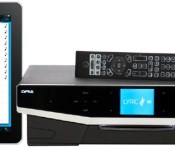
Cyrus’ new Lyric series music players may look like inkjet printers, but don’t judge them on their looks — they may be ideal hubs for audiophile-grade living room audio. Both the Lyric 05 (80W per channel, 24-bit DAC) and Lyric 09 (170W per channel, 32-bit DAC) can stream 24-bit, 192kHz tunes from other devices on a local network, with an iPad app serving as the remote control. That’s just the start of their audio abilities, though. They’ll also stream internet radio, and they play most music from Bluetooth- or USB-based sources; more conventional listeners still have access to a CD player, DAB+ radio, FM radio and a mixture of both analog and digital inputs. Prices are high at £2,250 ($3,673) for a Lyric 05 and £3,000 ($4,897) for a Lyric 09, but the premium may be worthwhile for music aficionados unwilling to compromise on either convenience or sound quality.
Filed under: Desktops, Home Entertainment, HD, Apple

Amazon Kindle Fire line picks up access to Verizon’s Redbox Instant
Amazon has just announced the availability of Redbox Instant by Verizon for their Kindle Fire


The Android-based app can now be downloaded from the Amazon Appstore for the second-generation Kindle Fire and Kindle Fire HD models and current-generation Kindle Fire HD and Kindle Fire HDX models, offering:
-
· Access to thousands of movies online instantly
-
· The ability to reserve discs at more than 43,000 Redbox kiosks nationwide
-
· The option to download movies previously purchased from a user’s Redbox Instant by Verizon account
-
· The convenience to start, stop and resume watching movies across any Redbox Instant by Verizon supported device
While the app is free, the services are not. You can sign up for a subscription that brings you access to thousands of streaming movies and 4 DVD rentals at your local Redbox Kiosk. If you are new to the service you do get a 30 day trial subscription to make sure it is something that is worth your money. You can sign up and learn more about the subscription service at redboxinstant.com.

LG G flex spied headed to Sprint, leak indicates
Sprint is expected to offer the recently introduced LG G Flex at some point in the near future, says reputable source @evleaks. Although the exact timing and price are not clear, the LS995 is likely closer to the United States than previously thought.
There’s no physical branding on the device yet the Sprint name in the calendar is a tip-off. Also, that symbol in the notification bar is for Sprint’s new Spark LTE service; the G Flex should debut with support for the carrier’s tri-band 4G LTE network.

Considering that we’re looking at a press-ready photo, and CES is a few weeks away, we may count on Sprint announcing the device for the future.
If LG follows its recent path we should look for the LG G Flex to hit multiple carriers in the United States over the next few months.
For those wondering what all of the hoopla is for the G Flex, check out this video of the device flexing under weight and healing itself.
The post LG G flex spied headed to Sprint, leak indicates appeared first on AndroidGuys.
LG debuts 5.5-inch Gx for native Korea
That didn’t take very long! Just a few days after first landing on our rumor radar, the LG Gx has been officially introduced. The Android Jelly Bean-powered smartphone features a 5.5-inch 1080p IPS display, a 13-megapixel rear camera, and 32GB internal storage. With a design that calls to mind the Nexus 5 and Optimus G Pro, the Gx boasts 2GB RAM, a 3140mAh battery, and 2-megapixel front-facing camera.
Unlike the LG G2, this one goes for the more traditional approach with home, back, and menu buttons across the front. All in all, this is a sharp looking device which squeezes into a svelte 9.2mm frame.
In terms of software, the Gx includes some of LG’s custom touches; Q Remote, Media Time, and Smart Day, for example.
There’s no indication as to whether the Gx will make its way outside of its native land of Korea but we might not be surprised if it does. We’ve got Consumer Electronics Show (CES) and Mobile World Congress (MWC) coming up in January and February.; both are ideal places to announce U.S. versions.
The post LG debuts 5.5-inch Gx for native Korea appeared first on AndroidGuys.

Minecraft creeps to PlayStation 3 on December 17th

The extensive console exclusivity period Microsoft enjoyed with Minecaft on Xbox 360 is coming to a close, as the first-person world-building game digs in on PlayStation 3 tomorrow. Like its 360 brethren, Minecraft on PS3 is limited by the console’s minuscule RAM — the procedurally-generated worlds you’ll explore are just a wee bit smaller than what’s possible on a computer.
Of course, PlayStation 3 isn’t the last stop for the Minecraft train: Vita, PlayStation 4, and Xbox One versions are all expected at some point in 2014. It’s unclear whether the PlayStation version of Minecraft will experience the same flood of add-on, PlayStation-specific content as DLC post-launch, but developer Mojang says that, “would be cool!” We can’t help but agree. As far as price is concerned, Mojang and Sony aren’t saying; we’re gonna take a wild guess that it’ll be about the same as on 360, where it’s $20.
Filed under: Gaming, Software, HD, Sony
Source: US PlayStation Blog
Notion Ink launches oddball tablet with edge-mounted ticker display

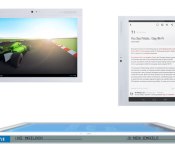
For every successful gadget, there’s countless devices that will slip away from your memory mere months after they’ve launched. Most will wind up rotting on the shelves next to Justin Guarini’s albums, but that doesn’t mean a comeback is out of the question. That’s Notion Ink’s plan, as it launches a follow-up to the quirky-yet-flawed Adam tablet that we reviewed two years ago. This new unit, the Adam II, comes with an eye-catching 100 x 5 monochrome ticker-tape display that offers up notifications along the device’s spine. Rounding out the spec sheet is a 1.5GHz dual-core Cortex A9, a 10.1-inch 1,280 x 800 IPS LCD, 8GB storage, 1GB RAM and Android 4.2.2. If that combination of stats is making you reach for your wallet, we’ve got some bad news for you. So far, the company has only made the Adam II available in India, where it’ll set the locals back Rs 16,499 for the WiFi-only version and 18,999 for the 3G one.
[Thanks, Jerry]
Filed under: Tablets
Via: Android Police
Source: Notion Ink
Motorola again teasing the wooden backs for Moto X
Motorola has taken to its social media platforms to tease the upcoming availability of the wooden back plates for its Moto X. Set to debut at some point in the future, these wooden covers are expected to come in four flavors.
Put this DIY project on hold. Trust us.
Motorola is not quite ready to let the world know the exact launch of these plates but might hope for sooner rather than later. While they’ve officially acknowledged that they are coming, Motorola has yet to provide concrete details. Rumor has it these will be a $50 premium over the normal backs for the Moto X.
The post Motorola again teasing the wooden backs for Moto X appeared first on AndroidGuys.
iPhone Market Share Expected to Hit 68% in the United States by 2017
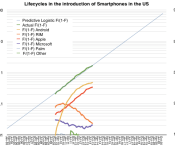
68% of Americans are expected to own an iPhone when the smartphone market reaches its saturation point in 2017, according to new research done by Asymco analyst Horace Dediu. Citing a parallel between the growth of the smartphone market and the growth of the iPhone over the years, Dediu predicts that both will continue to grow alongside each other as the smartphone market hits a saturation point at 90% in February 2017 with a predicted 180 million U.S. iPhone owners by that time, giving Apple a 68% market share.

If we believe that the iPhone can be modeled behaviorally then it may be possible to forecast its growth. One can simply draw a line extending the existing red segment above and read the F/(1-F) figure at any point in time. Solving for F results in a measure of penetration and hence number of users (if population is known.)
An alternative is to use the following formula derived from the linear interpolation of the two measured market shares. iPhone market share is y/(1+y) where y=0.21x and x = F/(1-F) and F is the expected market penetration of smartphones.
So if F = 91%, x = 10, y = 2.11 and therefore the iPhone market share = 68%.
We also know from the plot of the market that F = .91 is reached around February 2017. So we can suggest that at 90% penetration (approximately saturation) the iPhone will have 68% market share of users in the US. Forecasting the addressable market (US population aged older than 13) at about 266 million that implies 180 million US users of the iPhone by early 2017.
As Forbes points out, the idea of smartphones being used by 90% of the population by Dediu’s projected date would mean that the market would hit full saturation less than 10 years since the introduction of the original iPhone, making smartphones the fastest adopted technology in history:
And the remarkable thing about this is that the smartphone won’t even be ten years old by that point. Yes, the first real smartphone (there were attempts before this but nothing that really grasped peoples’ attention) was indeed the iPhone and it was released in 2007. But not until June: so if market saturation comes in Feb 2017 then market saturation will come in just under a decade.
And that is just amazing, stupendous in fact. It makes the smartphone by far the fastest adopted technology ever.
According to data from research firm Kantar Worldpanel posted earlier this month, the iPhone’s market share in the U.S. hit 52.8% in October following the launch of the iPhone 5s and the iPhone 5c. In the previous year, Apple’s market share was at 53.3% following the launch of the iPhone 5, and was at 36% and 25% in the two years prior with the launch of the iPhone 4S and iPhone 4, respectively.
     |
 AIVAnet