


‘Cover’ Lockscreen App Picked up by Twitter
 Homescreen and lock screen apps are all over the place. Facebook has their own little twist on things and now it looks like Twitter is breaking into the game. Not on their own of course. Rather, they have purchased ‘Cover‘ and the announcement went out this morning via Cover’s website. Cover is currently a beta app on the Play Store that is a context aware lock screen replacement. Neither party disclosed any details on the price tag that was eventually agreed upon.
Twitter, like Cover, believes in the incredible potential of Android. They share our vision that smartphones can be a lot smarter — more useful and more contextual — and together we’re going to make that happen. We’ll be building upon a lot of what makes Cover great, and we’re thrilled to create something even better at Twitter.
The future of Cover and Twitter is still a little closed door right now though. Cover states that the app will remain in the Play Store as it is for now while they focus their attention to Twitter.
 Source: Cover
Via: 9to5Google
Check out Cover in the Play Store
//<![CDATA[
ord = window.ord || Math.floor(Math.random()*1E16);
document.write('’);
//]]>
Twitter takes context-aware lock screen app maker Cover in-house

Twitter wants to be smarter. Or, rather, it wants your smartphone (and, presumably, tablet) to be a lot smarter. To do that, it’s bringing app maker, Cover, in-house. The announcement, made today via Cover’s blog, is light on any financial details, and instead focuses on the team’s potential to make the mobile Twitter experience “more useful and more contextual” as that social service continues to scale up.
As a refresher for those of you just learning of Cover’s existence, the startup’s responsible for a contextually aware Android lock screen — hence the acquisition — that’s been available in beta since last fall. But, it remains to be seen, whether or not that app will continue to receive support from the team. At present, Cover has no plans to abandon its users and pull the app from Google Play. Although, it’s likely that app will sunset as the team gets to work on serving up Twitter when you most expect it.
Filed under: Cellphones, Tablets, Software, Mobile
Source: Cover
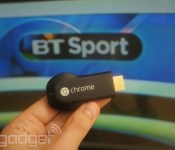
You can now stream BT Sport on Google Chromecast

The US may have beaten the UK to the punch on Chromecast hardware, but us Brits now have access to another thing the Americans don’t: live premiership football. Following news that it was expanding its apps to support the £30 streaming accessory, BT today switched live the necessary features to allow Sport subscribers to beam content from their iOS or Android device directly to their TV. Of course, you will need a BT Broadband package or be BT Sport subscriber to gain access to the live streams. If you’ve already met that requirement, then it’s a simple case of hitting the “Cast” button in either of BT’s official apps to enjoy football, rugby, Moto GP, tennis or UFC coverage on your nice big flatscreen.
Filed under: Cellphones, Tablets, Internet, Software, HD, Mobile, Google
Source: Google UK (Twitter)

NASA is offering code from more than 1,000 programs for public use

Everyone has probably day-dreamed of launching a space-ship from their backyard at some point. Well, now that NASA plans to release over a thousand of its software systems into the public domain, your idle musings could become a reality. On April 10th, the outfit is dropping a ton of free code for things like life support systems, aeronautics and, as Wired reports, even cryogenics, online for your perusal. This is an extension of what it’s been doing with its technology transfer program for the last 50 years, and like Data.gov and DARPA’s Open Catalog before it, the result of President Obama’s push to open government data to the public and digitize it for easy access.
The source code will be spread across SourceForge, GitHub and NASA’s website for now, but by next year it should be consolidated in one easy-access database. What’s more, NASA said that post release it’ll keep adding new code to the database. Now is the time to vote for a favorite space suit if you already haven’t — you just might need one after all.
[Image credit: Kenneth Lu/Flickr]
Via: Wired
Source: NASA

Here’s what you missed at Microsoft’s 2014 Build conference

We came, we saw, we barked orders into a phone. Though Microsoft’s annual developer conference is technically called “Build Windows,” we actually spent far more time at this year’s event playing with handsets — almost no PCs, come to think of it. Indeed, the star of the show was a husky-voiced lady (fembot?) named Cortana, Microsoft’s new Siri-like personal assistant. Of course, Cortana wouldn’t exist outside of the next version of Windows Phone (that’d be v. 8.1.), which we also got a glimpse of this week. In case you missed our three-hour liveblog — or were too busy following our Amazon Fire TV coverage — we’ve got a neat recap below. We promise we’ve left out all the boring bits about developer tools. Mostly, anyway.
Windows 8.1 Update

OK, we lied: there actually was some Windows news this week. And yes, we did play with at least one full-fledged PC. Microsoft announced a fairly modest update for Windows 8.1, and almost all of the improvements are aimed at winning over mouse-and-keyboard users. For instance, you can now pin Metro-style Windows Store apps to the desktop, with the Windows Store shortcut pinned by default. Speaking of the desktop, PC makers now have the option of booting to the desktop by default, though you’re really only likely to see that on traditional PCs, maybe not hybrid devices.
Other changes: when you right-click on something on the Start Screen, you’ll see your options pop up right there, where your cursor is, not at the bottom of the page. Wrapping up, there are dedicated power and search buttons on the Start Screen; you can pull up the desktop Taskbar even when using Windows Store apps; and Metro-style programs now have a Title Bar up top allowing you to close out by hitting an “X” in the upper-right corner. Really, lots of things that should have been baked into Windows 8 to begin with.
Return of the Start Menu

Oh, and speaking of things that should have always been part of Windows 8, Microsoft casually dropped some major news toward the end of its epic keynote: the company is planning to bring back the Start Menu you all know and miss. This time, though, it won’t just include a list of desktop programs, but there’ll be a second pane over on the right showing Live Tiles with Windows Store apps. Smart move, we say: not only would it make Windows 8 feel more familiar to new users, but it would drive home the point that whether it’s a desktop app or a Windows Store download, it’s all the same OS.
Cortana

Who needs Siri when you can have an assistant named after the life-saving sidekick in Halo? Though Microsoft’s new voice recognition program isn’t perfect, it’s at least rich in features, and does basically everything you’d expect of a modern voice-controlled personal assistant for your phone. That means, you can use Cortana to help you compose emails and texts, set reminders, take notes and search the web (with lots of help from Bing, of course). Also, much like Google Now, Cortana gets smarter over time as she learns more about your various likes, interests and late-night taco addictions (not that there’s anything wrong with that). Using a Notebook feature, you can input a lot of this information yourself, including Quiet Hours when you’d rather not be interrupted by phone calls (even then, select people, like your family, can still get through).
In our brief hands-on, we found that Cortana only responded when we phrased our queries in a certain way. (Pro tip: start with verbs. As in, “Remind me to ask Brian for a status update.”) Also, you have to press a button on-screen anytime you want Cortana to start listening. Still, Cortana’s only in beta and indeed, Microsoft tells us it’s working on an always-listening mode similar to what you’ll find on the Moto X. Better language recognition is also in the works, according to company reps, which means you might get away with saying “Can you find me a Thai restaurant in Palo Alto?” Lastly, Microsoft promises the final version of Cortana will have even more “personality” — whatever that means.
Windows Phone 8.1

But there’s more to Windows Phone 8.1 than just Cortana. The OS update, which will hit existing devices in the coming months, brings a number of new features, including a drop-down Action Center for notifications that looks suspiciously like the one in Android. Windows Phone users also get a customizable lock screen and a Windows Store that makes it easier to find featured apps — two improvements we first saw on Windows 8.1 for the desktop. Additionally, Windows Phone 8.1 ushers in a Wi-Fi Sense feature that automatically accepts the terms of service for networks, and securely shares your router’s password with contacts in Facebook, Outlook.com and Skype. Thus, you can give them guest access to your internet, but not your full network. Finally, there’s a new weekly view in the calendar, and you can use “Shape Writing” to draw letters on the keyboard, à la Swype.
New Lumia phones

What would a Windows Phone update be without some new hardware to go with it? Once Microsoft finished its three-hour opening-day keynote, Nokia held a party of its own, where we had a chance to play with the newly announced Lumia 930, 630 and 635. Though the 930 is clearly the flagship, it’s also incredibly familiar. In fact, it’s basically the Lumia Icon we reviewed two months ago, just with support for global LTE (the Icon is exclusive to Verizon in the US). But, for those of you outside the States who have been ignoring the Icon for just that reason, here’s a quick refresher: the phone has a 5-inch, 1080p screen, a 20-megapixel PureView camera and a quad-core Snapdragon 800 processor. The main difference, aside from those foreign LTE bands? The color options. Yes indeed, while the US model comes in just black and white, the 930 will be also available in orange and neon green.
Moving on down the line, the 630 and 635 are more or less identical to each other — at least on the outside. Both have a 4.5-inch screen with a 854 x 480 display, 5-megpaixel camera, Snapdragon 400 processor and a modest 512MB of RAM. The main difference is that the 630 is 3G-only with a choice of a single-or dual-SIM setup. The 635, meanwhile, runs on LTE and uses just one SIM. The Lumia 630 will cost $159 / $169 off-contract, depending on whether you get the single- or dual-SIM version. The 635, meanwhile, will cost $189.
Windows Everywhere

Get ready to see even more Windows apps on even more devices. As part of its opening-day keynote, Microsoft told a crowd of developers that it will now be possible to write a Windows app for one platform — say, Windows Phone — and then port it over to the tablet or desktop, all with minimal work on the back end. From there, developers will have the option of offering their apps in such a way that consumers only have to pay for it once, though they’d still be able to download it multiple times across different kinds of devices (tablets, PCs, et cetera). In theory, devs will also be able to write universal Windows apps for the Xbox too, though Microsoft will still curate the selection, as well as decide which apps require an Xbox Live Gold subscription.
Additionally — and this is big news — Microsoft announced that Windows would be free for phones, tablets smaller than nine inches, and miscellaneous gadgets that fall into the “Internet of Things” category. That gives manufacturers a bigger incentive to build Windows devices, which can only mean more options for you, the consumer. Finally, Microsoft also said it intends to bring Windows to robots and a “new class of small devices,” which we can only assume means wearables.
A look at Office for Windows tablets

It was just last week that Microsoft came out with Office for iPad, and now we’re seeing a glimpse of what Word, Excel and PowerPoint would look like on Microsoft’s own Windows OS. After teasing a touch-friendly “Metro” version of Office last year, the company is now ready to give us a slightly deeper look. The company used its day-one keynote to show us a few screenshots of the app-in-progress, which sports the familiar Ribbon UI and makes good use of gestures like pinch-to-zoom, and finger-highlighting. No word yet on how feature-rich it will be, but we can only hope it will be just as functional as the new iPad suite.
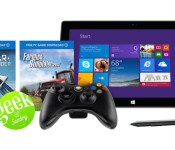
Microsoft’s Surface Pro 2 ‘Geek’ bundle includes free Xbox controller and games

If you’ve considered the Surface Pro 2 to be more than just a portable workstation, then Microsoft’s latest tablet bundle might pique your interest. In collaboration with online culture show Geek & Sundry, the company has quietly pushed live a new gaming deal on its virtual store in the US and Canada that throws in $105 worth of free games and accessories. For $899, the price of the base 64GB Surface Pro 2 model that’s already included, you’ll also get a wireless Xbox 360 controller and two games: Farming Simulator 2013 and a premium pack for free-to-play WWII flying simulator War Thunder Mustang. To be clear, neither title will ever vie for any gaming awards, but you can’t argue with free, right? Microsoft intends to run the offer until May 1st or until stocks run out, whichever comes sooner, so if you’ve been waiting for the right opportunity to grab yourself a Surface Pro 2, now might be the time to click in.
Filed under: Gaming, Tablets, Software, Microsoft
Via: Ubergizmo
Source: Microsoft Store

IFTTT update outfits iPads, tacks on push notifications

IFTTT’s (If This Then That) recipes automate your apps and other tech tasks to make things a breeze, and the latest update allows the software to play nice on more than just that iPhone. Version 2.0.0 of the application tacks on full support for the iPad. There’s also the ability to assign an IFTTT recipe to beam a push notification to your device, so you’ll know when David Ortiz hits a home run or if you’ll need to pack a raincoat in the morning. Of course, you’ll want to check those application settings so that you’re not duplicating efforts here. What’s more, new recipe collections and a location-specific Photos Trigger have been throw in as well. If your trusty iOS device hasn’t alerted you to the update just yet, venture over to the source link and nab it up.
Filed under: Software
Via: 9to5Mac
Source: IFTTT (iTunes), (Blog)
Over 200 NSA documents collected and made searchable, from Snowden to Prism

When Edward Snowden made a name for himself last June by leaking classified NSA information, he did so by working with The Guardian and a documentary filmmaker. As such, the public learned of much of the NSA’s surveillance measures through the medium of a single media outlet. In the ensuing months, much more has come to light, and today the American Civil Liberties Union is unveiling “NSA Documents Database,” a searchable, categorized database of just over 200 previously classified NSA documents.
That includes everything from the initial Snowden leaks through Mystic (and more). The collection comprises “all of the documents released since [June 5, 2013], both by the media and the government,” and the ACLU promises more documents will be added as they become available. In so many words, if you’re looking to dig in and bone up on the current government surveillance debate, this is gonna be your jam.
Filed under: Cellphones, Networking, Internet, Software
Source: ACLU, NSA Documents Database

Samsung’s ChatON now lets you recall those embarrassing messages

In an effort to get owners of its smartphones to actually use ChatON, Samsung has thrown numerous features at the messaging app to see what sticks. For instance, it’s just gifted inveterate file sharers with 1GB media transfers and given FourSquare types the ability to divulge their position and route via Glympse. But it also came up with a feature that may resonate more: the ability to cancel a missive. Provided you’re in a one-to-one chat, you can now tap the message bubble and hit “recall” to delete a text on the recipient’s device, even if they’ve already read it. Samsung says that’ll be handy if you text the wrong person, but we know what that feature’s really for.
Filed under: Software, Samsung
Source: Samsung
Internet Explorer 11 now looks nicer no matter what device you’re using

With Windows 8.1 updates rolling out on April 8th across all platforms, you didn’t think Microsoft was going to forget its browser, did you? Redmond has unified features on its mobile and desktop Internet Explorer 11 versions, while making it easier to use on different-sized devices. IE 11 for Windows Phone 8.1, in particular, underwent a major overhaul. You can now pin sites to Live Tiles like you can with the full version and sync tabs between devices using OneDrive. Another highly-requested new feature is InPrivate browsing, which leaves no trace of your surfing à la Chrome’s Incognito mode. There’s also a nod to low-bandwidth users with the so-called High Savings data compression mode which loads only the elements you want, reducing data use by 60-80 percent. Finally, Microsoft has introduced voice commands to WP8.1, plus a new reading view that brings a Kindle-like look to articles on your smartphone. Meanwhile, Internet Explorer 11 for Windows 8.1 received more subtle tweaks — check after the break for more.
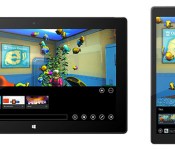
For the full IE 11 version, Microsoft is trying to make sure users are happy whether they’re using a 7-inch tablet or a 28-inch all-in-one. Depending on the device and whether it has a mouse or touchscreen, the browser will adjust the number tabs of displayed, adapt the type size and permit full-screen or regular browsing. Other changes are mainly for developers, with enhanced debugging and simplified testing for older versions of Internet Explorer — the latter often being a serious pain. Finally, Microsoft revealed FishGL, a new version of its classic aquarium screen that also serves as a 3D WebGL graphics benchmark on Windows 8.1 or Windows Phone 8.1. If you’re raring to grab all of that now, the updates are available for download on Windows 8.1 — otherwise, they’ll be pushed automatically for Windows 8.1 and Windows 7 starting April 8th.
Filed under: Internet, Software, Microsoft
Source: Microsoft
 AIVAnet