


Microsoft teaches robots how to deal with groups and draw from memory

Us humans are good at predicting how people will behave, particularly in groups, but artificial intelligence routines still have trouble dealing with much more than controlled, one-on-one discussions. They’ll be far more flexible if Microsoft’s Situated Interaction project pays off, though. The research initiative has produced sensor-equipped robots that can not only recognize multiple people, but infer their objectives and roles. Office assistants can tell who’s speaking and respond in kind, while a lobby robot can call the elevator if it sees a crowd headed in that direction.
Some of the robots also have a human-like ability to draw from memory, expanding on what we’ve seen from virtual assistants like Cortana or Siri. In addition to knowing your schedule, they can detect your presence and make predictions of availability based on your habits; they’ll know if you haven’t been around in a while, or when you’re likely to wrap up a conversation. One robot will even know that you’re coming because you asked one of its fellow machines for directions. It’s doubtful that you’ll see production versions of these context-aware robots any time soon, but they could lead to a generation of smart devices that are better at coordinating with (and relating to) their human counterparts.
Filed under: Robots, Software, Microsoft
Source: Microsoft Research

MediaFire Takes Aim at Google Drive with 1TB of Storage for $2.50 a Month (Promo)
The headlines lately have been pretty intense regarding cloud storage and the amount of space for a the price. Google recently dropped their monthly Drive prices to offer insane amounts of cloud storage. Seriously, $10 a month for a terabyte (1000GBs) of storage is pretty amazing. Dropbox on the other hand only hands over 100GBs for the same $9.99 and Box does 100 GB’s per month for $5. Google clearly has the underhand right now. However, MediaFire is taking aim at the giant with some pretty stellar promotions and new features.
 MediaFire is now offering 1TB of cloud storage for $5 a month. That cuts Drives price in half. To add to the promotion, new customers can pick up 1TB of space for $2.49 a month or pay out $24.99 for a whole year. In addition to the promo, a number of improvements and updates have also just been released.
New MediaFire Features
- Follow Files: share, collaborate, and track new files shared by users, automatically
- No File Upload Restrictions: Both free and paid accounts can upload any size file, up to 20 gigs in size
- Up to 50 gigs of cloud storage for free: Start with 10 GB and earn up to 50 GB in bonus space by installing MediaFire apps or inviting friends.
- 1 TB Pro Storage Plans: For a limited time, new users can sign up for just 2.50 a month, or 24.99 a year
“With the launch of our new storage plans, we are looking to provide everyday users with a secure and affordable way to share and store all of their music, photos, videos, and files with the people that matter most,“ said Derek Labian, CEO and Founder of MediaFire, “Over the next few months, we will be launching several new and exciting products, including new and updated applications for iPad and Android. Stay Tuned!”
You will get the most out of your MediaFire account if you install the the desktop client and the Android app. The deal is pretty hard to pass up on. If you don’t have a mediaFire account yet, feel free to head over to MediaFire.com and sign-up. you get 10GB for free regardless, but I think you might find that you like their layout, app and service enough to spend a little cash for the promotion, just because.
//<![CDATA[
ord = window.ord || Math.floor(Math.random()*1E16);
document.write('’);
//]]>

Unreal Engine 4 to support Windows Phone and Windows RT, but not anytime soon

Unreal Engine 4′s new $19 subscription option might be real tempting for developers on a budget, unless, of course, they’re hoping to make games for Windows Phone and Windows RT. Although Epic Games’ next-gen engine doesn’t work with the aforementioned flavors of Microsoft’s OS, that might be changing, albeit slowly. Tim Sweeney, the studio’s co-founder and CEO, divulged on the software’s forums that the firm’s already doing leg work to support the platforms. “We have been doing some work in this direction (implementing various levels of WinRT API support) and we want to have Windows Phone support eventually, but we’re a very long way from having a ship-quality implementation,” Sweeney said. Still, the head honcho adds that their focus will remain on Android and iOS development before branching out to Microsoft’s other flavors of Windows. Impatient devs can stick with Unreal Engine 3, but those aching for the latest tools will have to sit tight a while longer.
Filed under: Gaming, Software, Mobile
Source: Unreal Engine Forums
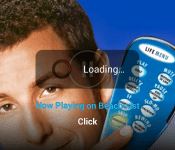
Netflix App Updates with New Second Screen UI and Performance Improvements
The Netflix app on Android has been updated. It offers up some playback optimizations that should help make things a bit speedier in your Netflix viewing. While that is nice, it is the second screen enhancements that a little bit more welcomed, especially for those using Netflix from their device to a Chromecast. Below is the old second screen view you would see when you are casting.
 Now, here is what the new Netflix second screen looks like.

 You can see the banner for the movie/tv show is shrunk and displayed in the middle. Below that you see where you are casting to and you can tap it to change the cast device. You can now rewind in 30 second intervals versus the previous 10 second intervals as denoted by the small near circle with the two arrow heads. At the top you have the name of the show or movie with a small arrow that you can tp to bring it up full screen or minimize it down to view the Netflix library.
It certainly looks a bit better and it seemed to start the movie a little quicker when selecting it to cast.
The update is live in the Play Store so feel free to pick it up when you have a minute.

//<![CDATA[
ord = window.ord || Math.floor(Math.random()*1E16);
document.write('’);
//]]>

Windows XP support officially ends today, still used by over 25% of PCs

It’s been over 12 years, folks: it’s time to let that aging operating system go. In case the insistent cries of all your favorite applications and anyone who’s used your computer recently weren’t enough indication, we’re here to make it totally clear that today is the day Microsoft ends official support for Windows XP. That means no more security updates and no more customer service calls. A paid option is available to organizations (think: governments, corporations, etc.) which offers “critical” patches and support, but even Microsoft suggests upgrading to a newer version of Windows instead of footing the bill.
We won’t rib you too much for sticking to XP, though; over 25 percent of you are still running Microsoft’s 2001 release, according to NetMarketShare. And that’s to say nothing of the world’s ATMs, 95 percent of which still run XP. Egads!

Relax, y’all — the company in charge of those ATMs says it’s in the process of upgrading and (as of last check-in a few weeks ago) should have one-third upgraded ahead of…today. We reached out to the company (NCR) and have yet to hear back on progress.
A variety of countries are also still dependent on XP for governmental affairs, such as The United Kingdom and The Netherlands, both of which had to work out paid measures with Microsoft for continued security support. China’s population is largely dependent on XP as well, with nearly half of the country’s computer users running the aged OS. Still, between years of warning, financial incentives to upgrade, and an update to XP that outright told users of today’s news, it’s hard to be upset at Microsoft. There was even free software for migrating content over.
So today we say goodbye to Windows XP: you were there for us back before the Internet was cool, and you set the standard for desktop OSes.
Filed under: Desktops, Household, Laptops, Internet, Software, Microsoft
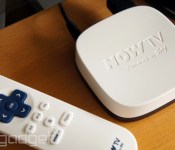
How to turn Sky’s £10 Now TV box into a networked media player with Plex

At just £10, Sky’s Now TV box is pretty good value for money as is. The idea, of course, is that cash continues to flow in Sky’s direction by means of the film, TV and sport subscription packages, but there’s nothing to stop you from forking out the hardware fee and using it simply as a window to BBC iPlayer, 4OD and other free services. Understandably, the selection of channels is limited — Sky would prefer you use the box for its paid content — but with only a few minutes of tinkering, you can easily turn your Now TV into a robust network media player capable of pulling video and audio from your personal network and several internet sources. You see, Sky’s hardware is basically a re-branded Roku LT player with a heavily curated app store, but as long as you have the correct file, you can push apps to a Now TV box that otherwise shouldn’t be there. Being able to run software like Plex immediately makes the cheap set-top box an even more compelling proposition, and better yet, side-loading apps couldn’t be much easier.
Assuming you’re all set up, logged in and faced with the Now TV channel screen, the first step is basically like entering a video game cheat code. With the remote, punch in:
Home, Home, Home, Up, Up, Right, Left, Right, Left, Right
You should be sent to a “Developer settings” page (shown below) with a prominent IP address centre stage, and the option to “Enable installer.” Jot down the digits, follow the prompts to accept the T&Cs, and your Now TV box will reboot and look completely unchanged. (Note that our screenshot shows “Disable installer,” as we’d already performed the step by this point.)

Now, head to your PC, load up a browser window (we’ve heard Internet Explorer doesn’t work, for some reason), and plug the Now TV box’s IP into the address bar — so, for us, it was http://192.168.1.65. This will take you to the rather bland “Development Application Installer” page. From there, you choose the app file (we’ll come to those shortly), hit install, and within a few seconds it’ll launch on the Now TV box and will be found in your channel list thereafter, just like any other app.

Unfortunately, while the actual installation process is a cinch, finding app files isn’t so easy. Sure, the Roku channel store is full of apps capable of running on Now TV boxes, but it’s up to the developers to package up the app for side-loading, and you won’t find the likes of Netflix and Amazon doing that. Furthermore, you likely won’t care for most of the apps that do actually have neat .zip files for you to install, but that doesn’t really matter. After all, you can only have one side-loaded channel running on your Now TV box at any one time, and you’re going to want to fill that slot with a media manager like Plex.
The latest build of Plex we could find for Now TV boxes can be downloaded here, but we’d sooner recommend RARflix, a modified Plex client with some UI tweaks, to serve as your front-end (you’ll find that file here). Another polished option is MediaBrowser (.zip file here), which also streams content from your local network, but lacks some of Plex’s bells and whistles.

First and foremost, Plex is for pushing video, music and pictures from your computer and wider local network to your TV. You’ll need to have Plex Media Server running on a machine at home to talk to the Plex app on your Now TV box, but it’s no trouble to set up. From the web interface, you can tell it what folders to look for media in, all of which is then available to stream through the Plex app — you can also agree to let it scrape your iTunes library if you’ve got a Mac. It’ll associate movie posters, synopses and the like with your files, making for a pretty slick user experience on the TV. What’s more, Plex has plug-ins (likes apps within the app) that allow you to stream from places like YouTube and Twitch. Admittedly their UIs are extremely basic, but they work well and video loads fast.

Other cool features include the “Plex It!” bookmarklet for browsers, which can be used to add video from various sources and websites to a queue in the Plex web app. From there, you can fling them to the Now TV Plex app for big-screen viewing. For power users who want to add media sitting in cloud storage, free mobiles apps and other benefits, there’s the paid Plex Pass subscription.
Whether you choose Plex, MediaBrowser or any other manager you might find a .zip for on enthusiast forums, you’re effectively turning that cheap Now TV box into a legit media centre and getting more out of it than Sky ever intended. Not bad for a tenner and 10 minutes of your time.
Filed under: Home Entertainment, Software, HD
Via: Plex forums (1), (2), MediaBrowser forums, Digiex
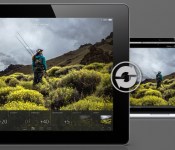
Lightroom mobile arrives for iPad with touch-friendly interface, realtime sync

Adobe Lightroom is one of the most popular image archive tools on the market, and beginning today, iPad-toting photogs now have an iOS app for their DSLR, smartphone and even tablet pics (gasp!) to call home. The companion application, Lightroom mobile, brings much of the desktop version’s functionality to your portable slate. The touch-friendly interface, which supports both portrait and landscape orientations, swaps mouse clicks for taps and swipes. Flick up or down to pick or reject images, for example, or tap twice to cycle through metadata. Any changes you make to an image in the app will be pushed to the cloud and out to any other Lightroom apps that you’ve signed into. Similarly, if you edit an image on a desktop or laptop (which you’ll want to do before making prints, since the iPad’s display isn’t calibrated), your changes will appear in Lightroom mobile within a few seconds.
Lr mobile uses Smart Previews to push compressed raw images to your device. Shots are scaled down to 2,560 pixels at the longest end, so they’re roughly 1-2 megabytes in size. Untouched RAW frames are left on your desktop or a server, so don’t worry about filling up your iPad with a hundred or so full-size DNGs. The app offers the same editing presets as you’ll find in Lightroom 5 (you need to download the 5.4 update before getting started with mobile). You can also tweak settings — such as color temperature, exposure, highlights and clarity — individually. Touch comes into play with editing shots as well. You can tap to select a white point or pull up the untouched version at any time by tapping the screen with three fingers. Images sync over WiFi, or, if you’ve been blessed with an unlimited data plan, you can use a cellular connection as well. The app is available today for iPad 2 or later running iOS 7 or higher. While it’s free to download, you’ll need a Creative Cloud subscription that includes Lightroom to take full advantage.
Filed under: Software
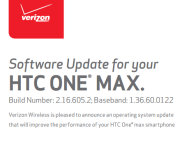
HTC One Max on Verizon Picking up Android 4.4.2 KitKat Update
HTC has certainly been doing their very best to keep true to their word with updates for their devices lately. Those of you rocking a stock HTC One Max via Verizon should see an OTA update pop-up on your device today, or soon, as they have begun the Android 4.4.2 KitKat update process.
 The update brings the One Max up to build number 2.16.605.2. Along with the update to 4.4.2, it is supposed to fix issues with device management running during OTA download, Bluetooth issues related to the 2012 BMW X5, copy function icon not working and the Verizon app not directing SMS messages properly. On top of all of that, the notification light now shows pending messages, emails and missed calls. A number of sneaky Verizon apps and services make their way into the build as well like Verizon Cloud, Verizon Location Agent and Verizon Support and Protect.
Verizon also lists a ‘master switch’ that turns all location settings on/off, a list of apps that use location services, estimated battery use of each app and 3 location profile s to choose from. Those are High accuracy, battery savings and device sensors.
All-in-all, a pretty good sounding little update for the One max owners out there. Anyone see the update hit their device yet?
Source: Verizon
Via Phandroid
//<![CDATA[
ord = window.ord || Math.floor(Math.random()*1E16);
document.write('’);
//]]>

Three Games Released by AMA for the Samsung Galaxy Gear
What is better than than controlling your phone, using voice commands and having the time on wrist? Games of course. Game and app developer, AMA, have created three wristable games for the Galaxy Gear owners out there to help them pass the time.
“We believe wearables and, particularly, smart watches such as the Galaxy Gear are the next big trend for consumers. Developing and publishing content on these devices attests to our lasting commitment to innovation.” says Jean-François Denis, AMA’s VP Sales.
First up is Puzzle 2 HD. This one is a classic block moving game where you will navigate your Master Blox across a board while avoiding obsticles, traps and teleporters. The game offers over 100 levels of though provoking problem solving glory.


- Play on your phone and your Gear; your progress will be saved.
- The game tests and trains wits, logic and strategic skills.
- Interactive and addictive game play.
- Tons of helpers and obstacles scattered throughout the game.
- High quality graphics, in a 3D game environment.
- 60 levels of difficulty that get unlocked once solved.
- Random play tests the way you manage random levels of difficulty
Next is Abalone. AMA states the game takes only a minute to learn but a lifetime to master.


- Play on your phone and your Gear; your progress will be saved.
- Online challenges: face many players from across the world whatever device they play with, and defend your rank in the international leaderboard.
- Challenge mode: 60 levels with variable difficulty to improve your tactics.
- Free game mode with more than 30 official variations.
- Multiplayer mode to defeat your friends anytime on your device.
- An Editor to create your very own rules.
- Fulfill achievements to prove your skills.
- Up to 15 bonus levels unlocked daily for regular attenders
Finally, there is Escape. Another puzzler of sorts where you need to navigate your character, Norm, across the playing board witout retracing your steps to help him Escape.


- Play on your phone and your Gear; your progress will be saved.
- Minimal and stylish graphics for maximum appeal.
- Simple controls for all ages.
- Surprisingly addictive.
- Dozens of levels to get you started.
- A unique brain teaser, complimented by relaxing audio and visual effects.
All three games are currently available for the Samsung Galaxy Gear through the Samsung app store. If you are a lucky Galaxy Gear owner, go give them a try and let us know how they play out.
//<![CDATA[
ord = window.ord || Math.floor(Math.random()*1E16);
document.write('’);
//]]>

Researchers teach smartphones to recognize your activity, lock out everyone else

Swipe patterns, passwords and fingerprint scanners are useful for keeping that mobile device locked down from the outside, but what happens once that code is cracked? Well, cybersecurity researchers at Georgia Tech have developed LatentGesture that continuously monitors gadgets for intruders based on taps and swipes. If the system detects any use patterns that vary from the observed user profiles, it locks the device down. “The system learns a person’s ‘touch signature,’ then constantly compares it to how the current user is interacting with the device,” said College of Computing assistant professor Polo Chou.
To create that “touch signature,” user activity is monitored in terms of swipes, taps and check boxes, making a custom profile for up to five authorized users. What’s more, those accounts can also be used as parental controls to keep kids out of the App Store. The software was found to be 98 percent accurate on phones and showed a 97 percent accuracy on tablets when tested on Android devices during the trial phase. Chau goes on to say that just like our fingerprints, how we interact with touchscreen devices is unique to each person, so having this software running in the background is a non-intrusive way to keep those trusty devices secure. This means that in the future, if someone happens to peep your passcode, you may still have a hope of locking them out before any major damage is done.
Source: GA Tech

