


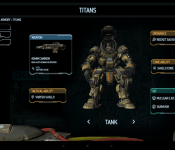
Titanfall companion app now available, XBox One gamers Only
 Companion apps to our favorite games can be a good thing, or an annoyance. It all depends on what platform you are playing on and what you think a companion app should do or be. EA has just recently released a new companion app for a game that I am sure many of you are very familiar with, Titanfall. Regardless if you have it or not, you have probably heard about it. If you do happen to be a Titanfall gamer, then you might be interested in the new app.
 The app is free to install and offers up a variety of things for gamers. Such as some back story to the game that wasn’t present. It also lets you keep up with your total kills, favorite weapons and time spent playing. Much like the Battlefield 4 Battlelog and Commander companion apps, the Titanfall companion also offers up a second-scree map when it is connected with your Xbox one. Wit it you can see a real-time interactive mini map of your current game. You can also see and track your team mates, focus on key areas of the battle field plus a few other special filters to gain access to additional map info that can’t be found anywhere else.
 The Titanfall companion app is free for all who wish to download it, but if you don’t have the game on Xbox One, you shouldn’t waste your time as the app is only for Xbox One players. That obviously got the console vs PC comment battles going in the Play Store. Feel free to get all bent out of shape over it, but it won’t do you any good. If you are a Titanfall Xbox One player though, you might want to pick this up and give it a whirl.
//<![CDATA[
ord = window.ord || Math.floor(Math.random()*1E16);
document.write('’);
//]]>
What you need to know about online advertisers tracking you
 Spend lots of time online? Then perhaps you’ve heard of targeted advertising, “Big Data” analysis and complaints of privacy violations by advertising companies. The ads above your Gmail inbox? Yeah, those. As it turns out, most people don’t like being tracked by advertisers. Surprise! As such, a variety of tools exist to protect individuals. But what about a solution that anyone could use, that didn’t require knowledge of cryptography or even a software install? That’s where the Do Not Track initiative comes in.
Do Not Track (DNT) is explained by its own name: Don’t track what I do online, including what I buy, what I read, what I say and who I communicate with. But how should it work? Therein lies the controversy. Since the subject is still being debated, now’s the perfect time to learn about it, voice your opinion and request more control over your data. If you want more control, that is.
What is it?
The idea of Do Not Track (DNT) was initially conceived in late 2007. Several groups, including the Center for Democracy and Technology (CDT) and the Electronic Frontier Foundation (EFF), asked the Federal Trade Commission (FTC) to help with the creation of something similar to the National Do Not Call Registry: a system to limit the amount of personally identifiable information a company can obtain without express authorization from an individual. More directly, DNT is a system to protect individuals from advertisers eager for personal info on consumers.
The proposed technology asked for online advertisers to submit web address information to the FTC, which the agency would publish and make accessible to the public. Why a list? So that web browsers (Firefox, Safari, Internet Explorer, etc.) could effectively block advertiser tracking on a wide scale. The list concept, however, was ultimately flawed: Every time an advertiser changed its web info, the DNT function became obsolete. It would require extreme vigilance to keep the system 100 percent effective. As such, it died.
In 2010, the idea of Do Not Track came back to life, albeit in a completely different form. Instead of relying on a list, web browsers would simply ask the advertising software (instantly, in the time it takes to load a webpage) to not track personal information. This is the Do Not Track initiative as we know it today.

Why should I care?
If you don’t care that websites and companies monitor your behavior, share what they know about you and generally act creepy about personal information, well, we’re impressed you got this far into a piece about Do Not Track. If you don’t want Amazon to show you ads about swimsuits, towels and sunblock because you mentioned you were excited about going to the beach on Facebook, you should care.
Not freaked out enough by that example? What if they know your daughter is pregnant before you know? For some people, this isn’t a big deal. For others, it’s extremely important.
We aren’t going to get into the implications of governments knowing everything about you; the Do Not Track initiative is only aimed at advertising companies. However, it’s not crazy to think that a government could request all the data an advertising company has in order to collect taxes, or worse: infringe on free-speech rights.
How does it work?
Modern browsers, such as Firefox, currently send something called “headers” to web servers (computers where websites are hosted). Say you’re visiting, I don’t know, this website. Say you’re on a PC, running Windows 7, and you’re using Firefox to read all about whatever happened to Netscape. The server hosting Engadget’s content needs to know how to present information (in this case, our website), to your particular setup. So your computer tells our web server how it’s set up and in turn, our web server returns a readable website. It also returns ad-tracking software.
The Do Not Track initiative simply adds an additional piece of information (the DNT header) to the initial request, which is set to 0 or 1. If the DNT header equals 1, the web browser knows it should not track the user’s behavior on the site, and a company knows not to use that data for advertising purposes.
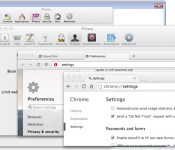
You can see the DNT header turned on in the highlighted text below:

Most popular web browsers and at least the two most popular web servers (IIS and Apache) already offer support for Do Not Track. To enable this option on your browser of choice, just follow the steps dictated by the developers, linked below:
Firefox
Internet Explorer
Safari
Chrome
Opera
Can I start using it right now?
Yes — but not so fast, cowpoke. While the system is implemented in browsers and web servers, it’s not actually being used by advertising companies right now. A list of websites that honor the system is on donottrack.us, but not all advertising companies have agreed to abide by it. There are even conflicts between browser and web server developers as to how it should be used.
For example: Google, one of the biggest advertising companies on the internet, provides a warning about the Do Not Track setting in Chrome (seen below). Not exactly reassuring, is it?

What’s the argument?
One major point of contention is a concept known as “the tyranny of the default.” This idea is that a great majority of users never change the default settings, and thus, whatever the default settings were will most likely stay that way. Should browsers assume that users want DNT enabled by default? Microsoft thought so, and proceeded to enable DNT on Internet Explorer without user interaction. However, many believe that in order for the initiative to have any type of weight on advertising companies, the user should intentionally enable it.

Because of Microsoft’s decision to enable DNT by default in IE, the people behind the Apache web server patched out the setting. Wait, what? You see, according to the rules of DNT, the service can only be implemented if it “reflect[s] the user’s preference, not the choice of some vendor, institution or network-imposed mechanism outside the user’s control.” If there is “misuse” of the technology — such as Microsoft, an institution, turning it on by default — web servers can decide to ignore the header and the tool is useless.
The debate about enabling DNT by default started in 2012 and it hasn’t ended yet. Google, Facebook and now Yahoo all ignore DNT requests (at least for now).
Want even more?
Everything about Do Not Track is still open for debate. Technology companies are still discussing proper ways to implement it. Advertising companies are deciding if they want to respect it. There’s an ongoing debate as to whether DNT means “don’t save this information” or “don’t use this information.” And, of course, governments are considering enforcing the technology. This means that, as of right now, DNT is useless.
For now, the best you can do is precisely what you’ve already done by reading this article: Learn about Do Not Track. If you do want this technology or something that serves a similar purpose, be vocal about it. Take it directly to advertising companies on social networks. Contacting your senator wouldn’t hurt either! Maybe you love the benefits of targeted advertising and personalized web browsing? Express your opinion and let people know! The subject is still wide open for debate.
Filed under: Networking, Internet, Software, Microsoft
Google Play Store v4.8.19 with Simplified Permissions, Bigger Buttons and lots More [APK Download]
This last Wednesday was a lackluster Google Apps update day. We caught the Google Play Newsstand update, but it wasn’t all that big of a deal. Thursday a new Google Play Services started filtering out and now we finally have an updated Google Play Store. Those are usually the best updates around, next to Google+, Gmail and Hangouts updates.
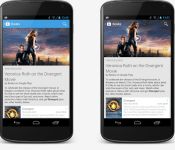
 The update moves the Play Store from version 4.6.17 to v4.8.19. With the update you will see a very noticeable change in the visual appearance at the top where the action bar is. Yes, it is gone. More so it is transparent and the top image shifts up to fill the void. Unfortunately it isn’t gone everywhere, but in a variety of places, like in Books, Music and TV shows. However it fades in when you scroll down.

 There is a new “Additional Information” section in apps. The new section offers up more detailed info like application version, installed file size, content rating and a permissions detail link.

 They also simplified the permissions screen some. Rather than a huge list, not it sits in a nice collapsible menu style layout complete with icons for what the app accesses along with the apps icon at the top. Looks so much nicer.

 You will also see the buttons to install, update, uninstall and the likes have been increased in size making them easier to get to and easier to see.
 Last but not least, the PayPal integration is added in. We previously reported that this was a new addition to the PlayStore. Now you can finally take advantage of it.
The update is rolling out slowly to devices everywhere and you can expect it to trickle in over the next week or so. however, if you are impatient and want to jump to the front of the line, you can just download the APK and install it on your own time. Hit the link below to go grab it.
Google Play Store v4.8.19 APK download
1st img via Kirill Grouchnikov G+
Via AndroidPolice
//<![CDATA[
ord = window.ord || Math.floor(Math.random()*1E16);
document.write('’);
//]]>

MapMyFitness brings coaching and improved post-workout stats to Android

After being nabbed up by Under Armour late last year, things have been relatively quiet for MapMyFitness and its activity tracking app. That all changed this week though, as the outfit has rolled out a totally redesigned version of its Android software with a host of new features. On top of the UI refresh, you can now compare stats with friends from Facebook, Twitter and your contacts list from within. Improved data and mobile graphs make bragging about your progress post-workout a bit easier as well. Route recording received a boost, adding Google Maps 3D tech for navigating the course with tilt and compass functions that update in real time as you run or ride. For MVP members, a coaching option is now built in for a dose of extra motivation. This serves up audio cues according to time, pace, speed, distance and duration goals that you’ve dialed in. Of course, that voice to keep you going comes at a cost of $5.99 a month or $30 annually.

Podcasts for iOS is now properly outfitted for Siri and CarPlay

Folks that spin favorites through Podcasts on iOS to endure the workday can nab an update that should boost listening sessions. Version 2.1 of the standalone app boasts improved browsing by episode, complete with Unplayed and Feed (available for download or stream) tabs for easy access. You can also save favorites for offline enjoyment and tweak the settings to automatically delete selections once you’ve listened. Siri integration finally makes its debut as well, allowing voice-activated commands like “play podcasts” or specific stations with “play Stuff You Should Know” for the virtual assistant. There’s also CarPlay support added in to prep for its arrival in autos in the months to come. If you haven’t been alerted to the new version just yet, hit the source link that follows to snatch it up.
Via: MacRumors
Source: iTunes
New Kairo and Colourform HD Widgets Themes go live as the app reaches 100% Saturation
Over the last few weeks cloud.tv has been rolling out the mega rebuilt update of HD widgets to version 4 for all users. It was a slow process, but one that needed to happen to help ensure minimal issues across devices and OS versions. Now that the rollout is 100% complete, cloud.tv can kick in the theme packs that they intended to release when the update started. There are two pack, both have a free option and a paid option.
First up is the new Kairo:
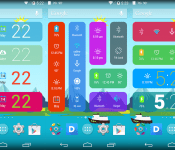
 Kairo offers up 40+ new colorful Android-style widgets that work and look great on phone and tablets. They are designed with todays ultra HD screens in mind with crisp fonts and vivid color choices. Kairo is free with 40+ widgets to choose from, but you can grab Kairo Xp for $0.99 and get access to over 60 widgets and a few other perks.
Next up is the new Colourform.
 This one offers up 30 color widget options and is free. There is Colourform XP paid version that is also just $0.99. The paid version offers up 50+ widgets to choose from and various other editing perks. Each of the new themes requires you to have HD Widgets 4.0 or newer installed, they have a 4.0.5 version floating about right now, and you must be on Android 4.0+. Feel free to check them out and let us know what you think.
HD Widgets ($1.99) – Play Store Link
Kairo – Play Store Link
Kairo XP ($0.99) – Play Store Link
Coulourform – Play Store Link
Colourform XP ($0.99) – Play Store Link
//<![CDATA[
ord = window.ord || Math.floor(Math.random()*1E16);
document.write('’);
//]]>

Nintendo being sued over motion patents in the Wii and Wii U

Nintendo’s not having a great 2014. Between lackluster financial results, an accidental controversy, and now a lawsuit from Philips, life could be better. The Dutch electronics company Koninklijke Philips (better known as just Philips, for obvious reasons) is suing Nintendo over motion patents that span the entire Wii line: “Wii video gaming systems and related software and accessories including, for example, the Wii console, Wii Remote Plus Controller, Wii Remote Controller, Wii U console, Wii U GamePad, and Wii Mini,” the lawsuit filing reads. Worse for Nintendo, Philips is looking to halt the sales of those products while the court case proceeds, which could turn the Wii U’s poor sales into an even more dire situation.
For its part, Nintendo isn’t issuing a formal statement. Philips’ formal statement is written all over the legal documents. The electronics company alleges that Nintendo intentionally infringed on patents owned by Philips, that Nintendo was warned about said infringing patents in late 2011, and that Nintendo continued to voluntarily violate said patents. Beyond the creation of devices, Nintendo allegedly infringed Philips’ patents, “by making, using, selling, offering for sale, andimporting interactive virtual modeling products within the United States.” As such, Philips is suing Nintendo in the United States district court (specifically in Delaware, where many companies register for tax reasons).
Should the case go to trial, Philips is requesting one by jury. Also, Nintendo will have to stop selling its Wii and Wii U game consoles in the US during the trial. All that said, it’s very likely this will be settled out of court so Nintendo can avoid that situation.
Filed under: Gaming, Peripherals, Software, HD, Nintendo
Via: Game Informer
Source: Scribd
Motorola Alert app for the Moto E in the Play Store not quite ready for the Moto G or X
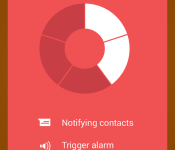
Motorola Mobility has released a new app to the Play Store today called Motorola Alert. the new app is free in the Play Store for Moto E devices but isn’t quite ready for prime time on the other Motorola devices like the Moto G or Moto X. Not sure what they were thinking on that one. The app is basically a simple location alert trigger app that sends your location data to the people you have designated.

 It will periodically send location updates to those people to help them find you as fast as possible in case of an emergency. Which means you should probably put people in the list that are close enough to actually help you and not so much your mom that lives across the country. The app does a little bit more than emergency location though. It also can create geo-fences so that you can get an alert for when your kids get to school, leave school, get home or what not.
The app is only available for the Moto E currently, but Motorola is said to be bringing it to the Moto G and Moto X later with no real plans to make it ‘just an app’ that everyone can have. However, the recipients don’t have to have the app or a Moto device to receive the alerts. It isn’t a bad concept really, Motorola is definitely trying to capture the youth / parents market with the Moto E and this app. having a teenager my self, I know it would come in handy. however there are a number of other apps that do similar things and a whole lot more and aren’t device specific.
You can check it out on the Play Store at your leisure, but Motorola doesn’t share much of anything on the app in the description section. Shame on you Motorola.
Via Phandroid
//<![CDATA[
ord = window.ord || Math.floor(Math.random()*1E16);
document.write('’);
//]]>

Autodesk is making a 3D printer to showcase its new software platform

The 3D printing process frustrates Autodesk CEO Carl Bass, so his company is looking to ease headaches with its new software project. Spark is an open platform effort that looks to create more reliable models while simplifying the steps needed to output them. By doing so, the outfit hopes to “set a new benchmark” for the production method, offering designers, manufacturers and others the tools needed to properly wrangle 3D printers. Not unlike what it has done with 3D animation and architecture, we’d surmise. In the days to come, Bass says Autodesk will work with other hardware makers to implement Spark on current-gen and forthcoming devices. What’s more, Autodesk aims to release its own 3D printer later this year — which the Wall Street Journal reports could be in the $5,000 price range. And just like Spark, the machine’s “design” will be made available to the masses as well, hoping to inspire more experimentation amongst its users. The unit is said to also employ “a broad range of materials,” but there’s no further info on exactly what that list includes. Although, PLA is probably a safe bet.
Filed under: Misc, Peripherals, Software
Source: Autodesk (1), (2)

Flappy Bird is coming back as a ‘less addictive’ multiplayer in August

If you got hooked on Flappy Bird just in time for the game to be pulled, you’re in luck. Creator Dong Nguyen told CNBC today that he’ll put the title back in the App Store in August. When it does return, Nguyen says it’ll be less addictive thanks to a new multi-player mode. And there are entirely new games the way too, including one that features a man hoping from building to building. No word on how he plans to keep folks from getting hooked on those just yet.
Flappy Bird’s Dong Nguyen: Flappy Bird is coming back. Multiplayer. August. @CNBC
– Kelly Evans (@Kelly_Evans) May 14, 2014
Flappy Bird creator Dong Nguyen tells @Kelly_Evans that he’s bringing back Flappy Birds, but not soon; it’ll have a multi-player feature.
– CNBC Social Team (@CNBCSocial) May 14, 2014
#Flappybird creator says he is creating lots of #games. Next one guy jumping from building to buildings. #CNBC
– Donna Burton (@DonnaBurton) May 14, 2014
Filed under: Gaming, Software, Mobile
Via: Business Insider
Source: CNBC (Twitter), @Kelly_Evans, @DonnaBurton
 AIVAnet
