



Students get iOS apps running (slowly) on Android

Running apps from one mobile platform on another is theoretically great for boosting your app selection, but it’s not a trivial task — even BlackBerry’s Android support is rough. However, some Columbia University students have managed the daunting feat of running iOS apps on Android with their Cider compatibility layer. This isn’t a regular emulator or virtual machine, like you might expect. Instead, it simply tricks apps into believing that they’re in a native environment: they adapt code on the fly to make it work with Android’s kernel and programming libraries. Even 3D benchmarks run properly.
Unfortunately, it’s not quite the Holy Grail of cross-platform compatibility… at least, not yet. As you’ll see in the (sadly vertical) demo below, most iOS apps run at glacially slow pace. They also don’t have access to most hardware features, so GPS tracking and other staple features are right out. This is still better than previous efforts, though, and it raises hopes that platform exclusives won’t be as important in choosing a mobile device as they have been in the past.
Filed under: Cellphones, Tablets, Software, Mobile
Via: 9to5 Mac, The Next Web
Source: Columbia University

Tesco fixing Hudl screen responsiveness issues with new update

It’s safe to say Tesco’s Hudl has been a success: the company has sold more than half a million units and is prepping a new model for release later this year. It hasn’t been all plain sailing for the supermarket giant though, as some of its Android slates shipped with a display issue that would often cripple the tablet by rendering the screen unresponsive. Tesco, to its credit, has been quick to replace customers’ Hudls no questions asked, but it may not need to anymore after it’s begun rolling out an Android update that eliminates those exact issues. The company tells us that some updates have passed Google certification and are already hitting affected Hudls, but it could take up to three weeks for the fix to reach everyone.

[New App] Overcast offers “You Shall Not Cast” to stop the insane Chromecasters in your Home
The Chromecast is a great little device that many o you are very familiar with. It has come a long way since its release. It has gained hundreds of apps, a couple of games, a home screen replacement app and so much more. However, it is a bit flawed when it comes to who controls what. Anyone in the house with access to the network and the right apps installed can take control of your Chromecast. This can lead to some pretty crappy movies, lame YouTube videos and a dependency on alcohol to make it through the evening. Rather than fight with the culprit by telling them to stop or changing it back to what you were trying to watch, why not send a more subtle message.
 Yes, that would be Gandalf relaying his disapproval of the content that was just playing on your TV. The app is silly little on from developer Excelltech and is completely free. Simply install it, open the app and hit the big red “OVERCAST” button and in a few seconds Gandalf will pop up on your Chromecast screen.
 Pretty fun. Wish it had some audio that relayed the text, that would be a little funnier. Still, it might come in handy one of these days.
Pick up the app for free through the Play Store.

//<![CDATA[
ord = window.ord || Math.floor(Math.random()*1E16);
document.write('’);
//]]>

Xbox One without Kinect is great for consumers, terrible for Kinect game developers

Sure, a $100 price drop on the Xbox One is great for us. First things first, it’s less money to fork over for a new game console. Second, no Kinect, which means no all-seeing eye judging our tawdry lifestyle. But what if you’re a Kinect game developer? What if you’re, say, a member of the studio with the most successful third-party game franchise for Kinect, and you’re in the middle of making an exclusive Disney game for it?
Oh, great. Super great.
– johntdrake (@johntdrake) May 13, 2014
Yup, that about sums it up. And that’s exactly how Harmonix director of publishing and PR John Drake put it just moments after Microsoft made its announcement this morning. Harmonix publicist Nick Chester followed up with the (slightly) more positive, “Now Kinect designers have to work extra hard to innovate and make solid software. Good thing we were already doing that!” Yikes! There’s also an official, far less exciting statement.
Harmonix issued the following, more finessed statement:
“As avid gamers, we’re excited for fans to have more choices out there. As game makers, this platform change doesn’t affect our strategy – it reinforces that we must continue to focus on building innovative, compelling and well-designed motion experiences to motivate consumers to buy our games. We believe that tightly-crafted motion games can be great, genre-defining interactive experiences, as we’ve proven with the Dance Central franchise on Kinect for Xbox 360, and we’re eager to prove it again with Disney Fantasia: Music Evolved this fall on both Xbox One and Xbox 360.”
Filed under: Cameras, Gaming, Peripherals, Software, HD, Microsoft

Google adds nearly all UK public transport routes to Maps for easier journey planning

Planning a journey across London using public transport has been possible in Google Maps from mid-2011. Since then, though, the search specialist has made only slight improvements to this feature, as well as extending its scope to cover other parts of south-east England. Google’s finally making an effort to incorporate public transport info from further afield into Maps, announcing it’s now got practically every route across Great Britain covered (Northern Ireland is still “in the works”). From today, Maps will look at train, bus, tram, ferry, underground and even airborne routes to help you get from one side of the country to the other, whether you be planning a trip from your computer, or within the iOS or Android apps. Support for a wider array of services and regions has been a long time coming, but at least you can now visualise where you want to go and how to get there, all without switching tabs.
Filed under: Transportation, Internet, Software, Google
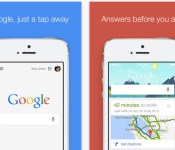
Google Search for iOS gets smarter with conversational voice search

Google’s just updated its search app on iOS, and in doing so it’s made the voice search feature much more useful. With Google Search version 4.0, using voice becomes conversational — you can ask follow-up questions in addition to simple queries like, “What’s the weather?” Once you know it will be sunny with a high of 95 tomorrow, you can ask Google “How about this weekend?” and get more info. As Google’s voice assistant competes with Apple’s Siri and Microsoft’s Cortana, more sophisticated, context-specific features like this are definitely important.
Better voice search is only part of the equation, though; the app update also brings more advanced Google Now integration, which means you’ll see articles from your favorite news sources, among other things. You’ll also get information related to your upcoming trip itineraries, such as a list of the best beaches in San Diego based on a recently emailed boarding pass. Oh, and the app update offers one special Easter egg for cricket fans: you’ll now see cards for the sport in Google Now. Download the latest version of Google Search via the source link below.
Via: 9to5Mac
Source: Google Search (iTunes)

Spotify finally adds Android and iOS staples to its Windows Phone app

Windows Phone users sometimes get left behind when it comes to new apps and freshly updated software. Unfortunately, Spotify is no exception. Today, the music streaming service finally added three core features to the WP offering that have long been key pieces for Android and iOS — ones that it promised back in February, in fact. Browse, Discover and Radio sections are now included in version 3.0, allowing you to hunt for tracks by mood, easily access new releases, create Pandora-like stations and more, all from the comfort of your handset’s touchscreen. In addition to the add-ons, a tweaked interface is the app’s first since it launched back in 2011, but it’s still a far cry from the new coat of paint that’s been applied elsewhere. Let’s hope this bit of attention paid to Windows Phone is a sign of things to come, especially in terms of adding the service’s new features as they arrive.
Source: Spotify, Windows Phone Store

Windows Store now helps you find apps faster, even if they’re for your phone

Although Windows 8.1′s store has a healthy stock of apps, actually finding those apps has been a pain at times. Much of the store’s interface has been hidden, and it hasn’t always been clear where to go if you’re just getting started. Starting today, it’s considerably easier to get around: Microsoft is pushing out a Windows Store update that puts more content front and center. The navigation bar is now a permanent fixture on the screen, and points you to popular areas like the categories and top app charts. You’ll also see themed collections (such as music apps) and multiple featured selections right on the first store page.
The improved shop takes better advantage of Windows’ increasing cross-platform app support, too. Developers can link their desktop software to its Windows Phone equivalent, making it clear that you’ll get both titles — handy if you didn’t realize that there was a pocket-sized version of a hot new release. The store tweaks are rolling out gradually to Windows users, so don’t be dismayed if you don’t see the new portal right away. However, the wait might be worth it if it helps you discover a hidden gem or two.
Filed under: Internet, Software, Microsoft
Via: WPCentral
Source: Windows Experience Blog

Plex for Android updates and brings in automatic photo backup Support
Plex is one of our favorite media streaming server applications available. Sure, there are plenty of others out there, but the Plex app, the support and the updates that Plex works to bring keeps them on our top favorite must haves list. Today Plex has started rolling out another update to the Android app that is sure be welcomed by the thousands out there that use it. The new update adds in an auto backup option for your camera photos.
 This is pretty great for a number of reasons, mainly because they are backing up to your personal storage on your server vs some cloud somewhere. I have yet to give it a whirl, but I also imagine that it also means you can view those photos through Chromecast as well.
If you don’t have Plex yet, it is a pretty simple app to use and understand. The real question you will need to ask yourself is if you want to buy the app or sign up for a Plex Pass subscription. Personally, a Plex Pass subscription is the way to go in my book, especially since this feature requires Plex Pass to use, for now. Hit the link below to go grab the update, or to learn about it for the first time.
Plex for Android on the Play Store
//<![CDATA[
ord = window.ord || Math.floor(Math.random()*1E16);
document.write('’);
//]]>

The Boyfriend Log merges data obsession with your love life

If we can log our exercise and eating data to get recommendations on how to improve our health, who’s to say we can’t apply the same concept to our love life? After all, with every day comes 1,440 minutes in which your relationship will live, breath and — gasp — change. Sometimes those fluctuations can be a lot to digest, and an app called The Boyfriend Log is here to help. Currently available on iOS, it does exactly what you’d think: monitor satisfaction with your S.O. on a day-to-day basis, showing you mood patterns to help you decide whether or not you’ve found “the one.”
With The Boyfriend Log, you answer the question “How was your relationship today?” with one of several color-coded responses, including romantic, flat, sad, happy and angry. A calendar view lets you see which moods are the most predominant; a lot of blue days might mean you have some reevaluating to do. If you’re dating multiple people at once, comparing your calendars for each suitor could provide some additional clarity. According to the app’s website, you might even use the data as a jumping-off point for a “loving, truthful discussion about what’s really going on.”
Hey, if it helps you to keep a diary of your relationship’s ups and downs, more power to you. And, interestingly, one of the App Store reviewers notes that she’s used it to rate her success at work each day. (Talk about dating yourself!) That said, not every boyfriend (or girlfriend) would be thrilled to learn they’re being treated like the subject of a study. And while the app is protected by a PIN of your choosing, if your partner does crack the code, you could no longer have a relationship to analyze.
Filed under: Software

