


Google’s new Outlook plugin lets you start video Hangouts with coworkers

Filed under: Internet, Software, Microsoft, Google
Via: Android Central
Source: Google Enterprise (G+), Google Support

Google Hangouts Plugin Makes Its Way to Microsoft Outlook, Makes Joining and Scheduling Hangouts Easier

Say what you will about Microsoft and Outlook, but the reality of it is that a great number of companies use Microsoft Office, Office and Outlook to conduct business everyday. That doesn’t mean that they don’t take advantage of Google services too. Today Google Enterprise has made an announcement for a new plugin for Microsoft Outlook that will allow you to join or schedule a hangout directly through Outlook Mail and Calendar. Google provides a good example of this:
For example, if you’re deploying Chromebox for meetings, now you don’t have to stop using Microsoft Outlook® to schedule Hangout video calls. Simply download the plugin and you’ll be ready to join the conversation.
This is pretty great news for employees who use Google Hangouts for meetings but have to toggle back and forth for scheduling and such. You will need to download and install the Hangouts Plugin for Outlook to your Windows PC to get it all rolling. Once installed you will see a nifty little icon that will allow you to make it all possible.
You might end up needing permission from IT to get this all rolling, so be sure to check before you go installing things to your work PC. Head over to the Google Support page to dive in a little more so you can take it to work on Monday and be an expert.
//<![CDATA[
ord = window.ord || Math.floor(Math.random()*1E16);
document.write('’);
//]]>

T-Mobile HTC One M8 OTA Begins Today, Improved Battery life Extreme Power Savings and More
T-Mobile has begun pushing out an OTA today for their HTC One M8. The update offers up a version number of 1.57.531.7and weighs in at 229.27MBs. The update information provided at the time of the OTA was pretty lackluster as it only offered up “System enhancement.”
 A little digging I located the the software update on T-Mobile’s Support page. As expected, this brings int the Extreme Power Savings function. It also states that it improves battery life, audio quality and Wi-Fi performance. With the file size being 1/3 or so of what a full Android OS version update is, it would seem that they included and fixed a ton of stuff.
T-Mobile offers up the typical prerquisites like 50% battery, Wi-Fi connection and that the device software not be rooted. All the details, nothing else really, can be found at the T-Mobile HTC One M8 support page.
//<![CDATA[
ord = window.ord || Math.floor(Math.random()*1E16);
document.write('’);
//]]>

3D scanner helps one artist remix Renaissance art

Some of the world’s oldest art is getting a bit of a facelift. Brooklyn artist Barry X Ball has developed a way to recreate Renaissance-era sculptures using 3D scanning. Rather than printing duplicates, Ball takes the statues “to the next level,” by adding on to them. In some cases that means finishing details in the way he thinks the original artist intended, and in others he’s looking to make something completely new. For instance, in one of his sculptures he replaced the roughed out head of Jesus in a famous Michelangelo sculpture with the original artist’s head, a tribute to him since he died a few days after carving it.
Each piece starts with a scan made up of 400 individual 3D pictures of a particular work. Ball tweaks the computer file, meticulously adds on to it and then has it printed out of stone or marble. That’s a lot of steps, however, his work is far from over. The intricate printing process for a sculpture could take up to a month to complete. Once it’s done, the team then carves smaller details into the final product by hand (no small task), completing the piece. The end result is a new 21st century masterpiece our ancestors might try to recreate in another 500 years.
Filed under: Peripherals, Software, Alt
Via: Gizmodo
Source: Barry X Ball

Titanfall’s second-screen app is neat, if you ever remember to look at it

The companion app for Xbox One’s Titanfall is finally available, free of charge, over at the the App Store and Play store. Ironically, it offers a second-screen gaming experience without any need for Microsoft’s Smartglass app, which was originally meant to be a hub for this sort of thing. Anyway, we’ve just whiled away two hours some time with the Android version and it all seems to work pretty smoothly — although it hasn’t done anything much for our K/D ratios.
We loaded the up the hefty (612MB) app and, for some reason, had to inform it the Xbox One’s IP address (accessed via Settings — Network — Advanced Settings), because it wasn’t automatically detected on the network. Once connected, the main screen on your mobile device offers access to a wiki about the game and to your all-important personal stats. It’s only when you load up the game on your console that the second-screen function kicks in, showing a zoom-able live map of the entire arena, including the names of players on your squad.

EA Mobile reckons the extra info on this map could give second-screen users an advantage, but for this writer it was more of a distraction, and it was quickly forgotten about in the midst of an overriding desire to not get killed in the “real” game playing out on the main screen. If you have any tips on how to actually make use of this thing, do us all a favor and them in the comments, otherwise we’ll just have to hold out for compelling second-screen app for a slower-paced game.
Filed under: Cellphones, Gaming, Tablets, Software, Mobile, Microsoft
Source: Google Play, Apple App Store
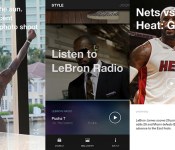
My week with LeBron… the app

LeBron James is the best NBA player… to follow on Instagram. Whether you’re a superfan of the Miami Heat forward or not, scrolling through the carefully curated mix of courtside action, Lanvin outfits and video tributes to Dwayne “The Rock” Johnson is pretty freaking endearing. He — with some help from his publicist, no doubt — is a master at communicating with us normals through social media, and even as someone who isn’t rooting for Miami this season, I’ve missed his updates since they stopped around the beginning of the playoffs. It’s not like I need to suffer major withdrawals, though; Samsung has an exclusive LeBron app with original content to keep Galaxy phone users attuned to his every move and outfit change.
I spent this past week, in which the Heat handily defeated the Brooklyn Nets, checking this app several times a day. I didn’t exactly have a good time. For one, I had to trade my non-Samsung phone for a Galaxy Note II to even get access to the app, and then there’s the fact that checking updates across the app’s four sections becomes pretty time-consuming. Still, I ended up fascinated — and also very confused.
So why does this app exist, you ask? Just because.
So why does this app exist, you ask? Just because. There’s no real point — for the user, at least — other than to look at pretty things and appreciate how awesome this guy’s life is. That means no links for buying LeBron’s sneakers or anything like that — it’s just perfect photo after perfect photo. There’s also no option to share posts on Twitter or Facebook, so it’s not intended to be a social experience. Maybe that’s meant to make the updates feel more intimate; look at you, lucky Galaxy S5 owner, getting exclusive access to your personal hero.

I expected celebrity cameos and selfies on private jets, but the LeBron app is more about video from recent games and behind-the-scenes photos of James at Samsung photo shoots. Best of all, if you want to watch game highlights, you’ll be treated to some of the highest-quality video you’ll ever see on your phone. Samsung clearly optimized clips for the app, and they look amazing.
The “Style” and “Journey” sections of the LeBron app do give you a look at pregame meals and snapshots with captions such as “Sunday reading,” but Samsung’s heavy hand feels very apparent in the presentation of these. The upside is that the app looks fantastic, especially compared to the official Miami Heat application with its omnipresent, pixelated TigerDirect ads.
When asked exactly how involved James is with the daily updates, a Samsung rep made it clear that the app is a team effort.
When asked exactly how involved James is with the daily updates, a Samsung rep made it clear that the app is a team effort. (And the company really doesn’t want any one person taking credit; the spokesperson wouldn’t even let me print his or her name.) “While LeBron is focusing all of his energy on the playoffs, Samsung is working closely with his team and the NBA to capture exclusive content,” he (or she) said. I confirmed that James is in charge of curating the radio feature, though, so you can listen to “HeadBand” by B.o.B and 2 Chainz knowing it has his stamp of approval.

The LeBron app does serve up some amusing stuff — you can pretty much eat vicariously through it, considering how many amazing photos of breakfast you’ll see — but it’s basically a publicist in app form. Samsung’s version of LeBron is a lot less entertaining than the one offered through the hashtag-heavy Instagram account that’s clearly run by him. I’m happily removing this app, switching back to my favorite LG phone and patting myself on the back for not being an obsessive celebrity stalker.
Filed under: Software, Samsung
Source: LeBron (Google Play)

Quest Visual, The Minds Behind Word Lens, Has Been Picked Up By Google, All Launguage Packs Free
 I remember when Word Lens was first starting out and how amazingly brilliant I thought it was at the time. After a quick search in our history I found that it was clear back in January of 2011 when the app was first demoed. It didn’t make its way to Android until July of 2012. Seem like ages ago. In case you are lost, Word lens is an augmented reality app that take text viewed on your screen through your devices camera and translates it to and from different languages visually without user input. The app has done quite well for itself over the years with a number of updates, additions of languages and UI tweaks. It would seem that they have finally caught the attention of Google and the developer company behind the app, Quest Visual, has been scooped up.
A statement that was discovered on the company’s website by AndroidPolice is as follows:
With Word Lens, we’ve seen the beginnings of what’s possible when we harness the power of mobile devices to “see the world in your language.”
By joining Google, we can incorporate Quest Visual’s technology into Google Translate’s broad language coverage and translation capabilities in the future.
As a thank you to everybody who supported us on our journey, we’ve made both the app and the language packs free to download for a limited time while we transition to Google.
We’re looking forward to continuing our work at Google – stay tuned!
Sounds pretty good to me. I mean, why spend the time and money to develop a similar application when you can just buy people that have already done it? What does this mean though? Well, for now if you download the app you get all the language packs for free. The packs, if memory serves, were $4.99 each in the past. So it is a huge savings. While many of us might not need them all, you will have them. The statement clearly indicates that at some point in time their work will make its way into Google Translate. Google Translate has already gone under a ton of work and offers camera translations, but not real time live translations like Word Lens. Near as I can tell, I haven’t used Google Translate in a while, the visual side requires relaying information to Google thus needing a data connection where as Word lens is offline.
It all seems like it could be a win win for Google, Word Lens and consumers who need both online and offline translations in a variety of formats in one simple app. For now though, you can grab the Word Lens app along with the suite of languages for completely free. never hurts to have it around and, really, why not?
//<![CDATA[
ord = window.ord || Math.floor(Math.random()*1E16);
document.write('’);
//]]>

Google Now gets billing integration, reminds you when payment is due

Google Now, with cards displaying info for your upcoming flights and shipment tracking, is becoming more and more useful. The latest improvement to Mountain View’s virtual assistant integrates billing reminders based on your emails. A tipster sent screens of the new feature to Android Police, though it doesn’t look like billing has rolled out to all users yet. If you do see it on your phone, you’ll only get basic information about your accounts, such as when a bill is due and how much you owe.
Based on a teardown of the Google Now APK, which reveals other options such as viewing minimum payments and previous balances, we’ll probably see new billing features added to Google Now at the time. Most helpful would be an option to head to your account via a “Pay now” link, and there’s no reason to think Google wouldn’t add in such functionality. Some billing providers have deeper integration than others, though, so the amount of information you’ll see will vary.
To check if you’ve received the update, head to the “Everything Else” section in Google Now. The service will ask you if you’re interested in information in bills based on messages in your Gmail. And let us know if you’re seeing the feature by commenting below.
Via: Android Police

The Otto is an adorable point-and-shoot for making GIFs

It looks like a baby’s first camera, but the blue and black plastic Otto camera is more than just a toy-like point-and-shoot. It’s a camera made specifically with the intention of creating instant GIFs — you know, these things? — and it’s pretty delightful. It operates a lot like Vine or Instagram video, in that you simply turn the crank (yes, really) to record. When you’re done capturing silliness, you push the GIF directly to your phone over a shared WiFi network. Easy! There’s a video of the Otto in action just below, as well as a pretty great GIF with Shaquille O’Neal looking sassy. Can you resist?

Filed under: Cameras, Software
Source: Kickstarter

HTC One M7 (2013) Unlocked and Developer Editions Getting Sense 6 Update
A new round of updates is being pushed out by HTC today. The Unlocked and Developer Edition versions of last years HTC One M7, is seeing an update that tosses on the more recent Sense 6 software. Along with Sense 6 you can also expect to find personalized font styles, new camera and gallery interface, BlinkFeed improvements, and the Extreme Power Savings mode.
 The update will weigh in at 668MB’s so you will want to make sure you have over 50% battery life, a solid Wi-Fi connection and a little time to kill while it downloads and installs. For everyone else in the U.S. with a carrier branded version, kick back and be jealous for now. They are still listed as being in the ‘Certification’ stage. At least you know it will be coming, eventually. President of HTC America, Jason Mackenzie, seems to be making god on his word when he tweeted out in April that the HTC One would get Sense 6 in May though. Keep it up HTC, you are making users happy.
Source: AndroidCentral
//<![CDATA[
ord = window.ord || Math.floor(Math.random()*1E16);
document.write('’);
//]]>

