


Android Developers share their favourite Android Wear Notifications
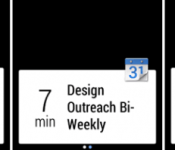
 The wearable industry took an interesting turn when Google announced that it was launching a new software OS specifically for wearable devices called Android Wear. Since then, we’ve been enthralled at the possibility of having a more Android-like experience on smartwatches with Motorola and LG promising their own devices in the near future. What we haven’t seen that much of yet are the Android Wear notifications, it looks like the Android Developers’ Timothy Jordan is now happy to show off some of his favourites.
 In screenshots presumably from Android Wear devices (or a developer’s emulator), we see different apps pushing their notifications, which are natively supported by Android Wear, to the wearable device. A sneak peek of notifications from Nest, Calendar, Clash of Clans and music players look well within Android Wear’s abilities, and it will be exciting to see what else the wearable OS is capable of in the near future.
What do you think about the Android Wear notifications? Are you liking what you see so far? Let us know your opinion in the comments below.
//<![CDATA[
ord = window.ord || Math.floor(Math.random()*1E16);
document.write('’);
//]]>
Google employee shows what to expect from Android Wear notifications

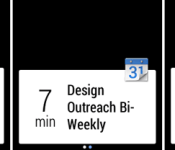
There’s plenty we know about Android Wear already: It’s Google’s software platform for wearables; it’s designed to allow you to interact with your phone and with Google Now straight from your wrist; and numerous manufacturers, from HTC to Motorola, have Wear-powered smartwatches coming in the near future. Now there’s even more we can glean, thanks to increasing activity at Google’s developer hubs. For example, in-house developer advocate Timothy Jordan has just highlighted the three examples shown above as being some of his favorite Wear notifications so far — including a slightly panic-inducing warning from a Nest thermostat. (Don’t worry, a follow-up message reassures everybody that the smoke is clearing.)

There’s also a regular calendar notification on show, a message from a game (Clash of Clans), and what looks to be the playback of a StarShipSofa science fiction podcast. The origin of each notification is identified by an icon in the top right corner, or by a background image. Meanwhile, although these particular examples are all short enough to fit on a single screen, Google has also recently demonstrated how longer notifications can spread over multiple screen using right-to-left swipes. In fact, Mountain View insists that it only requires a tiny bit of code to add this functionality to the notification system of an existing Android smartphone app, which hopefully means it’ll be easy for third-party app developers to make their full-length notifications work on Wear.
Filed under: Cellphones, Wearables, Software, Mobile, Google

Google Camera Moves to v2.2 and Returns the Timer Plus More [APK Download]
Happy Google app update Wednesday everyone. While in the past we have seen a number of Google apps update mid-week, it would seem Google has slowed things down a bit. Today we have only seen the Google Camera app and the Google Chrome app update. We will get to the Chrome update a bit later. The Google Camera app has been moved to v2.2.024. With the full version number bump we find a feature being returned along with a few nice new additions.


 In the updated app you find the return of the picture timer, offering up 3 and 10 second options. You can see the small stop watch in the lower part of the screen on the left. Simply tap it to change he timer settings. There is a new splash screen for cropping selections and in panorama you have a new fisheye and wide angle set of choices. Android Police also makes mention that you also have an option of full frame or cropped pictures. I don’t remember there being a vertical and horizontal choice in the previous version either, but I could be wrong.


 If you are hankering for the update and haven’t seen it hit your device just yet, you can download the APK and install it as normal through Gappsearly via the link below. Don’t forget though, your device needs to be sporting Android 4.4+ in order for it to install.
Google Camera v2.2 APK download


//<![CDATA[
ord = window.ord || Math.floor(Math.random()*1E16);
document.write('’);
//]]>

AllCast now sends your phone’s media to anything with a Chrome browser

For Koushik Dutta, it’s not enough that his AllCast app can stream an Android device’s content to set-top boxes and other mobile gear; he now has it streaming to PCs, too. His new AllCast Receiver for Chrome lets you send photos, videos and your device screen to anything with a Chrome web browser on the local network. If you want to use your Chromebook as a makeshift TV, you can. It’s not quite as slick as sharing content between native apps, though. You can’t use the wireless headset feature with video, and screen mirroring isn’t seamless. With that said, this is still one of the easier ways put your phone’s media collection on a bigger display.
Filed under: Cellphones, Home Entertainment, Software, HD, Mobile
Source: Chrome Web Store
Theft Alerts Introduced by Lookout to Help Prevent Phone Thievery; Well, at Least Recover Some Devices
According to Lookout, 3.1 million Americans have their devices stolen every year. I suppose I am lucky that in all my years of having a phone, any kind of phone, I have never had one stolen. Broke a few, but never stolen or lost. The fact of the matter is that it happens a lot more than I think it does. There are plenty of apps out there to help slow the numbers and thwart thieves. Heck, Android Device Manager isn’t to terrible at keeping track of your phone and then there is Ceberus who does quite a bit more. Another one is Lookout Mobile. They have announced an update to their app that will help catch the crook more so than help prevent them from high-jacking your device in the first place.
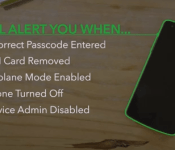
 With the update there are 5 Theft Alerts that can be triggered. These are the 5 most common things a thief would do after snatching your device.
- Entering the wrong password
- Removing the SIM card
- Turning on Airplane Mode
- Powering off the device
- Removing Lookout as a device administrator
If any of those things happen, Lookout will do a number of things. First it will take a snapshot with the camera. Which will only matter if the device is facing the culprit when they enter the wrong password, turn on Airplane mode or possibly power down the device. It will also pull the exact GPS location of the device. Then it will email them both to you.
Can’t blame them for trying, even if they are a little behind. Considering that lookout is a pretty standard install on device from carriers like T-Mobile, I am sure it will benefit the more standard end-user. That is assuming they choose to sign-up for a premium account for either $2.99 a month or $29.99 for a year. With the new update out Lookout is going to let current premium members have access to it now for the next week, that just means that free users won’t have a chance to try it out just yet. Once the week ends though, Lookout will be offering up free users a chance to give it a whirl through September 30th before being asked to sign up.
1.
2.
//<![CDATA[
ord = window.ord || Math.floor(Math.random()*1E16);
document.write('’);
//]]>

Apple acquires Beats Electronics for $3 billion

Apple is making things official: Dr. Dre’s Beats Electronics belongs to Cupertino, and it cost them $3 billion. Rumors had circulated that CEO Tim Cook was interested in nabbing up the audio accessory and music-streaming outfit, corroborated by a beer-drenched video in which Dre himself declared that he had become “the first billionaire in hip-hop.” And now, after Financial Times had already let the cat out of the bag, we have Apple’s side of the story. As expected, co-founders Jimmy Iovine and Dr. Dre (Andre Young) will join Cook and VP of Internet Software and Services Eddy Cue, but their exact job titles haven’t been revealed just yet.
Despite rumors that Apple was only interested in Beats Music in an effort to boost a decline in iTunes numbers, the deal includes both the hardware and the streaming software sectors of Dr. Dre’s business. And it’s Apple’s largest purchase ever. “Music is such an important part of all of our lives and holds a special place within our hearts at Apple,” notes Cook. “That’s why we have kept investing in music and are bringing together these extraordinary teams so we can continue to create the most innovative music products and services in the world.” That doesn’t rule out selling the headphone and speaker portion of the acquisition down the road, but it seems that for now, the folks at Apple are interested in the whole lot.
“I’ve always known in my heart that Beats belonged with Apple,” said Iovine, who’s also Beats’ CEO. “The idea when we started the company was inspired by Apple’s unmatched ability to marry culture and technology. Apple’s deep commitment to music fans, artists, songwriters and the music industry is something special.” Of course, the purchase — which includes $2.6 billion in cash and $400 million in stock — is subject to the requisite regulatory approvals, but it’s expected to close by late September.
“I’ve always known in my heart that Beats belonged with Apple.”
As you might expect, the Beats duo will be tasked with the next wave of Apple’s music products, but in an interview with The New York Times, Cook didn’t offer up any details. “They’re going to be coming up with ways of features that blow your mind,” he said in the interview, “and products you haven’t thought of yet, and seeing around the next corner to articulate the way to take music to an even higher level than it is now.” While Apple was once at the help of the digital music age, it has lost considerable momentum to services like Spotify, Rdio and Pandora despite. For now, it seems that Beats and Apple will keep their products separate until those new projects are complete, as the Cupertino-based outfit isn’t sharing any preliminary plans for any hardware that it will release or exactly how a subscription service may factor into its existing audio efforts.
To celebrate, Beats Music has already updated its iOS app, dropping the cost of an annual subscription to $100 (a $20 discount) and extending the free trial window to two weeks. What’s more, Tim Cook has confirmed to Financial Times that the streaming service will still be available to folks on Android and Windows Phone after the deal goes through.
[Photo credit: Andrew Burton/Getty Images]
Filed under: Portable Audio/Video, Software, Apple
Source: Apple, Beats Electronics
Verizon and Sprint HTC One M7′s Picking up Sense 6 Updates
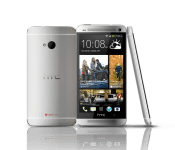
 Looks like a mid-week OTA is underway for the HTC One M7 on two carriers. As of today, Sprint HTC One M7 owners should start to see an update that brings in Sense 6 along with updates to Blinkfeed, the camera and gallery apps and TV app. Since you guys got KitKat back in January, you won’t see anything new in terms of Android version jumps. This update will carry along with it a version number of 5.03.651.3.
On big red, the update is similar. bringing in Sense 6.0 and the other things mentioned above. You guys will also have some W-Fi connectivity issues resolved, ISIS Wallet payments working and Emergency Alerts preloaded. For you guys, you will be looking for version number 4.10.605.3 with a baseband of 1.13.41.0421.
As for both carriers updates, you can expect it to roll out in stages and take a little time to every device out there. You can head into Settings > Phone updates > Check for updates to see if it ready for you. If it is, be sure you have over 50% battery life, a solid Wi-Fi connection and a little time to download and install it.
Source: Sprint / Verizon Via: AndroidPolice / Droid-Life
//<![CDATA[
ord = window.ord || Math.floor(Math.random()*1E16);
document.write('’);
//]]>

Old console, new tricks: Getting the most out of your Wii

It’s not a great time to be a Nintendo fan. Forecasts are falling; profits are down; and Nintendo’s new console just can’t bottle the lightning its predecessor left behind. The faithful may believe that the Wii U will pull through (after all, Mario Kart 8 and Super Smash Bros. are just around the corner), but even diehard fans need something to play in the meantime. Look backward, friends: The Nintendo Wii still has some life in it. Dust off your Wiimotes and don your protective jackets — we’ve found four ways to revitalize your old Wii.
Throw out your composite cables

Remember that standard definition video cable you found in the Wii’s retail box? Toss that out: It’s junk. The Wii isn’t a high-def game console, but that’s no reason to settle for outmoded video input. Upgrading to component cables makes games noticeably sharper; just make sure you hop into your Wii’s settings menu to enable 480p output.
Protip: If your TV is too hip for component cables, search out the Wii2HDMI dongle. It does exactly what it says it does: drags your Wii into the modern paradigm of home theater cabling.
Buy better controllers

Speaking of substandard equipment that came in the box, we need to talk about the Wii Remote. This white wand may have ushered in a new era of motion-controlled gaming, but it’s actually the least advanced motion controller of its generation. Nintendo eventually tried to fix this with the Wii Motion Plus, an uncomfortable gyroscope attachment that hung awkwardly from the controller’s expansion port. Toss these out too — Nintendo’s newer Wiimotes come with the extra sensor baked in. They’re compatible with the Wii U, too, should you ever want to upgrade.
Protip: If you have even a passing interest in Nintendo’s Virtual Console, take a look at the Classic Controller Pro. It doesn’t have any fancy motion controls, but it’s compatible with every classic on the Wii Shop Channel.
Leverage the library

The Wii U may be facing a drought of AAA releases, but its predecessor was flush with them. The Wii has a killer collection of first-party titles, including two Legend of Zelda games, both Super Mario Galaxy titles, the fantastic Metroid Prime Trilogy and even the return of the Donkey Kong Country franchise. Not good enough? There’s a wide assortment of third-party games to choose from, too: Games like House of the Dead: Overkill, Silent Hill: Shattered Memories, Okami, A Boy and his Blob and Sonic Colors have plenty to offer, and that’s just the tip of the iceberg. If you neglected your Wii in favor of the previous generation’s powerhouses, now’s a great time to see what you missed.
Protip: It’s no secret that the Wii is a beefed-up GameCube. Find yourself a wired controller and memory card and pilfer that library too.
Hack your Wii

Still not enough? You’ve got one more avenue of Wii resuscitation, and it’s a biggie: homebrew. The Nintendo Wii is probably the most hackable game console ever made. With little more than an SD card, the internet and some moxie, the old system can do, well, almost anything. The homebrew community has created USB loaders, classic game emulators, cheat engines, DVD players and even Wii-specific Linux distributions.
Setting it up is easy, too: The same LetterBomb trick that unlocked the Wii in 2011 still works today. After that, it’s as simple as loading a few apps onto a SD card and calling up the Homebrew Channel. Not sure what apps to load? Check out an application called Homebrew Browser (not to be confused with the aforementioned channel) — it serves as a makeshift marketplace for the console, maintaining a downloadable list of popular games, apps and emulators.
Protip: Now that Nintendo has shuttered its multiplayer servers, Homebrew servers are the only way to play Wii games online. Check it out here.
[Image credit: hermitsmoores/Flickr (composite cables); Radharc Images/Alamy (Wii game cases)]
Filed under: Gaming, Peripherals, Software, HD, Nintendo

Facebook pokes the EU to help push through its WhatsApp purchase

Facebook’s $19 billion acquisition of WhatsApp is a done deal in the US, but in Europe, it still has a few more hoops to jump through. In a bid to move things along, the Wall Street Journal reports that the social networking giant is taking the unusual step of actively seeking an investigation into the deal by the European Commission. As it stands, the company will be probed by regulators across Europe, but if the Commission gets involved, Facebook would no longer need to gain approval from each European member state. That could possibly push the deal through a little bit faster. Facebook’s decision to go direct likely stems from opposition it currently faces from European carriers, which are worried that the social network would dominate the text and photo messaging market (read: kill SMS revenues). For the Commission to get involved, Facebook needs proof that it’s already under review in at least three EU countries. It isn’t clear if that’s the case, but if it is, a Facebook-owned WhatsApp would likely become a reality a lot sooner than is currently expected.
Filed under: Internet, Software, Facebook
Source: The Wall Street Journal

Google uses self-aware datacenters to cut the cost of searching

Google spits out about 4 million search results per minute (among many other duties), which consumes a lot of energy. According to a recent blog, it cut its electrical bills significantly by applying the same kind of machine learning used in speech recognition and other consumer applications. A data center engineer on a 20 percent project plotted environmental factors like outside air temperature, IT load and other server-related factors. He then developed a neural network that could see the “underlying story” in the data, predicting loads 99.6 percent of the time. With a bit more work, Mountain View managed to eke out significant savings by varying cooling and other factors. It also published a white paper to share the info with other data centers and prove once again that humans are redundant.
Filed under: Internet, Software, Google
Source: Google

