



MIT project transforms selfies into pro-style portraits

As it stands, you can spice up your selfies with Instagram filters and other edits before beaming to the interwebs. But what about making a truly compelling smartphone self-portrait? Well, a team of researchers from MIT — alongside folks from Adobe and the University of Virginia — created an algorithm that could allow you to accurately apply the stylings of critically-acclaimed portrait photographers to everyday self-made snapshots. According to MIT grad student YiChang Shih, “style transfer” from the likes of Instagram and other filter-applying apps isn’t well-suited for complementing facial features. Instead, this software uses existing works (Richard Avedon, Diane Arbus, and Martin Schoeller are cited as examples) and makes an appropriate match with the captured image. Eyes, beard, skin and lighting are all compared to make an ideal pairing before applying the artistic details. “You can’t get stylizations that are this strong with those kinds of filters,” says Adobe’s Robert Bailey. “You can take a photo that has relatively flat lighting and bring out portrait-style pro lighting on it and remap the highlights as well.”
Filed under: Science, Software, Mobile
Via: TechCrunch
Source: MIT

iTunes Radio eyes local reach with broadcast content and focused ads

The Beats Music purchase may help Apple compete with Spotify, but iTunes Radio remains focused squarely on Pandora. According to a report from The Information, Apple is said to be working on local advertising while serving up content beyond the scope of musical selections with a hand from broadcast stations. iTunes Radio has yet to take off, and adding items like talk radio and more could give the platform a major boost. Items like ESPN’s daily slate and your favorite team’s hometown coverage are but a couple of examples that could make for a compelling station menu. There’s also the ads. They make money. If the folks in Cupertino can get local — or even regional — content, advertisers in those markets may be more apt to spend promotional dollars there. iHeartRadio has shown the interest in streaming broadcast programming with its apps available on mobile platforms and preinstalled in a number of automobiles. With CarPlay on the way, an expansion of iTunes Radio makes the upcoming in-car offering a much more enticing addition.
Filed under: Internet, Software, Apple
Source: The Information

GO Launcher EX moves to v5 with Complete Overhaul and Prime for Free
 GO Launcher EX has been around for quite a while. While the apps saturation is pretty heavy, 200 million plus users, there are plenty out there that have never seen it, used it or heard of it. Today is your lucky day as the GO Launcher Dev Team has released a substantial update to the home launcher replacement that brings it to version 5.0.
 In 5.0 they have started from scratch and built the app from the ground up all over again. That is a great approach when it comes time to bring a whole new version, look and feel to a long standing app. The updated app offers up a new flat style UI, full screen folders with smart card, GO panels, menu redesign and sub-menu modules, simplified app drawer and enhanced accuracy of the auto-folders. That is just what they have listed on the Play Store for what’s new.


 It certainly looks like a great new design to me. To celebrate the launch the GO Launcher Dev Team is kicking out the Prime version of the launcher for free from now through June 1st. Prime is normally $5.99, so this is a deal you might want to take advantage of really quickly. With Prime the ads are removed, you get 6+ more transitions, more gestures and a few other things that make the purchase a good idea. To pick up prime you just need to install the free version of GO Launcher EX. Once installed, head to the Menu > Preferences > About GO launcher EX > Enter Activation Code. You will have two code words to choose from. It doesn’t seem to matter which one you use as they both work. The activation codes are “appsales” and “appszoom“, without the quotation marks of course. hit the link below to go grab the new and improved GO Launcher EX and grab the Prime version while you are at it. Let us know what you think of their update.
//<![CDATA[
ord = window.ord || Math.floor(Math.random()*1E16);
document.write('’);
//]]>
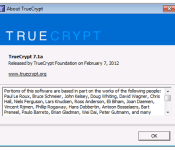
TrueCrypt development stopped amid a cloud of mystery

Last Wednesday the SourceForge page for popular open-source disk encryption software TrueCrypt started recommending the use of BitLocker on Windows instead. Visitors were told that the application was “not secure” anymore. Of course, social networks exploded with speculation, with people claiming the page was hacked or that the government, using a National Security Letter, might be requesting “changes” on the software. The truth is much more mundane: a developer of TrueCrypt confirmed to Reuters that it had been shut down out of boredom. Security researcher Steve Gibson said that after 10 years of work, the developers simply got tired of the project.
People who have used TrueCrypt over the years are baffled by the sudden stop in development and claims of insecurity. No known security holes exist, but the folks behind the initiative feel since the project won’t be updated anymore, it’s better find an alternative. At this point, if a bug is found, it’s safe to assume it will not be patched — no matter how serious it is.
All of this went down in the midst of an independent audit to ferret out potential vulnerabilities in TrueCrypt. The good news is that the audit will continue unabated. And, if legal issues with the license can be sorted, a new team will take over development instead of creating a “fork,” or a separate project based on the same core code. Unfortunately, the current license that TrueCrypt is distributed under forbids the creation of a commercially available fork. Matthew Green, a cryptography professor from Johns Hopkins University, is leading the effort to restart development on TrueCrypt. He doesn’t want to commit to the creation of a new version just yet, though work should continue once (and if) the licensing issues are resolved.
If you’re currently using TrueCrypt, you probably shouldn’t panic. We’re not exactly security experts, but its’ probably safe to continue using it until some security issues are found. Though, you should probably start looking for a backup plan.
Filed under: Software
Source: Reuters
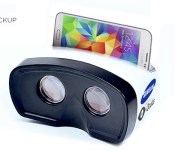
Samsung is working with Oculus on a media-focused VR headset

Last week we told you about Samsung’s unannounced virtual reality headset: a peripheral that enables VR interaction for flagship phones from the world’s largest phone manufacturer. This week we’ve got far more details. First things first, Samsung’s headset is the fruit of a collaboration with Oculus VR, the Facebook-owned virtual reality startup that both literally and figuratively kickstarted the current wave of VR products.
Oculus is handling the software-side of the product, while Samsung handles the hardware. The deal is a swap: Oculus gives Samsung early access to its mobile software development kit and helps develop user interface software, while Samsung gives Oculus early access to its next-gen OLED screens. And yes, Oculus is still making its own, gaming-focused, PC-based virtual reality headset; that’s why it needs next-gen, high-pixel density OLED screens from Samsung. Join us below for new details about the device itself, as well as more on the unlikely partnership between two tech giants.
THE PARTNERSHIP

Samsung wants to be first to market with a virtual reality headset, but it doesn’t want to invest the time and money that Oculus and Sony are. Oculus VR wants to create a high-quality virtual reality headset specifically for gaming, and it doesn’t want to rush one out. And thus, a convenient partnership is born between the two companies: Samsung makes the OLED screens that Oculus needs for its final product, Oculus makes the software that Samsung needs for its upcoming headset.
The partnership comes with both risks and rewards. On one hand, Samsung is a consumer electronics giant, and a company of that size investing in marketing and producing its own VR headset massively grows the medium. On the other hand, if it’s a bad product, it has the potential to poison the well — that is, it could be another Virtual Boy, thus making consumers even more apprehensive about VR as a medium.
We’re told by sources close to both companies that Samsung’s using an early form of Oculus’ mobile SDK — an exclusive use as part of the deal — developed in part by John Carmack. We were also told that the OLED screens that Oculus is getting as part of the deal are higher def than 1080p, and that the screens will also be used in at least some of Samsung’s next flagship phones. And this is where things get weird.
HARDWARE DIFFERENCES

Rather than having its own screen, Samsung’s VR headset uses your phone directly. It plugs in using an existing port on your phone (think: microUSB) and becomes the screen. The headset itself has built-in sensors — an accelerometer at very least — so any motion tracking functionality is offloaded from your phone’s processor.
The folks we spoke with who have dev kits are still running the headset on Galaxy S4 phones, and we’re told it’s a shockingly good experience. That said, the consumer device will run either a new version of the GS5 or potentially its successor — either way, it’ll be tweaked for optimal VR performance. The headset can be used with a paired game controller or as a standalone media device, navigated solely through motion and voice (we’ll discuss that more below).
Wait! Before you write it off forever as “one of those headsets that straps your phone to your face,” we’re told there are some pretty great benefits to using a mobile device. For one, the rear-facing camera allows for video passthrough. That’s to say, “You can see through the phone using the rear camera, which shows a video feed of the outside world to your eyes.” Pretty intense sounding, but a smart addition for making long-term use more realistic. While the latency is too great to make augmented reality applications possible, it’s a convenient way to pause whatever you’re doing and, say, have a sip of a tasty beverage.
There are also buttons on the unit itself. There are standard Android buttons — Home, Back, Recent Apps — as well as some extra stuff. It’s not clear what the other buttons are, but we’re told that none of them are used for interactivity. That could of course change by the final unit; all of this could, potentially, but this is the current state.
SOFTWARE

Pictured: Oculus Rift’s original dev kit with a Leap Motion attached
The dev kit runs a basic UI. You’re in an empty virtual 3D space, and you interact with various demos (floating objects) by nodding at them. Nod to select, basically. Don’t expect that form of interactivity to make it into the final product, though. We’re told that nodding isn’t a strong contender for the final software; voice, touch (tapping on the headset spikes the accelerometer, which can be used as a “click”), and just outright using a gamepad are all on the table.
At this stage, the UI/OS is still very early. Heck, Oculus’ mobile SDK is still very early, so the software it’s able to build isn’t close to a finished product. We were told about two different demos, neither of which involved interactivity. In one, you’re at the beach with jamming hippies. In another, you dive from a plane (which is said to be, “pretty fucking nerve-wracking”). In both instances, our sources say they were impressed with the device.
IT’S ALSO A MEDIA DEVICE
Finally, expect Samsung to tout this device as a media player as well. “But Ben,” you say, “There are very few media experiences for virtual reality headsets.” That’s a fact! Samsung’s apparently looking at its VR device as a head-mounted display as well (like Sony’s HMZ line). Gaming experiences are said to be pared down, and there’s no guarantee it’ll ship with a gamepad. This means that, while it’s a gaming device, and there are VR games in the works right now for Samsung’s headset, it’s intended for a much larger market than just the early adopters who’ll take a chance on VR. Both Samsung and Oculus are taking an interesting risk in partnering on this headset, and we’re looking forward to hearing more. Perhaps you’ve got one and want to tell us all about it? Please feel free to get in touch.
Oculus VR declined to comment for this story, and we haven’t heard back from Samsung.
Mockup artist: Daniel Cooper
Filed under: Cellphones, Displays, Gaming, Peripherals, Wearables, Software, HD, Mobile, Samsung

Samsung Galaxy Gear update switches it from Android to Tizen

When Samsung debuted its new line of Tizen-powered wearables, it looked like the original Galaxy Gear had been put on notice. Instead of leaving early adopters in the cold, the Korean smartphone maker has decided to make good on its promise to bring the wearable up to date — by switching it from Android over to its own OS. The update includes improvements to performance and battery life, a new standalone music player, customizable shortcuts, and voice-controlled camera commands. By installing the update, which at the moment is available as a manual download or via Samsung’s Kies software, you will lose any third-party tweaks or unsupported Android features that you’ve previously installed. However, you will gain many of the features present on the Gear 2 (except those dependent on additional sensors). Samsung hasn’t pushed an over-the-air update out yet, but that may not be a bad thing. It means some that may have accepted the update out of hand are less likely to make a decision they might regret later.
Filed under: Wearables, Software, Mobile, Samsung
Source: SamMobile

Google Maps brings terrain view back to Android for outdoorsy types

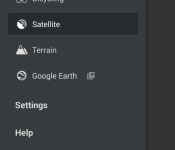
If you’re hoping to get a bit more help from Google Maps on your next trek through the wilderness, you may be in luck. Version 8.1.0 appears to be on the way, thanks to a peek at the APK from the folks over at XDA Developers, and it packs a handy terrain view option in the side menu. This selection offers 3D elevation details of the landscape with mountains and more — a useful tool for hikers, climbers and trail bikers. All told, this appears to be the major change as the app is said to hold over the existing features, aside from the addition for the great outdoors. Unfortunately, the new version isn’t available for download from the Play Store just yet, but those feeling particularly adventurous can sideload the update now.
[Image credit: MyLoupe/UIG via Getty Images]
Source: XDA Developers

NSA claims Snowden only sent one email questioning surveillance tactics

The man behind the biggest leak of United States government secrets in history, Edward Snowden, is having his reputation challenged by the very entity he sought to call out, the National Security Agency (NSA). According to the agency, only one email can be found which relates to him raising concerns internally about government surveillance overreach. That stands in stark contrast to what Snowden told reporters Glenn Greenwald and Laura Poitras in Hong Kong last summer, where he first detailed his history and the wealth of information he’d taken. “They would say ‘this isn’t your job,’ or you’d be told you don’t have enough information to make those kinds of judgments,” Snowden says in Greenwald’s recent book, No Place to Hide. “You’d basically be instructed not to worry about it.”
Specifically, the email released today by NSA allegedly shows Snowden asking for a hierarchical clarification. In what is said to be an email Snowden wrote in April 2013, he’s shown asking about the standing of executive orders (EOs) — directives ordered by the president which hold the “force and effect of law.” It’s fairly innocuous, but the revelation is intended to bring Snowden’s credibility into question. “If he lied about reporting issues to his bosses, what else did he lie about?”

The issue with this logic is we have no way of verifying whether Snowden recorded any other instances of flag-waving when employed by the Central Intelligence Agency or National Security Agency. Additionally, if he did make any other internal efforts, who’s to say they were conducted over email rather than, say, in person?

It also stands to reason that he would’ve raised an alarm internally much earlier given his history with various US intelligence agencies. As reported by Greenwald, Snowden’s disillusionment with US surveillance methods began to evolve into a whistleblowing plan as early as late 2009. For its part, NSA points out that the alleged Snowden email it released, “did not raise allegations or concerns about wrongdoing or abuse.” Further, the agency has “searched for additional indications of outreach from him in those areas and to date have not discovered any engagements related to his claims.” And us? Well, this is a game of he said/she said involving a highly secretive organization and a highly secretive individual. The organization has repeatedly been caught lying, as proven by classified documents revealed by Snowden. Do with that what you will.
[Image credit: Laura Poitras, The Guardian]
Filed under: Cellphones, Household, Networking, Internet, Software
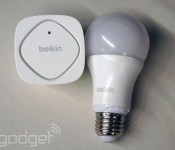
Apple’s smart home plan rumored to be a boring certification program

When rumors of Apple’s smart home efforts broke Monday, expectations for the future of home automation began to soar. According to sources speaking with Gigaom though, Cupertino’s connected household project has more to do with fragmentation and the “Made for iPhone” label portion of the initial rumor. It seems that the focus of the program is to certify those smart devices that are scattered around residences rather than building automation controls into iOS or some such. The process is said to keep both WiFi and Bluetooth connectivity alongside voice control as key items for linking all those gadgets together, but as of now, a universal control system or a list of partnerships doesn’t seem to be on tap for WWDC next week.
Filed under: Household, Software, Mobile
Source: Gigaom
Google Maps v8.1 Rolling Out, Brings Back Terrain Mode and Other Minor UI Tweaks [APK Download]
A day late, but not a buck short. Another Google app has updated, this time it is Google Maps. Maps is now at version 8.1 and brings back something that hiker, bikers and outdoor enthusiasts probably missed most, Terrain Mode. Terrain Mode is an alternative map view to satellite that offers a topographical look at the mountains, hills and valleys in a given area.

 Terrain Mode is the most significant aspect of the update. The rest of the update seems to be at some UI changes in various sections. Each navigation card offers up the navigation type via an icon, car, bike, person ect. They moved the time and mileage to the right and made it a little smaller too. In the transit view times and travel time have been made a big bolder so they stand out a bit more. Lastly, biking and Walking views look the same.
They also managed to shrink the file size a little bit from the previous maps version too. In typical Google fashion the update is rolling out in stages. If patience is NOT one of your virtues, hit the link below to go download the APK.
Download: Google Maps v8.1 APK
Via AndroidPolice
//<![CDATA[
ord = window.ord || Math.floor(Math.random()*1E16);
document.write('’);
//]]>

