


Android 4.4.4 for the Sony Xperia Z1 Compact makes a surprising Appearance
If you had to guess which device after the Nexus, Motorola and Google Play edition devices would be getting the Android 4.4.4 update next, I’m willing to bet that the Sony Xperia Z1 Compact wouldn’t be the first thing you blurt out. As fate would have it, however, Android 4.4.4 for the Sony Xperia Z1 Compact has indeed been […]
Android 4.4.4 update rolling out for LG G Pad 8.3 GPE
The LG G Pad 8.3 Google Play Edition might not be available to pick up on the Play Store anymore, but LG and Google are still giving it some update love. While users were pretty disappointment and looking for answers as to why every other GPE device was seeing Android 4.4.3 and they weren’t, users […]
Google releases YouTube Creator Studio to the Play Store
If you are one of the millions of YouTube creators out there that manage your own channel on YouTube, your life just got a little bit easier today. Google has, finally, released YouTube Creator Studio to the Google Play Store. The app makes managing your channel a heck of a lot easier when mobile. The […]
Android Wear brings Google to life

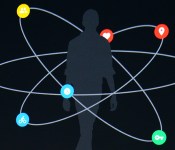
How many times have you checked your phone today? If Google’s data is correct, your answer is somewhere between zero and 125. This proclivity to check our phone is the foundation upon which Android Wear, the company’s wearables platform, is built. Wear isn’t about replacing your smartphone though; it’s about extending Android beyond your pocket and into the world around you. Yesterday’s I/O keynote revealed a lot about Google’s vision for the future — and Wear is the thread that could tie it all together.
On stage, Director of Engineering for Android, David Singleton, explained that everything in Android L is contextually aware, and has voice recognition enabled. Wear isn’t a separate entity; it’s an extension of Android L. An interface that bridges your experience of the world to the phone in your pocket (and vice versa). No more unlocking your phone and digging for restaurant recommendations. Wear knows your location and preferences; it’s already giving you step-by-step directions to a ramen joint around the corner. Or so the theory goes.
Wear isn’t a separate entity; it’s an extension of Android L.
Singleton’s demonstration of how Wear dances with, rather than marches beside, your phone was to order a pizza through his watch in under 20 seconds. A party trick to please the mostly developer audience, sure, but that demo showed Wear’s potential in a way that people understand: a useful interaction that solves a (hunger) problem. That’s something you can easily do from your phone, of course; the smartwatch skeptics are going to be harder to impress.

Singleton’s second onstage demo showed Wear working with a tablet, displaying a recipe from Allthecooks. The tablet is the main screen in this scenario, but Wear is listening; it’s a servant to more than one device. The tablet feeds Wear each stage of a recipe one by one. Swipe for the next instruction on the watch, and this is reflected back on the tablet. The same is true for all interactions on all apps across all your Android L devices. No more dismissing notifications twice. This same symbiosis will be present across Android, Wear and Chrome OS — Google’s making the most determined push for unity yet, and Wear is a big part of it.
Great, we can order pizza and make recipes a little less likely to fail. But Google has a much broader ecosystem now. Android will be in cars, TVs and your home. It knows what you like to eat, where you go on weekends and how badly you suck at Tappy Chicken. All of this information is united by your phone, and (the idea being) effortlessly enhanced by Wear. The feel-good promo videos might ham it up a little, but Google Now’s cards are getting smarter, and could find a natural home on your wrist. Having a wearable that controls (and is controlled by) all the technology in your life is, perhaps, the only logical case for a smartwatch — and that’s what Google is going for.
Google wants Wear to be the key that unlocks the Android experiences around you right now.
Earlier on in the I/O keynote, Director of Engineering at Google, Dave Burke, showed off a new feature within Android L — trusted environments. If you have a “Bluetooth watch” (this was before Wear was discussed), your phone knows you’re near, and removes the need for a password to access it. This might work for all Bluetooth devices, but it’s further evidence of the neat shape Google has cut out for Wear in Android’s future. Google wants Wear to be the key that unlocks the Android experiences around you right now.
If you’re thinking Wear is just a fancy example of the internet of things, that’s because it is. This isn’t even the first wrist-worn gadget to be used for controlling other smart devices. Jawbone and SmartThings may spring to mind. The difference here is potential scale. Having a fitness tracker feed into your home automation is great. A platform that can set your thermostat, get driving directions (or score a lift), tell you about your surroundings and quickly reply to a friend’s message is better.
Your phone is still the brain, the identifier, the hardware that knows you. Wear listens, interfaces, serves. Much like Android itself, or Google Now, Wear is a platform that, if grown with care and attention, could usher in the era of the smart-world. A world where technology is used to lower, not create barriers between discovery and social interaction. That’s the marketing dream at least, and surely one we’re all invested in. On a more practical level, if Google is working on a unified ecosystem (as it appears to be), it’s about time for something like Android Wear.
Korg DSN-12 turns your Nintendo handheld into a synthesizer, again

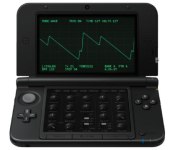
As we’ve seen before, Korg has a knack for bringing classic synth sounds to the screens of Nintendo’s handhelds. Teaming up with Detune once again, the outfit is bringing the tones with the likeness of yet another iconic instrument to those wielding a 2DS, 3DS or 3DS XL. The new effort, Korg DSN-12, takes its inspiration from the company’s MS-10 analog synth — one that’s fondly remembered for its bass and percussion chops. Here, a dozen monophonic sythesizers can be employed with a smattering of effects alongside a 64-step sequencer. There are multiple interfaces to sort through as well, including sequencer, synth knobs, patch panel, mixer and two oscilloscope sections to make use of Nintendo’s dual-screen setup. What’s more, thanks the 3DS’ three-dimensional abilities, those oscilloscopes are rendered in 3D for even more eye candy. As you might expect, the stylus can be used to wrangle the app that stores up to 64 different sequences to recall later. No word on pricing for the software just yet, but expect it to arrive in September for your sample building pleasure.
Via: Fact Magazine

SoundCloud’s iOS app gets simplified controls as it focuses on listeners

SoundCloud’s tune-sharing prowess continues to drawn the eye of musicians looking to distribute their tracks around the web and social channels. Today, the audio outfit’s iOS app got a major redesign that makes access to tracks you fancy a breeze. In addition to the simplicity-focused aesthetic overhaul, the software now sports “one thumb” controls: tapping anywhere toggles play/pause, swiping skips tracks and sliding along the tune’s waveform moves around the song and its corresponding artwork. There’s also a new You tab that compiles tracks, artists and playlists that you’ve both liked and created from scratch in one place so that you can get at them quickly. Songs found on the Search page can be played from that section in addition to giving a quick follow to users of note. Since SoundCloud took a listening focus with this version of the app, the recording function is no longer built in, so you’ll have to look elsewhere to capture on the go.
Filed under: Internet, Software, Mobile
Source: iTunes, SoundCloud
LG’s G Watch: designing a blank canvas for Android Wear

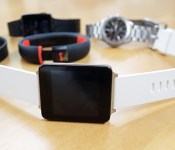
The G Watch is minimal. The shape aims to bring Android Wear front and center. “The content floats.” The lack of toggles, buttons and periphery is all intentional. “A lack of ornamentation,” is how Chul Bae Lee, VP of mobile design puts it. But it didn’t start out that way. Lee gestures at a soft sheet where there are roughly 10 prototypes of varying shapes and profiles. It’s the “What If…” of LG wearable design, but because these designs are still in LG’s collective brain for possible future use, we’re not allowed to take photos, although it doesn’t stop us from using our words.
We pore over the early prototypes, which are built and machine-finished to seem like the real thing. They intentionally have a slight weight to them, even if there are no electronics inside. One has a brushed-steel finish along a thick bottom bezel, while some jarring LG branding in the corner made another look a tiny wrist-mounted version of the company’s TVs. Several prototypes pack landscape screens, while another, with its curved sides and soft vertices, veers close to Samsung’s Gear 2, or Neo… or Live.
The G Watch has two primary features: commands and notifications — and not, Lee specifies, interaction. This, in a way, explains the lack of buttons (or cameras), as well as the inclusion of a touchscreen that, while accessible, certainly does do as much as your smartphone. “Commands” is an interesting way to put it too, because the primary way of getting information from the G Watch is by barking orders at it.
Circles and squares

The biggest difference between the LG G Watch and Motorola’s 360 is their faces. LG’s product goes for the smartwatch staple, a square LCD, in an aim to maximize usable screen space, while Motorola’s chosen to display Google’s latest project on a circular screen. Lee says. “A circular face? Well, we like it, but it’ll lead to a more classical watch experience.” The exec wouldn’t admit that his company would be bringing out a similarly shaped timepiece, but told us that LG is trying a whole load of things — and it probably helps when you have a display-making companion company.
“A circular face? Well, we like it, but it’ll lead to a more classical watch experience.”
While it’s the first effort, the G Watch is still borderline chunky (just like the rest of the Android Wear gang) and it’s due to what Lee calls the smartwatch’s biggest challenge: battery life. As the LG VP tells it: “I prefer to have high picture quality with (LCD or OLED).” He offers two options: a smartwatch with a low-grade display that will last a week on a charge, or one that has a high-quality screen, but lasts around a day. “[The battery life] could have been very different. It’s the mix of design, hardware, chipsets and display. Some people wanted a 15mm-thick watch face. Well, that’s crazy … but it’s all part of the compromise.”
The sales pitch for Android Wear is a notification-heavy one. This editor wants it to do more — what’s a watch doing that my smartphone doesn’t do already? How does it make my life better? “The point of the G Watch isn’t that we are wearing it, but that we are accessing information instantly — especially compared to a phone,” Lee says. “If I get a call or notification there, I have to drag it out of my pocket, check it, unlock it, answer it. Instant accessibility is the core value here.” But is it worth $229?
Does one size fit all?

The G Watch will arrive on July 7th in black and white options, but it’s a uniform, relatively unisex shape and size. LG’s stance is that smartwatches, at least for now, are nascent. Admittedly, there’s something regressive about gender-specific technology, but these watches and wearables will be compared to “dumber” male and female fashion accessories, whether they want to or not.
There’s something regressive about gender-specific technology, but these watches and wearables will be compared to “dumber” male and female fashion accessories
Lee recalls those heady feature phone days, where companies like LG used to market teenage, feminine and even “silver” phones to different customer segments. “As the smartphone era matured, [these segments] disappeared.” (There was the HTC Rhyme: never forget). Lee says it ties into another trade-off: Change the specification, like increasing the screen size, and you’re going to make the entire thing bigger. “The smartwatch has potential … but there’s still room for refinement.”
‘OK Google’ voice commands are coming to your Android lockscreen

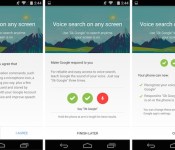
“OK Google.” The phrase is slowly working its way across Google’s mobile and web services, but the touchless control is about to get even better for many Android users. Previously limited to just the homescreen on Android 4.4 KitKat devices and anywhere on the Moto X (thanks to its always-on listening chip), the voice-activated command will soon be enabled on any screen, including the lockscreen, on your smartphone or tablet. That’s not all, either: Google’s also including a new Audio History feature that learns the sound of your voice to increase the accuracy of your searches.
The features come as part of an update to the Google Search app, which is currently rolling out slowly to devices following Google’s I/O keynote. Google is making the feature available on a phone-by-phone basis, meaning that even if you are able to grab the relevant app file, you still might not be able to use it. If you are eligible, however, all you have to do is navigate to your Google Now settings and enable the options inside the “OK Google Detection” menu.
[Image credit: Droid Life]
Filed under: Cellphones, Tablets, Internet, Software, Mobile, Google
Via: Droid Life
Source: Google Search (Play Store)
Android L and Chrome OS will soon have password and pin free Personal Unlocking Ability
It shouldn’t be much of a surprise that Google I/O produced a ton of information and they only touched on most of it. During two separate parts of the keynote there were two pretty cool features that Android L offers the end user to help simplify their life, while also protecting their data. One simple […]
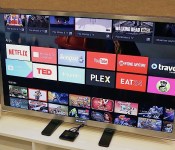
Android TV is Google’s latest shot at entertainment glory (hands-on)

For Android, smartphones and tablets are only the beginning. Google believes that there are so many other categories of hardware that could benefit from its mobile OS, so it announced that it’s building extensions of Android onto the TV, car and smartwatch. Each genre will require special hardware to be truly beneficial, but the former may have the greatest potential in terms of reach — after all, more people are looking for a solid television-watching experience than putting a “computer” on their wrist, and it’s going to be a long time before Android Auto goes mainstream.
Sadly, TV is also an area that Google has struggled with in the past (see Google TV), so it’s hoping that lightning will strike with its latest effort, called Android TV. We had a chance to check out the company’s first official piece of hardware, simply called the ADT-1. Since it’s a developer kit, you won’t be able to buy it — but that won’t be an issue once manufacturers begin selling their consumer-facing devices later this fall. Naturally, the version we checked out is considered pre-production, so a lot of things will likely change between now and its final release, but at least we have a good idea of what to expect from the experience.
The idea behind Android TV is pretty simple: It gives you an internet-powered smart TV with plenty of entertainment and gaming options. Media-streaming apps, Play Movies and TV support, gaming and second-screen/screen-mirroring functionality make the service incredibly tempting. The Android ecosystem is already pretty strong, and the company says it’s easy to adapt existing apps to make them compatible with the platform. With proper hardware and developer support, Android TV may have the legs it needs to stand on.
What can Android TV actually run on? According to Google, the OS will be available for smart TVs (Sony and Sharp have signed on to build televisions with the OS built in), media streamers (like a Roku), set-top boxes, cable boxes and micro consoles. The platform is ideal for any manufacturers that are interested in getting into the smart TV business, but don’t have the resources to develop their own ecosystem; it’s a good opportunity for smaller companies and startups to cook up Android TV hardware.
There are a few hardware requirements to ensure that Android TV doesn’t offer an inconsistent (or miserable) user experience: 2GB of RAM, 8GB of flash storage, WiFi and/or Ethernet, Bluetooth 4, Play-ready DRM and Widevine level one. Companies are also recommended to add mics for voice input, and standardized controller button mapping. These guidelines make a lot of sense because the system needs to be powerful enough to handle graphics-intensive games, entertainment apps and handoffs between the TV and mobile devices via Google Cast — nobody wants a sluggish TV experience, so it’s crucial that Google gets this aspect of its product right. The experience also needs to be as universal as possible so users don’t have to worry about drastically different learning curves.

Sluggishness fortunately doesn’t show up, even on early hardware and firmware. With a Nexus 5 equipped with the Android L Developer Preview, we used a virtual controller to navigate through the TV’s UI, and the system didn’t skip a beat (or a frame, for that matter). We didn’t have to wait for anything that we pulled up, so there were no interruptions to our experience.
The card-based user interface is simple enough. Recently played movies and TV shows, as well as recommended titles, are neatly displayed on the top. Scroll down a level and you’ll see a listing of your apps, including access to Google Play Games and Play Movies. Below that, games. Finally, at the very bottom of the screen you’ll find all of your necessary display and network settings. As you might expect, most apps have setups that are very similar to each other; they use a dual-pane UI with more cards on the right and a large slide-out menu on the left.
As mentioned earlier, Android TV also comes with voice-input options. You can speak to it through your remote controller, and it doesn’t matter what kind of request you have — whether or not it’s related to entertainment, it’ll still answer you the same way it would in Google Now. On one request, you can ask it to pull up movies from 1984, and on the next you can tell it to convert gallons into cups. Mentioning Tom Selleck will not only bring up a queue of the actor’s movies, but it’ll also have an information card about the actor and a list of other people that are somehow connected to him.

The usual entertainment suspects already have apps on Android TV — Netflix, Songza, YouTube, PBS Kids, Showtime and more were featured in our demo — but there should be plenty more options from other third-party developers before the service is ready to go this fall. (As an aside, reps told us that Google TV v4 apps will be compatible with Android TV.) Unsurprisingly, we noticed a slight bias toward Play Store products, but it’s not over the top; we didn’t feel like we were watching a nonstop Google ad, and as more apps become widely available and easily accessible on the platform, those influences will likely be toned down even more.
For the most part, the gaming experience was pretty smooth. We didn’t see as much latency between the game controller and the screen as we expected. There were some games that looked as though they needed a bump in resolution support, as they looked fuzzier than we’d like, but most titles (Need for Speed: Most Wanted, for instance) appeared as sharp on TV as they do on a high-res phone or tablet.
Finally, we’ll briefly touch upon the NVIDIA Tegra 4-powered dev kit, because there isn’t much to it cosmetically. From the top and sides, it’s nothing but a thin set-top box about the same size as two hands, if not slightly smaller. It’s more visually interesting on the bottom because it features four pointy nodules that raise the box up from whatever surface it’s resting on. On the back you’ll find power, HDMI and Ethernet ports.
We can’t make a final judgment on Android TV just yet, and the company’s got a rough path ahead. While the association with the Android ecosystem will be a nice draw for prospective buyers, the platform will be nothing if manufacturers and developers don’t jump on board the bandwagon and produce high-quality hardware at competitive prices. To see how well that works out for all parties involved, we’ll have to wait until this fall to get a verdict.
Filed under: Home Entertainment, Software, Google
 AIVAnet