


Unreal Engine 4 demo video with Tegra K1 GPU gets shown and Explained
One of the many highlights of Google I/O this year was that Android L. The next iteration of Android that is scheduled for release this fall. Something very notable about Android L goes beyond just the looks of the whole UI and the Material Design elements. What it supports is a pretty big deal. See, […]
Living in a Google world: Why Android L means you’ll never have to disconnect

The biggest news to come out of Google’s developer-focused I/O conference isn’t Android TV or even the several new Android Wear smartwatches; it’s that Android is about to become much more than a mobile operating system. It’s about to consume your life.
With the introduction of the Android L platform (as the next version of that operating system’s tentatively being called), Google wants to be a part of everything you do — with technology, at least. Whether it’s swiping through Google Now on your smartphone, dismissing notifications on your smartwatch, using voice search to find a movie on Android TV or searching for a cafe on your in-car display, Android will follow you everywhere. And while features like universal sync across devices and voice commands will likely make your life easier, Google’s getting something pretty significant in return: access to nonstop streams of your personal data and search history. In short, it’s pretty clear that the “L” stands for “Life.”
Android L is a functional overhaul of Google’s ecosystem disguised as an aesthetic face-lift.
Android L, which will soon make its way into developers’ hands, is a functional overhaul of Google’s ecosystem disguised as an aesthetic face-lift. The new OS gets a makeover courtesy of Material Design; a new look that incorporates floating elements and transition animations for a more engaging experience across Android, Chrome OS and the web. Along with that glossy new façade, though, comes the true innovation at the core of Android L’s master plan: features that unite your life across your phone, smartwatch, desktop and more. Here’s a taste of how L will streamline things: Android notifications, such as calls and text messages or even low-battery alerts, will show up on your Chromebook when your smartphone is nearby. (Incidentally, Apple announced similar functionality for OS X Yosemite at WWDC earlier this month.)

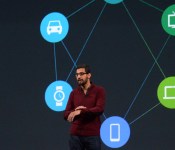
Sundar Pichai shares Google’s vision for taking Android L beyond mobile.
Early on during the Google I/O keynote, SVP Sundar Pichai laid out what’s essentially the company’s new mission statement: “We worked together — Android, Chrome and across all of Google — to craft one consistent vision for mobile, desktop and beyond.” So instead of getting windows into Google’s world via Android on your smartphone and services such as Google Docs, everything will fall under the omnipresent umbrella of L. Your search history and contextual info from Google Now will follow you virtually everywhere — even to the living room and your car if Google has its way — and truthfully the unified system offers plenty of perks. Beyond syncing settings and notifications, you’ll even be able to unlock your phone just by wearing your Android Wear watch — no PIN or lock screen pattern required.
The convenience factor here is nice, but it’s also just plain neat to see Google-powered devices acknowledging each other in new, interesting ways. A few years down the line, this feature could evolve into unlocking your front door with Android@Home, or even auto-resuming a playlist from your smartphone in your Android-ready car.
It’s a case of digital convenience intentionally breeding laziness.
If you’re already using Google services, Android L’s deeper cross-device ties likely won’t scare you away. After all, the company already knows quite a bit about anyone with a Google account and search history. But even if we’re okay with this omnipresence in our personal lives, Google’s step into the enterprise space blurs the lines uncomfortably. Baked into Android L is Android for Work, a BlackBerry Balance-style technology that keeps your work and personal accounts separate and secure on the same device. Google really doesn’t want you using a separate, non-Android phone for work, and by protecting sensitive enterprise data it hopes to keep you from leaving its search-lined world.

A slide from the I/O conference highlighting Google’s Android everywhere philosophy.
Android L’s clearly a bid to make Google into a way of life, but we shouldn’t be too surprised by that. This is Google operating as usual; this is a search company making a very public play for our data, albeit under the guise of efficiency for the end user. Effectively, it’s a case of digital convenience intentionally breeding laziness. And, really, when the walls between mobile, desktop and wearable no longer exist — when it’s one uninterrupted Google ecosystem, who would ever want to leave?
Google I/O 2014: Chromecast’s new Backdrop feature and Device Mirroring
Android TV was a big thing today. The UI looks beautiful, the multiple control methods are fantastic and gaming looks outstanding. What about the Google Chromecast? Google isn’t dropping it off the face of the planet, not just yet anyways. Later in the event Google talked about what is coming to the Chromecast. They […]

You can now edit articles, view random pages on the Android Wikipedia app

Wikipedia already has an app, but get ready to meet its replacement. Available on Android starting today, the app’s not just an aesthetic refresh; it adds the ability to edit entries directly from your mobile device. For those of us who use Wikipedia solely for browsing, that feature won’t matter, but for active community members it’s an important improvement.
Unlike the previous version, the new app is built on native Android, which should make for a more fluid experience navigating through pages. The interface is still streamlined and simple, with a menu bar which you can swipe up from the left. From there, you can log in, view your history, manage your saved pages or be taken to a random article. The random article feature is one of the best aspects of Wikipedia on the desktop — how else would I have learned about the WEC 11 martial arts event? — so users will definitely appreciate the Wikimedia Foundation listening to their feedback. Alas, the new Wikipedia app still doesn’t allow for tabbed browsing, but at least the aforementioned history feature lets you keep track of your activity.

If you currently have the Android Wikipedia app, an update will get you the new and improved version. Users on iOS, meanwhile, will have to wait till July to get the additional functionality.
Filed under: Internet, Software
Source: Google Play
You can now relive the Google I/O 2014 opening keynote

Did you nod off a few times during the last half hour of Google’s opening keynote of I/O 2014 earlier today? No worries! The full video has been archived for your post-event viewing pleasure on YouTube. Hop down past the break to take a good long look at the nearly three-hour event spanning Android “L,” Auto, Wear and more.
Filed under: Internet, Software, Google
Source: Google I/O
Google targets Amazon and Apple’s set-top boxes with Android TV platform

Google’s already well acquainted with the living room, having launched its Google TV platform at the I/O conference four years ago. It’s safe to say the set-top box software has fallen out of favor (with all but Sony, anyway), and Google’s been experiencing more success of late with its simpler Chromecast dongle. Well, today the search giant’s revealing its next play in home entertainment with Android TV, a brand new platform that’s part of Android L, and it’s bringing Google’s OS back to the big screen.
Much like on Apple’s set-top box or Amazon’s Fire TV, Google’s platform is a convenient front-end for it to plug video content from its own collection, in this case the Play store. It runs apps from other content providers like Netflix, of course, and allows you to pump live TV through the interface as well. Anything running Android TV will have the same functionality as a Chromecast, so you’ll be able to push content from your other devices to the TV exactly as you do with the dongle. Google Cast itself is being updated with direct screen mirroring, among other things.
Even closer to Amazon’s effort, Google intends Android TV not to be just for passive media consumption, but gaming as well. Different Android devices can be connected to your TV simultaneously to act as controllers. If your watching rather than gaming, then any Android phone, or smartwatch running the Wear platform, can be used as a remote.
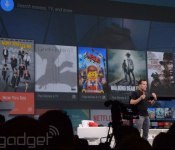
Android TV features a simple and familiar card-based UI that naturally focuses on visual information (displaying movie posters, for example). The home screen floats on top of the content you’re currently playing, bringing that feeling of depth that’s key to Google’s new Material Design language. Google’s services and personalized recommendations are prominent, and voice search and navigation is included to make finding consumables, or anything else, as easy as saying it from the sofa. Apps and content can organize themselves across your home screen dynamically, based on your recent usage patterns.
With a special Play store experience just for the big screen, Android TV will be launching later this year alongside the Android L release, and various hardware partners are already on board. Next year’s smart TV ranges from the likes of Sharp and Sony, among others, will have the Android TV platform built-in. And, if you don’t fancy buying a whole new set, Razer, ASUS and others will be making set-top boxes-slash-consoles. Google’s also got a dev kit for those eager to get working with the SDK right away, which in Android L is the same one for tablet and smartphone form factors, too.
Filed under: Home Entertainment, Software, HD, Google
Source: Google Android TV
Here’s what Google’s Android Wear can do

Google says that we glance at our smartphones 125 times per day, but wants Android Wear devices to take on much of that burden. During an I/O 2014 demo, it showed how smartwatches like LG’s G Watch — paired with Android 4.3 or higher phones — will display the most important info to you at any given time. That includes info like flights, the weather, your commute, appointments, reminders, Keep notes and messages. Since all Wear devices will have touchscreens, you can swipe up on the watch face, Google Now-style, to see more cards. Swiping sideways will then bring up additional info from a given card. Disposing of a card on the watch makes it disappear on your handset too.
You’ve also got voice commands, activated by — you guessed it — “Okay, Google.” You can use it to set a reminder or take voice notes that are automatically saved to Google Keep. You can also pose questions to the watch and get the answer in card form on both your wearable and phone screen. Swiping down from the top of the screen mutes or unmutes the sound on your watch and lets you peek at settings like the battery life.

You can also control music with touch or voice controls, (which will turn the song’s album art into your watch’s background screen, by the way). It’ll also function as a sportsband by measuring the steps you’ve taken and your heart rate on supported devices. Google will give you daily summaries of those stats, and those stats will also be fully available to developers via API functions.
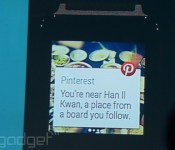
All of that comes with stock Android Wear, but developers will get access to those functions too. For instance, any phone notification from say, Twitter or Facebook, can also be available on your wrist, along with voice replies and notification pages as we saw in an earlier preview. Another sample third-party app flaunted by Mountain View was Pinterest, which will notify you when you’re near a pal’s location, letting you swipe to see a map and step-by-step directions. All that’s powered by Google Maps, which, of course, is baked into Android Wear.

Google showed off a few other third-party demos by ordering a pizza from the Moto 360 in about 20 seconds and displaying a step-by-step recipe on its watch face from the Allthecooks app. It also used voice-recognition to order a car with the upcoming Lyft wearable app. (It also noted in an aside that all Android Wear devices will be water-resistant.)
Google saved the best news for last: the Android Wear SDK is now available for developers with most of the API features included. If you’re champing at the bit to buy one, there’s another payoff too. LG’s G Watch is now available to order on the Play Store and Samsung’s newly announced watch, the Gear Live, is also up for pre-order. The much anticipated round-faced Moto 360, however, won’t be coming until later this summer.
For more, check our Google’s new Android Wear page and our I/O 2014 event hub right here.
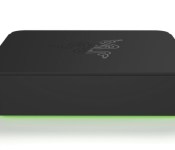
Razer’s making a gaming ‘micro-console’ with Android TV, available this fall

The company behind crazy devices like the Razer Edge and Project Christine is getting into game console creation as well. Razer’s employing Google’s Android TV initiative to create a game-focused “micro-console” and it’s arriving this fall. So, what does it do? Razer’s only offering a teensy bit of details, but what we know thus far sounds impressive. The micro-console can “stream movies, music and other apps for large-screen entertainment,” says Razer, “with an emphasis on gaming.” Sounds a lot like Amazon’s Fire TV, no? The difference here is that Razer’s also promising “hardcore” gaming, though we’re not hearing exactly how it will pull that off just yet (we asked!).
The same goes for what’s inside the Razer micro-console in terms of horsepower and connectivity — we’ve got no idea just yet. Internal storage? No idea. Price? Same situation. Actually, what Razer’s saying is, “In keeping with the spirit of Google I/O, we will not be discussing specific product details at this time.” Pretty funny you guys!
Anyway, in terms of gaming-specific applications, we also don’t know how you’ll control games on the device. Bluetooth game controllers? A custom controller? While we expect it’ll support Bluetooth, Razer’s not saying just yet. As for interface navigation, that’ll be handled by the Android TV app you heard about earlier today. There’s also some form of voice control, which we expect depends on your phone’s mic (though it’s always possible one’s built into a custom gamepad — we’ve got a lot of questions!).
Razer’s not offering hands-on opps today, and the image you see above is actually a render. As a result, it’ll be a few before we can offer more details on Razer’s first console experiment. For now…well, it sounds neat, right? Razer makes nice hardware and knows how to cater to gamers. Consider us cautiously excited.
Google Drive for Business now offers unlimited storage for $10 per month, per user

You didn’t think we’d go through the whole keynote without a little Google Drive love do you? To celebrate an impressive 190-million Drive users (that’s active within the last 30 days), Google has just added a more compelling “Drive for work” proposition — unlimited storage for just $10 per month, per user. It’s not just the price that’s better, there’s a few key updates that got some stage time too. One is that users can now encrypt data within Drive. As for creating documents of your own, that’s getting more seamless too. In the past, when you worked on a word document, it would be converted to a doc file, now it’s all handled natively within Google Drive (of which Docs is now part, of course), and a native Word file is only created as and when you need to send it on to users over email etc. Sundar Pichai made a big noise on stage at I/O about the number of corporates and Universities that were going “all Google,” could this be enough for you to go all green in the office too?
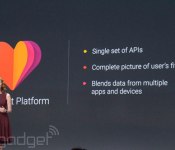
Google Fit is Android’s answer to exercise and health tracking

Google Fit is Google’s new health initiative. It’s a service that’ll track all your health metrics — sleep, steps, etc. — and it’s built into the next version of Android. But what does that mean? Well, it means that Google’s Android platform is getting the same kind of life metric tracking that Apple’s iOS users are getting in iOS 8 with HealthKit. More importantly, it means that the health devices you’re already using will play nice with the myriad Android devices out there. It also means that all your health data ends up in one place, in one app, rather than spread across a variety of software applications.

Adidas, Nike, Withings, Intel, RunKeeper and a variety of other fitness companies are involved with Android Fit. Nike’s FuelBand wearables were specifically given a shoutout on-stage at Google’s I/O event this afternoon, where the initiative was announced.
What we didn’t see from Google today is a dedicated app that collects all your data, like Apple’s Health app. Rather, the Fit initiative sounds like a platform for health device manufacturers trying to make their devices interface with Android. Google product manager Ellie Powers described it as using a single set of APIs for all health products, meaning all devices could technically work with all health/fitness software. While it isn’t the whole cloth approach that Apple’s taking in creating its own app, it’s the kind of open-source approach that we expect from Google.

