


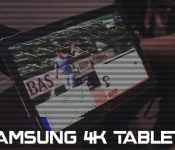
12-inch Samsung tablet with 4k spotted in the wild

Samsung seems to already have a 4K display on a tablet as a prototype has been spotted in the wild at the French Open. The tablet that was spotted is 12-inches in size and was being used to demonstrate an LTE broadcast at the French Open where Techradar was informed that it was running a Snapdragon 801 processor.
Despite that, any 4K device is expected to have the next-gen Snapdragon 805 which is optimised for 4K displays, giving a pixel density greater than anything we’ve seen yet on a tablet.
Would you buy a 4K tablet?
SOURCE: Techradar

The post 12-inch Samsung tablet with 4k spotted in the wild appeared first on AndroidGuys.

Samsung wearables may boast fingerprint sensors

Fingerprint sensors seem to be the next big thing when it comes to mobile devices, but have you ever thought about having them in your smartwatch?
The company behind the fingerprint sensor on the Galaxy S5, Synaptics, has revealed that next year the same technology could find its way onto Samsung’s smartwatches.
Whilst there are no plans yet as to what use the sensor may have on a smartwatch, or if it will even extend past just unlocking the device, it seems Synaptics are confident companies will begin to adapt their technology to wearables, and Samsung will be the first to do so.
The post Samsung wearables may boast fingerprint sensors appeared first on SmarterWatching.
Read the rest at the source, SmarterWatching.com
The post Samsung wearables may boast fingerprint sensors appeared first on AndroidGuys.
Engadget Daily: LG G3 review, Xbox One performance and more!

Today, we review LG’s latest handset, gain insight into how significantly the Kinect affects the Xbox One’s performance, go hands-on with Google’s secretive 3D-mapping tablet and learned about the Samsung Galaxy Tab 4 Nook. Read on for Engadget’s news highlights from the last 24 hours.

LG G3 review: the company’s best phone yet
The G3 may only look like it’s made of metal, but we’re not holding any grudges. LG’s 5.5-inch handset has 10-hour battery life and top-shelf specs, not to mention the nicest display on the market. Assuming it’s not too pricey, the G3 could be one of the best Android phones available.

Microsoft admits the Xbox One performs better without Kinect features
Despite the fact that the One’s Kinect has its own onboard processor, it apparently does weigh the console down to some degree. Thanks to the June update, however, developers can access “up to 10 percent additional GPU performance by re-allocating a few resources.

Google’s secretive 3D-mapping project now has a tablet: here it is
Remember Google’s sensor-loaded, 3D-mapping smartphone called Project Tango? Well, today we went hands-on with its new tablet counterpart. And yes, the slate is also replete with sensors and high-spec cameras.

Barnes & Noble teams up with Samsung for its newest Nook tablet
We knew that Barnes & Noble was working with someone else to develop future Nook devices, we just didn’t know who. But today, the company announced that it partnered with none other than Samsung to develop the 7-inch Galaxy Tab 4 Nook, which will launch in August.
You also might like:

Turn your Galaxy Note 2 into an Android 4.4.2 Toting Galaxy Note 3 / Galaxy S5 Hybrid with ezKAT

Hardware has a lifespan. That lifespan is something we try to prolong as long as possible. Nobody like spending money if there’s another way to prevents needing to do so. The manufacturers try to persuade us that we should simply scrap our old technology and upgrade to the latest and greatest and pour out a long list of enhancements that will make our life better. Generally all they do add some pretty cool upgrades to their devices from the latest and greatest processor and camera optics to finger print scanners and larger batteries. The question is; if you just upgraded your software to the latest and greatest versions, would that leap to a new device be significant enough to persuade you? Maybe ezKAT for the Samsung Galaxy Note II will help you decide.
This is especially so for cell phone manufacturers who want us to upgrade our devices a maximum of every two years. The normal cycle nowadays seems to be more around 12 months if we are lucky.
Enter the Android community!
So when the community gets together and takes the new features and ports them back into our older devices so they can last a little longer, we all smile and say a big thanks.
Head over to XDA-Developers and you’ll find an overwhelming resource of updates, modifications and tweaks for almost every phone on the planet.
I spend half my life on XDA and that’s where my latest upgrade to my aging Samsung Galaxy Note II came from.
My Note II is now more of a hybrid of Samsung Galaxy Note II and Samsung Galaxy S5 with features galore. It’s running Android 4.4.2 Kitkat and it has a completely new lease of life that makes me question upgrading my faithful Note II.
If you have a Samsung Galaxy Note II from AT&T, T-Mobile or the N7105, then you should read on.

Where did this all come from you may ask? well, XDA-Developers is simply a hub of information and only exists due to the rapidly expanding community of developers and users. The developer of this particular firmware is eZdubzitmk4. One of the top developers I’ve had the pleasure of following. his work is meticulous and the support he provides is as good as it can possibly get.
eZdubzitmk4 has put together a custom ROM by the name of ezKAT which is based off the official n7105 Android kitkat 4.4.2 release. He took the base, various applications, settings and tweaks from the Samsung Galaxy Note III and the Samsung Galaxy S5 and combines them into this piece of art.
When release it had the following feature list:
- All n3 features including Air Command
- S5 apps including settings
- Quick reply text option. (Go to sms settings then notifications)
- Status bar gradient colors, clock mods, gesture controls, and battery bar (SEE THIS THREAD FOR INSTRUCTIONS)
- Clock mods – see above link
- Network Speed
- CPU status in notification pulldown
- MIUI battery bar customizable
- Some tweaks for speed, more to come also
- Added lots of themes for the launcher, already installed
The ROM is currently at version 2.0 and a 2.5 release is due any day.

This is only the beginning as more and more add-ons and tweaks are provided in the thread on XDA and as downloads added by eZdubzitmk4 himself.
Installation is fairly simple with only a couple of learnt lessons to deal with, but once you’re done, you’ll never look back.
You need to be flash savvy to perform any procedures like this. Your phone needs to be rooted and have a modified recovery installed. You can find lots of help on XDA to achieve this.
All the files required for this firmware and add-ons can be found on XDA. Most of the main ones can be found in the ezKAT thread.
The steps for installation are: ( Sorry if I missed anything )
- Download the ROM ZIP and other suggested files and copy them your SD card
- Reboot into your recovery program.
- Backup your existing ROM.
- Wipe everything you can. Dalvik, Cache, System, Data, etc. Multiple wipes can sometimes help you out too.
- Flash the ROM ZIP file using your recovery program.
- Flash the provided Keyboard Fix OR Galaxy S5 Keyboard
- Flash a new modem image if required.
- Reboot your phone and let it boot completely.
- At this point, you may or may not have a keyboard to type with. It’s possible you’ll only have Google Voice Typing available.
If you only have Google Voice Typing, skip through the initial setup, as you won’t be able to sign into your WiFi.
Once you’re completely booted, go into Settings –> Language and Input and enable a real keyboard. - Now you need to go and set up your APN to get connected to your mobile network.
- Reboot into recovery once more and flash Super SU 1.99 to give you root access.
If you encounter any other issues along the way, be sure to go check in at the thread on XDA and you’ll normally find answers to most of the questions and problems that you may encounter.

Here are the recommended AT&T LTE APN Settings:
- Name: ATT Phone
- APN: Phone
- MMSC: HTTP://mmsc.mobile.att.net
- MMS proxy: proxy.mobile.att.net
- MMS port: 80
- MCC: 310
- MNC: 410
- APN type: default,mms,supl
- APN protocol: IPv4
- Enable/disable APN: APN enabled
- Bearer: Unspecified
If you have issues connecting to your Mobile network, you can find plenty of other resources around for setting up your APN.
Now your phone is running Android 4.4.2 Kitkat in the form of ezKAT and you’ll have awesome performance and battery life and your phone will feel like it has a new lease on life.

Once your up and running, head back to XDA and check out all the add-ons you can flash on top of ezKAT and continue to personalize your phone just the way you want it. There are other S5 applications you can install, one of my favorites being the Galaxy S5 email client. It has all the whiz bang new features like being able to slide your emails to delete them.
The possibilities are endless. There’s also a new kernel from AGNi that solves various issues with some devices not getting good or any Wifi at all. The other big added benefit is even more battery life and tweaking.


 There are also many caveats that go along with customizing your phone with new Recovery images, Firmware and Kernels. All I can say is “Read, read and read again”. Make sure you’re clear about the path you want to take. Make sure you understand what you are doing. Doing some of these steps incorrectly can result in bricked devices that are no good for anything, but that doesn’t happen very often anymore.
If you’re not sure about something and you can’t find an answer reading through the forums, ask questions and wait for the answers. The support you’ll get from the community and from eZdubzitmk4, the developer of this ROM, is nothing short of outstanding. You’ll get more support from the community and these guys than you ever will get from your carriers.
Always remember that these guys and gals do this for free and out of the passion for the community. Remember to thank people and even donate a few dollars to buy them a beer if you really love their work.
//<![CDATA[
ord = window.ord || Math.floor(Math.random()*1E16);
document.write('’);
//]]>
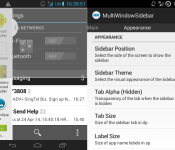
Get the Samsung-like MultiWindow Sidebar on any Android device [APK Download]

One of the better features of Samsung’s TouchWiz is the ability to house regularly accessed apps in a sidebar that recesses at the side of the screen at the touch of a button. Samsung also allow multiple windows to be stacked allowing two different apps to be viewed or worked on at the same time.
The guys over at XDA have created an APK that mimics the Samsung MultiWindow and Sidebar and it supports all devices running Android 4.0 and above. The split view has been made to compliment XMultiWindow & XHaloFloatingWindow Xposed Modules, so it is recommended to install those also.

• Choose the apps to appear in the sidebar with Select Apps
• Choose the method to launch apps using App Launch Mode
• (Optional) Enable Start on Boot
• Start the sidebar using Toggle Service
To Launch Apps, there are 2 modes.
• Tap an app to open it
• Drag an app to the respective location on the screen
You can customize what apps (PA Halo, XHaloFloatingWindow, XMultiWindow or Normally) to open when tapping or dragging.

MultiWindowSidebar_v1.2_250514.apk
VIA: XDA
The post Get the Samsung-like MultiWindow Sidebar on any Android device [APK Download] appeared first on AndroidGuys.
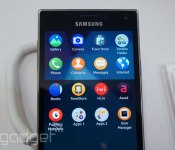
Samsung Z is Galaxy on the outside, Tizen on the inside

While Samsung has been a loyal proponent of Android for quite some time, it’s also spent the past few years cooking up its own open-source mobile operating system called Tizen. After several prototypes and revisions, the company finally saw fit to unveil the Samsung Z — its first ever Tizen smartphone — a couple of days ago. It was easily the star of the show at the Tizen developer conference here in San Francisco, so we were eager to take it for a spin.
At first glance, you’d be forgiven if you mistook the Samsung Z for one of the company’s other Galaxy S handsets. It’s all very familiar, from the Samsung logo at the top right down to the single physical home button at the bottom. Flanking the button on either side are hot keys for the menu and back functions respectively, which, again, mirrors its Android cousins. Flip it around, and you’ll find that the rear is covered in that familiar faux leather material we’ve seen on other Samsung devices too. It does have sharper edges than either the recent S5 or the Note 3, however, with flatter sides and a far blockier aesthetic.
Still, the Z itslef felt pretty solid from our few minutes handling it, and that 4.8-inch 720p HD AMOLED display remained sharp and vibrant under the show floor’s fluorescent lights. On either side of the phone are buttons for volume and power, while an 8-megapixel camera with LED flash sits on the back. Other specs include a 2.1-megapixel front-facing cam, 16GB of storage, a microSD card slot, a generous 2,600mAh battery plus a 2.3GHz Qualcomm Snapdragon processor. It even has a power saving mode, a fingerprint sensor and a heart rate monitor — you know, like that Galaxy S5.

But enough of the hardware. Let’s get down to what sets this phone apart from the rest of Samsung’s mobile lineup — the Tizen operating system. We’ll just say it upfront: It looks quite a bit like Android, or at least, the TouchWiz version of Google’s mobile OS. The app drawer, notification tray and settings page are very similar in look and feel to what we’ve seen on the GS5. Like the prototype we saw a few months ago, you can even fill the home screen with Tizen’s “Dynamic Boxes,” or what the rest of us call customizable widgets. You can apparently have as many as nine different home screens, and adding or removing these dynamic boxes is as simple as pressing and holding on the touch screen. Further, the camera app is almost identical to that of other Samsung devices, with similar settings such as “Best photo” and “Beauty face.”
There are a few uniquely Tizen touches that stand out, however. The most obvious one is that instead of just four or five favorite apps along the bottom of the home screen, you have as many as eight. Additionally, when you swipe up on those favorite apps, you’ll pull them to the top, revealing a split screen of the rest of your apps underneath. From there, you can navigate your app drawer as per usual by swiping left and right. You can also group apps together in a see-thru folder that look very similar to the ones on iOS. Also, when you’re in split-screen mode like this, you can easily swap out your favorite apps by dragging and dropping them around as you see fit. Though it’s a rather small thing, we also liked that you could change the interface’s color theme just by swapping out the wallpaper.

Understandably, there weren’t that many apps that we could play around with on the Z, as Tizen is such a young OS. Tizen apps are essentially web applications, built on standards such as WebKit and HTML5. A quick glance at the Tizen Store revealed a surprisingly healthy number of apps, though not ones from recognizable publishers. As you might expect, the Z supports most of Samsung’s own applications, such as S Health, S Voice and S Translate, all of which we saw on our show floor model.
There’s no word yet on pricing of the Z, but that shouldn’t be a concern to most of you, because it will only be available in Russia in the third quarter of this year. Samsung sees it as a test market of sorts, and will be launching an app challenge in that country to help the Tizen effort along. When we asked a Samsung spokesperson as to how the company hopes to market Tizen next to Android, all we received was a rather non-committal answer that it’s a “multi-platform company” that wishes to give its customers as many choices as possible. Still, we can’t help but wonder if Tizen, and the Z, are further signs of Samsung attempting to step out of Google’s software shadow.
Filed under: Cellphones, Mobile, Samsung
Samsung Galaxy F leaked with premium design

From last year, we have been hearing that Samsung will release a premium flagship device this year, known as Samsung Galaxy F. It was rumored to show up with the Galaxy S5, and we heard about its specs several times. Now after all this time, we finally get to have a glimpse of the Samsung Galaxy F or also know as the Samsung Galaxy S5 ‘Prime’. Thanks to @evleaks, below you can see a beautiful render image, which look a lot like the Samsung Galaxy S5, only with brushed metal finish. Have a look:
 @evleaks also shared a blurry image of the Galaxy F, and in the title description, they said that this device will replace the Galaxy S5 and hence there will be no Galaxy S6. However, they said that this statement is unconfirmed and unverified. We already know what will be under the hood, and it’s probably not a good successor to the Galaxy S5, but at least there will be an option for people if they want something more.
Are you looking forward to the Galaxy F? Let us know in the comment box below.
Source: @evleaks
The post Samsung Galaxy F leaked with premium design appeared first on AndroidGuys.
Samsung’s Tizen graduates from phone to television with smart TV prototype

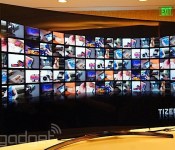
Yesterday, Samsung released a developer kit that shows it’s planning on releasing a version of its open-sourced Tizen platform to run on smart TVs, not just wearables and smartphones. At the Tizen Developer Conference in San Francisco yesterday, the company unveiled its first ever Tizen TV prototype to show off exactly that. Installed on what appears to be a Samsung TV with a curved screen, Tizen’s smart TV interface is still in its early development stages, so it’s entirely possible that the interface on display at the conference might not make it to the final version. Yet, it’s a good indicator of Tizen’s potential, so naturally we had to take a closer look.
On the left of the Tizen’s smart TV home screen is a “Home Bar” navigation menu that lists top-level items such as Live TV, Photo & Video, Music, Apps and Source. To the right is a “Dynamic Bar” that changes depending on what section you’re in. The Music tab will reveal a list of albums, while Live TV would show current TV listings, for example. When asked how media would be loaded onto the television, a Samsung spokesperson said you’d transfer the files over USB. The Tizen OS also theoretically supports media streaming, but there’s not yet an app that can demonstrate that. You could also store those files and apps on the cloud thanks to a new Tizen online storage system called CloudBox.
Navigating through the different menu selections can either be done with a standard remote control or one that’s more like a wand, allowing you to move a cursor around like you would a mouse. What’s unique about the Tizen platform, however, is that you’re also able to use a Web-based remote with your phone without having to really pair the two. All you have to do is head to a particular URL on your phone’s web browser (either by typing it in or scanning a QR code) and you’ll immediately see buttons that correspond to the TV’s channel and volume controls. You’re also able to key in words via a wireless keyboard interface, which is far preferable to entering text with the remote control and an on-screen keyboard.

There wasn’t much in the way of apps, which is understandable considering how new the system is. Still, we did see a web browser as well as a dedicated YouTube application. The browser seemed rather zippy and smooth for the few minutes we saw it demonstrated, but of course it’s hard to really judge its performance in such a short time period. Samsung’s Executive Vice President Jong-Deok Choi said on stage that Tizen’s smart TV platform is designed to be very Web-friendly. Indeed, it’s apparently able to run web apps that are written in standards such as HTML 5 and Javascript, which opens the doors for all sorts of applications and programs to enter the smart TV space.
As Tizen is an open platform, Samsung tells us that other TV manufacturers would be able to adopt it as well. There’s currently no concrete date for a Tizen-based smart TV from the likes of Samsung, though Choi did hint on stage that a Tizen-based smart TV could be coming to the market “very soon.”
Filed under: Home Entertainment, HD, Samsung
Trade your DSLR today to celebrate Samsung’s ‘Ditch Day’

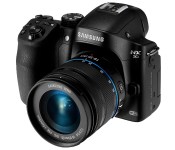
Been eyeing Samsung’s new NX30 mirrorless camera? Well, if you live in New York City and can make it to 42-43 Broadway Plaza in Times Square between noon and 6PM, it might be your lucky day. Thanks to Sammy’s “Ditch Day” promotion, you can trade in your current DSLR for the NX30, “while supplies last.” For more information about the terms and conditions, click here.

Departing Samsung exec dares to criticize his own products

Samsung’s former head of TV innovation, Richard Bullwinkle, insists he’s still on good terms with his old employer. But that could change when the company discovers what he really thinks about its smart TVs. In an interview with Fierce Cable, he admitted that some models he’s worked on are just too slow: “The switch from live TV to Netflix takes over two minutes,” he’s reported as saying. “That’s dinosaur speed.”
More broadly, he said that the whole smart TV industry is “in trouble” due to a lack of good content and apps, which is encouraging a “very high percentage” of people to rely on a separate device like a “Roku box or Apple TV box” instead. Then again, Bullwinkle says the harm to smart TVs isn’t “fatal,” and the only reason he quit his job is because Samsung wanted him to relocate to Seoul, while he preferred to remain in California: “They offered me a chance to move to Korea to be a true Samsung executive. I thought I was already a Samsung executive.” Burn.
Filed under: Home Entertainment, HD, Samsung
Source: FierceCable

