



Samsung will livestream its Galaxy Premiere 2014 event this Thursday

Just a quick note to let you all know that Samsung’s “Galaxy Premiere 2014″ event is slated for this Thursday. And, like the previous events of its kind you’ll be able to watch its livestream.
Samsung looks set to announce new Galaxy Tabs that have been leaked like crazy the last couple of weeks. We’re talking Galaxy Tab S 8.4 and Galaxy Tab S 10.5. These tablets will pack some serious firepower like QHD screens and 3GB of RAM, you can get more info by clicking links on each tablet. You’ll be able to watch this livestream via Samsung Mobile YouTube account this Thurday starting at 7pm EDT.
Are you excited for new tablets from Samsung?
The post Samsung will livestream its Galaxy Premiere 2014 event this Thursday appeared first on AndroidGuys.
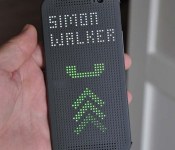
HTC Dot View Case for the HTC One M8. A Cool Idea that Needs Work.
HTC has been on an up and down spiral over the last couple of years as Samsung took the lead in the Android smartphone race. That’s not to say they haven’t made some awesome hardware, but they lost their way a couple of years ago and flooded the market with too many options and nothing spectacular.
With the Release of the HTC One and now the HTC One M8, HTC appears to be on the right track and the release of the HTC Dot View case for the HTC One M8 showed they were thinking out of the box.

The HTC Dot View case protects your phone while still allowing notifications and touch control without opening the case itself. There are a couple of issues that stop it being what it could have been, but it’s still a cool case, just not one that I’d have for myself.
Read the full review now on TheSavvyTechs.

//<![CDATA[
ord = window.ord || Math.floor(Math.random()*1E16);
document.write('’);
//]]>

Samsung orders less Galaxy S5 parts for Q3

Samsung’s Galaxy S5 is a relatively new smartphone, which was released in April, and there are already reports that Samsung is cutting down on parts orders for its flagship phone.
According to supply chain sources in Taiwan, Samsung is concerned about the iPhone 6′s arrival and thus is going to cut its orders for Galaxy S5 parts by 25%. In Q2 21 million units of Galaxy S5 were ordered and for Q3 Samsung is planing “only” 15 million units. While this seems kind of reasonable we certainly didn’t expect it, but it may turn out to be a good bet.
Galaxy S5 is not the only Samsung smartphone that is going through this process, Samsung is going to do the same thing with the Galaxy S4, though different numbers are in play. 6 million units of S4 were ordered in Q2 and allegedly Samsung is going to cut that down to 5 million for Q3.
This might not be connected to the iPhone 6 though. It might have something to do with the leaks regarding Galaxy F, which should be Samsung’s premium smartphone made out of metal. This alleged smartphone is leaking like crazy lately so we wouldn’t be surprised, even though it has been leaking on and off for a while now.
What do you think of all this, which scenario is more likely?
VIA: PhoneArena

The post Samsung orders less Galaxy S5 parts for Q3 appeared first on AndroidGuys.
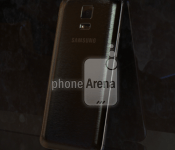
More leaked photos of the Samsung Galaxy F show us more of that brushed aluminium Back
 We’ve been hearing about a more ‘premium’ version of the Samsung Galaxy S5 for some time now. Initially thought to be called the Samsung Galaxy S5 Prime, the device has become better fleshed out over the last week with the official name of the device tentatively confirmed as being the Samsung Galaxy F. This latest leak from Phone Arena shows us the Galaxy F, this time photographed candidly showing us a general shot of the front and back of the device. As we have seen, the back cover appears to have a brushed aluminium finish, however with each additional photo, the more I suspect this is actually a plastic cover with faux metal finish; only time will tell.
 According to Phone Arena’s tipster, the Galaxy F will have a 5.3-inch Quad HD display, and although the photographed unit has a Snapdragon 801, the final product will have the Snapdragon 805. On the design front, the tip also says that the Galaxy F, despite the larger screen, is actually smaller than the Galaxy S5 thanks to thinner bezels, and the corners of the device are rounded slightly more too. Like the Galaxy S5, the Galaxy F is apparently going to have a dust and water-resistant IP67 rating. As always though, these leaks should be taken with a grain of salt with no official word on whether this device exists let alone when it will be released.
What do you think about the design of the Samsung Galaxy F? Are you interested in the Quad HD smartphone from Samsung? Let us know your thoughts in the comments.
Source: Phone Arena
//<![CDATA[
ord = window.ord || Math.floor(Math.random()*1E16);
document.write('’);
//]]>
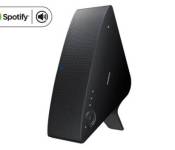
Spotify now handles multi-room streaming on Samsung devices

If you’ve decided to invest in Samsung’s wireless audio multiroom system instead of similar offerings from the likes of Sonos, there’s good news: it now supports Spotify’s Connect system. If you’ll recall, that’ll allow you to stream music on your Samsung speakers directly from the Spotify app on your tablet or handset, in a similar way to Chromecast. In addition, Samsung claims it’s the first to offer Spotify streaming to multiple wireless speakers at the same using its wireless audio multiroom system. To do so, you’ll need Samsung speakers like the M5 or M7 (with or without its WAM250 streaming hub), but you can also hook in certain Samsung soundbars, TVs and home entertainment systems. If your phone has NFC, you’ll be able to tap your wireless speakers to add them to Spotify. You can now give it a shot, if you’ve got a compatible Samsung speaker — all you’ll need is a downloadable app from Samsung and a subscription to Spotify’s premium service.
Filed under: Home Entertainment, Wireless, Samsung
Source: Samsung
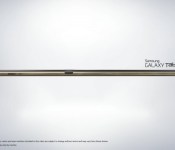
New Galaxy Tab S images and details surface

Sammy’s new Galaxy Tab S is expected to be revealed on June 12 and thanks to some new leaks, we now know a little bit more about the device.
The leaks show off a 10.5-inch device that will be just 6.6 mm thin and weigh 465 g, and have the same texture on the back of the device as seen on the Galaxy S5. Along with this info, we get a bit more of a look into the features of the device, which include a fingerprint scanner, Remote PC, Ultra Power Saving Mode, Download Booster and a feature that appears to allow the user to take incoming calls from their smartphone directly from their tablet.
The new Galaxy Tab S 10.5 is also expected to sport a 2560×1600 AMOLED screen, after Samsung had a brief fling with LCD panels in their Galaxy TabPRO and NotePRO tablets. Other than the screen, an 8MP camera is expected as well as Magazine UX UI and Android 4.4 KitKat.
Via SamMobile


The post New Galaxy Tab S images and details surface appeared first on AndroidGuys.
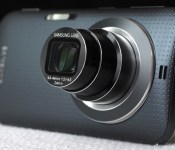
Galaxy K Zoom review: Samsung’s best cameraphone yet

Samsung is on a mission to build the perfect cameraphone. Low-quality fixed lenses and tiny smartphone sensors are clearly insufficient for photography enthusiasts, but while you always bring your phone to parties, sporting events and trips to the zoo, it’s often impractical to haul along a dedicated camera as well. The Galaxy K Zoom is Samsung’s response to this dilemma, marrying a 10x optical zoom lens with an otherwise ordinary Android handset. It’s hardly the best camera, or the best smartphone, but if you’re willing to make some compromises, this may just be the most compelling option yet.
Hardware

Last year’s iteration, the Galaxy S4 Zoom, was significantly underpowered, making for a generally unpleasant experience. The hybrid felt sluggish regardless of whether you were trying to take a picture, surf the web or make a phone call — it was a weak performer through and through. Fortunately, the K Zoom represents a step up from its 2013 predecessor. It’s hardly on par with the Galaxy S5 or flagship phones from other manufacturers, but it’s an improvement nonetheless. So if you’re looking to step up to a faster device with a similar feature set, you’ll get that here.
That said, you could certainly do better than the K Zoom in the sub-$700 price range. Samsung cut corners on specs in order to keep costs in check, and it shows. The device is powered by what the company’s calling a hexa-core processor, pairing a quad-core 1.3GHz Cortex-A7 with a dual-core 1.7GHz Cortex-A15 to make up Samsung’s Exynos 5 Hexa chipset. That sounds really great, doesn’t it? In practice, though, the device still feels sluggish, as I’ll explore further in the performance section below. You also get 2GB of RAM, 8 gigs of internal storage and support for up to 64GB microSD cards, which you’ll definitely need to add in if you plan on taking advantage of the photo functionality.
Also lacking is the 4.8-inch Super AMOLED display. It sports a 720p resolution, which just doesn’t quite cut it in this day and age. The screen size is adequate, and the smaller footprint does help to keep the K Zoom pocketable despite its rear-lens bulge, but Samsung really should have included a 1080p display here. Still, it’s a major step up from the S4 Zoom’s 4.3-inch, 960 x 540 panel, which, quite frankly, was an incredible disappointment. This year, details look sharp and the screen is bright enough for adjusting settings, verifying focus and reading text even in bright light, but there’s definitely still room for improvement.

Design-wise, the K Zoom has a slightly more premium look and feel than its predecessor. It’s clearly a hybrid of the Galaxy S4 and S5, with a front that’s more akin to the former and a removable, plastic back cover that’s nearly identical in appearance to what you get with Samsung’s 2014 flagship. It’s an attractive mash-up, no doubt, but it definitely lacks the high-end appeal of the HTC One M8, for example. Whereas the S4 Zoom looked more like a camera than a smartphone, with a pronounced grip on the rear, the K Zoom more closely resembles a phone. In fact, until you flip it around to reveal the lens, it looks like a slightly thicker Galaxy S4.
As for the hardware layout, there’s a home button below the display; a dedicated shutter button, power toggle and volume rocker on the right side; a headphone jack on the top; a micro-USB connector on the bottom; and a microSD slot on the left side. The microphones are positioned on the left and right of the K Zoom when held horizontally and, just as with the GS4 Zoom, they’re arranged in such a way that they can be easily blocked depending on your grip. The 10x, 24-240mm f/3.1-6.3 lens is positioned on the back, along with a slim, horizontal flash. Finally, there’s a 2,430mAh battery behind the removable cover with a micro-SIM slot underneath.
Software and user interface

The K Zoom ships with Android 4.4.2 (KitKat) and Samsung’s TouchWiz interface. I tested a model that’s being sold unlocked in Taiwan, so there are no carrier apps to speak of. You do get Samsung staples like S Voice and Dropbox pre-installed, and you can download more through Samsung Apps. Navigating the phone portion of the K Zoom was a breeze — the device is clearly powerful enough to handle basic tasks without issue, though I did run into some hiccups when using the camera.
You can launch photo mode by sliding the camera icon from the lock screen, by pressing down on the shutter release for one second or by opening the app directly. The three-tiered lens extends immediately, effectively doubling the K Zoom’s thickness at the widest focal length. You can zoom using the volume rocker (left to zoom in and right to zoom out), by pinching on the touchscreen or by using the on-screen zoom toggle. I found the first option to be most effective for still photos, while tapping the screen minimized shake when capturing video. The pinch-to-zoom option was the least precise of the bunch.

The camera includes a variety of shooting modes, including Auto (the default), Pro Suggest (which recommends a selection of filters depending on the scene), Program, Beauty Face, Shot and More (for burst shooting), Panorama, HDR, Night, Continuous Shot and Selfie Alarm (it automatically snaps a shot when it detects your face in the frame). There’s also an option to add more modes though the “Manage Modes” panel. Here you can choose from Kids Shot, Macro, Light Trace and Sunset, just to name a few.
There’s also a mode called Virtual Tour, which creates a walking photo tour of your surroundings. I could see this being useful for realtors and the like, but with poor in-camera stitching, the results are hardly professional. You even get a “Manual” mode, which lets you select the ISO, shutter speed and aperture, though oddly you’re only able to choose from the largest or smallest aperture available — nothing in between.

A main camera settings page enables more granular options. Here you can select the resolution, aspect ratio, compression quality, white balance, focus, drive mode, timer, flash mode (also accessible from the main shooting screen) and image effects. You can also activate geotagging, which tags each image with your GPS coordinates while also adding the nearest street to the filename, making it easy to identify shots from a specific location on the fly.
Camera and image quality

Let’s assume you’re buying the K Zoom because you like to take pictures. Besides the 20.7-megapixel, 1/2.3-inch sensor, which is on par with many lower-end point-and-shoots, the phone offers one distinguishing feature over similar handsets: a 10x optical zoom lens. You get less than half the range of the Galaxy Camera 2, which includes a 21x lens, but the 24-240mm range is still plenty generous, and far more versatile than what you’ll get on any current mainstream smartphone. That lens will let you zoom in very close to your subject, making for much more interesting Facebook posts and Instagrams.
Speaking of Instagram, you still can’t zoom directly from within the app. When we spoke to Samsung reps following the launch of the first Galaxy Camera, we were told full compatibility was on the way. That was nearly two years ago, so it’s probably safe to assume the tried-and-true method of capturing a photo first and then pulling it up in the Instagram app is going to be your only option for the life of this device. It’s hardly a dealbreaker, but considering instant social sharing is part of the K Zoom’s appeal, it’s disappointing nonetheless.
Getting into photo mode is also quite a hassle. Other cameras are ready to start shooting as soon as you hit the power button, but the K Zoom defaults to the home screen. Of course, you’ll probably be using this primarily as a phone, so that would be our preference too, but it does add a few seconds between when you decide you want to take a picture and when the camera’s ready to capture. If you’re looking to photograph a quick-moving subject, you’ll probably miss the shot. For selfies (there’s also a front-facing camera), shots of your food and the like, that’s not the end of the world, but considering it could take five seconds or longer just to snap an image, you’re bound to find this inconvenient at some point.
That brings me to another annoyance. The K Zoom defaults to a 16:9 aspect ratio, matching the phone’s display. Shots fill the screen entirely, which looks most natural on the device. But when you go to share photos or view them on a computer, you’ll probably be a bit frustrated, as I was after a few hours of shooting in the wrong format (as you’ll see in some samples below). At 15.1 megapixels, 16:9 photos also don’t take full advantage of the 4:3 sensor. You’ll need to switch into that mode to capture at the full 20 megapixels. There are also options to shoot at 3:2 (17.9MP) and 1:1 (8.3MP), if you prefer. For video, you can choose from 1080p at 60 or 30 frames per second, 720p at 60 or 30 fps or VGA.
Not that video is the K Zoom’s strong suit. Video quality is generally rather poor, particularly at longer focal lengths, where the absent image stabilization would have come in handy. You can tap to focus and expose, as you can when capturing stills, but brightness levels were often exaggerated, depending on the scene. Additionally, the camera reduces the microphone volume slightly whenever you zoom in or out, likely to avoid capturing sound from the lens motor. It’s effective in that regard, but the result is noticeably inconsistent audio.
Image quality is also hit or miss. Because of the large maximum aperture range, the lens performs much better at the wide angle than when you’re zoomed all the way in. The result is much sharper images at 24mm than you’ll get at 240mm, particularly when you’re shooting indoors, at night or on a cloudy day, as I did on my trip to the Taipei Zoo. The K Zoom’s biggest asset is its zoom lens, but image quality will definitely suffer if you try to take full advantage.

Assuming you plan to share images on social media straight from the camera, you’ll probably use the K Zoom to capture your food. Generally, the food photos I captured were properly exposed with good color balance (often a challenge in dim restaurants) and reasonable sharpness. Shooting in Auto, the camera opted for an exposure of f/6.0 and 1/32 second with a sensitivity of ISO 400. The image is mostly noise-free at a wider view, so it should be fine for sharing, though noise is clearly visible in the 1:1 inset.

The first few images I captured, including this one, the one above and the one below, were shot at the K Zoom’s default aspect ratio of 16:9. You can switch to a more common ratio very quickly through the settings menu, though, which I’d definitely recommend if you plan on sharing your photos. The image is roughly 1/2 stop underexposed, at f/4.9 and 1/20 second with a sensitivity of ISO 125. Text is legible, though you can see some artifacts in the 1:1 inset.

I switched over to Program mode for this shot, manually adjusting the sensitivity to ISO 3200 in order to capture sharp details in a dim room with a focal length of 240mm — in Auto, this f/6.3, 1/80-second capture would have been a blurry mess. The camera’s noise reduction filter stepped in here, effectively removing some noise, but flattening details in the process.

Typically, the K Zoom will top out at ISO 400 when you’re shooting in Auto mode, regardless of whether or not the situation requires a higher sensitivity. Details are surprisingly sharp in this f/4.4, 1/18-second handheld exposure, though noise is clearly visible in the 1:1 insets.

A 1/40-second exposure (at f/6.3) was clearly insufficient for this handheld shot at the camera’s maximum focal length of 240mm. Additionally, the K Zoom overexposed the scene slightly, washing out details in the trees in the background and the bear in the foreground. At ISO 160, noise is visible in the 1:1 inset, and details are soft due to blur. Image stabilization would have been a huge asset here.

This f/6.3, 1/40-second image is very slightly overexposed, with few washed-out details. Colors are accurate and details are reasonably sharp, with artifacts visible only in the 1:1 inset. The camera opted for a sensitivity of ISO 125 for this capture — noise is only barely visible when viewing the shot at 100 percent.

This is one of the K Zoom’s most successful captures. It’s properly exposed at f/4.7 and 1/90 second, and a sensitivity of ISO 100 helped to minimize noise, even when viewed at a 1:1 ratio. Colors are accurate and details are perfectly sharp for sharing on social media.

This final frame, also at ISO 100, was captured at f/4.6 and 1/54 second, yielding sharp details. Some elements are slightly overexposed, such as the man’s white shirt and the Chinese portion of the Taipei Zoo sign, but the vegetation is spot-on, with accurate colors throughout.
Performance and battery life

The K Zoom is hands-down a better camera and a better smartphone than the Galaxy S4 Zoom. Performance is significantly improved — the K Zoom is definitely in an entirely different class. It’s not, however, anywhere near as capable as flagship smartphones like the Galaxy S5, LG G3 and HTC One M8. Not that it needs to be. The Zoom handles basic tasks and apps with ease, and while it’s sluggish in camera mode at times, the biggest performance-related issue has to do with battery life.
| Galaxy K Zoom | Galaxy S4 Zoom | LG G3 | |
|---|---|---|---|
| Quadrant 2.0 | 14,633 | 4,828 | 25,548 |
| Vellamo 2.0 | 1,696 | 1,712 | 1,405 |
| 3DMark IS Unlimited | 9,359 | N/A | 16,662 |
| SunSpider 1.0.2 (ms) | 1,090 | N/A | 918 |
| GFXBench 3.0 Manhattan Offscreen (fps) | 3.6 | N/A | N/A |
| CF-Bench | 30,421 | 7,952 | 24,667 |
| SunSpider: Lower scores are better; results compiled on Chrome. | |||
On the surface, the K Zoom’s 2,430mAh battery performs very well. In our formal rundown test, the phone lasted for nearly 10 hours of 720p video playback with the display fixed at 50 percent. That’s actually on par with the Galaxy S5, which delivered roughly the same longevity with this particular test. That phone has a 2,800mAh cell on board, but it’s powering a much larger (5.1-inch) 1080p display. So, if you’re planning to use the Zoom for email, web browsing and consuming media, you should be able to make it through an entire day.

Capturing content is an entirely different story. My planned full-day outing was cut short when the battery died at 3:17 in the afternoon, having been chugging along since just before 9 o’clock that morning. During those six and a half hours, I spent about two hours shooting more than 350 photos and 15 minutes of HD video, an hour navigating Taipei using Google Maps, a few minutes uploading pictures to Instagram and Hangouts and the rest of the time idling, with the phone in standby mode in my pocket.
The depletion rate ranged from 10 percent per hour when using the K Zoom for ordinary smartphone activities to 60 percent when capturing 1080p video, so if you’re planning to shoot for more than an hour or so each day, you’ll absolutely need to bring along an extra battery. Assuming you’ll use the K Zoom as you would your current smartphone, capturing only the occasional still photo or video clip each day, you should do alright, but if you expect to snap hundreds of pictures each day on vacation, as many photographers do, the battery’s performance is unacceptable.
Wrap-up

Samsung has yet to announce US pricing and availability for the K Zoom, but it’s now available in Europe and select countries in Asia. In the UK, the phone is priced at £400, while elsewhere in Europe it can be had for €499. Considering both of those prices come in around $680, it wouldn’t be unreasonable to expect the Zoom to run upwards of 600 bucks if it ever hits American shores. That’s a lot of cash for a smartphone that lacks flagship specs.
With image quality on par with a sub-$200 camera (and inferior performance), you’ll probably be better off buying a separate camera and smartphone. There’s clearly appeal to having a two-in-one device like the K Zoom, and while Samsung’s made progress here, the hybrid Galaxy isn’t quite ready for prime time.
Filed under: Cellphones, Cameras, Mobile, Samsung
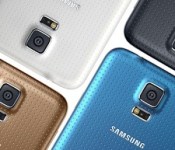
Supply chain orders for the Samsung Galaxy S5 are down 25% in Q3
 The predecessor of the Samsung Galaxy S5, the Galaxy S4, is most famous for smashing all sorts of “fastest sold” records including reaching 10 million units sold in 1 month and subsequently 40 million handsets sold after 6 months. It’s obviously been a hard act to follow for the Galaxy S5, though it has apparently beaten the Galaxy S4 in at least the category for the fastest to 10 million units sold. Unfortunately though, since that news, any sales news on the Galaxy S5 has been suspiciously absent from the public eye and the reason for that may be due to decreased demand. So much so, that Samsung is reportedly having to tell its supply chains to decrease supply by up to 25% in Q3 this year.
According to the report, 21 million units were ordered for this quarter (Q2) and only 15 million have been ordered for the upcoming quarter. Before we go on reading into this information, devices will always taper off in supply and demand as time goes on; that is to be expected. However, the Galaxy S5 has come under intense attack from all sides with generally superior equipped Android devices with overtly obvious innovations likely taking market share away from Samsung’s latest flagship (and that’s not even mentioning the effect Apple has on the smartphone market). This much has been made obvious by news that the LG G3 selling more per week in Korea than the Galaxy S5 was ever able to, probably another sign that Samsung is not quite as invincible as they might have fancied.
One way or another, when Samsung’s financials are eventually announced, we will know what kind of effect this new market has had on Galaxy S5 sales. What do you think about the Samsung Galaxy S5 having its supply decreased for Q3? Let us know your opinion in the comments.
Source: UDN.com via TalkAndroid
//<![CDATA[
ord = window.ord || Math.floor(Math.random()*1E16);
document.write('’);
//]]>

Samsung Galaxy Tab S press renders give away some dimensions and nifty Features
 With Samsung‘s Tab into Color event right around the corner, it’s no surprise to see that Samsung Galaxy Tab S press renders have leaked out to give us a better idea of what the tablet devices are going to look like. According to the renders, at least one of the Tab S tablets is going to weight 465g and will measure just 6.6mm thick; for reference, the self proclaimed thinnest tablet in the world, the Sony Xperia Z2 Tablet measures only marginally thinner at 6.4mm. The Tab S tablets look like they’re also going to incorporate a fingerprint scanner much like the Samsung Galaxy S5 did in the home button.


Software-wise, the Tab S tablets look like they are going to incorporate the same remote desktop tools available on the Note Pro and Tab Pro devices. Additionally, there appears to be a function that will allow you to sync your presumably Samsung smartphone to your Tab S and receive any calls to your phone on your tablet.


The Tab S is expected to have 8.4-inch and 10.5-inch variants, both with a resolution of 2560×1600, powered by an octacore Exynos 5420 processor, 3GB RAM, and 32GB storage with microSD slot. They will also have a 2.1MP front camera with a 8MP rear camera and be running Android 4.4.2. There should be plenty more details about prices and availability at the Tab into Color event on June 12th in New York City, however it’s expected that the devices be available for preorders following the event.


Are you interested in the Samsung Galaxy Tab S devices? How do you think the Galaxy Tab S tablets look? Let us know your thoughts in the comments.
Source: SamMobile
//<![CDATA[
ord = window.ord || Math.floor(Math.random()*1E16);
document.write('’);
//]]>

Korean protester spreads democracy’s message by baloon and flashdrive

As funny as the idea of a video game starring Kim Jong Un might be, how North Korea treats its people isn’t exactly a laughing matter. As a child of officials who were part of the North Korea’s Workers Party, Park Sang Hak didn’t have much to worry about. His family was part of the country’s elite and wondering where their next meal would come from wasn’t part of daily routine. According to Bloomberg Businessweek, however, when Hak saw the government starving its people he was overcome with guilt, and he defected to South Korea. As a direct result, two of Hak’s uncles were arrested as political criminals by North Korea’s State Security Department and executed as political enemies. He responded by putting a technological spin on South’s previous form of protest: sending propaganda pamphlets north by balloon. His version entailed floating DVDs and USB flash drives containing, among other things, videos about Samsung and Hyundai — evidence of the south’s economic prosperity under democracy.
Despite repeated death threats, he continues on — even sending DVDs with a rap video showing the deceased former leader Kim Il Sung as a transvestite in heels and a bustier, and as a portly Elvis wannabe.
While Park’s efforts to fight the power are valiant, he’s still at the mercy of Mother Nature. One launch of his balloons wound up in Seoul due to strong southern winds, and critics say that the airborne messages don’t often make it beyond the demilitarized zone because of wind patterns. Park remains steadfast in his mission, though, saying that hundreds of the some 27,000 defectors in South Korea have told him they’ve seen his materials. While that might not seem like many in the grand scheme of things, it’s enough to keep him pressing on. Be sure to check out his full story in the source links.
[Image credit: Associated Press]
Filed under: Samsung
Via: Telegraph
Source: Bloomberg Businessweek (1), (2)

