


Review: Incipio ATLAS Ultra-Rugged Waterproof case for Galaxy S4
Incipio, one of the more popular brands in the mobile accessory space, has been putting out products for many Android smartphones. Some products have even passed through here; check out our reviews of the various HTC One cases. We recently had a chance to review the Incipio ATLAS Ultra-Rugged Waterproof case for the Samsung Galaxy S4.
The case is made up of four layers which provide superior defense against shock and drops all the while remaining lightweight. One of the best things about this case is that it’s really slim, yet it’s waterproof, dustproof, shockproof; thanks to Tempered glass, rigid Plextonium Polycarbonate, supportive TPU, and shock absorbent silicone. It’s a mouthful to be sure, but they combine to create quite the protective shell for your device.
For a rugged case, the ATLAS Ultra-Rugged Waterproof case is quite good looking. It’s quite easy for a rugged case to end up making your phone look like a brick but this is not the case with Incipio’s design. Your phone stays relatively slim yet it feels solid as a rock.
While there are a lot of good things about this case, there was one issue that really bothered me. Sure, we use phones for all purposes (browsing, messaging, emailing,etc) but the most vital feature is making and receiving phone calls.
We found that with this case on our Galaxy S4 our callers complained of not being able to hear us loudly or clearly. Moving it closer to your mouth and speaking loudly helps, but it’s not our natural tone. Yes, we could go with a Bluetooth headset or hands free device, but that’s another product and more money. Perhaps the model we tested did not have a complete cutout for the microphone. We’ve not run into this issue with other Incipio products so we’re willing to bet this is an anomaly.
Also note that if you have a screen protector on your Galaxy S4 you might run into issues with display sensitivity and touch response. We had one in place ahead of our review and found that the screen did not respond to our touches quite like we hoped.
Generally speaking this was not Incipio’s best work but we still found it to be a better than average unit. If you work in a field where protection is a must (or if you are Bear Grylls) then this case will keep your Samsung Galaxy S4 clean as a whistle. And dry as a bone.
The Incipio Atlas Ultra-Rugged Galaxy S4 case retails for $89.99 and comes in four color options. You can also find them at Amazon for as low as $73.95, depending on the color you want.
The post Review: Incipio ATLAS Ultra-Rugged Waterproof case for Galaxy S4 appeared first on AndroidGuys.
Popular Google URL Shortener released on Android [App of the day]
When posting on social networks, sometimes you need to watch your character count per post. And in the past, Google has been there to provide a decent solution, goo.gl. Up until now, it has only been available by navigating to the site. Well, the Android app is finally here, and it does just about everything you could ask.
First, you need to sign in with your Google account to use the service. The interface should be familiar if you’ve ever used it previously. Paste your long link in the text box, and there you have it – a shortened link.

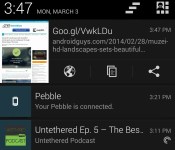
You can choose to open the link in the browser, copy to your clipboard, or share. And you can do all of these from the handy notification it gives you, as well.
For many, this may be a download-and-forget type of app. However, it’s very well done and convenient.
The post Popular Google URL Shortener released on Android [App of the day] appeared first on AndroidGuys.
Aerb 3in1 Smart Multimedia Dock for Galaxy Devices Review
Recently I got my hands on the Aerb 3in1 Smart Multimedia Dock and usually I am kind of skeptical about using off brand docks that claim to have a lot of functionality. Usually you have to jump through hoops to get a device to work, but yet the Aerb Dock is as easy as they come. I plugged in my peripherals (mouse and keyboard, HDTV, and micro usb charger) and your device becomes alive on your screen to do whatever you want. My wife thought this was the greatest way to play Candy Crush, but hey whatever floats your boat. Alright, lets break this thing down.
What we got: Aerb Smart Multimedia Dock
The Good:
- 2 x USB 2.0 (keyboard/mouse, external storage)
- 1 HDMI Out (TV/Monitor)
- 1 micro-usb (for charging and data transfer if plugged into computer)
- 4 built in rubber feet to hold the dock in place
The Bad:
- Won’t work with a thick case, but a very very thin case would
- Charges slow, but that’s not the real reason we are using it
- No audio out for speakers, but can use your TV’s HDMI to push through your system
Judgement:
I ended up plugging mine into my TV at home and connected with a wireless keyboard and mouse. This allowed me to have one extra USB, so I slapped on an external hard drive and everything worked as it should. I played movies from the external hard drive and they were crisp and clear running at 1080p.
It is useful to download “Rotation Locker”, which is free, to put your screen into landscape mode and keep it there. That way your entire screen is used by the TV and not just the middle of it.
The device is nice to have when you have friends or family over. Instead of them huddling around to see a new app or pictures, you can display it on the big screen, with great picture quality.
Reigning in at just under 25 bucks, this is a dock that holds its own and gives the factory Samsung Smart dock a run for its money. If I had to choose between the two I would go with the Aerb hands down. You’re getting the same functionality but minus the extra USB port and audio out, but for 50 bucks more it’s not worth it to me.
Check it out on Amazon and see what everyone else is saying or head over to Aerb’s official website for more details!
The post Aerb 3in1 Smart Multimedia Dock for Galaxy Devices Review appeared first on AndroidGuys.

uNu Unity Battery Case for Samsung Galaxy S4 Review
Overview
Modern smartphones are often judged by their ability to hold a charge, and are regularly criticised for just how long you have to have your device plugged into the wall. With smartphones becoming more feature-rich with bigger screens and better cameras, the charge is becoming an increasingly difficult manufacturing challenge to master, with phone makers often left with a trade-off between a bigger battery and keeping the device small.
uNu have addressed the battery concerns associated with modern smartphones with their Unity Battery Case for the Samsung Galaxy S4. The case has a built-in battery so effectively doubles the capacity and life of your Samsung Galaxy S4.
Design

The uNu Unity Battery Case for the Samsung Galaxy S4 is a relatively simple design and comes in 3 parts. First there’s the battery which fits into your device and your existing battery hooks into. Your device then sits in a new bezel with a new back and it all clips together very well.

This is your new device – encapsulated in a protective casing encompassing two batteries. Access to all the ports is retained, and easily too. Charging is exactly the same as normal, since your old battery hooks into the new one so they feed off each other, which means both get charged simultaneously, and I didn’t even notice an increase in charge time, despite charging two batteries.

The uNu case is very well made, with the Galaxy S4 sitting nicely in the case with very little movement. If anything it was too snug, as it took some force and wiggling to actually get the device into the case.
And then comes the biggest factor with the case, and it was always going to be the killer feature. It’s not the design, or whether it makes your battery last longer, or even if it’s aesthetically pleasing. It’s just how much fatter does it make your nice slim Galaxy S4.
Obviously you’re effectively doubling the width of the device by adding another battery, and my initial reactions out of the box was that I didn’t like it. I bought the Galaxy S4 actually over the HTC One because I liked how it felt in my hands and the thinness of the device was a major plus point. To completely compromise this is a big deal, but surprisingly after only around an hour of use, I now actually prefer the feel of the device in the uNu Unity Case.


The uNu Unity case has a natural curve to it, which makes it extremely nice when sitting in your hand. By adding that additional thickness to the device, it oddly makes it feel more usable. The Galaxy S4 is thin, I mean really thin, and sometimes that can compromise usability by making it seem fragile. By adding a centimetre or two to the thickness it makes the device feel more solid – something I really liked about the case.
Naturally as well as the increased battery life, which we’ll get onto in a moment, it adds alot of protection to your device.
Functionality

With such an increase in the thickness of the device, you want a hell of a lot of added functionality for that compromise, and the uNu Unity Case certainly delivers. The battery life is simply incredible. It is now 20:00 and I have had the device on since 06:00 this morning. During that time I have been playing Spotify for the 4 hours travelling I do, plus GPS whilst navigating Google Maps and playing Ingress, together with all the syncing going on with my Gmail and Facebook etc. and it’s still sitting at 56%.
I can deal with a few extra centimetres for that kind of result.
With these track results, you’d be looking at easily 2 days of heavy use before charging, and probably close to 4 days on light use. Those sorts of figures in a modern day smartphone are just unheard of, so uNu really knocked it out of the park here.
Of course, to accompany this, you have the added protection it physically gives your device, which is a nice peace-of-mind to have.
Conclusion

I have been pleasantly surprised by the uNu Unity Battery Case for the Samsung Galaxy S4 as I am someone who usually doesn’t entertain the idea of such a case, simply because I like the slim profile of my device. However, I have been completely turned by just how nice the uNu case feels to hold, and also the benefit adding another battery gives. I can finally not worry about staying next to a socket on the train ride home incase I run out of juice.
The uNu Unity Battery Case for the Samsung Galaxy S4 is available for $69.95, and I promise you it will certainly impress you.
The post uNu Unity Battery Case for Samsung Galaxy S4 Review appeared first on AndroidGuys.
Muzei Live Wallpaper: The best live wallpaper we’ve ever used
Dashclock Widget creator Roman Nurik is back with a beautiful live wallpaper for your Android phone.
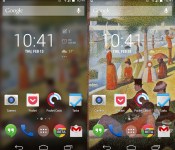
The appropriately named Muzei (or “museum” in Russian) sets a piece of art or custom photo as your phone wallpaper, rotating every night. The default setting adds a slight blur effect to the painting, blending in nicely with whatever you have on your homescreens. If you double tap an empty space on anywhere on your homescreen, it will toggle the blur, turning it back into a full-fledged piece of artwork.
The wallpaper hasn’t even been in the Play Store for more than two days, and it already has upwards of 50,000 installs. Seeing as how it is so popular already, we are going to take a look at just how great it is.
Featured Art

The big feature in this app is the “Featured Art” section. This rotates famous pieces of artwork as your wallpaper, chosen by Nurik and his fiancé. The rotations usually happen at around 9PM ET every night and so far we’ve seen work from Vincent van Gogh and Georges Seurat. There are definitely a lot more to come.
Custom photos

If classic artwork isn’t your thing, you can always choose custom photos to rotate every few hours. You can select entire galleries or just a handful of your favorites.
When I take pictures from my phone, I take a lot at one time. I tend to come back to the gallery and choose the best one, and leave all the others to be forgotten. The custom photo selector is a subtle way to remind you of pictures you once forgot about. Take a look at the original compared to the one with the blur effect.

It’s not a very good photo… at all. But with the slight blur effect that Muzei uses, it doesn’t look half bad. I almost want to go as far as saying that bad quality photos aren’t nearly as annoying to keep in your gallery anymore. Try this feature out – you’ll probably love it.
Extensions
Openness seems to be a common trend in Nurik’s app design philosophy. For anyone who hasn’t yet tried Dashclock, the app comes with a basic set of useful extensions by default. The API is open to other developers, so they can create their own extensions. So far, before hitting the two day mark in the Play Store, Muzei already has countless extensions.

Some of the notable extensions so far are Reddit, APOD, and 500px. Muzei seems to have a bright future already, and let’s hope it’s as popular as Dashclock has grown to be.
Bugs
This app is new… very new… so we are definitely going to expect some bugs. There have already been a few reported issues, but nothing that would completely turn anybody away from using it. And actually, Nurik has already addressed many of them, pushing out an update to the Play Store. We’ll have to see as time passes, but so far there haven’t been any huge issues.
You should download this.
This is usually the part where we review what we liked and didn’t like about the app. But I’m not going to do that. Muzei is too young to gripe about any substantial bugs, especially because it doesn’t have many at all. This app is gorgeous, and is filled with a huge amount of customization options. It’s still very early in the process to make any suggestions or improvements, but what I do know is this – If you want a beautiful and customizable live wallpaper for your phone, the Muzei Live Wallpaper is for you.
The post Muzei Live Wallpaper: The best live wallpaper we’ve ever used appeared first on AndroidGuys.

Rocket Robo review: You need to play this game
Rocket Robo is a side-scrolling puzzle game that you should download right away.
Every once in awhile a new game hits the Play Store, and the amount of work that went into making it blows you away. This is definitely one of those.
Gameplay

You play as a little robot sent out by an elderly tinker to collect stars to bring the light back to the night sky. You can touch the screen and tilt to fly around each world, dodging obstacles and collecting stars and secret treasures. The robot is really easy to maneuver, and the levels are diverse enough to make it an interesting experience. There are three different worlds in the game, and each one is pretty lengthy, so you won’t be bored anytime soon.
Graphics

The graphics in this game are beautiful. They remind me a bit of Little Big Planet for the Playstation, with obstacles that are made from everyday objects. Once you get a bit further in the game, the levels become more diverse and complicated, and still really beautiful to watch.
Soundtrack
This is quite honestly the best part of the game. It’s a little nontraditional compared to the type of game you’re playing, but it works. it keeps you engaged, and that’s what it’s there for.
Story

The game includes a small story line, accessed through the main menu. It’s cute and it’s fun, and it gives you quite a bit of back story about the little robot. Most other games would just send you in to battle without telling you what you’re doing.
Should I buy it?
All in all, Rocket Robo is a difficult one to pass up. It’s 99 cents in the Play Store, and well worth it. Bad Kraken Games needs to keep making games like this, so 99 cents isn’t too much to ask, is it? Download it below, and play your heart out!
The post Rocket Robo review: You need to play this game appeared first on AndroidGuys.

Yahoo reportedly set to surface Yelp reviews in search results

According to The Wall Street Journal, the next time you search for a chicken dinner on Yahoo you could be served up a Yelp review for the best bird in your hood. According to the paper’s source, Yahoo CEO Marisa Mayer announced a partnership that would surface Yelp reviews and listing in Yahoo’s search results, during a meeting Friday. Little else is known of the deal.
While the struggling internet company continues to see revenue fall, its latest earnings report revealed that search revenues for Q4 2013 were up eight percent over the same quarter the year before. The company is clearly still invested in its bread-and-butter, but it’s also made a push into content, signing names like David Pogue and Katie Couric to lead new news initiatives. During her CES keynote earlier this year, Mayer, who previously led search at Google, underlined Yahoo’s commitment to search, revealing it added 869 partners, and conducted 600 related experiments in 2013.
Filed under: Internet
Source: The Wall Street Journal
Pebble Appstore Beta 8 hands-on
The time is finally here… well, almost. Pebble finally announced their appstore for iOS, and left Android users waiting around for the launch on their favorite mobile platform. Recently, the Pebble team opened up a beta build to the public. It works, but remember: this is a very early build of the software. If you’ve watched how-to’s on the build for iOS, it’s basically the same thing,this one is just more buggy.
Disclaimer: Since this is a beta build of the appstore, we can’t vouch for anything that may go wrong. It’s buggy and slow, and that’s why it is still in beta.
Start-up
When launching the store for the first time, Pebble prompts you to sign-in to their servers, or sign-up. It then checks your installed watchfaces, letting you know which ones you’ll need to drop in order to upgrade to the newest software version. Afterwards, it updates your software to version 2.0 (the newest build).
If all goes well, you’re whisked into a world of endless watchface possibilities at your disposal.
What do I do now?

Before we get into anything else, let’s talk navigation. Pull from the left side of the screen to access the menu. The appstore is divided into three sections: My Pebble, Get Watchfaces, and Get Apps. Here is where you will also find your Pebble settings and anything else you might need.
My Pebble

This is where you’ll go to manage everything about your watchfaces and apps. Slide through the installed faces near the top of the screen, to directly manage the installed apps. Towards the bottom, sits the “locker”. This is where you’ll find your download history. If you’d like to switch one of these apps out, tap it, and it will ask you if you’d like to install. It’s that easy.
Get Watchfaces

Here is where you can browse watchfaces to your little heart’s content. Search, browse, install, do whatever you see fit.
Get Apps

This is the same premise as the watchface section, just for more useful. Here is where you can find battery indicators, games, remotes, fitness trackers, etc. It is very possible to spend hours in this section. You’ll probably find many things that you had no idea existed.
How do I get it?
If you’d like to lend a helping-hand in the production of the appstore, you can download the beta, here. And remember, use this at your own risk.
Even the early build of this appstore is wonderful, especially compared to what Pebble users had to go through to get apps in the past. Do you have a Pebble? What are some of your favorite watchfaces and apps? Let us know in the comments!
The post Pebble Appstore Beta 8 hands-on appeared first on AndroidGuys.
LifeProof Fre for Galaxy S4 Review
Last week I got my hands on a LifeProof Fre for the Galaxy S4 and after about a week of normal and rugged use, it is time to divulge the details.
When I first received the case and slapped it on my Galaxy S4 I was extremely disappointed. When I placed my first phone call to test out the audio volumes, the headset speaker sounded terrible with static and muffled voices. I figured that it might be my screen protector and body skin on the device is creating too much bulk and pushing the phone against the speaker membrane.
So I ripped them off, extremely easy to take off case, and put it all back together. However, my problem was still not resolved. So like every good reviewer I called up LifeProof, 35 minutes to get through, to see what I could do to remedy it and they told me to blow into the microphone port. Now I am thinking to myself, “What in the hell does that have to do with anything?”, well I did it and felt extremely stupid, but that didn’t fix my issue.
Now at this point I am just frustrated and I took action into my own hands. I placed a very small piece of Kleenex between the phone and the membrane and voila, my problem was solved. Now could this have been my fault, maybe, could this have been LifeProof’s fault, maybe, I can’t say it is because I didn’t give them the time of day to properly deal with it but when you’re on hold for so long I just don’t have time to deal with customer service.
Ok! Back to the review!
This case is sweet! I really enjoy the clear back and the case fits the phone like a glove. The call volumes going out and coming in are fantastic! I experienced no audio issue whatsoever and when playing music on speakerphone it is extremely clean and loud as if there isn’t a case on it at all!
Now the case does add some bulk, but we aren’t talking anything extreme when you take into account that the case is Waterproof, Dust-proof, Snow-proof, and Shock-proof. It slides easily from my pockets and doesn’t get hung up like some cases do. However, I am not a big fan of cases, I prefer to really feel a phone for what it is and not add any bulk to it. On the other hand, if I were going on a trip or taking the kids to the water park, I would, most definitely, slap a LifeProof on it and have some piece of mind!
The Good:
- Audio is clear both ways
- Speakerphone is crisp and clear
- Buttons are easy to press
- Feels and is secure
The Bad:
- LifeProof customer service
- Added bulk
Judgement:
If you are looking for a case to withstand all elements, this is the case to have! If you don’t mind some bulk and prefer piece of mind then this case will give you everything you need for a smooth $79 from LifeProof or $50 bucks from Amazon! However, if you don’t like bulk but maybe you find yourself with your family on the beach, this is something to highly consider to capture those moments you want and not worry about anything else.
The post LifeProof Fre for Galaxy S4 Review appeared first on AndroidGuys.

Talon for Twitter: A step in the right direction
From the creators of Sliding Messaging and EvolveSMS, Talon for Twitter is a great way to experience what Kit Kat has to offer on Android.
If you’ve ever used the official Twitter app for Android, you’d know very quickly that it could use some work. Third party apps have clearly taken over the Twitter space on Android, and unfortunately, some of these apps won’t last. The big bad people over at Twitter HQ would like to put a stop to third party apps all together, by limiting the amount of users each app can have. Fortunately for us, Talon is just now emerging in the app space, so it has a little while to go before hitting the dreaded API wall.
Let’s talk user interface
One of the features introduced in the launcher on the Nexus 5 were the transparent status bar and soft keys. When Kit Kat launched, Google gave developers the ability to use these features. But, that doesn’t mean developers will necessarily use them. Currently, I’ve only ever seen the Nexus 5 launcher and Google Now take advantage of these features… until now.

The use of transparent notification and status bars bring a whole new level to Immersive Mode. We’ve seen Carbon for Twitter take a stab at it, but nothing that quite uses the screen real estate this well. Moving forward, it would be great to see other developers take advantage of this.
On top of all of this, Talon just added a nice tablet UI. Not many apps have a tablet version, so this is always nice to see.
Customizations, galore
Talon has more customization options than you can shake a stick at. If the dark theme doesn’t suit you well enough, you can download a pre-made theme, or create your own. Change your font, or use “night mode” (do not disturb). It doesn’t really provide more options than other Twitter apps, but it sure isn’t lacking in this category.
A decent widget!
If you have read anything about Twitter on this website, you’ll know that I really fancy a decent widget. I’m not going to talk too much about this one, but sometimes these things are hard to come by.

Problems?
This app is almost brand new, so we’re going to give Klinker Apps the benefit of the doubt. But this is buggy. Not so much that it’s unusable, but enough to get on your nerves. It has some force closes, theme selection problems, and sometimes it takes a very long time to refresh. But it’s getting updated pretty quickly, so it’s nothing to worry about.
The future
Talon for Twitter is an example of how beautiful apps can look on Android 4.4. And for only $1.99, it’s worth every penny. If you’re looking for another Twitter client on Android, you need to check this out. Klinker Apps, keep doing what you’re doing, because it’s working.
The post Talon for Twitter: A step in the right direction appeared first on AndroidGuys.
 AIVAnet