


Kanye West Blames Rivalry Between Apple and Tidal for Lack of New Collaboration With Jay-Z
During the Seattle leg of his Saint Pablo Tour, Kanye West was reported as calling out the rivalry between Apple Music and Tidal as the main factor behind the reason why there won’t be a sequel to Watch The Throne, his 2011 collaboration with Jay-Z. The main reason appears to be Jay-Z’s ownership of Tidal and the streaming company’s ongoing rift with Apple Music, which he previously said was negatively affecting the music industry as a whole (via The Fader).
West also said that he and Jay-Z didn’t appear on the final cut of Drake’s song “Pop Style” because of the same “beef” between the two streaming services. The singer hinted that Apple didn’t want artists mainly associated with a rival to appear on one of its exclusive albums, Drake’s Views. During the concert, West said the trio needed to quash the squabble and “let people have this song,” echoing a similar tweet he sent out over the summer.
“Y’all didn’t get, what y’all were supposed to get with me and Drake on this song because of some Tidal/Apple bull—-,” Kanye said. “Every time I perform this song I think about this s—. I think about the politics. I think about how hard I go for music, for art, for y’all.”
Kanye’s discontent with Apple Music began earlier in the year when he remained adamant that his new album “Pablo” would “never” launch on the service, but it eventually did after a few weeks. In the summer, West tweeted out a request for Apple and Tidal to meet and officially end their fight, which came on the back of reports that Apple might have been discussing the acquisition of Tidal. Apple Music executive Jimmy Iovine eventually quelled those rumors, saying “we’re really running our own race. We’re not looking to acquire any streaming services.”
Tags: Apple Music, Kanye West, Tidal
Discuss this article in our forums
Sony MDR-1000X Review: Wireless Hi-Res Headphones Offer Next-Level Noise Canceling
The wireless headphone market has been shaken up so much recently that it’s hard to know where to begin when a new entry appears on the stage and announces itself as the next big thing.
Fortunately this latest Bluetooth offering from Sony is targeting a very specific market segment best referred to as “premium noise cancelation”, and the company seems pretty confident that with the MDR-1000X headphones ($400), it has got a hit on its hands.
Sony is claiming “industry-leading noise cancelation” with these luxury cans, which use ostensibly the same drivers as last year’s highly regarded MDR-1A headset made for listening to Hi-Res Audio, as supported by the company’s audiophilic Walkman range, not to mention its line of wireless home speakers and in-car audio systems.
Can it improve upon the finely honed features of Parrot’s Zik 3.0, Bose’s QuietComfort 35, and Sennheiser’s PXC 550 Wireless noise-canceling headphones? Let’s take a look.
Design
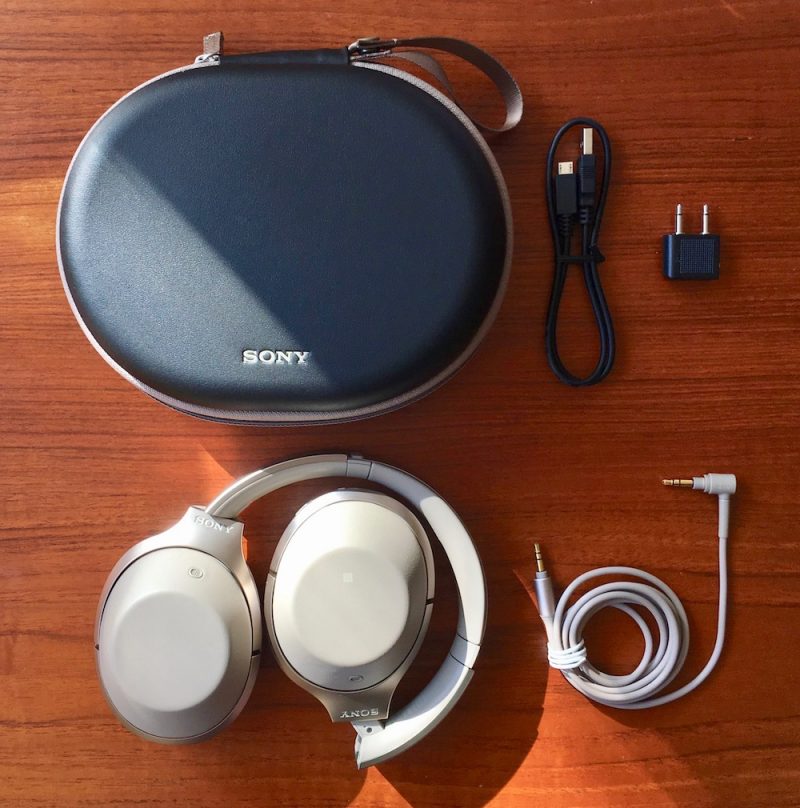
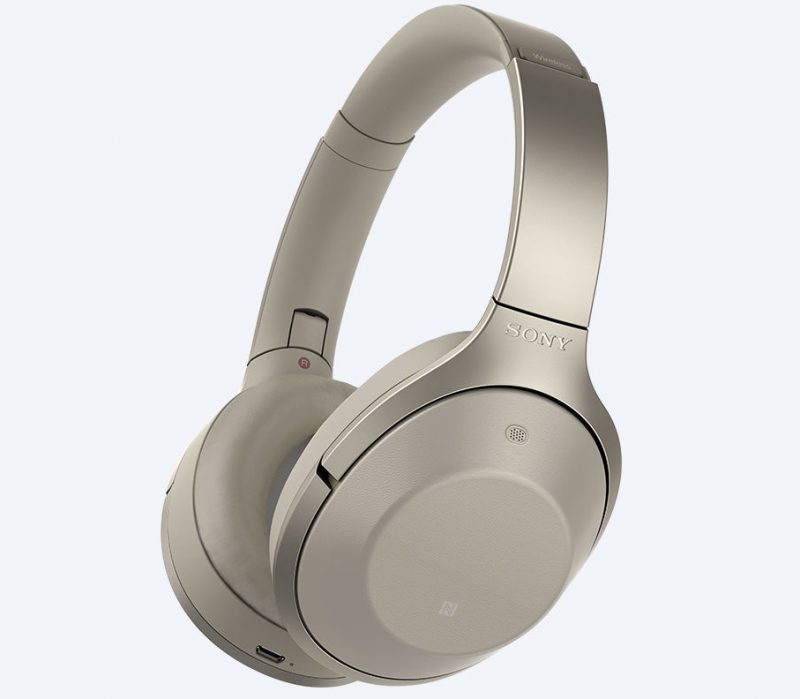
The Sony MDR-1000X’s come in a box design and hard carry case that will seem suspiciously familiar to Bose QC35 owners, but that’s where the similarities pretty much end. I received a beige pair (also available in black) that came with a nice thick matching 1.5 meter cable sporting a gold-plated mini jack, along with a black micro-USB charging lead and an airline adapter.
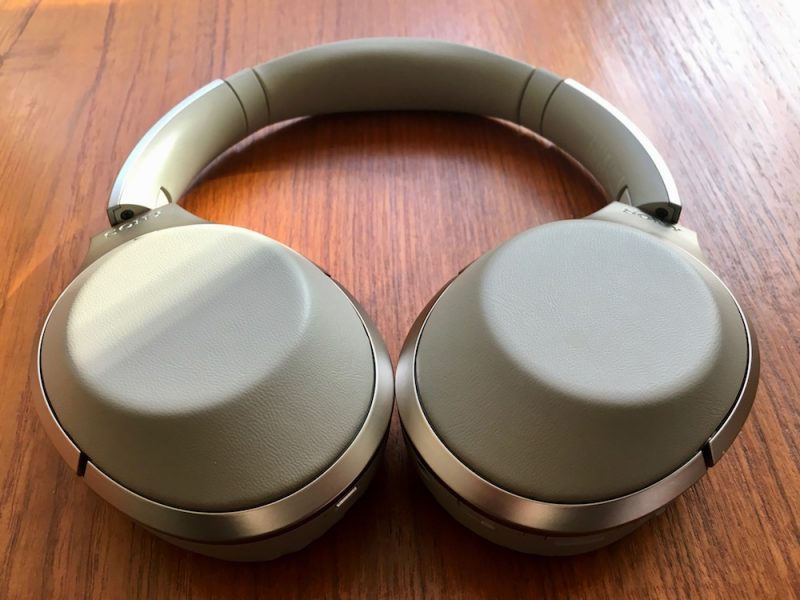
The swivel-folding earcups and pivots are made of a robust, creak-free plastic, with champagne-colored rims and squishy earpads covered in smooth synthetic leather that’s pretty convincing to the touch.
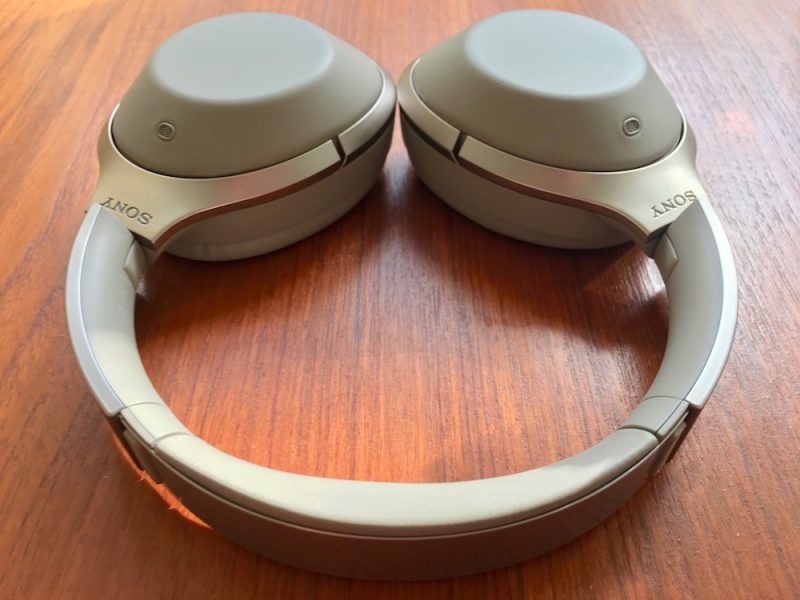
The polished steel headband packs some decent padding between the adjustable slats, and Sony has decided to let the design speak for itself by keeping the branding relatively understated. The only other distinctive mark on the outside of the cups are two small grilles where the noise-canceling microphones live. Altogether the headset weighs 275 grams, so slightly lighter than the QC35’s (309g).
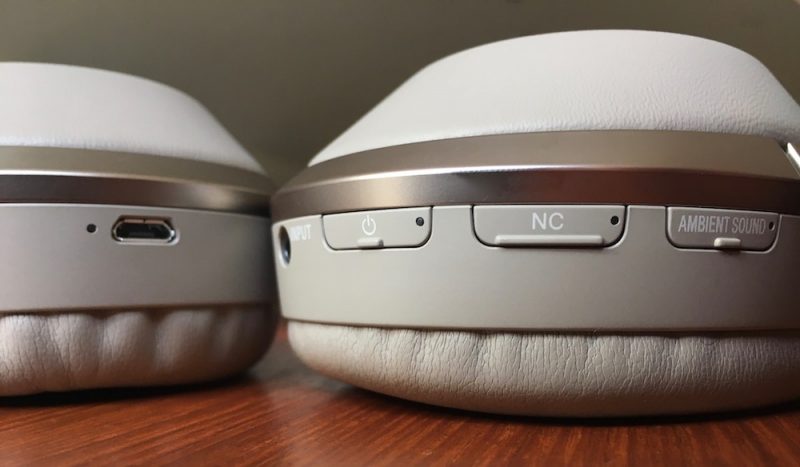
The left earcup contains an NFC chip for pairing with compatible devices and a micro-USB port for charging, while the right earcup has a touch-sensitive back that responds to taps and swipes to control music playback, skip tracks, change volume, and invoke Siri. Like most modern headphone gesture pads, it can also be used to take and end calls.
Around the rim of the right earcup are three physical buttons and an input jack. Unfortunately these controls aren’t particularly textured or distinctive, so expect some fiddling when you’re wearing the headphones before you get used to where they sit in relation to each other (although voice prompts helpfully accompany each press). The Ambient button lets you choose between different external sound filtering modes which we’ll cover below, the NC button lets you turn noise canceling on and off independently, while the power button can be pressed quickly for a battery level update and also activates the pairing sequence with a long press. All of the buttons have inset LEDs to indicate status.
Performance and Features
It’s worth stating right off the bat that Sony has taken noise cancelation to a new level with these headphones. This seems to have been achieved through a sustained period of self-reflection and extensive acoustics research in light of earlier shortcomings, combined with an exhaustive exercise in technological oneupmanship. In other words, Sony has pulled out all the stops in an attempt to beat Bose at its own game.

To begin with, Sony has chosen a headset design with a firmer grip than its NC rivals so that the earcups alone do a better job of isolating you from the outside world. There’s a slight trade-off here – Sony has used thicker urethane foam earpads than those found on Bose and Sennheiser’s NC cans to improve passive reduction, and they don’t feel quite as plush against your head as a result. It’s not a deal breaker by any means – they still feel lovely and squishy, and never bothered me after several hours of listening, but a few minutes back with the QC35’s was all it took to confirm they do lack the latter’s sumptuous cushiness.
Second of all, Sony’s patented Sense Engine boasts a “personal NC Optimizer”, a fancy-sounding piece of tech that’s supposed to determine your individual characteristics and wearing style to optimize the audio output just for you. Basically, Sony had the bright idea to build a microphone within each ear cup, which means the headset can sample ambient noise from both inside and out, effectively canceling out a wider range of sounds with corresponding inverted frequencies.

Hold down the NC button, and the headphone speakers emit a series of tones that bounce back and forth between the mics to analyze the shape of your head, work out whether you have big hair, wear glasses, and so on. It’s a unique innovation from Sony in the NC space – and it works, too. The only minor drawback for some wearers will be the ever-so-slightly more noticeable hiss when no music is playing. I found it pretty relaxing, kind of like distant lapping ocean waves. Your mileage may vary.
Otherwise, the NC easily stood up to scrutiny in a range of environments, including a busy bus and a crowded shopping mall. It didn’t detract from calls either, and effectively piped in my own voice as part of the conversation. The filtering is adaptive too, and corrected for changes in ambient levels as I moved around. These are also the first pair of noise cancelers I’ve worn that completely blot out my heavy-handed keyboard tapping and reduce my house phone in the same room to a barely audible, faraway whisper.
You don’t even need to take off the cans to realize just how effective the technology is, thanks to another feature unique to the Sense Engine called “Quick Attention”. Cupping your fingers over the touchpad instantly turns the volume down and lets in the outside world, allowing you to engage someone in conversation. Bring your hand back down and the music is re-instated to its prior volume. It’s genuinely useful for situations in which you’d usually be apt to take off the headphones – when a fight attendant offers you refreshments, for example.

The MDR-1000X’s Ambient button performs two further NC sound tricks. One is called “Voice mode” and lets in the range of sound frequencies the human voice normally occupies. This is also meant to let you hear in on important announcements – when you’re waiting to be called to a boarding gate, say – while still allowing you to enjoy your music in relative quiet.
I found the feature a bit overly enthusiastic, sometimes failing to filter out other ambient sounds like the rustle of bags and suchlike which then became exaggerated and annoying. The “Normal” ambient mode on the other hand worked very well, and let me stay mindful of traffic sounds as I walked the street without entirely extinguishing that insulated cocoon feeling that good NC cans do so well.
Sony’s headphones certainly have a stronger Bluetooth connection than the competition – the MDR’s didn’t drop out once in areas where rival Bluetooth headsets I’ve tested regularly faltered. The link was retained around harder corners and over bigger distances – the MDR-1000X’s even passed the ‘microwave test’ and didn’t get all glitchy as I hovered around the kitchen while my dinner was being nuked.
Wireless audio connections have their limits of course, but Sony has also included a neat sound prioritization feature in the MDR-1000X that I haven’t seen in other cans. By default the headphones automatically select the highest quality Bluetooth protocol available, but hold down both power and NC buttons for a couple of seconds and you can switch them to “Priority on stable connection” mode, which falls back to the less-demanding SBC codec. Bear in mind I’ve no idea how well it works because I never had to use it.
On the subject of wireless codecs, this headset supports them all: AAC (iPhone), aptX (Mac/Android), SBC (everything), and LDAC. That last one is a Sony special which apparently transmits up to three times more data than conventional Bluetooth for superior sound, but it only works with Sony devices, such as the company’s Xperia smartphones and Walkman digital audio players. There’s some proper science behind it and I have it on good authority (an audiophile friend) that it delivers on its promise, but I didn’t have any other Sony hardware to test it with.

To be honest though, it didn’t bother me. The MDR-1000X’s sound brilliant over bog-standard Bluetooth anyway, and certainly outperform the QC35’s thanks to a wider, more expansive soundstage. The mid-range is wonderfully balanced and the highs sparkle, while a good, chunky bass serves as a warm foundation. They sound even better when the cable is used – so long as the headphones are on. Whether this is all down to Sony’s DSEE HX processing (which allegedly recreates higher frequency signals lost in low-quality compressed music files) or simply better tuned drivers, I can’t say. Whatever the reason, the MDR-1000X’s sound fantastic, especially for NC cans.
A few other points bear noting. Unlike the QC35’s and PXC 550’s, Sony’s headphones don’t seem to be able to pair with more than one device at the same time. I had to manually disconnect my iPhone to reconnect with my Mac, and vice versa, despite the fact that the cans had no trouble auto-pairing with the last known device when turned on. Also, the 1000X’s live up to their 20 hour battery life, but they take 4 hours to fully charge – twice as long as Bose – and the battery is similarly integrated, so it has to go back to Sony if/when it comes to replacing.
Bottom Line
Sony has pulled a fast one on its rivals here. For a company whose last serious attempt at noise canceling was the h.ear on Wireless NC headphones, the MDR-X1000’s are a huge step up in performance. Not only do they look smart and block out distraction, they also pack a ton of technology (not to mention compatibility), keep a strong connection, and deliver a beautiful sound.
It’s a sure sign that the premium NC market is maturing, and that translates to better consumer choice. For those who favor comfort, always-on NC and listening simplicity, Bose still wins. If a bigger sound and the ability to switch between multiple audio sources are your top considerations, Sennheiser’s PXC 550 cans are a great alternative. But if superior noise canceling and audio quality are more important to you than cushiness and dynamic pairing, then these new MDR-1000X headphones from Sony have your back.
Pros
- Unrivaled noise canceling
- Exceptional sound for wireless
- Multiple audio codec support
- Solid design and touch controls
Cons
- Comfy, but not Bose-comfy
- Lacks dynamic multiple device switching
- Longer charge time than other cans
- $50 more expensive than Bose QC35
How to Buy
The Sony MDR-1000X headphones come in beige or black, cost $400, and can be ordered via the Sony website.
Note: Sony supplied the MDR-1000X’s to MacRumors for the purposes of this review. No other compensation was received.
Tags: Sony, review
Discuss this article in our forums
Apple Seeds Fourth Beta of tvOS 10.0.1 to Developers
Apple today seeded the fourth beta of tvOS 10.0.1 to developers for testing purposes, 10 days after releasing the third tvOS 10.0.1 beta and more than a month after releasing the tvOS 10 update. tvOS 10.0.1 has been in testing since September 21.
Designed for the fourth-generation Apple TV, the tvOS 10.0.1 beta can be obtained by connecting the Apple TV to a computer with a USB-C to USB-A cable and downloading and installing the software from a registered developer account via iTunes or Apple Configurator. Once a beta profile has been installed on the device through iTunes, new beta updates will be available over the air.
No obvious outward-facing features were discovered in the first three tvOS 10.0.1 betas, so it’s likely the update focuses on bug fixes and under-the-hood performance improvements to address issues discovered since the release of the first version of tvOS 10.
Single sign-on, a feature that will allow Apple TV users to sign in once with their cable credentials to access all live cable content included in a cable subscription, does not appear to be included in this beta and will be introduced in the future.
tvOS 10 brings improved search, expanded Siri capabilities, a new dark mode, a Continuity option for using the iPhone for text input, automatic download of universal apps, easy access to live TV, and more.
Related Roundups: Apple TV, tvOS 10
Buyer’s Guide: Apple TV (Caution)
Discuss this article in our forums
LeEco has to prove its content-first strategy is worth our time

Without its content offerings, the LeEco Le Pro3 is just another cookie-cutter smartphone.
How does a manufacturer make its generic-looking smartphones enticing to the general populace? For LeEco, the answer is stuffing its first two U.S. smartphone releases with an abundance of internet TV channels and what seem to be direct-to-video movie releases.
LeEco failed to explain why anyone would choose it over Hulu, Netflix, and Amazon Prime Video.
This is not a viable marketing strategy for a phone company that’s brand new to the U.S. Throughout its nearly two-hour presentation, LeEco showed off lots of product, including its flagship, the Le Pro3, and its mid-range counterpart, the Le S3, both of which come bundled with promises of bountiful content availability. However, LeEco failed to explain exactly why anyone would choose its offering over what’s already available. Hulu, Netflix, and Amazon Prime Video are all alive and well. The Chinese device maker is planning to compete in an already saturated market.
What’s more: Despite the fact that Google’s been strong-arming software updates and ensuring that legacy devices are supported with security patches, there was no promise from LeEco that it would do the same. With regards to its smartphones, LeEco’s strategy seems to be to push its vast library of content while ignoring what it is that brought us all to Android in the first place: the software.
Internet TV is as bland as it sounds
Internet TV is not the same as cable television. I say this as a loyal watcher of Pluto TV, one of the best internet television apps. I like to put it on the Late Night channel as I’m getting ready for bed to catch up on Jimmy Kimmel and James Corden. It’s become a nightly routine for me, but I don’t see myself doing the same with either the Le Pro3 or Le S3.
The content offered by LeEco is slim at best. First off, there are four different applications that all offer a variance of the same content: LeView, Le, LeVidi, and Live. Le is the live video app, while LeVidi offers all of LeEco’s movies and television content on demand. LeView is a video aggregator affixed to the far left side of the home screen and Live is merely a quick launch icon for Le that lives permanently in the dock.

If this all sounds confusing, that’s because it is. There are ostensibly four ways to consume LeEco’s content library, though only two of the apps are worth using: Le and LeVidi. Le offers a live television view, like if you were to launch the channel list option on your satellite or cable television receiver, while LeVidi looks and functions like Hulu, though it offers links to live feeds from time to time. The app also offers quick access to content from providers like Tastemade, SeeSo, and Machinima, as well as well as links to movies from partners like Lionsgate and MGM. Most of the movie offerings look like the kind of titles I’d typically skip over on any other streaming service, but I don’t doubt that there are at least a few gems buried in there.

Unfortunately, I didn’t have much time to delve deeply into LeEco’s media library, but I can say that I was dubious about what I initially saw. Much of the content reminds me of what free apps like Crackle and Tubi.tv offer, and I don’t bother with those services because I already know what I’m paying for with Netflix and Hulu.
Here’s the other kicker: You actually have to pay for all this content after your initial three-month trial period is up
Here’s the other kicker: You actually have to pay for all this content after your initial three-month trial period is up. A subscription to LeEco’s EcoPass is required to continuing using the aforementioned apps, though you get a couple of other goodies, too, like 5TB of cloud storage and extended warranties. LeEco hasn’t released details on how much the EcoPass will cost yet, but I imagine that whatever the going rate is will cover subscriptions to services like Seeso, which is typically included with an Amazon Prime subscription. Expect EcoPass to cost around the same as an annual Netflix subscription, too.
Software that’s trailing behind Google’s
Let’s forget for a second that the launches of the LeEco Le Pro3 and Le S3 are centered around their seemingly abundant content offerings. Would you still be interested in one as your daily driver? What if I told you that both of these devices are still running Android 6.0.1 and that they both eschew any semblance of Google’s stock Android interface in favor of a candied, millennial-esque aesthetic? LeEco’s EUI (ecosystem user interface) looks similar to what Xiaomi does with MIUI and Huawei’s done with EMUI, albeit mercifully doesn’t add the pile of features and apps that the other companies do — the main features of EUI are the content selection and seamless interaction with other LeEco products.
I understand that LeEco wants to differentiate itself, but there’s a way to do so while also offering an interface experience that’s close to Google’s. OnePlus is the perfect example of this with OxygenOS; it sticks to Google’s native Material Design paradigm while also tossing in extra features that make it an Android interface worth considering.
Bottom line

LeEco’s content offerings are compelling to some extent, considering the wide variety of videos offered — but the content offering alone is not enough to warrant the price of the Le Pro3 or the Le S3, which taken in a vacuum aren’t all that interesting themselves. Then you remember that the LeEco content requires a (currently unknown) monthly subscription fee.
LeEco is not exactly raking in subscriptions overseas, either, so it’s unclear as to why it’s marketing content as its marquee feature in the U.S. in the first place. Regardless, this strategy isn’t likely to work well in the U.S. where consumers have recently been trained to fear data-hungry services that will eat into their capped mobile data buckets.
LeEco has quite a journey ahead of it if it plans to make an impact stateside. I’ll be curious to spend a weekend with nothing but LeEco content to entertain me. Maybe then I can be convinced that this is the future of content consumption, and a feature worth buying a phone to get.
More:Le Pro3 and Le S3 hands-on: Welcome to the U.S., LeEco
Keep track of your fevers with this smart thermometer for just $15!
Right now you can grab this awesome digital smart thermometer from Kinsa for just $15 at Amazon. If your family spends a lot of time on the go, this thermometer is a great addition to any bag so you can quickly and easily check your child’s temperature if they aren’t feeling great. To keep kids sitting still, the app offers a bubble-popping game, and the flexible tip makes it more comfortable in their mouth.

Beyond just telling you the temperature, the thermometer can also give you real-time guidance on what to do next, which is gathered from sources like Mayo Clinic and Cleveland Clinic. You’ll be able to track your health history for each member of the family with ease, and all for just $15 right now.
See at Amazon
Best Music Streaming Services

Which streaming music service is right for you? Here’s a look at some of the top options.
Over the last several years, music streaming has become arguably the most common way people choose to listen to their favorite tunes. Alongside that rise, a number of services have popped up from major and minor players alike, all competing for your subscription dollars. While many of these services no doubt share a lot in common, there are some differences that give each its own personality.
If you’re trying to choose the right music streaming platform for you, here’s a rundown of some of the more popular options in no particular order.
Spotify

At more than 100 million users (40 million of which are paid subscribers), Spotify is the current king of the music streaming space — and it’s not hard to see why. The service is available on a wide variety of platforms with quality apps, and its free tier acts as an effective way for new users to see what Spotify is all about. If you want to remove ads, Spotify offers a $10 per month individual plan or $15 family plan.
Spotify offers a unique way of helping users sift through its catalog of more than 30 million songs as well, thanks to its weekly Discover playlist. As the name suggests, the playlist is refreshed weekly with new tunes Spotify thinks you might like based on your listening history. While other services have also thrown their hat in on curated suggestions, Spotify’s Discover Weekly playlist has earned consistent praise from those who like the adventure of finding new artists and songs to check out.
Sign up for Spotify
Pandora

As one of the first names in the streaming music game, Pandora is probably already familiar to many. Pandora operates as a streaming radio service, allowing users to start a radio station based around a particular artist or genre. You can then personalize each station by giving a thumbs up or thumbs down to each song played, allowing Pandora to further hone in on your tastes.
Pandora has also introduced Pandora Plus, a $4.99 per month subscription option that allows you to replay past songs, take your music offline, and skip as many tracks as you want. While this is a slightly tamer version of the unlimited, play-what-you-want offerings of other services, it’s also cheaper and should work just fine for those who enjoy Pandora’s streaming radio stations.
Sign up for Pandora
Google Play Music

As far as its catalog is concerned, Google Play Music can go toe-to-toe with every other service on this list. While the service is restricted to a web browser or an app for iPhone and Android, you should be able to find almost anything you’re looking for — with the exception of certain exclusives. At $10 per month for individuals or $15 for families, the pricing is right too. Add in the service’s quick access to playlists sorted by mood or activity, and things start to get interesting.
Where Google Play Music really shines, however, is its tie-in with another Google-owned property: YouTube. Included in your subscription is also a subscription to YouTube Red, which removes ads from YouTube and gives you access to some exclusive content. If you already watch a lot of YouTube, that definitely makes Google Play Music an attractive option.
Sign up for Google Play Music
Apple Music

Apple is a relative newcomer to the streaming music scene, but it’s already making quite a name for itself. Available via iTunes, as well as on iPhone and Android, Apple Music serves up catalog of music that’s just as compelling as other options on this list. Apple has also shown a knack for securing exclusive content, including from big names like Taylor Swift and Chance the Rapper.
Apple matches the pricing of its competitors, coming in at $10 for individuals and $15 for families. One of Apple Music’s more interesting offerings, its Beats 1 radio station, is available for anyone to stream for free, and includes interesting shows and interviews from celebrity DJs like Elton John and Josh Homme. Otherwise, subscribers will find plenty of on-demand music, along with some pretty compelling curated playlists in the service’s “For You” section.
Sign up for Apple Music
Groove Music

Microsoft’s latest shot at a music streaming service is called Groove Music, and, like the others, includes a pretty large catalog of music for $10 per month. The service is widely available on multiple platforms, including Windows 10 PC and Mobile, iPhone and Android. Groove is even available on Xbox, letting you stream your favorite tunes from your console.
Like others on this list, Groove Music offers up its take on curated playlists and suggestions in its “Your Groove” section. There, you’ll find relatively nuanced suggestions centered around mood, genre or other parameters based on tracks you’ve listened to in the past. Another of Groove’s unique features is its tie-in with Microsoft’s cloud storage service, OneDrive. Simply upload your own tracks to your OneDrive storage, and they’ll be accessible from your Groove library across all of your devices.
Sign up for Groove Music
Amazon Prime Music and Music Unlimited

Amazon curiously has a few different offerings on the table when it comes to music streaming. For Amazon Prime subscribers, you automatically get access to Amazon Prime music, which includes a comparatively paltry selection of songs that Amazon says come in at over a million. If you’re looking to step things up, however, the company now offers unlimited streaming of a much larger catalog that includes “tens of millions of songs” at $8 per month for Prime subscribers, or $10 for everyone else.
Like the others, Amazon Music Unlimited is ad-free, and includes on-demand music and curated playlists based on mood and genre. Where things get interesting is if you own an Amazon Echo, for which Amazon is offering a cheaper $4 per month Echo-only option. With Echo, you can do things like play a song based on lyrics you remember if you happen to forget its title.
Sign up for Amazon Music Unlimited
SoundCloud

If you’re looking to venture away from the mainstream a bit, SoundCloud is worth a look. As opposed to the other services on this list, SoundCloud made its name on remixes and indie artists, and includes a ton of that content for free.
SoundCloud does offer a subscription option at $10 per month, which includes offline playback, ad-free listening, and access to its full catalog of music. You’ll be limited to streaming either through the SoundCloud website, or via the service’s Android and iPhone apps, but there’s no substitute if you’re looking for a wealth of indie artists and remix tracks.
Sign up for SoundCloud Go
What’s your pick?
What’s your go-to streaming music service? Let us know your pick in the comments!
Amazon Echo Dot now shipping, get Alexa voice control for just £50
Amazon unveiled the Echo Dot alongside the full Amazon Echo at a launch event in London a few weeks ago, but its release was staggered. The full speaker version was made available first, but now the smaller, cheaper Alexa-based hardware is available too.
The Amazon Echo Dot is essentially an Amazon Echo but without the speaker drivers. It has a single speaker so Alexa can respond to your queries, but for the full audio experience it plugs into your own speaker system.
It can also hook up to a Bluetooth speaker wirelessly, so you don’t necessarily need to cable it to an AV receiver, speaker or amp of some description. And if you only plan to use it to control other smarthome gadgets, you can just plug it in somewhere out of sight.
- Amazon Echo vs Amazon Tap vs Echo Dot: What’s the difference?
- Amazon Echo: First 7 things you should do to get Alexa started
- Amazon Echo tips and tricks
Pre-orders of the Amazon Echo Dot have started shipping and you can now order one for yourself on Amazon.co.uk. Prime members can have it delivered tomorrow.
For those who want to spread Alexa voice assistants around their homes, Amazon offers a deal on the Echo Dot whereby if you order five you get a sixth free. Buy 10 and you get two extra Dots free.
The Amazon Echo Dot is available now for £49.99 and it comes in either black or white.
Marantz’s SR7011 is a do-it-all AV receiver powerhouse
Marantz has just announced its flagship home cinema amplifier for 2016, the SR7011 and it can do pretty much anything you’d want from an AV receiver. It will handle Dolby Atmos and DTS:X 3D object-based surround sound formats and delivers sound through up to 9 channels, each with 200-watts of amplification, making it a seriously powerful beast.
The SR7011 can calibrate the speakers in your room thanks to built-in Audyssey software and other Marantz-designed internal component promise the “purest possible sound”.
You’ll find eight HDMI inputs on the rear, so you’re not short of options to connect a Blu-ray player, games console, set-top box or any other HDMI device you have. All eight support 4K Ultra HD signals too, so you can use it with Ultra HD Blu-ray players such as the Panasonic DMP-UB900, Xbox One S or Samsung UDB-K8500.
The SR7011 is a dab-hand with music too and has built-in support for Spotify, Tidal and Deezer, and will support high-resolution audio. You also get Internet radio, Bluetooth and Apple AirPlay for streaming from mobile devices, but it will also work with Denon’s Heos multi-room speakers.
- Denon Heos review: multi-room made easy
The Marantz SR7011 AV receiver will be available from November black and silver-gold for £1499.
The new Zelda ‘Breath of the Wild’ trailers are the best yet
We’re hours away from Nintendo’s (brief) reveal of the NX, and if there’s one game we’re excited for, it’s The Legend of Zelda: Breath of the Wild. The new adventure, which is coming out on both the Wii U and NX next year, was a highlight at E3 2016, giving fans their first exposure to the more open, dynamic world. Now, Nintendo has released two new trailers, which show off its exploration and combat in equal measure. They’re beautiful snippets of the full game, underpinned by a sweeping orchestral score. I don’t need to say much more — just go watch them, you won’t regret it.
Source: Nintendo (YouTube)
‘Switch’ is Nintendo’s next game console
It’s been almost a year and a half since Nintendo announced the NX, and now the gaming giant has finally dropped the codename and secrecy in favor of something more official: Switch. Like the countless rumors previously asserted, it’s indeed a hybrid mobile and home console with a tablet element and detachable controllers.
The tablet itself (which Nintendo calls “the Switch Console” is thin and pretty attractive. It looks to have a screen measuring around 7 inches, of unspecified resolution. At home, it’ll plug into the “Switch Dock,” which in turn plugs into your TV, while out and about you can either hold it or use the built-in kickstand to prop it up. In the trailer, a gamer plugs in what looks to be an SD Card-style cartridge, meaning games are likely to distributed both digitally and physically.
It’s powered by an unspecified custom Nvidia Tegra processor, which is “based on the same architecture as the world’s top-performing GeForce gaming graphics cards.” Whether that means Pascal — the architecture underpinning the 1000 series of GeForce cards and the yet-to-be-announced Tegra X2 — or just that Tegra chips in general are based on the GeForce architecture, is not clear. But the question of which SoC is powering the Switch — and whether it’s based on newer or older architecture — is important to answer if we’re to work out what exactly it’s capable of.
The controllers are just as we expected. Nintendo is calling them “Joy-Con.” They can be attached to a central unit called the “Joy-Con Grip” to behave like a single game controller, but also slide onto the side of the tablet for a more Wii U-like experience. Oh and, as rumored, they can also be used independently like two miniature gamepads.
If none of this sounds like your thing, Nintendo will once again offer a “Pro Controller” option laid out more traditionally. The trailer shows off lots of multiplayer gaming, either with multiple controllers connected to one system, or many Switch consoles connecting together wirelessly. We assume it’ll have online play as well.
So what will you be able to play on it? As well as the usual first-party suspects, Nintendo says it has the support of many developers and publishers, including Activision, Atlus, Bethesda, Capcom, EA, Epic Games, Konami, PlatinumGames, Square Enix, Take-Two and Ubisoft. In the trailer you can see third-party games like The Elder Scrolls V: Skyrim and NBA 2K alongside what look to be a new Mario and Mario Kart games and Splatoon. In Nintendo’s bold future, Splatoon will be an e-sport watched live by tens of thousands of people.
“Nintendo Switch allows gamers the freedom to play however they like,” Nintendo of America President Reggie Fils-Aime said, “it gives game developers new abilities to bring their creative visions to life by opening up the concept of gaming without boundaries.”
The Switch will be released worldwide in March 2017.
Timothy J. Seppala contributed to this report.

