


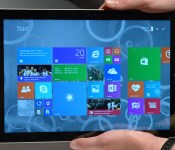
Hands-on with Microsoft’s Surface Pro 3

So, it wasn’t the Surface Mini we were expecting. But hey, we got fresh hardware, so that’s all that matters. The new Surface Pro 3 isn’t the smallest tablet Microsoft has made — in fact, it’s the biggest, with a 12-inch, 2,160 x 1,440 screen. But if you think it’s just a blown-up version of the old model, you’d be wrong. In addition to being the biggest, highest-res Surface, it also brings new pen tech, a new kickstand, and a new keyboard, to boot. Also, it’s surprisingly thin and light, considering this thing is big and powerful enough to replace a full-fledged Ultrabook. As a heads-up, we’re taking a device home from today’s press event, so you can expect to see a full review on our site soon. In the meantime, though, here are some early impressions to tide you over.
The Surface Pro is indeed thin, and it is indeed lightweight: at 0.36 inch thick, it’s about as skinny as an older-gen iPad, which is pretty impressive when you remember this is competing not with traditional tablets, but full-sized Ultrabooks. At 1.76 pounds, it’s definitely lighter than any Ultrabook you’ve ever carried; just don’t compare it to something like an iPad (not that you would: this is a bonafide computer replacement we’re talking about here). Throughout, the metal chassis feels similar to what we saw on the Surface 2 and Surface Pro 2, though Microsoft has retooled the kickstand so that it can now extend back 150 degrees, in addition to the usual two upright positions.
As ever, the kickstand has a sturdy hinge mechanism; it’s not difficult by any means to pull the kickstand out, but there’s just enough friction that it feels well-built. For all you Surface nerds out there, you just have to try out that near-flat, 150-degree position. The first time I pushed the stand out that far I actually felt a bit nervous, like I was about to break the thing. Such is the joy of using the newer model: you can indeed go farther with the kickstand, and you’ll be rewarded with a hands-free, almost Yoga-like experience if you do.

Taking a tour of the device, you’ll find the usual USB 3.0 port, along with a DisplayPort for adding an external monitor. There’s also a headphone jack, as you’d expect, along with an exposed full-sized SD card slot, in case the built-in storage (64GB to 512GB) isn’t enough.
But enough about ports: You’re here for the display, aren’t you? Sure you are. So let’s talk about the screen. First of all, it’s big. Duh. Twelve inches, up from 10.6 on the Surface Pro. The resolution has grown too, from 1,920 x 1,080 to 2,160 x 1,440. As you can imagine, the screen is quite sharp — it’s basically impossible to see any pixels without putting your face up against the screen and actively looking for them. The viewing angles continue to be good too, though the glossy finish means you will still encounter some screen glare.

More important than the higher pixel count, perhaps, is the new pen tech. With this generation, Microsoft ditched Wacom and instead used an N-Trig active digitizer. We know, we know: this probably sounds like inside baseball to all but our most hardcore readers. In truth, though, it’s a better experience. The pen, first of all, has been redesigned so that it feels more like a normal ink-based pen. Indeed, it does feel more substantial in the hand, not that I had many complaints about the pen that came with the Surface Pro 2. Also, the screen has just enough friction that when I write on it, I feel like I’m writing on paper (or as close as you can get, anyway). On the software side, Microsoft’s own OneNote app now sends your scribbles to the cloud as soon as you lay them down — yep, kind of like how Google Drive or some such will save your work as soon as you start typing.
Last thing — and yes, I saved the best for last — you can wake up your sleeping tablet by pressing the purple OneNote button at the top of the pen. Click that and the screen will light up, and you’ll be able to use OneNote from the lock screen — even without entering your log-in credentials. For the record, Windows 8 already has a camera app you can use from the lock screen, and that’s great, but this is better for people who actually need to get work done. In my quick test, it worked quickly and flawlessly. You can bet I’ll be trying it many more times once I take my review unit home.

One final word before I leave you to peruse all those hands-on photos: We need to talk about the keyboard. You know, the thing that allows you to use this as a laptop replacement. The touchpad here is bigger, and more precise, and now has a built-in touch button so that you can actually bear down on it. All good things. Also, you can now fold up the top of the keyboard so that it attaches magnetically to the tablet’s lower bezel, effectively creating the sort of wedge profile you’d expect to find on a proper laptop. Let me tell you, I will be using this feature generously, especially on my upcoming six-hour flight to California when the last thing I want to be doing is type on a completely flat surface (no pun intended). Again, more on that in the full review, but for now: I like.
Zach Honig contributed to this report.
Live from Microsoft’s Surface event in NYC!

Microsoft’s here in the Big Apple to announce a new Surface product or two, and we’re on site to bring you all the latest updates. It’s been a while since MS has announced updates to its tablet and PC lineups, so we’re expecting some substantial news here today. Stay tuned!


Filed under: Microsoft
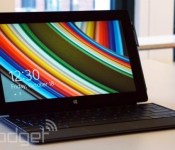
Watch Microsoft’s Surface event livestream right here!

Microsoft is set to announce some Surface related news and we’ll have all the nitty gritty in our liveblog. But you can also watch the event live after the break or right here courtesy of the fine folks in Redmond. So follow along, while still reading our live coverage, of course.
Filed under: Tablets, Microsoft
Source: Microsoft
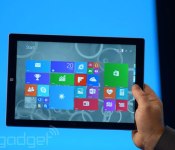
Microsoft announces its biggest tablet yet, the 12-inch Surface Pro 3

When Microsoft invited us to a “small gathering” here in New York City, we thought that meant a smaller-screened Surface Mini was in order. Instead, the company just announced a larger Surface, the 12-inch Surface Pro 3. Like the previous Surface Pro, it supports pen input, making it a good choice for creative professionals, especially with that extra screen real estate. In addition to being the biggest Surface yet, though, it’s also the thinnest-ever product with an Intel Core i7 processor. All told, the thing measures just 9.1mm (0.36 inch) thick, making it about as thick as one of the earlier iPads — incredible when you remember this is more akin to an Ultrabook than a tablet. What’s more, this thing is fanless, promising quiet performance throughout. Pretty standard for a regular slate, sure, but a fricking Core i7 laptop? Not quite.
In addition to being thin, the Surface Pro 3 is relatively lightweight, at 800g (1.76 pounds). And let’s be clear: when we say “relatively,” we mean compared to a comparable 12-inch laptop, or even a 13-inch Ultrabook; those would weigh somewhere in the neighborhood of three pounds. Even the 11-inch MacBook Air comes in at 2.4 pounds. Of course, the new Surface Pro 3 is still heavy next to an iPad Air or Samsung Galaxy Tab. But hey, the Surface Pro was never supposed to compete with those kinds of tablets anyway. No, this is and always was a laptop killer.
OK, so it’s just a bigger, surprisingly lightweight version of the last-gen Surface Pro, right? Not exactly. The third-gen model has a new kickstand on the back that allows the screen to sit at a near-flat angle of 150 degrees. The new Type Cover keyboard (that’s the one with the physical buttons) has been improved as well — especially with regard to the touchpad. Also, though the keyboard cover still “clicks in” the upper portion of the keyboard can now fold up and attach magnetically to the tablet’s lower bezel. We know, we know, this may be difficult to picture, but bear with us: By doing that, you’re effectively elevating the upper portion of the keyboard, creating a wedge profile similar to what you’d enjoy on a proper laptop. So, if you never got comfortable typing on the old Surface’s flat keyboard, maybe this is the ergonomic tweak you’ve been waiting for.
Developing…

Microsoft wants its new pen to be a big part of the Surface Pro 3

Satya Nadella and his team are hosting an event in New York City, where Microsoft has already revealed its Surface Pro 3. Not surprisingly, the company’s placing a lot of focus in the integrated pen. “When you hold it and a pen in your hand, it has to feel light,” said Panos Panay on stage. “When you hold a pen in your hand, it has to be light.” But what is exactly is Microsoft doing to make this happen?
Developing…
Filed under: Microsoft

China bans the installation of Windows 8 on government computers

China believes that Windows 8 poses enough of a future security risk that it’s banning government agencies from installing the operating system on any of its new computers. In a statement issued last week and picked up by China’s official news agency today, the Central Government Procurement Center has dealt Microsoft a massive blow by stating that all desktops, laptops and tablets must now run an OS other than Windows 8. Consumers aren’t affected, as it’ll only focus on computers used by government offices. It’s a curious decision, given the fact a reported 70 percent of Chinese computers run Microsoft’s 13-year-old Windows XP platform, but it’s believed officials are trying to stop agencies from being left in the cold should the company pull official Windows 8 support in the future. The government will now focus its efforts on its own Linux-based OS, which is an idea it’s been flirting with for a while already, firstly by promoting its use in an official capacity and then by attempting to persuade consumers in China to switch too.
Filed under: Software, Microsoft
Via: Reuters
Source: Xinhua, Central Government Procurement Center (Chinese)
Tune in at 11AM EST tomorrow for our Microsoft Surface liveblog!
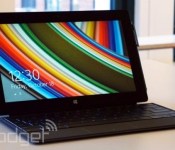
It’s been a while since Microsoft announced a new product in its Surface family, but we can almost guarantee there’ll be at least one new model at tomorrow’s NYC event. We’ve heard some rumblings about a Surface Mini running Windows RT, and we wouldn’t be surprised if MS announced a next generation of its Surface Pro as well. In any case, we’ll be there to bring you all the action. Bookmark this page to get our liveblog updates starting tomorrow around 11AM EST. In the meantime, don’t be shy — share your predictions with us in the comments below!
‘Assassins Creed: Pirates’ now available as a free-to-play browser game

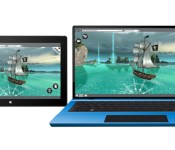
Here’s the thing about Assassins Creed: Pirates (you know, aside from the obvious swashbuckling theme): It was made specifically for phones and tablets. In fact, Ubisoft warned from the get-go that we probably wouldn’t see a PC or console version. Starting today, though, you can play it on your computer after all — well, sort of. Ubisoft just released a free browser-based version allowing you to play in the browser, using either touch input or a mouse and keyboard. What’s nice, too, is that although Ubisoft developed the web game with Microsoft, it actually works with every major browser — Chrome, Firefox, Opera, Safari and, of course, IE. As a bonus, it runs at full-screen, something most web-based titles can’t.
There are a couple catches, though, starting with the very nature of the game. Though Assassins Creed: Pirates is indeed a shoot-em-up title in its original form, the web version is a simple racing game (not that there’s anything wrong with that), where you challenge your friends to see who can steer the ship the fastest. From the settings menu, always a click away in the upper-left corner, you can change the weather conditions on the fly in case you get bored with racing in calm waters. Speaking of, this might be a good time to underline another Microsoft connection: the game makes use of Babylon.JS, an open-source 3D engine based on WebGL, JavaScript and TypeScript, which was developed by four developer evangelists at the company.
The second catch: the game only works on desktop browsers, which means unless you’re using a Windows tablet with IE installed, you’re out of luck; it won’t work on the mobile version of Safari, for instance. (Moral of the story: get a Surface.) Assuming you’ve got a Windows tablet or a computer of any sort, the game is live now, with support for five languages and three difficulty levels. Check it out!
Filed under: Gaming, Internet, Microsoft
Source: Assassins Creed: Pirates, Microsoft
Upcoming Xbox One update might let you use external drives

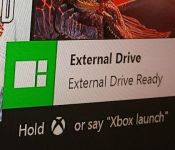
According to Microsoft product director Albert Penello, external drive support for the Xbox One has always been on the company’s docket to enable in a future update. That refresh looks to be on the horizon after an unnamed Xbox developer took to Reddit to tease an image showing that very feature in action. Members of the Xbox One preview programme are often privy to early features, which have recently included improved Party Chat and manual checks for system updates, but this leak will likely attract the most attention. Although the Xbox One ships with a 500GB internal hard drive, blockbuster games can command 50GB without breaking a sweat. That game storage, of course, adds up over time. Attaching an additional drive will not only stop you from running out of space, it’ll also stop you from voiding your warranty with a do-it-yourself replacement.

Filed under: Gaming, Microsoft
Via: Ubergizmo
Source: Reddit

Microsoft puts on an ‘infinite’ light show to make data pretty

If you’re Microsoft, how do you convince people that data is more than just a dry set of charts and graphs? You put on one heck of a light show, that’s what. The company recently marked the launch of a database server app by opening the Infinity Room, a temporary art installation that dazzled the public with all the data behind the quarters in their pockets. The project, built by Universal Everything, relied on an array of choreographed LED lights and pixel spheres to produce animations in a mirrored room, giving guests the impression that they were standing in an endless sea of information. As you’ll see in the video below, the effect is very Matrix-like — and certainly more memorable than a run-of-the-mill slideshow. You sadly can’t visit the Infinity Room in person anymore, but Microsoft has a 360-degree version at the source link if you want to get a sense of what it was like.
Filed under: Internet, Microsoft
Via: Architecture Lab, The Verge
Source: Microsoft, Freefarm (Vimeo)

