



Microsoft wins case to block FBI request for customer data

When Microsoft said last year that it’s committed to protecting its customers from government data requests, it wasn’t messing around. Microsoft general counsel and executive VP Brad Smith recently revealed that the software giant successfully challenged an FBI National Security Letter that tried to seek basic information from one of its enterprise customers. The letter apparently had a nondisclosure provision that would’ve prevented Microsoft from telling the customer in question about the request. Microsoft challenged that provision in Seattle’s Federal Court, stating that it was “unlawful and violated our Constitutional right to free expression,” and wouldn’t you know it, the FBI withdrew the letter. Smith said in a blog post that such requests are rare, but it’s still good to know the Redmond company is continuing to do what it can to be transparent about such things — even if it knew about them all along.
Via: ArsTechnica
Source: Microsoft

Minecraft arrives on Xbox One and PlayStation 4 this August

Look, playing Minecraft on a console is really great. It’s basically the same delightful/terrifying experience from PC, albeit in the comfort of your living room. What’s not to like? Well, on last-gen consoles, there was at least one unfortunate side effect of the platform: the procedurally generated world of Minecraft was significantly smaller than what could be done on PC. With Xbox One and PlayStation 4 versions arriving this August, that changes. As development studio Mojang puts it, “It brings significantly bigger worlds and a greater draw distance than Xbox 360 Edition.” Hot dog!
Of course, should the more bite-sized world of last-gen Minecraft suffice (and believe us, it’s plenty big), the PlayStation Vita version also arrives this August. Here’s even better news: if you already bought the game on PlayStation 3, you own it on Vita. A similar deal applies to folks converting from PS3/Xbox 360 versions to PS4/XB1 versions: if you already own the prior version and you want to upgrade to current-gen, it’s just $5. The latter deal only applies for the first year of availability, so you’ll wanna upgrade soon-ish to snag it on the cheap.
To sweeten the deal even further, saved games from last-gen/Vita will scale up to current-gen consoles (though it’s not possible to go back — beware!). All the updates to last-gen versions will come packed in to this August’s version, and the whole package goes for $20. Oh, and the creepers are still super, super creepy.
Filed under: Gaming, Software, HD, Sony, Microsoft
Source: Mojang

Google jumps over Apple and becomes the most valuable brand

Google became the most valuable brand in the world by leaping over Apple, at least according to Millward Brown’s 2014 100 Top BrandZ report. According to them Google had a 40% increase in value and is now valued at nearly $158.9 billion. Google Glass (which is in open beta now) certainly had something to do with that revenue bump.
Apple is not worth approximately $147.9 billion and according to Millward Brown they had a decrease of 20%, unlike Google. This could change when the iWatch and the larger iPhone hit the market though, considering they didn’t already, that might have something to do with the decrease in value.
In the 3rd place is IBM valued at $107,5 billion with a decrease in value of 4%, 4th is Microsoft $90.1 billion and an increase of 29%, and so on. You can check the rest of top 10 most valuable brands on the image above.
VIA: PhoneArena
SOURCE: Millward Brown
The post Google jumps over Apple and becomes the most valuable brand appeared first on AndroidGuys.
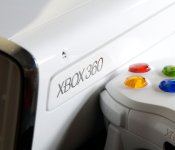
Old console, new tricks: Getting the most out of your Xbox 360

Whether you’re holding out for the Kinect-less Xbox One or you’ve already unpacked a new system, there’s still plenty of life left in the Xbox 360. Microsoft will have its new system properly on track after another half dozen or so software updates, but until then, it’s all about getting everything we can out of older hardware. Nearly nine years later, here’s how to make sure your Xbox 360 is aging gracefully.
Cancel your Xbox Live subscription

You’ve probably heard that Microsoft is switching up how Xbox Live Gold works next month, but if your 360 is more of a Netflix machine than an online gaming portal, then you can start saving money right now. If you cancel your Xbox Live subscription before August 31st, you’ll get a prorated refund for the time remaining — this FAQ has more details.
Keep your Xbox Live subscription

But wait! Before you hit that button, maybe it’s time to see if you’ve been getting your money’s worth from Xbox Live Gold. It’s about more than just multiplayer gaming or apps like Netflix and Vudu. The first way to save money is by checking for deals on the subscription itself. Regular pricing for Xbox Live Gold is $10 per month or $60 per year. Keep an eye out for deals from retailers like Best Buy, Amazon, eBay or even the Microsoft Store that cut the entry fee by $10, $20 or even $25. Next, check out this chart that lays out what’s available to everyone, and what will still require Xbox Live Gold after June.

Protip: Check out our deals updates for a heads-up, or keep an eye on websites like CheapAssGamer, FatWallet or SlickDeals to find out when sales are happening. Otherwise, double-check any new games you buy, as they frequently are either available as bundles that shave some of the cost, or include a trial card inside that’ll help you sate that weekend craving for some Halo.
Games with Gold

After Sony introduced an Instant Game Collection with PlayStation Plus that doles out free games every month, Microsoft responded by adding Games with Gold to its package. Sure, the monthly freebies are coming to Xbox One, but the Xbox 360 version has one big advantage over the XB1 and PlayStation offerings: You can keep the games. That’s right, all you need to do is check in twice a month (on the 1st and the 16th), start a download of whatever is currently being offered and it’s yours for good, even if you cancel Xbox Live Gold later. The only downside? So far, they’ve usually included older and lower-profile titles than the competition, but you can see a complete list here. This month’s games were Dust: An Elysian Tail and Saints Row: The Third, and in June, subscribers can snag Dark Souls, Charlie Murder and Super Street Fighter IV: Arcade Edition — not a bad haul for zero additional cost.
Protip: There’s an additional benefit of Deals with Gold that adds a monthly rotation of discounted games, videos and DLC — check Major Nelson’s blog to find out what’s going on sale and when.
Xbox 360 SmartGlass

In the years since the Xbox 360 launched, Microsoft added a new way to interact with the system other than just gamepads and remotes: your phone or tablet. The SmartGlass app (formerly known as My Xbox Live) can control apps, games and movies on the Xbox 360, and even search content using Bing. The simplest way to use it is with Xbox Live. Sending messages to friends or checking their Xbox Live status is often quicker from the second screen, and your phone likely has a better keyboard than using an add-on for the 360′s controller. The apps are free to install and are available on Android, iOS, Kindle Fire and Windows 8/Windows Phone.
Protip: Get a full list of SmartGlass-enabled games, apps and movies right here.
Clear your cache

Occasionally, issues with your Xbox 360 (glitches in the dashboard, sign-in errors, problems with certain games) can be solved just by clearing its cache. On the Xbox, clearing the cache just removes temporarily downloaded game updates, but it doesn’t affect system updates, game files or anything else on your hard drive. After clearing, you’ll be asked to download game updates again the next time you’re on Xbox Live. To do it, just go to the Settings page, highlight any storage device (cache will be cleared on all devices), press Y, select clear and say, “Yes.” See how easy that was? So easy.
Xbox Live Arcade

Microsoft may have thrown indie games in with the big boys on Xbox One, but on Xbox 360, there are probably still a few smaller gems you haven’t played yet. Over 600 games were pushed to XBLA since launch, including well-known hits like Braid, The Walking Dead, Castle Crashers, Limbo, ‘Splosion Man and Minecraft. Better yet, they have demos, and probably only cost a few bucks to try out. Unfortunately, Microsoft’s Destination: Arcade visual browser hasn’t returned after a short beta test in 2010, but we suggest trying out The Bridge, Bastion, N+, Super Meat Boy, Ascend: Hand of Kul and keeping your eyes peeled for upcoming titles like AirMech Arena and Slender: The Arrival. Know some hidden gems we’ve missed? Leave us a note in the forums so we can try them out.
[Image credit: momo_leif / Alamy]
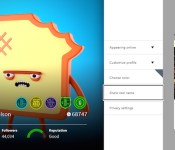
Xbox One’s June update adds your friends’ real names and external drive support

Here are some hard facts: regardless of how proud you are of that Xbox Live handle combining your love for Halo, the Deftones and Arrested Development without subbing in numbers for letters, it’s probably hard for online pals to tell you apart from xXC0rtanaSl4ve69Xx. With the June Xbox One update, though, you’ll have the option to add a real name to your profile, and thus, friend notifications. Not entirely cool with the rest of your Titanfall squad knowing your given name? No sweat: you can cherry pick who sees the name your parents gave you from who doesn’t. And yes, you’re right: this is something that the PlayStation 4 has offered since it launched in November. This patch finally allows using external drives for storage too, so long as they’re USB 3.0 and are at least 256GB. The update also implements an auto sign-in feature, which should especially come in handy if you pick up a Kinect-less console next month. Previously, you’d either have to manually select a profile and sign in or let Kinect scan you and activate your account.
If you didn’t use SmartGlass much before, push notifications when your friends start broadcasting via Twitch, and the ability to watch said streams on your device could change that. What’s more, the One Guide’s TV listings are coming to the companion app in addition to a universal remote. While it might seem like these updates are happening more and more often, that’s all according to plan. Back in January, Microsoft said that frequent patches would roll out to help the console become “better faster,” and well, that’s what we’re seeing.
Filed under: Gaming, Home Entertainment, HD, Microsoft
Source: Xbox Wire

Microsoft’s Surface Pro 3 now available to pre-order

Microsoft’s intimate Surface event didn’t reveal the smaller tablet many expected, instead it went much bigger. In an attempt to capitalize on early buzz for its new super-thin 12-inch slate, the company today opened pre-orders for the Surface Pro 3, Surface Pro Type Cover and Surface Pen in 22 countries worldwide. The Core i7 Surface Pro 3 is now available on the Microsoft Store in both 256GB and 512GB variants, starting at $1,549/£1,339 with an estimated August 31st ship date. The $799/£639 64GB Core i3 model is expected to ship around the same time, although the Core i5 versions of the Surface Pro 3, Surface Pro Type Cover, Surface Pen and Pen Loop will make their way to you a little earlier, shipping by June 20th. Customers in China, Japan, Korea, Malaysia, Thailand and Taiwan will have to wait until August to get their hands on the biggest, highest-resolution Surface yet.
Filed under: Tablets, Microsoft
Via: Surface Blog
Source: Microsoft Store (US), (UK)
Engadget Daily: Microsoft Surface Pro 3, Voice over LTE and more!

You might say the day is never really done in consumer technology news. Your workday, however, hopefully draws to a close at some point. This is the Daily Roundup on Engadget, a quick peek back at the top headlines for the past 24 hours – all handpicked by the editors here at the site. Click on through the break, and enjoy.

Hands-on with Microsoft’s Surface Pro 3
We were expecting the Surface Mini, but Microsoft surprised us with the opposite. The new tablet is their largest yet and takes aim at the Macbook Air and other ultraportable laptops.

Microsoft wants its new pen to be a big part of the Surface Pro 3
During today’s Surface event, Microsoft placed a lot of focus on their new pen, emphasizing that theirs is meant to mimic a real, ink-based pen and isn’t yet another stylus.

Verizon’s next-gen voice service still planned for this year, will come with video calling
Last week, AT&T became the first mobile operator to deploy Voice over LTE, a next-generation voice technology. Now, Verizon’s followed up, announcing that it will roll out the same service later this year.

Watch ‘Game of Thrones’ mysteries explained (or disproved) with science
Looking for explanations on how certain phenomena in the Game of Thrones universe work? The friendly folks behind PBS’s It’s OK To Be Smart take a closer look at long winters, dragons and more.
You also might like:
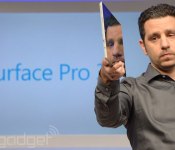
Microsoft reportedly axed a smaller Surface

We’d surmise that a few folks were disappointed then Microsoft’s Surface event concluded earlier today. Rumors swirled that the “small gathering” tease meant a more compact version of Redmond’s tablet was imminent, but instead the festivities focused on a larger 12-inch pro model. Now, Bloomberg reports that a more compact model was on tap before being nixed ahead of its official debut. The report states that CEO Satya Nadella and EVP Stephen Elop concluded that the device didn’t offer enough pizazz to differentiate it from the options that are currently on the market — smaller Windows-powered slates from the likes of Dell and others. MS engineers had reportedly been working on the so-called Surface mini alongside Qualcomm for the better part of a year before the plug was pulled ahead of final approval.
Filed under: Tablets, Microsoft
Source: Bloomberg
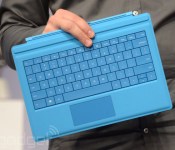
Surface Pro 3’s accessories include a new Type Cover and a 4K-ready dock

A professional tablet like the Surface Pro 3 deserves some equally high-end accessories, don’t you think? Microsoft certainly thinks so, as it just introduced some add-ons built with demanding users in mind. To start, it has a new $130 Type Cover keyboard add-on with a much-improved trackpad — the new design has a 68 percent larger area than the Type Cover 2, and 78 percent less friction. It’s better for lap use, too; you can lock in the cover’s position so that it won’t wobble around so much while you’re typing on your legs.
The company has also unveiled a $200 docking station for those who want to use the new Surface as a makeshift desktop. Besides adding a bevy of extra connections (three USB 3.0, two USB 2.0, Ethernet and audio) to the tablet, the dock also lets you output video at 4K through its Mini DisplayPort. If you need an extra-sharp secondary display for Photoshop, you’ve got it. Both the station and the new Type Cover should be available when the Pro 3 launches in North America on June 20th, and there are promises of extra peripherals in the future.
Filed under: Peripherals, Tablets, Microsoft
Source: Microsoft (MarketWatch)
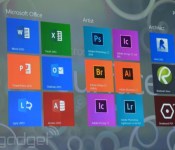
Adobe is working on a touch-friendly, full-powered version of Photoshop CC

Microsoft is breaking out the big guns for the launch Surface Pro 3. It trotted out creative software powerhouse Adobe to show off a new version of Photoshop CC it’s got in the works. This edition is designed specifically for use with a touchscreen and stylus. Icons and other UI elements have been doubled in size so that they’re easier to tap with a free finger and gestures like pinch-to-zoom work flawlessly. And this isn’t some hobbled, half-featured version like Photoshop Express or Photoshop Touch. What’s more, it should be ready to support high-density displays like the one found on the new Surface. While the focus today may have been on how the Creative Cloud app would work on Microsoft hardware, it should excite avid Adobe users regardless of what brand PC they rely on. The lack of touch and high-density display support has been a bit of a pain point. And don’t worry, there’s “more on the way” according to Michael Goff. Besides, the tiles for other Adobe CC apps that popped up during the demo kinda gave that away.

