


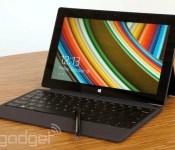
Microsoft slashes Surface Pro 2 prices by up to £150

Microsoft might be gearing up for the launch of its bigger, better Surface 3 tablet, but it still hopes to shift some older slates in the interim, with help from an enticing discount. In the biggest price cut we can remember since Surface RT received similar treatment, all configurations of Surface Pro 2 are now available through Microsoft’s UK store for £140 or £150 off their normal cost. This means you can grab the base 64GB model for £569 (down from £719), up to the top-of-the-line 512GB unit for £1289 (reduced from £1439). Alright, so they’re still not the most wallet-friendly tablets around, but if you want full-fat Windows 8.1 on a 10.6-inch slate, then at least these ones are cheaper than they were last week.
Filed under: Laptops, Tablets, Microsoft
Source: Microsoft

Skype Translator will let you chat in real-time with people in other languages later this year

Tonight at Code Conference, Microsoft CEO Satya Nadella brought his Skype team onto the stage to prove that his company’s got the next big thing. Taglined “the pre-beta of magic,” the service, called Skype Translator, turns your real-time conversation into a Star Trek-like universal communicator. You can speak to someone who speaks a different language; the service adds the other person’s translations for you in subtitle format at the bottom of the screen. It’s not an immediate translation: You’ll need to wait until the other person is done speaking before the service starts whirring away. We’ve seen similar demonstrations in the past, but the key point here is that the beta service is due out by the end of the year, and will be on all devices that run Skype. The company isn’t committing to specific language support yet, but it likely will be a matter of which ones Skype is able to do the best at launch.
Filed under: Cellphones, Mobile, Microsoft
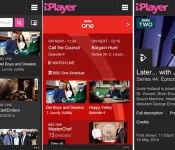
Revamped iPlayer app for Windows Phone adds live TV but drops radio

Windows Phone users typically have to wait longer for apps and updates than their iOS and Android counterparts, but the latest BBC iPlayer rollout tips things back in Microsoft’s favour. As part of its ongoing iPlayer revamp, the Beeb has pushed live an new version of the Windows Phone app, delivering up-to-date channel pages, themed programme collections and clearer categories. On top of that, the app has a new media player that automatically delivers the best quality streams depending on a user’s connection. Windows Phone users will also be able to watch live TV for the first time, but the feature comes at a cost. Radio content will no longer be available after the BBC decided to cut the option in order to offer “the best TV viewing experience in iPlayer.” The good news is that the iPlayer Radio team expects to release a new app with “an optimised listening experience,” meaning users won’t have to go too long without access to The Archers.
Filed under: Cellphones, Internet, Software, Mobile
Via: BBC Internet Blog
Source: BBC iPlayer (Windows Phone Apps)

Watch Dogs: The Joystiq Review

The advanced technology in Watch Dogs is not just indistinguishable from magic – it IS magic. The game would have you believe you’re the world’s most powerful hacker, bending surveillance cameras, traffic control and all manner of personal electronics to your one-touch whims. But in this paranoid vision of the future, in which every mundane device is grafted to the same computerized skeleton, the right software might as well be an all-powerful wand.
Wouldn’t you like to be the wizard?
Click here for more
Filed under: Gaming, Software, HD, Sony, Microsoft
Source: Joystiq

Engadget Podcast 398 – 5.26.14

It’s all happening in San Francisco this week, as your hosts are joined by Tim Seppala and Mat Smith to talk NSA reform, Surface Pro 3, burritos and.. Guy Fieri? Terrence takes the time to detail the recent bill that passed in the house, which makes steps in the right direction to rein in the NSA’s snooping, but fails to make a serious impact. There’s also Microsoft’s new “slate-top,” a combination of tablet and laptop that’s much improved over the previous Surface generation, but at a wallet-busting price. We have plenty more fun and news packed into this edition — and at least one office dog — so join us at the streaming links below for our slightly delayed, but worth-the-wait episode of the Engadget Podcast.
Hosts: Ben Gilbert, Terrence O’Brien
Guests: Timothy Seppala, Mat Smith
Producer: Jon Turi
Hear the podcast:
02:52 – ‘Gutted’ NSA reform bill passes the House, but sheds supporters
13:40 – Samsung is making a VR headset for its phones and tablets
28:02 – Surface Pro 3 review: Has Microsoft finally made a tablet to replace your laptop?
44:04 – The real-life hacking behind Watch Dogs’ virtual world
Subscribe to the podcast:
[iTunes] Subscribe to the Podcast directly in iTunes (enhanced AAC).
[RSS MP3] Add the Engadget Podcast feed (in MP3) to your RSS aggregator and have the show delivered automatically.
[RSS AAC] Add the Engadget Podcast feed (in enhanced AAC) to your RSS aggregator.
Download the podcast:
Contact the podcast:
Connect with the hosts on Twitter: @terrenceobrien, @realbengilbert
Email us: podcast [at] engadget [dot] com

Weekends with Engadget: Surface Pro 3 review, Samsung VR headsets and more!

Head past the break to find some of the top stories from the past week!

Surface Pro 3 review: Has Microsoft finally made a tablet to replace your laptop?
Microsoft surprised us by announcing the Surface Pro 3. We got to spend some quality time with the device and shared impressions in our review. Can this laptop / tablet hybrid take on the latest and greatest tablets and computers from Apple, Lenovo and others?

Samsung is making a VR headset for its phones and tablets
According to sources within Samsung, not only is the company working on a virtual reality headset, it expects to announce it this year. Between Samsung’s future headset, Sony’s Project Morpheus and Facebook’s Oculus Rift, this is shaping up to be an exiting year for VR hopefuls.

WHAT YOU NEED TO KNOW ABOUT NET NEUTRALITY
The concept of net neutrality is simple, however, its implications are enormous. Read on as our own Ben Gilbert breaks down the arguments behind an open internet and dissects how ISP regulation could affect you.

Google ads could be coming to thermostats, refrigerators and car dashboards
A Google filing with the SEC hinted that it’s considered displaying ads on a variety of devices that include “refrigerators, car dashboards, thermostats, glasses, and watches.” The company has since commented on the issue, saying that, “Nest, which we acquired after this filing was made, does not have an ads-based model and has never had any such plans.”

A week with Leica’s T, the most beautiful mirrorless camera money can buy
What’s it like shooting with the latest camera from Leica? It’s pure bliss! Machined from a solid block of aluminum, this camera is a work of art. However, if you want to join the club, you’ll need to fork over nearly $2,000. Is it worth it? Find out.

eBay asks all users to change their passwords following cyberattack
eBay looks like it’s the latest company to suffer a security breach after it alerted users that an attack had “compromised a database containing encrypted passwords and other non-financial data.” Change those passwords, stat!

WATCH MICHAEL JACKSON’S HOLOGRAPHIC RETURN AT THE BILLBOARD MUSIC AWARDS
Just after releasing his posthumous record called Xscape, Michael Jackson made a holographic appearance at the Billboard Music Awards. And yes, there was moonwalking.

Microsoft wants its new pen to be a big part of the Surface Pro 3
During the Surface event, Microsoft placed a lot of focus on their new pen, emphasizing that theirs is meant to mimic a real, ink-based pen and isn’t yet another stylus.

The real-life hacking behind Watch Dogs’ virtual world
Ubisoft’s Watch Dogs is finally going to be released next week. How realistic is its portrayal of the world of hacking and cyber-espionage? To make it as real as possible (while keeping gameplay fun), the publisher consulted with digital security firm Kaspersky Labs.

What you need to know about vaporizers
Smoking’s a tough habit to break, but there’s a number of products available to help cope with nicotine addiction. One way that’s grown exceedingly popular in recent years is vaping. Our own Sean Cooper takes a closer look at the world of vaporizers and the questions surrounding the technology.

Following Microsoft, Sony’s PlayStation business officially enters China

It’s only been about a month since Microsoft announced that it’ll be bringing the Xbox to China come September, courtesy of the local government lifting its somewhat lax ban on imported video games and consoles. Today, Sony finally confirmed that the PlayStation will indeed be joining Redmond’s console in the Far East. Just like Microsoft’s collaboration with China’s BesTV, Sony’s also be working with a local company called Shanghai Oriental Pearl Culture Development (OPCD in short). As pointed out by Sina Tech, the interesting thing is that both BesTV and OPCD are part of the massive Shanghai Media Group.
Sony and OPCD’s joint venture will form two companies: one to manage the manufacturing and sales of the hardware, and the other to manage the services plus the sales, licensing, distribution and R&D of the software. Sony China will own 70 percent of the newly formed Sony Computer Entertainment (Shanghai) (which presumably handles the non-hardware part), but just 49 percent of the other new company dubbed Shanghai Oriental Pearl Sony Computer Entertainment Culture Development.
As you’d expect, the announcement stresses that the joint venture “will introduce quality, healthy games that are suitable to China’s national conditions and the preferences of domestic players, as according to the relevant government policies.” This means we’ll likely see many censored PlayStation games over there (and also fewer games in general), plus our guess is that the consoles might not even be compatible with games released in other countries. That said, it’s worth remembering that Nintendo’s China joint venture, iQue, never applied this kind of regional restriction onto the DS and 3DS it sold there.
What’s unclear is when and which of the PlayStation products will officially hit the stores in China, but given Sony’s earlier attempts plus its long preparation for this launch, we wouldn’t be surprised if the Japanese company beats Microsoft to the race here.
Via: Engadget Chinese
Source: SSE (Chinese PDF)

Google, Yahoo and others are getting fed up with government gag orders

The EFF may be handing out gold stars to firms that publish their own transparency reports, but earning that recognition isn’t easy. Government data requests are often coupled with gag orders, barring firms from telling users that security agencies are thumbing through their data. Now Google, Yahoo, Microsoft and Facebook are arguing that these orders are a violation of the First Amendment.
Naturally, the government disagrees, pointing out that the nondisclosure requirements of its security requests have been applied tens of thousands of times without issues. It further argues that “hypothesizing scenarios in which the NSL [national security letter] statue might conceivably be applied unconstitutionally” doesn’t make it unconstitutional in actuality. It’s a secret investigation, the government says; there’s no First Amendment right to distribute information related to it.
The companies are appealing the case, and say they don’t want to put the security investigations under the public eye — they just want their users to have more detailed statistics about the the volume and type of information the government demands. Both Google and Yahoo have separately promised to continue to push the issue, each arguing that users have a right to know when their data is being examined.
[Shutterstock / Alkestida]
Filed under: Misc
Source: WashingtonPost, US Courts
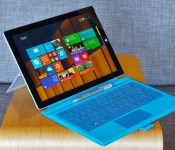
Surface Pro 3 review: Has Microsoft finally made a tablet to replace your laptop?
It didn’t last long, but there was a moment earlier this week when I was sure Microsoft would unveil its own laptop. At a press event, Surface chief Panos Panay took the stage to remind the reporters in attendance how they once said tablets would make laptops obsolete. A quick scan around the room revealed rows of journalists, all typing on Ultrabooks — including the MacBook Air, no less. For a moment, it seemed like Panay was conceding defeat.
Indeed, Microsoft has had multiple chances to prove it can bridge the divide between slates and laptops: Both the first- and second-gen Surface tablets were intended as do-it-all devices. And both times, the company fell short of its mission. The Surface Pro in particular was powerful enough to rival Ultrabooks, but suffered from several usability flaws: It was awkward to use in the lap, and also unwieldy as a tablet. For most people, a touchscreen laptop was still the better choice.
Even so, that wasn’t Panay conceding defeat up there on stage — that was him being persistent. When he finally did get to the point, he unveiled not a laptop, but a tablet, the Surface Pro 3. Most notably, this third-gen device steps up to a larger, 12-inch screen, bringing it in line with contemporary Ultrabooks. The keyboard has been born again too, this time with a larger, more responsive touchpad and the ability to prop it up at a more comfortable angle. As a tablet, meanwhile, the Surface Pro 3 is thinner and lighter than the Surface Pro 2, despite having a bigger display. Just as important, the device will start at $799 when it goes on sale next month — that’s a hundred dollars less than last year’s model. All told, the Surface Pro 3 is Microsoft’s biggest, fastest, thinnest, lightest, best tablet yet. Panay even went so far as to say, “Today we take the conflict away.” Did they, though?
Hardware
Physically speaking, the Surface Pro 3 has more in common with the Surface 2, which runs Windows RT, than with previous Surface Pros. This year, Microsoft ditched the old carbon-black color in favor of a more playful silver, though the chassis itself is still made of sturdy magnesium alloy, with chamfered edges making it easy to wrap your fingers around. It’s not just the color, though, that makes me think of the Surface 2: The Surface Pro 3 measures just 0.36 inch thick, making it only a tad fatter than the Windows RT model; that guy comes in at 0.35 inch wide. This is stunning when you remember the Surface 2 is a traditional tablet, comparable to the iPad, whereas the Surface Pro is basically an Ultrabook without a built-in keyboard. In fact, Microsoft says this is the thinnest machine with an Intel Core i7 processor. It may also be the lightest too, at 1.76 pounds. And even if it’s not, it’s still a meaningful improvement — both the first- and second-generation Surface Pros weighed two pounds.
The Surface Pro’s thinness seems even more impressive when you compare it to its peers: full-fledged Ultrabooks. Most 13-inch Ultras come in at around three pounds and half an inch thick (if they’re lucky). Even the 11-inch MacBook Air, which benefits from a smaller footprint, tips the scales at 2.38 pounds. Next to those systems, the Surface Pro 3 is impossibly compact. In fact, I was loath to go back to my 13-inch MacBook Air after my review was over; the new Surface is just so much lighter. Truly, why can’t all Ultrabooks be this easy to carry?
As a tablet, of course, the Surface Pro still doesn’t feel particularly light; you don’t just forget what it feels like to use a lighter device like the iPad Air. That said, it’s definitely lighter than a 12-inch tablet has any right to be. Also, there’s this: Despite that bigger screen — or maybe because of it — the Surface Pro 3 handles better than its predecessors. For one thing, blowing up the screen size actually allowed Microsoft to slim down the proportions. Think about it: With more internal space to work with, the engineers were able to rearrange the components, laying some items side by side instead of stacking them on top of each other. The result is a substantially thinner device that might not have been possible had Microsoft stuck with a 10.6-inch screen size.
Additionally, the new Surface Pro has a different aspect ratio: 3:2, instead of the usual 16:9. During his keynote, Panay said the company was actively trying to mimic the dimensions of a legal pad, the sort of object humans are already used to holding, and working with. It was a smart move, I think: With this new shape, the tablet feels less top-heavy in portrait mode, and it’s easier to reach things with your thumbs in landscape. Goes to show that weight reduction isn’t everything (though it definitely helps).

There’s one more design change I haven’t yet talked about, and that’s the kickstand. As it is, the Surface 2 and Surface Pro 2 have dual-stage kickstands that can be arranged in one of two positions. The Surface Pro 3 goes a step further — literally — with an option to pull out the kickstand at a near-flat 150-degree angle. This is useful if you’re playing a board game or using a drawing app, and an upright angle won’t do. All in all, too, the kickstand feels well-built, if a little rigid. Granted, I wouldn’t want the hinge to move so easily that it verges on snapping off. But the kickstand here is so tightly wound that I actually feel a bit naughty every time I push it back into that 150-degree position; there’s so much friction that when I push the stand back, I feel like I’m doing something I’m not supposed to. It’s also still a bit awkward to pull the kickstand out, since there’s only a notch on one side of the tablet. Again, though, it feels durable, and still makes that soft “click” sound every time you snap it shut.
Despite the bigger size, the port selection is the same as ever. That means: a power button on the top landscape edge; a Mini DisplayPort and USB 3.0 connection on the right; and a volume rocker and headphone jack on the left. The bottom, of course, is home to the magnetic guides that allow it to click into the optional Type Cover keyboard (more on that in a moment). There’s also a microSD slot tucked under the kickstand, supporting cards as large as 128GB. Microsoft also upgraded the cameras so that both go up to 5-megapixel resolution. Meanwhile, there’s a proprietary charging port on the right side, just below the USB socket. Though the charger stays put, it’s still awkward to insert — a minor annoyance you’ll surely get used to, should you choose to buy this. As for the front-facing speakers, said to be 45 percent louder than last year’s model, they pass my “Dolly Parton rundown test” with flying colors. (They make other kinds of music sound good, too.)
Finally, there’s one thing you won’t find on this device: a place to stow the pen. Rather, you’re supposed to slip it inside a loop that attaches to either the Surface or the optional Type Cover keyboard. Unfortunately, the thing fell off after just a few days of use, which means you’re probably on your own when it comes to making sure you don’t lose your writing implement.
Display and pen input

The Surface tablets have always had lovely displays, and the third-gen Pro is no exception. What we have here is a 12-inch, 2,160 x 1,440 IPS panel, with text so sharp you’d have to put your nose up against the screen to see any pixels. Colors are punchy, but balanced, and the viewing angles are good too, though even a low-glare screen like this isn’t immune to reflections from overhead light. In general, I had little trouble reading the screen, but using the Surface in my lap was sometimes challenging; the most stable kickstand position doesn’t necessarily mean the best viewing angles.
Under the hood, Microsoft used some different pen technology this time around: an active digitizer made by N-trig, as opposed to Wacom. While it might sound like I’m harping on specs there, hear me out: You’ll be making some trade-offs. On the one hand, Wacom’s digitizer offered more nuanced pressure sensitivity: 1,024 degrees, versus 256 from N-trig. On the other hand, N-trig’s setup allows for a thinner glass display and thus, a slimmer overall design. Additionally, N-trig’s pen was designed to feel more like a proper, ink-based pen, and is therefore more natural to hold. Likewise, the screen has just enough friction that drawing on it feels more like dragging a pen across paper — or as close as you can get, anyway. Personally, I’d choose a thinner, lighter device over more precise pressure sensitivity, but hey, don’t let me set your priorities for you.
As you’re using the pen, you’ll notice it does some old tricks, along with some new ones too. It supports hovering, for instance, and you can use the top button as an eraser in select apps. On a more surprising note, you can press that top button to wake the tablet from sleep, at which point OneNote will open above the lock screen. Kind of like how you can already use the camera app from the Windows 8.1 lock screen. Also, OneNote now sends your scribbles to the cloud as you’re writing them — not unlike how you’d expect Google Drive to immediately save your work.
Typing experience

Just so you know, I’m typing this sentence from a Surface Pro 3. The thing is sitting in my lap, even. And you know what? I’m doing alright. This isn’t my favorite laptop keyboard — not by a long shot — but I’m doing OK. And I think you will too. But before I get ahead of myself, let me explain what you’re getting here. The first thing you should know, perhaps, is that there’s just one keyboard option: a backlit Type Cover keyboard built specifically for the Surface Pro 3′s bigger frame. For now, at least, the flat Touch Cover keyboard is not an option. Frankly, I always preferred the physical buttons anyway, just because the learning curve is so much smaller. The only thing you’ll miss, maybe, is the Touch Cover’s lighter-weight design. But given the choice, I’ll take a more natural typing experience over a lighter keyboard any day. And hey, the tablet’s already pretty light; you can deal with a few extra ounces.
What I like best about this new keyboard is that I don’t have to type on a completely flat surface if I don’t want to. Unlike previous Type Covers, this one has a magnetic strip on the top, allowing you to fold up the upper piece of the keyboard so that it attaches firmly to the tablet’s lower bezel. The end result is sort of a wedge profile, similar to what you’d find on a proper laptop. And it goes a long way in making the thing more comfortable to use. Mind you, nobody’s forcing you to pick the propped-up option; you can go flat if you want to. I just don’t understand why anyone would.

The problem is that the keyboard is flimsy, and it’s nowhere as sturdy or comfortable as “real” keyboards. As I type this, I can see the keyboard cover giving a bit under the weight of my fingers; it’s enough to make me not want to use it in my lap (though I do it anyway, out of necessity). With every keystroke, I make a loud “clack,” letting anyone around me know I’m getting stuff done. The keys are also bunched close together — the opposite of your standard chiclet layout. That means it’s a little too easy to hit the wrong key. Luckily for me, I have a copy editor, so you can’t tell how many typos I actually made while writing this review. Suffice to say, it was enough that I eventually started to type more gingerly, in the hopes I wouldn’t make quite as many mistakes.
The Surface Pro 3′s Type Cover also brings an improved touchpad. And that’s good timing, because the latest Windows 8.1 update made the OS much more mouse-and-keyboard friendly. In brief, the trackpad here is bigger, with a built-in touch button you can press down on. It’s also said to be more responsive, but I’ll be the judge of that, not Microsoft. Even if the trackpad is more precise than it used to be, it’s still many steps behind the sort of glass touchpad you’d find on the MacBook Air or many Windows Ultrabooks. It sometimes takes multiple tries to get two-finger scrolling to work. Ditto for clicking and dragging windows and other objects around the screen. Other times, I accidentally navigated backward out of a web page when I was really trying to do some other sort of gesture. If you’re serious about having a mouse, especially in desktop mode, you might be better off using a Bluetooth one, especially if you intend the Surface Pro to be your daily driver.
Performance and battery life
| PCMark7 | 3DMark06 | 3DMark11 | ATTO (top disk speeds) | |
|---|---|---|---|---|
| Microsoft Surface Pro 3 (1.9GHz Core i5-4300U, Intel HD 4400) | 5,010 | 5,053 |
E1,313 / P743 |
555 MB/s (reads); 252 MB/s (writes) |
| Microsoft Surface Pro 2 (1.6GHz Core i5-4200U, Intel HD 4400) | 4,922 | 6,236 |
E1,906 / P997 / X303 |
534 MB/s (reads); 167 MB/s (writes) |
| Lenovo ThinkPad X1 Carbon (2014, 1.6GHz Core i5-4200U, Intel HD 4400) | 4,773 | 5,881 |
E1,727 / P930 / X284 |
555 MB/s (reads); 137 MB/s (writes) |
| HP Spectre 13 Ultrabook (1.6GHz Core i5-4200U, Intel HD 4400) | 4,786 | 6,005 |
E1,837 / P962 / X293 |
527 MB/s (reads); 327 MB/s (writes) |
| Lenovo IdeaPad Yoga 2 Pro (1.6GHz Core i5-4200U, Intel HD 4400) | 4,676 | 5,688 |
E1,713 / P914 / X281 |
546 MB/s (reads); 139 MB/s (writes) |
| Samsung ATIV Book 9 Lite (1.4GHz “quad-core” processor, AMD Radeon HD 8250) | 2,060 | 2,814 |
E749 / P530 |
550 MB/s (reads); 139 MB/s (writes) |
| Samsung ATIV Book 9 Plus (1.6GHz Core i5-4200U, Intel HD 4400) | 4,973 | 5,611 |
E1,675 / P867 / X277 |
547 MB/s (reads); 508 MB/s (writes) |
| Acer Aspire S7-392 (1.6GHz Intel Core i5-4200U, Intel HD 4400) | 5,108 | 5,158 |
E1,724 / P952 / X298 |
975 MB/s (reads); 1.1 GB/s (writes) |
| Sony VAIO Pro 13 (1.6GHz Intel Core i5-4200U, Intel HD 4400) | 4,502 | 4,413 |
E1,177 / P636 / X203 |
1.04 GB/s (reads); 479 MB/s (writes) |
| Sony VAIO Pro 11 (1.8GHz Core i7-4500U, Intel HD 4400) | 4,634 | N/A |
E1,067 / P600 / X183 |
558 MB/s (reads); 255 MB/s (writes) |
Make no mistake: When it comes to performance, the Surface Pro has always been able to go head to head with traditional laptops. Still, it’s nice to know that as other Ultrabooks have experienced modest performance gains, Microsoft has kept pace. Armed with a Haswell processor (a 1.9GHz Core i5-4300U chip), 8GB of RAM, a Samsung-made solid-state drive and the usual Intel HD 4400 graphics, the Surface Pro 3 holds its own in synthetic benchmark tests, with scores that fall in line with the competition. It also boots quickly, taking just 10 seconds to get to the lock screen and then one more to load the Start Screen. My WiFi connection was consistently fast too, thanks to the 802.11ac radio inside (there’s also Bluetooth 4.0, if you need it).
Accordingly, the Surface Pro 3 can do everything an Ultrabook can do. One of my favorite things about working on a Windows machine is the Snap feature, so I routinely have two programs laid out side by side — usually Chrome and HipChat. In particular, I often have a dozen tabs open at once, including Gmail, my calendar, Engadget, Facebook, Twitter and the publishing software we use to write stories, not to mention the odd Wikipedia page and music-streaming service. In addition to the usual multitasking, you could also edit photos if you wanted, or maybe even cut together some video.
Throughout, the metal surfaces stayed relatively cool, and I didn’t hear much noise coming out of the thin vent that surrounds the perimeter of the device. As with every other Ultrabook, though, the new Surface wheezes a bit during gameplay. Load up a game and the thing gets quite warm — almost hot — to the touch. Hot and noisy, too. At one point, the fans started exhaling so loudly that I heard them even in a loft space with various coworkers milling around nearby. If I can hear it over all that ambient noise, well, that’s not good. Fortunately, it takes a lot to make the system pipe up like that. And if you do, it could be that you’re doing something Ultrabooks weren’t actually designed for.
|
Battery life |
|
|---|---|
| Microsoft Surface Pro 3 | 7:08 |
| MacBook Air (13-inch, 2013) | 12:51 |
| MacBook Pro with Retina display (13-inch, 2013) | 11:18 |
| Sony VAIO Duo 13 | 9:40 |
| Samsung ATIV Book 9 Plus | 8:44 |
| HP Spectre 13 | 8:30 |
| Sony VAIO Pro 13 | 8:24 |
| Lenovo IdeaPad U430 Touch | 7:53 |
| Acer Aspire S7-392 | 7:33 |
| Acer Iconia W700 | 7:13 |
| Sony VAIO Pro 11 | 6:41 |
| Lenovo IdeaPad Yoga 2 Pro | 6:32 |
| Microsoft Surface Pro 2 | 6:27 |
| Lenovo ThinkPad X1 Carbon (2014) | 6:18 |
| Lenovo IdeaPad Yoga 13 | 5:32 |
| Lenovo ThinkPad X1 Carbon (2013) | 5:07 |
| Lenovo ThinkPad X1 Carbon Touch (2013) | 5:00 |
| Samsung ATIV Book 9 Lite | 4:33 |
Microsoft describes the Surface Pro 3′s battery life in two ways: You can get up to nine hours of web surfing (WiFi on, auto-brightness turned off), or you can simply expect a 15 to 20 percent increase over previous models. Translation: Your mileage will vary, but battery life will be improved either way. And improved it is. In our video-looping test (also with WiFi on and auto-brightness disabled), the tablet managed seven hours and eight minutes. Compare that with the Surface Pro 2, which couldn’t crack six and a half hours.
Now, let’s put that seven-hour battery life in context. In short, it’s not great, but it’s not bad, either. Other ultraportables that are either small in size or super lightweight have tended to last a similar amount of time (see: the Acer Aspire S7-392 or the Sony VAIO Pro 11). Even some larger Ultrabooks, like Lenovo’s Yoga 2 Pro and ThinkPad X1 Carbon, deliver less runtime despite having room for bigger batteries. The thing is, of course, there are many Ultrabooks that last much, much longer on a charge. The HP Spectre 13, Sony VAIO Pro 13, Sony Duo 13 and Samsung ATIV Book 9 Plus all last around eight and half hours, if not closer to 10. (The MacBook Air can go even longer, though I’ve never tested the 11-inch model.)
Though the Surface Pro 3 is lacking in battery life compared to larger Ultrabooks, it at least charges quickly. After pushing the battery to its limits, I got back up to 72 percent in around 90 minutes. So, even if you only have a short time to recharge, you should still recover enough juice to last you through a couple hours of work. And by the time that runs out, you probably will have found another outlet.
Configuration options and the competition

The Surface Pro 3 can be either sorta expensive or really expensive, depending on the specs you choose. At the low end, there’s a Core i3 model with 64GB of storage, priced at $799. The next step up is a Core i5 configuration with 128GB of storage; that’ll sell for $999. To get that same Core i5 unit with 256GB of storage instead, you’ll pay $1,299. Rounding out the list are two Core i7 models: one with 256GB of storage and the other with 512GB. Those will cost you $1,549 and $1,949, respectively. As of this writing, the two Core i5 models were slated to ship on June 20th. The Core i3 and Core i7 configurations, meanwhile, aren’t shipping until August 31st, according to Microsoft’s online store. Either way, you can pre-order any of them now, if you like.
Unfortunately, whichever you pick, the $130 Type Cover keyboard is sold separately, which means the Surface Pro 3 immediately suffers in comparisons with proper Ultrabooks, like the Yoga 2 Pro ($1,199), Dell XPS 12 ($1,000), Acer Aspire S7-392 ($1,300) and the Samsung ATIV Book 9 Plus ($1,400). For instance, if you wanted the Surface Pro 3 with a Core i5 processor, 8GB of RAM and a 256GB SSD, you’d pay $1,299 for the laptop and $130 for the keyboard, for a total of about $1,430. The Yoga 2 Pro with comparable specs is currently going for $1,399, with an online price of $1,199.
And there’s the rub: With a subpar keyboard, how can the Surface Pro truly be a laptop killer? And if the idea is for the Surface Pro to go head to head with Ultrabooks, the keyboard should also be included gratis. But it’s especially bad if that $130 keyboard isn’t even that comfortable to type on. So what do you end up with, then? A device that’s slightly more expensive than comparable laptops, with an inferior typing experience. When you put it that way, it’s tough to give this a glowing recommendation.
Wrap-up

With each generation of Surface devices, Microsoft gets closer to building a device that can replace both your tablet and laptop. Unfortunately, though, the company’s progress has been gradual, and even after three attempts, it still hasn’t addressed some serious usability flaws. This time around, the biggest problem is the keyboard. It’s tough to say who should buy the Surface Pro 3 as a laptop alternative when the very thing that makes it a notebook replacement — its optional keyboard — offers a subpar typing experience and a frustrating trackpad. Adding insult to injury, it’s not even included in the box; it’s an optional $130 accessory that helps drive up the cost compared to similar PCs.
The good news is that despite its larger screen size, the Surface Pro is easier than ever to use as a tablet, thanks to a thinner, lighter design and more sensible aspect ratio. If Microsoft could just figure out the keyboard thing (and start throwing it in for free), I’d be more inclined to recommend this as a laptop replacement. For now, unless you want a tablet and laptop in equal measure, and sincerely enjoy using Windows Store apps, a touchscreen Ultrabook is still your best bet.
Edgar Alvarez and Zach Honig contributed to this review.
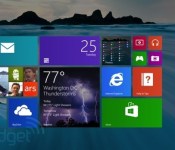
New Windows 8.1 version is cheaper for device makers, with a catch

Microsoft has just announced Windows 8.1 with Bing, confirming rumors about a lower-cost Windows version for OEM manufacturers only. As suspected, Redmond is attempting to recoup the lost revenue with ads by forcing suppliers to keep Internet Explorer with Bing search as the default browser. However, end-users will be able to change those settings so that Microsoft won’t arouse the wrath of European regulators (again). Rumblings about a discounted version of Windows 8.1 began cropping up earlier in the year, and Microsoft recently announced that Windows Phone 8.1 would be free for 9-inch or smaller devices. Other than the Bing and IE defaults, the new OS is reportedly identical to the standard version of Windows 8.1. However, the OEM cost will reportedly drop from $50 to $15, so don’t be surprised to see a new crop of cheaper Windows devices arriving soon.
Filed under: Desktops, Laptops, Microsoft
Source: Microsoft
 AIVAnet