


[Download] Google Search 3.1.24 that Sees Slight Changes to Homescreen Icons

Google continues to update their apps this week, and now we have Google Search reaching version 3.1.24. Nothing huge was changed in this version, mainly just changes to the icons on your homescreen. If you have a tablet, the persistent search bar would overlap your homescreen icons, but that is all fixed now. They also tweaked the settings icon when adding widgets or icons to your homescreen to fit the KitKat look. Other than that, I’m sure we have the traditional bug fixes and performance enhancements.
Android Police did what they do best, and did an apk teardown and found that some of the code suggest that Google Now will work better on pin-pointing apps or contacts you are requesting it to bring up. Always nice when Google Now gets improved, so if you haven’t received the update through the Play Store yet, hit the link below to grab the apk. Let us know how it runs.
Source: Android Police
Daily Roundup: SteamOS release, holiday gift guide for the geek, Z Ultra Google Play edition and more!

You might say the day is never really done in consumer technology news. Your workday, however, hopefully draws to a close at some point. This is the Daily Roundup on Engadget, a quick peek back at the top headlines for the past 24 hours — all handpicked by the editors here at the site. Click on through the break, and enjoy.

SteamOS available December 13th
Valve announced today that its gaming operating system, SteamOS, will be available to both individuals and hardware manufacturers on December 13th. Click the link for more details.

Holiday gift guide for ultimate geek
Welcome to Engadget’s final holiday gift guide — for the geek who has everything. Here is where you’ll find the perfect present suggestions for every tinkerer and hardcore nerd in your life.

Android Device Manager on Google Play
At last, Android Device Manager has hit the Play store today, making it more convenient than ever to command and control handsets from afar. Follow the link for more info.

Sony Z Ultra Google Play edition hands-on
Engadget’s Brad Molen goes hands-on with the Google Play edition of Sony’s 6.4-inch Xperia Z Ultra. This $650 handset remains identical to the original model, with the exception of a few new camera features, courtesy of Android 4.4 KitKat. Click the link for pics and details.

Google updates Keep web app, goes overboard with the Santa references

Santa Tracker has clearly made its mark on Google — things in Mountain View are beginning to look a lot like Christmas. But then, it’s probably much too difficult to resist the urge to sprinkle in a few references to Kris Kringle in a post detailing updates to your list-making app. And surely many a holiday gift giver will be pleased with the tweaks to the Web version of Keep, including full-color notes, text scaling, new fonts and the ability to rearrange lists. Search has also been improved and Google’s brought over a navigation drawer for switching between archived and active notes. Now Merry Christmas to all and so on and so forth.
Filed under: Internet, Software, Google
Source: Google+, Google Play
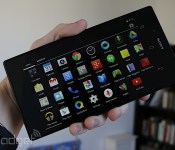
Sony Z Ultra Google Play edition hands-on

Sony’s gargantuan phone, the 6.4-inch Xperia Z Ultra, is finally getting some quality time in the United States, but not exactly the same way we had envisioned at first. For $650, you can now grab a Google Play edition of the device (in the US, anyway), which is compatible with AT&T’s and T-Mobile’s LTE and HSPA+ networks. Essentially, this means that the unlocked phone features a stock version of Android 4.4, is free of Sony’s software tweaks and carrier bloatware and it’ll (in theory) get updated to the latest and greatest version of Android sooner than most other devices.
Since the Z Ultra (no Xperia branding this time) doesn’t come with Sony’s user experience, this means that it’s missing some features you normally find on flagship Xperia devices, such as the Bravia Engine. You’ll get a stock camera UI, rather than Sony’s proprietary interface, which means you won’t have access to as many manual settings as you’d probably prefer; that said, at least it comes with a standard HDR setting, so its software algorithms may be a little different from Sony’s, and may affect the final image somewhat. Also gone is the native Android gallery that we’ve grown to love or hate over the years, and in its place is the new Google+ Photos app that was introduced in Android 4.4 KitKat and featured on Nexus devices.
Aside from these differences, there isn’t much else to the experience; the look, feel and dimensions of the device are all the same, so if you thought the original Z Ultra was too big (and too expensive) for your tastes, there’s nothing about this new edition that will change your mind. Still, this is the best option for anyone who wants an official stock Android experience on such a large handset (without venturing into loading ROMs, at least), so perhaps a handful of you may be looking at the Z Ultra in a completely new way now. Either way, we’ve got some pictures below for your viewing pleasure.
Filed under: Cellphones, Tablets, Wireless, Mobile, Sony, Google
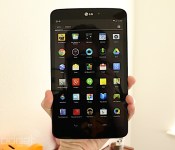
LG G Pad 8.3 Google Play edition hands-on

If you’ve been eyeing the LG G Pad 8.3, your decision just became more difficult. Yesterday Google announced — and began shipping — a Google Play edition of the tablet for $350 in the US, which makes it the very first slate to receive the stock Android treatment. What does this mean, exactly? Google Play editions come with Android 4.4 KitKat without any manufacturer or carrier customizations, so it looks precisely the way Google intends it. This can be good or bad, because there are a couple tradeoffs you need to consider: The good news is that these types of devices typically get upgrades to the newest version of Android far earlier than the vast majority of smartphones and tablets, but you also need to give up a few features that were unique to their skinned counterparts.
In the case of the G Pad 8.3, this means you won’t be able to enjoy the Knock On (aka, “double-knock”) feature, nor will you have Slide Aside or access to a litany of LG’s Q-branded functions like QPair, QRemote or QSlide. None of these missing services are crucial to the functionality of the G Pad, although we must admit that we’ve grown rather fond of Knock On. The camera interface is also quite different, but the only thing that might frustrate you is the lack of manual settings; if you only rely on automatic mode to make the photo magic for you, this likely won’t be an issue of concern. Just like we saw on the Z Ultra Google Play edition, the G Pad also doesn’t come with the native Android gallery app, as it appears that the Google+ Photos app has taken its place as the default. You’ll also have the stock camera UI to deal with, rather than LG’s, so you won’t be able to make many manual adjustments. Of course, this probably isn’t a huge concern for a lot of tablet users who may only use their camera for basic needs.
Aside from software changes, you’re not going to see anything different on the outside. The dimensions are all the same as the original model, as are the actual hardware components. It’s only available in black (the back strip is fitted with brushed metal, with black plastic ends), but it’s offered for the same price as the model we reviewed last month. We’ve got a bunch of images for you to behold below.
Google Santa Tracker app updated for 2013
Google’s official Santa Tracker application for Android has been updated for 2013, bringing about some new goodies. As expected, the app supports Chromecast; find out where the jolly, fat guy is from your handset or connected television. Also included in the refreshed app are three new games. You know, some fun stuff to while you wait for Mr. Kringle to come down the chimney…or through the front door. We don’t care how he gets here just so long as he does.
The post Google Santa Tracker app updated for 2013 appeared first on AndroidGuys.
Gmail for Android gets a vacation responder, printing and universal attachment support

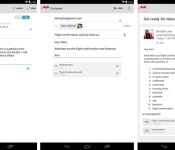
Many workers are about to leave on holiday trips, and Google is more than willing to help them avoid the office with an updated Gmail app for Android. The new release includes a vacation responder that will let fellow employees know that you’re off the clock. If you’re running Android 4.4 KitKat, you can also print email to avoid checking your phone during family gatherings. And if you simply must deal with that company report right away, you’ll be glad to know that Gmail now supports file attachments of all types. The new app is gradually rolling out as of this writing, so don’t be disappointed if you have to wait a little while for an upgrade.
Filed under: Cellphones, Mobile, Google
Via: Gmail (Google+)
Source: Google Play
This is the white Nexus 7 (hands-on)

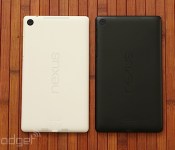
The Nexus 7 has been out in a black hue since this summer, so it was only a matter of time before Google launched it in white. And this many not come as any sort of shock, but the white version of the ASUS-made Nexus 7 doesn’t pack any unexpected surprises — unless, of course, you were hoping the device would be white on the front and the back (although white is barely visible along the edges when you’re looking at the front). We had the opportunity to play with the KitKat-packing slate today, and your overall user experience will be exactly the same regardless of your color preference. The outside is essentially alike as well, although there are two exceptions: this one has the FCC info printed on the back, which by the way has a glossier feel than the soft-touch plastic on the black Nexus 7. In fact, we were immediately reminded of the feel of the white Nexus 5. If the new hue is for you, they’re already shipping from the Play Store in the US for $270: your only option is a 32GB WiFi-only model. Check out the gallery below for plenty more images.
Google Play to see new games categories in February 2014
Google expects to further expand the number of Google Play categories for games in 2014, according to a new post on the Android Developers Blog. Expected to take effect in February, we should be on the lookout for Simulation, Role Playing, Educational, and perhaps others. Developers can now use the Google Play Developer Console to pick from one of these a new categories for their games; the game will not change until the new categories go live in February 2014.
The post Google Play to see new games categories in February 2014 appeared first on AndroidGuys.
Gmail Android app updated with vacation response, printing, and more
The official Gmail client picks up new features, however some are specific to Android 4.4 or later
The official Gmail app for Android is getting an update today which adds new moderate and handy features. Chief among the details is the ability to set vacation auto-responses, something previously only offered in the full web experience.
In addition to attaching photos or videos to emails, users can now toss in any file type, including .ZIP and .PDF. Those of you running Android 4.4 KitKat or later can also print hard copies of your emails directly from with the Gmail app.
Last, but not least, users may notice “enhanced performance of the app on low memory devices”, which come courtesy of Google’s Project Svelte.
The post Gmail Android app updated with vacation response, printing, and more appeared first on AndroidGuys.

