


Google+ updating: Snow Globe effect for your Photos [Download]
Google is pushing out a nice festive little update in the play store for Google+. While you are viewing one of your photos in Google+ you can give your device a little shake to make it snow. Shake your device again to save the snowy photo and share it with your circles. The update also automatically refreshes friends locations, includes a variety of photo improvements and the usual bug fixes.
What’s new:
1. Shake your device to add snow to your photos. Many of you enjoyed last week’s#AutoAwesome snow (http://goo.gl/913KlK), so we’re adding another way to let it snow this holiday season. Just open one of your photos, shake your device, and snow will start falling. Shake again to save. (http://youtu.be/YWRa6Cz6m_M)
2. Search across more stuff, from a single box. Now you can search for posts, people, photos and communities — all from one place. So the next time you’re looking for something specific, just tap ‘Search’ and type what you want.
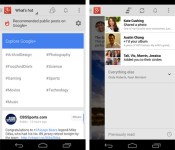
3. Control who can buzz your phone, without missing notifications from others. If you only want certain people to be able to buzz your phone (like family), simply adjust your “Who can notify me” settings. Notifications from others will now appear in “Everything else,” so you can read them whenever it’s convenient.
4. Explore content by category. Now when you visit the What’s Hot stream, you’ll be able to “go deeper” on a number of different categories — from Music and Science to Sports and Photography.
5. Spread the love this holiday season. Now when you +1 posts in the stream, you’ll see something lovely.
In typical fashion, the update is rolling out gradually through the Play Store to everyone. That process can take a a little bit of time. If you don’t like waiting then you can go download it from our sister site, Gappsearly and pick up v4.2.4 right now, enjoy.
Via Android Police
Google+ for Android update brings search and notification improvements, holiday cheer

Following last month’s update to enhance locations and photos, the folks in Mountain View are rolling out version 4.2.4 of Google+ for Android today. Added features this time around include the ability to search everything from the same box and content browsing by category from the What’s Hot stream. Notifications get a tweak as well, allowing users to control who’s able to buzz them immediately by adjusting “Who can notify me” in the settings menu. Finally, to show you’re in the proper seasonal spirit, shaking your device now adds animated snow to an open photo via Auto Awesome. A second shake will save the image for posterity. The updated software is making its way to Google Play “gradually,” so check back later if it’s not snowing… er, showing up just yet.
Filed under: Software, Mobile, Google
Source: Vic Gundotra (Google+), Google Play
Google announces winners of the first annual ‘Players’ Choice Awards’
For the past few weeks, users on Google Play have been able to vote for their favorite apps and games of 2013. Dubbed the rightful name of ‘Players’ Choice Awards’, the list boasts just that. These are some great apps and games that you’ve most likely heard before, and some you may not have.
Here are the winners of each respective category:
- I Can’t Quit You – Most Addictive Game: Knights & Dragons
- Old School, Still Cool – Best Franchise Game: Bejeweled Blitz
- Lights, Camera, Games – Best Game Based on a Movie: The Hobbit: Kingdoms
- Quietly Brilliant – Best App for Enhancing the Everyday: Duolingo: Learn Languages Free
- At Your Service – Best App for Booking and Buying: Flixster
- I ❤ Google – Best Google App: Youtube
Along with the notable apps and games in the chosen categories, there was an option for users to write-in their other favorites that may not have made the list. Here are the write-ins for 2013.
- Write-In Game: Ingress
- Write-In Game: Samurai Siege
- Write-In App: Newshog: Google News & Weather
- Write-In App: Swiftkey Keyboard
If you’d like to see the full list, you can do so, here. Do you have any apps or games which you think should have been included? Feel free to let us know in the comments!
The post Google announces winners of the first annual ‘Players’ Choice Awards’ appeared first on AndroidGuys.

Google+ app for Android turns any photo into snowglobe
A new update rolling out to Google+ for Android today lets users turn their photos into a virtual snowglobe.
We’ve included a fun holiday gift in the new version of Google+ for Android launching today. Shake your device while viewing one of your photos, and watch the snow fall. Shake it again to save your new snowy photo and share it with family and friends.
This cool feature follows closely behind the other recent Autoawesome effect that adds snow and twinkles to your winter photos. Great stuff as always, Google!
But wait, there’s more
There are a number of additional details tucked inside the new Google+ experience. Check it out!
- Search across more stuff, from a single box. Now you can search for posts, people, photos and communities — all from one place. So the next time you’re looking for something specific, just tap ‘Search’ and type what you want.
- Control who can buzz your phone, without missing notifications from others.If you only want certain people to be able to buzz your phone (like family), simply adjust your “Who can notify me” settings. Notifications from others will now appear in “Everything else,” so you can read them whenever it’s convenient.
- Explore content by category. Now when you visit the What’s Hot stream, you’ll be able to “go deeper” on a number of different categories — from Music and Science to Sports and Photography.
Look for the updated Google+ app to show up in your notification bar starting as soon as today.
The post Google+ app for Android turns any photo into snowglobe appeared first on AndroidGuys.
Latest Gmail tweak lets images display in your email automatically

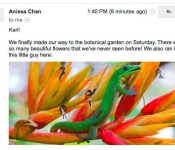
There are bad people out there in the world; bad people that look for backdoors in email image attachments to load up with malware. Google knows this and Google wants you to know it has your back. So with the company’s latest Gmail update, it’s re-routing images served from external servers to its own “secure proxy servers” for automatic display in your email. The benefit of which means you won’t have to click to accept image downloads anymore — they’ll just be there as soon as you open your email. If you’re a privacy nut (and why shouldn’t you be?), you can still set Gmail to ask before downloading images. And if you’ve previously set that as default in settings, the good news is that preference will still remain default. This Gmail update’s initially targeted for roll out to the desktop, but Google plans to implement the image server change across mobile sometime next year.
Source: Official Gmail Blog
Microsoft uses eye tracking to argue that Google distorts search results

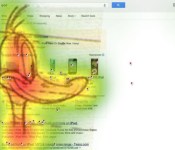
Google has already made a few concessions to please European antitrust regulators worried about fair placements in web search results. However, Microsoft doesn’t feel those sacrifices are good enough — and it claims to have scientific proof that more changes are necessary. One of the company’s astroturfing outfits, Initiative for a Competitive Online Marketplace, has commissioned an eye-tracking study which suggests that Google’s lower-profile sponsored links and map results still draw too much visual attention. “Organic” search results and alternative services get just a fraction of the eyeballs, the Initiative argues. While the data may be of some use to officials, we’d advise taking it with a giant grain of salt — company-backed studies are rarely objective sources of information.
Filed under: Internet, Microsoft, Google
Via: GigaOM
Source: ICOMP
Google Santa Tracker On Android Helps You Track The Big Man Himself Again
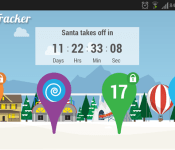
 It’s that time of year again and Google has launched its new and improved Santa Tracker app. The Google Santa Tracker is available for download now from the Google Play Store and follows a similar vein to Google’s web version of the Santa Tracker (which you can check out here). When you fire up the app, you’ll find it’s a little less comprehensive than the web page, but still contains some nice, Christmas gems.
On the front page, you’ll be greeted by a countdown to the 24th of December when ol’ Santa saddles up and the real tracking begins, however, while we’re all waiting for that magical night, the Santa Tracker app has a set of mini-games to keep you busy including Gumball, Memory and Elf Jetpack. At present, only Gumball is available to play with Memory and Elf Jetpack unlocking on the 17th and 19th respectively. The games appear to be fun enough to burn some time, and there’s Google+ integration as well if you feel the need to share your high score.
 The app also apparently includes Chromecast support which will allow you put the countdown on your other screen while you continue to play the game on your device. It’s definitely a cool little app, which will get better as the 24th approaches. You can download the Google Santa Tracker now for free on the Google Play Store so hit the links below to pick it up.
Source: Phandroid
Application: Google Santa Tracker
Price: Free

Waze speeds up its sat nav app with quicker search and simpler interface

Even though Waze is now under Google’s umbrella, it’s continued to operate as if nothing has changed, other than the fact that it now has a billion dollars. To that end, it’s just rolled out a new release for Android and iOS with some welcome new features, most significantly an auto-complete function for addresses and categories that plays well with its new Google search powers. Other goodies include a redesigned main menu, easier waypoint editing and new icons on the map view to see traffic reports or nearby pals. Hopefully, other than borrowing its tech, Google will continue to leave the new acquisition alone — after all, how many apps let you be guided around by a celebrity?
Source: Waze
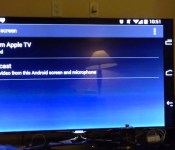
Mirror app for Android can record your screen or stream it to Apple TV (video)

CyanogenMod developer Koushik Dutta has followed up his CM 11 Screencast display recording app with one for a wider range of Android users with an extra feature. Mirror for Android can not only record whatever’s happening on your tablet or phone’s screen, but it can also display it wirelessly, AirPlay- or Miracast-style, on an Apple TV. Currently it requires Android 4.4.2 and root access, but Dutta says there is a non-root solution on the way. If you’d like to try it out and have the appropriate hardware, just click here to join the Google+ community, click here to join the beta and then download the app from Google Play. That may not be possible for individuals without a Nexus device and / or CyanogenMod 11 nightly build, so if you just want to see what it’s like, check out a quick video demo embedded after the break.
Filed under: Cellphones, Home Entertainment, HD, Mobile, Apple, Google
Source: Koushik Dutta (Google+), Google Play

Google brings flight, hotel and restaurant reservations to Maps for iOS

If you fancy yourself a jetsetter, fine-diner, or, er, traveling salesman and happen to use an iDevice, Google has some good news for you. The latest update to Maps on iOS brings some of Google Now’s functionality into the company’s navigation app. Search for your restaurant, departing airport or hotel, and the application will auto-populate with your plans — so long as the confirmations were sent to your linked Gmail account. Sure, it’s similar to what the outfit added to Maps’ desktop version earlier this year (pictured above), but since when was feature parity a bad thing?
Filed under: Cellphones, Mobile, Apple, Google
Source: iTunes

