



Android can now wake you up when you’re close to your bus stop

If you’ve ever taken the bus or subway home after drinking too much at a party, you know how tough it can be to get off at the right stop — you may fall asleep well before then. That shouldn’t be an issue if you’re using a recent Android phone, however. Android Police has noticed that the latest version of Google Now on Android lets you set an alarm that wakes you up shortly before a favorite destination comes up; you can safely catch some shut-eye knowing that you’ll still be home on time. There are third-party apps that offer similar reminders, but it’s good to have a built-in safety net when you’re not entirely sober.
[Image credit: Jose Antonio Navas, Flickr]
Filed under: Cellphones, Transportation, Internet, Mobile, Google
Source: Android Police

IRL: Choosing the Nexus 5 over the Moto X (and the Galaxy Note, too)

I enjoyed using the Nexus 4 during my time with it last summer, but its short battery life, glass back and quirky camera behavior made it tough to truly love. The Nexus 5 is theoretically a different beast: it addresses all those flaws while introducing huge leaps in performance and display resolution. I was tempted enough by those upgrades to buy the new phone and give it a spin on Rogers’ network here in Canada. Would it be the Nexus phone I’d always wanted, and make me forget about other Android flagships that launched at the same time, like the G2 and Galaxy Note 3?
For the most part, yes. I’d prefer something closer in size to the compact Moto X, but the Nexus 5 is easier to hold than the Nexus 4, let alone the Note 3 (which, as good as it may be, isn’t exactly built for one-handed use). The battery isn’t as long-lasting as the G2′s, but it’s better than the Nexus 4′s — enough to comfortably last through one of my nights out. That’s impressive given both the eye-pleasing 1080p screen and the upgrade to LTE, both of which I abuse all too often through Instagram and Twitter. While its photography won’t challenge that of a Lumia 1020 or iPhone 5s, this is the first Nexus whose camera seems truly usable in less-than-ideal conditions. It’s undoubtedly a better camera phone than the Note 3, both of which struggles in low light; the Galaxy S5 is far better, but it also came out several months later.
The real delight has been Google’s implementation of Android 4.4 KitKat. It’s not a revolutionary OS upgrade, but I appreciate both hands-free voice search from the home screen as well as quicker access to Google Now. The very nearly stock interface is also extremely responsive on the phone’s Snapdragon 800 processor. Frankly, it’s hard to go back to a phone with a heavily customized take on Android. While a phone like the G2 is still very quick, lasts longer on battery and has features I’d like — such as double-tapping to wake the screen — there’s something refreshing about Google’s unintrusive interface.
No phone is perfect, of course, and the Nexus 5 still leaves plenty of room for improvement. I don’t mind the lack of storage expansion or the non-removable battery, but I can see why that would irk some potential users. Although firmware updates and the Google Camera app have gone a long, long way toward improving the Nexus 5′s photographic experience, it’s still not the fastest or most feature-packed camera phone available. I miss the always-on voice search of the Moto X, for that matter. Still, the Nexus 5 makes it hard to go back to other Android phones. Although different devices may have larger batteries or useful software, the Nexus 5 is very well balanced overall — especially for something that costs so little off-contract.
Filed under: Cellphones, Mobile, Google, LG

Engadget Daily: life with self-driving cars, the world’s largest video game collection and more!

Today, we investigate the pros and cons of self-driving cars, uncover some of the most intriguing devices from Computex 2014, celebrate Tetris‘ 30th birthday and learn about the world’s largest video game collection. Read on for Engadget’s news highlights from the last 24 hours.

What you need to know about self-driving cars
Self-driving cars have the potential to make our roadways safer and more efficient, but what does a world full of AI-controlled vehicles really look like? Read on as our own Sean Cooper explains the reality of life with autonomous cars.

Baby steps toward better wearables at Computex 2014
Between the multitude of knock-off, e-ink and prototype devices at Computex 2014, it’s obvious the evolution of wearables is just beginning. Read on as our own Sarah Silbert investigates such gadgetry from this year’s conference.

Cable companies are reportedly funding fake consumer groups to attack net neutrality
It’s no secret that cable companies could benefit from prioritizing web traffic, but they may be using nefarious means in an attempt to squash the open internet. Vice is reporting that several providers are funding fake consumer groups to battle net neutrality.

The world’s largest video game collection just went up for auction
What you’re looking at is just a glimpse of the world’s largest video game collection, which includes (brace yourself) over 11,000 titles. The best part? It’s currently up for auction.
You also might like:

Hangouts’ web chat now lets you sketch messages

Ever threatened to draw someone a picture because they didn’t understand you in an online chat? It’s now easy to act on that threat. Google has started rolling out an update to Hangouts’ web interface that lets you sketch your ideas. If you have access, hovering over the camera icon will reveal a pencil button that launches the new tool. While it’s extremely simple, the mini-app should be enough to annotate a picture or whip up a quick diagram. We’ve reached out to Google for more details regarding its new doodler, including the possibility of a mobile launch; we’ll let you know if there’s more to add. For now, you’ll just have to keep checking Hangouts’ web client to see if you can craft your own visual aids.
Via: Talk Android
Source: Android Police

Google and the accidental mystery of Webdriver Torso

A series of 11-second videos have been driving the internet crazy. There are over 80,000 of them, and all they show are a series of blue and red rectangles moving around on screen in seemingly random directions. The soundtrack is equally obtuse, comprised of a series of varying sine wave tones. The mysterious videos, posted by YouTube user Webdriver Torso, have become something of an infuriating web phenomenon. Why? Well, the internet can’t resist a good mystery (or a bad one for that matter). Are they encoded spy messages? Contact from aliens? Or, just plain, old test videos that have caught the collective imagination? A lot of internet man-hours have gone into figuring out what, or who is behind them, and we can exclusively confirm the answer. If you’re impatient you can skip right to the end for the reveal, but lets take some time to recap the story so far.
The Webdriver Torso account started uploading videos to YouTube eight months ago at a pretty staggering rate — as often as every two minutes at its peak. Every single one of them is 11 seconds long. Almost all of them are the same format. For example, there’s the classic tmpAZWIOG, the avant-garde tmpXsjor2 and my second favorite, the sublime tmpvRXNJM. They all make for pretty perplexing viewing. Nothing but shapes and tones. But, this is the internet, and people demand an explanation, and when you sprinkle in some vivid imaginations (oh, and one random Eiffel Tower video that sticks out like a sore thumb) you have the makings of an online mystery.
It’s not just a mystery that has existed in the usual cool shade of internet forums, either. There’s been input from sites like The Daily Dot, and even the BBC and The Guardian have waded into the fray. As interest in the YouTube account snowballed, inevitably it would attract individuals with a little more to add other than wild speculation. A thread on BoingBoing would see user “Isaulv” claim that they had seen very similar images displayed on a set-top box at a Google conference about automation, suggesting that the clips are created by software as a means of testing the quality of uploaded video. The Guardian, however, reported that the same user managed to track down the slides from the show, which revealed that the test videos were actually slightly different. And like that, the web’s best sleuths were back to square one.
An Italian blogger, who goes by the name “Soggetto Ventuno,” deserves perhaps more credit than anyone else in solving the Webdriver Torso puzzle. Ventuno approached The Daily Dot with his findings, which were the result of what can only be described as some serious internet sleuthing. Ventuno discovered (via this site) that the Webdriver Torso account was part of a network of accounts called ytuploadtestpartner_torso. Further pulling on this thread revealed a handful of other accounts with similar videos. Many of which were pulled, or made private, once Ventuno’s investigations were published. A Google+ account associated with ytuploadtestpartner_torso also linked to a random Facebook page, and a Twitter account — both of which have since been taken down.
The removal of these links was too late though, as Ventuno had already garnered enough information from them to take the next steps. The Facebook account mentioned “Johannes Leitner,” a Google employee who happened to be friends with fellow employee Matei Gruber, who was based in Zurich. “Matei” was a name directly mentioned in the Eiffel Tower clip referenced earlier, one of only two clips that isn’t blue and red shapes. (The other is an episode of Aqua Teen Hunger Force dubbed in French.) Ventuno continued pulling at this thread, even comparing images of the Zurich Google office to those of scenes from some of the pulled videos (he noted matching lamps and desk phones, among other things).
The evidence was piling up, but what about the boring, meaningless videos? Well, not all of them were quite so dry. The more observant/persistent observer might have spotted something unusual about the video “tmpRkRL85.” If not, you can watch it below, and see if for yourself.
Now, anyone who’s been on the internet for more than a week should instantly recognize those silky smooth dance moves. This prolific account subtly Rickrolled any armchair detectives paying close attention — you think it’s just more boxes then, bam, Rick Astley’s silhouette is all up in your grill. This video appears to be the first solid indication that something fishy is up. Further clues started to crawl out of the woodwork, suggesting that YouTube and Google were keen to stoke the coals of curiosity too. Search either site for “Webdriver Torso” and you’ll be treated with a related Easter egg. If nothing else, Webdriver Torso had clearly reached a tipping point.
So, with a strong enough theory to suggest that these videos could have originated from Google directly (via its Zurich office,) and a few official hat tips to the account (via the YouTube menu Easter egg and Google Doodle), we decided to ask the video site directly for an official statement, and this is what we received (warning, may contain mild Rickrolling):
“We’re never gonna give you uploading that’s slow or loses video quality, and we’re never gonna let you down by playing YouTube in poor video quality. That’s why we’re always running tests like Webdriver Torso.”
Turns out this channel is how Google keeps tabs on upload quality. Clips are sent to YouTube’s servers and then compared against the original file to ensure that the quality remains the same. The account going viral was just an accident, though once it happened Google was more than happy to play into the fun.Those other accounts that have since vanished or gone private? They’re all Google test accounts too, though the web giant wouldn’t divulge what exactly Ekaterina Basic or Timmy Tester were experimenting with.
So there you go. It wasn’t aliens; nor was it a post-Cold-War spy transmission system. It was, after all that, an upload-testing system that, in no uncertain terms, got totally out of hand.

Get This Look: FlatOBlue

We’re huge fans of changing the home screen around a bit and creating a new user experience for our Android. So much so that we present our ongoing series of Get This Look posts. In a nutshell we show you a new layout, app, widget, or icon set for your Android handset and tell you which apps you’ll need to mimic the feel.
Some of these are a little easier to create than others and many of them can be tweaked to no end. The following details are but the ingredients to which you can create your own delicious Android dish; your results will vary. Which is awesome! If nothing else, this is a great way to discover new apps, widgets, icons, and more!
FlatOBlue
Why we love this look:
Face it, your stock phone dialer sucks. After opening that thing over and over every day it can feel quite dry and mundane. Why not spice that up a bit and theme your phone application? Indeed, you can have the dialer automatically switch themes over time and look different nearly every time you use it.

There are quite a few dialer themes you can download and install from the Google Play Store but today we’re fond of one in particular. Called FlatOBlue, it brings a modern look to your phone with simple color designs and icons. It doesn’t hurt that it looks pretty Google-y. Oh, and for those wondering, no… it’s not going to switch everything over to Russian.
You’ll spend less than $2 for this look and we’re pretty sure you’ll love us for it.
What you’ll need:
- ExDialer – Dialer & Contacts
- ExDialer Theme FlatOBlue

The post Get This Look: FlatOBlue appeared first on AndroidGuys.

Baby steps toward better wearables at Computex 2014

Google’s latched on to Diane Von Furstenberg as the solution for making Glass fashion-forward, unveiling a collection of frames made by the famed Belgian designer last week. While it remains to be seen whether trendy colored-frames can make a $1,500 wearable more appealing, a few smaller companies here at Computex in Taiwan have some novel ideas that could make you more willing to strap a mini-computer on your face… or your wrist.
To be clear, there are plenty of cheap smartwatches and Google Glass rip-offs hogging booth space at Computex. It’s just another sign that wearables are taking off in a big way — everyone wants in on the game, even if it means producing an also-ran product at a much lower price point. Innovative fitness trackers, for one, didn’t make a big splash at the show, with devices like Acer’s Liquid Leap mimicking features we’ve already seen in countless other products.

But even if their tech isn’t cutting-edge, many manufacturers showcasing here in Taiwan are paving the way to more innovative design with one-off prototypes. In some cases, that means sleeker and more diverse hardware, and in others it means clunky but interesting use cases. We’ve seen examples of both, and it made trudging through the copy-cats worthwhile.
Take E Ink, for instance. The company has teased the concept of a full wraparound display smartwatch several times, but a rep at the show said the design has been prototyped, and he wasn’t shy about providing details about how such a watch would work. For one thing, having more screen real estate would let you view more information than on your typical smartwatch, and color E Ink would allow for some neat watch-face designs. And, as one Engadget reader pointed out, the sleek design’s footprint isn’t a far cry from some bracelets, so it could be a more stylish option than the Galaxy Gear, for example.
While getting rid of the watch strap altogether could make for a sleek design with more room for displaying information, one company wants to put the band to good use by adding a lithium-ceramic battery. Prologium’s watchband battery could double the runtime of your wearable, which is definitely good news for anyone who’s been disappointed with the Galaxy Gear or Pebble’s stamina.

One of Epson’s E Ink watches on display, designed in partnership with wOw Tokyo, is also worth mentioning. It’s like the girly equivalent of the Pebble Steel — there’s a delicate, feminine pattern on the band — with a longer battery life but no smart functionality, that is. The E Ink screen displays a variety of cute animations and watch faces, including images of London’s Big Ben, street lamps and circus tents. Another version, not on display, offers the same concept with a soccer theme. Nothing revolutionary here; just an E Ink watch that serves as an alternative to the standard monochrome aesthetic we’re used to seeing.
An attractive design is one thing, but on the other end of the spectrum is an unwieldy yet novel take on the head-mounted display trend. It’s no Oculus Rift, but the PhoneStation literally puts your handset’s screen before your pupils, channeling a side-by-side picture so you can watch 3D YouTube hands-free. In its current incarnation, the design is almost ridiculously heavy on your head — especially when you have a larger phone like the Galaxy Note 3 — but the convenience factor is pretty obvious.

With a little refinement, such as a lighter design or one that distributes weight more efficiently, the PhoneStation could become a compelling option for virtual-reality gaming (just add a Bluetooth controller and you’re set). And since nearly all of the tech comes from your handset, the price point would likely be quite low.
As Computex becomes less of a show about Ultrabooks, there’s room for smaller vendors from Asia and beyond to showcase quirkier products and proofs-of-concept. And, frankly, that’s made for a very interesting few days roaming the convention-center halls. Even if you never own a wraparound-display watch or strap a Galaxy Note to your head, get ready to think beyond Pebble and Google Glass — the wearable game is just heating up.
What you need to know about self-driving cars

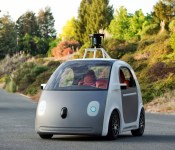
A few months back at CES, I found myself at the Las Vegas Motor Speedway as a guest at BMW’s “Highly Autonomous Driving” demo. While our cameraman set up his gear and I pondered what I was going to say about BMW’s mystery kit, I watched one of the carmaker’s drivers hooning through a wet section of the track drifting an M235i. Little did I know at the time that the driver wasn’t actually driving: He was a passenger. That night, BMW suggested self-driving cars were years off, maybe as many as 10. But Google’s just shown us its vision, and the “when” is much, much closer. Despite my racing-heavy introduction earlier this year, the automakers want to sell self-driving cars as a safety blanket. And if they can prove its ability to save lives, it’ll become a reality in short order.
WHAT IS IT?

Call the technology what you will: driverless, highly autonomous or self-driving. No matter the term used, the end result is that some element of control of the vehicle passes from your hands and feet to a computer. In its simplest form, cruise control could be considered part of this technology, though traditionally it is referred to as a driving aid. As one of its seemingly endless list of features, Audi offers Adaptive Cruise Control with Stop & Go in some of its fleet. This technology enables your car to follow the vehicle ahead of you in traffic, automatically speeding up and braking when they do and even coming to a complete stop if needed. These driver-assist tools attempt to take the drudgery out of driving, leaving you to enjoy the rest. Driving automation is about improving the experience and adding safety.
But what’s being proposed recently by the likes of Google, Audi, Volvo, BMW and most other large automakers is much, much more. This discussion is not about automated aids, but about complete control of the driving experience. Google’s newly announced car, for example, completely computerizes all the work of driving and replaces all pilot input with a start and stop button. You won’t need to know how to drive. In fact, you don’t even have to care about cars anymore if you’d rather not. Google’s vision happens to be a pod you travel in as if by magic; other makers may opt to have control available that you can enable or disable.
BMW’s demos in Vegas showed off what its cars can do without any human interaction at the “dynamic limits of the car.” In short, we blitzed about a track at close to 70 MPH in a twisty section, through pylons in an Auto-X demonstration, and then capped it with some emergency avoidance maneuvers. It was our first time going for a drive without a person actually being involved in the process and we left fairly awestruck. At the very end of our test session, the M235i intentionally drifted by loading on the power going into a wet bend and the car maintained the slide by itself. The demonstration was very impressive, made more-so by the fact we weren’t just toodling down the street on a milk run: we were hustling.
That said, we also saw that same car get it completely wrong in the wet section and spin out, so it’s not infallible.
HOW DOES IT WORK?
Google’s car is outfitted with a staggering array of equipment to keep tabs on where it is and to track its surroundings. A LiDAR (Light Detection and Ranging) scanner on the car’s roof maps the world in real-time, similar to Microsoft’s Kinect. It tracks depth and distance, acting as the car’s eyes. That info is compared to stored data to help discern pedestrians from inanimate objects.
In tandem, radar and ultrasonic scanners (plus cameras) keep track of the 360 degrees of space around the car. This includes reading signage, watching for road hazards, monitoring for red lights and everything else you normally watch out for while driving. Google has been adding scenarios for road hazards such as construction and even recognizing and understanding a cyclist’s hand signals for lane changes and the like. Think of this system as the car’s brain.
While Google is at the forefront of this new frontier of automobiles, the company will likely remain behind the scenes in the industry. While we don’t see Google selling cars, we do expect it will stay an innovator in the space, developing the platform for car vendors. Like its Android OS is adopted by cell phone makers, it’s not hard to imagine the same happening for automotive tech.
WHY SHOULD I CARE?
Where you stand on this likely depends on what you hope to get out of your automated driving experience. If you can’t parallel park to save your life — or other’s bumpers — a BMW’s i3 can already take care of that for you. Maybe you’re worried about pop as he’s older and no longer safe driving for his groceries? No worries: type in a destination and the car will get him there.
Or perhaps you don’t own a car or live in an area with no parking? Car sharing services will undoubtedly become more popular and simpler to use. Imagine reserving your ride in an app and having the car arrive at your doorstep at some pre-determined time. You arrive at a your destination, hop out then the car takes off on some other mission like a taxi, but with no driver or fare. Once you’ve wrapped up your business your car is there, on time for the scheduled pick up. People with impaired vision, problems with mobility, or other ailments that prevent them from driving a car will have another transportation option. Being able to arrange your own travel to and from where you’re going on any particular day without need for any other party’s taxi, bus or shuttle is a revelation. Party people will celebrate having another way to get home after drinking more glasses of wine than planned. Hop in your car and have it ferry you home, safely.
Of course, traditional methods of carriage for the drunken may not cheer this new technology. Uber (and its ilk), taxis, and even buses/subways could see a slip in customers as these new choices come on line. Also consider the downsides: instead of parking your car once you arrive at your destination, it simply heads home, using more energy. While these technologies buoy ease of use and safety, they do little to directly reduce the number of cars on the road.
WHAT’S THE ARGUMENT?

Some folks are going to hate it, plain and simple. Having no control of the metal box carting you through space at high-speed is likely to be an intimidating experience for some. So much happens around you while you’re driving: what if the car doesn’t react properly? Or at all? What if the system crashes? All of these are valid concerns, and all are possible. To the credit of interested parties, years of work have gone into this research by many companies. Google alone has logged 700,000 autonomous miles of driving. That’s almost two round-trips to the Moon, or 17 laps around our little blue planet.
The National Safety Council estimates that roughly 35,000 people died in 2013 in US traffic accidents. There were also some 3.8 million car crashes requiring medical attention. The NSC estimates that hundreds of billions of dollars per year are spent on crashes, if you tally up lost revenue, insurance payouts, medical costs and property damage.
People make mistakes. We’re easily distracted and we certainly can’t juggle 20 tasks at once while driving. Computers can, they never tire, never get sleepy or spill a latte on their lap while fumbling for a turn indicator.
WHAT DOES THE LAW SAY?

The laws surrounding driverless cars are shiny new. With only California, Nevada, Michigan, Florida and the District of Columbia offering the thumbs up thus far, there’s definitely a long road ahead. Currently those states require a driver behind the wheel just in case something goes awry. Technical issues aside, the legality of it all may be its biggest initial stumbling block to success. Meanwhile, the statistical argument in favor of self-driving cars is pretty strong: 90 percent of accidents are human error.
Also consider that most state legislation doesn’t outright prohibit — or even consider the possibility — of automated cars, the question of liability will need to be addressed. Who will be held “at fault” in the case of an accident? The carmaker? The software integrator? A sensor manufacturer? In the case of human driver vs. machine driver, the tapes could be reviewed as the automated car would have recorded footage leading up to the accident to help demonstrate where guilt should be attached. It’s a whole new legal realm we’ve barely explored.
WANT TO KNOW MORE?
If you want to keep abreast of what Google’s up to with its cute as a button automatic car just track this site. If you happen to live in Michigan, your State University is set to become a hot bed for automotive study. Take a peek at the school’s Mobility Transformation Facility and the whopping 32-acre test facility being built right now. If you’re curious about the i3 and all its magical tech, BMW gives away some more technical info over here. Lastly, Audi’s list of driving aids are miles long and some are pretty nifty, have a gander at those here.
[Image credit: Google, jurvetson/Flickr, Si-MOCs/Flickr]
Filed under: Transportation

Yahoo to strip Facebook and Google logins from Flickr starting June 30th

Yahoo’s slowly been closing off third-party logins for its web services, but it’s now turning its attention to one of its most-established communities: Flickr. The Next Web reports that the company has emailed users telling them that Facebook and Google account logins will be removed from the photo-sharing site starting June 30th. Yahoo previously said the change would allow it to offer “the best personalized experience to everyone,” but given its desire to reinvent itself, ridding its services of rival logins keeps users inside its walled garden and helps boost its own userbase. If your desired login option will cease to exist come June 30th, Yahoo asks that you log into the site one last time using your Facebook or Google details. You’ll be required to create a new Yahoo account, which will then be linked with the account you’ve used previously.
[Image credit: Murilo Cardoso, Flickr]
Filed under: Internet
Via: The Next Web
Source: Yahoo

Living With Google: Gmail

In the world of Google apps, Gmail is one of the most important tools in the Android world. Your Gmail account is attached to everything Google. From the very first Android device you pick up you set up a Gmail account for the play store and other Google services. Gmail is not only a E-mail client it is your Google account that stores your contacts and Google settings.
Setting up a Gmail is very straight forward. Choose your name, password, and recovery Email if you have one. Your account and profile is your name and password for everything Google like YouTube and Maps. You will receive an initial email welcoming you to Gmail and it has links to show all the features and tips for using your account. There is also a Privacy agreement allowing Google servers to scan you Email for advertising and for information to help personalize your other Google services like Google Now.
Gmail is fast, secure, and easy to use. Very efficient at blocking spam and malicious files that may harm your device. Most people agree Gmail is the safest email client available online today for the common user. Using the mail client Google automatically sorts your mail in three groups primary, social, and promotions. You can customize what mail goes in what tab but Google has made it very efficient in sorting by itself with no user input. Primary mail is your common mail between your contacts and business dealings. Social mail is your Facebook, Youtube, Twitter, Google+, and other social networks. Promotions are like the spam and promotion email you want to see like Groupon and Google Play.
In my personal experience I have always used Gmail for its reliability and ease of use I have to primary Email accounts and one AOL of all things from the old days. In general most all my mail is sorted in it proper folders. When setting up a new phone or computer I sign in and immediately my contacts and mail is restored along with my Google settings. I have a few other tabs I have created for work and business contacts and only once in a blue moon does anything seem out of place. Google has really made an email client what it should be smart, easy and safe.
The post Living With Google: Gmail appeared first on AndroidGuys.

