



A quick guide to following World Cup 2014 on Google, Facebook and Twitter

Like a trio of vuvuzelas, the three big internet platforms became a significant part of the World Cup’s background noise in 2010. They have even more to offer this time around: Not just a multitude of ways to follow scores and other stats, but also places to go if you want to trumpet your opinions and listen to those of others. So, we’ve rounded up some of the best advice from Twitter, Facebook and Google on how to get the most out of the new features they’re dishing out for Brazil 2014.
If you’re already au fait with the Twittersphere’s workings, you’ll want to begin your journey at the #WorldCup2014 hashtag page. This main timeline will show you relevant tweets from celebs, teams, pundits and people in your network. On the right-hand side you’ll see quick access to a Teams page, so you can easily find and follow your home nation. There’s also a handy bar down the left that shows the latest scores and upcoming games.
Oh, and remember the three-letter hashtag for your team! Just like in 2010, using this hashtag inside a tweet will magically cause the appearance of your national flag (“hashflag”) to bring some color to your tweet. For example, it’s #URU for all of you Uruguayans.

If you’re not already on Twitter, then you’ll want to start by signing up and saying “yes” at the bit where you’re offered some extra World Cup excitement. This will take you through a couple of easy steps to choose your favorite team and set your wallpaper accordingly. If you’re a true patriot, you’ll keep that wallpaper forever. Forever, dammit.

This all starts at the Trending World Cup page, which works in a similar manner to Twitter’s hub — albeit with a bit less detail. You can view upcoming matches, but there’s no obvious shortcut to find your official team page — you just have to search for it (e.g., “U.S. Soccer“) and look for the blue tick to highlight the official site. There is, however, a “Fan Map” that shows the locations of millions of footy fans around the world and what, exactly, they’re fans of. It’s a gimmick, perhaps, but it has already proven itself useful in showing that England’s Wayne Rooney is widely detested across mainland Europe.

Compared to the other two, there’s a distinct lack of structure and effort from Google at the #WorldCup2014 page. In fact, there isn’t even one official hashtag — people are just using whatever tag comes to mind, resulting in something of a mess.
Then again, Google has other assets at its disposal that World Cup fans might find useful. Firstly, there’s a straightforward search, which will show up-to-the-minute scores and stats when you search for relevant terms like “world cup” or “world cup uruguay.” There’s also Google Trends, which shows all manner of strange observations about upcoming matches, based on what people are searching for.
If you load up Google Now on your phone or browser, you should automatically be asked if you’re interested in match update cards, and then be asked to select your favorite team(s). And finally, if you haven’t already, check out Google’s amazing Street View tours of the Brazilian stadiums that are about to play host to the angst, happiness and sporting talent of an entire planet.
[Lead image credit: AP Photo/Silvia Izquierdo]
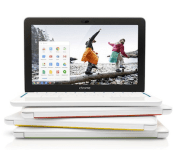
Your Chromebook now sends photos to Google+ in the background

To date, Chrome OS has only backed up photos to the cloud as long as you left the Google+ Photos app open; that’s a hassle on the frequently limited screen real estate of a Chromebook. You won’t have that headache if you grab the updated Photos app, however. The new version automatically uploads snapshots from your SD card in the background, even if the app is closed; you can move on to email knowing that all those vacation pictures will be safe. It’s a simple addition, but it should make a big difference if you’re planning to go on photo safaris this summer.
Filed under: Laptops, Internet, Software, Google
Via: The Next Web
Source: Chrome Web Store, Oren Blasberg (Google+)

Google Glass update serves up World Cup scores and faster photo sharing

Google Glass is about to get a handful of updates that should be especially helpful this summer. To start, it should be easier to share Glass photos from your vacation; a new MyGlass app for Android (iOS is due later) will surface your most recent snapshots. An upgrade to Glass itself, meanwhile, lets you keep tabs on World Cup matches and group standings. It should be simpler to find your parking spot and track packages, too. Google hasn’t said when all the updates will roll out to its smart eyewear, but it expects the MyGlass update to hit later this week — hopefully, in time for the World Cup’s June 12th kickoff.
[Top image credit: Miguel Tovar/STF via Getty Images]


Google’s flight search can now send you on random journeys

Google Flight Search is fine if you already have a destination in mind, but what if you simply want to sate your wanderlust? That’s where a new “I’m Feeling Lucky” button comes into play. Hit that and the search tool will suggest a random place to go; if you’re not feeling quite that spontaneous, you can set budget and time limits. Google has also added some tools for those willing to do some legwork, including a full-screen exploration mode and a region browser that suggests trips within the boundaries you’ve chosen. All the new features should go live today, so you now have plenty of opportunities for spur-of-the-moment expeditions.
Filed under: Transportation, Internet, Google
Source: Google Travel Blog
Theater chain bans Google Glass in a bid to cut down on piracy

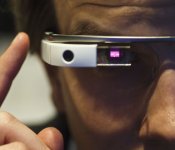
If you’re one of the few people in the country with a prescription Google Glass headset, you might want to keep extra glasses handy for when you go to the movies. First, some guy got booted from an AMC theater on the suspicion he was recording the film (he wasn’t), and now a different theater chain has outright banned the headset. That theater company is Alamo Drafthouse, which operates in five (soon to be six) states and like AMC, it’s trying to cut down on piracy. Indeed, the company’s CEO Tim League said in a tweet that Glass specifically won’t be allowed in auditoriums once the lights dim for previews. Fortunately, at least, you can continue to wear your headset while the house lights are up, or when you leave the screening room for a popcorn run. Once the movie starts, though, you’d better be wearing proper glasses, lest you get pegged as a movie bootlegger.
.@macjaeh @gay4soccer policy only about piracy concerns. But on a personal level, I advocate turning off distractions during a movie.
– Tim League (@timalamo) June 9, 2014
Via: CNET
Source: Tim League (Twitter)

Google’s street art project includes over 5,000 images of murals (and graffiti, too)

There’s a joke here about Google owning everything (“all your art is belong to us”?) but if you’re the sort of person who enjoys looking at interesting graffiti, you might appreciate this anyway. The company just announced that it’s added a collection of street art to its existing art database, which originally included only 100-some-odd examples of street work. Now that number has grown to more than 5,000, with images that include murals and etchings (like the one by Vhils above), in addition to your usual graffiti. If that sounds like little more than a well-organized group of Google image search results, you can also use Street View to explore buildings that have been tagged — even some that have been demolished or are closed to the public (RIP 5 Pointz). Curious? We’ve put the source link below, like we do.
Via: Google Official Blog
Source: Google street art project

Google just bought a satellite company for $500 million

Google is in the ground, on the roads and floating through the skies, and now it’s looking beyond, by agreeing to the half-billion dollar cash purchase of a company that says it’s “built and launched the world’s smallest high-resolution imaging satellite, which collects beautiful and useful images and video every day.” Skybox Imaging (already signed up as a Virgin Galactic customer) says it started with a goal of tracking changes happening across the surface of the earth, while recent rumors from The Information suggest tech giants like Google and Facebook are in a space race as they try to connect the world to the internet and their various services. The satellite company’s tech can immediately assist Google Maps / Earth, but Google says it could have other purposes too, like acting as a relay to spread wireless internet to places currently without service or where connections have been knocked out by disasters.
Filed under: Wireless, Science, Internet, Google
Source: Skybox Imaging, Google

Google tweets a picture of a new unknown phone

Google is promoting Google Now and its features via Twitter, but they’re doing it on an unknown device. This of course couldn’t be an accident, so… let the speculation begin.
The phone looks kind of similar to the Nexus 5, but not quite. It’s quite beautiful if you ask us, simple and yet compact, considering it has those gorgeous thin bezels on the sides similar to LG G3. There are 3 options in our opinion. It is a new Nexus 6, Motorola Moto X+1 or an Android Silver phone. We can’t be sure at this point, but our guess is that it’s not the Moto X+1 considering that Google sold Motorola to Lenovo, so it’s unlikely they would promote a Motorola device. Which leaves us with Nexus 6 or an Android Silver phone. We can’t be sure which one considering that there’s been reports that the Nexus program will be replaced by Android Silver. We’ll also go out on a limb here and guess it’s an LG phone, it looks like something between the Nexus 5 and LG G3.
What is your guess? Do you like the phone’s look?
SOURCE: Google (Twitter)
The post Google tweets a picture of a new unknown phone appeared first on AndroidGuys.

UK to introduce new road laws allowing the use of self-driving cars

Not to be left behind by developments in the US, the UK government is set to rewrite road laws to allow self-driving cars on Britain’s roads. According to Mail Online, science minister David Willetts has already opened discussions with the Department for Transport to help British companies develop their own driverless cars and encourage the world’s car companies to do the same. Willetts’ comments come just weeks after Google showed off its new self-driving prototypes that don’t come equipped with a steering wheel, mirrors or pedals. As we’ve noted before, laws covering driverless cars are still new, with only a few US states, including California, Nevada, Michigan, Florida and the District of Columbia, giving them the green light (but require someone to sit in the passenger seat, at least for now). The UK government aims to follow suit, allowing researchers at Oxford University, who have pioneered a cheaper version of Google’s self-driving tech, to legally test different driving scenarios on (hopefully quiet) British roads.
Filed under: Transportation, Google
Via: The Independent
Source: Mail Online
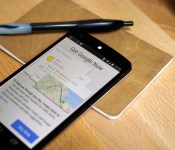
Google Now is going to make sure you don’t miss your exit, ever again

Google Now keeps on getting some nifty features that will make your life easier. The service recently got offline sync and notifications for Chrome users. This time around we have a smaller but an interesting addition to Google Now.
If you’ve ever missed your stop while riding on a train for example and ended up miles and miles away from your destination, this Google Now feature might help you in the future. Google Now will ask you if you need an alarm to let you know you’re close to a certain stop while you’re travelling via train or a bus. Interesting enough, this feature does not connect to your smartphone’s alarm functions.

This might be an interesting feature for some and quite useless for others, but it’s here. Are you going to use it? If you’re interested poking deeper in Google Now, check out our big list of Google Now commands.
VIA: PhoneArena

The post Google Now is going to make sure you don’t miss your exit, ever again appeared first on AndroidGuys.
 AIVAnet