


Google goes all-in with USB Type-C
Earlier today, Google made some changes to the Play Store, moving its “Devices” category to a whole new website. Along with this change came an all-new Chromebook Pixel, which features either an Intel Core i5 or i7 processor, 8 or 16GB of RAM, 32 or 64GB of on-board storage, and a price tag starting at only $999. Another addition to the new Chromebook Pixel is the inclusion of two USB Type-C connectors.

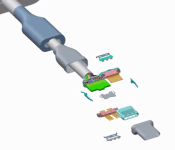
The addition of the Type-C connectors is all thanks to Google joining the USB Implementers Forum, helping to create these new connectors over the past few years. Google is pushing to add them to the new Chromebook mainly because laptops have no common charging standard, unlike smartphones that mostly use Micro-USB. Type-C combines fast charging capabilities with quick data transfer speeds, all while being large enough for laptops and small enough for smartphones. Also, USB Type-C is completely reversible, so you won’t need to struggle with plugging in your device. Google explains:
USB Type-C can deliver up to 100W of power, which is more than even the largest laptops typically need. When a USB Type-C enabled device is plugged in, the charger negotiates the right power for that device. That way, phones, laptops and tablets can all be powered from the same charger.
But Google seems to have bigger plans with USB Type-C. The company has open sourced its work on Type-C adapters so there will be an abundance of compatible accessories in the future. That’s great news. But what’s even more exciting is this quote from Adam Rodriguez, a Product Manager at Google:
We at Google are very committed to the USB Type-C spec. Expect to see this in a lot of Chromebooks and Android phones in the near future.
This is basically Google saying that Android phones, at least the ones made by Google at the start, will have USB Type-C connectors in the future. Just think: one universal USB cord to use with your laptop, tablet and smartphone.
Are you excited to get rid of that annoying Micro-USB cable, or are you indifferent?
Google renames the devices section of the Play Store to “Google Store”

Google has just rebranded the devices section of the Play Store and entitled it “Google Store”. Hand-in-hand with the name change is a brand new modern design, which features large, bold fonts, oodles of white space and fresh, clean imagery.
When you load the new website, you’ll be greeted with a message that say’s: “The new home for the latest products made with Google. Have a look around.” If you choose to sift through the site, you’ll notice the Nexus 5 and the 2013 model of the Chromebook Pixel have now been consigned to the scrapheap of technological history. All other devices are still there, including: the new Chromebook Pixel, the Nexus 6, Nexus 9, Android Wear watches, the Nexus Player and the Chromecast.
There’s also a new “Closer look at Android page”, which houses a short presentation targeted at those who are considering switching to Android.
To celebrate the launch of the new Store, Google is currently offering free shipping on all devices. If you’d like to take advantage of this offer, simply hit the source link below.
Source: Google Store
Come comment on this article: Google renames the devices section of the Play Store to “Google Store”

Chromebook Pixel (2015) arrives, USB-C ports in tow — starting at $999
Last month Google unofficially revealed a new Chromebook Pixel was on its way sometime soon, though at the time no specific details were given. As it turns out, today is the day, as the Chromebook Pixel (2015) has landed.
For those that were intrigued by the idea of a high-end Chrome OS experience but not so keen on Google’s $1300 asking price for the Pixel, you’ll be happy to know that the latest model is a fair amount cheaper at $999 for the Intel Core i5 model with 8GB RAM and 32GB storage. Although this is still much more expensive than typical Chromebooks, a $300 price reduction is a welcome change. If you want even more power under the hood, a $1300 variant dubbed the “LS” model comes with an Intel Core i7, 16GB RAM and a 64GB SSD.
That’s about the only difference between the two variants, with both models packing the same 3:2, 2560 x 1700 pixel touchscreen display, a battery that lasts about 12 hours between charges, and fast-charging that lets you get two hours of use in 15 minutes. The new Chromebook Pixel line also has two USB-C ports, in addition to two USB 3.0 ports. There’s also a headphone jack and a microSD card reader.


Aesthetically both the standard and LS Chromebook Pixel (2015) have a very similar design to their predecessor, though they have been polished up a bit, removing visible traces of speaker grilles, screws and fan vents. You’ll also find the same Chrome OS core here, with no major software changes being made for Google’s latest super-powered Chromebook.
Interested in picking up a new Chromebook Pixel? Both models are available right now on the rebranded Google Store.

Chrome for Android update includes pull-to-refresh gesture
 Refreshing a page on the Chrome for Android app has been a little inconsistent for the last few months. The original placement of the refresh button was in the address bar before moving to a choice behind the menu button. Hiding behind another button proved to be quite annoying as refreshing a page is a common action. Today’s release of v41.0.2272.92 introduced a pull-to-refresh action from any page. Simply pull down on as you would in other apps and Chrome will refresh the page.
Google also included the usual bug fixes and performance improvements with the update.
Source: Chrome Releases
Come comment on this article: Chrome for Android update includes pull-to-refresh gesture
Chromebook Pixel review (2015): less expensive, still impractical

The Chromebook Pixel was the most beautiful laptop that we told people not to buy. With a machined aluminum chassis, pixel-dense screen and a spacious keyboard, it had a design that in some ways outmatched even the Retina display MacBook Pro. The problem: It ran Chrome OS for an operating system, with no support for the sort of desktop apps you’d expect to use on a $1,299 machine. Speaking of the sort, it cost $1,299. Oh, and the battery life was short too — barely four hours on a charge. So much for having a portable machine you could take anywhere. It was, as we said at the time, “a lovely thing that everyone should try to experience, but few should seriously consider buying.”
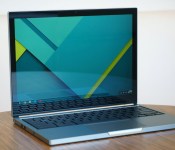
As far as Google was concerned, though, the Pixel was just ahead of its time. That, and maybe it needed a little refining. Not to be deterred, the company just released a second-generation model, also called the Pixel. The idea, as Google explains it, is that it keeps everything people loved about the original, while correcting everything that made it a tough sell. That means the design is virtually identical, with an all-metal shell, 12.85-inch, 2,560 x 1,700 touchscreen and a well-spaced keyboard. This time, though, the battery is rated for 12 hours, partly thanks to Intel’s latest Core processors, and there are two reversible USB Type-C ports like the kind used on the new MacBook announced earlier this week (except in this case, there are some regular USB connections too). Meanwhile, Chrome OS is more polished than it was two years ago, and can now run a few Android apps. Most importantly, perhaps, Google dropped the Pixel’s starting price to $999. A 23 percent price cut isn’t exactly a trivial difference, but is it enough to turn the Pixel into a practical purchase? Not quite. But almost.
Hardware

As I said, with the exception of those new USB Type-C ports (and a slightly slimmer profile), the new Pixel looks just like the old one. So, I probably shouldn’t spend too much time fawning over the design, as if it were brand-new. That said, I want you to understand how well crafted, how delightful to use this thing is. The aluminum chassis here isn’t just reminiscent of a MacBook, but actually better made in some ways, with a softer finish and a denser body that feels weightier in-hand. (In fact, it weighs less than the 13-inch Retina MBP: 3.3 pounds versus 3.48.)
As before, there’s a thin LED strip on the lid, except now, you can double tap it to see roughly how much battery life you have left (up to four bars will light up). It’s a handy feature, though I haven’t used it much, mostly because the battery life is so good I never worry about having enough juice for the day. Meanwhile, a few other details — a low-rise hinge, black rubber feet and a skinny bumper around the touchscreen — also lend the impression that someone at Google put a lot of thought into the design.
So does the display. I’m simply not used to seeing this nice a screen on a Chromebook. In fact, I don’t think I’ve seen one this nice since the first Pixel came out two years ago. As before, the Pixel has an oddly shaped 12.85-inch panel, with an equally uncommon resolution of 2,560 x 1,700. That’s a 3:2 aspect ratio, by the way, meaning it’s noticeably taller than your typical 13-inch laptop screen. Indeed, thanks to those extra vertical pixels, the screen density comes out to an impressive 239 ppi, making it ever so slightly sharper than the 13-inch Retina display MacBook Pro (227 ppi). Not that you can spot the difference.

In addition to being sharp, the Pixel’s display boasts rich colors and wide viewing angles.
As it turns out, too, that Retina MBP comparison is an apt one, and not just because of their similar screen resolution; the quality is on par, too. In addition to being sharp, the Pixel’s display boasts rich colors and wide viewing angles, even despite the touchscreen’s glossy finish. The visibility is so good, in fact, that when my seatmate on a recent flight asked me to open the window shade, I could make out the contents of the screen, even with sunlight streaming in next to me. My only concern is that the tall display could be a problem for travelers stuck in coach. As it happens, I was seated in Economy Plus on a newer plane, and the person in front of me was kind enough not to recline, but I bet that on a smaller aircraft (and with less considerate neighbors), things would have gone differently. Heck, even with the 13-inch Air, which has a lower-slung screen, I’ve had problems using it in coach.
Google’s “if it ain’t broke, don’t fix it” philosophy applies to the keyboard as well. For all intents and purposes, this is the same tactile, well-spaced keyboard as last time, with one exception: Whereas the row of function keys used to have a stiff feel, they now have the same shape as all the other buttons on the keyboard. And that’s a good thing. With the exception of my Google password, which has a lot of special characters and is easy to mess up — I was able to type at a fast clip with very few typos. The buttons don’t even have that much travel, per se, but the keys are large and easy to hit, and they’re springy enough that I didn’t have to mash the keys in order for my button presses to register. The touchpad is also a joy to use: spacious with smooth, controlled tracking.

That leaves one of the few things that’s actually different about the design, and that’s the ports. As I mentioned, the new Pixel has two reversible USB Type-C ports — the same sort used on the new MacBook announced earlier this week. But whereas Apple caused a controversy by including just one port on its new flagship laptop, Google mercifully built in two Type-C connections — along with two “regular” Standard A USB ports for good measure. In particular, I like that there’s one Type-C port on either side — it means I have some flexibility in terms of where I plug in the charging cable. As I type this, for example, I’m sitting in a middle seat on a plane, with a power outlet on either side of me. The lady on my left indicated she might need an outlet at some point. Good thing there’s another one on my right, with a nearby power plug to match.
Finishing up our tour, there’s also a headphone jack and full-sized SD card; kind of a crucial detail on a Chromebook with only 32GB of built-in storage. Basically, then, you have all the ports you’d likely want, unless you were holding out for an HDMI socket. (And if you were, you’ve heard of Chromecast, right?) Truly, it seems that as long as there are still standard USB 3.0 ports there, you get the best of both worlds. On the one hand, you can charge gadgets faster over USB Type-C than a regular micro-USB port. You also can get away with carrying just one power brick for all your gadgets, including your Pixel and whatever phones or tablets you own. At the same time, you don’t need an adapter to use your existing peripherals (Ethernet adapters, USB headsets, etc.). Apple might be right that people will one day require fewer ports, and that USB Type-C, in particular, will be ubiquitous. But we’re not there yet. For now, then, this mix of old and new USB sockets feels like a sensible compromise.
Software

Chrome OS has come a long way since we reviewed the original Pixel, back in February 2013. First off, most every Google app has offline access, including Gmail, Drive, Music and Google Play Movies & TV. Many third-party apps, such as Pocket and Amazon Kindle Cloud Reader, now work offline, too. In fact, the selection is big enough that there’s even a section of the Chrome Web Store dedicated to offline-capable apps. In short, then, the idea that Chromebooks are crippled without an internet connection is a big fat myth. I will say this, though, there is nothing more infuriating than being locked out of a Chromebook during a flight because you have two-factor authentication and can’t receive your six-digit code over SMS. That happened to me while testing another Chrome OS laptop recently and, well, let’s just say I won’t be making that mistake again. Always have backup codes handy, kids.
The idea that Chromebooks are crippled without an internet connection is a big fat myth.
What else has changed in the last two years? It’s now easier to juggle multiple accounts. As of late last year, Chromebooks have always-on, “OK Google” voice search. The Pixel’s touchscreen now supports pinch-to-zoom. You can remotely lock your machine if it gets lost or stolen. The file manager is better organized. Chrome OS sends photos to Google+ in the background, even if you don’t have the app open. And hey, if Chrome OS isn’t enough, you can load a new operating system through a USB drive (or you could just run it in its own window). Speaking of different platforms, you can now run a handful of Android apps, including Vine, Evernote and Flipboard. The selection is still small, but it’s a nice-to-have feature nonetheless.
But it’s not just Chrome OS that has matured; the rest of the web has caught up too. Though I still can’t do everything I need to on a Chromebook, most of the services I use, or could possibly want, are now in the cloud. Skype, one of the biggest apps I used to miss on Chromebooks, is now accessible from a browser. So is HipChat, the messaging client Engadget staffers use to communicate with each other. (Ditto for Slack, which many other workplaces use.) Like most people, I also make good use of music-streaming services like Spotify, Slacker and Pandora, all of which have a cloud player. Netflix works fine here too, even though there were some compatibility issues years back. The same goes for Amazon Prime Video, Hulu Plus and the like. I can do almost anything I want on a Chromebook.
If you think there’s a chance you’ll miss one of your usual desktop apps, you might just want to buy yourself a similarly priced Mac or Windows machine.
The keyword is “almost.” There are still some gaps. The software updater for my Garmin running watch won’t install on a Chromebook. I can’t install iTunes on the Pixel, though I can upload my collection to Google Play Music. I happen not to be a gamer, but if I were, I wouldn’t be able to download Steam, or play any truly native games — beyond the mobile-style titles found in the Chrome Web Store. There’s no web-based video editor that matches the ones I might use on a desktop. Meanwhile, most of Adobe’s Creative Cloud apps aren’t available on Chromebooks. Technically, Photoshop is compatible, but for now it’s only available in beta to education customers. I could use Chrome’s Remote Desktop feature, I suppose, but that’s a clumsy solution compared to simply loading an app on my local machine.
Depending on who you are and what you do with a computer, it’s possible that none of these will be dealbreakers for you. But if you think there’s a chance you’ll miss one of your usual desktop apps, you might just want to buy yourself a similarly priced Mac or Windows machine — and then install the Chrome browser for when you need it. Because when a laptop costs $999, you should be able to use it exactly how you want; you shouldn’t have to resort to workarounds.
Performance and battery life
| SunSpider v.1.0.2* | Google Octane | Mozilla Kraken* | |
|---|---|---|---|
| Chromebook Pixel (2015) | 298ms |
23,907 |
1,428ms |
| Toshiba Chromebook 2 (Celeron N2840, 4GB RAM) | 967ms |
7,714 |
4,284ms |
| Samsung Chromebook 2 (11-inch, Celeron N2840, 2GB RAM) | 525ms |
7,223 |
3,936ms |
| Acer Chromebook 13 (NVIDIA Tegra K1, 2GB RAM) | 609ms |
7,051 |
4,816ms |
| Lenovo N20p (Celeron N2830, 2GB RAM) | 567ms |
7,288 |
4,287ms |
| ASUS C200 Chromebook (Celeron N2830, 2GB RAM) | 483ms |
7,198 |
4,291ms |
| Acer C720 Chromebook (Celeron 2955U, 2GB RAM) | 342ms |
11,502 |
2,614ms |
| Dell Chromebook 11 (Celeron 2955U, 4GB RAM) | 340ms |
11,533 |
2,622ms |
|
*SunSpider and Kraken: Lower scores are better. |
|||
Of course the Pixel is faster than other Chromebooks: It has a fifth-generation Core i5 processor, Intel HD 5500 graphics and 8GB of RAM, compared with a Celeron CPU and 2GB to 4GB of RAM on most competing models. It’s no surprise, then, that the Pixel swept its rivals in every web-rendering test, including SunSpider, Mozilla Kraken and Google’s own “Octane” benchmark. Now, I’ve always contended — and still contend — that even those lower-powered Chromebooks are still sufficient for basic tasks like email, web surfing and chatting. Still, the Pixel is noticeably brisker. And really, who’s going to argue with faster performance? In addition to booting in a swift five seconds, the Pixel is quick to load new windows, as well as toggle between open tabs. Additionally, the built-in 802.11ac WiFi radio was quick to reconnect to known networks after the machine had been asleep.
|
Battery life |
|
|---|---|
| Chromebook Pixel (2015) | 10:01 |
| MacBook Air (13-inch 2013) | 12:51 |
| HP Spectre x360 | 11:34 |
| ASUS C200 | 11:19 |
| Apple MacBook Pro with Retina display (13-inch, late 2013) | 11:18 |
| Acer Chromebook 13 | 10:07 |
| Samsung ATIV Book 9 Plus | 8:44 |
| Samsung Chromebook 2 (13-inch) | 8:22 |
| Dell XPS 13 (2015) | 7:36 |
| Lenovo Yoga 3 Pro | 7:36 |
| Acer Aspire S7-392 | 7:33 |
| Microsoft Surface Pro 3 | 7:08 |
| Acer C720 Chromebook) | 6:27 (Core i3) / 5:57 (Celeron) |
| Toshiba Chromebook 2 | 6:34 |
| Chromebook Pixel (2013) | 4:08 |
Google rates the new Pixel for 12 hours of battery life — a marked improvement over the original, which only promised five hours of runtime. Though I never quite made it to the 12-hour mark, it’s clear the battery life is a markedly better here: I got 10 hours of continuous video playback — not far off Google’s own estimate. Also, as an experiment, I packed the Pixel’s charger in my checked luggage, so that I would have to rely solely on the Pixel’s built-in battery to get me through a cross-country flight. After three and a half hours of consistent web surfing, chatting and word processing, I still had 66 percent, or six hours, left according to the battery icon in the system tray. I’m no mathematician, but I think that means I would have achieved nearly 10 hours of use.
Additionally, the Pixel touts some fast charging — two hours in 15 minutes, or a full charge in two hours, according to Google. I actually believe that’s a conservative estimate. After just 17 minutes, I had a 29 percent charge, or around 3.5 hours of juice. All told, it took me an hour and 41 minutes to return to a full charge, which was even faster than I was expecting.
Configuration options and the competition

The Pixel starts at $999 with a fifth-generation Core i5 processor, 8GB of RAM and 32GB of internal storage. If money is no object there’s also a $1,299 “LS” (ludicrous speed) model with a Core i7 CPU and 16GB of RAM. Either way, you get 1TB of Google Drive storage, free for three years. And, like every other Chromebook, you’re automatically entitled to 12 free Gogo in-flight WiFi passes.
A nice perk, that, but is it worth the $999 asking price? Not for most people. For a hundred dollars less, you can get the HP Spectre x360, which also has a machined aluminum chassis and a roughly three-pound build, except it also runs traditional desktop programs. For a little more money, you can find plenty of machines that more closely match the Pixel on the spec front, especially screen resolution. Lenovo’s Yoga 3 Pro convertible is currently going for $1,200 with a 3,200 x 1,800 display and a 2.6-pound build. The 2.6-pound Dell XPS 13 also has a 3,200 x 1,800 display for $1,300, though you could also get a lesser configuration for as little as $800. Meanwhile, the 13-inch Retina display MacBook Pro starts at $1,299 with an aluminum chassis and a display that matches the Pixel in both quality and pixel count. To be fair, not all of the machines here can beat the Pixel on battery life, but some do: both the Spectre x360 and 13-inch Retina display MBP last roughly 11.5 hours.
Wrap-up

Four years after the first Chromebook came out, the idea of a laptop running the Chrome browser as an OS is still a niche proposition. These things aren’t for everyone, and probably never will be. That said, the idea doesn’t seem as silly as it once did. Personally speaking, I wouldn’t buy one — but that’s mostly because it won’t run Photoshop, and it doesn’t play nice with certain peripherals like my running watch. Barring that, though, I love the Pixel. Between the design, display, keyboard and battery life, it’s among the finest notebooks I’ve had the pleasure of using. I’m sad to have to give my review unit back.
Even so, I’m running out of excuses. More and more apps now run in the browser, including big holdouts like Skype. Although I personally require certain desktop apps, there are surely others out there who would have no problem living in Chrome. If that’s you, you’re getting hardware that stands up to the Retina display MacBook Pro as well as many Windows flagships, and you’ll probably pay slightly less than you would for a machine with similar specs. That said, if you think you’ll need certain desktop programs from time to time, a Mac or Windows Ultrabook is still the more practical choice.
Street Art, Google’s first Android Wear watch face, is now live in the Play Store

Google has just released its first Android Wear watch face to the Play Store. It’s called Street Art, and features a very pretty design, though it comes with barely any customization options.
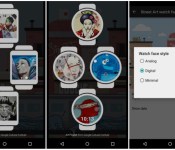
Every few minutes, the watch face rotates through a giant list of street art pieces, powered by Google’s Street Art Project. Dozens of different artists’ paintings are featured, including Cheko, Erik Otto, Gemeniano Cruz, Mariana Dias Coutinho, Mercedes deBellard and many more. As for customization, there are three different watch face choices: Minimal, Analog and Digital. Minimal features a circle that surrounds the screen with small dots to represent the minute and hour hands. Analog shows you numbers around the display with traditional watch hands, just like any other analog watch face. Digital shows the time towards the bottom, highlighting the featured art piece.
Other than that, there aren’t too many additional options to make it your own. You can choose to add or remove the date to your watch face, though you can’t choose the highlight color or how often paintings rotate through. Oh, and for those wondering, the Street Art watch face has small notification cards. We’ve attached some screenshots below for a closer look:
#gallery-1
margin: auto;
#gallery-1 .gallery-item
float: left;
margin-top: 10px;
text-align: center;
width: 33%;
#gallery-1 img
border: 2px solid #cfcfcf;
#gallery-1 .gallery-caption
margin-left: 0;
/* see gallery_shortcode() in wp-includes/media.php */
-

- Minimal

-

- Analog

-

- Digital

-

- Art information

-

- Small card view

Every time the watch face changes images, you’ll get a card letting you know the artist’s name and information on the painting. Swiping the card to the left will allow you to open the page on your phone, if you’d like to check out more information on the featured piece.
This watch face isn’t the most customizable, but it does do a really nice job at making sure you don’t get tired of the same old watch face. If you’d like to check this one out for yourself, head to the Google Play Store link below.

Verizon makes it official, announces Nexus 6 available March 12th

Consistent with earlier leaks of promotional materials, Verizon officially announced today the availability of the Nexus 6 starting on March 12th. If it is any consolation for those who have been waiting, Verizon will release the Nexus 6 with Android 5.1 Lollipop out of the box, so users will benefit from the work Google has been doing to fine tune Lollipop since its release last fall.
As the leaks indicted, Verizon is pricing the Nexus at $249.99 with a 2-year contract. Buyers can also get it for $27.08 per month for 24 months on Verizon Edge. Consumers may not need much of any additional inducement to pick one up if they were already interested, but to help push people over the edge, Verizon is offering six months of access to Google Play Music All Access if the Nexus 6 is purchased before March 31st.
Verizon will start taking orders on-line on March 12th and the device should be available in stores starting on March 19th.
source: Verizon
Come comment on this article: Verizon makes it official, announces Nexus 6 available March 12th
First Google branded store opens in London

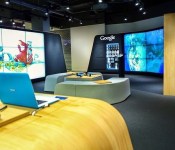
Google had partnered up with Currys PC World to open its first branded store, located in the UK. The Google Shop is based inside the Currys PC World store on Tottenham Court Road in London, a popular area for electronics retailers in the capital.
Rather than a Google owned store, the front is more of an advertising exercise and mutual arrangement between the two businesses. All sales revenues goes directly to Dixons Carphone, but Google doesn’t have to pay any rent for the space. Inside the store, a range of Android phones and tablets, Chromebook laptops, and Chromecast TV services are all available for purchase. The shop also holds tutorials showing consumers how to use the devices and various apps.
Inside the store, there is a large screen “Portal” that allows people to fly around the world using Google Maps and a “Doodle Wall” complete with digital spray-can.
“With the Google Shop, we want to offer people a place where they can play, experiment and learn about all of what Google has to offer,” – James Elias, the U.K. marketing director for Google.
Although many electronics retailers are shifting more and more products online, there is still a lot to be said for hands-on experience before purchasing. The Google Shop could be as important for company brand recognition as it is useful for consumers looking to find their ideal gadget.
In addition to the Tottenham Court Road store, Google plans to open two more London-area shops. Currys Pc World stores in the London borough of Fulham and the Essex borough of Thurrock are both set to feature Google branded stores later in the year.
Google’s Nexus 6 will finally reach Verizon on March 12th

Yes, the rumors were true — after a months-long wait, Verizon has confirmed that it’ll launch the Nexus 6 on March 12th, with stores picking it up on March 19th. The Google-powered phone will still be relatively expensive, at $250 on a two-year contract or $27 per month on Edge, but you will get both HD voice calling (Android 5.1 comes standard) and a free 6-month subscription to Google Play Music All Access for your trouble. Is it worthwhile at this point? That’s hard to say. This is still the latest and greatest Android flagship phone, but there’s no question that Verizon missed the boat, as it sometimes does. If you wanted a relatively pure Android experience on Big Red, you probably bought a Droid Turbo or Moto X last fall.
Filed under: Cellphones, Mobile, Google, Verizon
Source: Verizon
Google’s WebView app now available for all Lollipop devices in the Play Store

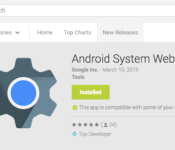
Just a few weeks ago, Google released its WebView app to the Play Store, though it was only in beta upon its arrival. But if you own a Lollipop device and visited the Play Store yesterday, you may have noticed that the WebView app is now installed on your device. That’s because Google has removed the beta tag from the app, and sent it to all Lollipop devices.
WebView is a tool developers use to allow their apps to render webpages, without the need to open the content in an external browser. Now with Google adding it directly to the Play Store, much like many of its other apps, Google can send important performance fixes to the app without the need to wait for the next system update to roll out. WebView is only available for devices running Lollipop, so hopefully your device will get the update to 5.0 sooner rather than later.
If you’re interested, you can check out the Play Store link below for more information on the app, but for those folks with Lollipop devices, the app should already be installed on your device.

