


Google releases reference sample to show how apps can work on multiple devices

Since last summer, we have seen Android makes its way to new form factors. The operating system now works with phones, tablets, wearables, and vehicles. With so many form factors now supported, it makes sense that Google wants apps to have seamless experiences. The company has introduced a sample multi-device application called Universal Music Player that offers a continuous experience across Android, Android Wear, Android Auto, and Google Cast devices.
Hit the break for looks at the mult-device approach in action.


The sample uses features such as MediaStyle notifications, MediaSession, and MediaBrowserService. These features are what allows content to be spread from device to device.
Source: Android Developers Blog
Come comment on this article: Google releases reference sample to show how apps can work on multiple devices
New Google reference app helps developers build multi-screen apps

With the recent introduction of Android Wear, Android TV and Android Auto, Google is expanding its ecosystem to as many screen sizes as possible. With all of the new screen sizes now on the Android platform, the company is urging developers to create the best looking applications as possible, no matter what size screen. To do so, Google has created a new reference sample application called the Universal Music Player for developers to use as a reference point. The app combines a number of different features from Android 5.0 Lollipop and will show developers the recommended way to build their apps for Wear, Auto and Google Cast devices.

The application uses recently-added features like MediaStyle notifications, MediaSession and MediaBrowserService, which allows developers to easily implement browsing and playback on multiple devices while only using one version of the application. The app also shows developers how to add album artwork to the lock screen, control music playback through the Wear and Auto platforms, and much more.
If you’re a developer that’s interested in trying out the Universal Music Player, head to the GitHub link below. Or if you’d like some more information on the topic, check out the Google Developers Blog.
Android 5.1 OTA now available to download and flash for the Nexus 10
If you have a Nexus 10, you can stop tapping that “check for updates” option because we have the actual OTA update (from Google) ready for you to download and flash.
Of course, you can sit and wait, but that could take up to 2 to 3 weeks. It’s not all that hard to flash it yourself and you could be enjoying the goodness today. If you need a refresher or you’re a newbie, just hit up our complete guide to flashing this OTA to your Nexus 10 (or any other Nexus device).
Nexus 10 (mantaray) from LRX22C to LMY47D (5.1)
Come comment on this article: Android 5.1 OTA now available to download and flash for the Nexus 10
Say goodbye to the Nexus 5

The Nexus 5 had a really nice run, but it has finally come to an end. The Nexus 5’s popularity among the Android faithful continued into the Nexus 6 generation because not everyone wanted a 6-inch phone. I don’t think any other Nexus phone survived this much beyond one year of availability.
Google has stopped selling the Nexus 5, but I am sure it will live on through eBay, and other sites like it, as a great phone to buy used.
Come comment on this article: Say goodbye to the Nexus 5
Google says expect USB Type-C in Android phones and Chromebooks in the future
The next big thing in the world of connectors is going to the USB Type-C spec connector, and Google is making sure that its devices are going to be prepared going forward. The nifty thing about USB Type-C is that it is able to be used for display, transfer of data, or power, all from the […]
The post Google says expect USB Type-C in Android phones and Chromebooks in the future appeared first on AndroidSPIN.

Google’s new Chrome extension brings classic art to every tab

Following up on its successful Earth View experiment, Google’s latest Chrome add-on is the Google Art Project extension. Like Earth View, the new addition turns your boring blank tabs into canvases for gorgeous imagery. Rather than highlighting satellite imagery, though, this extension pulls from the Google Art Project to display famous artworks from museums and galleries around the world.
We’re still exploring what’s on offer, but we’ve already seen paintings from acclaimed artists like Whistler (pictured above), Van Gogh, Vernet, Monet and Degas. Only a quarter of a million people are using Earth View right now, meaning there are millions of drab gray tabs still left to brighten up. If yours are included in that figure, you can grab the Google Art Project extension from the Chrome Web Store for free.
Latest Google Play Music update brings extended album art through the status bar
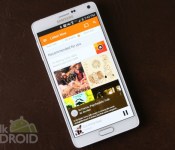
 Google’s Play Music app is getting an update that changes a few minor details through the application.
With the update, whenever you’re looking at anything with album art, the artwork will extend through the status bar. This is a slight change from the colored status bar Google has been implementing, but it’s a nice change. Tapping the search button also automatically brings up the keyboard. That probably should’ve been default since day one, but hey, better late than never.
An interesting point of this update is that Google is also changing some of the branding within the app. Don’t expect to see much more “All Access” plastered anywhere, as Google is changing most of that to “Music Unlimited.” Branding changes happen all the time, but it seems like Google can’t quite get one thing to stick. We’ve had Google Music, All Access, YouTube Music Key, and none of them have really been great names, even if the service itself does well. Maybe Music Unlimited will be the magic charm.
Hit the link below to grab the update if you don’t feel like waiting for it to roll out to your device.
source: Google Play Music 5.8.1835R.1777180
Come comment on this article: Latest Google Play Music update brings extended album art through the status bar
The fight for your wallet: A look at the mobile payment scene’s new big three

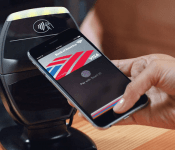
Apple, Samsung and Google are major forces in the smartphone industry and these three companies are about to advance their fight to a new emerging space: mobile payments. Not exactly a new concept, but these three tech titans are now competing to replace your wallet with one of their respective platforms.
At a glance Android Pay, Apple Pay and Samsung Pay might all look similar. They all use near field communication (NFC) tech in some shape or form and they each have the word “pay” in their name. However, when you really start to take a closer a look at what these three mobile payment platforms have to offer, you’ll notice that there are some noteworthy differences.
At a glance Android Pay, Apple Pay and Samsung Pay might all look similar.
Here’s an overview highlighting some of the details that we currently know about the mobile payment industry’s new big three.
Compatibility

Android Pay is more of a developer tool, instead of a standalone application like Samsung Pay and Apple Pay. Google’s follow up to Wallet is designed for OEMs and developers to mold as they see fit.
Meanwhile, Samsung’s and Apple’s solutions are proprietary and only work with in-house hardware. With support already announced for its upcoming Galaxy S6 and Galaxy S6 Edge smartphones, the South Korean tech firm is set to launch its new mobile payment setup later this summer. As for Apple, the California-based company’s Apple Pay is already available to iPhone 6 and iPhone 6 Plus users, with the outfit’s new smartwatch set to follow suit next month.
In addition to offering a flexible platform for developers and hardware producers, Google recently cozied up with three major wireless carriers. Out of the gate, this may help extend Android Pay’s reach further than its stifled predecessor.
Handling Transaction Data

Apple has been pretty straightforward about how Apple Pay works, clarifying that it will not store, share or track your purchase data. As for mobile payments newcomer Samsung, it’s still not completely clear how the company will manage transactions. So far the firm has revealed that Samsung Pay users will be able track transaction histories on their own devices. But that’s about it. Samsung will likely reveal more details as the company gets closer to the launch of its new service later this summer.
Android Pay will use temporary payment tokens for transactions opposed to transmitting a person’s permanent credit card details.
Like Samsung Pay and Apple Pay, Google’s platform will tokenize confidential user details such as credit and bank cards. Android Pay will use temporary payment tokens for transactions opposed to transmitting a person’s permanent credit card details. The idea here is to reduce the opportunities for would-be attackers looking to steal private financial information.
Additional Security Measures

One of the biggest concerns surrounding mobile payments (and standard credit card use) is security. The media is currently flooded with stories of merchant and creditor privacy breaches. This has caused quite an uproar among the very consumers that these three platforms are targeting. To help calm these concerns, measures such as tokenization have been taken, along with a few additional precautions.
Samsung Pay and Apple Pay require fingerprint scans in order to complete a transaction. This reduces the need for complicated passwords or PIN numbers that can potentially become compromised.
Samsung Pay and Apple Pay require fingerprint scans in order to complete a transaction. This reduces the need for complicated passwords or PIN numbers that can potentially become compromised.
Additionally, Apple’s payment setup leans on a dedicated chip unique to its hardware. Referred to as the “Secure Element,” this item is used to store a device’s identification number, user fingerprints and other secure data. This chip is believed to be somewhat comparable to an EMV card, and is completely segregated from its device’s iOS operating system.
Samsung Pay will tout a similar feature to Apple’s Secure Element, which will be provided by semiconductor manufacturer Infineon. Details about Samsung’s security silicon remain scarce, however the German-based chip maker says its hardware will offer device and transaction protection.
Unique Traits and Other Variables

Android Pay has the potential for deeper hardware integration by letting app developers and equipment manufacturers tinker with its API. Since it’s not tethered to a specific hardware platform, Mountain View’s emerging setup has a chance to be used across multiple hardware and software brands, depending on Google’s long-term strategy.
While Apple Pay has only been publicly available for a handful of months, it definitely shows a lot of promise. Dozens of financial institutions have already pledged support for the service and its online payment options are steadily increasing.
Although it’s the newest entrant in the great mobile payment race, Samsung Pay may have an ace up its sleeve. Thanks to its acquisition of LoopPay, the outfit has equipped its gear with tech capable of working with non-NFC magnetic card readers. This means the service will work with just about any legacy point-of-sale system.
This Guy’s Two Cents

It’s way too early to declare a winner here. Each of these mobile payment options have their pros and cons, but the biggest battle will be winning over casual consumers worried about security. Toss in factors like brand loyalty, third-party support and things become even more complicated. But I must say that I like Samsung’s inclusion of legacy payment terminals. This, along with the company’s history of releasing a high volume of devices might help put Samsung Pay in the hands of more consumers, once the service is up and running. However, it’s really hard to underestimate the folks in Cupertino and Mountain View.
Now that we’ve had a closer look at the mobile payment scene, we’d love to know your thoughts on the matter. Do you think mobile payments are the next big thing, or an impractical gimmick that will eventually fade away? Be sure to share your thoughts in the comments and let us know what you think.
// <![CDATA[
(function () ());
// ]]>
Android 5.1 Lollipop – Here’s what’s new!
brightcove.createExperiences();
Android 5.1 Lollipop is officially in the wild and it comes with a metric ton of changes. However, most of them are under the hood and the actual interface only saw a few minor tweaks here and there. Let’s take a look at what’s different in 5.1.

Quick Settings tweaks
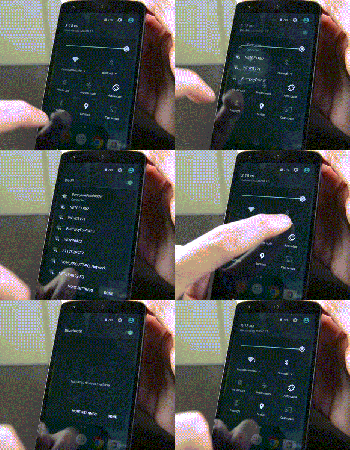
The Quick Settings in Android 5.1 Lollipop saw a couple of tweaks. They include:
- You can now connect to WiFi and Bluetooth devices without being required to go into the Settings app. Simply click the down arrow and continue from there.
- There is a new animation for the portrait mode toggle (more on that later).

Screen Pinning improvements
Screen Pinning is a feature (under Security in the Settings) that allows you to lock someone into a single application. This is great for kids or if someone is borrowing your phone.
- The verbiage in the Settings has been changed for clarification purposes.
- When you pin an application, Android now shows you which buttons to press in order to leave Screen Pinning mode. Otherwise, the feature works exactly as it did before.

Contacts app improvements
The Contacts app has undergone a couple of minor improvements:
- There is no longer any color overlays on contact pictures.
- Google+ photos are no longer used for contact pictures.
- Other minor tweaks here and there.

System Volume tweaks
The lack of silent mode is a sore spot for many Lollipop users, although HTC and Samsung have managed to (generally) re-add the feature in their skins. With Android 5.1, Google didn’t give us silent mode back but they did make some other tweaks:
- The icons of Priority Mode and No Interruptions Mode now appear in the selection window. This is so people new to the OS understand what the icons mean when they show up in the status bar (shown in the gif above).
- No Interruptions Mode will now still deliver notifications and you’ll still see the notification light blinking. It’s no silent mode, but it works pretty much the same. The only real gripe is that alarms still don’t go off so you’ll still need to create a tweaked Priority Mode (where alarms are okay, but everything else is turned off) in order to get a “truer” silent mode.
- You can now access system volume even while watching video, listening to music, or otherwise engaging in media. Simply click the bell icon on the right side (see video for a demonstration) and the media volume will disappear, replaced by the system volume.
- Other small tweaks are there, including the ability to better manage Priority Mode.

New animations
A few new animations have made their way into Android 5.1.
- The four icons at the top of the Clock app are now animated.
- The Portrait/Landscape toggle in Quick Settings is also now animated.

Other various tweaks
Some of the other highlights from the Android 5.1 update include:
- NuPlayer officially takes over for AwesomePlayer as the default streaming player.
- When you receive a heads-up notification (when they appear at the top and are clickable), you can swipe up to hide the notification but it will remain in the notification drop-down for you to check later. In Android 5.0, swiping up on the heads-up notification dismissed the notification entirely.
- Device Protection mode is now a thing that exists. This nifty new feature keeps your device locked down even if it has been factory reset, preventing thieves from getting around your security. Sadly, this is only available on the Nexus 6 and Nexus 9 as well as, according to Google, all Lollipop devices launched going forward.
- HD Voice Calling is now included. Devices on compatible carrier networks that support HD Voice will be able to use the feature. Reportedly, this only works with the Nexus 6 for right now.
- Dual-SIM support is now baked right into the OS.
- Unless otherwise stated, we believe the memory leak has finally been fixed.
- There were over 14000 additional tweaks, fixes, and other changes that came to Android 5.1 that improved everything from performance to battery. To see them all, here’s the full changelog.

The new “no SIM card” icon.
What we’re still waiting on
While the 5.1 update was huge in its own right, it didn’t bring everything. Here are a few features many people are still waiting on.
- A true silent mode where notifications come in, alarms act as normal, but the device doesn’t vibrate or ring.
- T-Mobile Nexus 6 users are still waiting for WiFi Calling but that should be coming soon.
- There is still no reboot option. When long pressing the power button, you still only have the option to Power Down.

Overall
Overall, the update is a big step forward for Lollipop and dare we say, the Lollipop we probably should have had to begin with. Performance on the Nexus 5 (at least) has been noticeably better and the inclusion of the new features gives a more full and complete feeling to the UI and experience overall. Let us know what you thought of the Android 5.1 Lollipop update. Did Google address all of your concerns or are there still some things you wish they had?
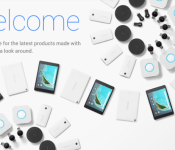
Play Store shake up: devices section renamed to Google Store, Nexus 5 is gone

Google just rebranded the devices section of the Play Store, which is now called Google Store.
The new Google Store page features a fresh design with large, bold fonts, lots of white space, and clean imagery. Google calls this landing page the “new home for the latest products made with Google” and it’s subjectively an improvement over the previous layout. All of Google’s current products are present, from the new Chromebook Pixel 2015 (improved specs, cheaper price tag, USB Type-C – more details here), to the Nexus 6 and Nexus 9, all Android Wear devices, Nest, Nexus Player, and Chromecast. There’s also a presentation page for Android, which features the same clean, airy aesthetic, under the “All kinds of screens for all kinds of scenes” tagline.
To celebrate the launch of the new Store, Google is offering free shipping on all devices for a limited time. If you’re wondering whether you need to sign up with your payment info again, the answer is no – your info from the Play Store will be carried over automatically.
Missing from the Store is the Nexus 5, which appears to have reached the inevitable end of life status, and the 2013 version of the Chromebook Pixel.

It’s not clear yet why Google has opted to separate the device section under the new Google Store branding. We could speculate that the move is meant to better delimitate the increasing number of Google-branded hardware products, perhaps in preparation for a bigger effort in this area.
We also don’t know if changes are coming to other sections of the Play Store, though at least a redesign looks likely at this point.
You can judge the new Google Store for yourself here, but be advised that it’s only accessible from the countries where Google actually sells hardware.

