



Amazon Planning March Launch for Apple TV Set-Top Box Competitor
In light of recent reports stating that Apple is hard at work on an Apple TV refresh, Amazon is allegedly readying a new Web TV box that would compete with Apple’s set-top box and the Roku, according to Re/code. The report states that Amazon’s new media streaming device could be available as soon as March.

Similar to rumors that surfaced last year, this latest information claims Amazon’s set-top box will tie into the company’s Instant Video service and may support third-party content providers in a manner similar to the Apple TV and Roku.
A box is also a logical move for Amazon, which is investing heavily to build up a Web video catalog, and is starting to produce its own shows as well. An Amazon box will allow its customers to easily watch that stuff on their TVs; it should also give other content providers a chance to serve up their stuff via apps, in the way that Roku and Apple TV boxes do.
Sources tell me Amazon’s box is will be powered by Google’s Android operating system, which is also not a surprise — Amazon’s Kindle Fire tablets use a “forked” version of Android.
Re/code also speculates that Amazon’s set-top box could contain a gaming component, noting that the company is looking to expand its Amazon Games Studio by hiring game developers who can “break down technology barriers and deliver experiences people have never seen before.” This follows another recent rumor from VG247 that suggests the online retailer is working on an Android gaming console similar to the Ouya.
Amazon has stepped up its streaming content offerings in the past year, producing 14 original television pilots and using feedback to decide which get made into full shows, as well as spending significant amounts of money to secure exclusive rights to popular shows like Downton Abbey and The West Wing.
Currently, Amazon’s Instant Video service is available on iPads and iPhones, the Xbox 360, the Nintendo Wii, the Sony Playstation 3, smart televisions from LG, Panasonic, Samsung, Sony, and Vizio, TiVo, the Roku box, as well as a number of Blu-ray players.
     |

Steve Jobs to be Honored With Commemorative Postage Stamp in 2015
 The United States Postal Service today approved a commemorative Steve Jobs stamp that will be printed as part of a collectible series next year, according to The Washington Post (via Engadget).
The former Apple CEO’s stamp is still in the design stages and will be released at some point in 2015.
Jobs, who passed away in 2011 after a battle with pancreatic cancer, has also been posthumously honored for his visionary achievements with a special Grammy Merit Award and a Disney Legends Award. He was also inducted into the Bay Area Business Hall of Fame, has had a building at Pixar named after him, and was featured in an exhibit at the U.S. Patent Office Museum.
The Washington Post has also revealed several other future postage-stamp subjects approved for coming years, including Johnny Carson, John Lennon, and Michael Jackson.
(Image courtesy of Engadget)
| |

Steve Jobs will go postal with commemorative stamp in 2015

Soon you’ll be able to celebrate the life of tech icon Steve Jobs in a new analog way: by sending snail mail. The U.S. Postal Service has approved a commemorative stamp honoring the Apple co-founder to be printed as part of a collectible series next year. Stamp subjects are traditionally kept a secret until just before printing to raise public demand, however, The Washington Post outed a list of upcoming mailbox-honorees Thursday. Other influencers set to be commemorated on your utility bills include Rudolph the Red-Nosed Reindeer, “Favorite Desserts,” and Barrack Obama (potentially part of an artistic misspelled presidents series?). If you can’t handle waiting to see what will show up in your mailbox, hit the source link for three years of salacious details.
Filed under: Apple
Source: Washington Post

Camera+ Updated With Photo Editing Improvements, Widescreen Shooting Mode [iOS Blog]
 Popular photography app Camera+ was today updated to version 5.1, adding several refinements to The Lab, which is the photo editing section of the app. It’s now possible to tap and hold on adjustments to reset them and there’s a new boost feature that increases the intensity of filters to 200 percent.
The app also includes a new setting to allow users to select which section to use first when editing photos and Camera+ now supports widescreen photos with a new 16×9 shooting mode.
Several bugs have been fixed in the new version of the app, including an API bug that prevented apps like Day One from working with Camera+.
Camera+ is an all-in-one camera app that’s been a popular choice for iPhone photography since 2011. It supports both in-app shooting and editing and includes a rich feature set for manipulating photos. The app can be downloaded from the App Store for $1.99. [Direct Link]
| |

Apple Expanding North Carolina Data Center Once Again [Mac Blog]
Apple is expanding its Maiden, North Carolina data center again according to permits filed with Catawba County, reports The Hickory Daily Record. The plans say the additional data center building will cover 14,246 square feet with walls 25 feet tall, made of precast concrete wall panels along steel columns, similar to the “tactical” data center that was added in 2012.
 Photo of the facility from 2012, courtesy WIRED
Like the previous tactical data center, plans for the new one shows banks of computers in the main portion of it and 11 air units to cool it. Two more air units will supply the office and other occupied area of the data center.
Its security measures appear to be similar to that of the previous data center, including what’s called a man-trap door — one door closes before the second one opens.
Apple’s facility in Maiden is enormous, with a 100-acre solar farm and a 500,000 square foot data center, with plans in place for a second. Apple also has data centers built or under construction in Prineville, Oregon and Reno, Nevada.
| |

Adobe Releases Another Emergency Update for Flash [Mac Blog]
 Adobe today released a second security update for its Adobe Flash Player software on both Mac and Windows, addressing a threat that could allow an attacker to take control of an affected system, executing malicious code. The vulnerability (CVE–2014–0502) allowed attackers to compromise at least three nonprofit organizations according to security firm FireEye (via ArsTechnica).
This threat actor clearly seeks out and compromises websites of organizations related to international security policy, defense topics, and other non-profit sociocultural issues. The actor either maintains persistence on these sites for extended periods of time or is able to re-compromise them periodically.
This actor also has early access to a number of zero-day exploits, including Flash and Java, and deploys a variety of malware families on compromised systems. Based on these and other observations, we conclude that this actor has the tradecraft abilities and resources to remain a credible threat in at least the mid-term.
Today’s update follows a critical security update that was released just over two weeks ago, fixing the same zero-day vulnerability giving hackers complete control over compromised systems.
The vulnerability affects all Macs with Adobe Flash Player version 12.0.0.70 and earlier and Adobe recommends all users update their products to the latest of Flash. Adobe maintains a site where users can check the version of Flash installed and the up-to-date Flash software can be downloaded from Adobe’s website.
| |

Google Launches ‘Project Tango’ 3D-Mapping Smartphone
Google today launched Project Tango, an experimental smartphone and developer kit that incorporates 3D sensors able to map indoor and outdoor environments. Designed as a 5-inch phone containing custom hardware and software, the first Project Tango prototype makes more than a quarter million 3D measurements each second, tracking three-dimensional motion to create a visual 3D map of the space around itself.
Google describes Project Tango primarily as a mapping tool, automatically capturing the world around each user to provide directions, dimensions, and environmental maps.
What if you could capture the dimensions of your home simply by walking around with your phone before you went furniture shopping? What if directions to a new location didn’t stop at the street address? What if you never again found yourself lost in a new building? What if the visually-impaired could navigate unassisted in unfamiliar indoor places? What if you could search for a product and see where the exact shelf is located in a super-store?
The company also pictures Project Tango as the first step towards fully immersive augmented reality games that merge gameplay with real world locations.
Imagine playing hide-and-seek in your house with your favorite game character, or transforming the hallways into a tree-lined path. Imagine competing against a friend for control over territories in your home with your own miniature army, or hiding secret virtual treasures in physical places around the world?
According to TechCrunch, Project Tango utilizes a vision processor called the Myriad 1, from Movidius, which is incredibly power efficient compared to other 3D-sensing chips on the market. The power necessary for 3D chips to function has thus far been one of the major issues preventing the technology from being incorporated into a smartphone, but because it functions like a co-processor much like Apple’s own M7 motion co-processor, it is able to draw less power.
Project Tango’s three-dimensional mapping capabilities are similar to technology developed by PrimeSense, a company that Apple acquired last year. PrimeSense developed the technology used in Microsoft’s original Kinect and went on to create motion-sensing mobile chips capable of scanning an environment in full 3D. PrimeSense imagined the technology could be used for interactive gaming, indoor mapping, and more, much like Project Tango.
It isn’t clear how Apple plans to use PrimeSense’s technology in future devices or whether it has plans to release a smartphone that supports a 3D chip, but Project Tango demonstrates some of the potential capabilities of 3D sensing built into mobile devices that Apple could replicate should it choose to go in that direction. Apple has expressed interest in 3D indoor mapping in the past, having acquired indoor mapping company WiFiSlam in early 2013.
Google is recruiting professional developers to create apps for Project Tango and wants work to begin as soon as March. The company is distributing 200 prototype dev kits, inviting developers to describe what they would build using the technology. Google plans to give out prototype kits for developers interested in navigation/mapping, single/multiplayer games that use physical space, and new algorithms that use processing sensor data.
| |

Apple brings two-step verification for Apple ID to more countries

After discovering a huge security hole last year, Apple added an extra layer of protection for Apple ID and iCloud users in the form of two-step verification. Today it’s making the important security feature available in more countries: Canada, France, Germany, Japan, Italy and Spain. With two-step verification, Apple sends a special code to a trusted device like your iPhone whenever someone attempts to make changes to your account or log in for the first time on a new device. Similar to what Google does with Gmail, the extra step prevents malicious changes happening without your knowledge. It’s a simple thing to set up, and something that can save you from a whirlwind of pain should your Apple ID ever fall into the wrong hands. Those in the mentioned countries can register now on Apple’s website.
Filed under: Cellphones, Wireless
Via: 9to5Mac
LaCie’s External Drive Lineup Gains New 5TB Drives from Seagate [Mac Blog]
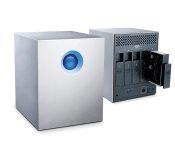
LaCie has launched several new products with Seagate’s new 5TB drives, including a new Thunderbolt 5-bay RAID array that puts up to 25 terabytes of storage in one 5-bay unit. LaCie’s is using Seagate’s new drives featuring ‘Shingled Magnetic Recording’ technology to push the physical boundaries of magnetic storage.
The new drives are also available in LaCie’s d2 Quadra for $350 and the d2 USB3.0 Thunderbolt for $450.
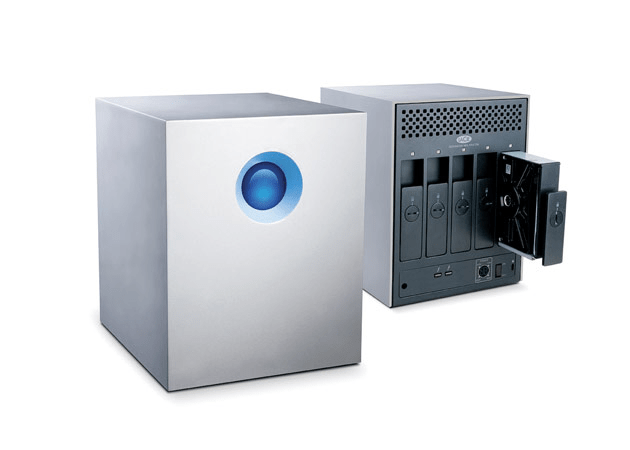
More speed means a leaner workflow. Get 785MB/s* thanks to five 7200rpm/64MB cache hard disks preconfigured in RAID 0. With these speeds, you have all you need for any post-production work. Handle multiple 2K uncompressed 10-bit streams. And with capacities up to 25TB, you have enough storage for today and the future. For example, you could store all your project’s raw daily footage onto a single LaCie 5big. Focus on your creative projects without the hassle of managing multiple storage devices.
LaCie says their new RAID is the largest 5-bay storage product on the market, sporting speeds up to 785MB/s. The RAID is available in three configurations, 10TB, 20TB, and 25TB, for $1000, $2000, and $2500 respectively — Thunderbolt cable included — from LaCie’s website or the Apple Online Store, with the 5TB d2 available for $450 and the 5TB Quadra for $350.
| |

Engadget’s tablet buyer’s guide: winter 2014 edition

The tablet landscape is changing rapidly. It’s now relatively trivial to find a cheap, full-featured Windows slate, and we’ve seen a number of smaller models that still manage to pack plenty of power. In light of those shifts, our tablet buyer’s guide looks very different this winter. Dell and Nokia are on the list for the first time, and Windows tablets sit shoulder-to-shoulder with their mobile OS rivals. We’ve even brought back an older Nook that’s received a new lease on life thanks to updated software and a significant price cut. Whether you’re looking for a productivity machine or just something to watch movies on, we’ve got a tablet that should fit the bill.
10-inch tablets
Apple iPad Air

After a couple years of playing it safe with iPad designs, Apple pulled out all the stops with the iPad Air. It’s one of the lightest full-size tablets on the market, weighing in at just one pound. It’s one of the fastest, too: Its dual-core A7 processor frequently outperforms the better quad-core chips inside its rivals. You also get to download a free, fairly powerful suite of productivity apps. Buyers may not like the proprietary Lightning connector, and they could miss both the memory card slot and multi-window app support offered on other devices. Still, the new iPad is ideal for gamers and anyone else who wants a big, fast mobile OS tablet without the usual bulk.
The bottom line: A large tablet that doesn’t sacrifice performance or portability.
Key specs: Dual-core A7 processor, 1GB of RAM, 16GB to 128GB of storage, 1.2-megapixel front and 5-megapixel rear cameras, 9.7-inch (2,048 x 1,536) display.
Price: $499 and up
Sony Xperia Tablet Z

The Xperia Tablet Z is an old hand in this group; its Snapdragon S4 Pro is no longer cutting edge, and there are higher-resolution tablets available at slightly higher prices. However, it still has one of the more appealing designs on the market. With its lightweight body, water resistance and infrared blaster, Sony’s design simply has more party tricks than many of its rivals. If your tablet has to double as a TV remote, poolside computer or kitchen assistant, this may be your best choice. Be sure to watch out for its impending sequel, though.
The bottom line: Still one of the best-designed Android tablets, although it’s not the fastest.
Key specs: 1.5GHz quad-core Snapdragon S4 Pro processor, 2GB of RAM, 16GB or 32GB of storage, 2.2-megapixel front and 8.1-megapixel rear cameras, 10.1-inch (1,920 x 1,200) display.
Price: $450 and up
ASUS Transformer Book T100

The Transformer Book T100 is a value champ among larger Windows tablets. For under $400, you’re getting a quad-core slate that runs desktop Windows apps, lasts for up to 11 hours on a charge and comes with its own keyboard dock. The T100 doesn’t have the performance or storage needed for more demanding apps, but it could still be ideal for anyone who wants a tablet that can double as a basic laptop.
The bottom line: One of the cheapest Windows tablets, offering tremendous bang for your buck.
Key specs: 1.33GHz quad-core Atom processor, 2GB of RAM, 32GB or 64GB of storage, 1.2-megapixel front camera, 10.1-inch (1,366 x 768) display.
Price: $393 and up (at Amazon)
Microsoft Surface Pro 2

Microsoft’s Surface Pro 2 is billed as a tablet, but it’s really an Ultrabook without a built-in keyboard — and that makes it one of the most powerful slates on the market. The Core i5 chip inside is quick enough to do some heavy lifting, whether it’s 6K video editing or large Photoshop projects. It also fixes many of the qualms we had with the original Pro. The battery lasts longer; there are more memory options; and the kickstand is more comfortable on your lap. The Pro 2 is far from the most portable tablet in this roundup, so consider the Surface 2 if you want something lighter and thinner. Just be aware that it doesn’t support traditional Windows apps.
The bottom line: The Windows 8.1 tablet for power users.
Key specs: 1.9GHz dual-core Intel Core i5 processor, 4GB or 8GB of RAM, 64GB to 512GB of storage, 720p front and rear cameras, 10.6-inch (1,920 x 1,080) display.
Price: $899 and up
7- and 8-inch tablets
Google Nexus 7 (2013)

The Nexus 7 is no longer the most powerful small tablet on the block, but it still boasts exceptional bang for the buck. It’s fast, and it carries both a very sharp display as well as wireless charging. More importantly: It’s the standard-bearer for stock Android. The Nexus 7 is the only small tablet running Android 4.4 as of this writing, and it should get future updates quickly. While it’s more expensive than 2012′s model, it’s an even better bargain.
The bottom line: Exceptional value for the money, and the definitive Android tablet.
Key specs: 1.5GHz quad-core Snapdragon S4 Pro processor, 2GB of RAM, 16GB or 32GB of storage, 1.2-megapixel front and 5-megapixel rear cameras, 7-inch (1,920 x 1,200) display.
Price: $229 and up
Apple iPad mini with Retina display

While the original iPad mini trailed some competitors in performance, the iPad mini with Retina display comes out ahead — sometimes by a significant margin. It has the highest-resolution display of any tablet with a screen measuring eight inches or smaller, and the A7 processor helps it outperform many larger rivals. It even has a 128GB storage option that’s still extremely rare for tablets this size. Just be prepared to pay a premium: The new mini is one of the most expensive devices in its class, and it doesn’t include extras like a keyboard dock or stylus.
The bottom line: One of the priciest small tablets, but also one of the best.
Key specs: Dual-core A7 processor, 1GB of RAM, 16GB to 128GB of storage, 1.2-megapixel front and 5-megapixel rear cameras, 7.9-inch (2,048 x 1,536) display.
Price: $399 and up
Amazon Kindle Fire HDX (7-inch)

If you value a tablet’s price-to-performance ratio above all else, you can’t ignore the 7-inch Kindle Fire HDX. For $229, you’re getting a small tablet with performance that humbles the Nexus 7 — and, for that matter, many larger competitors. Features like Mayday live support and Second Screen media streaming are nice to have, too. The only catch, as is usually the case with Kindle Fire tablets, is the heavy emphasis on Amazon’s content ecosystem. If you regularly use competing services (including Google Play), you’re better off getting a tablet running regular Android. Consider the 8.9-inch model if you need more screen real estate.
The bottom line: In terms of sheer value for the money, the best tablet here; just make sure you really like Amazon’s media services.
Key specs: 2.2GHz quad-core Snapdragon 800 processor, 2GB of RAM, 16GB to 64GB of storage, HD front camera, 7-inch (1,920 x 1,200) display.
Price: $229 and up
Dell Venue 8 Pro

The Venue 8 Pro is the small tablet for people who want a tiny PC more than anything else. You can run legacy Windows apps, add microSD storage and draw with an optional pen. However, you won’t have to pay a premium for the added sophistication; the Venue costs as much as some of its mobile OS counterparts. It doesn’t have HDMI video output and has suffered from some glitches, but it remains one of the best ways to get the full Windows experience without buying a full-sized device.
The bottom line: A capable, affordable Windows PC in concentrated form.
Key specs: 1.33GHz dual-core Atom processor, 2GB of RAM, 32GB to 64GB of storage, 1.2-megapixel front and 5-megapixel rear cameras, 8-inch (1,280 x 800) display.
Price: $300 and up
Galaxy Tab Pro 8.4

While Samsung launched four new Android tablets at the start of 2014, the tiniest of them — the Galaxy Tab Pro 8.4 — may be the most interesting of the bunch. It has the highest-resolution display of any small slate, and it’s about as fast as its bigger brethren. You may also find its magazine-like interface a refreshing break from the usual grid of app icons. The Galaxy Tab Pro 8.4 is as expensive as the new iPad mini, but it promises a similar level of value for the money.
The bottom line: A very powerful Android tablet in a compact form factor.
Key specs: 2.3GHz Snapdragon 800 processor, 2GB of RAM, 16GB to 32GB of storage, 2-megapixel front and 8-megapixel rear cameras, 8.4-inch (2,560 x 1,600) display.
Price: $400 (16GB; 32GB not available in the US)
3G/4G tablets
Not everyone has the luxury of using their tablet on WiFi; whether you’re on a business trip or a vacation, you may need a cellular-equipped slate to stay connected. Thankfully, there’s an abundance of 4G models to choose from. While there’s often some premium to be paid for either the data plan or the hardware, it may be worth the expense to avoid packing a big, bulky laptop.
Apple iPad Air (WiFi + Cellular)

You know by now that the iPad Air is much faster and lighter than its ancestors. However, its WiFi + Cellular variant provides a few additional improvements for frequent travelers. The new model supports a whopping 14 LTE frequencies; odds are you’ll get full-speed data wherever you go. The tablet also supports T-Mobile USA for the first time, and the carrier’s customers can use up to 200MB of data per month for free. Limited expansion remains a concern, but there are few other big tablets that are so well-suited to life on the road.
The bottom line: Everything we love about the iPad Air, with LTE on top.
Key specs: Dual-core A7 processor, 1GB of RAM, 16GB to 128GB of storage, 1.2-megapixel front and 5-megapixel rear cameras, 9.7-inch (2,048 x 1,536) display, unlocked LTE/EV-DO/HSPA+ data.
Price: $629 and up
Apple iPad mini (WiFi + Cellular)

If you want a small, travel-ready tablet with relatively few sacrifices, the cellular edition of the iPad mini with Retina display is your best bet. It’s just as fast as the iPad Air, and it offers the same broad LTE support. The mini is undoubtedly expensive, but you’re getting a lot for your money.
The bottom line: One of the most popular LTE tablets, in bite-sized form.
Key specs: Dual-core A7 processor, 1GB of RAM, 16GB to 128GB of storage, 1.2-megapixel front and 5-megapixel rear cameras, 7.9-inch (2,048 x 1,536) display, unlocked LTE/EV-DO/HSPA+ data.
Price: $529 and up
Google Nexus 7 (2013, LTE)

The Nexus 7 is already quite capable in WiFi-only form. However, its cellular variant is truly something special. In the US, the tablet offers LTE for AT&T, T-Mobile and (technically) Verizon through one model; American travelers won’t have to sacrifice 4G speeds or carrier support as they have in the past. Combine that with global HSPA+ support, and you have a tablet that will rarely let you down when abroad. The $350 price just makes it that much sweeter.
The bottom line: One of the most flexible cellular tablets on the market, at a price that’s hard to match.
Key specs: 1.5GHz quad-core Snapdragon S4 Pro processor, 2GB of RAM, 32GB of storage, 1.2-megapixel front and 5-megapixel rear cameras, 7-inch (1,920 x 1,200) display, unlocked HSPA+ and LTE data.
Price: $349
Lumia 2520

There isn’t a huge selection of LTE Windows tablets, but Nokia’s Lumia 2520 deserves to be at the top of that list. It has an outdoor-friendly display, brisk performance and epic-length battery life. An optional, battery-equipped keyboard can turn it into a productivity powerhouse. Windows RT will prevent you from running conventional desktop apps, but it’s hard to beat the price — at $500 off-contract, the 2520 is decidedly more affordable than many big LTE tablets, no matter what platform they’re running.
The bottom line: The de facto choice for travel-ready Windows tablets.
Key specs: 2.2GHz quad-core Snapdragon 800 processor, 2GB of RAM, 32GB of storage, 1.2-megapixel front and 6.7-megapixel rear cameras, 10.1-inch (1,920 x 1,080) display, LTE and HSPA+ data for AT&T and Verizon.
Price: $500 at AT&T and Verizon
Budget
ASUS MeMO Pad HD 7

The definition of value for money. The ASUS MeMO Pad HD 7 is no threat to the Nexus 7 or other mid-tier tablets, but it costs much less while preserving some useful features from its higher-end counterparts — namely, a color-rich IPS LCD, dual cameras and a quad-core processor. There’s even a microSD slot, which the Nexus 7 lacks. Never mind the software upgrade challenges that often come with custom Android interfaces; at this price, they’re easy to live with.
Key specs: Quad-core 1.2GHz ARM Cortex-A7 processor, 1GB of RAM, 16GB of storage, 1.2-megapixel front and 5-megapixel rear cameras, 7-inch (1,280 x 800) display.
Price: $149
Amazon Kindle Fire HD (2013)

We liked the original Kindle Fire HD from 2012, so last year’s refresh is virtually a shoo-in for the budget category. Apart from the exterior, you’re not getting anything new. At a lower $139, however, it’s quite the steal; you’re getting a slate with solid performance, a pleasing display and healthy battery life. The 8GB model will do the job if you want a basic device for Amazon Instant Video streaming or Kindle books, and a $169 16GB variant is available if you have a small personal media collection. Just be aware that there are no cameras, and you’re (officially) stuck grabbing software from the Amazon Appstore.
The bottom line: The Kindle Fire HD takes on new life as a budget tablet.
Key specs: 1.5GHz dual-core OMAP 4460 processor, 1GB of RAM, 8GB or 16GB of storage, 7-inch (1,280 x 800) display.
Price: $139 and up
Nook HD

You might wonder why Barnes & Noble’s Nook HD has returned to our list after a long hiatus. Simply put, it’s a good value these days. It’s affordable and boasts a sharper display than most devices in its class. And unlike the Kindle Fire HD, you’re not locked into the manufacturer’s ecosystem — you can download any app you like from Google Play. The base 8GB Nook HD doesn’t afford much space for offline media, but you can spring for the 16GB model (or a Nook HD+) if you need more.
The bottom line: One of the few high-resolution tablets in this price range, and more flexible than some of its peers.
Key specs: 1.3GHz dual-core OMAP 4470 processor, 1GB of RAM, 8GB or 16GB of storage, 7-inch (1,440 x 900) display.
Price: $129 and up
Filed under: Tablets, Apple, Samsung, Sony, Microsoft, Nokia, ASUS, Google, Amazon, Dell

