



Google+ for iOS updated to make your photos look better, create videos with them

You don’t have to wait for iOS 8 to edit your photos in the cloud: Google is giving the option to its iPhone-toting users right now. The latest build of Google+ for iOS has been outfitted with the usual assortment of Snapseed-sourced features, including a ton of filters, enhancements and basic crop and rotate tools. Naturally, these edits are stored in Google’s own cloud, so you can continue tweaking images on new devices. The update also gives iOS users access to Google+ Stories — giving you something to do with those newly edited photos.
Not familiar with Stories? It’s pretty simple: its a tool that creates “Auto Awesome” travelogue videos, automatically curating content from your albums and mashing them together into a easily sharable format. The feature debuted on Android last month, and is slowly making its way to other platforms.
Filed under: Cellphones, Apple, Google
Source: Google

Watch Apple’s WWDC 2014 keynote in full

For those of you who have been living under a rock for the past few hours, Apple had a number of things to announce on the first day of WWDC 2014. And in case you weren’t paying attention to our liveblog from Moscone West, or able to keep up with the livestream, there’s now archived footage of the event for you to watch. The presentation was kicked off by CEO Tim Cook, though it was Craig Federighi, Apple’s Senior Vice President of Software Engineering, who led the charge most of the way — so much so that his boss referred to him as “Superman” during the keynote. Once you press play on the 118-minute video, expect to see anything from the unveiling of OS X Yosemite to the revelation of iOS 8 — plus a lot, a lot more.
Filed under: Home Entertainment, Internet, HD, Apple
Source: Apple
iOS 8 to Include Battery Usage Per App and Much More
During today’s Worldwide Developers Conference keynote, Tim Cook and other Apple executives gave us a fast-paced, broad-ranging look at some of the features we can expect with iOS 8, including improvements to Messages, keyboard enhancements in the form of QuickType and access to third-party keyboards, HealthKit, Extensibility, and more.
Along with the features that were demoed on stage, an iOS 8 graphic displayed some additional functions that went largely under the radar, many of which look quite interesting. For example, iOS 8 will apparently display battery usage by app, a handy feature that will let users monitor the battery drain of specific apps, shutting down those that are drawing too much power.
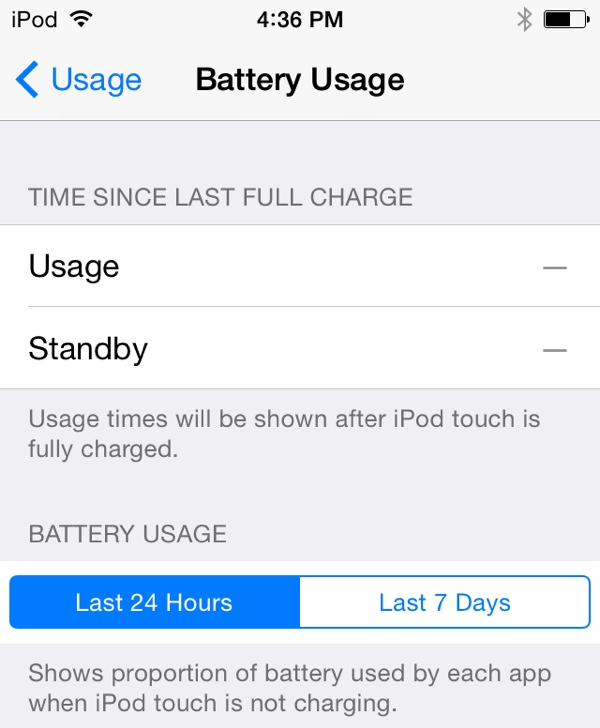 Image courtesy of Evan Coleman
iPads will gain the ability to take Panoramic photos like the iPhone, while the Camera will gain an instant burst mode, a timer mode, and separate controls for focus and exposure. iBooks will support an auto night mode and the ability to organize books by series, while notifications will include travel time.
A mysterious Tips app, which was first depicted in an early screenshot of iOS 8, is also mentioned, though it is unclear what this app will do. It is possible Tips will provide iOS users with information on lesser known iOS features, serving as a tutorial app for those who want to learn the ins and outs of their devices.
 Click to make larger
An “In Case of Emergency” card will be added to iOS 8, displaying contact information and possibly health-related information as well. Users will be able to use Siri to purchase iTunes content, Notes gains a new rich text editing feature, and RSS feeds are displayed within Shared Links in Safari.
Other mentioned features offering unknown functions include Place cards in other apps and Speak Screen.
Finally, there are also several accessibility improvements coming, including an Alex voice, Braille keyboard, improved zoom, and multi-device support for MFi hearing aids. Guided Access, which limits an iPad or iPhone to opening a single app, will gain time limits, a countdown timer, and Touch ID integration.
These are of course, only a small selection of the hundreds of new features and minor functions that will likely be added to iOS 8 as it is in development. iOS 8 is available to developers immediately, while the public will get access to the new mobile operating system later this year.
(Thanks to Phil for the image!)
Xcode 6 Allows Developers to Test Larger iPhone and iPad Screen Sizes
With the release of Xcode 6 today after Worldwide Developer Conference, developers have found an option within Xcode to size apps for devices referred to as “Resizable iPhone” and “Resizable iPad”, as pointed out by Mac4Ever [Google Translate]. The option is next to other Apple devices, including iPad Air, iPhone 5s, and iPad Retina.
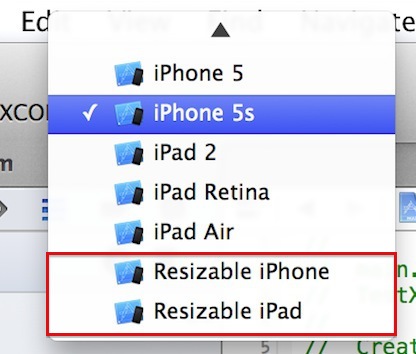
The options are likely to enable developers to start developing apps that fit on the rumored larger 4.7 and 5.5 inch screens of the iPhone 6 and, perhaps, the rumored 12-inch iPad Pro. Another photo of the Xcode simulator shows the difference between an app visually optimized for an older iPhone in what appears to be the resolution for one of the two iPhone 6 models.
It’s not yet known what the exact resolutions are for the 4.7 and 5.5 inch iPhone 6 models or even the rumored 12-inch iPad Pro, but the “resizable” functionality would allow developers to explore building versions of their apps for larger screens that are currently available.

OS X Yosemite Public Beta Limited to First Million Registered Users [Mac Blog]
Earlier today as Apple was unveiling OS X Yosemite for the first time at the Worldwide Developers Conference, software chief Craig Federighi announced that there would be a public open beta for the new operating system ahead of its launch this fall. Now, users on our forums have discovered an AppleSeed sign up page for the program, with Apple noting that the program is open to the first one million users who register.

How can I participate?
To join the OS X Beta Program, just sign up using your Apple ID. When the beta software is ready, you’ll receive a redemption code that will allow you to download and install OS X Yosemite Beta from the Mac App Store. Then go ahead and start using it. When you come across an issue that needs addressing, report it directly to Apple with the built-in Feedback Assistant application.
Users will also need to be running OS X Mavericks, and Apple recommends that the OS X Yosemite beta be installed on a secondary Mac in the event of possible bugs and errors.
OS X Yosemite includes a brand new user interface design alongside major new features focusing on seamless integration between Mac and iOS devices. The new operating system also includes a new cloud storage solution called iCloud Drive, as well as the ability to make phone calls and texts through an iPhone.
A Look at ‘Health’ and ‘HealthKit’, Apple’s New Health Initiative
Ahead of WWDC, perhaps one of the most hyped features for iOS 8 was “Healthbook,” which was said to serve as a Passbook-style app that aggregated a variety of health-related information in a colorful card array.
While Apple did indeed announce a new health initiative and accompanying app, “Healthbook” turned out to be off the mark. The app is called simply “Health,” and appears to differ a bit from how it was described in early rumors. According to Apple, Health is designed to be an “easy-to-read” dashboard of health and fitness data, which can pull in information from several different sources. “It might just be the beginning of a health revolution,” reads Apple’s iOS 8 Health page.

Heart rate, calories burned, blood sugar, cholesterol — your health and fitness apps are great at collecting all that data. The new Health app puts that data in one place, accessible with a tap, giving you a clear and current overview of your health.
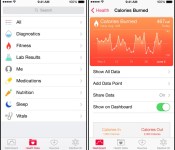
The Health app keeps track of several different health metrics measured by various devices, including heart rate, calories, cholesterol, and more. It also features an “emergency card” that includes all of a user’s important health information, including blood type and allergies, which can be displayed directly on the lock screen of an iOS device.

As can be seen in screenshots of the app, it aggregates information into a selection of categories such as Diagnostics, Fitness, Lab Results, Medications, Nutrition, Sleep, and Vitals. Many of these categories can also be displayed on a dashboard chart, giving users an at-a-glance view of their overall health.
Accompanying Health is the HealthKit tool for developers, which can be incorporated into both new and existing health and fitness apps to allow them to access the health data stored within the Health app. Users are able to choose exactly what’s shared and can, potentially, chose to share data from a blood pressure app with a doctor. Apps can also be authorized to share information with each other. A nutrition app might share how many calories are consumed with a fitness app.
According to Dr. John H. Noseworthy, CEO of the Mayo Clinic, Apple’s HealthKit has the potential to “revolutionize how the health industry interacts with people.” The Mayo Clinic is already working with Apple and HealthKit, creating an app that allows patients to monitor their blood pressure, sending alerts to doctors automatically.
Despite all of the focus on Apple’s health related initiative before WWDC, the company spent very little time going over the Health app. It is likely we’ll see an additional focus on health in the coming months as it is likely to also integrate with Apple’s much-rumored wearable device, the iWatch. Health and HealthKit, both part of iOS 8, are available to developers today with a public release expected in the fall.

Apple App Store getting developer bundles and video previews

As Tim Cook embarked on the developer section of the keynote at WWDC, it might be easy for end users to disconnect. But, if you did, you’d have missed out on two fairly solid updates: developer app bundles and (finally) video previews. Now, developers can combo their apps and sell the for a discounted price should they choose. Likewise, previews allow developers to give us a better taste before we buy. If you happen to dabble in developing yourself, then you might also be relieved to hear that TestFlight is now officially part of Apple’s developer set-up, too.

Apple’s iOS 8 supports widgets in Notification Center

It’s been a long time coming, but Apple is finally adding support for widgets to iOS. On stage at its Worldwide Developers Conference, the company’s senior VP of Software Engineering, Craig Federighi, revealed that devs can now start building widgets within the Notification Center on iOS 8. Unlike Google’s take on widgets with Android, Apple’s equivalent won’t have them living on the home screen of your smartphone or tablet. Instead, iOS widgets will share the drop-down hub with app notifications. Still, there’s a lot of potential here, as it’s going to let those of you with an iOS device have more interactivity and quick access to your favorite applications. iOS 8 will be available this fall.
Filed under: Cellphones, Software, Mobile, Apple

Apple will finally support third-party keyboards in iOS 8

After years of waiting, Apple has finally brought support for third-party keyboards to iOS. Inside iOS 8, keyboards like Swiftkey and Swype, which have enjoyed huge usage on Android, will have system-wide access to all apps and services on your iPhone and iPad. Swiftkey has confirmed it’s on board, but if you don’t fancy that, you’ll still able to enjoy Apple’s new QuickType keyboard. The company says the improved keyboard learns from the way you type and text, offering a pick of suggestions for your next word based on the content of your message or the person you’re conversing with. Planning a meal with your friend or loved one? The keyboard will auto-populate words like “dinner” or “eat” as you type. At launch, QuickType will support 14 regions including the US, UK, Canada and Australian English, Brazilian Portuguese, Chinese (that includes Hong Kong and Taiwan), French, German, Italian, Japanese, Spanish and Thai.

Apple’s smart home initiative is called HomeKit

We heard it was coming, and here it is: Apple’s smart home platform. Taking the stage in sunny San Francisco, Apple’s Craig Federighi announced HomeKit: Cupertino’s solution for the connected home. Don’t expect to pick up a unified automation system at your local Apple Store, though — the firm’s foray into the field a communication standard, not a product. Federighi describes HomeKit as a “common network protocol with secure networking to ensure only your iPhone can open your garage door or unlock your door.”
The wireless protocol is designed to securely pair individual or group devices with your mobile device — and it works with Siri, too. “You could say things like ‘get ready for bed,’” Federighi explains, and HomeKit will automatically dim your lights, lock your doors and lower the thermostat. Apple says it’s working with “leaders” in home automation to make HomeKit a secure and robust wireless protocol. Hopefully, we’ll hear more about the platform soon.

