



iOS 8 Introduces Peer-to-Peer AirPlay Playback, Easy iOS to Mac Screen Capture [iOS Blog]
iOS 8 introduces a new peer-to-peer AirPlay feature that will allow iOS devices to stream content to the Apple TV without the need for a shared network connection. Currently, an iOS device must be on the same WiFi network as an Apple TV, which can make it a hassle to use AirPlay when away from home.

The new feature is described on Apple’s iOS 8 enterprise preview page, as delinking AirPlay from WiFi will make it far easier for people to use AirPlay in classrooms and businesses that may have complicated networks.
With iOS 8, you can wirelessly connect iPad, iPhone, or iPod touch to Apple TV without first connecting to the organization’s network. Which means you can present or share your work even if you’re offline or the organization has a complex network.
With iOS 8, Apple will also make it easier to capture video from an iOS device directly on a Mac. As described by our sister site TouchArcade, an iOS 8 device plugged in to a Mac will show up as a camera, which can have its screen recorded in QuickTime. This feature is designed for developers to create app previews, but end users will also be able to use the function to record their device screens with iOS 8 and Yosemite.
Apple’s new peer-to-peer AirPlay feature and the iOS 8/Yosemite video capturing capabilities will be available to the public this fall, following the official launch of iOS 8 and OS X Yosemite.

Razer’s Junglecat looks like an Xperia Play gamepad for the iPhone

Apple’s iOS gamepad protocols have spawned some solid mobile button solutions, but they all have the same fundamental problem: portability. The appeal of mobile games is mobility — it’s not fun to lug around a spare controller on the off chance you might pick up a quick game on your phone. Razer’s first mobile game controller embraces this problem by aping one of the strangest smartphones of the last decade: the Xperia Play.
Like the Xperia Play, the Razer Junglecat gamepad hides underneath your smartphone, sliding in and out like a QWERTY keyboard. Unfortunately, it’s not quite as robust — the Play’s touch-sensitive dual thumb pads aren’t represented here, just the standard four-way d-pad, two bumpers and A, X, B and Y buttons. At least it features Razer’s flair for customization: a companion app will allow users to fully remap all of the controller’s functions, and also serves as a portal for compatible games. It’s also an iPhone exclusive controller. Interested in trading 20mm of pocket space and $99 for a portable gamepad? Check out the source link below.

iOS 8 Tidbits: Time-Lapse Mode, Request Desktop Site, and Grayscale Mode, and More
During yesterday’s keynote, Apple packed a ton of information on iOS 8 into a short period of time, showing off a multitude of new features like interactive notifications, QuickType predictive text, enhancements to group messages, new family sharing options, and more.
Given the time constraints, many new iOS 8 changes went under the radar and while we detailed a few of these yesterday, now that iOS 8 has been downloaded on thousands of developer devices, even more minor additions to the operating system have come to light. Our forum members and iOS 8 users on Twitter have detailed a huge number of the new changes, and we’ve catalogued the more interesting improvements below.
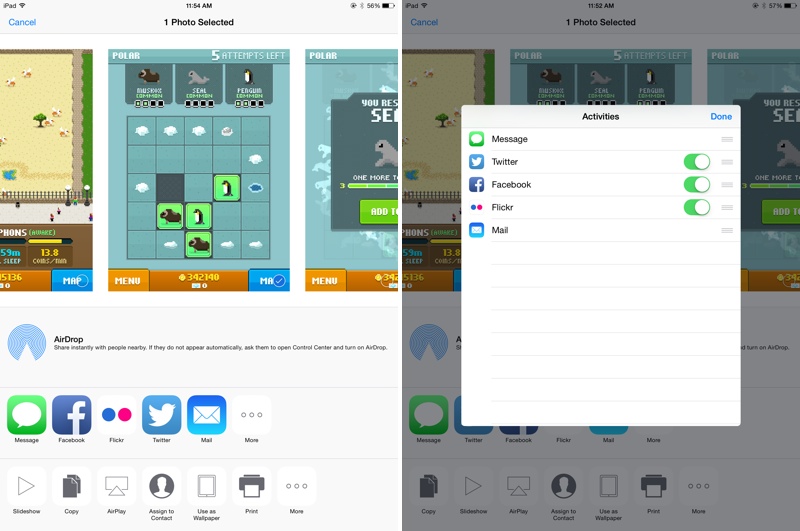
Share sheet customizations – When sharing an image, website, or other type of media, users can now customize their sharing options. The list of apps where content can be shared can be rearranged and disabled, as can the media options like Copy, Print, and AirPlay. Some sheet icons also have a new look that eliminates the black border in iOS 7.
Request desktop site in Safari – As noted by a Twitter user, Safari now includes an option to “Request Desktop Site,” which will load the desktop version of a site rather than the mobile version.

Time-Lapse mode for Camera – The Camera app has gained a new Time-Lapse mode, which captures a series of images and then compiles them into a time-lapse video. There are also new manual exposure controls, which allow exposure to be selected when taking a photo.

DuckDuckGo search – Users can now opt to select DuckDuckGo as their default search option in Safari. DuckDuckGo is known for its anti-tracking stance, opting not to profile its users.
iBooks – iBooks now comes preinstalled on iOS devices with iOS 8. Previously, it was a separate download in the App Store. There’s also a new auto night mode and an organization option to group books from a series together.
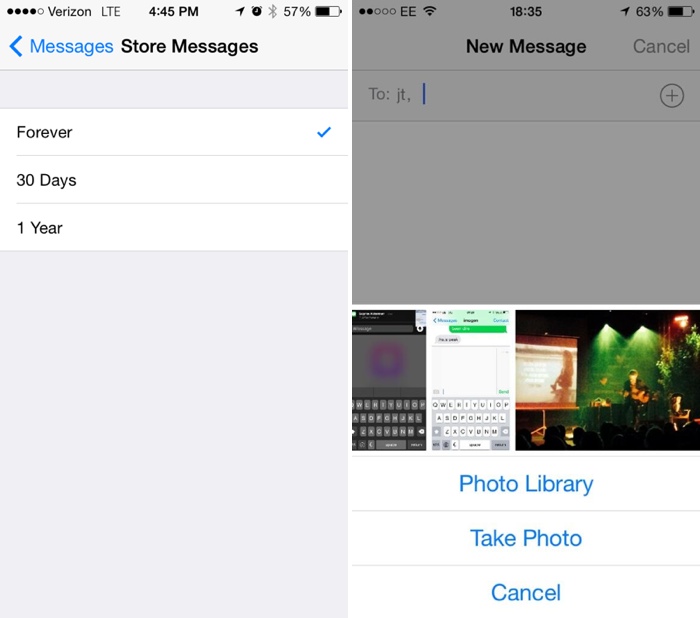
Messages – Along with several improvements to group message management, there are now options to remove stored messages after a set period of time of 30 days or one year, which will allow users who have extensive iMessage threads to free up valuable space. When adding an image to a message, there’s a new feature displaying recent photos for quick insertion.
Photos – The Photos app has received new organizational options, including two albums for “Recently Added” and “Recently Deleted.” The Recently Deleted section temporarily displays images that have been removed from the app in case of accidental deletion. The date and time a photo was taken is also displayed.

WiFi Calling – iOS will include an option for WiFi calling, allowing users to place calls over WiFi instead of cellular when connected to a WiFi network, saving minutes and data. Several carriers, including T-Mobile, have already announced support for the feature.
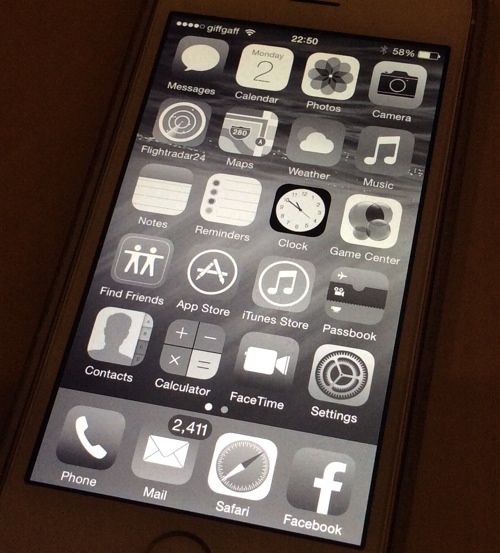
Grayscale mode – There are several new Accessibility options, including a new “Grayscale” mode that shifts the entire operating system into shades of black and white. There’s also Improved Zoom option.
Keep up with all of the new changes introduced with iOS 8 on our forums, where our readers are discussing and sharing a seemingly endless number of feature enhancements and tweaks in the “iOS 8, All The Little Things” thread.

AirPlay on iOS 8 doesn’t need a network to stream your media

Right now, Apple’s AirPlay media streaming requires an established WiFi network to fly. That’s fine when you’re at home, but do you really want to ask for a friend’s hotspot password just to show vacation photos on their Apple TV? Mercifully, iOS 8 will let you skip that hassle. One of the many under the radar upgrades to the software is peer-to-peer AirPlay support — you can now share content to an AirPlay-capable device as long as you can make a direct connection.
The basic concept is old hat, as you might suspect. DLNA has done this for a while, and third-party apps on various platforms can pull this off. All the same, the improved AirPlay technology should be handy both for media-savvy socialites as well as presenters who aren’t always guaranteed network access in the meeting room.
Filed under: Cellphones, Home Entertainment, Tablets, HD, Mobile, Apple
Via: AppleInsider, Gizmodo
Source: Apple

iOS 8 Ditches Yahoo Weather for Content From The Weather Channel
Apple appears to have ceased using data from Yahoo for its Weather app in iOS 8, instead getting weather information directly from The Weather Channel. iPhones running iOS 8 have a slightly revamped weather app that pulls its information from The Weather Channel, whereas previously, weather information was obtained through Yahoo.

Yahoo’s weather information, however, was also supplied by The Weather Channel (TWC), so it seems that Apple has opted to cut out Yahoo as a go-between. The switch from Yahoo to TWC is a bit surprising given reports of ongoing talks between Yahoo and Apple over ways to more deeply integrate Yahoo services into iOS apps. While it is unclear if those plans have been scrapped, an April report suggested Yahoo was aiming to revamp its mobile search platform with the hopes of being iOS’s default search engine.
While the source of the weather data Apple uses is ultimately the same, Twitter user Ryan Jones, who created the Weather Line app, has pointed out that Yahoo and TWC use “different geocoder, citation algorithms, and location coverage.” Because of that, the data presented to the end user may be slightly different even though Yahoo also obtained its data from TWC.
In addition to using TWC as a source for weather data, the iPhone’s weather app is now displaying a nine day weather forecast, up from the previous five day forecast. There’s also a new weather summary at the bottom of the app, noting the current weather conditions along with conditions for the rest of the day.
The new Weather app within iOS 8 is currently available to registered developers. The general public will get access to the operating system this fall, after beta testing has been completed.

OS X Yosemite Brings HMTL5 Video Support for Netflix [Mac Blog]
 During yesterday’s WWDC keynote, Apple announced several improvements to Safari in OS X Yosemite, including HTML5 video support for Netflix. According to Apple, the improvements bring an extra two hours of video watching under a single battery charge when streaming Netflix video with Yosemite.
Netflix today confirmed that it supports HTML5 video streaming on Safari in OS X Yosemite, explaining that it has worked closely with Apple to implement Premium Video Extensions in Safari. The extensions allow playback of video content in the browser without using plugins like Microsoft’s Silverlight.
We’re especially excited that Apple implemented the Media Source Extensions (MSE) using their highly optimized video pipeline on OS X. This lets you watch Netflix in buttery smooth 1080p without hogging your CPU or draining your battery. In fact, this allows you to get up to 2 hours longer battery life on a MacBook Air streaming Netflix in 1080p – that’s enough time for one more movie!
Netflix’s plugin-free video is currently available to all OS X Yosemite users who have installed the beta. OS X Yosemite will be released to the public this fall.

Instagram Receives Major Update With New Image Manipulation Tools [iOS Blog]
Instagram received a significant update today, adding 10 new creative tools to the app to put it on par with more robust image editing apps. Users will now be able to manipulate and adjust brightness, contrast, warmth, saturation, highlights, and shadows.
When you go to select a filter, you’ll now see a new wrench icon. Tap it and you’ll find a tray of photo editing tools ready for you to explore. You can also now adjust how much of a filter you apply to a photo by double tapping the filter icon.
There’s also a new adjustment tool for cropping and straightening photos at the same time, as well as a vignetting tool for darkening the edges of a photo. Sharpen is designed to make photos clearer, while each filter will now be adjustable by strength to produce a range of new looks for pictures.
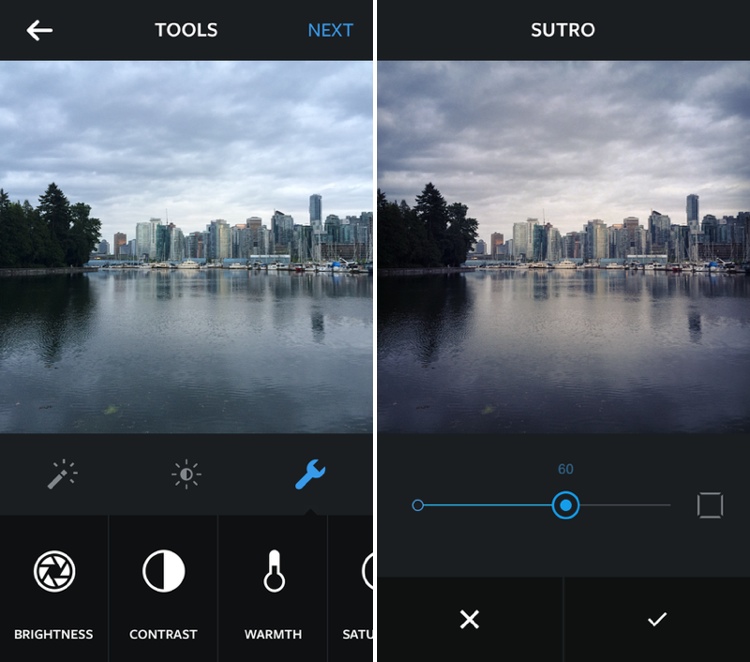
Here’s a full rundown of the new tools:
– Adjust: Crops and straightens at the same time.
– Brightness: Lightens or darkens a photo.
– Contrast: Brightens light areas, darkens dark areas further.
– Highlights: Lightens or darkens the lighter areas of the image.
– Shadows: Lightens or darkens the darker areas of the image.
– Sharpen: Subtly enhances the crispness of an image to make it clearer.
– Saturation: Increases the color intensity of an image.
– Warmth: A slider that allows for adjustments towards warm orange tones or cool blue tones.
– Vignette: Darkens the edges of a photo to highlight the center of the image.
– Filter Strength: Sliders that adjust how strong each filter will appear (includes Borders).
According to Instagram co-founder Kevin Systrom, who spoke to Re/code, the goal isn’t to complicate Instagram, but to improve image editing tools without removing focus from the main product.
“We are aiming to make the core better, creating more of an ecosystem,” he said “Everyone can build a photo app, but not everyone can build a community.”
Instagram‘s new tools, particularly the ability that allows images to be adjusted by filter strength, will allow for a whole new photo editing experience for users. The update is available immediately from the App Store.
Instagram can be downloaded from the App Store for free. [Direct Link]

Beats Acquisition Boosting Apple’s ‘Coolness’ Factor Among Young Consumers
 Last week, Apple confirmed its plans to acquire Beats Electronics and Beats Music in a $3 billion deal that would bring a successful headphone business and a fledgling streaming music service under Apple’s umbrella. While many have pointed to Jimmy Iovine as the acquisition target, Apple may also be using the deal to boost its “coolness” factor among younger users, as suggested in a survey by education technology company Chegg (via Re/code).
Chegg asked 10,000 students about their experience with Beats and their knowledge of the Apple-Beats merger. While most of the students surveyed were familiar with the Beats brand, only 15 percent had purchased Beats products and a mere three percent had subscribed to the Beats Music service. More than half of the students (60 percent) were aware of the deal with one quarter claiming the deal will make Apple more “cool” and fifty percent believing the acquisition will increase Apple’s popularity among students.
This is largely good, albeit unsurprising, news for Apple, which has long dominated the college market. In most college lecture halls across the country, you’ll see rows and rows of MacBooks — many of which were purchased using Apple’s educational discount or in Apple-affiliated campus stores. Still, more and more young people are streaming music using services other than iTunes. Spotify has more than 40 million subscribers, and 40 percent of its American users are between the ages of 18-24.
Beats is often criticized as being a bass-heavy fashion accessory and not a true audiophile product, but sales figures reveal that the typically younger consumers who buy Beats are more interested in appearance than audio quality. According to marketing research company NPD, Beats accounts for 27 percent of the $1.8 billion headphone market and more than half (57 percent) of the premium market for headphones with a starting price tag of $100 or more.

iOS 8 Offers Quick Access to Apps Based on Location
Apple outlined several of iOS 8′s major features during yesterday’s WWDC keynote, but with the operating system now in the hands of developers, details on several lesser known features have been leaking out.
One new feature sees the iPhone displaying apps on the lock screen based on location. For example, MacRumors readers have seen relevant app icons pop up while at or near brick and mortar locations like Starbucks and the Apple Store. While at a Starbucks, for example, the Starbucks app icon is displayed in the lower left corner of the iPhone’s lock screen, which allows a Starbucks Passbook card to be easily accessed.

This feature isn’t limited to Apple’s own stores or to major retailers, either, as one Twitter user has also seen an app for a train station on the lock screen while at that particular location.
Displaying location-based apps on the lock screen is particularly useful at Starbucks and the Apple Store as both locations allow users to make purchases using their iOS devices. In fact, a common theme between the apps that have demonstrated this functionality is a specific on-site function like the ability to make a purchase or display a ticket.
It is not clear how this feature works, or which apps are compatible at this point, but the iOS 8 release notes mention the location based apps as a facet of Location Services. “When Location Services is turned on, the device’s current location is used to recommend relevant apps on the lock screen.” Based on the description of the feature, it appears to work through both the App Store and physical location and will eventually be able to be turned off by turning off location services for the App Store.
As we approach the public release of iOS 8, it’s likely we’ll hear more about this new location-based alert feature. iOS 8 is expected to be available to the public in the fall, following a developer-oriented beta testing period.
(Thanks, Kyle!)

Intel Unveils Fanless PC Reference Design Based on Upcoming Broadwell Chips
Intel today showed off a new reference PC design built around the company’s upcoming Broadwell Core M processor. The Core M is based on a 14 nm process and will the first Broadwell chip to be made available to manufacturers, who are expected to debut the chip in retail products by the end of this year.
With Intel experiencing difficulties and delays with the development of Broadwell, the current Haswell generation has been stretched out somewhat with only modest “Haswell refresh” bumps taking place in recent months to tide users over until Broadwell. With improved performance and efficiency, Broadwell is seen as a significant opportunity for innovation in personal computers.
 Intel’s reference design for hybrid tablet-notebook running on Broadwell
At Computex, Intel president Renee James showcased the first Core M device — a 12.5-inch tablet-notebook hybrid that is thinner than the iPad Air, has a fanless design, and provides energy-efficient performance for mobile users.
The innovative design is based on the first of Intel’s next-generation 14nm Broadwell processors that are purpose-built for 2 in 1s and will be in market later this year. Called the Intel Core M processor, it will deliver the most energy-efficient Intel Core processor in the company’s history. The majority of designs based on this new chip are expected to be fanless and deliver both a lightning-fast tablet and a razor-thin laptop.
Apple has been rumored to planning to release a fanless Retina MacBook Air later this year, but it is unclear exactly what technology Apple will use to achieve that design. The Core M processor being shown by Intel today is part of the Broadwell-Y series that runs at just a handful of watts, while the MacBook Air currently includes Haswell-U series chips running in the 15-watt range. Broadwell-U chips are expected, although perhaps not in significant quantities until early 2015.

