


Apple Diversifies Chip Orders for iOS Device and Apple Watch Amid Predictions of ARM Macs
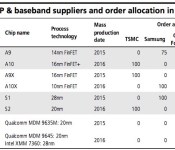
KGI Securities analyst Ming-Chi Kuo, who has frequently offered accurate information on Apple’s product plans based on supply chain information, has released a new report outlining his expectations for the company’s chips over the next several years. Kuo highlights a diversified supplier lineup for Apple’s A-series chips used in its iOS devices, with TSMC, Samsung, and GlobalFoundries all contributing to production.
Kuo sees the 2015 chip breakdown with the A9 chip destined for this year’s iPhones being shared by Samsung and GlobalFoundries, while TSMC handles the A9X that would be used in iPad models. That split is projected to flip in 2016, with TSMC handling the A10 iPhone chips and Samsung being responsible for A10X iPad chips.

Perhaps most enticingly, Kuo projects that Apple could begin launching ARM-based Macs in the next year or two based on its custom chip designs.
Apple may launch Mac products that use own AP in next 1-2 years. This prediction is based on the assumption that Apple’s self-developed AP performs at a level between Intel’s Atom and Core i3 and is good enough for Mac. Using self- developed AP can help Apple better control the timing of Mac launches and Mac product features.
Use of A-series chips in Macs would certainly be limited to lower-end devices at first, but Apple’s emphasis on controlling its supply chain and the improving performance of Apple’s A-series ARM chips compared to low-end Intel chips could lead to a shift in the coming years.
Kuo also looks at the Apple Watch, where Samsung has been reported to be handling the primary portion of Apple’s custom “S1″ chip for the upcoming smartwatch. He believes, however, that TSMC will take over responsibility in 2016 for the S2 in the second-generation Apple Watch.
Kuo certainly does not have a perfect track record with his claims over the years, but he is reliable enough that his predictions are followed closely. Given muddled rumors of Apple’s chip partnerships for future devices, it will be interesting to watch how these supplier deals play out over time.

Samsung in Talks to Buy BlackBerry for $7.5 Billion
Samsung has recently been in talks with BlackBerry about a potential takeover, reports Reuters. The South Korean company has reportedly offered to buy BlackBerry for $7.5 billion, in the hopes of acquiring BlackBerry’s extensive patent portfolio. Executives from both companies are said to have met last week in order to discuss the potential deal.
South Korea’s Samsung proposed an initial price range of $13.35 to $15.49 per share, which represents a premium of 38 percent to 60 percent over BlackBerry’s current trading price, the source said.
The offer price would imply an enterprise value of $6 billion to $7.5 billion for BlackBerry, assuming conversion of $1.25 billion of convertible debt, according to the documents.
BlackBerry has struggled with flagging sales in recent years, and in 2013, the company received a takeover bid worth $4.7 billion from Fairfax Financial, but the deal ultimately fell apart. BlackBerry went on to receive interest from both Apple and Microsoft, among others, but was uninterested in breaking up the company to sell it piecemeal.
Ultimately, the company accepted investments and aimed to re-establish itself in the smartphone market, which led to the launch of the Passport, a large square-shaped phone, and the Classic, a throwback to original BlackBerry designs.
BlackBerry holds quite a few valuable patents, which are estimated to be worth $1 billion to $3 billion. In 2012 alone, its patent portfolio grew by 986 patents, many of which are relevant to competing smartphone companies like Samsung.

Wireless Charging Looks to Go Mainstream in 2015
As the largest consumer electronics show in the world, CES often gives us a hint of the technologies we can look forward to in the near future, based on the products that are shown off at the show. In 2013 and 2014, there was a heavy focus on wearables, and this year’s emphasis on home automation suggests 2015 will be a big year for connected home products.
There’s one other important emerging technology that we may see explode over the course of the next few years — wireless charging. Several companies, including Energous and WiTricity, demoed upcoming wireless charging solutions, and the Alliance for Wireless Power had a booth showing off how wireless charging will work in the Home of the Future.
MacRumors had a chance to sit down with Alex Gruzen, the CEO of WiTricity, who walked us through the company’s technology, its existing partnerships, and gave us details on when we might see the debut of the first products using WiTricity’s technology, which uses the Rezence specification agreed upon by the Alliance for Wireless Power. WiTricity’s wireless charging solutions, which we have covered multiple times in the past, works using magnetic resonance, which is able to transfer power over distances using the magnetic near-field.
In the past, wireless charging solutions like the Powermat (which uses a competing technology from the Power Matters Alliance) have required the electronic device being charged to rest directly on the power source, but WiTricity’s wireless charging technology is unique because it does not require direct contact. The magnetic field used for charging is able to wrap around barriers, letting WiTricity charging pads be placed in unassuming locations like under desks, rugs, tables, and more.
In our time at the WiTricity booth, we saw charging pads that were placed under concrete, under desks, and more, hidden out of sight but still capable of delivering a full charge to a device (or multiple devices at once) equipped with WiTricity’s technology. This type of hidden charging technology is what we can expect in the future, and Energous, previously mentioned, also debuted a similar “WattUp” technology that uses radio frequencies to charge devices, replacing a charging pad with a transmitter that can provide power up to 15 feet away. Read more 
iPad Buyer’s Guide: Which Model is Best For You [iOS Blog]
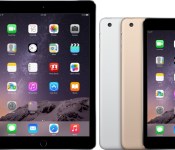
So you want to buy an iPad? Great. Would you believe Apple actually offers five different iPad models? Sure, the company only touts two of them — the iPad Air 2 and the iPad mini 3 — but Apple continues to carry three older models that could be right for you, depending on your circumstance. In this guide, we’ll take a look at the different iPads Apple offers to help you decide which model is best for you.

iPad models
Apple has two current iPads, with the most obvious difference being size. Here’s an overview of what each line offers:
iPad Air: The bigger of the two models. The current version is the iPad Air 2. Key specifications:
- Measures 9.4 by 6.6 by 0.24 inches and weighs less than a pound
- Fully laminated 9.7-inch LED backlit Retina display with an anti-reflective coating
- 2048‑by‑1536 resolution at 264 pixels per inch
- 64-bit A8X processor and M8 motion coprocessor
- 16GB, 64GB, or 128GB of storage
- 8-megapixel iSight camera and 1.2-megapixel FaceTime camera
- Sensors include Touch ID, gyroscope, accelerometer, barometer, and ambient light

Apple also offers the original iPad Air in its current lineup. When comparing the 16GB models (the iPad Air is available with 16GB or 32GB storage), you save $100 if you go with the iPad Air, but it lacks the Touch ID, iSight burst mode, and the anti-glare screen that is found in the iPad Air 2. It’s also a little thicker and uses an older and slower 64-bit A7 processor with an M7 motion coprocessor. The iPad Air 2 is worth the extra money, even if only for the laminated anti-reflective display that makes content look absolutely gorgeous.
For a deeper dive into the differences between the iPad Air 2 and the iPad Air, read the MacRumors iPad Air 2 roundup.
iPad mini: A smaller iPad is by no means a lesser iPad. The latest model is the iPad mini 3. Key specifications:
- Measures 7.87 by 5.3 by 0.29 inches and weighs about 0.75 pounds
- 7.9-inch LED backlit Retina display
- 2048‑by‑1536 resolution at 326 pixels per inch
- 64-bit A7 processor with M7 motion coprocessor
- 16GB, 64GB, or 128GB of storage
- 5-megapixel iSight camera and 1.2-megapixel FaceTime camera
- Sensors include Touch ID, gyroscope, accelerometer, and ambient light

Apple has two other iPad mini models in its current lineup, and both are older models.
The iPad mini 2 has only one major feature difference from the iPad mini 3: Touch ID. While Touch ID is a great security feature that’s convenient to use, you might be willing to sacrifice it to save some money. Also, the iPad mini 2 is the only iPad mini model available with 32GB of storage, a nice alternative for anyone who doesn’t have the cash for a 64GB iPad mini 3.
The original iPad mini does not have a Retina display; its resolution is 1024‑by‑768 resolution at 163 pixels per inch. It has an older and slower A5 processor, and has no support for panoramic photos, camera burst mode, or video zoom. It’s also available only with 16GB of storage. It’s the entry-level, cheap iPad in Apple’s lineup, good for Internet access, ebooks, and casual games.
The MacRumors iPad mini 3 roundup has more details on the differences between the three iPad mini models.
Performance
If you want to get the fastest, most current iPad available, pick the iPad Air 2 — it’s a remarkable 87 percent faster than the iPad mini 3 in Geekbench 3 multi-core benchmark, and it’s an impressive 34 percent faster in Geekbench’s single-core benchmark. The iPad Air 2 is Apple’s fastest iPad to date.

Thinking about buying an iPad Air instead, to save a few dollars? You’ll make a performance sacrifice. The iPad Air 2 is 70 percent faster in Geekbench’s multi-core benchmark, and 23 percent faster in Geekbench’s single-core benchmark.
When it comes to the iPad mini 3 and the iPad mini 2, there’s virtually no performance difference because they use the same internals. Geekbench results show that the iPad mini 2 is marginally faster than the iPad mini 3, but we’re talking low single-digit percentage points. There’s no need to consider performance when deciding between the iPad mini 3 and the iPad mini 2.

There’s a huge difference between the iPad mini 3 (and iPad mini 2) and the original iPad mini. You’re going to give up a lot of performance to save some money. In Geekbench’s multi-core benchmark, the iPad mini 3 is nearly four times faster than the iPad mini. In Geekbench’s single-core performance, the iPad mini 3 is well over four times faster than the iPad mini.
So is it worth saving $150 to buy a $249 iPad mini over a $399 iPad mini 3? For anyone on a budget, it’s a compromise that has to be made, but you might want to consider buying a $299 16GB iPad mini 2 instead. For the extra $50, you get the same performance boost as you would if you bought an iPad mini 3, and the only feature you miss out on is Touch ID.
Customization options
Apple offers several features that you can add to the iPad. They all cost extra, so be prepared to add to the price of the standard configuration model.
Storage: All iPads start with 16GB of storage. The latest iPad models have options to upgrade to 64GB (an extra $100 to the base price) or 128GB (an extra $200 over base) — there’s no 32GB option anymore. If you play a lot of games with detailed graphics or like watching movies and TV shows, consider getting more storage. Otherwise, you’ll find yourself trying to remove storage-hungry apps, removing media files more often than you’d like, and relying on cloud storage (which could be fine if you’re always connected to the Internet).
Cellular connectivity: Speaking of Internet connectivity, if you need to be online most of the time with your iPad, you can’t always depend on a Wi-Fi connection being available. Apple offers cellular iPads that work with AT&T, Sprint, T-Mobile, and Verizon in the U.S. and a variety of carriers internationally.
Cellular support adds $130 to the price of all corresponding models, plus you have to sign up for a data plan with each carrier and pay a recurring fee. If you already have a plan, see if it has an option to add an iPad data plan. If you have an iPhone on a service plan that allows mobile hotspots, also consider whether pairing a Wi-Fi iPad with an iPhone will meet your needs. With Instant Hotspot in iOS 8, it’s dead simple to allow an iPad to connect via Wi-Fi to an iPhone and use the phone’s cellular data service as needed.
Available finishes: The iPad Air 2 and the iPad mini 3 are available in gold with a white bezel, silver with a white bezel, and space gray with a black bezel. The iPad Air, iPad mini 2 and iPad mini are available in silver/white and space gray/black. There’s no extra cost for picking the colors of your choice.

AppleCare+: Each new iPad comes with one-year warranty and 90 days of complimentary support. For an extra $99, you can get AppleCare+, which extends the warranty and support to two years and also allows for two incidents of accidental damage coverage (subject to a $49 service fee per incident).
AppleCare+ is a good idea if your new iPad is going to be used by several people, such as by your family or in a classroom. And if you plan to bring your iPad with you while traveling or working on location, the accidental damage coverage is reassuring.
Fortunately, you don’t have to buy AppleCare+ right away. Apple gives you 60 days from the date of purchase to buy AppleCare+. You can buy your new iPad, monitor how it’s being used, and then decide to invest in AppleCare+ if it fits your use case.
Accessories
As you may or may not know, there are hundreds of different kinds of accessories you can buy with your iPad. These are just a few you might consider when you’re buying your new iPad.
Cases: A case will help protect your investment. Cases are as simple as a protective sleeve, or as complex as a combination case/stand/keyboard. Expect to spend $25 to $150. Apple’s $39 iPad Air and iPad mini Smart Covers use magnets to attach to the iPad and the protective flap folds to do duty as a stand. A more expensive Smart Case ($69 iPad mini, $79 iPad Air) offers better protection and features the same folding cover.

Cables: The iPad comes with a USB to Lightning cable, but you might want to buy an extra one. They’re a little pricey; a 1-meter cable is $19. Cheaper non-Apple Lightning cables are available, but shop carefully, since many cheap cables are not durable, or the may not work properly with your iPad.
Input devices: Since all iPads have Bluetooth, you can use a Bluetooth keyboard ($100 to $200), which is ideal if you want to do a lit of writing. Some keyboards that are designed for the iPad have a built-in iPad stand or an do double duty as a case. If you’re an illustrator, you may want to buy a stylus ($15 to $100), especially one that’s pressure sensitive.
Which iPad should you buy?
It’s easy to recommend the iPad Air 2. It’s fast and lightweight, and the new anti-reflective screen is a vast improvement. It also has features not on the iPad Air, most notably slow-motion video capture, burst camera mode, and Touch ID. The iPad Air seems like an affordable alternative, but the iPad Air 2’s price/performance and features are an excellent package well worth the money.
If you prefer a smaller iPad, you can choose between the iPad mini 3 and the iPad mini 2. The only difference between the two is Touch ID — is a fingerprint sensor really worth the extra money? Touch ID is a convenient feature, but it’s one you can probably live without. Save some money and go with an iPad mini 2. However, if you want 64GB or 128GB of storage, your only choice is the iPad mini 3 unless you can still find one of the higher-capacity iPad mini 2 models on closeout somewhere. The original iPad mini is Apple’s entry-level device at $249 and could be a good iPad dedicated to your kids.
Should you get an iPad mini 3 or 2 if you have an iPhone 6 Plus? The iPhone 6 Plus has a nice, big screen, but the iPad mini’s screen still offers quite a bit more screen real estate. More importantly, the iPad mini will use the iPad version of your apps, while iPhone versions run on the iPhone 6 Plus. iPad apps are designed to take advantage of the bigger screens, so the interfaces are different than iPhone versions, which have interfaces made for smaller screens.
 Mockup of 12.9-inch iPad (left) with fourth-generation iPad (right) and iPad mini
If you’re not in a rush to buy a new iPad, you could wait and see if/when Apple releases a 12-inch iPad Pro. Rumor says that the iPad Pro will measure between 12.2 and 12.9 inches, resemble the iPad Air 2 and iPad mini 3, and use the same A8X processor.
Finally, if you want to save a few dollars, check Apple’s refurbished store. Apple installs a new battery and replaces the outer shell on refurbished iPads, and you get the same one-year warranty as you would with a new iPad. The inventory varies greatly, so make sure to check back frequently if the model you want isn’t in stock.
It also takes a few months for new products to begin showing up at all in the refurbished store, and at the time of this writing, Apple had yet to begin offering refurbished versions of the iPad Air 2 or iPad mini 3. Since a lot of returns happen after the holidays, there may be and influx of new products in the refurbished store soon.
Google’s Play Store eclipses Apple’s App Store in number of apps and developers for first time

Given the differing business models being employed by Google and Apple in getting their mobile operating systems into the hands of consumers, it should be no surprise that despite a jump start by Apple, Google is ahead in many measures. Even in areas where Apple has a lead, Google is steadily marching toward dominance. An example of this occurred in 2014 according to app metrics tracking firm AppFigures whose latest numbers show Google’s Play Store has surpassed Apple’s store in terms of both number of apps and developers.
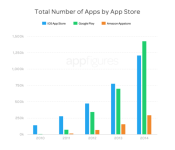
According to AppFigures, the Google Play Store now boasts 1.43 million apps compared to 1.21 million available in Apple’s App Store. There are some who may counter that Apple is much more strict about what gets into their store, which keeps the numbers down. Nevertheless, there will be many Android fans who will point to this change in app figures as a major milestone for Google’s business.
Meanwhile, the number of developers who are working on apps for each store continued to grow faster for the Play Store than it did for the App Store. In terms of actual numbers, Google has been in the lead for a few years now and has now reached 388,000 developers compared to Apple’s 282,000 developers.
As a whole, app development continues to grow at a very strong clip. All three major app stores – Google’s Play Store, Apple’s App Store and Amazon’s Appstore – all saw at least 50% growth during 2014. This kind of expansion should continue during 2015 as manufacturers work to expand their ecosystems to a whole variety of new platforms, especially wearables, that will push developers to consider new ways to support interaction with apps.

source: 9to5Google
Come comment on this article: Google’s Play Store eclipses Apple’s App Store in number of apps and developers for first time
European App Store Price Increase Turns Off Auto-Renewing Subscriptions [iOS Blog]
Apple last week implemented price increases for App Store content throughout the European Union and in several other countries, rebalancing the company’s pricing as exchange rates have shifted and new taxes have gone into effect in some countries.
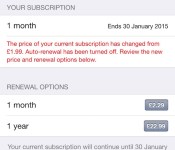
One side effect of that change, however, is that auto-renewing subscriptions for app content have been automatically turned off for any pricing tiers that saw increases due to Apple’s changes. The issue was noticed by a MacRumors reader and also highlighted by Popular Science UK editor Tom Royal today.

Users have so far apparently not been notified that auto-renewals have been turned off following the price increases, although in the examples we’ve seen the renewal dates are still several weeks into the future.
It is understandable that Apple may want or need to receive consent from customers before automatically raising recurring subscription fees, but so far neither publishers nor users have been notified of this issue and they are only discovering it for themselves when digging into the subscription settings for their apps.
Apple was proactive about notifying app developers of impending price increases roughly a day and a half of time, but additional information on the effect those changes are having on recurring subscriptions was not included. As a result, some users may suddenly find themselves losing access to their content while publishers may lose out from users who simply elect not to follow up on the issue and resubscribe, regardless of whether the new rates themselves would be a determining factor.
Users in affected countries should check their settings for any recurring in-app subscriptions and ensure that they turn auto-renew back on should they wish to continue receiving their content.
(Thanks, Richard!)

Facebook Announces ‘Work’ App for iOS Focused on Workplace Social Networking [iOS Blog]
Facebook today plans to launch a new app for iOS and Android, simply titled “Work”, that will allow businesses to build their own Facebook-like social networks to facilitate interaction amongst employees.
The service, which will also available on the main Facebook website, has been beta tested in “a very small set” of businesses around the world, Lars Rasmussen, the engineering director at Facebook who is heading up the project, told TechCrunch. Today’s launch is the next step in testing the project, a continuation of a process the company has essentially been working on for a decade due to its basis in Facebook’s own employees using the service to plan meetings, share files, and collaborate on projects.

“Facebook at Work’s strength is that we’ve spent ten years and incorporated feedback from 1 billion active users,” he says. “All of that is embedded now in the same product but adapted for different use cases.”
And it’s actually used by staff. “When Mark makes an announcement he just posts it on Facebook at Work,” Rasmussen says.
No details on pricing of the app, or overall service, were given, though TechCrunch points out that Rasmussen never rules out advertisements as a future possibility for the service. Facebook at Work will also be a bit bare bones when it launches today, as the service will allow users to share and receive documents, but due to the company’s time crunch to meet today’s launch, there won’t be any in-app editing yet.
Rasmussen also gave TechCrunch a run-down of how the service functions when starting out, describing linking accounts amongst a user’s personal Facebook and an overall similarity to the company’s previously established Groups service.
“When an employer adopts Facebook at Work, they can construct it with a set of new accounts. Users can then link their work and personal accounts together so that they are logged into both at the same time.” This would work much like Groups and public profiles do today. On mobile, you would have two mobile apps running at the same time, he adds. “Even if the employee chooses to link there is no crossover. The content stays entirely within your personal or work Facebook.”
Though Facebook’s new app is decidedly business-focused, it follows the company’s recent trend of separating individual aspects of the service into multiple independent apps acting autonomously from the main Facebook app.
The nascent service has a bit of an uphill battle, with competing services already filling the market and ensuring users their personal data won’t leak over into the work side of things, but Rasmussen points out he’s already seen how a service like this can fail by working on Google Wave, a similar work-focused service. “I can say that the challenges of making work more efficient is something that has been on my mind for a long time,” he told TechCrunch, “And I come to it with a lot of passion and the knowledge of a failure of doing this at a different company.”
Facebook’s Work for iOS app is scheduled to launch later today.

Google Adding ‘Word Lens’ Camera Translation and Conversation Mode to Translate App [iOS Blog]
Google today announced a forthcoming update to its Google Translate app for iOS that will bring instant camera-based translation and automatic language recognition to Apple’s mobile devices. This will be Google’s first update to the translation app in nearly a year.

The updated translation app improves upon the current text recognition feature by incorporating the real-time translation technology that Google acquired with Word Lens last year. Instead of capturing a photo for translation, users can point their phones at signs, menus and other text and immediately view overlays containing the translated phrases.
At launch, this Word Lens feature will support a limited number of languages (English to and from French, German, Italian, Portuguese, Russian and Spanish) with additional languages expected in the future. It also will work even when there is no available Internet connection.
Google has also added a new real-time conversation mode that is available for the first time on the iOS platform. Previously incorporated into Android, this real-time mode improves the flow of a conversation by automatically detecting the languages being used by the participants. Once language identification is complete, users can speak at a natural pace without needing to tap the mic between each side of the conversation.
Google is rolling out the Translate update across its platforms with the iOS version debuting in the next few days. Google Translate is a universal app and available for free in the iOS App Store. [Direct Link]
GoPro Shares Tumble After Apple Granted Remote Control Camera Patent [Mac Blog]
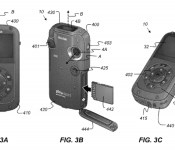
Shares of personal camera maker GoPro fell 12 percent as trading volume doubled yesterday following the publication of a recently awarded Apple camera patent (via Bloomberg). Apple was granted US patent no. 8,934,045 yesterday by the U.S. Patent and Trademark Office for a remote control camera system powered by a wrist-worn device.

Originally filed by Kodak in 2012 and subsequently acquired by Apple in a much larger patent deal, the patent details a remote digital camera system that can be controlled by a smartwatch or phone. In its description, the patent seeks to addresses a wind resistance flaw present in select GoPro cameras that may lead to image artifacts.
According to Dougherty & Co. analyst Charlie Anderson, the GoPro stock plunge was led by investors concerned that Apple may encroach on the extreme action-adventure camera market currently dominated by GoPro. Investor reaction to this patent appears to have been overblown, however, as Apple patents a variety of technology innovations, most of which are not used in consumer products. And in this case, the technology wasn’t even Apple’s to begin with, making it even less clear whether the company has any intention of following up on it.
Google Play grew much faster than Apple’s App Store in 2014 – report

According to a recent report from appFigures, Google Play has grown more than Apple has in both the number of apps and developers in the year 2014. Google has also grown faster than Apple in the total number of apps available, total number of developers creating apps for the platform, and for the first time in 2014, the Play Store has released more new apps than App Store released in a given year.
Taking a look at the charts below, we’re seeing major growth in the number of apps and developers in the Google Play Store, iOS App Store, as well as the Amazon Appstore from 2010 to 2014. Google ended the year 2014 with over 1.43 million published apps, compared to Apple’s 1.21 million. Amazon is still very far behind, finishing the year with only 293,000 apps in all. We can also see the total number of developer growth for each platform. Google finished the year with almost 400k developers, while Apple nearly made it to 300k. Amazon is nearing the 50k mark to finish out 2014. As you can see, Google Play’s developer community has grown faster than Apple’s for the third year in a row.

Moving forward, we can also see that app development is on the rise. Google Play grew in the number of apps by more than a 100% increase, while Amazon grew a bit more than 80%, and Apple growing by under 60% in 2014. Additionally, more developers joined Google Play in 2014 than Amazon and Apple combined. The Google Play Store now has 388k developers on the Android platform, compared to Apple’s 282k and Amazon’s 48k.

The report also took a look at the fastest growing categories in each app store. Google Play’s Games and Photography apps increased tremendously, while Apple’s Business and Food & Drink categories rose the most. There’s not much jarring information here, but the charts below still show some interesting results.

So, why is Google Play growing so much faster than Apple’s App Store? It’s mainly because Android is so much more popular than iOS globally, and its developer base is simply larger. Also, the difference may have a lot to do with the way Google and Apple publish apps in their respective stores. Apple has a more rigorous app approval process before anything can get published, while Google is a tad more lenient up front, then fixes problems and violations after the app is published. Due to these opposing publishing processes, we’re unsure if these charts account for the removal of apps after they’ve already been published.
Either way, we’re still seeing major growth out of both Google and Apple, so it will be interesting to see who surpasses who in the coming years.

