



Federal Review Blames Lack of Resources and Planning for L.A. Schools’ Failed iPad Initiative
A recent study by the U.S. Department of Education has found the Los Angeles Unified School District’s $1.3 billion “iPad-for-all” education initiative, announced in the summer of 2013, had been “plagued by lack of resources and inadequate planning for how the devices would be used in classrooms,” reports the Los Angeles Times.
The iPad initiative was officially canceled last month amidst an investigation by the FBI focusing on the relationship between Apple executives and former LAUSD superintendent John Deasy. The investigation was sparked by claims the bidding for the deal had been altered to favor Apple and Pearson, the higher-education company providing content for the iPads.
The troubled project led to the resignation, under threat of dismissal, of former head of technology for LAUSD, Ronald Chandler. Deasy also resigned under similar circumstances last October.

The new report deems the project too heavily focused on Apple’s iPad as the centerpiece for the initiative, with no willingness to focus on a less-expensive alternative. It also found that the teachers who were supposed to incorporate the iPads into their classroom on a daily basis weren’t provided nearly enough training in ways to successfully integrate the technology into an effective lesson plan.
The report further mentions that senior managers were “unable or unwilling” to voice concerns over these issues before they snowballed into bigger problems, with the Department of Education mainly looking at a lack of an immediate replacement for Chandler, as well as general mismanagement of the project, as main points of blame.
Attempts to fix the program before its eventual end were tried, but faced stonewalling at the hands of a few Deasy supporters, all believing the former superintendint did nothing unethical at any time before or during the intiative’s lifespan.
“The Department of Education had a number of common-sense suggestions … such as better planning, better testing and evaluation of technology, and better training,” said school board member Monica Ratliff, who chaired a panel that reviewed the technology project last year. She produced a report that raised issues similar to those of the Education Department, but it was discounted by some Deasy allies as unfair to the superintendent.
The initial rollout of the program – in 47 schools and with $30 million spent on Apple products – in the fall of 2013 met immediate criticism amid ill-prepared teachers, spotty Internet connections, and crafty students bypassing security filters.
Following a suspension of the contract between the LAUSD and Apple back in August, the program initially begun over a year and a half earlier was officially canceled last December. The iPad-for-all program and its components currently remain under review by the FBI.

Belkin Plans to Add HomeKit Support to WeMo Line in ‘Very Near Future’ [iOS Blog]
Belkin’s WeMo line, which consists of a range of home automation products like light switches, motion sensors, cameras, and more, has been around a few years, but the company has been dedicated to updating it and adding new products on a regular basis.
It appears that the WeMo line’s next major update could be the addition of HomeKit support, letting the complete range of products integrate with Apple’s upcoming home automation platform. Speaking to MacObserver, a Belkin spokesperson confirmed that the company is committed to introducing HomeKit support, which will come in “the very near future.”
WeMo will continue to evolve as we deliver on our promise of being the most approachable entry point to the connected home, and it is a natural progression based on Belkin’s long-term partnership with Apple that compatibility with HomeKit will be a part of that evolution.
We are currently in conversations with Apple, but no specifics have been finalized at this point. Though our primary goal will always be to create a robust WeMo platform and unparalleled user experience for both current and future WeMo users, we are actively engaged in bringing HomeKit compatibility to fruition in the very near future. Stay tuned.
Belkin was one of the first accessory companies to embrace home automation, and its wide collection of connected products will likely help skyrocket HomeKit to popularity once it becomes available. Belkin started out with a line of connected WeMo switches that allowed any electronic item plugged into them to be controlled by a mobile device, but has since expanded to light bulbs, slow cookers, humidifiers, coffee pots, cameras, motion detectors, and more. There’s even a WeMo Maker that can be used by do-it-yourselfers to for a wide range of connected home projects.
 Belkin’s newest WeMo products
This January, Belkin debuted several new WeMo products, including a WeMo Door and Window sensor, a Keychain sensor, an improved motion detector, and an Alarm sensor that alerts users when an existing home alarm goes off.
Belkin has even bigger plans for home automation in the future. At CES this year, the company was demoing a smart home system that included an under-the-sink WeMo Water sensor designed to measure a home’s water usage, and Belkin told MacRumors that a similar product for measuring power usage was in the works.
Quite a few companies have announced plans to integrate with Apple’s HomeKit, including iDevices, Elgato, Schlage, and more, but Belkin is one of the largest. At the current point in time, it seems that Apple is still putting the finishing touches on its HomeKit tools with chips just beginning to ship out in November, so it may be a few months yet before we begin seeing the first HomeKit-compatible products hitting store shelves.
Late 2014 Mac Mini Gained Option for 2TB Fusion Drive in December [Mac Blog]
When the newest Mac mini first launched in October of 2014, Apple did not give the option for it to be configured with a 2TB drive, much to the disappointment of many Mac mini fans.
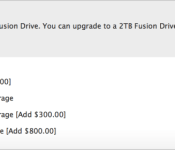
As noted by 9to5MacApple reversed its decision to only offer 1TB of storage space in December and quietly updated the Mac mini build-to-order options, adding an option for a 2TB Fusion Drive for an additional $100. Before the change, users could only choose a 1TB Fusion Drive or 1TB of PCIe-based flash storage.

Though the return of a 2TB storage option will likely please some potential Mac mini buyers, the new 2014 machine has not been well received due to its soldered RAM and lack of a quad-core processor option.
Apple’s Mac mini can be purchased from the company’s online store, with pricing starting at $499. The high-end 2.8GHz option with a custom 2TB Fusion Drive and 8GB of RAM is priced at $1,099.
Here’s how the Apple Watch companion app works

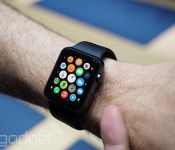
It’s no secret that Apple is making customization a big part of the Apple Watch, but there’s apparently more to it than meets the eye. The folks at 9to5Mac claim to have details and images showing how a pre-release version of the wearable’s companion iPhone app works, and there’s a fairly extensive range of tweaks. For a start, you can create your own watch face monogram if you just have to remind everyone that it’s your wristwear. You also don’t have to embrace Apple’s fitness model if you don’t want to. You decide how often it gives you progress updates, and you can turn tracking off altogether if you’d rather not let the watch quietly judge your lifestyle.
Other noteworthy examples? You can customize the app grid from the phone, and limit when you get messages to prevent strangers (or just overly chatty friends) from buzzing your wrist non-stop. It’s not clear that this represents everything the app will do by the time it’s ready, and there’s certainly more customization on the watch itself, but this at least gives you an inkling of the control you’ll have when you strap this device on your arm.
Filed under: Cellphones, Wearables, Mobile, Apple
Source: 9to5Mac
Apple Watch iPhone Companion App Reveals New Details About Upcoming Wearable
Apple’s latest iOS 8.2 beta includes a reference to an Apple Watch companion app that will be installed on the iPhone to give users a way to access settings on their Apple Watch devices, and a new report from 9to5Mac using code created by developer Steven Troughton-Smith (which can be found on Github), details some of the functionality that can be found in the upcoming app and in the Apple Watch.
Called the Apple Watch “Companion,” the app is described as housing both settings for the Apple Watch itself and settings for various Apple Watch applications. As we learned from the WatchKit SDK included in the first iOS 8.2 beta, initial Apple Watch apps will be extensions of existing iPhone apps and will be reliant on the iPhone to function.
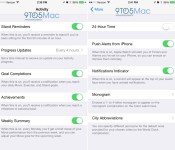
According to screenshots of the app running on an iPhone, the Apple Watch will be able to send reminders to stand up every hour, progress reports on activity at selected intervals, and notifications for goal completions such as reaching a daily Move, Exercise, or Stand goal.

The Apple Watch will also be able to send notifications for achievements, such as when a personal activity milestone is met, and there’s an option for a Weekly Summary, which will give users a brief recap of how much they moved during the previous week.
In addition to various fitness-related alerts, there are sections in the app to turn on push alerts from the iPhone for Timers and Alarms, get a notification alert in the form of a red dot on the Apple Watch face, and specify acronyms for various cities in the World Clock. All of these aforementioned settings and notifications can be controlled within the “Companion” app.
There’s also an interesting feature that lets users choose a one to four letter monogram that will appear on the Apple Watch’s Color watch face, which is described as a “Complication.” First introduced in new marketing earlier this year, Apple Watch Complications are special functions that are displayed within various watch faces, such as stock quotes, weather, and more, like the monogram. With this enabled, the Apple Watch face will display a user’s initials.

Apps displayed on the Apple Watch home screen in a cluster pattern will be able to be organized and rearranged within the Apple Watch Companion app on the iPhone. Because there’s no keyboard, there are tools within the Companion app that suggest the Apple Watch will use voice-based communications for messages and other text-based entry forms.
Like the iPhone and the iPad, the Apple Watch will include an option for a passcode that’s used to verify Apple Pay payments. As has been detailed in the past, the Apple Watch will require users to enter a passcode when putting the watch on for the first time, and it will make sure that skin contact is maintained to prevent unauthorized Apple Pay payments with the device.
The Companion app also appears to confirm that the Apple Watch will indeed feature its own storage and the ability to play songs stored directly on the device, as the About Screen lists storage capacity, songs, and photos stored on the Apple Watch.
As the launch of the Apple Watch approaches, details on the device are beginning to leak out, but there are still several unknown elements. For example, there’s no solid word on how long the battery will last, aside from Apple CEO Tim Cook’s suggestion that users will need to charge it on a nightly basis, and we have no word on pricing, aside from the entry-level $349 Sport model. There’s also no clear cut launch date in place, but the most recent rumors have suggested that the device could be released in March.

There are a few other minor details that can be gleaned about the Apple Watch based on the Companion app screenshots, and a full range of images is hosted over at 9to5Mac. Other details include stock selections, the use of the Taptic Engine for Maps directions, various Accessibility features, and more.

InvenSense Faces Investor Lawsuit for Not Disclosing ‘Sweetheart’ Sensor Deal With Apple [iOS Blog]
Apple sensor supplier InvenSense is facing a class-action lawsuit filed by investors accusing the company of defrauding investors by not revealing the true terms of its deals with Apple and Samsung, reports Silicon Beat. InvenSense recently joined Apple’s supply chain, producing gyroscopes and accelerometers for the iPhone 6 and 6 Plus.
In the lawsuit, investors accuse InvenSense CEO Alan Krock of providing misleading guidance when he discussed a large new customer during the company’s earnings conference call in July 2014.
“Instead of revealing the true condition of the company and its prospects, defendants hid those facts from investors and chose to issue strong guidance and paint a picture of a bright future with a new mega-customer,” the complaint states.
Investors believed the new customer to be Apple and increased their stock holdings based on this assumption. During this buying frenzy, InvenSense insiders reportedly sold off their shares, making more than $5.3 million at a time when the price of InvenSense’s stock was climbing.

Investors were surprised when InvenSense’s gross margins dropped 11 percentage points in the following quarter despite this supposed lucrative Apple contract, and the company’s share price quickly fell 20 percent. Plaintiffs in the case assert this decline in the company’s financial state was the result of overly generous supplier deals with Apple and Samsung, as well as manufacturing problems that delayed component shipments. The company’s failure to disclose these “sweetheart deals” is the basis for the class-action lawsuit.
InvenSense isn’t the first supplier to face financial troubles after inking a deal with Apple. Materials manufacturer GT Advanced last year filed for bankruptcy following a failed manufacturer agreement with Apple to supply sapphire for future Apple devices.
iPhone Buyer’s Guide: Which Model to Choose [iOS Blog]
It’s been over eight years since the iPhone made its debut, and it’s still the most popular smartphone on the planet. For years, Apple’s iPhone offerings were very straightforward: one expensive top-of-the-line model, a more affordable iPhone with fewer features or slower specs typically identical to previous year’s flagship model, and maybe even a cheap model based on the flagship model from two years’ prior. And they all had the same screen size.

Your choices aren’t so simple now. Apple now offers four different iPhone models with different screen sizes and different prices. Confused as to which iPhone to get? Use this guide to help you decide.
iPhone models overview
Let’s go over the key specifications and differences between the iPhones, starting with Apple’s priciest offering.

iPhone 6 Plus: Apple’s biggest iPhone. If you’ve always wanted the biggest screen possible on your iPhone, this is the model to get. Some might see the iPhone 6 Plus as a viable alternative to an iPad mini 3, but keep in mind that you’ll be using the iPhone version of apps, not the iPad versions. That means the app UIs will be designed with a smaller screen in mind.
Key specifications for the iPhone 6 Plus:
– Measures 6.22 by 3.06 by 0.28 inches and weighs 6.07 ounces
– 5.5-inch screen with a 1920-by-1080-pixel resolution at 401 pixels per inch
– 64-bit A8 processor with M8 motion coprocessor
– 8-megapixel iSight camera with optical image stabilization; 1.2-megapixel FaceTime camera
– Siri voice-activated interface
– 16GB, 64GB, or 128GB of storage
– Apple Pay support
– Sensors: Touch ID, accelerometer, barometer, gyroscope, proximity, ambient light
– Available in three finishes: gold, silver, and space gray
– 2,915 mAh battery
The iPhone 6 Plus could be the phone to get if you’re serious about photography. It’s the only iPhone with optical image stabilization. For recording video, both iPhone 6 models offer cinematic video stabilization and continuous autofocus video, which aren’t found in the iPhone 5 models.
If you want to use Apple Pay, you have to get one of the iPhone 6 models. The NFC chip that Apple Pay uses is not found in the older iPhone 5 models.

iPhone 6: The iPhone 6 has almost the same specs as the iPhone 6 Plus. It’s only missing features are optical image stabilization in the iSight camera and the bigger battery in the iPhone 6 Plus. It’s the iPhone to get if you want the latest and greatest but don’t want the bigger size.
Key specifications for the iPhone 6:
– Measures 5.44 by 2.64 by 0.27 inches and weighs 4.55 ounces
– 4.7-inch screen with a 1334-by-750-pixel resolution at 326 pixels per inch
– 64-bit A8 processor with M8 motion coprocessor
– 8-megapixel iSight camera; 1.2-megapixel FaceTime camera
– Siri voice-activated interface
– 16GB, 64GB, or 128GB of storage
– Apple Pay support
– Sensors: Touch ID, accelerometer, barometer, gyroscope, proximity, ambient light
– Available in three finishes: gold, silver, and space gray
– 1,810 mAh battery
Learn more about the specifications for the iPhone 6 Plus and iPhone 6.

iPhone 5s: This was Apple’s top-of-the-line iPhone before the iPhone 6 was released. Now it’s the high-end offering of the two smaller models.
Key specifications for the iPhone 5s:
– Measures 4.87 by 2.31 by 0.30 inches and weighs 3.9 ounces
– 4-inch screen with a 1136-by-640-pixel resolution at 326 ppi
– 64-bit A7 processor with M7 motion coprocessor
– 8-megapixel iSight camera; 1.2-megapixel FaceTime camera
– Siri voice-activated interface
– 16GB or 32GB of storage
– Sensors: Touch ID, accelerometer, gyroscope, proximity, ambient light
– Available in three finishes: gold, silver, and space gray
– 1,560 mAh battery

iPhone 5c: Released at the same time as the iPhone 5s, the iPhone 5c represents Apple’s entry-level model. It’s free with a new carrier contract. The iPhone 5c is very similar to the iPhone 5 that was released in 2012, as it uses the same internals.
Key specifications for the iPhone 5c:
– Measures 4.90 by 2.33 by 0.35 inches and weighs 4.65 ounces
– 4-inch screen with a 1136-by-640-pixel resolution at 326 ppi
– 8-megapixel iSight camera; 1.2-megapixel FaceTime camera
– Siri voice-activated interface
– 8GB of storage
– Sensors: accelerometer, gyroscope, proximity, ambient light
– Available in blue, green, pink, and yellow
– 1,510 mAh battery
Remember the iPhone 5s and 5c are missing the following features that are found in the iPhone 6 Plus and/or iPhone 6:
– Display zoom and Reachability
– Optical image stabilization (iPhone 6 Plus only)
– 43-megapixel panorama photos
– Cinematic video stabilization
– Continuous autofocus video
– Apple Pay
– Voice over LTE support
– Barometer
The iPhone 5c is also missing slow-motion video recording and auto image stabilization in the iSight camera, auto HDR in the FaceTime camera, burst mode in both cameras, and Touch ID.
Performance
Both the iPhone 6 Plus and the iPhone 6 feature Apple’s latest mobile processor, the 64-bit A8. There’s also a M8 motion coprocessor, which is used to handle data from the accelerometer, barometer, compass, and gyroscope.
The A8 is the reason why the iPhone 6 is the fastest iPhone to date, with the iPhone 6 Plus just a few percentage points behind. Looking at results from Geekbench 3, the iPhone 6 is less than 1 percent faster than the iPhone 6 Plus in both multi-core tests and single-core tests. Choosing between the iPhone 6 and iPhone 6 Plus isn’t really about performance; it comes down to size, battery life, and the optical image stabilization.

If you would rather have a smaller iPhone, the better performer is the iPhone 5s, with its A7 processor and M7 motion coprocessor. The iPhone 6 is 14 percent faster than the iPhone 5s in Geekbench 3’s multi-core tests, and 15 percent faster in the single-core tests. So the iPhone 5s is noticeably slower, but it’s speed that you’ll be happy with.

The iPhone 5c uses an A6 processor, which was introduced with the iPhone 5 in 2012, so it’s a couple of generations old. The iPhone 5s is nearly twice as fast as the iPhone 5c; the iPhone 6 is about 2.5 times faster. It’s the sacrifice you make with a free phone.
Remember, since a lot of what you do on the iPhone involves Internet connectivity, the speed of your Internet connection will affect performance. Obviously, an iPhone connected via LTE is supposed to be faster than 3G, and Wi-Fi is supposed to offer even faster connectivity. But lots of things beyond your control can affect Internet performance.
Usability
The iPhone 5s and 5c can be used with one hand by most people; the screens are small enough to use your thumb to tap all over the screen. For some people, this is important. For example, while you’re on the bus or subway, you might need one hand to hold on and the other to use your phone.
The iPhone 6 Plus and iPhone 6 are larger, so one-handed use may not be possible for some people. Smaller hands won’t be able to use the iPhone 6 Plus one-handed, and even large hands won’t be able to touch the top of the iPhone 6 Plus screen.
One way to adjust to the larger screen size is arrange your home screen so that your most commonly used apps are located near the bottom of the screen. That way, you cut down the need to stretch your thumb to the top of the screen.
You can also use Apple’s Reachability feature in iOS 8 for the iPhone 6. Tap (not press) the Home button twice, and the screen effectively cuts in half, with the top of the screen now placed within reach of your thumb.
Another consideration is how you plan to carry your iPhone 6 or iPhone 6 Plus. The iPhone 6 will fit in most pockets, but not the iPhone 6 Plus. Some people have reported their iPhone 6 Plus bent after stashing for a prolonged period in a pocket. Apple says that bending is “extremely rare,” and Consumer Reports says that the iPhone 6 “should stand up to typical use.”
Storage
It may seem curious that Apple doesn’t have a 32GB option for the iPhone 6. But the price difference between the 16GB and 64GB models is $100, so moving up in capacity for your iPhone 6 doesn’t seem like such a huge price leap.
If you like to consume media on your iPhone, you frequently try new apps, take a lot of pictures and videos, and/or you like to play games that are graphically intensive (first person shooters, adventure games, racing games), get the 64GB model. If you rely on your iPhone as a production tool for video, audio, or photography, get 128GB of storage. (If your mind is set on an iPhone 5s, consider the 32GB version.)

The 16GB model can work, but you might have to rely on online storage. (If you are getting an iPhone 5c, you’re stuck with 8GB of storage.) You can use iTunes Match to store your music in iCloud, but you have to pay $24.99 per year for the service. You also need an Internet connection to stream the music for your account, or to remember to download music to your device for non-streaming playback.
You can also sign up for iCloud Drive, which allows you to store files in the cloud. Every video and photo that you take is saved to your iCloud Photo Library, so you can then delete those files to make room on your iPhone. iCloud storage plans range from free for 5GB, to $19.99 per month for 1TB.
Other online storage services can work with your iPhone, though in some instances, it’s not as seamless as iCloud. For example, if you have Dropbox, you can set the preferences so that new photos shot on your iPhone are automatically saved to your Dropbox account.
Other investments to make
So you know which iPhone you want. What else should you buy? Here are a few items to consider.
AppleCare+: Apple iPhones come with a one-year limited warranty and 90 days of complimentary support. AppleCare+ extends the warranty and support to two years for $99.

AppleCare+ includes repair and replacement for the battery, the included earphones, and two incidents of accidental damage (subject to a $79 service fee). If you’ve ever dropped your iPhone before, AppleCare+ could be worth the peace of mind.
Fortunately, you don’t have to buy AppleCare+ when you buy your iPhone. Apple gives you 60 days from your iPhone purchase date to buy AppleCare+.
Cases: Though it may seem blasphemous to cover up an iPhone, a cover can provide more grip and protection from short drops. Cases are as simple as sleeves or as complex and super durable as an Otterbox. Some cases has built-in stands, or storage pockets for cards and cash so you don’t have to carry a wallet. Prices from major brands typically range from about $20 to $100.
Extra cables: Apple provides a Lightning cable with your new iPhone. You might want to buy an extra one; you never know when you need it. Apple’s Lightning cables are $19, and you can find third-party Lightning cables that are cheaper, but there’s no guarantee that such cables will be fully compatible with your iPhone. For example, some cheap cables can’t be used to charge your device.
Better headphones: If you’re serious about your music, you’ll want to replace the Apple-bundled earphones with those that produce better sound quality. The Apple earphones are fine and have improved over previous generations, but headphones from Sennheiser, Grado, Audio-Technica, and many others produce sound that cater to audiophiles.
Or maybe you just don’t like the fit of Apple’s earphones, or you want a Bluetooth set. There are many reasons to replace Apple’s earphones, so make sure you make proper considerations in your budget ($20 to $500).
Mounts: You’ll probably have your iPhone with you almost all the time, including in the car. If you have a more recent car, it might have Bluetooth support, a USB port, or a line-in jack. A car mount lets you prop up your iPhone on your dashboard so you can maintain a sightline to the road. Some car mounts can clip on to your car’s air vents, or use a suction cup to hold its place on the dash, or fit in a cupholder. You’ll generally pay between $25 and $75 for a car mount.
Camera accessories: Serious about using the iPhone as a camera? You’ll need to get some gear to make the most out of the iPhone camera. There is a vast array of lenses, like the Olloclip line, as well as external flashes, night optics, infrared cameras, tripods, storage devices, and more.

If you want to use your iPhone to create videos or take a lot of pictures, you might even want to buy a selfie stick. This stick lets you hold the iPhone away from you as you record yourself. Most sticks are adjustable, allow you to move the iPhone closers or farther away, and some include a Bluetooth remote that acts as a shutter button. The PicStick ($30), pictured above, is extendable and has a built-in Bluetooth controller on the handle for snapping pictures.
Which iPhone should you buy?
The iPhone 6 hits the sweet spot between performance and size–it’s the iPhone to get. It offers more screen than iPhones with a 4-inch display without being unwieldy. And it’s the top-performing iPhone, so it’ll handle the most demanding apps. Consider buying the 64GB version so you’ll have plenty of storage for your photos, videos, and apps.
The iPhone 6 Plus meets the demand of users who want a “phablet.” It performs just as well as the iPhone 6, since it has the same processor. The 5.5-inch screen is brilliant, but for some people the overall size of the iPhone 6 Plus is too big and a clumsy item to carry. If you’re serious about using the iPhone as a video or photo production device, the 128GB iPhone 6 Plus is the one to get, especially since it has camera features not found in the other iPhones. It’s also got the best battery life out of all the iPhones because it’s big enough to house a larger battery.

If you like having a small phone, the iPhone 5s fits the bill. For a phone that’s a year old, it still offers great performance even when compared to the iPhone 6. You’ll miss out on Apple Pay and a few camera features, but you’ll be plenty happy with the iPhone 5s overall.
If you’re looking for the cheapest iPhone available, right now it’s the iPhone 5c. It’s available only with 8GB of storage, so you may need to rely on cloud storage to make up for the lack of space. You’ll also miss out on a lot of camera features; if photos are important but you want a small phone, opt for the iPhone 5s. The iPhone 5c also doesn’t support Touch ID. Rumor has it that Apple will cease production of the iPhone 5c in 2015, so if you want it for nostalgic reason, you should buy one sooner than later.
Collapsible ‘TextBlade’ Keyboard for iOS Devices Uses Just Eight Smart MultiTouch Keys [iOS Blog]
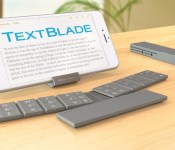
WayTools today debuted the TextBlade, a compact, collapsible keyboard that’s just a third of the size of an iPhone. Instead of using traditional keyboard layout, it uses “next-gen key switch technology” to allow users to type using just eight large smart keys that represent the entire alphabet.
Described as the first MultiTouch keyboard, the TextBlade weighs 1.5 ounces and lasts for a month in between charges thanks to the lithium polymer battery built into the spacebar. Charging takes less than an hour and works through any USB port.

The TextBlade is collapsible and uses built-in magnets snap the pieces together into a form factor thats “as easy to carry as a pen,” which was WayTools’ main goal for the product. Its keys use a technology called “MagLever,” which the company says is superior to a rubber spring keyboard with no drag, stretch, or wear.
TextBlade is brimming with advanced technology, including the World’s first physical MultiTouch Keys, ultra low energy Bluetooth Smart, and the first MultiLayer Keys, bringing symbols and editing to home row … all engineered into the most compact touch-type machine ever produced.
TextBlade uses the same character map as a traditional QWERTY keyboard, allowing people to use the same fingers to select the same letters as they would on a standard keyboard. This function makes typing on the TextBlade “instantly familiar” according to WayTools. The keyboard’s eight smart MultiTouch keys are also described as “MultiLayer,” allowing them to be used to select symbols and make edits quickly. All keys one might expect to find in an iOS-compatible keyboard, including keys for accessing audio controls and Siri, are included in the TextBlade.
Keyboard covers shrink keys, and fatten your tablet. Not TextBlade.You get full 19mm finger spacing – the same as a desktop.Precision keys outperform a MacBook Pro, with full 2mm travel and extra large keytops. TextBlade’s innovative frameless array eliminates all keyboard shudder, with rock-solid grip that hugs the table closer than a MacBook Air, so it’s even easier on your wrist. TextBlade’s ultra-low profile is half as thick as an iPhone 6.
TextBlade can be pre-ordered from the WayTools website for $99, and will begin shipping out to customers in February.

EA Announces ‘The Sims 4’ Will Launch on Mac in February [Mac Blog]
EA today announced via Twitter that the newest game in The Sims franchise, The Sims 4, will be coming to the Mac in February. The Sims 4 was first launched on the PC in September and EA initially promised a 2014 Mac launch for the game, but was unable to meet that target.

As with other games in the franchise, The Sims 4 invites players to create and control the lives of virtual characters, establishing relationships, building homes, and helping them advance through their careers. The Sims 4 has received some criticism for gameplay changes and features that were stripped from the previous game, but EA has pledged to return at least some of that former functionality to the game in the future.
The Sims 4 has received several content updates since its September launch, adding in ghosts, pools, and holiday decor. The game’s first “Game Pack” expansion, The Sims 4: Outdoor Retreat will launch next week, adding new objects, features, and gameplay options.
Mac users who may have already purchased the PC version of The Sims 4 will be able to download the Mac version of the game at no additional cost. Though EA says the game will launch “next month,” there is no specific release date specified at this time.

AllCast Lands on iOS With Streaming Media Support for Apple TV, Roku, Xbox, and Fire TV [iOS Blog]
The popular Android-only AllCast media streaming app has now made its way to the iOS App Store. The app allows users to stream media to a variety of smart TVs and standalone set-top devices such as the Apple TV, Roku, Xbox, and Amazon Fire TV.

The app uses DLNA to stream media and requires only minimal configuration before users can stream to any media device on the same wireless network as their iPhone or iPad. The setup varies with each device — Xbox 360 owners must enable the “Play To” option in the settings, while Fire TV owners must install the AllCast app for the Fire TV. Once configured, users can open the AllCast app for iOS, select their media, and choose the connected streaming media device to start playback.
AllCast is similar to Apple’s AirPlay technology, an Apple-developed streaming system that allows Apple owners to wirelessly stream content on their iOS devices and Macs to their HDTVs and speakers. Unlike AllCast, AirPlay also supports mirroring that uses an Apple TV to display a Mac or iOS device screen on an HDTV.
The AllCast app is available for free in the iOS App Store and is compatible with both the iPhone and iPad. A $4.99 in-app purchase unlocks a premium version that removes all advertisements and allows for the playback of longer video streams. [Direct Link]

