



Netatmo reveals designer bracelet that helps to protect your skin from sun damage

Netatmo’s adding a dash of fanciness to this year’s parade of wearable announcements at CES. The firm, known for its thermostat and weather monitor, unveiled the June bracelet: a wrap around piece of arm candy with a gem stone-like sensor that measures sun exposure. Since it was designed by Louis Vuitton and Harry Winston collaborator Camille Toupet, it looks a lot chicer than most wearables out there. The downside, however, it that it doesn’t have its own display. Instead, it syncs with an iOS app, which not only displays how much sun you’re getting, but also tells you what SPF number your sunscreen should have and when to wear shades or a hat. When it starts shipping in the second quarter of the year (or so the firm hopes), it’ll come with a $99 price tag and will be available in platinum, gold or gunmetal. That sounds expensive for something that fills an extremely specific niche, but if you usually pay more than that for jewelry, we imagine it might be a worthy investment.
Filed under: Peripherals
Via: Mashable
Source: Netatmo

Pandora’s Android app gets an alarm clock function, right on time

There’s no denying it — many people will need extra motivation to get up at a reasonable hour after sleeping in during the holidays. It’s a good thing, then, that Pandora has just given its Android app the alarm clock and sleep functions that reached iOS nearly a month ago. Most of the functions are the same. You can still tell Pandora to wake you up to your favorite streaming station, and you can hit the snooze button if you’re not quite ready to greet the new day. Android users do get a few OS-specific perks, including support for recurring alarms and the luxury of switching apps once the alarm has been set. If you need some tunes to make the early morning a little more bearable, you’ll want to swing by Google Play to grab Pandora’s update.
Filed under: Cellphones, Mobile
Via: The Next Web
Source: Google Play, Pandora
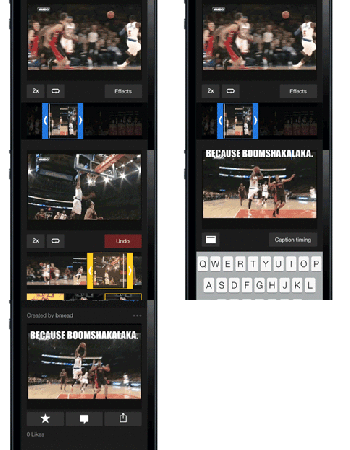
Yahoo Sports for iOS adds Loops for capturing clutch catches, epic fails

Fancy making your own social media commentary during the big game? Yahoo Sports for iOS now lets you capture those monster dunks in animated GIF form. The company has officially labeled the creations Loops, and users can add their own commentary as captions on top of the moving picture. As you might expect, files can then be shared via Tumblr, Twitter, Facebook and e-mail. Not to be left out, the app was revamped for iOS 7 with speedier performance in its sneakers. For a look at some samples, click over to the source link and take a peek.
Source: Yahoo

Super Bowl XXVIII will be streamed for free on Fox Sports website and app

The past Super Bowl live streams have been wildly successful, so it’s no surprise that fans will again be able to watch each touchdown online for the third year in a row. Fox Sports, the channel in charge of this year’s coverage, will start broadcasting Super Bowl XXVIII (including Bruno Mars’ halftime songstravaganza) on its streaming website and iOS app at 6:30PM on February 2nd. In addition to the big event (and the interesting commercials that go with it), Fox Sports will also stream its NFC coverage starting January 5th. According to Variety, only cable TV subscribers of certain providers can access the games, but Fox has yet to confirm that info. If that’s true, well, fans can always watch the AFC playoffs on CBS’ online portals instead.
[Image credit: Stephen Luke/Flickr]
Source: Variety, FoxSportsGo, iTunes

Ring in the new year from your phone with the Times Square Official Ball App
 2014 is approaching fast, it’s only a few hours a way, and if you can’t be in New York City or near a TV, you can see one of the most famous ball drops right from your Android device.
The app isn’t new, but if you deleted the official app from the Times Square Ball Drop since last year, be sure to download it again so you don’t miss out on ringing in the new year with the rest of the world.
The raising of the ball starts at 6 p.m. EST and then be sure to tune in right before midnight with your 2014 glasses and champagne (if you’re of age, of course) to catch the main event.
Happy New Year from AndroidGuys! We can’t wait to continue bringing you guys coverage of all things Android in 2014!
RING IN THE NEW YEAR WITH THE FREE OFFICIAL 2014 TIMES SQUARE BALL APPS
Watch the Live Webcast and Talk with the Ball on Twitter for a unique live perspective on the Times Square New Year’s Eve Celebration
Revelers across the globe can get up close and personal with the New Year’s Eve celebration in Times Square with the free official 2014 Times Square Ball Apps, from the Times Square Alliance and Countdown Entertainment, organizers of Times Square New Year’s Eve. For the first time, users will enjoy the mobility of watching the Times Square New Year’s Eve celebration at home, work or anywhere in the world while conversing with the Times Square Ball who will share his unique perspective of the performers, revelers and other festivities happening in Times Square via Twitter.
Now available on Android and Apple devices, the new 2014 Times Square Ball App continues to grow in popularity with nearly 500,000 downloads from 162 countries across the globe. Revelers worldwide from Afghanistan, Argentina and Australia to Ukraine, Vietnam and Zimbabwe will use the app to watch the official Times Square New Year’s Eve webcast.
Additionally, the Times Square Crossroads App, brought to you by the Times Square Alliance, will be available for revelers to tune into the New Year’s Eve live webcast and learn more about events at the Crossroads of the World.
The live, six-hour commercial-free webcast will be hosted by returning national television and radio personality Allison Hagendorf (Host on The CW, VH1, Fuse TV, AXS, SiriusXM) and will cover the action and excitement in Times Square, including the Ball Raising at 6 p.m. EST, live musical performances, and hourly countdowns with network television hosts and other celebrities in Times Square as the anticipation builds towards the midnight countdown and the famous Ball Drop. Allison will be joined by three correspondents who will provide backstage access, behind-the-scenes stories, and interviews with revelers, performers and other special guests. This year’s show will also feature an exclusive reveal of AP’s Year-End News Highlights video and an exclusive clip from the upcoming movie The Amazing Spider-Man 2™.
“In response to the tremendous worldwide enthusiasm,” said Jeffrey Straus, president of Countdown Entertainment, “we are again providing the official live viewing experience for users of mobile phones and tablets to interact with the Times Square Ball and the world’s most famous New Year’s Eve Celebration.”
“With the new Times Square Crossroads App, revelers around the world can experience the energy of New Year’s Eve in Times Square and watch the global celebration, including live musical performances, interviews with celebrities and the magical Ball Drop at midnight, all on their mobile devices,” added Tim Tompkins, president of the Times Square Alliance.
“New Year’s Eve 2014 marks the fifth year Livestream brings the celebration in Times Square to millions around the globe in real-time,” said Max Haot, co-founder and CEO of Livestream. “Now, with the reimagined Times Square Ball App, we’re bringing a live, social experience to the fingertips of revelers worldwide.”
The official 2014 Times Square Ball App is now available worldwide for free download through Apple’s App Store and via Google Play for mobile phones and tablets. The Ball App can be found in Entertainment, Travel, and News categories.
The Times Square Ball App was produced by Monday Sessions Media, developed by HAAS/créa, with streaming components developed by Livestream LLC. Device requirements:
- Apple products: iPhone, iPod Touch, iPad. Requires iOS 6 or later. 9.1MB (size of App)
- Android products: Requires Ice Cream Sandwich 4.0 or later. 4.6MB (size of App)
App images, demonstration video, and download available at: http://timessquareball.net/app/
The Times Square Crossroads App is now available worldwide for free download through Apple’s App Store and via Google Play for mobile phones. The Crossroads App can be found in the Travel category. The Times Square Crossroads App was developed by BarkleyREI, with streaming components developed by Livestream LLC. Device requirements:
- Apple products: iPhone, iPod Touch. Requires iOS 6 or later. 6MB (size of App)
- Android products: Requires Gingerbread 2.3 or later. 3.5MB (size of App)
To join the Times Square New Year’s Eve conversation on social media, follow #BallDrop.
Follow the Times Square Ball on Twitter at twitter.com/timessquareball
Like the Times Square Ball on Facebook at facebook.com/timessquareball.
For more information about Times Square New Year’s Eve, visit TimesSquareNYC.org.
The post Ring in the new year from your phone with the Times Square Official Ball App appeared first on AndroidGuys.
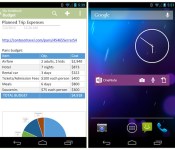
Microsoft’s OneNote Android app updated with native sharing and widgets

Since its major overhaul back in July, Microsoft’s OneNote Android app has languished while the company built out the Windows version of its note-taking tool. That changed today after Microsoft pushed live a new update to the Play Store, which includes new capture, sharing and widget features that Microsoft believes will help you get “more things done in less time.” The updated app now integrates with Android’s built-in sharing intents, allowing you to pull up a native sharing menu inside apps and immediately add new content to your OneNote account. Microsoft’s also added a number of OneNote widgets, embedding options to view your most recent photos, recordings and notes, let you add new content and pin homescreen shortcuts to your favorite pages or notebooks. With its revamped UI, the Android app is almost at feature parity with OneNote for Windows 8.1, giving us a real reason to consider it over rival note-taking apps like Evernote.
Filed under: Internet, Software, Mobile, Microsoft
Source: OneNote for Android

Fitbit app lets you track activity with just your iPhone 5s, no Fitbit device required

Fitbit updated its iOS app today, bringing, perhaps most significantly, the ability to track “basic” activity on an iPhone 5s, without the company’s proprietary wearable. Using Apple’s motion-sensing M7 chip, the app’ll track your steps, distance and the number of calories you’ve burned. You can also utilize features like food and weight tracking, fitness goals and add friends on the app by downloading it in the source link below and tapping on the “No Fitbit Yet? iPhone 5s tracks the basics” text. So you can start those New Year’s resolutions now — and, the company no doubt hopes, get in on the FitBit experience before picking up the wearable.
Filed under: Wearables
Source: iTunes, Fitbit Help

Nike updates Training Club app to help you keep those New Year’s resolutions

You know what always comes after pigging out during the holidays: a New Year’s resolution to get fit, this time (you swear!) for sure. Well, Nike’s hoping to kickstart your quest to fitness by updating its Nike Training Club (N+TC) apps for Android and iOS. New features include the ability to customize exercise routines, as well as earn reward content and sharable milestones whenever you reach a goal. Nike has also added six new exercise videos (of athletes and celeb trainers) to its archive of more than a hundred. Other than that, the app’s now more tightly integrated with other Nike products: it’s now possible to add minutes from each run on the separate Running app to your N+TC total, and you can tag N+TC sessions on the FuelBand app. The update will hit both platforms’ app stores on December 31st — just in time to make you feel less guilty about that third slice of cheesecake on New Year’s Eve.
Source: Nike, Google Play, iTunes

BlackBerry urges BB10 users to roll-back its glitchy Twitter app

After loads of BB10 user complaints, BlackBerry is pulling the latest Twitter update from its app market. Should you still need your 140-character fix however, the beleaguered smartphone maker has a solution: roll back to the application’s previous version — 10.2.1 — via the simple step-by-step instructions posted on its blog. First, delete Twitter from your device. Then, open BlackBerry World, refresh it and search for the micro-blogging service by name. Voila, a (hopefully) stable app should appear. If anything, this proves that the QWERTY king listens to more than just those in its boardroom. So, the next time that you notice an app go wonky, speak up — it likely won’t be in vain.
Filed under: Mobile, Blackberry
Via: Mobile Syrup
Source: Inside BlackBerry

Carrier site helps Americans watch out for data-hungry mobile apps

American carriers warn you when you’re using a lot of data, but they don’t always tell you how to avoid that usage in the first place. Thankfully, they’re taking a more proactive stance with the launch of their Know My App site. The CTIA-run page shows the typical data consumption of popular mobile apps and compares it against capped US wireless plans. You’ll want to avoid using bandwidth-heavy apps like Netflix when away from WiFi, for instance, but miserly software like Candy Crush Saga is safe even with basic internet service. Know My App won’t be of much use to mobile veterans — or anyone holding on to unlimited data for dear life — but it could prove vital to newcomers who don’t yet know how to keep their wireless bills in check.
Filed under: Cellphones, Wireless, Internet, Mobile
Via: PCWorld
Source: Know My App
 AIVAnet