



Xbox One SmartGlass beta apps bring TV controls to Android, Windows and Windows Phone

Microsoft only just revealed it would test new TV remote features on the Xbox One and its associated SmartGlass apps, and Windows Phone Central points out that right now anyone can give them a try. All you need is one of the game systems and a device running Android, Windows 8 or Windows Phone 8. We tried out the apps and they install right alongside the standard Xbox One Smartglass apps, although there are some known issues and rough edges. The smiley face button serves as a way to report any issues, but overall things worked smoothly, and we were able to navigate recordings on a standard Comcast DVR or surf through the OneGuide without a problem. Download the apps now and try them via Google Play, the Windows Store or Windows Phone Store — we haven’t spotted a beta version for iOS yet.

Filed under: Gaming, Home Entertainment, HD, Mobile, Microsoft
Via: WPCentral, Android Central
Source: Google Play, Windows Phone Store, Windows Store
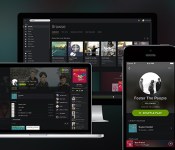
Spotify’s new design is cleaner, darker and puts the focus on content

If you’re using Spotify on the web, desktop or iOS you should notice a pretty massive change starting today. (The new look should be coming to Android “near future.”) The company is launching its most dramatic overhaul since its launch in 2008. Most noticeably, it’s flat and dark. Like Swedish death metal dark. The gray and white elements it experimented with over the last couple of years have been banished and it has returned to its roots with a UI that is primarily black and slightly lighter black. Sure, there are still green highlights and the new rounded (dare we say finger-friendly) icons are a lighter shade of gray, but the overall effect is one where the most important element — the content — jumps off the background.
Of course, if Spotify simply painted everything black that wouldn’t be big news. The redesign touches on almost every element of the experience. The edges are softer, there’s a heavy use of blurring on background images (especially in the mobile app) and there’s a new typeface, Proxima Nova, that’s clean and heavily rounded. Despite the starkness of the UI elements, these touches make the app feel warm and inviting. The new look also borrows flourishes from social networks. Artist and user pages now feature a round profile image against a large cover photo and content is now presented as image-heavy cards when browsing. Those round profile photos also give you a quick visual cue to let you know a card is for a person or artist, rather than a song or album. In general you’ll notice a lot more images throughout the interface, and big ones at that.
The overall look is not that unlike a dark cousin of Google+, at least in the browser. The desktop client uses many visual elements as the redesigned web player, but still retains some of the more traditional media manager elements. The mobile app employs a heavy does of transparency and slides around individual UI elements to keep them out of the way and maximize screen real estate. It also makes the shift to a tabbed interface that more inline with modern design trends.
The changes are not purely cosmetic either. The company has finally fully implemented search as you type across all platforms, and it’s blazingly fast. This will also be the first time that many users will get to enjoy collections — a feature that has been rolling out painfully slowly. Rather than being forced to save albums as playlists, users will simply be able to add them to their library for quick and easy access.
For more about Spotify’s effort to breathe new life into its streaming music service, read our additional coverage here.
Filed under: Home Entertainment, Internet, Software, HD, Mobile

iWork upgrade lets you share read-only documents

Apple isn’t letting the launch of Office for iPad go completely unanswered. It’s pushing out a slew of iWork updates that might not keep Microsoft awake at night, but should fill in a few conspicuous feature gaps. You can now share read-only documents, for one thing — you no longer have to worry that others will mess with a Pages report. You can also open iWork documents from iCloud webmail, and there’s a host of cross-app improvements that include a new editor tab and the option of modifying imported charts. All the upgrades are available on iCloud, iOS and the Mac, so you can check out the many, many tweaks for yourself.
Filed under: Cellphones, Tablets, Internet, Software, Apple
Via: 9to5 Mac
Source: iWork for iCloud, App Store

Google to focus on portrait shots and effects with improved camera app

We know that Google has been looking to bring more advanced photo features to Android for a while, but it may soon be ready to show off what it’s been working on. Sources aware of Google’s plans have confirmed to us that the search giant is currently testing a new version of its camera app that will sport a refreshed UI, a background-blurring effect for portrait shots, and improved panorama and Photo Sphere modes. As part of its overhaul, we’re told that Google has finally fixed issues with the default camera’s photo framing, allowing users to snap images with a new 100-percent no-crop viewfinder. That means you’ll see exactly what your Android device will capture before you hit the shutter button, with no unwanted objects creeping in at the edges.
The company is also said to be making the camera app more extensible, by opening support for third-party filters. This will allow developers (and Android enthusiasts) to create and import custom effects inside the stock camera app. The camera app’s portrait skills may see some improvements too, with the addition a new lens blur mode that will take photos with a shallower depth of field, mimicking the effects you’d typically see in Nokia’s Refocus app and HTC’s new One. New high-resolution panorama and Photo Sphere modes have also been added, improving the quality of your sweeping shots.
While many are awaiting the release of Android 4.4.3, the latest version of KitKat, Google is set to make these camera improvements available to users by way of a standalone update. Our sources indicate that the app will exist separately so that non-Nexus owners running Android 4.4 and above will be able to take advantage of the improvements, without having to wait for an OTA update from their device maker or carrier.
Filed under: Cellphones, Software, Mobile, Google

Amazon Cloud Drive Photos app re-designed

Finding that view pictures or video from your cloud storage isn’t that fun? Amazon Cloud Drive Photos app has recently been re-designed with the goal of bringing enjoyment back to re-living all those duck face selfies you took last summer.
Amazon Cloud Drive Photos app is an app that lets you store your memories on the Amazon Cloud from your phone or tablet with 5 GB of space for free. You can store photos or videos up to 20 minutes in length and you are able to view them across mobile devices or computers. The app offers both automatic uploads of media or manual uploads.
The app has been re-designed completely in order make it easy for you to look at your pictures and video stored on the Amazon Cloud. The navigation has been simplified so that you get get to your most frequently used features. A nice addition has been the ability to sort your videos in one album and sort your photos and albums by date and name, features that were previously missing. In addition to that, Amazon has also included some upload enhancements that allow you see the process of your uploads.
Amazon Cloud Drive Photo Drive app is available on both the Google Play Store and the Amazon Appstore.
The post Amazon Cloud Drive Photos app re-designed appeared first on AndroidGuys.

Outlook Web App for Android will help your smartphone fit in at work

It’s easy to find Android phones that can handle the Exchange-based email you often find in the workplace, but they don’t always support all the latest features. That won’t be a problem for much longer, though, as Microsoft has just revealed plans to bring Outlook Web App to Google’s platform later this year. Much like its iOS counterpart from 2013, the Android release should let you take advantage of Office 365 technology that might not make it into third-party email software. The app may not be all that exciting by itself, but it could be the key to using your preferred phone for work instead of having to switch to company-approved hardware.
Filed under: Cellphones, Mobile, Microsoft
Source: Office Exchange Blog (1), (2)

The Free Movie and TV App, Crackle, Now Supports Chromecast
 If you need more reasons other than Plex, Vudu, YouTube, AllCast, Netflix and Hulu to spend $35 on a Chromecast device, how about Crackle. Crackle has been around for quite some time. It is an app that offers movies and tv shows of varying variety for you to stream and watch legally. Legally being the key word. You won’t find the latest and greatest flicks out, but you will find a movie list that is always changing. Often times you will even find flicks that aren’t available through Netflix to stream. For instance, Crackle has the Johnny Depp flick ‘The Rum Diary’ available to stream, where as Netflix only has it available on DVD.
There is a price to pay for free service though. You will have to deal with a couple commercials throughout your viewing experience. There are usually one or two before the movie starts and then a number of them throughout the movie.
 You can see where the breaks are in the bar there at the bottom, looks like 8 commercial breaks on this 1 hour and 36 minute movie. I have been personally using Crackle for a number of years on my Google TV boxes and phones. I am happy to see it updated with Chromecast support.


 If you have never used Crackle, or have a Chromecast and want to give it a looksy, then click down below and head tot he Play Store and pick it up. You can also just go to Crackle.com and watch right from your browser.

//<![CDATA[
ord = window.ord || Math.floor(Math.random()*1E16);
document.write('’);
//]]>

Google wants you to become a Pokémon master on April Fools

Google’s known for its weird and wonderful April fools jokes, but this year’s edition might be the best we’ve seen to date. Because it’s already April 1st in Australia and Japan, Google has introduced its “latest” build of Google Maps, laying down a “Pokémon Challenge” that requires you, a budding Pokémon Master, to discover and capture all of manner of creatures to fill up your Pokédex, simply by navigating around your local area. To start playing, make sure you have the latest version of Google Maps for iPhone or Android, hit the search bar and select “Press start.” You’ll have to be quick though, you’ve got until 2am on April 2nd to catch ‘em all.
Filed under: Cellphones, Internet, Software, Mobile, Google

Ultrakam lets your iPhone capture higher resolution film-like video clips

While Sony and Samsung are busy making phones with 4K recording capabilities, one developer has worked its pixel magic to get more from iPhone cameras. Ultrakam is the first iOS app capable of recording “2K” resolution with a film-like 24p frame rate, letting iPhone 5s owners shoot 2240 x 1672 pixel video (around 75 percent more pixels than regular HD) to output higher-quality footage than the default camera app. There’s support for the iPhone 5 and 5c, as well as the the iPad mini, iPad Air and iPad with Retina display, but the app is limited to high-definition and “2K” at 20fps on “older” devices.
Including an array of settings and various shooting modes that allow you to record higher bit-rate video and audio, with a minute of footage consuming up to 3GB of storage on max settings (expect that 64GB iPhone 5s to fill up fast), Ultrakam is primarily aimed at filmmakers. However, there’s plenty of neat features for regular users to show off their talent. It offers slow motion video, but again the iPhone 5s has all the fun, as it supports slow motion capture at 120fps over the iPhone 5′s 60fps. You can slow down your recordings by up to 10x if you choose the lowest preset. The app also supports timelapse shooting, offering custom configurations that will snap high resolution photos at set intervals, combining them to output a high-quality landscape. Once you’ve shot your footage, Ultrakam’s built-in player and editing tools let you play video, generate stills, color correct and share them with ease. Ultrakam is available on the App Store for $6.99 — a little more costly than your regular camera app, but the extra quality and advanced features may justify the price.
Filed under: Cellphones, Software, Mobile
Via: The Next Web
Source: Ultrakam, (App Store)
Organize colors as quickly as you can with Compulsive [App of the Day]

I know, I know. The last thing we’re all looking for is another addictive puzzle game. But Compulsive is so addicting that we can’t let it go!
The premise is simple. You have a grid of colorful tiles, and it’s your job to join the like colors together. You can move any tile wherever you’d like to create bigger groups, as long as it’s moved next to a like color. Join 4 or more colors together to clear them from the game board. Easy, right?
There is one thing, though. When you move a tile, the two colors swap places. Here’s where the strategy comes in. You need to move them strategically so the tile that you’re moving lands next to a like color, otherwise it will be difficult to create big groups.

The game is complete with a few different game modes – Arcade (timed), Strategy (limited moves), Zen (free play), and Multiplayer. Multiplayer mode is set up through Google Play Games, so you can play against anyone you’d like.
Getting rid of ads will cost you $.99, but honestly, there aren’t that many to begin with.
Pick up Compulsive for free on Google Play!
The post Organize colors as quickly as you can with Compulsive [App of the Day] appeared first on AndroidGuys.

