


Samsung’s ChatON now lets you recall those embarrassing messages

In an effort to get owners of its smartphones to actually use ChatON, Samsung has thrown numerous features at the messaging app to see what sticks. For instance, it’s just gifted inveterate file sharers with 1GB media transfers and given FourSquare types the ability to divulge their position and route via Glympse. But it also came up with a feature that may resonate more: the ability to cancel a missive. Provided you’re in a one-to-one chat, you can now tap the message bubble and hit “recall” to delete a text on the recipient’s device, even if they’ve already read it. Samsung says that’ll be handy if you text the wrong person, but we know what that feature’s really for.
Filed under: Software, Samsung
Source: Samsung

Evernote’s Penultimate for iPad now behaves more like a real notebook

Penultimate is supposed to mimic a notebook on your iPad, so it only makes sense that the app’s interface should mirror the pen-and-paper experience as much as possible. Right? Evernote thinks so, as it has released a Penultimate update that gets closer to the real thing. You can swipe from off-screen to turn pages, and you can set a color for every pen width; effectively, you now have a collection of favorite pens. Not all of the updates are meant to simulate analog drawing. Penultimate notes look much nicer when seen from Evernote, and there are improvements to ink rendering, palm recognition and connections with Jot Script pens. The upgraded app still won’t replicate the feel of actual notebooks, but you might not miss them quite so much.
Filed under: Tablets
Via: The Next Web
Source: App Store, Evernote Blog

Facebook Messenger for Android lets you pin chats right to your home screen

Facebook’s big-spending CEO presumably has a grand plan for Messenger, now that he’s gone to such great lengths to own WhatsApp. For the time being though, his company is continuing to focus on subtle but useful changes to its homemade apps, with the Android version of Messenger just receiving an update to version 4.0. In line with the last week’s iOS update, one of biggest new features is the ability to bunch your friends into groups and then pin these gatherings to a dedicated Groups tab, so you can quickly bombard the right people all at once. Unlike iOS, however, you can now also add a shortcut to any group or conversation directly from your Android home screen, letting you open up a floating chat head with a single tap, with no need to navigate through the app. That’s the sort of convenience that reminds us why a dedicated Facebook phone was always so unnecessary.
Filed under: Cellphones, Tablets, Internet, Mobile, Facebook
Source: Google Play Store

Blizzard takes a stab at mobile gaming, brings its free card game to the iPad

Blizzard hasn’t really had a presence in mobile gaming… not unless you think the Battle.net Authenticator is rip-roaring entertainment, anyway. However, the developer is giving the category an honest try today by releasing Hearthstone for the iPad. Much like on the desktop, the free-to-play card game lets you fight both real and virtual opponents as you build up a collection of Warcraft-themed minions and spells. Decks sync between devices, so you won’t have to start from scratch. The title is currently available on the App Store in Australia, Canada and New Zealand; more countries are coming soon, and those using Android, iPhones and Windows tablets can also expect to play in the near future. The iPad app isn’t likely to replicate the off-the-charts success of Blizzard’s PC titles, but the company has to start somewhere. And besides, we’ve seen the problems that some major game producers have faced after downplaying the importance of phones and tablets — Blizzard may be wise to cover its bases.
Via: AppAdvice

Google infuses Play Newsstand, Movies & TV and Keep apps for Android with new features

While Microsoft was busy announcing its updated mobile platform (among other things) today, Google spent its time pushing updates for its Play Newsstand, Movies & TV and Keep apps for Android. Newsstand’s update, in particular, makes it easier to discover more things to read. New tabs on the “Read now” menu provide instant access to sections like business, entertainment and sports, while the My News and My Magazines pages have been combined to form a 2-in-1 destination called My Library.
The Play Movies & TV app, on the other hand, now has a navigation bar that bundles Settings and Help & Feedback within a slide-out window, as well as a Google account switcher on top. Android Central also noticed that you can now slide a finger on the screen to rewind or go forward either continuously (if you don’t lift your finger till you get to the part you want) or in 10-second intervals. Finally, Google’s Keep note-taking app can now return image-only entries when you do a search, since it finally parse text written on photos like Evernote does. It also has a new Trash view that gives you access to deleted entries for up to seven days (after which, they’re gone forever), and it now automatically moves checked entries to the bottom of lists. These updates should hit your Android phones and tablets soon enough, if they haven’t yet.

Filed under: Cellphones, Tablets, Mobile, Google
Via: Android Central (1), (2)
Source: Google Play Newsstand, Google Play Movies & TV, Google+, Google Keep

Lifelogging camera Autographer reaches out to Android users

Having a photojournalist follow us around all day could work out to be pretty expensive, which is why we liked the idea of Autographer’s neck-worn lifelogging camera – even if we didn’t appreciate the low-fi picture quality. In any case, the device’s creators are continuing to improve the product, releasing a companion app on Google Play that opens it up to Android users. The company can’t fix the camera’s weak sensor, but at least there’s an identical set of features to what’s on the iOS counterpart.
Filed under: Cameras
Source: Google Play
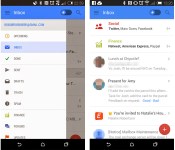
Gmail’s mobile app may soon let you snooze and pin messages

As useful as the mobile Gmail client can be, it hasn’t always stacked up well against third-party apps with special tricks up their sleeves. If features that Geek.com spotted in a test version of Gmail for Android make the cut, though, you may have more reasons to stick with Google’s official app. The experimental software lets you snooze messages until you’re ready to deal with them — if you’d rather not look at a bill until the day it’s due, you can. Alternately, you can pin email to make sure an important conversation stays on top. Finance, Purchases and Travel tabs have also slipped into the interface alongside more familiar sections. There’s no guarantee that any of the new features will survive the testing process, but at least some of them should be useful enough to reach a publicly available version of Gmail.
Filed under: Cellphones, Internet, Mobile, Google
Source: Geek.com

Amazon feature Sonic CD as Free App of the Day

Amazon are offering the Sonic CD app on their Appstore as their free app of the day and it’ll save $2.99.
Sonic CD takes you back to the traditional platform scroller that we were all used to and now you can enjoy it on your Android device for free.
Amazon change their featured app daily, so be quick and grab it before it goes back up again.
The post Amazon feature Sonic CD as Free App of the Day appeared first on AndroidGuys.

Spotify releases an all new design across its apps

Spotify are today releasing an update which you’ll notice will change the look of the music streaming service across all of their applications and platforms.
Called “Cat” internally, the design is said to be inspired by iOS 7 and is focused on placing emphasis on the content. That includes frosty panes, clean sharp icons, and circular album art.
“We have this metaphor of stepping into a theatre — when you dim the lights, the content comes forward,” Michelle Kadir, director of product development at Spotify, told Wired.co.uk. “We wanted to use that for ourselves and the product.”
A ‘My Music’ feature will also be focused on which contains all your music you’ve liked, starred, or added to a playlist. When you hit the plus button alongside a song, artist, or album, it will automatically be added to the new ‘My Music’ list rather than having to specify an individual playlist. Starred items will remain, however.
Spotify has been working on the new design for six months in order to perfect it and it says it sees this as a “first big step of many this year.”
The new design is rolling out starting today, and will be available across Android, iOS, Windows Phone, Mac, Windows, and Web Browser as the day progresses.
The post Spotify releases an all new design across its apps appeared first on AndroidGuys.
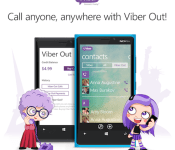
Viber’s Windows Phone 8 app now allows you to call any number you want

How does Viber celebrate being acquired for a ton of money? By bringing one of its most popular features, Viber Out, to Windows Phone 8 — that’s how. In second thought, we’re probably way off. Still, the Skype rival has indeed updated its WP8 application, celebration or not, allowing users to now make calls to any phone number thanks to Viber Out. This new version also lets you send video messages and multiple photos at a time, while added Bluetooth support should make it easier for you to enjoy some hands-free action. As usual, you can grab the update from the Windows Phone Store — and feel free to share your Viber 4.1 impressions with us in the comments below.
Filed under: Cellphones, Internet, Software, Mobile, Microsoft
Source: Windows Phone Store
 AIVAnet