



San Francisco Giants (and most of MLB) adopt Apple’s iBeacon for an enhanced ballpark experience

“It’s kind of a no-brainer.” That’s what the San Francisco Giants’ Chief Information Officer, Bill Schlough, said when asked why the team is implementing Apple’s iBeacon technology this season.
For the uninitiated, iBeacon is a small Apple device that communicates with iPhones through Bluetooth to expand the location services in iOS. In practice, it’s a marketing tool that lets apps know when you approach or leave the presence of an iBeacon. This is the first season that pro baseball is implementing the technology with 20 of the 30 Major League Baseball teams participating, though retailers have been using it since last year.
For the Giants, the technology is another way to better engage with fans. “Mobile and digital experiences are paramount to our fan experience,” according to Schlough, “and they have played a role in the fact that we’ve had 246 straight sellouts.” (Winning two World Series in the past five years probably doesn’t hurt ticket sales, either.)
The Giants have long been one of the most technologically progressive organizations in baseball. Fans first enjoyed in-stadium cell coverage in the early 2000s, and in 2004 the club became the first in professional sports to turn its stadium into a WiFi hotspot. Currently, there are 1,289 WiFi antennas blanketing AT&T Park with connectivity good enough to stream video to thousands of fans. Plus, during the offseason, when the Giants installed the iBeacons (it only took a day to do it), Schlough’s team put in an entirely new LTE backhaul system to deliver more mobile bandwidth to ticket holders.
All told, 19 iBeacons are located at all of the fan entry and exit points of the ballpark, per MLB policy. That number will vary at other stadiums — the Dodgers, for example, are reported to have 65 installed, presumably due to the presence of more ways to get inside Dodger Stadium. They’ll be used to check fans in (think Foursquare) upon entry, assuming they have an iOS 7 device running the MLB At the Ballpark app and have Bluetooth turned on when they walk through the gate. The app’s available to both iOS and Android devices — and provides maps, concession info, video clips and the ability to upgrade your seat — but only folks with Apple devices benefit from the bespoke iBeacon experience.

Once checked in, teams can push tailor-made notifications and relevant offers through the app. Fans need not fear that they’ll be bombarded with junk, though, as MLB is soft-launching the technology as a pilot on Opening Day, and there are restrictions on its use… at first, at least. “We don’t want to turn this into some sort of SPAM engine,” says Schlough. So, the club’mms exploring new and creative ways to use the devices to improve, not take away from the gameday experience. Of course, users can always opt-out of the program altogether, too.
Generally speaking, iBeacon strategy is controlled by MLB: the league tells teams where to place the hardware and what sorts of stuff can be sent to folks who check in using the technology. For now, that means fans get a welcome message when they check in, and maybe an offer to upgrade their seat or get a discount on concessions. Schlough wouldn’t tell us exactly what kind of offers the Giants will be making, but he did say that he’s particularly excited about geo-targeting. “It opens up a world of possibilities,” he says, indicating that iBeacons could enable the club to send notifications about activities happening nearby (not everyone sits and watches the game from their seat) or target offers for specific parts of the park.
The expectation is that MLB will let clubs “get more creative” once iBeacon has proven stable and useful for fans. Naturally, the Giants don’t know when that’ll be, but the team will have things ready to go whenever the league office gives the go-ahead. Until then, Schlough’s biding his time and figuring out how to best use iBeacon to service one of the most tech-savvy fan bases in the bigs.
[Lead image credit: Jeff Chiu,AP]
Filed under: Cellphones, Software, Apple
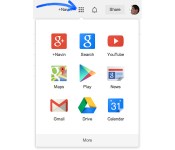
Google now lets you arrange its web apps just the way you like them

Google’s web-based app launcher can be very handy… unless the app you want is at the bottom, that is. Thankfully, the search firm has just taken some of the frustration out of its interface by letting you drag and drop app icons to reorder them however you like. If you always check Google Finance at the start of the day, you just have to bring it to the top. It’s a simple change, but it could save you from creating bookmarks just to reach Google’s services a little faster.
Via: Google (Google+)
Source: Google Support

Office Mobile is now completely free to use on Android and iPhone

Today’s Office news isn’t all about the iPad. Microsoft now lets you use Office Mobile completely for free on both Android and the iPhone; if you’re a home customer, you can both edit and read documents without paying for an Office 365 subscription. The gratis apps are ultimately meant to encourage use of the desktop and iPad clients, where you do need to pay for full access. Even so, it’s hard to object to having another free tool for tweaking company reports while on the move.
Filed under: Cellphones, Mobile, Microsoft
Via: Android Central, Office Mobility Blog
Source: Google Play

Timehop comes to Android – “Did I really say that?” [App of the Day]
The popular iOS app, Timehop, is finally on Android, and it’s here to make you feel infinitely nostalgic.
Timehop gives it’s users an easy way to look back in time. It’s basically a feed of your favorite social networking sites, but only shows posts from a couple of years ago. If you’re unfamiliar with it, we’ll walk you through it.
The app is overall really easy to use. Login to your Facebook, Twitter, Instagram, or Foursquare accounts, and your feed populates with posts that happened around this time a few years back. It gives you posts that happened 1-4 years in the past, reminding you of your sleepless nights in college, or how excited you were when Ace Ventura came on television. Also, if you’d like to share any of these posts to Facebook or Twitter, you can do so with a few easy clicks.

Timehop is a simple application that doesn’t try to do too much for it’s own good, and that’s why we enjoy using it. Download it for free from Google Play!
Via: TechCrunch
The post Timehop comes to Android – “Did I really say that?” [App of the Day] appeared first on AndroidGuys.
Runtastic announces new Hydration feature, revamped app, and more
A new design, new features, and improved functionality are making it to the app, just as the company passes a big milestone.
Runtastic has long been one of the most popular fitness apps across every mobile platform. Today, they’re announcing the new version of their app, as they surpass 70 million downloads!
The new app has been in the works for over a year now, and they are very excited to release all of the new features. Runtastic 5.0 has a more polished, cleaner look, offering a better overall user experience. They’re also adding more customization options to just about everything in the app.
What’s possibly the best news is the new Hydration feature, giving users personalized hydration recommendations almost instantly after the workout. It now takes into effect local weather conditions, personal statistics, and activity details to ensure the correct amount of water is recommended.
The new update also moves some PRO features to the free version of the app, including the Music Player and LIVE Tracking & Cheering. Runtastic Training Plans are also available on the Android app, and can be purchased via Runtastic.com or the app.
So, with all of this being said, how much have you really been focusing on your New Year’s resolution? Especially with Spring right around the corner, this is as good a time as any to download the app!
Press Release
Runtastic ‘Ups the Ante’ with Flagship App as Company Reaches 70 Million Downloads
New Hydration Feature Helps Users Make Informed Decisions with Post-Activity Insight
San Francisco, CA – March 27, 2014 – Today Runtastic – an innovative suite of apps, products and services that track and manage health and fitness data to motivate individuals to get in shape, stay healthy and improve overall fitness – announced a brand new version of their flagship app, Runtastic. Over the past year, the award-winning app has undergone a complete transformation, incorporating user feedback, expert knowledge and industry trends. The result is a revamped design and user experience, as well as new features and improved functions. This announcement comes as the company surpasses 70 million downloads worldwide.
“It’s impossible to make progress by standing still or becoming complacent,” says Florian Gschwandtner, CEO of Runtastic. “We’re confident that the new Runtastic app will help inspire and enable our users to continue on their health and fitness journeys with renewed focus, motivation and passion.”
Fresh Design & Enhanced Experience
Runtastic 5.0 boasts a clean, modern design that provides users with a more polished and engaging experience. Screens and navigation options can be easily customized to meet users’ personal preferences, and state-of-the-art technology allows data to sync seamlessly and effortlessly between the Runtastic app and users’ personal Runtastic.com accounts. The app has also been enhanced to run consistently across multiple platforms, while simultaneously utilizing and capitalizing on each operating system’s unique functions and characteristics.
New Feature to Keep You Hydrated
Hydration is a key component of staying healthy and becoming fit. That’s why a new feature in the Runtastic app takes into account users’ activity details, personal stats, local weather conditions and more to provide a post-activity hydration suggestion. In the past, when a Runtastic user finished an activity, they would only have the opportunity to input activity details. While this ever-popular functionality is still present and useful, the hydration feature takes tracking to the next level by offering an instantaneous hydration recommendation based on user-specific data.
“We need to continue moving beyond simply tracking and aggregating data,” says Gschwandtner. “The hydration feature is one great example of how we can coach users and help them make a healthy, informed decision, at precisely the right moment, using their unique, personal data.”
New & Improved Features
For the first time, Runtastic Training Plans are available on Android devices and can be purchased either within the Runtastic app or on Runtastic.com. Existing elements of Runtastic have also been fully-optimized and several features that were previously only available in the PRO version of the app, such as the Music Player and LIVE Tracking & Cheering, are now available for free. These user favorites motivate Runtastics to engage with one another, share their activity with their social networks and ultimately achieve more advanced health and fitness accomplishments.
The post Runtastic announces new Hydration feature, revamped app, and more appeared first on AndroidGuys.
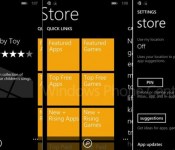
Windows Phone 8.1’s new store may help you find apps faster

Windows Phone 8.1 may not just add a bevy of software features — it may improve how you find software, too. WPCentral claims to have leaked details of a Windows Phone Store revamp in the OS that reportedly makes it easier to discover hot apps. Featured titles would take center stage in this new portal, and new sections would help you sift through fast-rising apps or specific categories. Upgrades could soon be less of hassle, for that matter. A new My Apps area would let you check for updates without waiting for notifications, and you could (finally!) tell Windows Phone to update apps automatically. There’s no certainty that this storefront will make it into the final WP8.1 release, but you won’t have to wait long for confirmation.
Filed under: Cellphones, Mobile, Microsoft
Source: WPCentral
Organizy App Review: Turn your phone into your grocery shopping Companion [SP]
 I’m not huge on grocery lists normally; I like to think that my memory is superior to any sort of written or electronic reminder, though in practice, I almost always forget some small thing. That’s where Organizy comes in; the grocery shopping list app from the developer with the same name that aims to make your shopping experience an easier and more efficient one.
Probably the first thing that you will notice about Organizy after a few minutes navigating yourself through its menus is that it has quite a nice user interface; menus slide in and out when required and it works smoothly. It’s not quite ‘Google Cards’-nice, but it does the job and looks great doing it. There are also alternate themes to use depending on your preference and Organizy also supports 6 other languages besides English (Russia, Spanish, Japanese, Italian, German and French).
 While Organizy is a simple app, the developers have still been thoughtful enough to include a help file that goes through all the different functions and interactions you will have with the Organizy app.
 To start a shopping list, all you need to do is press the add list symbol in the top right and enter a shopping list name. Once that is done, you can add items one by one. The process for this is surprisingly easy as Organizy has a existing library of groceries you might be looking for; start typing apples and Organizy will suggest all the options it has with the word “apple” in it. While the lists aren’t exhaustive, it’s a nice touch, and you can always enter custom items yourself.
 You can also define the quantity of that item you wish to buy as well as the standard grouping term you want to use, such as “packet” or “item”. Again, the list isn’t exhaustive, though I was surprised there’s no option to add denominations of your own. There is also a space to add a comment for that item, and a chance to put the item into a specific category (the significance of this will be clear later). The nice thing about selecting on of Organizy’s existing groceries is that it will automatically assign that grocery a preset category, though of course you can set this yourself. Again though, I was disappointed there is no option to add your own category.
 Once your shopping list is complete, you will be able to see it in all its colour-coded glory. When using the list itself at the shops, marking off an item is as simple as swiping right which will strike-out the text. If however you realize you don’t actually need a particular item, getting rid of that entry is as easy as swiping left; if you do this by mistake, recovering the deleted item is as easy as giving your device a shake. If your list is cluttered with already found items, you can also remove them all in one fell swoop with the option at the bottom of the menu.
 You will remember I said to keep the specific categories in mind from earlier; there is one other function you can perform with your shopping list and that is to send or share it via another app. Using Google Keep as an example (you could easily do this with email, Facebook, etc. as well), Organizy will export the list as text with your shopping items organized by your categories including names and quantities. It’s not rocket science, but the formatting and the ability to do this is a nice touch.
 I like the Organizy app; it’s simple, but functional, which is pretty much everything you need from an app like this. You could argue that it needs, or would be better with additional features, but for what it is (a $0.99 app), it does exactly what you need it to and looks good doing it.
You can pick Organizy up for $0.99 on the Google Play Store now (link below). There is also a free version in which you’ll have to suffer the presence of ads.
Application: Organizy Pro – Shopping List
Price: $0.99
Application: Organizy free – Shopping List
Price: Free / with Ads
Official Website at Organizy.com
//<![CDATA[
ord = window.ord || Math.floor(Math.random()*1E16);
document.write('’);
//]]>
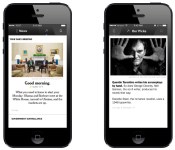
NYT Now curated news app coming to iPhone April 2nd for $8 per month

At a cocktail-fueled meet and greet at SXSW, we met with New York Times editors Jill Abramson and Clifford Levy to discuss the news organization’s 2014 lineup of services, including a new enterprise dubbed NYT Now. Created as an iPhone (and iPod touch)-only application, NYT Now is the company’s latest subscription-based product. On the surface, it appears to be simply a “lite” version of the paper’s daily content, but The Times is reassigning nearly a dozen editors to Now full time to curate internal content as well as articles from third-party news orgs, such as Engadget. Now is not without its challenges, though. Full access will run you $8 per month, which, while a far cry from the $45 you’ll fork over for a full digital subscription with Times Premier, is still a significant amount. You’ll be able to download the app on April 2nd, with free access to headlines, summaries and 10 articles each month. The $8 fee (billed every four weeks) will enable full access to any article that appears in the NYT Now app.
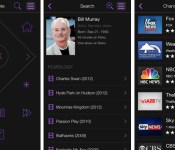
Roku’s revamped mobile apps bring content search and a fresh look

Roku’s mobile software just got a long overdue coat of fresh paint. The remote control apps for both Android and iOS now have a minimalist (and very purple) interface, as well as search that lets you track down content based on actors, directors and similar minutiae. It’s now easier to control most any Roku device on the network, too. You don’t have to use an account for most functions, and a single sign-in will automatically log in to every device linked to your credentials. There’s still no iPad-optimized app — really, Roku? — but what’s here is definitely worth grabbing from the App Store or Google Play.
Filed under: Cellphones, Home Entertainment, Software, HD, Mobile
Source: App Store, Google Play
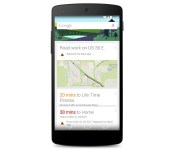
Google Search on Android now warns you when traffic grinds to a halt

Your Android phone can now warn you when traffic is likely to crawl to a standstill on the drive home. Google has updated the platform’s search app to send Google Now notifications if road work, accidents and other incidents might create major delays. The alert system won’t be as slick as having your very own traffic drone, but it should help you find an alternate route before you’re caught up in gridlock.
Filed under: Cellphones, GPS, Mobile, Google
Source: Google (Google+), Google Play
 AIVAnet