



Distiller whiskey recommendations launches on Android [App of the Day]

The popular iOS app, Distiller, brings whiskey recommendations to your Android.
Where do people learn about different types of whiskey? Experience?
If you’ve never come in contact with different types of whiskey, it’s very hard to pick the right one. You may find yourself staring at a shelf for too long before deciding on something you have no idea about. Besides, whiskey can get pretty pricey, so maybe it’s best to know what you’re getting yourself into. Distiller is here to help you choose the right whiskey for the right occasion.
To begin, tap the “get a recommendation” button and answer a few simple questions. Are you looking for something new to try? What’s your experience level? In what environment will you be enjoying this drink?

After the questions are answered, Distiller will give you multiple suggestions based on your answers. What’s more, is that you can view customer reviews, purchase, or rate the whisky yourself, all from the app!
The Distiller recommendation engine factors in tens-of-thousands of different points to analyze different flavor profiles, price, reputation, and “giftability” of a whiskey name.
It’s a beautifully designed app that’s functional and informative. It’s basically a mobile-optimized version of the website, Drinkdistiller.com.
Download the app and find your new favorite bottle of whiskey!
Source: Distiller
The post Distiller whiskey recommendations launches on Android [App of the Day] appeared first on AndroidGuys.
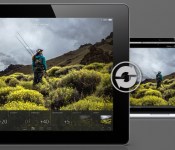
Lightroom mobile arrives for iPad with touch-friendly interface, realtime sync

Adobe Lightroom is one of the most popular image archive tools on the market, and beginning today, iPad-toting photogs now have an iOS app for their DSLR, smartphone and even tablet pics (gasp!) to call home. The companion application, Lightroom mobile, brings much of the desktop version’s functionality to your portable slate. The touch-friendly interface, which supports both portrait and landscape orientations, swaps mouse clicks for taps and swipes. Flick up or down to pick or reject images, for example, or tap twice to cycle through metadata. Any changes you make to an image in the app will be pushed to the cloud and out to any other Lightroom apps that you’ve signed into. Similarly, if you edit an image on a desktop or laptop (which you’ll want to do before making prints, since the iPad’s display isn’t calibrated), your changes will appear in Lightroom mobile within a few seconds.
Lr mobile uses Smart Previews to push compressed raw images to your device. Shots are scaled down to 2,560 pixels at the longest end, so they’re roughly 1-2 megabytes in size. Untouched RAW frames are left on your desktop or a server, so don’t worry about filling up your iPad with a hundred or so full-size DNGs. The app offers the same editing presets as you’ll find in Lightroom 5 (you need to download the 5.4 update before getting started with mobile). You can also tweak settings — such as color temperature, exposure, highlights and clarity — individually. Touch comes into play with editing shots as well. You can tap to select a white point or pull up the untouched version at any time by tapping the screen with three fingers. Images sync over WiFi, or, if you’ve been blessed with an unlimited data plan, you can use a cellular connection as well. The app is available today for iPad 2 or later running iOS 7 or higher. While it’s free to download, you’ll need a Creative Cloud subscription that includes Lightroom to take full advantage.
Filed under: Software
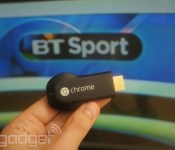
You can now stream BT Sport on Google Chromecast

The US may have beaten the UK to the punch on Chromecast hardware, but us Brits now have access to another thing the Americans don’t: live premiership football. Following news that it was expanding its apps to support the £30 streaming accessory, BT today switched live the necessary features to allow Sport subscribers to beam content from their iOS or Android device directly to their TV. Of course, you will need a BT Broadband package or be BT Sport subscriber to gain access to the live streams. If you’ve already met that requirement, then it’s a simple case of hitting the “Cast” button in either of BT’s official apps to enjoy football, rugby, Moto GP, tennis or UFC coverage on your nice big flatscreen.
Filed under: Cellphones, Tablets, Internet, Software, HD, Mobile, Google
Source: Google UK (Twitter)
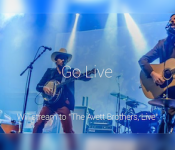
Broadcast your point of view with Livestream’s new Google Glass app

NAB 2014 wouldn’t be the same without Livestream, one of the internet’s most popular broadcasting services, introducing new hardware or software. As such, Livestream has just announced another way for users to share video on its site: an application for Google Glass. Obviously, Livestream isn’t the first to bring this feature to the wearable set, since you can already use the search giant’s own Hangouts app to broadcast what you’re seeing.
Starting an event is as easy as pie: the “Livestream” voice command launches the app and one simple tap on the side of your Glass headset gets you live in no time (roughly five seconds or so, in our experience). As it stands, the only way to pair an account is by having Glass scan a QR code, which can be found within the event pages on Livestream’s website; soon you’ll be able to do this straight from the streaming platform’s iOS and Android apps. Livestream Co-Founder and Chief Product Officer, Phil Worthington, told us that it’s all about integrating the Glass app with the rest of the company’s ecosystem, like its Broadcaster and all-in-one Studio video switchers. “Our mission is to democratize live video broadcasting, so this is the best step in our revolution. We want to be on every device possible,” Worthington stated.
(Psst… Livestream video demo taken with Google Glass. How meta.)
Filed under: Misc, Wearables, Internet, Google
Source: Livestream

Flappy Bird parody game “Flappy Jeremy” mashes Ron Jeremy and Miley Cyrus

You know that recurring dream you have of Ron Jeremy replacing Miley Cyrus in the “Wrecking Ball” video? Well Flappy Jeremy has just made your dream come true. Inspired by the once removed but coming back again (possibly?) Flappy Bird, Flappy Jeremy seeks to fill the emptiness left by the disappearance of the original title.
As the title suggests this game is a clever and creative mash up of Ron Jeremy riding Miley Cyrus’ wrecking ball from the video. Ron Jeremy sits on top of the ball in his tighty whities with beer belly hanging out for all to enjoy. The game is very simple to play, but the fun setting and the challenge of this game will keep you playing for hours.
The goal of this addicting game is to let your bird “Ron” swing the wrecking ball without bumping into any obstacles. Swing as far as you can and conquer the game. It sounds much easier than you think and will keep you playing for hours in an attempt to make it all the way through the game. Don’t let the seductive image of Ron Jeremy get you too excited though because you only have one chance to finish this game and beat everyone’s high score.
Flappy Jeremy is a free game and you can find it on the Google Play Store.
The post Flappy Bird parody game “Flappy Jeremy” mashes Ron Jeremy and Miley Cyrus appeared first on AndroidGuys.

Boomshine, a great way to pass time

Boomshine is an addictive casual game. The point of this game is to start a chain reaction and try to explode as many dots as you can. The concept is simple, but yet catchy and addictive.
The game starts out by having a bunch of multicolored dots flying around on your screen. The most logical thing to do at this point would be to try and blow them up, right? In order to do that you must touch somewhere on your screen, hopefully in an area where you have a good quantity of those multicolored dots. As you make an explosion, your explosion grows in size causing all dots that are within the explosion radius to do the same. This chain reaction that you create is what you are being scored off of. Your goal is to destroy as many of the colored dots as you can with one blast to pass the level.
The game contains 12 levels that range in difficulty, progressing the deeper you get into the game. So far this game has had over 30 million games played by over 100,000 different players. The game offers achievements and highest score leaderboard via Google Play Game Services.
Boomshine is a free, ad-supported game, but for a $1.00 in-app purchase you can remove the ads. You can download this perfect way to pass time on the Google Play Store.
The post Boomshine, a great way to pass time appeared first on AndroidGuys.

IFTTT update outfits iPads, tacks on push notifications

IFTTT’s (If This Then That) recipes automate your apps and other tech tasks to make things a breeze, and the latest update allows the software to play nice on more than just that iPhone. Version 2.0.0 of the application tacks on full support for the iPad. There’s also the ability to assign an IFTTT recipe to beam a push notification to your device, so you’ll know when David Ortiz hits a home run or if you’ll need to pack a raincoat in the morning. Of course, you’ll want to check those application settings so that you’re not duplicating efforts here. What’s more, new recipe collections and a location-specific Photos Trigger have been throw in as well. If your trusty iOS device hasn’t alerted you to the update just yet, venture over to the source link and nab it up.
Filed under: Software
Via: 9to5Mac
Source: IFTTT (iTunes), (Blog)

Vine, now with messaging

Vine isn’t just about sharing six-second videos anymore. The Twitter-owned service has just launched a messaging feature that lets you reach out to friends through either videos or text messages. It’s not very sophisticated at this stage (there’s no true group chat, for instance), but you can send videos to anyone in your smartphone’s contacts, whether or not they’ve installed a Vine app. Android and iOS users can get chatty today, but there’s no word on a corresponding Windows Phone update. Wherever Vine goes from here, it’s apparent that the service wants to be more than just entertainment — it would like to be a complete social platform.
Filed under: Cellphones, Internet
Source: Vine, App Store, Google Play

KISS’ Photo Bomb app will glam up your photos in the worst way possible

Hey you! Have you ever wanted to use a mobile app to relive the heady glam-rock days of the late 1970s? If so, the newly released KISS Photo Bomb app for iOS and Android is not the way to go. The name says it all, really: with the app you can digitally insert members of KISS into your photos, as well as lather your face in iconic makeup (see above) and stick Gene Simmons’ crimson tongue just about anywhere you like. The end results are… just as absurd and facepalm-y as you’d imagine. Yes, this is a real thing. No, we don’t know why. Wait, yes we do: it’s a ridiculous, naked money grab, with additional sticker and frame packs priced at $1 a pop. Then again, we’d expect nothing less from the guys who thought sticking their faces on caskets was a rad idea.
Source: KISS Photo Bomb
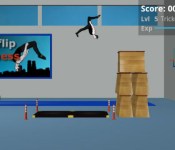
Backflip Madness is flippin’ awesome [App of the Day]

If you ask us, there’s nothing wrong with spending countless hours on your Android playing a mindless backflip game. (We’re not alone, right?) Well, if you don’t think so, you’re in the right place. Backflip Madness will have you flipping over and over and over again.
The aim of the game is simple: successfully land a backflip in the coned-off area. You’ll need to practice landing backflips from the ground, benches, cars, and even buildings. Each level consists of a certain number of flips you need to complete, without falling more than 2 times. And trust us… it’s very easy to fall.

Doing a flip is easy. There’s only one button to press, and that button controls everything. Keep tapping to bend your knees, jump, tuck, and extend your legs for landing. Timing is everything when completing the process.
And that’s about all there is to it. You can enter free play mode to test a level before completing the challenge, or you can dive right in. This game may not sound like much, but you won’t want to put it down once you begin.
Every game in the Play Store has its place. File this one under “I spent $.99 on this game and I don’t regret it.” Download it and tell us what you think!
The post Backflip Madness is flippin’ awesome [App of the Day] appeared first on AndroidGuys.
 AIVAnet