


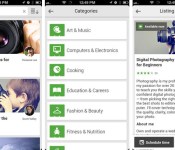
Google’s Helpouts service now offers expertise on your iPhone

Need to brush up on your cooking skills, but only have your iPhone close at hand? Don’t panic: Google has quietly brought its Helpouts service to iOS. Much like the existing Android software, the iPhone-sized app (sorry, no iPad version) lets you schedule video chats with experts on topics ranging from baking to bike repair. Just be prepared to limit yourself to free advice — Google isn’t offering paid Helpouts in the iOS app. You’ll also need to go to the web if you want to create listings for your own instructional sessions. If neither of those limitations is a deal-breaker, though, you can start taking lessons today.
Filed under: Cellphones, Internet, Mobile, Google
Via: 9to5 Mac
Source: App Store

Roku 3 update lets you search for movies and more with a smartphone

Roku baked its comprehensive search feature into its mobile apps last month, but only folks who used it with the firm’s HDMI Streaming Stick have been able to enjoy life without wielding a remote to hunt and peck for letters. Starting today, however, more of the outfit’s hardware is getting some love: an update is trickling out to Roku 3 devices that’ll enable the search feature with the apps. Since the company expects the software rollout to wrap up by April 22nd, it may be a while before your own box gets updated. Other Roku models are expected to snag the upgrade in the following weeks. Until then, you can use the clicker to hunt for content by actors, directors and show titles. Like an animal.
Filed under: Home Entertainment, Software, HD, Mobile
Source: Roku Blog

BBC’s Sport app now delivers real-time goal notifications

While the BBC’s Vidiprinter dutifully does its job providing us with all of the goals around the grounds, many have ditched TV and now use a smartphone to check the latest football results. The BBC Sport app has done a stellar job at providing live match updates, but a new update is about to make things a little more efficient. Using the same technology that pushes breaking news from BBC News, the Sport app now allows iOS and Android users to receive alerts for more than 150 domestic teams. Right now, the app will deliver notifications at kick-off, when a goal is scored, at half-time and the final score, but the BBC says it’ll add more in the future. To take advantage of the new alerts, make sure you have the very latest version of the iOS or Android app, then hit the “My Alerts” link in the app menu to select your favourite team.
Via: BBC Internet Blog
James Bond gets an Android upgrade

With all the games out there, you would have thought that one of the most iconic spies of all time, James Bond would have his own Android game, right? Surprisingly the answer is no, he does not. In order to fill that 007 void, Glu Mobile Inc., has teamed up with Eon Productions and MGM Interactive to bring the first free-to-play mobile game in the history of the Bond franchise.
The game will be inspired by the franchise’s rich history, themes, characters, and narratives providing the atmosphere that Bond fans have grown accustomed to over the past half century. Niccolo de Masi, Glu CEO states: “We look forward to delivering a never before seen gameplay experience on mobile for the passionate worldwide community of Bond fans.”
As far as why MGM and Eon Productions chose Glu Mobile, Gary Barber, MGM Chairman and Chief Executive Officer says that Glu has the experience and established track record to deliver a game of this magnitude. MGM believes that Glu can deliver an experience worthy of the Bond name.
James Bond started as a character in Ian Flemings’s series of novels and short-story collections. The franchise grabbed the world’s attention with its first movie released in 1962, “Dr. No”. Over the past 50 plus years, Eon Productions and MGM has build James Bond into the legendary character that he is today. The next installment in the franchise, the twenty-fourth film to be exact, is due out in November 2015.
Unfortunately to all Bond fans and gamers alike, you will have to wait another year as the game is slated for summer 2015.
Source: Glu Mobile, Inc. Press Release
The post James Bond gets an Android upgrade appeared first on AndroidGuys.

NBC’s iOS app can now send shows to your TV, sort of

The big US broadcasters like to tout the strength of their mobile TV apps, but actually viewing the apps’ content on a TV has frequently proven elusive. That’s a rather glaring omission, don’t you think? Some credit is due to NBC, then, as it recently updated its iOS app with AirPlay support. Unfortunately, it’s pretty basic at this stage. All you can do is turn on AirPlay mirroring and beam whatever is on your mobile device’s screen — you’re out of luck if you’d like to see optimized videos, let alone do something else on your iOS gear while you watch. Still, it’s good to see NBC catch up on features that services like Hulu have had for quite a while.
Filed under: Cellphones, Home Entertainment, Tablets, HD
Source: App Store
Here’s look at the future of Google Calendar for Android

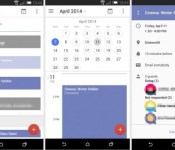
See those images above? Those could become a familiar sight in the future if you religiously use Google’s Calendar app for Android. This crisper, cleaner Google Calendar was recently spotted by Geek.com (which also spilled the deets on a test version of Gmail) on a phone loaded with unreleased features. If you notice, the new interface gets rid of the app’s busy grids and lines, relying instead on blocks of color to distinguish one entry from the other.
What’s more intriguing, however, is a new feature called daily agenda, which automatically emails you the day’s full schedule. Since the updated calendar will also come with Google+ integration, or so the source claims, daily agenda emails will also include birthdays, giving you no excuse to forget anybody’s special day. Other than these changes, you’ll also reportedly see a parallax scrolling effect while flipping through months. Of course, the final product could be wildly different from what we’re seeing here. We might have to wait a few more months to find out, though — Geek.com believes Google will launch the redesigned calendar at the I/O conference in June.

Filed under: Cellphones, Tablets, Mobile, Google
Source: Geek
Facebook app ditches chat, moves to a standalone Messenger

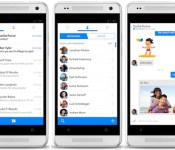
Facebook has been testing new features inside its standalone Messenger app for months, and now the social network is pulling the chat feature from primary offering. The outfit has included messaging functionality in its main apps for some time now, but late last year Mark Zuckerberg announced that the company would eventually pull the plug. For a few months now, users that have both apps installed have been linked out to the Messenger software when accessing chat in the regular ol’ version. The switch will take place over the next two weeks, and TechCrunch reports that Facebook has begun notifying users of the change.
“The reason why we’re doing that is we found that having it as a second-class thing inside the Facebook app makes it so there’s more friction to replying to messages, so we would rather have people be using a more focused experience for that,” Zuckerberg told TechCrunch in November. This means you’ll have to download that Messenger app if you want to keep that direct line of communication open with your Facebook pals, unless you have an Android device that can’t run it, use the mobile site or keep your talks confined to the outfit’s Paper reader.
Filed under: Internet, Software, Mobile, Facebook
Source: TechCrunch

Say “Hello” to hello sms for Android [App of the Day]

Tired of your boring stock messaging app? Perhaps you’re always on the lookout for the best looking SMS app. Whatever your dilemma, hello sms is here to save you!
Stock SMS messaging apps are often known for being boring, lacking options, and overall just providing a bland user experience. Hello sms aims to fix the drab look, as well as give you a more organized and streamlined inbox.
Hello sms organizes your conversations unlike any other messaging app, and does so by sorting conversations in tabs that run along the left side of the inbox. It’s a very beautiful design that is obviously inspired by simplicity and ease of use. Perfect for the on-the-go texter who prefers a clean and polished look.

The app does a great job at making picture messaging and group messaging easy as well. It also has a neat feature that applies a dark color scheme to the app as night sets in. Oh, and did I mention that the app is completely ad-free? That’s definitely a plus for anybody!
Hello sms is a stylish app that simplifies organization in the inbox, and features quick and easy ways to send messages and media. So if you’re looking for a new messaging app, or just want to test it out for the fun of it, download hello sms, and fulfill your texting needs!
The post Say “Hello” to hello sms for Android [App of the Day] appeared first on AndroidGuys.

Momondo helps you prioritize your relationships by proximity and climate

Sure, it’s easy to plan out trips to visit your friends, but Momondo believes it can add a bit of fun to that process. The travel search engine’s app now features something called “friend compass” that shows your friends’ locations all over the world while you spin around. Since Momondo’s service shows the cheapest flights and hotels you can book, each friend that appears on the compass comes with info on the most affordable flight available — and yes, you can book one from within the app. If that travel itch has gotten so bad, you can also use the compass to find out which friend lives in the coldest or the hottest locations, the nearest or the farthest places and the ones who’ll cost you most and and least money to visit. The friend compass works using Facebook’s API and a smartphone’s GPS, so suffice it to say, it’ll only only show people in your Facebook list. Bummer.
Filed under: Cellphones, Mobile
Source: McCann London
Netflix App Updates with New Second Screen UI and Performance Improvements
The Netflix app on Android has been updated. It offers up some playback optimizations that should help make things a bit speedier in your Netflix viewing. While that is nice, it is the second screen enhancements that a little bit more welcomed, especially for those using Netflix from their device to a Chromecast. Below is the old second screen view you would see when you are casting.
 Now, here is what the new Netflix second screen looks like.

 You can see the banner for the movie/tv show is shrunk and displayed in the middle. Below that you see where you are casting to and you can tap it to change the cast device. You can now rewind in 30 second intervals versus the previous 10 second intervals as denoted by the small near circle with the two arrow heads. At the top you have the name of the show or movie with a small arrow that you can tp to bring it up full screen or minimize it down to view the Netflix library.
It certainly looks a bit better and it seemed to start the movie a little quicker when selecting it to cast.
The update is live in the Play Store so feel free to pick it up when you have a minute.

//<![CDATA[
ord = window.ord || Math.floor(Math.random()*1E16);
document.write('’);
//]]>
 AIVAnet