


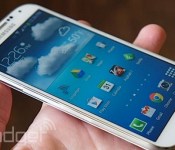
Samsung devices no longer boosting benchmark scores after Android 4.4 update

Those artificially inflated benchmark scores Samsung devices were getting last year? They’ve been patched. According to new tests run by Ars Technica, Samsung devices running Android 4.4 no longer boost CPU speeds during benchmark tests. In July, Exynos variants of the Galaxy S 4 and Note 3 were caught running their CPUs at an unsustainable max speed during benchmark programs, bolstering their total score by as much as 20 percent. Samsung suggested this was normal, claiming that varied processor frequencies were designed to provide an “optimal user experience.” The firm never clearly explained if the phenomenon was a feature, fault or foul play, but it’s over now: devices updated to the latest version of Android are apparently running clean.
Via: Android Police
Source: Ars Technica
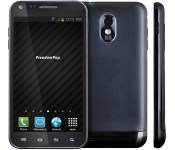
FreedomPop’s new smartphone keeps your calls and data private for $189

When surveillance agencies collect large volumes of cellular data, it’s easy to understand why you’d want an extra-secure smartphone. Those devices aren’t always affordable, though, which is why FreedomPop has launched the Privacy Phone for $189 contract-free. It’s ultimately an old Galaxy S II, but its software boasts some strong secrecy measures — all of its internet-based calls and messages are encrypted, and data goes through a virtual private network (VPN) that masks your identity. Don’t count on total security. FreedomPop isn’t using more than 128-bit encryption, and VPNs aren’t always safe from prying eyes. Still, the Privacy Phone may fit the bill if you’re looking for better-than-usual anonymity at a low price.
Filed under: Cellphones, Mobile
Source: FreedomPop
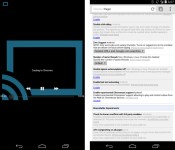
Chrome beta for Android lets you send web videos to your Chromecast

Want to stream any web video from your smartphone to your Chromecast? Grab the beta release of Chrome 34 for Android. The browser includes experimental support for sending embedded clips to Google’s media stick, saving you from launching a native app just to watch something on a TV. As you’d expect, there are some compatibility hiccups at this early stage. YouTube works well (surprise!), but other sites are hit and miss — you’re best off sticking to videos from major, HTML5-friendly hosts like Vimeo. If you’re willing to live with some inconsistencies, though, you can try the streaming feature today.
[Image credit: WhyYouPaul, Reddit]
Filed under: Cellphones, Software, HD, Mobile, Google
Via: Liliputing
Source: Reddit, Google Chrome Releases

GoPro Hero3+ Black Edition: Big Things Come In Small Packages

When it comes to recording extreme sports like Skydiving, Bungee Jumping, or even free climbing there isn’t much that you need to do so. If you have a GoPro camera handy you’re all set and really what more could you ask for. With the new GoPro3+ Black Edition you have the capability to record in 4k and take pictures at 12 megapixels, if that wasn’t enough you can also take the thing underwater and really push your creative limits. Of course this is the most common use for the GoPro so me being a geek I decided to test it out at CES 2014. My plan was to be completely mobile and not need a laptop to do anything for my videos, if you have ever been to CES, or any other convention like it, you know that the amount of time available is never enough to see it all. That being said I can tell you that when you’re at CES you don’t really have much time to sit down, especially if you are part of a small team trying to get as much out of the show as possible. Using a GoPro3+ Black Edition camera and my trusty Galaxy Note 3 to put out quick posts and clips of CES 2014 all while staying completely mobile and rushing to my next meeting was my solution to staying mobile and capturing demos, events and meetings. Sounds simple enough right? Well let’s just see in my review of the GoPro Hero3+ Black Edition.

What’s In The Box:
The GoPro Hero3+ Black Edition is a high end device and with a high end price comes some great box contents such as:
- The GoPro Hero3+ Camera (Of Course)
- High Capacity Li-Ion Battery
- A Wireless Waterproof Remote
- 131′/41m Waterproof GoPro Housing
- Charging/Transfer Cable For GoPro
- Charging Cable For Wireless Remote
- Quick Release Buckles
- Curved and Flat Adhesive Mounts
- 3-Way Pivot Arm
That’s quite a bit of stuff to play with. Personally I like the Wireless Remote, huge lifesaver. I’ll tell you why later on.

Physical Attributes:
When I first saw the GoPro camera I knew it would be tiny but taking it out of the box, man it was something else. It is really small, I mean I knew how small it was going to be but you have to know, I am used to carrying around my DSLR for recording which after a while can get pretty heavy so the fact that I can have a camera that can shoot 4k video and 12mp photos while still fitting in my pocket is a great physical feat all in itself.
The lens is big and it has to be, that’s how you get all those amazing wide angle shots that make this style of video shooting a true GoPro video. As far as the material and build quality goes it feels great in your hand and has a grip with it, which is great because you wouldn’t want to put a scratch on that big beautiful lens.


Performance
It’s a GoPro camera so it has a tough and proven track record for the extreme side of things. The camera proved durable and portable as it should be. Thanks to the waterproof housing I was able to get in and record where others with their thousand dollar cameras could not which made for some really great footage. The videos in 4k came out great and file size wise HUGE which was to be expected given the recording format I was using. Photos were great as well, however while using the Protune feature of the camera some of the photos did get really washed out.
Video Quality:
This is a no-brainer, it’s a GoPro with 4k video recording, I think that says it all. It records videos in such an amazing way and well just watch the video below to get an idea. Keep in mind YouTube doesn’t do the GoPro justice as it only goes up to 1080 :(. The thing I loved the most is the insane amount of choices when it comes to video recording formats.There are exactly 11 different video modes that you can choose from through the Android app and these include;
- 4k (17:9)
- 4k
- 2.7k (17.9)
- 2.7k
- 1440
- 1080 (Super View)
- 1080
- 960
- 720 (Super View)
- 720
- WVGA
That is quite a array of choices, personally I found myself switching between 1080 Super View (that’s the one that gives you the signature GoPro wide angle recording format) and 4k.


Photo Quality:
It shoots 12 megapixel images that look great. I did find that some images were a bit washed out or too overexposed when using the Protune feature so I left that off and manually tweaked the photos myself. Using the GoPro Hero3+ during CES 2014 was great and having such a tiny camera was great as it allowed me to get some shots that were nearly impossible to get among the mobs of journalist that flooded press conferences. Thanks to the Android app you also have quite a few options when it comes to using the GoPro Hero3+ as a camera. These options include; the ability to change your photo resolution (12mp wide, 7mp wide, 7mp med, and 5 mp med), choose how many shots are taken via continuous shot (single, 3SPS, 5SPS, or 10SPS), change how many photos are taken on a second basis in Burst Rate mode (3/1 sec,5/1 sec,10/1 sec, 10/2 secs, 30/1 sec, 30/2 sec, 30/3 sec), and you can also change the settings of the Time-Lapse mode to fit when a photo is taken based on seconds (0.5 sec, 1 sec, 2 sec, 5 sec, 10 sec, 30 sec, 60 sec). As you can see GoPro really went above and beyond when it comes to the GoPro Hero3+.
Accessories:
I received the GoPro Jaws(Flex Clamp) with the GoPro Hero3+ and I had a blast using it. Unfortunately a certain idea of mind didn’t quite pan out so I was unable to use it during CES. After I came back though I purchased the GoPro Suction Cup mount and well I have not stopped using my GoPro Hero3+ camera since. The GoPro Suction cup mount can withstand winds of up to 150 mph (which is crazy) and well living in the city the closest I was going to get to that was going 70 mph down the freeway. I will admit it is a bit scary putting a $400 camera on top of your car with nothing but a suction cup but for the sake of this review I did it and it was great. The mount held up easily to the 70mph winds and there was little to no shake in the video which is, quite frankly, amazing to me. All in all I’d say a GoPro Hero3+ isn’t complete without at least one accessory so check out the link below and see which one suits your needs.

Android App
PROS:
This was the main feature of the GoPro camera for me, the Android App. If it wasn’t for this application I would have had to carry around my laptop just so I could transfer videos off the memory card. Thankfully the GoPro Android app allows me to connect to my camera via Wi-Fi and move videos off the GoPro wirelessly. This came in very handy as I didn’t have to stop and sit down to transfer files to my laptop.

The second most valuable feature of this app is the Live View function. I can connect wirelessly to the GoPro camera from my Note 3 and see what the GoPro is seeing. This is pretty much a necessity as there are quite a few other Journalists trying to get their own shot, especially during Press only events. Being able to mount the GoPro camera on a monopod and use my Note 3 as a viewfinder really helped one up some of the other guys at my eye level.

The third and final thing that the GoPro app allowed me to do is tweak the settings and modes. The GoPro can shoot in a variety of different video formats (4k, 1080 super-wide, 720, and many more). It can also take photos in both single, time-lapse, and burst mode. With all these features to use being able to use my 5.5 inch screen to tweak the settings is a whole lot easier than having to go through the menu on the GoPro camera itself.
Additional Features:
These are the other features that you get with the GoPro app:
- Locate Camera- Makes the GoPro camera beep so you can locate it (No GPS :/)
- SD Card Capacity- Allows you to see exactly how much room is available on your Micro SD Card)
- Upside Down- Allows you to record the video right side up while the physical camera is upside down
- Delete files- Allows you to delete the files when connected wirelessly to the GoPro Hero3+ (thank you captain obvious)
CONS:

When using certain format types the GoPro app does not provide a thumbnail making it hard to see which video is which. Now normally this wouldn’t bother me so much but the fact that the videos are not being stored in a organized manner makes it harder to know which video is which. The only way to figure that out is to play the video. Unfortunately this was also an issue as when using a recording in 4k for example you can’t play the video on your mobile device (in my case my Note 3) because it isn’t supported.
On some occasions Wi-Fi would stay despite having turned off the camera. This required me to turn it back on and turn Wi-Fi off manually
What We Liked About It:
- Great video and photo capabilities
- Portable (fits in a pocket)
- Waterproof housing is AMAZING!!!
- Creates it’s own wireless access point for data transfers
- Can be controlled via Wi-Fi with included wireless remote or free Android app
- Wide range of accessories
- Can take a hit in the housing case
- Battery life (normal use)
What We Didn’t Like About It:
- Battery life (keep in mind this was through heavy video recording, normal use battery life is great)
- Photos sometimes washed out with Protune enabled, same for videos
- No thumbnails for some of the content in the GoPro app
What Could Make It Better:
- Bigger battery (maybe the ability to have a mount with a built-in battery
- Zoom option
Overall Thoughts:
The GoPro Hero3+ Black Edition camera is one the most versatile and capable little cameras out there. While the price maybe be a bit high at $400 I can tell you that it is certainly worth it. Not only do you get a camera capable of 4k video and 12 mp photos you also get a wide range of accessories to use it with that enhance the functionality of the Hero3+. All things considered the GoPro Hero3+ Black Edition is solid proof that big things sometimes do come in small packages.
A quick sidenote:
After doing this review I am still surprised at how resilient the GoPro camera is in the waterproof housing (which also serves as a strong case) and after watching the video I am sure you will believe in the almost indestructible GoPro. Just to give you an idea, this video was shot with a GoPro camera that accidentally fell out of an airplane and landed in a pig pen.
I have included links to the GoPro camera along with the accessories I used for this review, feel free to check them out and if you can nab one for yourself, you won’t regret it.
Gallery


Weathered old HTC HD2 dresses up like a Nokia X

You may remember the HTC HD2 from posts such as “will it play Tekken 3?” and “wait, it runs Windows RT now?” Despite the handset’s age, a stalwart community keeps it relevant by getting anything and everything to run on the developer favorite. It’s only fitting, then, that the HD2 be one of the first to don Nokia’s heavily skinned version of Android, other than the unreleased X family, of course. That’s right: An XDA Developers forum member by the name of gilbert32 has apparently succeeded in porting some form of the Nokia X Android build onto a rather beat-up-looking HD2. We say succeeded, but while it looks the part and plays a booting sound when fired up, “everything else” is admittedly non-functional. Then again, if the goal was to show the HD2 still has legs after all this time, then mission accomplished, sir.
Filed under: Cellphones, Software, Mobile, HTC, Nokia
Via: GSMArena
Source: XDA Developers

XBMC looks to improve Android video playback with ‘Gotham’ beta

Version 13 of XBMC’s media center software, codenamed Gotham, is now ready for your official beta-testing pleasure. The organization — which started the project for the Xbox and spawned apps like Plex and platforms like Boxxee — kicked off work on the update nearly a year ago. It said that many of the qualms addressed by version 12 (Frodo) users have been addressed. Most notably, it now supports native hardware decoding on Android for x86 and ARM platforms, which should bring smoother playback for Blu-ray and other codecs. Other improvements include support for more 3D formats (with the notable exception of 3D Blu-ray), better touchscreen support, enhanced UPnP capability, “dramatic” audio engine improvements and easier setup. Though nightly versions have been available for a while, the company provided the usual caveats about beta software and the importance of backing up. If you’re unperturbed by that, hit the source.
Filed under: Home Entertainment, HD
Source: XBMC

Android 4.4.2 Hits the AT&T Galaxy S4 and T-Mobile LG G2 – Device Updates

Let’s see if your device is getting updated. Well if you have an AT&T Galaxy S4, you might be enjoying some Android 4.4.2. Hopefully you are, and you T-Mobile LG G2 users will be getting yours shortly. Let us know if you got any updates.
Device Updates
Android 4.4.2 for the AT&T Galaxy S4
Android 4.4.2 for the T-Mobile LG G2
Android 4.3 for the T-Mobile Xperia Z
T-Mobile now rolling out Android 4.4.2 update for LG G2
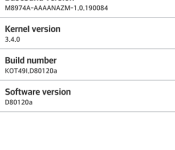
A few days ago we told you that in March, LG will start rolling Android 4.4.2 update for LG G2 owners in UK, but it seems they are not the only one who will be getting blessings by LG. T-Mobile has announced that beginning March 3, they will start rolling out the update for LG G2 users all over the USA.
 The OTA update will start between the dates of March 6th to the 25th, however the update is available now so you should manually check for updates and it might be there. The update will bring :
- Update to Android 4.4 KitKat
- Auto Brightness
- User experience improvements
Any T-Mobile LG G2 users already rocking Android 4.4.2? Tell us about it in the comment box below.
The post T-Mobile now rolling out Android 4.4.2 update for LG G2 appeared first on AndroidGuys.

T-Mobile LG G2 Receiving Android 4.4.2 Starting Today
T-Mobile users rocking and LG G2 might see some Android 4.4.2 today. T-Mobile posted on their page that the update should be rolling out today, but naturally it might take a bit for it to roll out to all users.
- Update to Android 4.4 KitKat
- Auto Brightness
- User experience improvements
If you don’t see the update in your settings, give it some time. On the support page, it does mention the OTA will be rolling out between the dates of March 6th to the 25th. If it isn’t there quite yet, just be a little more patient and it will arrive. Let us know if you received it.
Source: T-Mobile
Via: Android Police
Gartner: Android passes iOS to become the most popular tablet platform

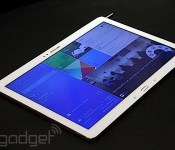
Several years ago, technology research firm Gartner predicted Apple would maintain its hold on the tablet market until 2015. A new study from the company, however, shows Android taking a decisive lead: in 2013, it boasted 62-percent market share, compared to 36 percent for iOS. Google’s mobile operating system climbed to the number one position thanks to more tablet sales overall, though Gartner also credits the proliferation of cheaper, smaller-screen slates (the Nexus 7 no doubt included) with establishing Android’s newfound dominance.
The other winner, according to this study: Samsung, which grew by 336 percent in 2013 to a 19.1-percent share of the tablet market. That’s still a much smaller piece of the pie than Apple’s 36 percent, but among Android device makers the Korean company is still very much the king. Conversely, Microsoft has seen very modest growth; Windows 8 tablets accounted for just 2.1 percent of the market in 2013. Click through the source link for more stats.
Filed under: Tablets, Mobile, Samsung, Google
Source: Gartner

