



LG’s L90 handset is rolling out this week… in Russia

If the debut of LG’s L-series of handsets at last month’s Mobile World Congress had you hankering for a new phone, you’re in luck. The 4.7-inch L90 starts rolling out this week in the CIS region (think Armenia, Belarus, Kazakhstan and Russia). LG has also detailed a few new specs, as well. In addition to the 1.2GHz processor, the L90 comes with either 8GB or 16GB of RAM and a 2,540mAh battery. Its cameras are rated at 1.3MP up front, and 5MP or 8MP for the rear. Pricing and domestic availability remain ambiguous for now, but the South Korean outfit promises more local info will be available closer to a domestic launch. To pass the time until then, you could always work out your own custom Knock pattern; we recommend the beat from “Around the Fur” by the Deftones for maximum cool-points.
Filed under: Cellphones, Mobile, LG
Source: LG Newsroom

You can now mirror your Android screen on Chromecast, if you have a Nexus 5

Cyanogen’s Koushik Dutta has been teasing the prospect of mirroring your Android screen on Chromecast for a few weeks, and today you can finally try the feature — if you have the right smartphone, that is. An updated version of the Mirror for Android beta includes early support for mirroring to either a Chrome browser or Chromecast, but only if you have a Nexus 5. Google’s phone is the sole device with the hardware video decoder needed for this mirroring technique, Dutta says. You also have to get root-level access to the operating system with the current release, although that won’t be necessary in the future. Provided you meet the app’s exacting requirements, you can give mirroring a spin at the source link.
Filed under: Cellphones, Home Entertainment, Mobile
Source: Koushik Dutta (Google+)

Google Play Games for Android now shows you who wants to play

Google Play Games just became much, much more useful for avid Android gamers. A newly released update to Google’s entertainment hub lets you see all your invitations; it’s now much clearer that someone wants to play. The upgrade also shows you a not-quite-live view of who’s playing, and a new Find Games area (shown here) suggests titles you can try. Play Games still won’t compare with advanced gaming frameworks like PlayStation Network or Xbox Live, but it’s likely worth a download if your smartphone regularly doubles as a handheld console.
Filed under: Cellphones, Gaming, Tablets, Mobile, Google
Via: Android Central
Source: Google Play

Evernote for Android now supports handwritten notes

No matter how great your Android keyboard is, sometimes good old handwriting is the best way to take notes in a meeting or jot down your next big idea. If carrying a notebook with you everywhere isn’t your style, starting today you can create digital handwritten notebooks using Evernote’s Android app. To use the feature, just tap the pen icon at the top right of any new note. A spotted canvas will appear, and you’re free to write with your finger or stylus to your heart’s content. There are four color and three thickness options if you’re feeling creative, and audio and text files can be added to the same page to spice things up. Like everything else in Evernote, your handwritten notes are searchable, so you’ll be able to find what you’re looking for later on. In addition to handwriting, Evernote dropped a few other updates for Android users: an improved note editor and a faster camera. You can get everything now by downloading the latest version of the app by heading over to Google Play.
Filed under: Cellphones, Tablets, Mobile
Via: The Next Web
Source: Evernote
Nexus 5 Camera CPU bug fix coming soon
If you’re a Nexus 5 owner then you’ll know about the bug which causes the phone’s CPU to be maxed out when using the camera, resulting in high battery drain. According to a post by Google on the company’s issues tracker, it seems Google have isolated the issue and will be issuing a fix shortly.
The bug is caused by something called “mm-qcamera-daemon” which causes high battery consumption, and since this process is related to handling camera data, it means that third-party apps can trigger it, so it’s not constrained to an operating system calling function.
According to Google, one particular offender is Skype, which seems to be accessing the camera regularly from the background and by doing so is triggering that bug. We’ll ignore why Skype is trying to access the camera without you knowing…
As mentioned, Google has found a fix for the bug and is bundling it in the next maintenance version of Android, most likely 4.4.3. Until then, the only fix is to reboot the device, and Google are recommending that removing Skype may relieve the issue.
The more significant point is that this bug may not be constrained to Nexus devices, since third-party apps are able to call the camera, so KitKat devices running a Qualcomm chip for camera processing, like the Galaxy Note 3, are also most likely affected. Unfortunately a fix will have to go via the manufacturer for these devices, so may delay the patch being delivered to your non-Nexus device.
If you think you’ve been hit by this bug, drop us a comment below.
[Via Google Issue Tracker]
The post Nexus 5 Camera CPU bug fix coming soon appeared first on AndroidGuys.

CNN’s Flipboard rival now belongs to… Flipboard

CNN bought the news aggregation service Zite to get a fast track in the mobile space, but it never gained much ground versus Zite’s arch-rival, Flipboard. Accordingly, the TV broadcaster is throwing in the towel — it just sold Zite to Flipboard for $60 million. The deal brings a raft of previously unavailable CNN content to Flipboard’s news curation platform, ranging from articles to video feeds for shows like Anderson Cooper 360 and Inside Politics. The network has also agreed to produce custom magazines (shown here) that go beyond what you’d normally find online. CNN’s content is available today, and it’s launching alongside a big Android app update that lets readers sign in with Google, control article density, curb their data use and attach photos to custom magazines.
Filed under: Home Entertainment, Internet, HD
Source: CNNMoney, Inside Flipboard (1), (2)
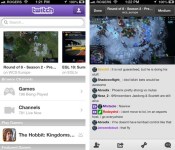
Soon you’ll be able to broadcast mobile games via Twitch.tv

Twitch.tv is ready to give your Jetpack Joyride skills the audience they deserve. The outfit has just released a mobile software toolset that will let devs enable live broadcasting, capturing and archiving of your in-game exploits on Android and iOS. With its proposed features (including chat, audio capture and options for finding streams from people playing similar games), the mobile tools essentially mirror what’s available on PC and consoles. Even with 10 million installs of Twitch’s mobile apps, however, the question that remains is if anyone will actually want to watch you play Threes.
Filed under: Cellphones, Gaming, Mobile

Adobe’s all-in-one photo app Revel arrives on Android

If one of the many, many photo apps on Android isn’t doing it for you, Adobe’s just added Revel to the fray. Though it’s touting features like ease-of-use, automatic syncing, sharing and privacy for the app (which has been on iOS for quite a while), we actually found the built-in Photoshop Express-like features to be the best part. Those include scaling, rotation, brightness, contrast, filters and other handy adjustments, with a much simpler interface than Photoshop Express (thank goodness). If interested, you can upload all the photos and video you want for the first 30 days, then add 50 videos or photos a month for free after that. For unlimited storage, you’ll pay $6 per month or $60 per year. A notable oversight is that Creative Cloud subscribers don’t get free access, as it would let pros share their portfolios more easily. As for as the privacy, it’ll probably take us quite a bit more time to get over some deep trust issues.
Filed under: Cellphones, Software, Mobile
Via: CNET
Source: Adobe (Google Play)
Pebble 2.0 Beta App updated to version 11
The Android Beta App for the latest Pebble 2.0 has just been updated to version 11 and it seems a lot of the teething issues that users were originally experiencing have been ironed out.
Changelog:
- PebbleKit JS localStorage is now sandboxed for each app
- Many improvements to onboarding and FW installation
- Issues with sideloading apps in some circumstances have been fixed
- Some issues with loading JS configuration views after the app has been quit have been addressed
- JavaScript app logs printed via ADB are cleaner
- MyPebble now loads faster
Pebble are saying there is still one known outstanding issue which is yet to be fixed:
- Pairing a Pebble during onboarding may not succeed. If you run into problems, exit the Pebble app. Remove the pairing entry from Android BT settings & your Pebble. Then pair manually using BT settings.
Pebble are advising that you’ll need to uninstall version 10 of the App before you install this one, and also any javascript-based Apps will need to be manually reinstalled after upgrading.
You can download the latest version 11 of the Android Beta App here.
[via Pebble]
The post Pebble 2.0 Beta App updated to version 11 appeared first on AndroidGuys.

Vudu will soon let you send movies to your Chromecast

There isn’t exactly an abundance of major movie services that will send video to a Chromecast; for the most part, Google Play Movies and Netflix still rule the roost. It’s a good thing, then, that Vudu has announced plans to support the TV media adapter through both updated mobile apps and Chrome on the desktop. The provider won’t say just when Chromecast support is coming other than “soon,” but early adopters can register for a beta test. Either way, it’s clear that Vudu still wants its video platform on every living room device you own.
[Thanks, Mark]
Filed under: Home Entertainment, Internet, HD
Source: Vudu Blog, Vudu Beta Community
 AIVAnet