


OnePlus introduces StyleSwap Covers for the upcoming One
Yet again, OnePlus is releasing another little detail on its upcoming One smartphone. However, recent announcements have mainly dealt with hardware specs, battery, and the screen, this announcement deals with aesthetics.
The One will have “StyleSwap” covers, which will allow the user to customize the look of their device. The only picture we have is from OnePlus’ forum, as seen above, which seems to have a silk, sandstone, denim, bamboo, and kevlar options. OnePlus is really pushing their “Never Settle” campaign, by making a smartphone that is customizable from software to design. The company hasn’t released any details on price or availability, but we hope they keep them affordable and readily available at launch.
I hope that all this hype OnePlus is generating for the One actually comes to light in the second quarter this year. Which cover are you looking forward to?
The post OnePlus introduces StyleSwap Covers for the upcoming One appeared first on AndroidGuys.
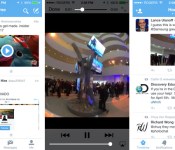
Twitter now shows you video previews inside its mobile apps

Checking out a linked video from within Twitter’s official mobile apps is frequently a clumsy process, but it’s about to get a lot smoother. The social network has started rolling out simple in-line video previews on both its Android and iOS apps. If you’ve received the upgrade, you’ll see thumbnails of clips in your timeline; all you have to do is tap them to watch the footage from within the Twitter app. The move is no doubt meant to drive up views of promoted videos, but we won’t mind if it helps us catch up on cat videos during our daily commutes.
Filed under: Cellphones, Tablets, Internet
Source: New York Times

This app creates a custom radio show based on articles from your favorite news sites

Podcasts and talk shows are perfect for your daily commute, but it’s rare to find one that only covers what you want to hear about. Newsbeat, an iOS and Android app released today by the Tribune Company, hopes to change how you listen to news. The app has access to over 7,000 different sources ranging from big-time papers to smaller blogs. Before you start listening, you can tell it what types of stories and publications (cough cough, Engadget) you’re interested in hearing from, and the app uses Pandora-like artificial intelligence to create the perfect newscast for you.
Each personalized program is designed to last the length of your typical commute, and kicks off with weather and traffic information based on your current location. Stories are read aloud using text-to-speech, with some important stories — think world news like the Malaysian Airlines disappearance — read by voice actors. Each one only lasts between 60 and 90 seconds, and news you’re not interested in can be skipped. When you do skip a story, the app learns from its mistake and makes articles like that one less of a priority in the future. If you’re into that whole reading thing, you can see the text version within the app or tap on a particular post to see it at its original source (or even see other publications’ takes on the same news).
We had a chance to demo Newsbeat earlier this week. In general, we thought the experience sounded a lot like NPR — that is until the text-to-speech announcer kicks in. Tribune is using an “advanced text-to-speech technology” that sounds a little more realistic than Siri, but still has a pretty solid computer-generated feel. There’s no denying it’s not a real person reading your news. That said, it’s a slightly awkward experience we might be willing to get used to if it manages to distract us from the boredom of another 30 minutes on the gym treadmill.
Source: Newsbeat
Google: We’re aware of issues with YouTube app crashing
With enhanced functionality being introduced to Google Now, it seems that the recent update to the app has somehow introduced issues with the YouTube app crashing.
The good news is Google is aware of it and have advised that a backend fix has been issued so if you were experiencing YouTube crashing after updating the Google Search app then it should have resolved itself.
If for some reason you are still experiencing issues, then Google advises YouTube can still be accessed by visiting m.youtube.com in your mobile browser, and you should report the issue on their YouTube product forums.
The post Google: We’re aware of issues with YouTube app crashing appeared first on AndroidGuys.

Twitter testing ways to hide @replies and hashtags

Twitter occassionally tests new ways to streamline its service; some features make the cut, while others are destined never to see a public release. Buzzfeed reports that in its latest experiment, the company has begun changing how it delivers the humble @reply, in some cases hiding usernames from users’ timelines completely. The change, which is currently limited to beta versions of the official app, drops physical mentions in favor of grouped conversations, relying on that little blue/grey line to make engagement more intuitive. Like it did with native retweets, Twitter is looking into whether it can cut manual operators like hashtags and introduce more visual cues, which help new users understand how the service works (and it really needs new users). The latest experiment is likely to confuse existing tweeters, however, so Twitter will have its work cut out if it wants to please everyone.

[Image credit: ari, Flickr]
Filed under: Internet, Software
Via: The Next Web
Source: Buzzfeed
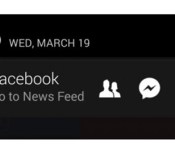
Facebook adds profile photos to experimental Android notification bar

Facebook makes it a habit to test new features before release, and one of them is a permanent notification bar that popped up for some Android users last year. Now, that feature’s back, and it even comes with an upgrade: it shows your profile picture right next to Facebook’s familiar icons. Just like the first time around, the bar stays in Android’s notification tray whether or not you have a new message or friend request. The only difference this time is that your face will stare right back at you every time you access the tray. As is usually the case with Facebook’s experimental releases, only a small pool of users has access to the tool right now. If you happen to be one of them and hate having to look at yourself all the time, don’t worry: simply click the “i” icon to disable the bar via the Settings page.
Filed under: Cellphones, Tablets, Mobile, Facebook
Source: The Next Web

Huawei has ‘no plans’ to launch an Android/Windows Phone hybrid

If two heads are better than one, does that mean two mobile operating systems are better than one? Huawei seemed to think so. CMO Shao Yang recently told TrustedReviews that it was working on a phone that ran Android and Windows Phone, but the company did an about-face today and said it has “no plans” to launch such a dual-booting Frankenphone. When Yang first brought up the notion, he said that an Android/Windows Phone combination could be more enticing to consumers than a standalone WP device. He may have had a point (if only because of sheer novelty), but c’mon now: while geeks may swoon, average phone buyers probably wouldn’t embrace it as enthusiastically. Even if Huawei made switching between platforms seamless (a very big if, mind you), users would still have to grapple with the intricacies of two very different OSes. The world probably won’t mourn the loss of Huawei’s hybrid, but hey — at least the dual-boot dream lives on with Ubuntu and Karbonn.
Filed under: Mobile
Via: TechCrunch
Source: FierceWireless
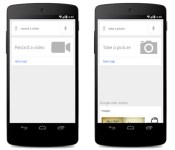
‘Okay Google, take a photo’ comes to Search for Android app

Glass users are all too familiar with the battery of commands required to get the headwear to spring into action. Beginning today, two of those lines are available in the Google Search for Android app. If you say “Okay Google” followed by “take a photo,” your device will launch the camera app. Similarly, “take a video” accomplishes the same, albeit it in movie mode. Of course, we prefer to speak into a smartphone only when absolutely necessary, and with plenty of other methods for launching into photo mode (including, of course, simply tapping the camera icon), this is a feature we don’t plan to use anytime soon.
Filed under: Cellphones, Google
Source: Google
Google Keyboard 3.0 released adding personalised word suggestions
Google’s very own keyboard has today been updated to version 3.0, or more specifically 3.0.19373. The update brings a few minor bug fixes and tweaks, such as a dedicated “ABC” button to switch from emoji.
Of most interest in the Google Keyboard 3.0 update is a new personalised suggestions feature which uses data from other Google Apps and Services to improve suggestions and corrections.
The settings is enabled by default, so will need turning off if you aren’t too happy with Google capturing keyboard info in other apps.
Google Keyboard 3.0 is now available in the Google Play Store.
The post Google Keyboard 3.0 released adding personalised word suggestions appeared first on AndroidGuys.

SmartRecruiters aims to modernize the hiring process
 There has been a big effort in the hiring industry to make it easier for possible candidates to apply for jobs. SmartRecruiters is changing that focus from the applicant to the hiring manager. They are leading the way with a new innovative tool that lets hiring managers work on-the-go.
There are many companies and apps out there to assist the job-seeker find and apply for potential positions. What about the hiring manager? What advances have been made to make their life easier or even modernize it? Sifting through applications is a modern version of a ball and chain limiting the ability of the hiring manager to be away from their desk.
To solve this decades old problem, SmartRecruiters just announced the release of their first ever hiring app for Android. That’s right, a hiring app. This app gives executives that are making hiring decisions the ability to take the recruiting process mobile. It enables the decision makers to engage talent real time and make faster, better hires.
According to CareerBuilder, nearly half of candidates use their smartphones when job searching; 59% use their tablets but only 33% of Fortune 500 companies have adapted their career sites for mobile devices. This also means that most of those comapnies have not updated their equipment to let the hiring managers go mobile.
Maksim Ovsyannikov, the Senior Vice-President of Product for SmartRecruiters, stated that when building their Android app, they had several goals that they wanted to accomplish like making it look good and easy to use. Another one of their goals was to make it a natural companion to the desktop experience.
The world is mobile, right? Well, as it turns out, not the world of recruiting. — Maksim Ovsyannikov
To measure the success of the app as compared to the desktop expereince Maksim explains that user preference of mobile workflow over that of the desktop (where supported) is a great barometer. In addition to keeping track of those trends, another source was user feedback. Maksim also stated that “time and time again once they started using our Android app, they preferred to use it to review new candidates over doing so on their desktops in all cases”. That is a strong statement to make, but in an industry that hasn’t seen a big technological change since internet applications became the new standard, this is a welcomed upgrade for many hiring managers.
SmartRecruiters is a freemium, end-to-end hiring platform. The platform gives hiring managers and recruiters everything they need to post jobs, manage candidates, and select the right individual while removing the complexity from the process. The app can be found on the Google Play Store.
The post SmartRecruiters aims to modernize the hiring process appeared first on AndroidGuys.

