


The Best Games for your Android device

We’re big fans of gaming and with the thousands of Apps in the Google Play Store, it can often be hard to find those great titles that can give you hours of fun. That’s why we’ve trawled the Google Play Store to bring the top games for your Android device.
Grand Theft Auto: San Andreas

Anyone who had a PS2 remembers GTA: San Andreas, and it was the biggest attempt to give freedom to the player in the open world. Rockstar have managed to bring the award winning title in all its glory to your Android device, and the experience is fantastic. Compatible with most Bluetooth controllers, you’re able to play the title just as you could back in the day. The graphics are somewhat to be desired compared to modern titles, but keeping in mind the age of Grand Theft Auto: San Andreas, the experience more than makes up for it.
SHADOWGUN: DeadZone

One of the first cross-platform multiplayer games to come to the store was SHADOWGUN: DeadZone which brought intense shooting on some great looking maps with console-like graphics. Built on the freemium model, progress can be achieved by playing rounds and ranking up, but can be accelerated using in-app purchases. With easy to use controls and great graphics, SHADOWGUN: DeadZone is a great multiplayer game.
DEAD TRIGGER 2

Think of DEAD TRIGGER 2 as Dead Island on your Android device; made by the same developer as SHADOWGUN, you can expect the same great gameplay, shooting fun, and addictiveness. If you like Zombie killing, then why not give this game a go to take that Zombie Killing addiction on the move with you on your Android device.
Asphalt 8: Airborne

If you enjoy arcade racing games then you’ll love Asphalt 8: Airborne, with fantastic graphics, multiplayer, and 47 high performance cars to chose from, you’ll find yourself putting hours of fun into this game. Race in 9 different settings, such as Venice, French Guiana, Iceland, and the Nevada Desert, across 8 seasons and 180 race events. Bundle in some great barrel rolls and you’ve got Asphalt 8 that will be sure to find a permanent place on your homescreen.
Plants vs Zombies 2

A game that simply needs no introduction. What happens when you combine deadly plants with the half-dead? An addictive game that will have you trying to defeat hordes of zombies with your plant army. Taking what worked so well in the first Plants vs Zombies, the sequel adds more plants, more powerups, and more zombies to add to what we knew and loved with the original game.
Do you have a game that you can’t live without? Drop us a comment in the section below to recommend it, and why you like it, to have it added to our list.
The post The Best Games for your Android device appeared first on AndroidGuys.

Google clamps down on Android apps with deceptive ads

Google has issued revised rules for Google Play apps in its continuing effort to stay one step ahead of nefarious developers. This time, the primary target is apps with pop-up ads that spoof a system, service or app notification and trick you into clicking where you shouldn’t. It’s also cracking down on “promotion or install tactics” that cause downloads or Play store redirects without your say-so, along with apps that send unsolicited SMS ads. Finally, it’s forbidding any the use of “erotic content” to promote pornography and forcing advertisers to clarify when and how they use in-app purchases. Google will allow developers a 15-day grace period before it drops the ban hammer — by which point the bad guys will have likely found workarounds.
Via: Techcrunch
Source: Google Play

Shazam is now more social and better-looking on iOS, Android is next

As part of an ongoing major redesign on mobile, Shazam has just rolled out a new version of its iOS app. Adding to the changes we saw last month, today’s update focuses on offering improved social sharing features, an even better lyrics experience and a more polished UI throughout the application. Users will now see in-depth artist biographies, redesigned album and song pages, as well as the inclusion of videos for songs. Shazam also points out that the app was also tweaked to have enhanced audio recognition and suck a little less power out of your iDevice — much like Skype did recently with one of its apps. The update is initially only available for iOS, but the Android crowd can expect these revisions to come “in a couple of weeks.”
Filed under: Internet, Software, Mobile
Source: App Store
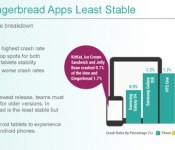
Study shows which Android and iOS versions are most likely to crash apps

If you’ve ever argued that your new smartphone is more reliable than what you’re replacing, you now have some evidence to back up your claims. Crittercism has posted a study showing that apps running in newer versions of Android and iOS (such as KitKat and iOS 7.1) are considerably less likely to crash; you’re practically inviting headaches if you stick with a phone running Gingerbread or iOS 6. The research also suggests that the Galaxy S 4 and iPhone 5 are the most trustworthy devices, while tablets of all kinds are relatively crash-happy. The findings aren’t shocking when both Apple and Google have both spent years fixing bugs, and it’s notable that the study only covers crashes with third-party apps — they don’t address first-party software glitches. Still, this data is as good an excuse as any to upgrade an aging handset stuck on an old platform.

Filed under: Cellphones, Tablets, Mobile, Apple, Google
Via: GigaOM
Source: Crittercism (DocumentCloud)
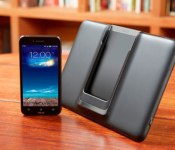
AT&T releases specs for upcoming ASUS PadFone X
Back in January, we reported that AT&T will exclusively release the ASUS PadFone X in the US, and now AT&T is finally back again with something new for us regarding the PadFone X. On their official blog, AT&T published the whole information about the specs of the PadFone X, check it out below:
 Size
Size
- PadFone: 143.93 x 72.46 x 9.98 mm (150g)
- PadFone Station: 250.4 x 172.25 x 11.63 mm (514g)
Operating System
- Android 4.4 (KitKat)
Display
- PadFone: 5”, 1920 x 1080 (441PPI)
- PadFone Station: 9”, 1920 X 1200 (252PPI)
Camera
- PadFone: 13MP Pixel Master + 2MP front-facing
- PadFone Station: 1MP front-facing
Processor
- 2.3Ghz quad-core
Baseband chipset
- Qualcomm Snapdragon 800
Internal Memory
- 16GB (2GB RAM)
Memory Card
- microSD™ slot in smartphone extends external memory up to 64GB
Wi-Fi
- WiFi (802.11 a/b/g/n/ac)
Bluetooth®
- BT 4.0
GPS
- GPS/aGPS
Battery/HAC
- PadFone : 2,300mAh
- PadFone Station: 4,990mAh
About the release, AT&T said they “ are one step closer”. So we have no idea how long that step will be, but I think AT&T should release it as soon as possible, because the competition is not getting any easier. Will you grab the PadFone X? Let us know in the comment box below.
Source: AT&T
The post AT&T releases specs for upcoming ASUS PadFone X appeared first on AndroidGuys.

The week’s best Android rumors: Motorola XPlay, Amazon Set-Top box, new Galaxy Tabs, and more
Motorola XPlay
Motorola are rumored to be launching their 6.3-inch phablet called the XPlay around Q3 2014. Reports indicate that Motorola have decided to drop the XPlay name, and may just be calling it the next Moto X. Specs are currently uncertain but speculation suggests the Moto XPlay will include a quad-core Snapdragon 800 CPU, 2GB RAM, and the Jelly Bean version of Android.
New Galaxy Tabs
Evidence has surfaced that suggests Samsung have dropped off a 10.1-inch Galaxy Tab to the FCC for approval to confirm recent reports that Samsung are working on a new tablet. The new device has a display diagonal size of 267.5 mm which equates to about 10.5 inches, with the device measuring about 9.7 inches by 6.94 inches. Further details are unknown at this point, but it seems Samsung are definitely working on a new tablet.

Amazon Set-Top Box
With Amazon’s media event scheduled for next week, there are rumours that Amazon may be preparing a launch of their own dedicated set-top box to rival the Apple TV and Google Chromecast. It is expected that the set-top box may come bundled with a game controller and hook into Amazon’s Android App Store to provide gaming capability. The form factor of the media device is still up for debate, but it is expected to mimic the Chromecast.
Android 4.3
A new version of Android is rumored to be arriving in short order, or so says a new report. It’s a minor one, to be sure, and seems to center around the camera features.
New Droid
Another member of the Droid family could debut later this year, according to new chatter. Said to have a larger screen, it could feature next-gen Kevlar materials and come under the name of Droid Quantum.
The post The week’s best Android rumors: Motorola XPlay, Amazon Set-Top box, new Galaxy Tabs, and more appeared first on AndroidGuys.
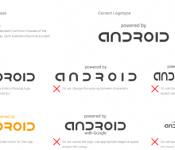
Google mandates Android logo on device bootup screens

When we first booted up the new HTC One, we were greeted by a “Powered by Android” logo near the bottom of the screen; Samsung has done the same thing with the Galaxy S5. At first this may not seem like a very big deal, but thanks to some internal documents and verification from sources familiar with the matter, there may actually be a lot more to this simple logo than meets the eye. We’ve confirmed with sources that Google now requires that manufacturers add the “Powered by Android” logo to their splash screens in order to get certified for its Mobile Services.
Most people likely won’t even notice the logo, nor will they care. However, making it a requirement on all devices running Google Mobile Services is just another indication that the software giant isn’t pleased with its mobile OS getting the bad end of the branding stick. Given how upset Google was at Samsung’s recent moves to add an excessive number of TouchWiz features to the Note Pro, it’s understandable that the company wants to ensure its name and branding still gets seen and recognized by end users. Google seems concerned that manufacturer branding efforts are making it hard for consumers to know what mobile OS truly powers their devices. This brand new requirement will likely affect not only new devices going forward, but any older devices that still receive updates.
Filed under: Cellphones, Wireless, Mobile, Google
Source: Android Police, Geek
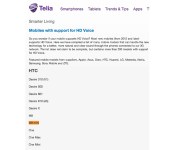
Swedish carrier hints at an HTC One M8 Mini, we feign surprise

HTC has just released a new One smartphone, so it stands to reason that the company would give the One Mini a similar upgrade, wouldn’t it? Sure enough, there’s now a hint that such an update might be in the cards. Swedroid has spotted an “M8 mini” lurking in Swedish carrier Telia’s list of HD Voice-capable phones. While the entry has vanished (as have other HTC models), the provider explains that it changed the list to reflect the phones it has “right now” — not a confirmation of the tiny M8, but not exactly a denial, either. The listing didn’t include any details of the phone, and there’s no guarantee that it will launch soon, if it launches at all. However, HTC recently told us that its existing “product family strategy” has been working well; it would be shocking if the firm didn’t have something like a One M8 Mini in development.
Filed under: Cellphones, Mobile, HTC
Via: Phandroid
Source: Swedroid (translated), Telia (translated)
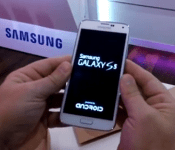
‘Powered by Android’ on Bootup Now Required by Google
We all know the Android OS pretty well by now. We are all also very familiar with the various skins that OEM’s place over it like Sense and TouchWiz. Google is apparently making a slight change to what OEM’s must do in order to use the Android OS in their devices. A new ground rule will require any device that is certified for Google, which means they have Play Store access and Google apps pre-installed at start-up, to display ‘Powered by Android’ on the boot-up screen. As depicted in the first boot up of the new Samsung Galaxy S5.
 The new implementation won’t just be required for new devices going forward though. Previous devices that receive updates will also be getting a ‘Powered by Android’ logo added too. The logo has a detailed size, spacing and placement rule set making it easy to implement and hard to deviate from. The logo must be a minimum of 20dp and with a 10db clear space boarder where nothing else can be placed. It can be larger, but not smaller. At least that is what I am understanding from the documentation provided by Android Police. While Google has yet to confirm this, a source for AP has confirmed it and with it appear on the boot up screens for the Galaxy S5 and for the HTC One M8, we are likely to agree that it is something that we will see on all new devices.
Does this mean much to you guys? Probably not. In my eyes I see it as a good way for Google to keep Android in front of the consumers. While many people don’t turn their devices off and on often, nor do many people not know they bought and Android device, it certainly won’t hurt with keeping the branding easily in view. With so many new devices and new customers making the switches to an Android device, there is still quite a lot of confusion out there. To this day I still hear people refer to their device as “the new droid” when asked what device they have. Certainly that was due to the heavy influence and marketing of Motorola and Verizon for the Droid line of devices.
Source: Android Police & Geek.com
//<![CDATA[
ord = window.ord || Math.floor(Math.random()*1E16);
document.write('’);
//]]>
Agent – do not disturb & more [App of the Day]
Our devices are now more like accessories than gadgets, since they are with us pretty much 24 hours of the day. So what better way to make the object that is with you for most of the day more useful and integrated into helping you in day-to-day activities.
There are many tools on the Google Play Store that will help you remember where you car is, or silence your phone during the night, but Agent on Android bundles 5 of those most useful tools together into one app, puts a great user interface on it, and here you have our Android App of the Day.
What does Agent feature?
★ Drive Agent is triggered by bluetooth and motion sensing (activity detection). It can be configured to read SMS messages aloud, respond with voice, auto respond to texters and callers to let them know you’re driving (editable message) & only respond to your own hand-picked list
★ Battery Agent triggers at a percentage you choose. It helps conserve battery by giving you the option to turn off bluetooth, dim your screen and reverts back to normal settings automatically when you charge your phone.
★ Parking Agent remembers where you parked, based off your speed or bluetooth connection. Will remember your last five parking spots.
★Meeting Agent syncs with your calendar to silence/ put your phone on vibrate when you don’t want to be disturbed. It can be configured to activate for busy events only, gives you the ability to specify your working week so that it only syncs with your calendar on days and times you prefer, works with shared calendars and auto responds to selected contacts during these “busy” events.
★ Sleep Agent will silence your phone automatically when you go to sleep. You can configure sleep times for different days of the week, minutes of inactivity before activating, auto response to selected callers and texters during your sleeping hours, list of contacts that can wake you & Bluetooth, autosync, wifi and mobile data deactivation.
Agent is a fantastic free app that will sure to find a use for every Android user and their device.
The post Agent – do not disturb & more [App of the Day] appeared first on AndroidGuys.

