


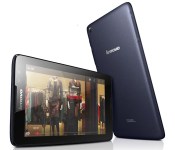
Lenovo’s latest budget Android tablets focus on high-quality audio

If Samsung’s new Galaxy Tabs aren’t your cup of tea, Lenovo may have the budget tablets you’re looking for. It just unveiled four entry-level Android slates that expand on the sound quality focus we saw in last year’s models. The Tab A7-30, A7-50, A8 and A10 all have Dolby audio that should improve your small-screen movie experience. They also have “responsive” (if unnamed) quad-core processors, too. You’re mostly choosing devices based on screen sizes. The A7-30 has a basic 7-inch display and optional cellular support, while the A7-50 jumps to HD and throws in a 2-megapixel front camera; move to the A8 and you’ll get an 8-inch panel, while the A10 includes (you guessed it) a 10-inch display. Lenovo plans to ship the new Tab A-series worldwide in the second quarter of the year, with UK prices ranging from a frugal £100 ($166) for an A7-30 to a still quite affordable £170 ($283) for an A10. There’s no mention of a US launch for the new A-series so far, but we’ve reached out for more details. We’ll let you know if these starter tablets reach American shores.
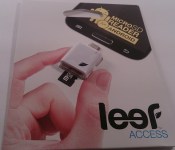
Leef Access: The Quarter Sized Portable MicroSD Card Reader for Android Devices
Lately I have been on a storage kick. From the 32GB Leef Pro, to the 128GB Toshiba Thumb Drive, to the 64GB SanDisk Connect Wireless Thumb Drive, to the more recently acquired 128GB SanDisk MicroSD card. I might have an addiction to having more storage options and ways to access it than really needed. However, the whole purpose is more so for you guys then me. With so many various storage solution out there, I want to check out as many viable solutions as possible to help you guys make a decision on what you might be looking for in your Android life. The latest addition to the storage solution battle comes from Leef with the Leef Access micro SD reader for Android.
 Whats in the package
- 1 Leef Access micro SD card reader device
Nothing more and nothing less. The Leef Access measures in at 1.18 x 1.18 x 0.35 inches ( 30 x 30 x 9 mm). It is pretty close to the same size as a quarter. (IMG below: Quarter underneath the Leef Access)
 This ultra small little device offers you a few little niceties. On the rear, opposite side of the micro USB plug, you will find two slots. The top slot is the active card reader slot while the slot below it offers you a place to store and carry an additional micro SD card.
 On the front to the right, or left depending on how you look at it, is a small LED that lights up to show that the device is active and working. On the opposite side as the LED there is small set of holes for attaching a wrist strap or keychain.
 The Leef Access is also waterproof and dust proof. Most micro SD cards are also waterproof, dust proof and even shock proof. That doesn’t mean you should toss it into the sink and then immediately plug it into your phone though.
How does it Perform
The performance is based on your device, or device, being about to use it. You need OTG support on your device in order to recognize the card reader. Most newer phones and tablets don’t have any issues. Without issue I slipped a Leef Pro 32 GB card into the Access and plugged it into my Sony Xperia Z. The phone easily read the Access and the card. You treat the extra addition just like built-in storage or like a micro SD card in your device. Open your file explorer app and you can view, transfer or delete files at will.

 What I like about the Leef Access
I really like the small compact size of the device. Even though it is tiny, it offers the lanyard/keychain holes to attach it easily to something that I won’t loose. Leef could have easily left the card reader alone with the one active card slot, but adding in the additional slot for easily carrying more storage was a nice touch.

 What I don’t like about the Leef Access
While the Access is waterproof and dust proof, it isn’t bend proof. While I am pretty careful with things I carry around, accidents can happen. I am not all that keen that there isn’t a cap or cover to help further protect the Access’s micro USB tip from possibly being bent. On the same note, lint is the evil spawn of dust bunnies. In the off chance that pocket lint comes into play in your life, there is the real possibility that it could get stuck inside the card slot or the usb plug.
I am sure those are insane and rather ridiculous things to consider, but it is something that occurred to me that might be important to you.
Over All thoughts
The Leef Access is a standalone device purchase. It doesn’t come with a micro SD card, so you will need to provide your own. This actually helps keep the cost down dramatically. With SanDisk and Samsung always having Micro SD card sales on Amazon you probably already have two or three micro SD cards sitting around anyways. It never hurts to have ways to transport those cards and to access their content without having to unmount the one in your phone and swapping them all the time. That being said, you will be pretty happy to find out that the Leef Access is only $9.99. So even if you have fears of lint and a bent usb plug, they are inexpensive enough to have a couple around. Plus it comes with a 5-year limited warranty.
Don’t go jumping up and down and hitting buy buy buy just yet though. The Leef Access has become a rather sought after little guy. Leef’s site is sold out at the moment, but they will be stocked back up on April 14th. You can pre-order one now though as long as you are willing to wait a bit for it to ship. While you are there, you can also pick up a Leef Pro MicroSD card for 20% off to accompany the Access.
Bounce on over to 2leef.com and take a look and pre-order a Leef Access today.
//<![CDATA[
ord = window.ord || Math.floor(Math.random()*1E16);
document.write('’);
//]]>

Sony’s Xperia Z2 is coming to North America in May

Sony’s Xperia Z2 is already available in a few corners of the world, but North America has so far been left high and dry. That drought will soon come to an end, though, as Bell says that it’s bringing the waterproof Android flagship to Canada this May. While the carrier isn’t divulging pricing at this stage, we’d expect the Z2 to cost $200 Canadian or more on a two-year plan, like most high-end smartphones. As for the good ol’ US of A? Unfortunately, there’s no word on an American launch — for now, you’ll have to make do with the Xperia Z1S if you live stateside.
Filed under: Cellphones, Mobile, Sony
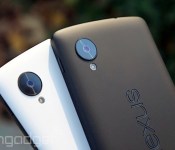
Google to focus on portrait shots and effects with improved camera app

We know that Google has been looking to bring more advanced photo features to Android for a while, but it may soon be ready to show off what it’s been working on. Sources aware of Google’s plans have confirmed to us that the search giant is currently testing a new version of its camera app that will sport a refreshed UI, a background-blurring effect for portrait shots, and improved panorama and Photo Sphere modes. As part of its overhaul, we’re told that Google has finally fixed issues with the default camera’s photo framing, allowing users to snap images with a new 100-percent no-crop viewfinder. That means you’ll see exactly what your Android device will capture before you hit the shutter button, with no unwanted objects creeping in at the edges.
The company is also said to be making the camera app more extensible, by opening support for third-party filters. This will allow developers (and Android enthusiasts) to create and import custom effects inside the stock camera app. The camera app’s portrait skills may see some improvements too, with the addition a new lens blur mode that will take photos with a shallower depth of field, mimicking the effects you’d typically see in Nokia’s Refocus app and HTC’s new One. New high-resolution panorama and Photo Sphere modes have also been added, improving the quality of your sweeping shots.
While many are awaiting the release of Android 4.4.3, the latest version of KitKat, Google is set to make these camera improvements available to users by way of a standalone update. Our sources indicate that the app will exist separately so that non-Nexus owners running Android 4.4 and above will be able to take advantage of the improvements, without having to wait for an OTA update from their device maker or carrier.
Filed under: Cellphones, Software, Mobile, Google

Amazon Cloud Drive Photos app re-designed

Finding that view pictures or video from your cloud storage isn’t that fun? Amazon Cloud Drive Photos app has recently been re-designed with the goal of bringing enjoyment back to re-living all those duck face selfies you took last summer.
Amazon Cloud Drive Photos app is an app that lets you store your memories on the Amazon Cloud from your phone or tablet with 5 GB of space for free. You can store photos or videos up to 20 minutes in length and you are able to view them across mobile devices or computers. The app offers both automatic uploads of media or manual uploads.
The app has been re-designed completely in order make it easy for you to look at your pictures and video stored on the Amazon Cloud. The navigation has been simplified so that you get get to your most frequently used features. A nice addition has been the ability to sort your videos in one album and sort your photos and albums by date and name, features that were previously missing. In addition to that, Amazon has also included some upload enhancements that allow you see the process of your uploads.
Amazon Cloud Drive Photo Drive app is available on both the Google Play Store and the Amazon Appstore.
The post Amazon Cloud Drive Photos app re-designed appeared first on AndroidGuys.
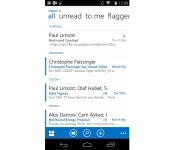
Outlook Web App for Android will help your smartphone fit in at work

It’s easy to find Android phones that can handle the Exchange-based email you often find in the workplace, but they don’t always support all the latest features. That won’t be a problem for much longer, though, as Microsoft has just revealed plans to bring Outlook Web App to Google’s platform later this year. Much like its iOS counterpart from 2013, the Android release should let you take advantage of Office 365 technology that might not make it into third-party email software. The app may not be all that exciting by itself, but it could be the key to using your preferred phone for work instead of having to switch to company-approved hardware.
Filed under: Cellphones, Mobile, Microsoft
Source: Office Exchange Blog (1), (2)

LG G2 for Sprint gets a taste of Android 4.4 KitKat

LG G2 owners on Sprint no longer have to look on with envy as their friends on AT&T and T-Mobile get upgrades to Android 4.4 KitKat. The CDMA carrier has just started rolling out the OS update on its network today. There aren’t any special treats beyond Google’s more advanced software, but the release does fix a bug with Sprint’s included Next Radio app. Unfortunately, there’s no word on a corresponding KitKat upgrade for Verizon’s G2 customers — if you’re on Big Red, you’ll have to keep waiting.
Filed under: Cellphones, Mobile, Sprint, LG
Via: Android Police
Source: Sprint (1), (2)
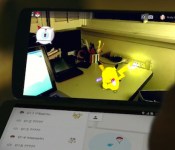
Google wants you to become a Pokémon master on April Fools

Google’s known for its weird and wonderful April fools jokes, but this year’s edition might be the best we’ve seen to date. Because it’s already April 1st in Australia and Japan, Google has introduced its “latest” build of Google Maps, laying down a “Pokémon Challenge” that requires you, a budding Pokémon Master, to discover and capture all of manner of creatures to fill up your Pokédex, simply by navigating around your local area. To start playing, make sure you have the latest version of Google Maps for iPhone or Android, hit the search bar and select “Press start.” You’ll have to be quick though, you’ve got until 2am on April 2nd to catch ‘em all.
Filed under: Cellphones, Internet, Software, Mobile, Google
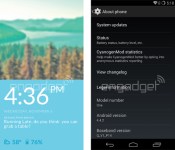
This is what the new CyanogenMod OS looks like on the OnePlus One

OnePlus has been constantly dishing out teasers for its upcoming One smartphone since December, but little is known about its UI until we received these two screenshots today, courtesy of a reliable tipster. First of all, this Android KitKat-based OS is dubbed “CyanogenMod 11S,” and given how the lock screen on the left looks nothing like the one in the original CyanogenMod, we assume the “S” indicates that this flavor carries OnePlus’ customizations. This cleaner lock screen lacks the usual unlock slider, but it still shows the clock, date, weather, battery level and text messages over a solid-color background. Here’s hoping that we can also toggle specific apps from the lock screen using swipe gestures.
The screenshot on the right confirms the presence of the three virtual Android buttons (as opposed to hardware ones), and that this Android 4.4.2-based OS is made for a device named “One.” With 23 more days to go until the phone’s launch, we’ll be keeping an eye out for the OnePlus One’s few remaining secrets — especially its sub-$400 price tag, which is very competitive for this 5.5-inch 1080p, Snapdragon 801-powered device.
Filed under: Cellphones, Mobile

Samsung’s Galaxy S5 doubles as a baby monitor, if you have a Gear watch

The Galaxy S5: powerhouse smartphone, fitness guru… baby monitor? Yes, you read that right. SoyaCincau has learned that Samsung’s jack-of-all-trades Android flagship includes a “baby crying detector” mode that uses the phone as a listening station. If your child is upset, the GS5 sends a vibrating alert to your Gear watch (needed for the feature) that urges you to come to Junior’s aid. You probably wouldn’t want to lean on the detector too often — Samsung certainly doesn’t think it’s a wise idea, as you can see from the massive legal disclaimer pictured here. Still, it could come in handy if you don’t have a dedicated monitor and occasionally want to keep tabs on your tyke while you run around the home.
Filed under: Cellphones, Household, Wearables, Mobile, Samsung
Via: Gizmodo
Source: SoyaCincau

