



Vine, now with messaging

Vine isn’t just about sharing six-second videos anymore. The Twitter-owned service has just launched a messaging feature that lets you reach out to friends through either videos or text messages. It’s not very sophisticated at this stage (there’s no true group chat, for instance), but you can send videos to anyone in your smartphone’s contacts, whether or not they’ve installed a Vine app. Android and iOS users can get chatty today, but there’s no word on a corresponding Windows Phone update. Wherever Vine goes from here, it’s apparent that the service wants to be more than just entertainment — it would like to be a complete social platform.
Filed under: Cellphones, Internet
Source: Vine, App Store, Google Play

Facebook Messenger for Android lets you pin chats right to your home screen

Facebook’s big-spending CEO presumably has a grand plan for Messenger, now that he’s gone to such great lengths to own WhatsApp. For the time being though, his company is continuing to focus on subtle but useful changes to its homemade apps, with the Android version of Messenger just receiving an update to version 4.0. In line with the last week’s iOS update, one of biggest new features is the ability to bunch your friends into groups and then pin these gatherings to a dedicated Groups tab, so you can quickly bombard the right people all at once. Unlike iOS, however, you can now also add a shortcut to any group or conversation directly from your Android home screen, letting you open up a floating chat head with a single tap, with no need to navigate through the app. That’s the sort of convenience that reminds us why a dedicated Facebook phone was always so unnecessary.
Filed under: Cellphones, Tablets, Internet, Mobile, Facebook
Source: Google Play Store
Google infuses Play Newsstand, Movies & TV and Keep apps for Android with new features

While Microsoft was busy announcing its updated mobile platform (among other things) today, Google spent its time pushing updates for its Play Newsstand, Movies & TV and Keep apps for Android. Newsstand’s update, in particular, makes it easier to discover more things to read. New tabs on the “Read now” menu provide instant access to sections like business, entertainment and sports, while the My News and My Magazines pages have been combined to form a 2-in-1 destination called My Library.
The Play Movies & TV app, on the other hand, now has a navigation bar that bundles Settings and Help & Feedback within a slide-out window, as well as a Google account switcher on top. Android Central also noticed that you can now slide a finger on the screen to rewind or go forward either continuously (if you don’t lift your finger till you get to the part you want) or in 10-second intervals. Finally, Google’s Keep note-taking app can now return image-only entries when you do a search, since it finally parse text written on photos like Evernote does. It also has a new Trash view that gives you access to deleted entries for up to seven days (after which, they’re gone forever), and it now automatically moves checked entries to the bottom of lists. These updates should hit your Android phones and tablets soon enough, if they haven’t yet.

Filed under: Cellphones, Tablets, Mobile, Google
Via: Android Central (1), (2)
Source: Google Play Newsstand, Google Play Movies & TV, Google+, Google Keep
Lifelogging camera Autographer reaches out to Android users

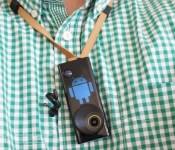
Having a photojournalist follow us around all day could work out to be pretty expensive, which is why we liked the idea of Autographer’s neck-worn lifelogging camera – even if we didn’t appreciate the low-fi picture quality. In any case, the device’s creators are continuing to improve the product, releasing a companion app on Google Play that opens it up to Android users. The company can’t fix the camera’s weak sensor, but at least there’s an identical set of features to what’s on the iOS counterpart.
Filed under: Cameras
Source: Google Play
Gmail’s mobile app may soon let you snooze and pin messages

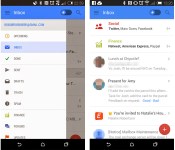
As useful as the mobile Gmail client can be, it hasn’t always stacked up well against third-party apps with special tricks up their sleeves. If features that Geek.com spotted in a test version of Gmail for Android make the cut, though, you may have more reasons to stick with Google’s official app. The experimental software lets you snooze messages until you’re ready to deal with them — if you’d rather not look at a bill until the day it’s due, you can. Alternately, you can pin email to make sure an important conversation stays on top. Finance, Purchases and Travel tabs have also slipped into the interface alongside more familiar sections. There’s no guarantee that any of the new features will survive the testing process, but at least some of them should be useful enough to reach a publicly available version of Gmail.
Filed under: Cellphones, Internet, Mobile, Google
Source: Geek.com

Here’s Amazon’s gamepad: standard controller layout, media functionality for $40

We all expected this, right? Yes, Amazon has a game controller, and it works with the company’s newly announced Fire TV. Sure, you could use the set-top box’s remote or an upcoming custom app to play games, but there’s a dedicated controller too that’s ready to wrangle Minecraft Pocket Edition, NBA 2K14 and titles from other big name developers Ubisoft and Take-Two. “The controller is comfortable, it’s familiar,” noted Amazon Games’ Mick Frazzini. As you might expect, this means that there’s a button, dual-thumbstick and d-pad layout similar to the Xbox’s option. With Amazon’s offering, there are skip and play/pause media controls along the bottom edge with navigation controls placed front and center. There’s even a GameCircle button that offers easy access to scores and achievements. And yes, dual triggers and a pair of shoulder buttons rest along the top edge.
Amazon’s Fire wireless game controller runs on two AA batteries and touts 55 hours of juice before needing a rest — thanks to “Intelligent power management with auto-sleep.” The accessory will set you back an additional $40, but it’ll come with 1,000 Amazon Coins and Sev Zero (an Amazon Game Studios third-person shooter) to get the action started. What’s more, the outfit says that the average price of games on its platform is around $1.85 with over 1,000 free options to boot. That’s good, because from the looks of things, Amazon’s own game devs are hard at work on a truckload of titles that are “coming soon.” If you’re itching to place your order, jump over to the source link to do just that.
Filed under: Gaming, Home Entertainment, HD, Amazon
Source: Amazon

Amazon feature Sonic CD as Free App of the Day

Amazon are offering the Sonic CD app on their Appstore as their free app of the day and it’ll save $2.99.
Sonic CD takes you back to the traditional platform scroller that we were all used to and now you can enjoy it on your Android device for free.
Amazon change their featured app daily, so be quick and grab it before it goes back up again.
The post Amazon feature Sonic CD as Free App of the Day appeared first on AndroidGuys.

Casino game Party Slots looks to hit social jackpot [App of the Day]

Looking to make your online casino experience a little more sociable? Party Slots by GAMEVIL looks to put social into the online casino experience with its real-time multiplayer slots game.
The addictingly fun game looks to take slots to the next-level by adding a social aspect. This allows players to cooperate and compete for party bonuses and a chance to win huge community jackpots. The goal for this specific game is to change the game from a slot machine experience into a social experience.
“There is a lot of enthusiasm for the social game market right now,” Kyu Lee, President of GAMEVIL USA
Aside from the multiplayer slots, the game also offers exciting bonus games, where users can multiply their wins with challenges like Hi-Lo and Party Poppers. With a built-in reward system, players are to earn points to obtain higher ranks and receive greater bonuses. The game also incorporates some cool social features like the ability to share likes to become a Party Slot celebrity.
With offices in Los Angeles, Tokyo, Beijing, and Seoul, GAMEVIL has over 350 million game downloads across multiple platforms since 2000 and is currently working with more than 70 of the top studios around the world.
Party Slots is a free to download game with in-game purchases available. You can find it on the Google Play store.
The post Casino game Party Slots looks to hit social jackpot [App of the Day] appeared first on AndroidGuys.
KitKat’s share of Android devices more than doubles to 5.3 percent

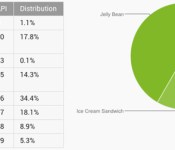
After months of treading water, Android 4.4 KitKat is finally taking off. Google reports that 5.3 percent of Android users are running the newer OS version as of early April; that’s more than twice the 2.5 percent that it claimed one month earlier. There’s no official explanation for the jump, but it’s most likely thanks to a wave of KitKat upgrades from HTC, LG and Samsung. Most older versions lost share as a result. It could be a long, long time before KitKat overtakes Jelly Bean (which dipped to 61.4 percent), but the transition is under way — and it’s only likely to accelerate now that flagships like the Galaxy S5 and new One are reaching store shelves.
Filed under: Cellphones, Tablets, Mobile, Google
Source: Android Developers
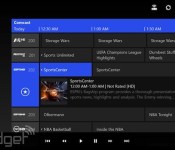
Xbox One SmartGlass beta apps bring TV controls to Android, Windows and Windows Phone

Microsoft only just revealed it would test new TV remote features on the Xbox One and its associated SmartGlass apps, and Windows Phone Central points out that right now anyone can give them a try. All you need is one of the game systems and a device running Android, Windows 8 or Windows Phone 8. We tried out the apps and they install right alongside the standard Xbox One Smartglass apps, although there are some known issues and rough edges. The smiley face button serves as a way to report any issues, but overall things worked smoothly, and we were able to navigate recordings on a standard Comcast DVR or surf through the OneGuide without a problem. Download the apps now and try them via Google Play, the Windows Store or Windows Phone Store — we haven’t spotted a beta version for iOS yet.

Filed under: Gaming, Home Entertainment, HD, Mobile, Microsoft
Via: WPCentral, Android Central
Source: Google Play, Windows Phone Store, Windows Store
 AIVAnet